Yes! You can use AI to fill out Form CMS-460, Medicare Participating Physician or Supplier Agreement

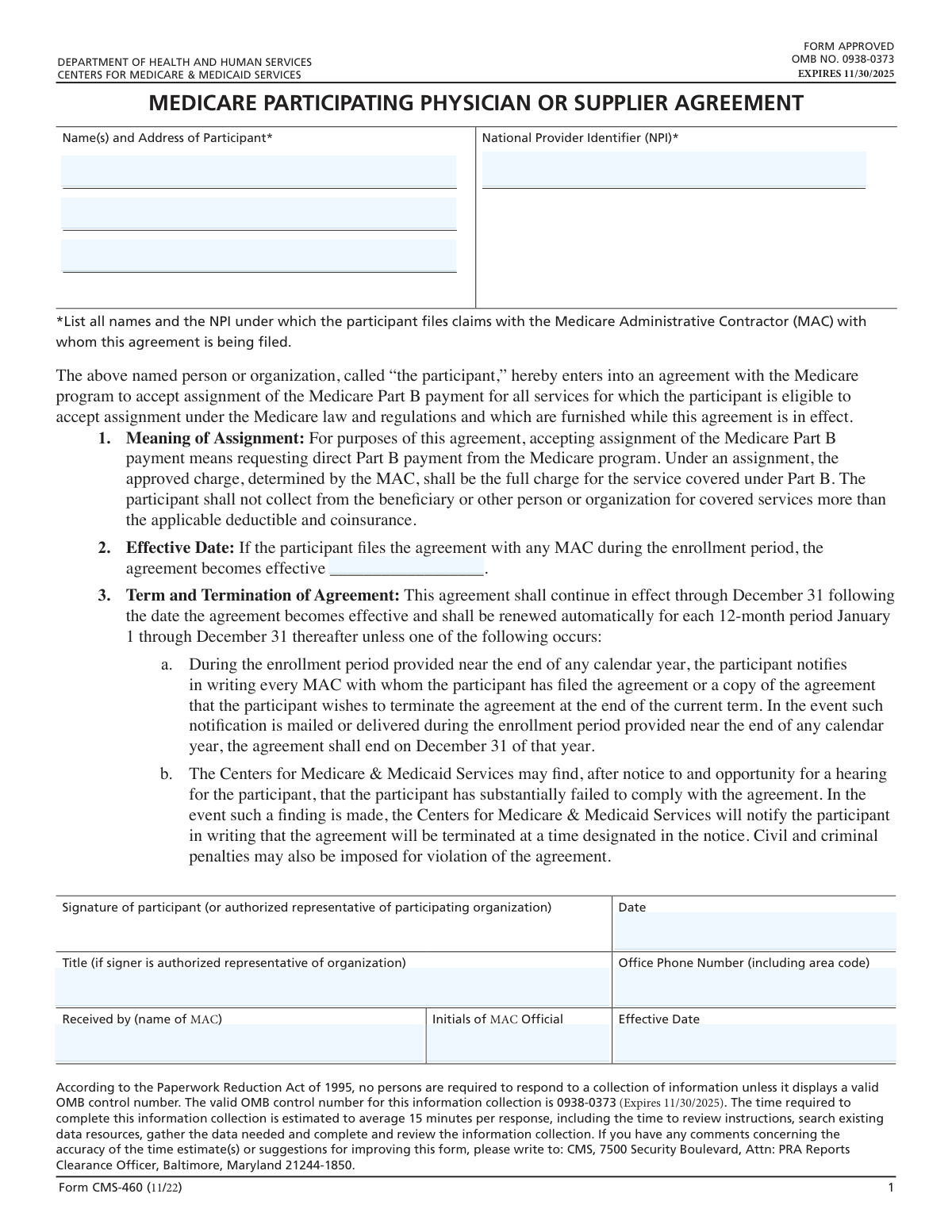
Form CMS-460, the Medicare Participating Physician or Supplier Agreement, is an official CMS document through which physicians, practitioners, and suppliers formally agree to accept assignment of Medicare Part B payments, meaning they accept the Medicare-approved charge as payment in full and cannot bill beneficiaries beyond applicable deductibles and coinsurance. By signing this agreement, participants benefit from fee schedule amounts that are 5 percent higher than non-participating providers, as well as direct and timely reimbursement from Medicare. The agreement is typically filed during the annual open enrollment period (mid-November through December 31) and becomes effective January 1 of the following calendar year, renewing automatically each year unless terminated. Today, this form can be filled out quickly and accurately using AI-powered services like Instafill.ai, which can also convert non-fillable PDF versions into interactive fillable forms.
Our AI automatically handles information lookup, data retrieval, formatting, and form filling.
It takes less than a minute to fill out CMS-460 using our AI form filling.
Securely upload your data. Information is encrypted in transit and deleted immediately after the form is filled out.

Form specifications

Form name: Form CMS-460, Medicare Participating Physician or Supplier Agreement
Number of pages: 1
Language: English
Categories: CAR forms, healthcare provider forms, CMS forms, physician forms, L.A. Care forms, Medicare forms
main-image

Instafill Demo: How to fill out PDF forms in seconds with AI

How to Fill Out CMS-460 Online for Free in 2026

Are you looking to fill out a CMS-460 form online quickly and accurately? Instafill.ai offers the #1 AI-powered PDF filling software of 2026, allowing you to complete your CMS-460 form in just 37 seconds or less.
Follow these steps to fill out your CMS-460 form online using Instafill.ai:
  1. 1 Navigate to Instafill.ai and either upload the CMS-460 PDF or search for it in the form library to open it in the AI-powered form filling interface.
  2. 2 Enter the participant's full name(s) and complete mailing address in the 'Name and Address of Participant' fields, listing all names under which claims are filed with the Medicare Administrative Contractor (MAC).
  3. 3 Provide the National Provider Identifier (NPI) associated with the participant, ensuring it matches the NPI used when submitting Part B claims to the MAC.
  4. 4 Fill in the effective date of the agreement (typically January 1 of the upcoming calendar year if filed during the open enrollment period), along with the participant's signature date.
  5. 5 Enter the authorized representative's title (if signing on behalf of an organization) and the office phone number including area code.
  6. 6 Review all entered information for accuracy using Instafill.ai's validation tools, ensuring names, NPI, and dates are correct before finalizing.
  7. 7 Print the completed form, obtain the required signature from the participant or authorized representative, and submit it to your MAC by mail or via web-based application submission upload in PECOS before the enrollment deadline.

Our AI-powered system ensures each field is filled out correctly, reducing errors and saving you time.

Why Choose Instafill.ai for Your Fillable CMS-460 Form?

Speed

Complete your CMS-460 in as little as 37 seconds.

Up-to-Date

Always use the latest 2026 CMS-460 form version.

Cost-effective

No need to hire expensive lawyers.

Accuracy

Our AI performs 10 compliance checks to ensure your form is error-free.

Security

Your personal information is protected with bank-level encryption.

Frequently Asked Questions About Form CMS-460

Form CMS-460 is the Medicare Participating Physician or Supplier Agreement. It is used by physicians, practitioners, and suppliers to agree to accept assignment of Medicare Part B payments for all covered services provided to Medicare patients, meaning they accept the Medicare-approved charge as the full charge and cannot bill beneficiaries more than the applicable deductible and coinsurance.

Physicians, practitioners, and suppliers who want to become Medicare participating providers must complete Form CMS-460. Currently enrolled providers who want to change their participation status during the open enrollment period also need to complete this form. Providers who are already participating and wish to maintain their current status do not need to take any action.

Participating providers receive Medicare fee schedule amounts that are 5 percent higher than non-participating providers for physicians' professional services. Additionally, participants receive direct and timely reimbursement from Medicare and benefit from 'one stop' billing for beneficiaries with Medigap coverage, where Medicare automatically forwards claims to the Medigap insurer for coinsurance and deductible payments.

The annual participation enrollment program for Calendar Year (CY) 2025 runs from November 15, 2024, through December 31, 2024. This is the only time currently enrolled providers can change their participation status, with any changes taking effect on January 1, 2025.

You must send your completed CMS-460 form to your Medicare Administrative Contractor (MAC), NOT to CMS directly. If you submit Part B claims to multiple MACs, you must mail the agreement (or a copy) to each MAC. Sending the form to CMS instead of your MAC will delay processing.

You will need to provide your name(s) and address, your National Provider Identifier (NPI) under which you file claims with the MAC, your signature (or that of an authorized representative), the date, your title (if signing as an authorized representative of an organization), and your office phone number including area code.

The agreement continues in effect through December 31 following the date it becomes effective and automatically renews for each 12-month period (January 1 through December 31) thereafter, unless the participant notifies their MAC in writing during the open enrollment period that they wish to terminate, or CMS finds the participant has substantially failed to comply with the agreement.

New physicians, practitioners, and suppliers should complete the blank CMS-460 agreement and submit it along with their Medicare enrollment application to their MAC. If already enrolled in Medicare, they have 90 days from enrollment to decide whether to participate; if they choose to participate within that timeframe, they should complete and send the CMS-460 to their MAC. All newly enrolled providers are automatically non-participating unless they submit the CMS-460.

If you are currently a participant and wish to withdraw, you must write to each MAC to which you submit claims during the open enrollment period, advising them of your termination. This written notice must be postmarked before the end of the current calendar year (December 31), and the termination will be effective on the first day of the next calendar year.

Yes, contractors are required to make Form CMS-460 available on their websites so providers can enter all required information (except for the signature and effective date) before printing. You can also use AI-powered services like Instafill.ai to auto-fill the form fields accurately and save time, after which you print, sign, and mail or upload the form via PECOS to your MAC.

If you encounter a flat, non-fillable version of the CMS-460 PDF, services like Instafill.ai can convert it into an interactive fillable form, allowing you to type in your information digitally before printing and signing. This saves time and reduces errors compared to handwriting the form.

Your MAC is required to prominently display the CY 2025 fee schedule data on their website, including procedure codes, par and non-par amounts, and limiting charges for both facility and non-facility settings. MACs must also provide a link to the 2025 Medicare Fee Schedule and notify providers via listserv when the fees are posted, which occurs after the CY 2025 Physician Fee Schedule Final Rule is put on display (around November 1).

Accepting assignment means requesting direct Part B payment from the Medicare program. Under an assignment, the approved charge determined by the MAC is the full charge for the covered service, and the participant cannot collect from the beneficiary or any other person more than the applicable deductible and coinsurance amounts.

Yes, you can request a hard copy disclosure report from your MAC. Providers without Internet access will not be charged for hard copies. However, if you have verified Internet access and request a hard copy, your MAC must inform you that you may be charged, giving you the opportunity to rescind the request. Hard copy disclosures are generally not produced until January 1, 2025.

After the annual participation enrollment process closes, MACs are required to load updated local Medicare Participating Physicians and Suppliers Directory (MEDPARD) information on their websites within 30 days. MACs also notify hospitals, Social Security offices, Area Administration on Aging offices, and other beneficiary advocacy organizations about how to access this information. If you do not have Internet access, you can contact your MAC by phone or letter to obtain MEDPARD participation information.

Compliance CMS-460
Validation Checks by Instafill.ai

1
National Provider Identifier (NPI) Format and Validity
The NPI field must contain a valid 10-digit numeric identifier assigned by CMS to the physician, practitioner, or supplier. The NPI must conform to the Luhn algorithm check digit standard used for all NPIs. If the NPI is missing, incorrectly formatted, or fails the check digit validation, the agreement cannot be processed and the participation election will be rejected, potentially leaving the provider without PAR status for the upcoming calendar year.
2
Participant Name and Address Completeness
All name and address fields for the participant must be fully completed, including the full legal name of the individual or organization, street address, city, state, and ZIP code. The name provided must match the name under which the participant files claims with the MAC. Incomplete or mismatched name and address information can result in the agreement being unprocessable, delayed enrollment, or the agreement being associated with the wrong provider record.
3
Consistency Between Participant Name and NPI
The name(s) listed in the participant name field must correspond to the NPI provided on the form, as the NPI is tied to a specific individual or organization in the NPPES registry. If multiple names are listed, each must be associated with the NPI under which claims are filed with the submitting MAC. A mismatch between the listed name and the NPI record could result in the agreement being filed under the wrong provider identity, causing billing and reimbursement errors.
4
Participant Signature Presence
The signature field must contain a wet or authorized signature from either the participant themselves or an authorized representative of the participating organization. An unsigned CMS-460 form is legally invalid and cannot constitute a binding participation agreement under Medicare regulations. If the form is submitted without a signature, it must be returned to the provider for completion, which may jeopardize timely enrollment before the December 31 deadline.
5
Signature Date Format and Validity
The date field accompanying the participant's signature must be present and formatted as a valid calendar date (MM/DD/YYYY). The date must fall within the open enrollment period (November 15 through December 31 of the current year) for existing providers changing participation status, or reflect the postmark date for new providers enrolling outside the open enrollment window. A missing, future-dated, or out-of-range date may render the agreement ineffective or result in an incorrect effective date being applied.
6
Effective Date Accuracy and Pre-Population
Per CR 13835 requirement 13835.21, the effective date in Item 2 of the CMS-460 must be pre-populated by the contractor as January 1 of the applicable calendar year (e.g., January 1, 2025) for agreements filed during the open enrollment period. The effective date field must not be left blank or contain any date other than January 1 of the upcoming year for open enrollment submissions. An incorrect or missing effective date could result in the participation agreement taking effect on the wrong date, affecting reimbursement rates and assignment obligations.
7
Office Phone Number Format Validation
The office phone number field must contain a valid 10-digit U.S. telephone number including the area code, formatted consistently (e.g., (XXX) XXX-XXXX or XXX-XXX-XXXX). The phone number must not contain placeholder values, all-zero sequences, or non-numeric characters beyond standard formatting symbols. An invalid or missing phone number prevents the MAC from contacting the provider for follow-up on the agreement, which could delay processing of the participation election.
8
Title Field Required for Organizational Representatives
If the signer of the CMS-460 is not the individual participant but rather an authorized representative of a participating organization, the Title field must be completed with the signer's official title or role within the organization. This field is conditionally required and must not be left blank when the participant is an organization rather than an individual provider. Omitting the title when an organizational representative signs the form raises questions about the signer's authority and may invalidate the agreement.
9
MAC Recipient Field Completion
The 'Received by (name of MAC)' field must be completed by the MAC upon receipt of the form, identifying the specific Medicare Administrative Contractor that received and is processing the agreement. This field must not be left blank at the time of processing, as it establishes which MAC holds the agreement on file. An incomplete MAC recipient field creates an audit trail gap and may cause confusion if the provider submits claims to multiple MACs, as the instructions require a copy to be sent to each MAC to which the provider submits Part B claims.
10
MAC Official Initials Presence
The 'Initials of MAC Official' field must be completed by the receiving MAC official to confirm that the agreement was reviewed and accepted by an authorized MAC representative. This field serves as an internal control confirming that a qualified individual processed the form. If this field is blank, the form lacks evidence of official MAC acknowledgment, which could create disputes about whether the participation agreement was properly received and accepted.
11
Postmark Date Within Enrollment Period for Existing Providers
For existing providers changing their participation status, the postmark date or submission date of the CMS-460 must fall within the annual open enrollment period, which runs from November 15 through December 31 of the current year. Agreements postmarked after December 31 cannot be accepted for the upcoming calendar year's participation status change. Per CR 13835 requirement 13835.13, contractors shall only process participation elections and withdrawals postmarked before January 1, 2025, making this date validation critical to proper enrollment processing.
12
New Provider 90-Day Enrollment Window Compliance
For newly enrolled physicians, practitioners, or suppliers submitting the CMS-460 outside of the open enrollment period, the submission date must fall within 90 days of the provider's Medicare enrollment date. If the CMS-460 is submitted after the 90-day window has elapsed, the provider cannot become a participating provider until the next open enrollment period. The system must cross-reference the provider's Medicare enrollment date against the CMS-460 submission date to enforce this rule and prevent late participation elections from being incorrectly processed.
13
Multiple NPI and Name Entries Consistency
When a provider lists multiple names and NPIs on the form (as permitted for providers who bill under more than one identifier), each name must have a corresponding valid NPI, and all listed NPIs must be registered to the same individual or organization in the NPPES system. The form instructions explicitly state that all names and NPIs under which the participant files claims with the submitting MAC must be listed. Incomplete or mismatched multiple-entry combinations could result in some billing identifiers being excluded from the participation agreement, leading to assignment billing errors.
14
Form Version Currency Check
The CMS-460 form version used must be the current approved version (11/22) with a valid OMB control number of 0938-0373 and an expiration date of 11/30/2025. Submissions made on outdated or expired versions of the form may not reflect current regulatory requirements and should be flagged for review or returned to the provider for resubmission on the correct form version. Using an expired OMB form version is non-compliant with the Paperwork Reduction Act of 1995 and may affect the legal validity of the agreement.
15
Provider Alteration Restriction on Protected Form Fields
Per CR 13835 requirement 13835.20, all parts of the CMS-460 that do not require data entry by the provider must be protected from alteration. A validation check must confirm that pre-populated or locked fields such as the effective date in Item 2, the agreement terms in Items 1 through 3, and the OMB information have not been modified from their standard values. Any detected alteration of protected fields must trigger rejection of the form, as unauthorized modifications could change the legal terms of the participation agreement.
16
Submission Routing Validation — Form Sent to MAC, Not CMS
The CMS-460 must be submitted directly to the provider's MAC and must not be routed to CMS headquarters. The form instructions explicitly warn that sending the form to CMS instead of the MAC will delay processing. A validation check should confirm that the receiving entity identified in the 'Received by' field is a valid MAC and not a CMS central office address. Incorrect routing of the form could result in the participation election missing the enrollment deadline, leaving the provider's participation status unchanged for the upcoming calendar year.

Common Mistakes in Completing CMS-460

Omitting all names and NPIs when multiple identifiers are used

Many participants only list one name or one NPI even when they bill under multiple names or identifiers. The form explicitly requires listing ALL names and NPIs under which the participant files claims with the MAC. Failing to include all identifiers can result in incomplete coverage of the participation agreement, meaning some claims may not be processed under the PAR agreement. Carefully review all billing identifiers used with the specific MAC before completing the form, and list each one. Tools like Instafill.ai can help ensure all required fields are populated correctly.

Sending the CMS-460 to CMS instead of the MAC

A very common and explicitly warned-against mistake is mailing the completed CMS-460 form to the Centers for Medicare & Medicaid Services (CMS) rather than to the appropriate Medicare Administrative Contractor (MAC). The instructions clearly state 'DO NOT SEND YOUR CMS-460 FORM TO CMS, SEND TO YOUR MAC.' Sending to the wrong address will delay processing and could cause the agreement to miss the enrollment deadline. Always verify the correct MAC address for your jurisdiction before mailing.

Missing the open enrollment deadline

Providers often fail to submit or postmark the CMS-460 before December 31, which is the close of the annual open enrollment period (generally mid-November through December 31). Missing this deadline means the provider cannot change their participation status until the next enrollment period, a full year away. Mark the enrollment window on your calendar well in advance, and ensure the form is postmarked before December 31 to be effective January 1 of the new calendar year.

Leaving the effective date field blank or entering an incorrect date

Participants frequently leave the 'Effective Date' field blank or enter a date other than January 1 of the applicable year. The instructions specify that contractors pre-populate this field with January 1 of the appropriate year on web-based versions, but paper filers may leave it blank or write an incorrect date. An incorrect or missing effective date can cause processing delays or disputes about when the agreement takes effect. Confirm the correct effective date (January 1 of the upcoming calendar year) before submitting. AI-powered tools like Instafill.ai can automatically populate this field with the correct date.

Failing to submit the agreement to every MAC where claims are filed

Providers who submit Part B claims to more than one MAC sometimes only send the CMS-460 to one MAC, assuming it covers all jurisdictions. The instructions explicitly state that the form (or a copy) must be mailed to each MAC to which the participant submits Part B claims. Failing to file with all relevant MACs means the participation agreement will not be in effect for claims submitted to the MACs that did not receive the form. Identify all MACs you bill and send a copy of the signed CMS-460 to each one.

Not signing the form or having an unauthorized person sign

Some participants submit the CMS-460 without a signature, or have someone sign who is not the participant or an authorized representative of the participating organization. The form requires the signature of the participant or an authorized representative, and the title of the representative must also be provided if signing on behalf of an organization. An unsigned or improperly signed form will be rejected, potentially causing the provider to miss the enrollment window. Ensure the correct individual signs the form and that their title is included if they are signing as an organizational representative.

Omitting the office phone number or entering it without the area code

Participants frequently leave the 'Office Phone Number' field blank or enter only a 7-digit number without the area code. The form specifically requires the phone number including the area code. An incomplete phone number can prevent the MAC from contacting the provider if there are questions about the agreement, potentially delaying processing. Always enter the full 10-digit phone number including the area code in the designated field.

Incorrectly assuming no action is needed when changing participation status

Providers who want to change their participation status (either from PAR to non-PAR or vice versa) sometimes mistakenly believe no action is required, confusing the 'no action needed' rule that applies only to those maintaining their current status. Only providers who wish to keep their existing PAR or non-PAR status can do nothing; those wishing to change must actively submit the CMS-460 (to become PAR) or submit a written termination notice to each MAC (to withdraw from PAR). Misunderstanding this rule results in the provider's status remaining unchanged for the entire upcoming calendar year.

New providers missing the 90-day window to elect participation

Newly enrolled physicians, practitioners, and suppliers often do not realize they have a 90-day window from the date of Medicare enrollment to submit the CMS-460 and elect participating status. After this window closes, they must wait until the next annual open enrollment period. Missing this window means the provider is automatically classified as non-participating for potentially up to a year, resulting in lower fee schedule amounts (5% less) and no direct Medicare reimbursement. New providers should submit the CMS-460 along with their enrollment application or immediately upon enrollment confirmation.

Altering pre-populated or protected form fields

When using the web-based version of the CMS-460, some providers attempt to modify pre-populated fields such as the effective date or other protected sections of the form. The instructions require contractors to protect all parts of the form that do not require data entry from being altered. Modifying these fields can invalidate the form or cause it to be rejected by the MAC. Only enter information in the fields designated for provider data entry, and do not attempt to change pre-filled or locked fields.

Submitting a termination notice too late when withdrawing from participation

Providers who wish to withdraw from their participation agreement sometimes submit their written termination notice after December 31, missing the required deadline. The agreement specifies that written notification must be mailed or delivered during the enrollment period (before the end of the calendar year) to each MAC with which the agreement was filed. A late termination notice means the agreement automatically renews for another full year, binding the provider to accept assignment for all covered Part B services. Ensure the termination letter is postmarked before December 31 and sent to every MAC where the agreement is on file.

Using an outdated version of the CMS-460 form

Some providers submit older versions of the CMS-460 form that they have on file from previous years rather than using the current version (11/22). Using an outdated form can result in rejection by the MAC, as form requirements and OMB approval numbers change over time. The current form's OMB approval expires 11/30/2025, and only valid, current versions should be submitted. Always download the most recent version of the CMS-460 directly from your MAC's website or the CMS website before completing and submitting it. AI-powered tools like Instafill.ai can help ensure you are always working with the most current form version.
Saved over 80 hours a year

“I was never sure if my IRS forms like W-9 were filled correctly. Now, I can complete the forms accurately without any external help.”

Kevin Martin Green

Your data stays secure with advanced protection from Instafill and our subprocessors

Robust compliance program

Transparent business model

You’re not the product. You always know where your data is and what it is processed for.

ISO 27001, HIPAA, and GDPR

Our subprocesses adhere to multiple compliance standards, including but not limited to ISO 27001, HIPAA, and GDPR.

Security & privacy by design

We consider security and privacy from the initial design phase of any new service or functionality. It’s not an afterthought, it’s built-in, including support for two-factor authentication (2FA) to further protect your account.

Fill out CMS-460 with Instafill.ai

Worried about filling PDFs wrong? Instafill securely fills form-cms-460-medicare-participating-physician-or-supplier-agreement-1 forms, ensuring each field is accurate.



