Yes! You can use AI to fill out California Form 568 (2024), Limited Liability Company Return of Income
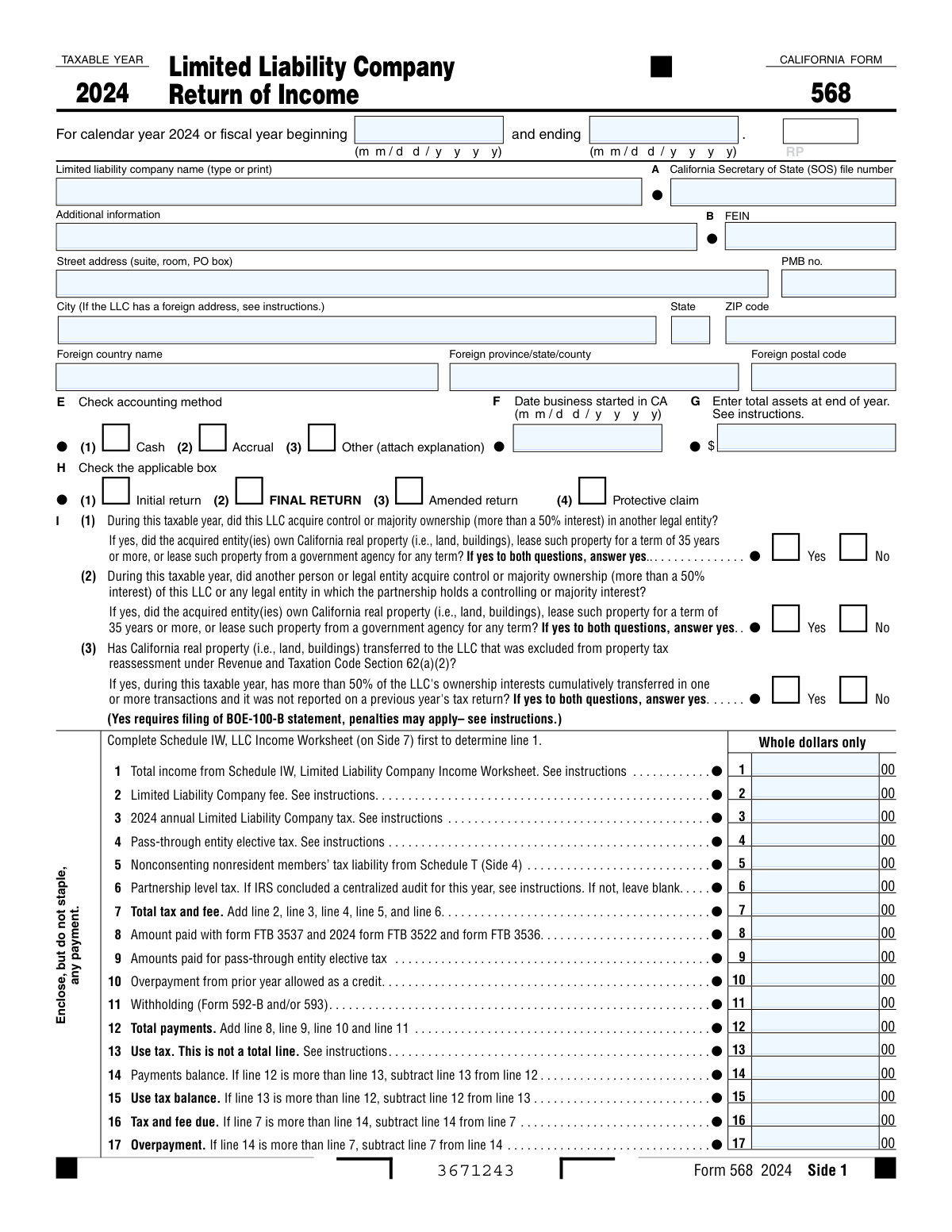
California Form 568 is the primary state income tax return for limited liability companies that are doing business in California, registered with the California Secretary of State, or otherwise subject to California LLC tax rules. It reports the LLC’s income and deductions (including trade/business and other activity items), calculates the annual $800 LLC tax and any additional LLC fee based on total California income, and may include other entity-level items such as nonconsenting nonresident member tax and pass-through entity elective tax. The form also captures key entity information (FEIN, SOS file number, accounting method, assets, members) and includes required schedules (e.g., Schedule B, Schedule K, Schedule L, and Schedule IW) to support the amounts reported. Filing it accurately is important to avoid penalties/interest and to properly claim credits, withholding, and refunds.
Our AI automatically handles information lookup, data retrieval, formatting, and form filling.
It takes less than a minute to fill out CA Form 568 using our AI form filling.
Securely upload your data. Information is encrypted in transit and deleted immediately after the form is filled out.
Form specifications
| Form name: | California Form 568 (2024), Limited Liability Company Return of Income |
| Number of pages: | 7 |
| Filled form examples: | Form CA Form 568 Examples |
| Language: | English |
Instafill Demo: filling out a legal form in seconds
How to Fill Out CA Form 568 Online for Free in 2026
Are you looking to fill out a CA FORM 568 form online quickly and accurately? Instafill.ai offers the #1 AI-powered PDF filling software of 2026, allowing you to complete your CA FORM 568 form in just 37 seconds or less.
Follow these steps to fill out your CA FORM 568 form online using Instafill.ai:
- 1 Confirm filing requirement and gather records: LLC legal name, CA SOS file number, FEIN, addresses, accounting method, start date in CA, year-end assets, member list, and federal return/supporting schedules (e.g., federal Form 1065 items, Form 8825, Schedule D details, withholding Forms 592-B/593).
- 2 Complete Schedule IW (LLC Income Worksheet) first to compute Total California income (Schedule IW line 17) and carry it to Form 568 Side 1, line 1 to determine the LLC fee tier.
- 3 Enter entity and return information on Sides 1–3: taxable year dates, principal business activity code, maximum number of members, and answer all yes/no questions (real property ownership/transfer questions, apportionment, nonresident members, disregarded entity status, reportable transactions, etc.).
- 4 Fill out income and deduction schedules: Schedule A (Cost of Goods Sold) if applicable, Schedule B (Income and Deductions), and Schedule K (members’ distributive items) including any required attachments (e.g., depreciation form FTB 3885L, Schedule D (568), federal Form 8825, and supporting statements).
- 5 Compute taxes and fees on Side 1: LLC fee (line 2), annual LLC tax (line 3), pass-through entity elective tax (line 4 if applicable), nonconsenting nonresident members’ tax from Schedule T (line 5), and any partnership-level tax (line 6), then total on line 7.
- 6 Report payments and credits: enter prepayments (FTB 3537/3522/3536), PTE elective tax payments, prior-year overpayment credit, and withholding (Forms 592-B/593), then calculate balance due or overpayment (lines 12–21) and include use tax if applicable.
- 7 Review, sign, and submit: complete Schedule L and Schedules M-1/M-2 if required, attach any required schedules/K-1s and statements, sign the return (and preparer section if used), and e-file or mail with payment (enclose, do not staple) by the due date.
Our AI-powered system ensures each field is filled out correctly, reducing errors and saving you time.
Why Choose Instafill.ai for Your Fillable CA Form 568 Form?
Speed
Complete your CA Form 568 in as little as 37 seconds.
Up-to-Date
Always use the latest 2026 CA Form 568 form version.
Cost-effective
No need to hire expensive lawyers.
Accuracy
Our AI performs 10 compliance checks to ensure your form is error-free.
Security
Your personal information is protected with bank-level encryption.
Frequently Asked Questions About Form CA Form 568
Form 568 is the California Limited Liability Company (LLC) Return of Income. It reports the LLC’s California income and calculates items like the annual LLC tax, the LLC fee, and certain member-related taxes and credits.
LLCs that are doing business in California, registered with the California Secretary of State, or have California-source income generally must file Form 568. The form also applies to single-member LLCs (SMLLCs) that are disregarded for tax purposes, with special instructions and sections.
It means you should enter amounts rounded to the nearest whole dollar (no cents). If you have cents, round using standard rounding rules.
Line 8 is for payments already made using California payment vouchers/forms such as FTB 3522 (annual tax), FTB 3536 (estimated fee), and FTB 3537 (extension). Do not include withholding or PTE elective tax payments here if the form instructs you to report them on separate lines.
You must complete Schedule IW (Side 7) first and then transfer Schedule IW, line 17 to Form 568, Side 1, line 1. Schedule IW totals California income amounts and specifically states the total cannot be negative (if less than zero, enter -0-).
The LLC fee (line 2) is generally based on total California income and is calculated using the instructions tied to Schedule IW. The annual LLC tax (line 3) is a separate annual amount due for many LLCs, even if the LLC has little or no income, depending on the rules in the instructions.
This line is for the California PTE elective tax amount if the LLC is making the election and paying at the entity level. Payments made toward this elective tax are reported separately on Side 1, line 9.
Complete Schedule T if the LLC has nonresident members who did not consent and the LLC must compute and report their tax liability at the entity level. The total from Schedule T is carried to Form 568 (the form shows it flows to Side 1 for the nonconsenting nonresident members’ tax liability line).
Use tax is a separate tax on certain purchases where sales tax was not paid (for example, out-of-state purchases used in California). It is not included in the “total payments” line; instead, the form compares use tax to payments on lines 14 and 15 to determine whether there is a use tax balance due.
Check “Initial return” if this is the first Form 568 for the LLC, “Final return” if the LLC is ending and this is the last return, and “Amended return” if you are correcting a previously filed Form 568. A “Protective claim” is used to preserve a refund claim when the right to the refund depends on future events; follow the instructions if you believe this applies.
The principal business activity code identifies the LLC’s main type of business and is required (the form states “Do not leave blank”). Use the code specified in the Form 568 instructions for your industry.
If the LLC is a multiple-member LLC, the form instructs you to attach a California Schedule K-1 (568) for each member (based on the maximum number of members during the year). This supports the allocation of income, deductions, and credits to members.
These questions ask whether the LLC acquired or was acquired (more than 50% ownership change) and whether California real property is involved, or whether certain excluded property transfers later triggered cumulative ownership transfers over 50%. If you answer “Yes” where indicated, the form notes that filing a BOE-100-B statement may be required and penalties may apply—review the instructions carefully.
A disregarded entity is an LLC treated as not separate from its owner for tax purposes (often a single-member LLC). If you answer “Yes” to the disregarded entity question (Side 2, U(1)), the form instructs you to complete specific parts (Side 1, Side 2, Side 3, Schedule B, Side 5, and Side 7, if applicable) and to complete the Single Member LLC Information and Consent section.
Common attachments include Schedule A (Cost of Goods Sold) if applicable, supporting schedules for “Other income,” “Other deductions,” and inventory methods, FTB 3885L for depreciation/amortization, federal Form 970 if LIFO was adopted, federal Form 8825 for rental real estate, and federal Form 8886 if a reportable/listed transaction is disclosed. You may also need to attach schedules for trusts if the LLC has a beneficial interest in a trust (Side 2, Y).
Compliance CA Form 568
Validation Checks by Instafill.ai
1
Taxable Year Date Range Format and Completeness
Validates that the taxable year beginning and ending dates are present and in MM/DD/YYYY format, and that the end date is after the start date. This is critical because filing status, due dates, and many computations depend on whether the return is calendar-year or fiscal-year. If the dates are missing, malformed, or reversed, the submission should be rejected and the filer prompted to correct the taxable year period.
2
Entity Identification Numbers (SOS File Number and FEIN) Format Validation
Checks that the California Secretary of State (SOS) file number and the FEIN are provided (when required) and match expected numeric/length patterns (e.g., FEIN as 9 digits). Correct identifiers are essential for matching the return to the registered LLC and preventing misapplied payments/credits. If validation fails, the system should flag the return for correction before acceptance or route it to manual review if partial identifiers are provided.
3
LLC Name and Address Completeness (Domestic vs Foreign Address Rules)
Ensures the LLC legal name and a complete mailing address are provided, including city, state, and ZIP for U.S. addresses, or foreign country/province/postal code for foreign addresses. Address completeness is required for notices, refunds, and compliance correspondence, and foreign addresses have different required components. If required address components are missing or inconsistent (e.g., foreign country present but U.S. state/ZIP used), the submission should fail validation and request correction.
4
Accounting Method Selection Must Be Exactly One
Validates that exactly one accounting method box is checked: Cash, Accrual, or Other. If 'Other' is selected, an explanation attachment/field must be present. This matters because accounting method affects income recognition and reconciliation schedules; ambiguous selection can invalidate computations. If multiple or none are selected, or 'Other' lacks an explanation, the return should be rejected as incomplete.
5
Business Start Date in California Format and Logical Consistency
Checks that 'Date business started in CA' is in MM/DD/YYYY format and is not after the taxable year end date. This date supports determinations about first-year filing, registration, and potential minimum tax/fee applicability. If the date is invalid or logically inconsistent, the system should flag the record and require correction or an explanatory override.
6
Return Type (Initial/Final/Amended/Protective) Mutually Exclusive and Dependency Checks
Ensures that the return type selection is valid (e.g., Initial, Final, Amended, Protective claim) and that incompatible combinations are not selected. Certain schedules/sections are triggered by these selections (e.g., Schedule O required when 'Initial return' is checked). If the selection is missing, multiple, or required dependent schedules are absent, the submission should fail validation.
7
Principal Business Activity Code Required and Valid
Validates that the Principal business activity code is not blank and matches an allowed code format (typically numeric NAICS-style length). This is required for classification, analytics, and certain compliance rules. If missing or invalid, the return should be rejected or flagged for correction because the form explicitly states it must not be left blank.
8
Maximum Number of Members Must Be a Positive Integer and Drives K-1 Requirements
Checks that the maximum number of members is provided and is a whole number (no decimals/negative values). If the number indicates a multiple-member LLC, the system should require that a California Schedule K-1 (568) is attached for each member (or that member detail records equal the stated count). If the count is missing or inconsistent with attached schedules, validation should fail and request reconciliation.
9
Disregarded Entity (U(1)) Consistency with Single Member LLC Section and Owner Information
If U(1) indicates the LLC is disregarded, validates that the Single Member LLC Information section is completed, including sole owner name, owner TIN/SSN, owner entity type checkbox, address, and telephone. This is important because disregarded entities are reported differently and require owner-level identification and consent. If U(1)=Yes but owner fields are missing or contradictory (e.g., member count > 1), the return should be rejected or routed to exception handling.
10
Whole-Dollar Amount Enforcement on Tax and Fee Lines
Validates that all lines marked 'Whole dollars only' (e.g., Side 1 lines 1–12 and 14–17, Side 2 lines 18–21 where applicable) contain integers with no cents. This prevents rounding discrepancies and downstream calculation mismatches. If cents are detected, the system should either auto-round per policy with an audit note or fail validation and require resubmission with whole-dollar entries.
11
Tax and Payment Arithmetic Cross-Check (Side 1 and Side 2 Totals)
Recomputes and verifies key totals: line 7 equals lines 2+3+4+5+6; line 12 equals lines 8+9+10+11; line 14/15 reflect the comparison of lines 12 and 13; line 16 equals line 7 minus line 14 when applicable; line 17 equals line 14 minus line 7 when applicable; and Side 2 line 21 follows the stated formula. This is essential to ensure the return’s balance due/refund is correct and payments are applied properly. If any computed total differs from the reported value beyond an allowed tolerance (typically zero for whole dollars), the submission should fail validation and highlight the specific lines causing the discrepancy.
12
Overpayment Allocation Validation (Line 18 and Line 19 vs Line 17)
Checks that the amount credited to next year (line 18) is not greater than the overpayment (line 17), and that the refund (line 19) equals line 17 minus line 18. This prevents issuing refunds larger than the overpayment or misapplying credits. If the allocation does not reconcile, the system should block submission until corrected.
13
Schedule IW Line 17 Non-Negative and Must Match Form 568 Side 1 Line 1
Validates that Schedule IW line 17 is not negative (or is reported as -0- when applicable) and that it exactly matches Form 568 Side 1, line 1. This is critical because the LLC fee and other computations depend on California total income as determined by Schedule IW. If the values do not match or line 17 is negative, the return should fail validation and require correction of the worksheet or the main form entry.
14
Schedule A and Schedule B Cost of Goods Sold Linkage and Inventory Method Requirements
Checks that Schedule A line 8 (COGS) equals Schedule B line 2, and that Schedule A line 8 equals Schedule A line 6 minus line 7. Also validates that if the LIFO adoption box is checked, federal Form 970 is attached, and that any 'Yes' to inventory valuation change includes an explanation attachment. If these linkages or required attachments are missing, the return should be rejected because COGS materially affects taxable income.
15
Nonconsenting Nonresident Members Tax (Schedule T) Consistency with Main Form
If Side 1 includes a nonzero amount for nonconsenting nonresident members’ tax liability (referenced from Schedule T), validates that Schedule T is attached and that the total tax due on Schedule T matches the amount carried to the main form line. Additionally checks that each Schedule T row has a valid member TIN format (SSN/ITIN/FEIN) and that withholding amounts are not negative. If Schedule T is missing or totals do not reconcile, the system should fail validation to prevent under/overstatement of tax.
16
Signature, Date, and Preparer Authorization Completeness
Validates that the authorized member/manager signature and date are present, and that paid preparer fields (PTIN, firm name/address, preparer signature/date, firm FEIN if applicable) are completed when a preparer is indicated. Also checks that the 'May the FTB discuss this return with the preparer' Yes/No selection is explicitly marked. If signature/date are missing, the return should be treated as unsigned and rejected; if preparer identifiers are incomplete, the system should flag for correction or compliance review.
Common Mistakes in Completing CA Form 568
People often skip Line J because they don’t know the correct NAICS/business activity code or assume the narrative description is enough. A missing or incorrect code can trigger processing delays, notices, or mismatches with federal filings. Use the Form 568 instructions to select the correct code that best matches the LLC’s primary revenue-generating activity, and ensure it aligns with the federal return (if filed).
Line 1 on Side 1 must come from Schedule IW, but filers frequently enter book income, federal totals, or Schedule B totals instead. This leads to incorrect “total income” for California purposes, which can cascade into an incorrect LLC fee and balance due/refund. Always complete Schedule IW first using California-sourced/attributable amounts and then carry Schedule IW line 17 to Side 1, line 1.
Schedule IW requires California amounts (and special rules if the business is within and outside CA), but many filers enter worldwide totals or forget to apportion/assign properly. Others mistakenly include receipts already reported by another LLC, which the worksheet explicitly prohibits, inflating the fee base. Follow the Schedule IW instructions for assignment/apportionment and confirm you are not duplicating receipts used by another LLC to compute its fee.
The LLC fee is based on “total income” (as determined through Schedule IW), not net profit, taxable income, or gross receipts from one schedule. This mistake happens because filers assume the fee is tied to profitability, leading to underpayment or overpayment and potential penalties/interest. Use the fee table in the instructions and base it strictly on the Schedule IW-derived total income amount.
Many filers omit the annual tax because they believe it’s covered by an earlier payment (FTB 3522) or not due for low-income/inactive periods. Missing or misplacing the $800 can create an unexpected balance due and late-payment penalties. Confirm whether the annual tax applies for the year and report it on Line 3, then reconcile it against payments reported on Line 8.
Filers often enter only one payment type, use the wrong tax year’s vouchers, or include pass-through elective tax payments that belong on Line 9 instead. This causes the return to show an incorrect balance due or refund and can lead to payment tracing issues with the FTB. Gather proof of all 2024 payments, separate elective tax payments to Line 9, and ensure the amounts match the correct year and entity.
Because both relate to members and payments, filers frequently put elective tax amounts on the nonresident line or vice versa. This can misstate total tax, misapply credits to members, and trigger notices when the FTB can’t match payments to the correct program. Report elective tax on Line 4 (and payments on Line 9) and use Schedule T/Line 5 only for nonconsenting nonresident members’ tax liability.
The “Yes if yes to both” logic and the 50% control/ownership thresholds are commonly misunderstood, so filers check “No” when a reportable change occurred. Incorrect answers can lead to missed BOE-100-B filing requirements, penalties, and follow-up inquiries related to California real property change-in-ownership rules. Carefully evaluate ownership changes, entity acquisitions, and excluded transfers, and if the conditions are met, answer “Yes” and follow the BOE-100-B instructions.
Filers often complete the main pages but forget attachments referenced throughout the form (e.g., a K-1 for each member, Schedule R for apportionment, Form 8825 for rental real estate, FTB 3885L for depreciation, or required inventory/263A statements). Missing attachments can delay processing, cause disallowed deductions, or generate FTB notices requesting documentation. Use a checklist tied to each “attach schedule/form” prompt and confirm the number of K-1s matches the maximum members reported on Line K.
People frequently check the wrong filing status box (e.g., “Final” when the LLC is still registered, or “Initial” when it’s not the first CA year) or misunderstand disregarded entity rules for single-member LLCs. This can lead to incorrect filing requirements (missing required sides/schedules), processing delays, or compliance issues if the FTB expects different information. Verify the LLC’s classification for tax purposes, confirm whether it is a disregarded entity, and complete the required sections (including Side 3 single-member information/consent when applicable).
The form repeatedly states “Whole dollars only,” and Schedule IW line 17 cannot be negative (must be entered as -0- if less than zero), but filers still enter cents or negative totals. This can cause validation errors, math mismatches, or processing delays, especially in e-file or OCR scanning. Round to whole dollars consistently and follow the form’s explicit instructions for lines that prohibit negative numbers.
Saved over 80 hours a year
“I was never sure if my IRS forms like W-9 were filled correctly. Now, I can complete the forms accurately without any external help.”
Kevin Martin Green
Your data stays secure with advanced protection from Instafill and our subprocessors

Robust compliance program
Transparent business model
You’re not the product. You always know where your data is and what it is processed for.
ISO 27001, HIPAA, and GDPR
Our subprocesses adhere to multiple compliance standards, including but not limited to ISO 27001, HIPAA, and GDPR.
Security & privacy by design
We consider security and privacy from the initial design phase of any new service or functionality. It’s not an afterthought, it’s built-in, including support for two-factor authentication (2FA) to further protect your account.
Fill out CA Form 568 with Instafill.ai
Worried about filling PDFs wrong? Instafill securely fills california-form-568-2024-limited-liability-company forms, ensuring each field is accurate.



