Yes! You can use AI to fill out ACORD 146, Equipment Floater Section

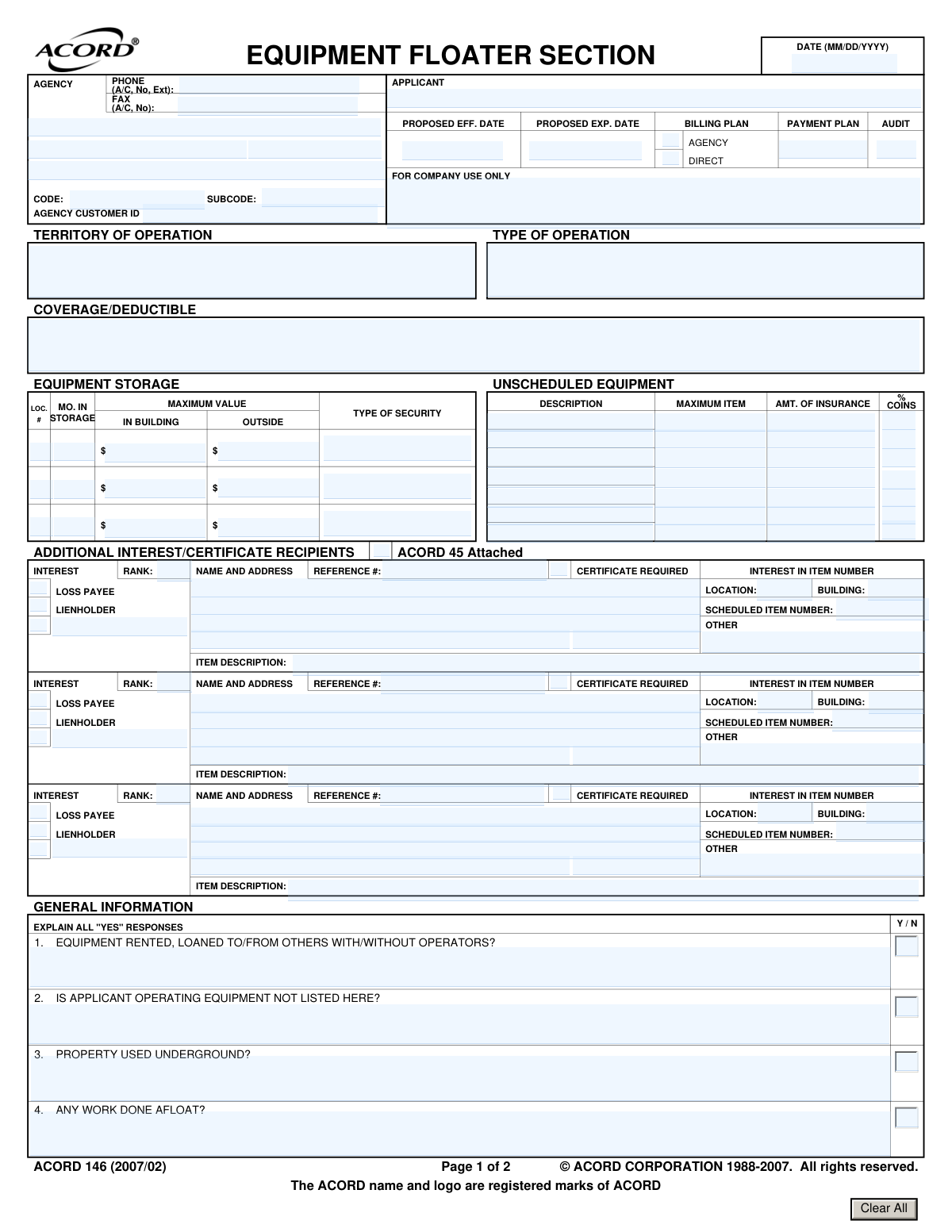
The ACORD 146, Equipment Floater Section, is a supplemental form used in the commercial insurance industry to list and describe specific pieces of mobile equipment for coverage under an inland marine policy. It allows businesses to insure valuable items that are moved between job sites, protecting them against loss or damage. Today, this form can be filled out quickly and accurately using AI-powered services like Instafill.ai, which can also convert non-fillable PDF versions into interactive fillable forms.
ACORD 146 is part of the ACORD forms and construction insurance forms categories on Instafill.
Our AI automatically handles information lookup, data retrieval, formatting, and form filling.
It takes less than a minute to fill out ACORD 146 using our AI form filling.
Securely upload your data. Information is encrypted in transit and deleted immediately after the form is filled out.

Form specifications

Form name: ACORD 146, Equipment Floater Section
Number of fields: 297
Number of pages: 1
Language: English
main-image

Instafill Demo: How to fill out PDF forms in seconds with AI

How to Fill Out ACORD 146 Online for Free in 2026

Are you looking to fill out a ACORD 146 form online quickly and accurately? Instafill.ai offers the #1 AI-powered PDF filling software of 2026, allowing you to complete your ACORD 146 form in just 37 seconds or less.
Follow these steps to fill out your ACORD 146 form online using Instafill.ai:
  1. 1 Navigate to an AI-powered form-filling service like Instafill.ai and upload or select the ACORD 146 form.
  2. 2 Provide the applicant and insurance agency details in the header section; the AI can often pre-fill this from your profile.
  3. 3 Enter the details for each piece of 'Scheduled Equipment,' including description, model year, serial number, and insured value.
  4. 4 If applicable, specify the coverage amount and coinsurance percentage for 'Unscheduled Equipment'.
  5. 5 Complete the 'General Information' section by answering the yes/no questions regarding equipment usage and operating territory.
  6. 6 List any 'Additional Interest/Certificate Recipients,' such as lienholders or loss payees, for the relevant equipment items.
  7. 7 Review all auto-filled information for accuracy, make any final adjustments, and then download, print, or electronically submit the completed form.

Our AI-powered system ensures each field is filled out correctly, reducing errors and saving you time.

Why Choose Instafill.ai for Your Fillable ACORD 146 Form?

Speed

Complete your ACORD 146 in as little as 37 seconds.

Up-to-Date

Always use the latest 2026 ACORD 146 form version.

Cost-effective

No need to hire expensive lawyers.

Accuracy

Our AI performs 10 compliance checks to ensure your form is error-free.

Security

Your personal information is protected with bank-level encryption.

Frequently Asked Questions About Form ACORD 146

This form is used to apply for inland marine insurance, specifically an 'equipment floater' policy. It allows you to provide detailed information about mobile equipment you want to insure against damage or loss as it moves between locations.

Any business that owns, rents, or is responsible for mobile machinery and tools, such as construction contractors, photographers, or landscaping companies, will use this form to list their equipment for insurance coverage.

Scheduled equipment refers to specific, high-value items that you list individually with their serial number and insured value. Unscheduled equipment provides blanket coverage for a group of lower-value items, like small tools, without having to list each one separately.

For each scheduled item, you must provide a detailed description, including the manufacturer, model, model year, serial number, purchase date, and the specific amount of insurance you are requesting for that piece of equipment.

This section is for listing any person or entity, such as a bank (Lienholder) or leasing company (Loss Payee), that has a financial stake in your equipment. They will be notified or compensated in the event of a covered loss.

The ACORD 146 is a supplemental application and is not submitted by itself. It must be attached to the main ACORD 125, Commercial Insurance Application, to be considered a complete submission to the insurance carrier.

This question asks if your equipment is used on or over water, for example, on a barge, dock, or other vessel. This type of work involves unique risks that the insurance company needs to evaluate.

Insurers ask this to understand the full scope of risk, as equipment is more exposed to potential damage when it is not in your direct control. You must explain any 'Yes' responses so the insurer can properly assess the risk.

You need to describe where your equipment is stored when not in use, including the location, security measures, and the maximum value of equipment stored inside a building versus outside. This information helps the insurer assess the risk of theft or damage during storage.

Yes, services like Instafill.ai use AI to help you fill out forms like the ACORD 146 accurately and efficiently. These tools can auto-fill fields, reduce manual entry, and help ensure all necessary information is included.

To complete the form using Instafill.ai, you just need to upload the ACORD 146 PDF to their platform. The AI will make the document interactive, allowing you to easily type your information into the correct fields.

If you have a non-fillable or 'flat' PDF, you can use a service like Instafill.ai. It can convert the non-fillable PDF into an interactive, fillable form online, so you can complete and save it digitally.

Coinsurance is the percentage of your equipment's total value that you agree to insure. If you have a claim, your payout could be reduced if the amount of insurance you purchased is less than the required coinsurance percentage of the total value.

Compliance ACORD 146
Validation Checks by Instafill.ai

1
Proposed Policy Period Validity
This check ensures the 'PROPOSED EXP. DATE' is chronologically after the 'PROPOSED EFF. DATE'. A policy's expiration date cannot be before its effective date. If this validation fails, the user should be prompted to correct the dates to reflect a valid policy term.
2
Conditional Explanation for General Information Questions
Validates that if any of the four 'Y / N' questions in the 'GENERAL INFORMATION' section are answered 'YES', the 'EXPLAIN ALL "YES" RESPONSES' field must be filled out. This is critical for underwriting to understand specific risks like work done afloat or property used underground. A failure would require the user to provide the necessary explanation.
3
Scheduled Item Purchase Date Logic
For each item listed in the 'SCHEDULED EQUIPMENT' section, this validation ensures the 'DATE PURCHASED' is on or after the specified 'MODEL YEAR'. It is logically impossible to purchase a piece of equipment before it was manufactured. This prevents data entry errors and ensures the timeline of the asset is accurate.
4
Model Year Format and Range
This check verifies that the 'MODEL YEAR' for each scheduled item is a valid 4-digit year and is not a year in the future. This ensures the data is realistic and accurate for rating and valuation purposes. An invalid or future year would be flagged for correction.
5
Unscheduled Equipment Item Value Limit
Ensures the 'MAXIMUM ITEM' value under the 'UNSCHEDULED EQUIPMENT' section does not exceed the total 'AMT. OF INSURANCE' for that same section. The per-item limit cannot be greater than the total blanket coverage available. This prevents misconfiguration of the policy limits and ensures the terms are logical.
6
Additional Interest Item Number Integrity
This validation confirms that the 'INTEREST IN ITEM NUMBER' listed in the 'ADDITIONAL INTEREST' section corresponds to a valid 'SCHEDULED ITEM NUMBER' from the equipment list. This ensures that lienholders and loss payees are correctly linked to the specific collateral they have an interest in. An invalid reference would prevent the form from being processed.
7
Scheduled Item Identification Completeness
For any row in the 'SCHEDULED EQUIPMENT' section where an 'AMOUNT OF INSURANCE' is entered, this check requires that the 'ID # / SERIAL NO.' field is also completed. Scheduling an item requires a unique identifier for the insurance to apply unambiguously. Failure to provide a serial number for an insured item would trigger an error.
8
Agency Phone Number Format
Validates that the 'PHONE (A/C, No, Ext):' field follows a standard North American phone number format (e.g., 10 digits, possibly with parentheses, spaces, or hyphens). Correct formatting is essential for ensuring the agency can be contacted without issue. An incorrectly formatted number would be rejected.
9
Standard Date Formatting
This check verifies that all date fields on the form, such as 'PROPOSED EFF. DATE' and 'DATE PURCHASED', adhere to the specified MM/DD/YYYY format. Consistent and valid date formatting is crucial for data processing, record-keeping, and avoiding ambiguity in policy terms. Any date not in this format would be flagged as an error.
10
Currency Field Numeric Validation
Ensures that all fields intended to contain monetary values, such as 'AMOUNT OF INSURANCE' and 'MAXIMUM VALUE', are populated with valid, non-negative numeric data. This prevents non-numeric characters from being entered into financial fields, which would cause calculation and processing errors. The system should reject any entry containing letters or invalid symbols.
11
Coinsurance Percentage Range
This validation ensures that the 'COINS %' field contains a numeric value between 0 and 100, inclusive. A coinsurance percentage cannot be negative or exceed 100%, as it represents a portion of the value. This check maintains the logical and financial integrity of the policy terms.
12
Additional Interest Party Completeness
If an interest type such as 'LIENHOLDER' or 'LOSS PAYEE' is selected for an item, this check ensures the corresponding 'NAME AND ADDRESS' field is completed. It is necessary to identify the interested party to fulfill the legal and contractual obligations of the policy. A missing name and address would make the designation incomplete and invalid.
13
Minimum Coverage Request
This check ensures that an 'AMT. OF INSURANCE' greater than zero is specified for at least one coverage type, either in the 'SCHEDULED EQUIPMENT' or 'UNSCHEDULED EQUIPMENT' section. An application for insurance must actually request coverage on some property. A form submitted without any amount of insurance requested would be considered incomplete.

Common Mistakes in Completing ACORD 146

Incomplete or Incorrect Serial Numbers

Applicants often mistype or omit the ID/Serial Number for scheduled equipment because it can be difficult to locate or read. This is a critical error, as the serial number is the primary unique identifier for the insured item. Without an accurate serial number, an insurer may dispute or deny a claim, arguing the damaged item is not the one listed on the policy. To avoid this, physically inspect each piece of equipment and double-check the number against purchase records; AI-powered tools like Instafill.ai can help validate data formats to catch obvious typos.

Using Purchase Price for Valuation

A frequent mistake is listing the original purchase price as the 'Amount of Insurance' for equipment that is several years old. Insurance coverage is typically based on either Replacement Cost (RC) or Actual Cash Value (ACV), which accounts for depreciation. Using an outdated purchase price can lead to being significantly underinsured and receiving a much smaller payout than needed to replace the equipment after a loss. Always determine the current market value or replacement cost before filling out the form.

Vague Equipment Descriptions

Entering a generic description like 'Excavator' or 'Generator' instead of the full Manufacturer, Model, and Capacity is a common shortcut. This ambiguity works against the applicant, as an underwriter may assume a base model when setting premiums, and a claims adjuster may value the item as the least expensive type. To ensure proper coverage and valuation, provide a detailed description including the manufacturer, model name/number, and key specifications like capacity or horsepower.

Failing to Explain 'Yes' Answers

The 'General Information' section asks several yes/no questions and explicitly requires an explanation for all 'Yes' responses. Applicants often check 'Yes' to questions like 'Equipment rented, loaned to/from others?' but neglect to provide the mandatory detailed explanation. This renders the application incomplete, causing processing delays as the underwriter must request the missing information to properly assess the risk. Always prepare and attach a separate sheet with detailed explanations for any 'Yes' answers.

Incorrectly Listing Lienholders or Loss Payees

The 'Additional Interest' section is complex and prone to errors, such as omitting a lender, providing an incorrect address, or misunderstanding the 'Rank' of interest. Failing to properly list a lienholder can violate your loan agreement and create significant complications during a claim, as the insurer may not be able to pay the lender directly. To prevent this, use your financing or lease agreement as a direct source for the lienholder's name, address, and interest, ensuring all information is transcribed exactly. AI form-fillers like Instafill.ai can help by structuring this data correctly and saving it for future use.

Misusing Unscheduled Equipment Coverage

Applicants sometimes try to cover moderately expensive items under the blanket 'Unscheduled Equipment' coverage to avoid listing them individually. However, they often overlook the 'Maximum Item' value limit specified in this section. If a piece of equipment valued at $5,000 is lost but the per-item limit is only $1,000, the applicant will suffer a significant uncovered loss. Always schedule any individual item that is valued higher than the unscheduled per-item limit.

Omitting Details on Equipment Storage and Security

When filling out the 'Equipment Storage' section, people may leave the 'Type of Security' field blank or provide a vague answer like 'Fenced yard'. Insurers use these details to assess the risk of theft, and a lack of specific information may lead them to assume a higher risk, resulting in higher premiums. Describing security measures in detail (e.g., 'fenced, lighted, video surveillance, locked gates') can demonstrate lower risk and potentially lead to better rates. Since this form is often a non-fillable PDF, a tool like Instafill.ai can convert it into a fillable version, making it easier to add these important details.

Forgetting to Disclose Rented or Loaned Equipment

The question 'Equipment rented, loaned to/from others with/without operators?' covers a broad range of scenarios that are often overlooked. Applicants may forget to list equipment they rent from others, assuming it's covered by the rental company, or fail to mention that they sometimes loan their own equipment out. This can lead to major coverage gaps, leaving the applicant personally liable for damage to equipment they don't even own. Carefully review all operational practices, including rentals and loans, and disclose them fully.

Ignoring Coinsurance Requirements

The 'Coinsurance %' field is a critical but often misunderstood part of the policy that requires you to insure your property to a certain percentage of its total value. An applicant might choose a value without understanding the consequences, or intentionally underinsure property to lower their premium. If a claim is filed and the amount of insurance is less than what is required by the coinsurance clause, the insurer will impose a penalty, reducing the claim payment significantly. It is crucial to discuss this with an agent to ensure you are insuring your equipment to the proper value.

Submitting an Incomplete Application Package

This Equipment Floater Section (ACORD 146) is a supplementary form that must be attached to a main commercial application, typically the ACORD 125. Furthermore, it may require an ACORD 45 for listing additional interests. Applicants sometimes submit this form by itself, resulting in an incomplete application that cannot be processed. Always ensure you are submitting a complete package with all required base forms and attachments to avoid delays in binding coverage.
Saved over 80 hours a year

“I was never sure if my IRS forms like W-9 were filled correctly. Now, I can complete the forms accurately without any external help.”

Kevin Martin Green

Your data stays secure with advanced protection from Instafill and our subprocessors

Robust compliance program

Transparent business model

You’re not the product. You always know where your data is and what it is processed for.

ISO 27001, HIPAA, and GDPR

Our subprocesses adhere to multiple compliance standards, including but not limited to ISO 27001, HIPAA, and GDPR.

Security & privacy by design

We consider security and privacy from the initial design phase of any new service or functionality. It’s not an afterthought, it’s built-in, including support for two-factor authentication (2FA) to further protect your account.

Fill out ACORD 146 with Instafill.ai

Worried about filling PDFs wrong? Instafill securely fills acord-146-equipment-floater-section forms, ensuring each field is accurate.