Yes! You can use AI to fill out ACORD 145, Accounts Receivable / Valuable Papers

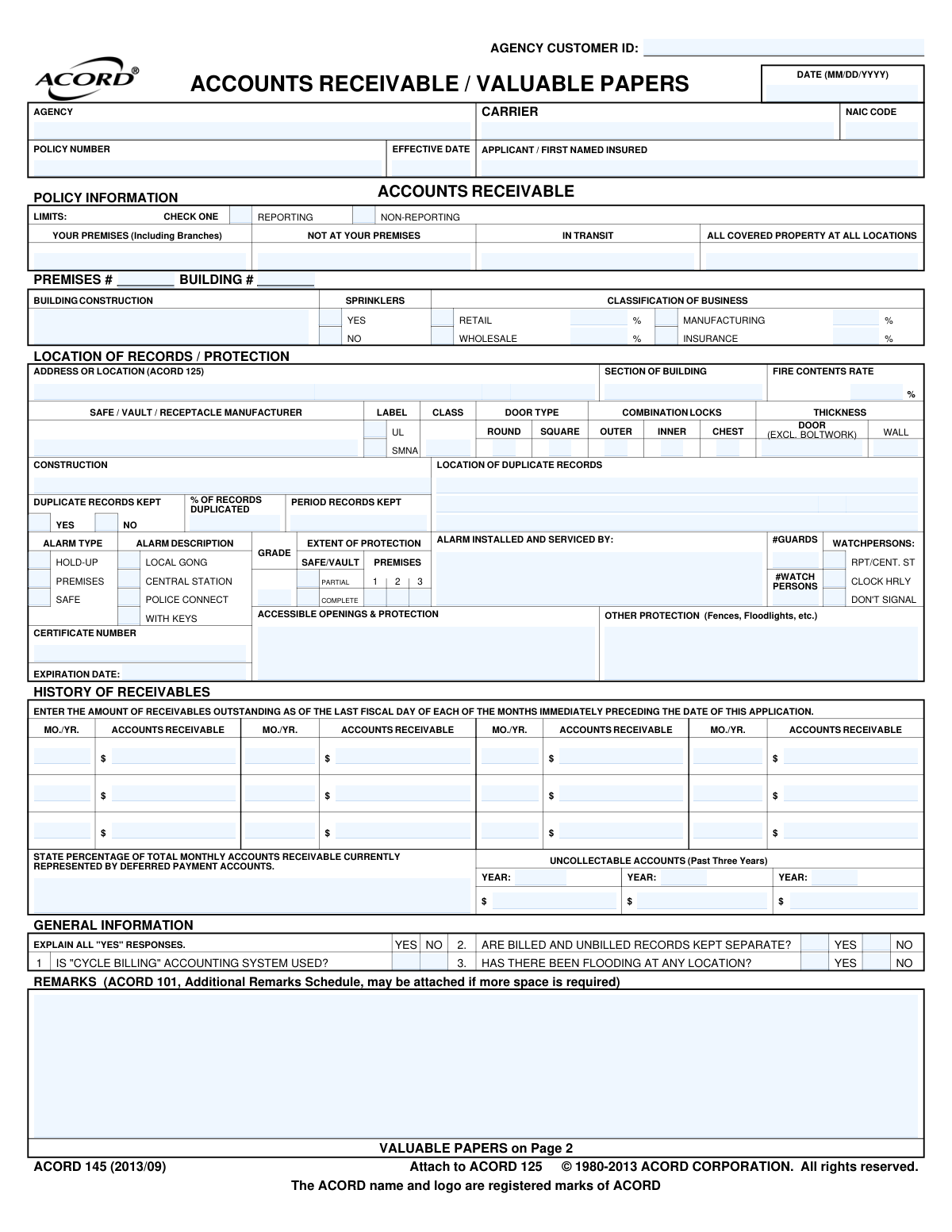
ACORD Form 145 is a standardized insurance application for businesses seeking coverage against the loss of accounts receivable and valuable papers. It collects detailed information about the applicant's record-keeping practices, security measures (like safes and alarms), and financial history to help underwriters assess risk and determine policy terms. Today, this form can be filled out quickly and accurately using AI-powered services like Instafill.ai, which can also convert non-fillable PDF versions into interactive fillable forms.
ACORD 145 is part of the ABLE account forms, construction contract forms and construction insurance forms categories on Instafill.
Our AI automatically handles information lookup, data retrieval, formatting, and form filling.
It takes less than a minute to fill out ACORD 145 using our AI form filling.
Securely upload your data. Information is encrypted in transit and deleted immediately after the form is filled out.

Form specifications

Form name: ACORD 145, Accounts Receivable / Valuable Papers
Number of fields: 208
Number of pages: 1
Language: English
main-image

Instafill Demo: How to fill out PDF forms in seconds with AI

How to Fill Out ACORD 145 Online for Free in 2026

Are you looking to fill out a ACORD 145 form online quickly and accurately? Instafill.ai offers the #1 AI-powered PDF filling software of 2026, allowing you to complete your ACORD 145 form in just 37 seconds or less.
Follow these steps to fill out your ACORD 145 form online using Instafill.ai:
  1. 1 Navigate to Instafill.ai and upload or select the ACORD 145 form.
  2. 2 Provide the primary applicant, agency, and policy information in the header section.
  3. 3 Complete the 'Accounts Receivable' section, detailing coverage limits, business classification, record storage, and security systems.
  4. 4 Enter the historical data for accounts receivable for the past 12 months and details on any uncollectable accounts.
  5. 5 Fill out the 'Valuable Papers' section, specifying limits, storage receptacles, and listing any specifically scheduled papers.
  6. 6 Review all the information auto-populated by the AI for accuracy, making any necessary adjustments to the data.
  7. 7 Electronically sign the application as the producer and/or applicant and submit it to the appropriate insurance carrier.

Our AI-powered system ensures each field is filled out correctly, reducing errors and saving you time.

Why Choose Instafill.ai for Your Fillable ACORD 145 Form?

Speed

Complete your ACORD 145 in as little as 37 seconds.

Up-to-Date

Always use the latest 2026 ACORD 145 form version.

Cost-effective

No need to hire expensive lawyers.

Accuracy

Our AI performs 10 compliance checks to ensure your form is error-free.

Security

Your personal information is protected with bank-level encryption.

Frequently Asked Questions About Form ACORD 145

The ACORD 145 form is a supplemental application used to apply for insurance coverage for a business's Accounts Receivable and Valuable Papers. It gathers details on the value of these assets and the security measures in place to protect them.

Any business seeking insurance to cover financial losses from the damage or destruction of their accounts receivable records or other important documents should complete this form. It is submitted to an insurance agent or carrier along with a primary commercial application, like the ACORD 125.

This form is not a standalone application; it must be attached to your main ACORD 125, Commercial Insurance Application. Both forms should be submitted together to your insurance provider.

You must provide the total amount of your outstanding accounts receivable for each of the last 12 months. This information helps the insurer understand the value of your receivables over time to determine an adequate coverage limit.

A 'Blanket Amount' provides a single, overall limit for all your valuable papers. A 'Specified Amount' allows you to list and insure specific, high-value documents for an individual amount, which is ideal for items that are costly or difficult to replace.

Insurers need to assess the risk of loss, and details about your safes, alarms, and other security measures are crucial for this evaluation. Having robust protection can demonstrate lower risk and may result in more favorable insurance terms.

If you need more space for remarks or to list additional valuable papers, you can use an ACORD 101 (Additional Remarks Schedule). Be sure to attach the ACORD 101 to your ACORD 145 application when you submit it.

A 'Reporting' policy requires you to periodically report your receivable values to the insurer, with premiums adjusted accordingly. A 'Non-Reporting' policy has a fixed premium based on a set coverage limit for the entire policy term.

This question helps the insurer understand your data backup and disaster recovery plans. Keeping duplicate records, especially at a separate location, significantly reduces the risk of a catastrophic loss and is viewed favorably by underwriters.

Yes, services like Instafill.ai use AI to help you complete forms like the ACORD 145. These tools can auto-fill fields with your business information, which saves time and helps ensure accuracy.

To fill out the ACORD 145 online, you can upload the document to Instafill.ai. The platform will make the form interactive, allowing you to easily type your information into the fields, then save or print the completed form.

If you have a non-fillable or 'flat' PDF, you can use a service like Instafill.ai to convert it into an interactive form. Simply upload the file, and the platform will make it possible for you to type your answers directly onto the form.

In this section, you need to list the total dollar amount of accounts receivable that you were unable to collect for each of the past three years. This data helps the insurer understand your historical credit and collections performance.

No, that appears to be a formatting error on this document image. The form is officially titled ACORD 145, Accounts Receivable / Valuable Papers, and you should fill it out for that specific coverage, not for contractor's equipment.

Compliance ACORD 145
Validation Checks by Instafill.ai

1
Exclusive Reporting Type Selection
Ensures that for the Accounts Receivable section, either 'Reporting' or 'Non-Reporting' is selected, but not both. This selection is critical as it determines the premium calculation method and the insured's ongoing reporting duties. An invalid or ambiguous selection prevents accurate policy setup and rating.
2
Business Classification Percentage Consistency
Validates that the sum of all provided business classification percentages (Retail, Wholesale, Manufacturing, Insurance) equals 100%. This is crucial for accurately assessing the risk profile of the business based on its operational mix. An incorrect total indicates a data entry error and will lead to misclassification and improper rating.
3
Valid Date Format and Logic
Verifies that all date fields, such as 'Effective Date' and 'Signature Date', are in a valid MM/DD/YYYY format. It also checks that dates are logical; for example, an 'Alarm Certificate Expiration Date' must be in the future relative to the policy effective date. This ensures data integrity and prevents processing errors related to policy terms and compliance.
4
Conditional Duplicate Records Detail
Checks that if the applicant indicates 'YES' to keeping duplicate records, then the location of those records and the percentage of records duplicated are specified. This information is vital for underwriters to assess risk mitigation measures and apply appropriate credits. Failure to provide these details when 'YES' is selected results in an incomplete risk profile.
5
General Information 'Yes' Response Explanation
Validates that if any of the three 'General Information' questions are answered 'YES', a corresponding explanation is provided in the Remarks section. Underwriters rely on these explanations to understand specific risks, such as exposure to flooding or the nature of the billing system. A missing explanation for a 'YES' answer leaves a critical information gap and may delay the application process.
6
Accounts Receivable History Integrity
Verifies that the 'History of Receivables' section contains valid month/year entries and corresponding numeric dollar amounts for the 12 months preceding the application. This historical data is essential for calculating the average exposure and determining appropriate limits and premiums. Incomplete or nonsensical data prevents accurate underwriting.
7
Valuable Papers Limit Type Validation
Ensures that for Valuable Papers coverage, if 'Blanket Amount' is selected, the corresponding limit is provided, and if 'Specified Amount' is selected, the schedule of papers is filled out. This choice defines how coverage applies, so an invalid selection or missing corresponding data prevents the policy from being issued correctly. Both cannot be selected simultaneously.
8
Specified Valuable Papers Schedule Completeness
If 'Specified Amount' coverage is chosen for Valuable Papers, this check confirms that at least one item is detailed in the schedule with a description and a specific insurance amount. This schedule forms the basis of coverage for those items. An empty schedule for specified coverage makes the selection meaningless and the policy unenforceable for those items.
9
Conditional Alarm Service Provider Information
Validates that if any alarm type (Premises, Safe, Hold-Up) is indicated as present, the name of the company that installed and services it is provided. The quality and reliability of the alarm company is an important underwriting factor that can affect discounts. Missing this information prevents a full assessment of the protective safeguards.
10
Required Signatures for Application Binding
Verifies that both the applicant's signature and the producer's signature are present on the application. These signatures are a legal requirement, attesting to the accuracy of the information and authorizing the insurer to issue a policy. An unsigned application is not valid and cannot be processed or bound.
11
Florida National Producer Number Requirement
This validation ensures that if the producer is operating in Florida, the National Producer Number (NPN) field is populated, as explicitly required on the form. This is a state-specific regulatory requirement for agent tracking and compliance. Failure to provide the NPN for a Florida application will result in rejection by the carrier or state regulatory bodies.
12
Mutually Exclusive Yes/No Selection
Verifies that for any question with a 'Yes' and 'No' checkbox pair (e.g., 'Sprinklers', 'Can papers be replaced?'), only one of the two is selected. Selecting both or neither creates ambiguity and prevents the system from correctly interpreting the applicant's response. This check ensures data clarity and is fundamental for accurate risk evaluation.

Common Mistakes in Completing ACORD 145

Incomplete or Inaccurate History of Receivables

Applicants often provide incomplete or estimated figures for the 'History of Receivables' section, which requires outstanding amounts for the last 12 months. This happens because gathering precise historical data can be tedious. Inaccurate data leads to incorrect premium calculations and can result in being underinsured at the time of a loss, as the insurer uses this history to determine average exposure. To avoid this, prepare by exporting monthly sales or accounts receivable reports from your accounting software before starting the form.

Vague Descriptions of Safes and Alarms

Many applicants provide generic information like 'alarm system' or 'fireproof safe' in the 'Location of Records / Protection' section. This mistake occurs when the business owner doesn't know the technical specifications, such as the UL rating of a safe or the grade of an alarm system. This ambiguity prevents the underwriter from applying protective safeguard credits, resulting in higher premiums and can even jeopardize a claim if the protection was misrepresented. Always check the equipment's documentation or contact your security provider for specific details like manufacturer, class, and certificate number.

Failing to Explain 'YES' Responses

The form requires an explanation for all 'YES' answers to questions in the 'General Information' section, but applicants frequently check the box without providing context in the Remarks. This oversight leads to an incomplete application, as the underwriter cannot assess the risk associated with flood history or a 'cycle billing' system without more information. This always causes processing delays, so be sure to use the Remarks section to elaborate on any affirmative answers.

Misunderstanding Blanket vs. Specified Valuable Papers Coverage

Applicants often confuse 'Blanket Amount' with 'Specified Amount' for Valuable Papers coverage. They might list a total value under 'Blanket' while intending to cover a single, high-value item, or vice-versa. This can lead to catastrophic underinsurance for unique, costly-to-recreate documents like architectural blueprints or deeds. To prevent this, list irreplaceable items with their specific recreation cost in the 'Specified' schedule and use the 'Blanket' limit for general business papers.

Leaving Limit or Percentage Fields Blank

It is common for applicants to leave limit fields (e.g., 'In Transit') or business classification percentages blank, assuming a blank means zero or not applicable. However, this creates ambiguity for the underwriter, who must stop and ask for clarification, delaying the quoting process. If a limit or percentage is zero, explicitly enter '$0' or '0%' to clearly communicate your intent and ensure the application is processed smoothly.

Inconsistent Information with ACORD 125

The Applicant Name, address, or policy number on this ACORD 145 form often does not match the primary ACORD 125 Commercial Insurance Application it's attached to. This is a frequent data entry error that causes significant administrative delays and confusion. In a worst-case scenario, it could lead to coverage being issued for the wrong entity or location. Using an AI-powered form filling tool like Instafill.ai can prevent this by populating consistent data across all related forms in an application package.

Omitting Details on Duplicate Record Keeping

Applicants often neglect to fully describe how and where duplicate accounts receivable records are stored, or check 'No' to having duplicates when they have a cloud-based accounting system. The ability to recreate records from backups is a primary underwriting consideration that heavily influences the premium. Failing to provide details on your backup process (e.g., off-site, cloud sync frequency) will cause the insurer to assume the highest risk, leading to a much more expensive quote.

Incorrectly Selecting Reporting vs. Non-Reporting Form

Choosing between a 'Reporting' and 'Non-Reporting' policy type is a frequent point of confusion. Businesses with fluctuating receivables may incorrectly choose 'Non-Reporting' and be underinsured during peak season, while others may choose 'Reporting' but fail to comply with the monthly reporting requirements, risking claim penalties. This choice has major implications for premium and coverage adequacy, so it should be discussed with an agent to align with the business's sales cycle.

Incorrect Date Formatting

Dates for policy effectiveness or alarm certificate expiration are often entered in an incorrect format (e.g., DD-MM-YY instead of the required MM/DD/YYYY). This simple mistake is due to habit or oversight but can cause data entry errors in the carrier's system, leading to administrative friction and potential issues with policy periods. AI tools like Instafill.ai help eliminate these errors by automatically validating and formatting data into the correct format as you fill out the form. If the form is a non-fillable PDF, Instafill.ai can also convert it into an interactive, fillable version.

Missing Signatures or Producer Information

The final page containing signature lines for both the applicant and producer, along with the producer's license number, is frequently submitted incomplete. This occurs when applicants or agents rush through the final steps of the application process. An unsigned application is not legally binding and cannot be processed, immediately halting the underwriting process until the proper signatures and producer details are obtained. Always perform a final review of all pages to ensure all required signature and identification fields are complete.
Saved over 80 hours a year

“I was never sure if my IRS forms like W-9 were filled correctly. Now, I can complete the forms accurately without any external help.”

Kevin Martin Green

Your data stays secure with advanced protection from Instafill and our subprocessors

Robust compliance program

Transparent business model

You’re not the product. You always know where your data is and what it is processed for.

ISO 27001, HIPAA, and GDPR

Our subprocesses adhere to multiple compliance standards, including but not limited to ISO 27001, HIPAA, and GDPR.

Security & privacy by design

We consider security and privacy from the initial design phase of any new service or functionality. It’s not an afterthought, it’s built-in, including support for two-factor authentication (2FA) to further protect your account.

Fill out ACORD 145 with Instafill.ai

Worried about filling PDFs wrong? Instafill securely fills acord-145-accounts-receivable-valuable-papers forms, ensuring each field is accurate.