Yes! You can use AI to fill out Vanguard Charitable Open a Philanthropic Account
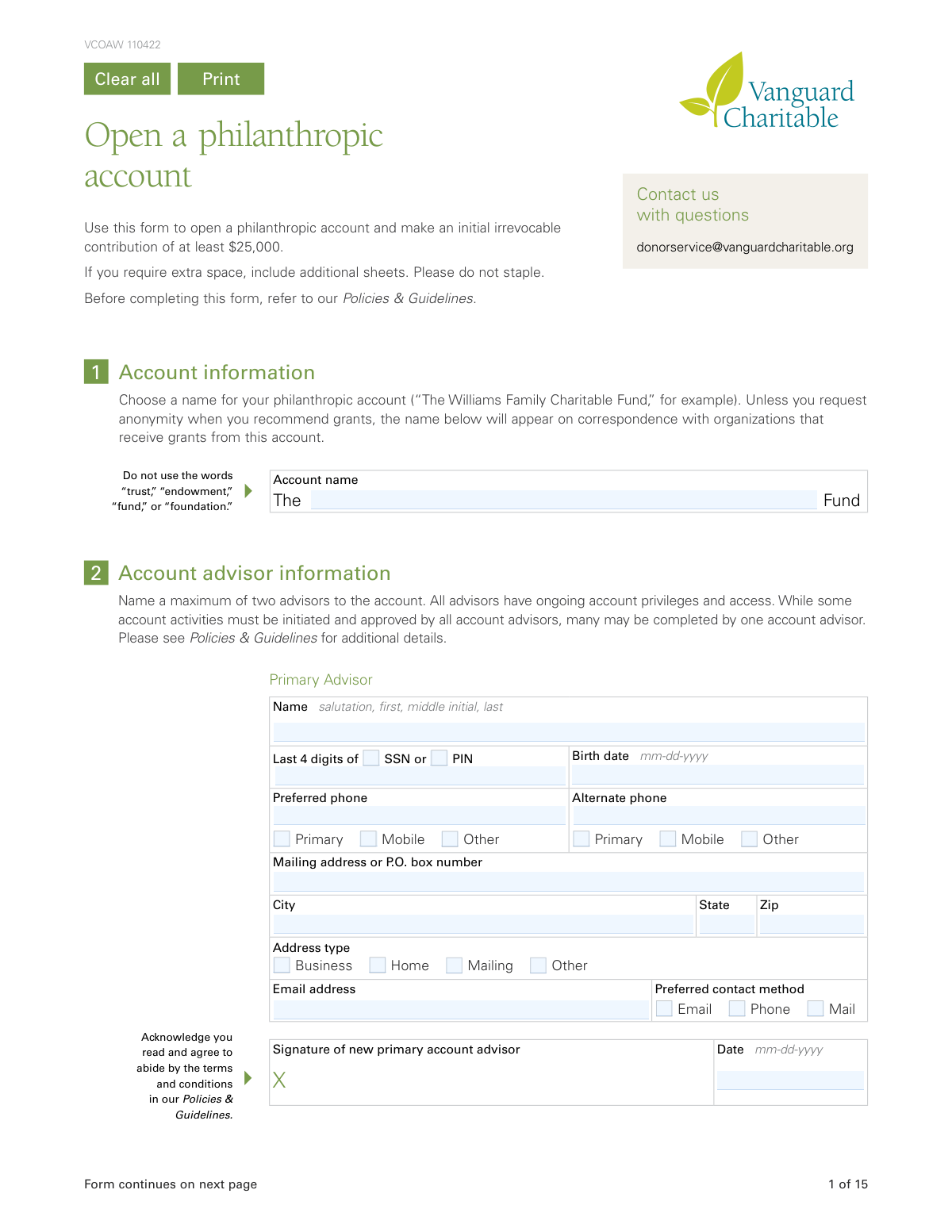
This form is used to open a new philanthropic account, also known as a donor-advised fund, with Vanguard Charitable. It allows individuals or organizations to make an irrevocable initial contribution, name account advisors, establish a succession plan, and select investment options for the donated assets. Today, this form can be filled out quickly and accurately using AI-powered services like Instafill.ai, which can also convert non-fillable PDF versions into interactive fillable forms.
Our AI automatically handles information lookup, data retrieval, formatting, and form filling.
It takes less than a minute to fill out VCOAW 110422 using our AI form filling.
Securely upload your data. Information is encrypted in transit and deleted immediately after the form is filled out.
Form specifications
| Form name: | Vanguard Charitable Open a Philanthropic Account |
| Number of pages: | 1 |
| Language: | English |
| Categories: | charitable forms, ABLE account forms, Vanguard forms, Vanguard Charitable forms |
Instafill Demo: How to fill out PDF forms in seconds with AI
How to Fill Out VCOAW 110422 Online for Free in 2026
Are you looking to fill out a VCOAW 110422 form online quickly and accurately? Instafill.ai offers the #1 AI-powered PDF filling software of 2026, allowing you to complete your VCOAW 110422 form in just 37 seconds or less.
Follow these steps to fill out your VCOAW 110422 form online using Instafill.ai:
- 1 Navigate to Instafill.ai and upload or select the Vanguard Charitable 'Open a Philanthropic Account' form.
- 2 Use the AI assistant to fill in Sections 1 and 2 with the desired account name and the personal details of the primary and secondary account advisors.
- 3 Complete Section 3 to establish a succession plan, choosing how account assets will be managed or distributed in the future.
- 4 Detail your initial contribution of at least $25,000 in Section 6, specifying the type and source of the assets being donated.
- 5 Provide donor information in Section 7 for tax substantiation and select your desired investment allocations for the funds in Section 9.
- 6 Carefully review all entered information for accuracy, then complete the required signatures in Section 11, obtaining a Medallion signature guarantee if necessary.
- 7 Submit the completed and signed form to Vanguard Charitable via mail, fax, or email as per the instructions on the final pages.
Our AI-powered system ensures each field is filled out correctly, reducing errors and saving you time.
Why Choose Instafill.ai for Your Fillable VCOAW 110422 Form?
Speed
Complete your VCOAW 110422 in as little as 37 seconds.
Up-to-Date
Always use the latest 2026 VCOAW 110422 form version.
Cost-effective
No need to hire expensive lawyers.
Accuracy
Our AI performs 10 compliance checks to ensure your form is error-free.
Security
Your personal information is protected with bank-level encryption.
Frequently Asked Questions About Form VCOAW 110422
This form is used to establish a new philanthropic account with Vanguard Charitable, which functions like a donor-advised fund. It also documents your initial irrevocable contribution of at least $25,000.
Yes, you must make an initial contribution of at least $25,000 to open a philanthropic account. Any additional contributions you make later must be a minimum of $5,000.
Yes, the form specifies that you should not use the words 'trust,' 'endowment,' 'fund,' or 'foundation' in your account name. This name will appear on correspondence to charities unless you request anonymity.
A succession plan (Section 3) dictates what happens to your account's assets when all advisors are no longer able to manage it. It is crucial for ensuring your long-term charitable intentions are fulfilled as you direct.
If you do not specify how your contribution should be invested, Vanguard Charitable will automatically allocate your account's assets to the 'Conservative Growth' investment option by default.
A Medallion signature guarantee is a special stamp that verifies your signature for transferring securities, which you can obtain from a financial institution like a bank or broker. Note that a notary public cannot provide this guarantee.
You can submit the form via email, fax, or mail to the addresses provided on the last page. However, if your form includes a Medallion signature guarantee, you are required to mail the original document.
For assets held at another firm, you must complete Section 6c and use the delivery instructions on page 14 to initiate the transfer from your brokerage. Completing the form alone does not start the transfer process.
Yes, you can name a minor as a successor-advisor in your succession plan. However, they cannot assume account privileges until they reach the legal age of majority.
Section 3b allows you to choose a contingency plan for this scenario. You can opt to reallocate the grant among other named charities or have it distributed to an alternative organization.
Yes, services like Instafill.ai use AI to accurately auto-fill form fields, which can save you time and help reduce errors when completing complex forms like this one.
Simply upload the PDF form to the Instafill.ai platform. The AI will identify all the fields, allowing you to provide your information once and have the form filled out automatically for you to review and download.
If you have a non-fillable PDF, you can use a service like Instafill.ai. It can convert flat PDFs into interactive, fillable forms so you can easily type your information directly into the fields.
You can name a maximum of two advisors for the account. All named advisors will have ongoing account privileges and access.
Yes, you can make a cash gift via check, wire transfer, or Electronic Bank Transfer (ACH/EBT). You must complete Section 6e and follow the specific funding instructions on pages 14 and 15 to complete the transfer.
Compliance VCOAW 110422
Validation Checks by Instafill.ai
1
Account Name Prohibited Word Check
This validation ensures that the proposed Account Name in Section 1 does not contain the prohibited words 'trust,' 'endowment,' 'fund,' or 'foundation' as explicitly instructed on the form. This is important for legal and naming compliance for this type of philanthropic account. If validation fails, the user must be prompted to choose a different name that adheres to the guidelines.
2
Primary Advisor Information Completeness
Verifies that all required fields for the Primary Advisor in Section 2 are filled out, including Name, Last 4 digits of SSN or PIN, Birth date, a phone number, a complete mailing address, email address, and a signature. This information is critical for account setup, identity verification, and communication. A failure to provide any required field will prevent the form submission and highlight the missing information.
3
SSN/PIN 4-Digit Format
This check ensures that the 'Last 4 digits of SSN or PIN' field for all advisors and donors contains exactly four numeric digits. This is a standard format for partial identification numbers and is crucial for security and data integrity. If the input contains non-numeric characters or is not four digits long, the submission should be rejected with an error message.
4
Valid and Logical Birth Date
This validation confirms that all birth date fields are in the 'mm-dd-yyyy' format and represent a real, logical date. It also checks that the date is not in the future and that the individual is of legal age (e.g., 18 years or older) to act as an advisor. This is essential for legal compliance and ensuring the advisor has the capacity to manage the account. An invalid or illogical date would trigger an error.
5
Succession Plan Percentage Summation
This check validates that the percentages assigned to the different succession plan options in Section 3 sum to exactly 100%. This is critical to ensure there is a complete and unambiguous plan for the account's assets. If the total is not 100%, the form cannot be processed, and the user must adjust the percentages accordingly.
6
Succession Plan Conditional Section Completion
This is a logical check to ensure that if 'Option 1' or 'Option 2' is selected in the Succession Plan (Section 3), the corresponding 'Successor-advisors' section (3a) is completed. Similarly, if 'Option 3' is selected, the 'Nonprofit organizations' section (3b) must be filled out. This ensures that the choices made in the plan are supported by the necessary detailed information. Failure to complete the required subsequent sections will result in an incomplete application.
7
Successor and Current Advisor Uniqueness
This validation cross-references the names of Successor-advisors in Section 3a against the names of the Primary and Secondary advisors in Section 2. The form explicitly states that a successor cannot be a current advisor on the same account. This check prevents logical conflicts in account roles and ensures the succession plan is valid. A match would result in an error requiring the user to name a different successor.
8
Nonprofit Grant Allocation Summation
If Section 3b is used to name nonprofit organizations for a final grant, this check ensures the specified percentages for each charity sum to exactly 100%. This is vital for ensuring the entirety of the account balance is allocated as intended when the succession plan is enacted. If the total is not 100%, the user must correct the allocation before proceeding.
9
Minimum Initial Contribution Amount
This validation verifies that the total 'Approximate value' of all assets listed for contribution in Section 6 (6a, 6b, 6c, 6d, 6e) is at least $25,000. This is a mandatory minimum to open a new philanthropic account. If the total contributed value is less than the minimum, the application will be flagged as not meeting the initial funding requirement.
10
Investment Allocation Percentage Summation
This check ensures that the percentages allocated across all selected investment options in Section 9 sum to exactly 100%. This is crucial for correctly investing the contributed funds according to the donor's wishes. An incorrect total would lead to ambiguity and prevent the proper setup of the account's investment portfolio.
11
Donor and Signatory Consistency
This validation confirms that the names of the individuals signing in Section 11 ('Signature of owner/trustee/officer') match the names of the donors/trustees listed in Section 7 ('Primary Donor/Trustee/Owner' and 'Joint Donor/Trustee/Owner'). This is a critical security and legal check to ensure that the person authorizing the irrevocable gift is the actual owner of the assets. A mismatch would invalidate the contribution and require correction.
12
Valid Email Address Format
This check ensures that all fields designated for an email address contain a string that conforms to the standard email format (e.g., '[email protected]'). This is important for ensuring that Vanguard Charitable can communicate electronically with advisors and donors. An invalid format would prevent successful submission and prompt the user for a correction.
13
Charity Ineligibility Option Selection
This validation ensures that if Section 3b (Nonprofit organizations) is completed, one of the three options under the 'Charity ineligibility' subsection is selected. This provides a necessary contingency plan if a designated charity is no longer eligible to receive grants when the succession plan is enacted. Failure to select an option creates ambiguity and would halt the processing of this section.
14
Mandatory Advisor Signature and Date
This check verifies that the Primary Advisor (and Secondary Advisor, if one is listed) has signed and dated the form in Section 2. The signature signifies agreement with the terms and conditions in the Policies & Guidelines. Without a signature and date, the advisor appointment is not legally binding, and the application is incomplete.
Common Mistakes in Completing VCOAW 110422
The form explicitly instructs applicants not to use words like 'trust,' 'endowment,' 'fund,' or 'foundation' in the account name. People often make this mistake because these words seem appropriate for a philanthropic account, leading to the form being returned for correction. To avoid this, simply follow the provided example, such as 'The Williams Family Charitable Fund,' and omit the specified terms.
In Section 3 (Succession Plan) and 3b (Nonprofit Organizations), all specified percentages must add up to exactly 100%. Applicants frequently make small calculation errors, especially when allocating across multiple options or charities, which invalidates the plan. This requires Vanguard Charitable to contact the applicant for clarification, delaying the account setup. Carefully double-check all calculations before submitting the form.
The form uses a 'check-then-complete' structure, such as in the Succession Plan (Section 3). Applicants often check a box for Option 1, 2, or 3 but then forget to fill out the corresponding detailed sections (3a or 3b) on the following pages. This oversight results in an incomplete and unenforceable plan, requiring follow-up and resubmission of corrected pages.
The form requires a Medallion Signature Guarantee for certain asset transfers, which is different from a standard notarization. A Medallion Guarantee is provided by a financial institution and guarantees the value of the transaction, whereas a notary only verifies identity. Submitting the wrong one is a common, critical error that will cause the transfer to be rejected and significantly delay the funding of the account.
For contributions held outside Vanguard (Sections 6c, 6d, 6e), this form only informs Vanguard Charitable of your intent; it does not automatically trigger the transfer. Applicants mistakenly believe the form is all that's needed and fail to contact their external bank or brokerage to send the assets. This results in the philanthropic account remaining unfunded until the applicant takes separate action.
In Section 9, applicants must allocate their contribution across various investment options, and the total must equal exactly 100%. With over 20 choices, it is easy to make a math error or to skip the section entirely. If left blank or calculated incorrectly, the contribution will be placed in a default allocation that may not align with the donor's goals.
The names of the asset owners listed in Section 7 must exactly match the required signatures in Section 11. A common mistake occurs with jointly owned assets, where one owner fills out the form but forgets to obtain the signature of the other owner. This mismatch invalidates the authorization to transfer the assets, halting the contribution process until all required signatures are provided.
Section 3a clearly states that successor-advisors cannot be current advisors on the same account. Applicants often overlook this rule and attempt to name a spouse or partner who is already listed as a secondary advisor. This designation will be rejected, leaving a potential gap in the succession plan and requiring the applicant to resubmit the section with a valid successor.
This form is a non-fillable PDF, forcing applicants to complete it by hand, which often leads to errors. Illegible handwriting, transposed numbers in account details, or misspelled names can cause processing to fail or data to be recorded incorrectly. AI-powered tools like Instafill.ai can convert non-fillable PDFs into interactive forms, preventing these manual errors by allowing you to type directly and ensuring data is clean and legible.
The 15-page application has multiple signature fields, including for each advisor (Section 2) and all asset owners (Section 11). It is very common for an applicant to miss one or more of these signature or date fields. An unsigned or undated form is legally incomplete and will be immediately returned, stopping the entire account opening process until a fully executed copy is received.
Saved over 80 hours a year
“I was never sure if my IRS forms like W-9 were filled correctly. Now, I can complete the forms accurately without any external help.”
Kevin Martin Green
Your data stays secure with advanced protection from Instafill and our subprocessors

Robust compliance program
Transparent business model
You’re not the product. You always know where your data is and what it is processed for.
ISO 27001, HIPAA, and GDPR
Our subprocesses adhere to multiple compliance standards, including but not limited to ISO 27001, HIPAA, and GDPR.
Security & privacy by design
We consider security and privacy from the initial design phase of any new service or functionality. It’s not an afterthought, it’s built-in, including support for two-factor authentication (2FA) to further protect your account.
Fill out VCOAW 110422 with Instafill.ai
Worried about filling PDFs wrong? Instafill securely fills vanguard-charitable-open-a-philanthropic-account forms, ensuring each field is accurate.