Yes! You can use AI to fill out ACORD 147, Installation / Builders Risk Section

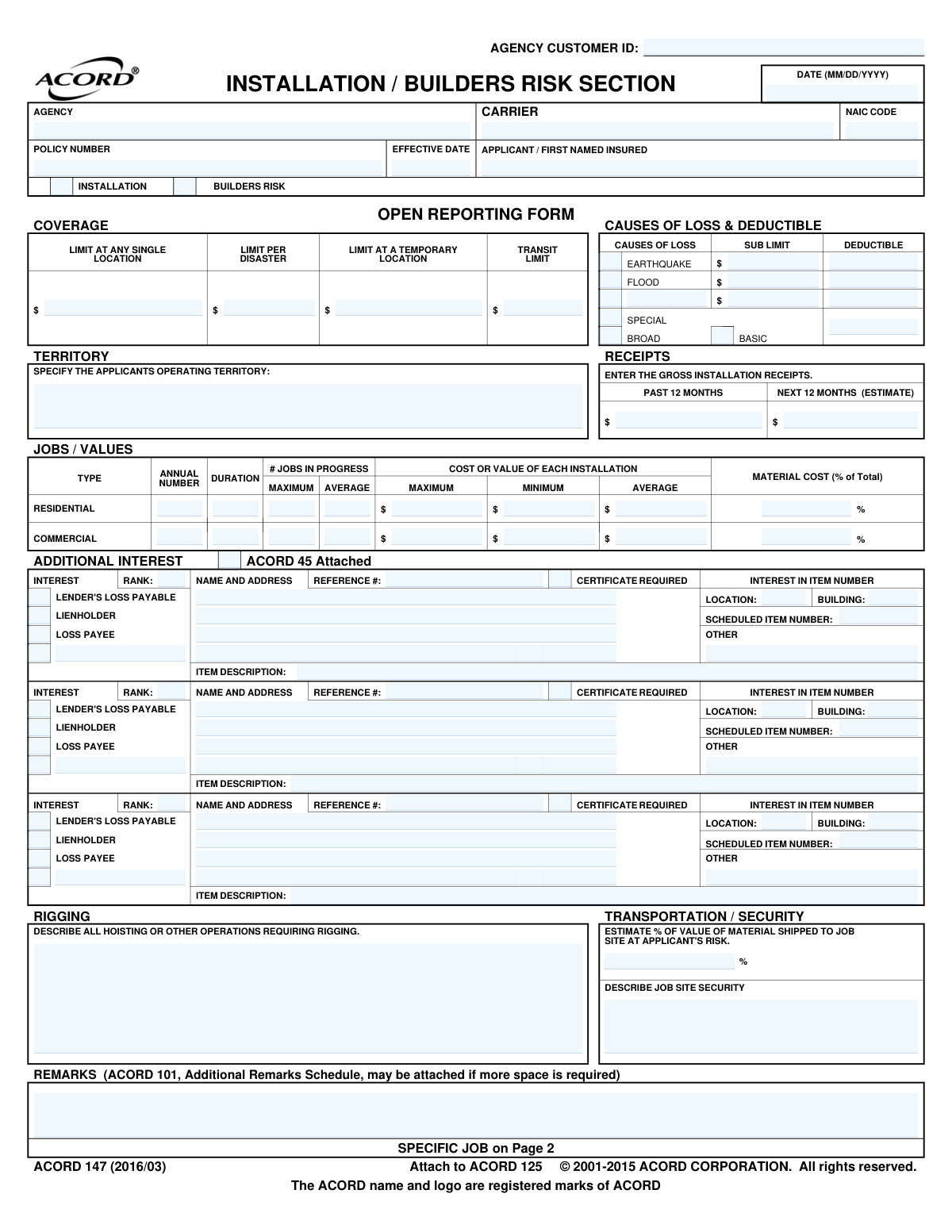
ACORD 147, the Installation / Builders Risk Section, is a supplemental insurance application used in conjunction with ACORD 125 (Commercial Insurance Application). It gathers detailed information about a contractor's projects, including job values, duration, security, and transportation, to underwrite coverage for materials and property during construction or installation. Today, this form can be filled out quickly and accurately using AI-powered services like Instafill.ai, which can also convert non-fillable PDF versions into interactive fillable forms.
ACORD 147 is part of the builders risk forms, construction insurance forms and installation risk forms categories on Instafill.
Our AI automatically handles information lookup, data retrieval, formatting, and form filling.
It takes less than a minute to fill out ACORD 147 using our AI form filling.
Securely upload your data. Information is encrypted in transit and deleted immediately after the form is filled out.

Form specifications

Form name: ACORD 147, Installation / Builders Risk Section
Number of fields: 205
Number of pages: 1
Language: English
main-image

Instafill Demo: How to fill out PDF forms in seconds with AI

How to Fill Out ACORD 147 Online for Free in 2026

Are you looking to fill out a ACORD 147 form online quickly and accurately? Instafill.ai offers the #1 AI-powered PDF filling software of 2026, allowing you to complete your ACORD 147 form in just 37 seconds or less.
Follow these steps to fill out your ACORD 147 form online using Instafill.ai:
  1. 1 Navigate to Instafill.ai and upload or select the ACORD 147 form.
  2. 2 Enter basic applicant, agency, and policy information in the header section.
  3. 3 Specify the coverage type (Open Reporting or Specific Job) and provide details on job values, receipts, and duration.
  4. 4 Define the required coverage limits for transit, temporary locations, and disaster events, along with the causes of loss and deductibles.
  5. 5 Describe the applicant's operating territory, transportation methods, job site security, and any rigging operations.
  6. 6 List any additional interests, such as loss payees or lienholders, with their corresponding details.
  7. 7 Review all the provided information for accuracy, then have the producer and applicant sign and date the form to complete the application.

Our AI-powered system ensures each field is filled out correctly, reducing errors and saving you time.

Why Choose Instafill.ai for Your Fillable ACORD 147 Form?

Speed

Complete your ACORD 147 in as little as 37 seconds.

Up-to-Date

Always use the latest 2026 ACORD 147 form version.

Cost-effective

No need to hire expensive lawyers.

Accuracy

Our AI performs 10 compliance checks to ensure your form is error-free.

Security

Your personal information is protected with bank-level encryption.

Frequently Asked Questions About Form ACORD 147

The ACORD 147, also known as the Installation / Builders Risk Section, is used to apply for insurance coverage for property and materials during construction or installation projects. It is an attachment that provides specific details for this coverage and is submitted with the main ACORD 125 Commercial Insurance Application.

This form should be completed by contractors, builders, or any business seeking builders risk or installation floater insurance to protect against loss or damage to a project during construction.

The 'Open Reporting Form' on page 1 is for covering multiple, ongoing jobs under a single policy, typically for contractors with continuous work. The 'Specific Job' section on page 2 is used to insure a single, particular project with a defined scope and contract value.

You must list any third party with a financial interest in the project, such as a bank (Lienholder) or property owner (Loss Payee). You will need their full name and address, and you must specify their interest type.

This section requires you to report your business's total revenue from installation jobs over the past 12 months, as well as an estimate for the upcoming 12 months. This helps the insurer assess the scale of your operations.

These options define the scope of perils your policy covers, from the most limited (Basic) to the most comprehensive (Special). You should discuss with your insurance agent which level of coverage is appropriate for your project's risks.

Describe the measures you take to protect the site from theft or damage, such as fencing, lighting, surveillance cameras, or security guards. This information helps the underwriter assess the project's risk level.

The form states that if you need more space for remarks or to list additional interests, you can attach an ACORD 101 (Additional Remarks Schedule).

Yes, the applicant or an authorized representative must sign and date the form on page 3 to certify that the information provided is true and complete. The insurance producer (agent) also needs to sign.

Yes, services like Instafill.ai use AI to auto-fill form fields accurately from your existing data, which saves significant time and helps prevent errors.

You can use a platform like Instafill.ai to fill out your form online. Simply upload the PDF, and the tool will make it an interactive, fillable form that you can complete, save, and download.

Tools like Instafill.ai can convert non-fillable or 'flat' PDFs into interactive forms. This allows you to easily type your information into the correct fields as if it were an online form.

Compliance ACORD 147
Validation Checks by Instafill.ai

1
Effective Date Chronology
This check validates that the 'EFFECTIVE DATE' is not in the past. An insurance policy cannot be backdated through a standard application process. This ensures the policy starts on the submission date or a future date, which is critical for establishing the correct coverage period. If the date is in the past, the form will flag an error and require correction before submission.
2
Applicant Name Completeness
Verifies that the 'APPLICANT / FIRST NAMED INSURED' field is not empty. The applicant's name is the most fundamental piece of information, identifying the legal entity seeking coverage. Without this information, the policy cannot be quoted, underwritten, or issued. A failed validation will prevent form submission until the name is provided.
3
Causes of Loss Selection
Ensures that at least one 'CAUSES OF LOSS' checkbox (BASIC, BROAD, or SPECIAL) is selected. This selection defines the scope of perils the policy covers and is essential for rating and policy creation. If no selection is made, the system cannot determine the coverage being requested and will prompt the user to choose an option.
4
Job Term Date Logic
For a 'SPECIFIC JOB' on page 2, this validation confirms that the 'COMPLETION' date is on or after the 'COMMENCEMENT' date. A completion date that precedes the commencement date is a logical impossibility and indicates a data entry error. This check prevents inaccurate policy terms and ensures the defined job period is valid.
5
Installation Value Consistency
This check validates the logical relationship between the 'COST OR VALUE OF EACH INSTALLATION' fields. It ensures that the 'MINIMUM' value is less than or equal to the 'AVERAGE' value, and the 'AVERAGE' is less than or equal to the 'MAXIMUM' value. This prevents illogical data entry that would confuse underwriting and rating calculations, flagging an error if the hierarchy is incorrect.
6
Gross Receipts Completeness
Confirms that both 'PAST 12 MONTHS' and 'NEXT 12 MONTHS (ESTIMATE)' for gross installation receipts are provided and are valid numeric values. These figures are crucial for underwriters to assess the size and scope of the applicant's operations, which directly impacts the premium calculation. Missing or invalid data will halt the quoting process.
7
Coverage Limit Format
Validates that all monetary limit fields, such as 'TRANSIT LIMIT' and 'LIMIT AT ANY SINGLE LOCATION', are entered as positive numeric or currency values. These limits define the carrier's maximum liability and are essential for the policy contract. Non-numeric or negative values are invalid and would cause processing failures.
8
Additional Interest Detail Requirement
If an 'ADDITIONAL INTEREST' section is initiated (e.g., by checking a box or entering a name), this rule ensures that the 'NAME AND ADDRESS' and the type of 'INTEREST' (e.g., Loss Payee, Lienholder) are also completed. This is vital for ensuring that third parties with a financial stake in the property are correctly identified and included on the policy. Incomplete entries will trigger an error, as the interest cannot be properly recorded.
9
Transportation Method Percentage Sum
In the 'SPECIFIC JOB' transportation section, this check verifies that the sum of '% FOR APPLICANT'S VEHICLES' and '% BY COMMON/CONTRACT CARRIER' equals 100%. While not always strictly required to be 100, a deviation often indicates a data entry error or misunderstanding. This validation flags potential inaccuracies for review, ensuring the risk exposure from transportation is fully accounted for.
10
Signature Date Format and Presence
This validation ensures the 'DATE' field next to the applicant's signature is filled in and follows the specified MM/DD/YYYY format. The signature date legally documents when the applicant attested to the accuracy of the information provided. An invalid or missing date can create legal and compliance issues, so the form will not be considered complete without it.
11
Specific Job Description Requirement
When the 'SPECIFIC JOB' section on page 2 is filled out, this check ensures the 'JOB DESCRIPTION' text area is not empty. The description of the work is critical for the underwriter to understand the specific risks associated with the project. Without this information, a proper risk assessment is impossible, and the application for that specific job will be considered incomplete.
12
Material Cost Percentage Range
Validates that the 'MATERIAL COST (% of Total)' field contains a numeric value between 0 and 100. This percentage helps underwriters understand the breakdown of project costs between materials and labor, which can influence risk assessment. A value outside this range is illogical and would be flagged as a data entry error.
13
Producer License Number Requirement
This check verifies that if the policy is being written in a state that requires it (e.g., Florida, as noted on the form), the 'NATIONAL PRODUCER NUMBER' or 'STATE PRODUCER LICENSE NO' is provided. This is a regulatory compliance requirement to ensure the agent or broker is licensed to sell insurance in that jurisdiction. Failure to provide it would result in a compliance failure and rejection of the application.
14
Contract Amount vs. Location Limit
This is a logical consistency check for a 'SPECIFIC JOB' that compares the 'CONTRACT AMOUNT' to the requested 'LIMIT AT LOCATION'. It flags a warning if the limit is less than the contract amount, as this could indicate the applicant is underinsured. This helps prevent situations where a total loss would not be fully covered, protecting both the insured and the agent from potential errors and omissions issues.

Common Mistakes in Completing ACORD 147

Confusing 'Open Reporting' with 'Specific Job' Coverage

Applicants often fill out the wrong section or incorrectly complete both Page 1 ('Open Reporting Form') and Page 2 ('Specific Job'). Page 1 is for contractors who need continuous coverage for multiple, ongoing projects, while Page 2 is for a single, defined project. This error leads to improper coverage, either leaving new jobs uninsured or causing the applicant to pay for broader coverage than necessary, and will cause significant delays in binding the policy. To avoid this, clearly identify whether you need a policy for one job or for your ongoing operations and complete only the relevant page.

Providing Incomplete 'Additional Interest' Details

This section is frequently filled out with just a name, omitting the full address, interest type (Loss Payee/Lienholder), or reference number. Failing to check the 'Certificate Required' box is also a common oversight. Incomplete information can delay project financing, as lenders will not proceed without being properly listed, and may put the applicant in breach of their contract. To prevent this, gather all required information from the lender or property owner beforehand and ensure every field in the 'Additional Interest' section is completed accurately.

Miscalculating or Misreporting Project Values

Applicants often struggle to accurately report values, confusing the 'Contract Amount' with the total insurable value, especially when owner-supplied materials are involved. For instance, the total value at risk should include the contract price plus the value of any materials or equipment supplied by the project owner. Understating the value can lead to significant financial loss if a claim is subject to a coinsurance penalty, while overstating it results in paying excessive premiums. Carefully calculate the total completed value of the project, including all materials, labor, and overhead.

Neglecting Transit and Temporary Location Coverage Limits

Many applicants focus solely on the job site itself and leave the limits for 'Transit' and 'Temporary Location' blank or at $0. This creates a major coverage gap, as materials are uninsured against loss during shipping or while stored at an off-site warehouse. A single event like a vehicle accident or warehouse fire could result in a catastrophic, uninsured loss of materials. To avoid this, estimate the maximum value of materials that will be in transit or storage at any given time and request adequate limits.

Using Vague Descriptions for Security, Rigging, or Job Type

Fields requiring a description, such as 'Describe Job Site Security' or 'Describe all hoisting or other operations requiring rigging,' are often answered with one-word responses like 'fenced' or 'cranes'. This lack of detail forces the underwriter to request more information, delaying the quote and binding process. Insufficient detail can also lead to an inaccurate risk assessment and premium calculation. Provide specific, detailed descriptions, such as 'Job site is enclosed by a 6-foot chain-link fence with a locked gate and monitored by overnight security patrols,' to ensure clarity.

Selecting an Inappropriate 'Causes of Loss' Form

Applicants often do not understand the significant differences between 'Basic,' 'Broad,' and 'Special' Causes of Loss, sometimes choosing the cheapest option without realizing the coverage limitations. A 'Basic' form policy may exclude common perils like theft or water damage, leading to a denied claim that the applicant assumed would be covered. To avoid this, discuss the project's specific risks with your insurance agent to determine if the comprehensive coverage of a 'Special' form is more appropriate, preventing unexpected gaps in protection.

Inaccurate Estimation of Gross Installation Receipts

When applying for an 'Open Reporting' policy, the premium is heavily influenced by the estimated gross receipts for the next 12 months. Applicants may provide a rough guess, which can lead to financial complications. A low estimate can result in a large, unexpected bill after the end-of-year premium audit, while a high estimate means overpaying for insurance throughout the year. To avoid this, base your estimate on historical data and signed future contracts to provide the most realistic projection possible.

Forgetting to Sign and Date the Application

An unsigned or undated application is one of the most common and easily avoidable mistakes. An application without a signature is not legally valid and cannot be processed by the insurance carrier, leading to immediate rejection and delays. This can jeopardize project timelines if coverage is required to begin work. Always perform a final review of the entire application, paying special attention to the signature and date fields on Page 3 before submission.

Failing to Specify the Complete Operating Territory

The 'Territory' field is critical for defining the geographical scope of coverage, but it is often left blank or filled in with a vague term like 'various'. Insurance coverage is strictly limited to the territory defined in the policy. Performing work outside of this specified area could result in a claim being denied, leaving the contractor exposed to a major uninsured loss. To avoid this, clearly list all states, counties, or the specific mileage radius from your business address where work will be performed.

Omitting 'Value of Owner Supplied Property'

On the 'Specific Job' section (Page 2), applicants sometimes only enter the 'Contract Amount' and leave the 'Value of Owner Supplied Property' field blank, even when the owner is providing materials. The total insurable value of the project must include everything that is being installed, regardless of who purchased it. Failing to include the value of owner-supplied goods will result in the project being underinsured, which can trigger a coinsurance penalty and lead to an out-of-pocket loss in a claim. Always confirm with the project owner if they are supplying any materials and include that value in the application.
Saved over 80 hours a year

“I was never sure if my IRS forms like W-9 were filled correctly. Now, I can complete the forms accurately without any external help.”

Kevin Martin Green

Your data stays secure with advanced protection from Instafill and our subprocessors

Robust compliance program

Transparent business model

You’re not the product. You always know where your data is and what it is processed for.

ISO 27001, HIPAA, and GDPR

Our subprocesses adhere to multiple compliance standards, including but not limited to ISO 27001, HIPAA, and GDPR.

Security & privacy by design

We consider security and privacy from the initial design phase of any new service or functionality. It’s not an afterthought, it’s built-in, including support for two-factor authentication (2FA) to further protect your account.

Fill out ACORD 147 with Instafill.ai

Worried about filling PDFs wrong? Instafill securely fills acord-147-installation-builders-risk-section forms, ensuring each field is accurate.