Yes! You can use AI to fill out ACORD 144, Glass and Sign Section
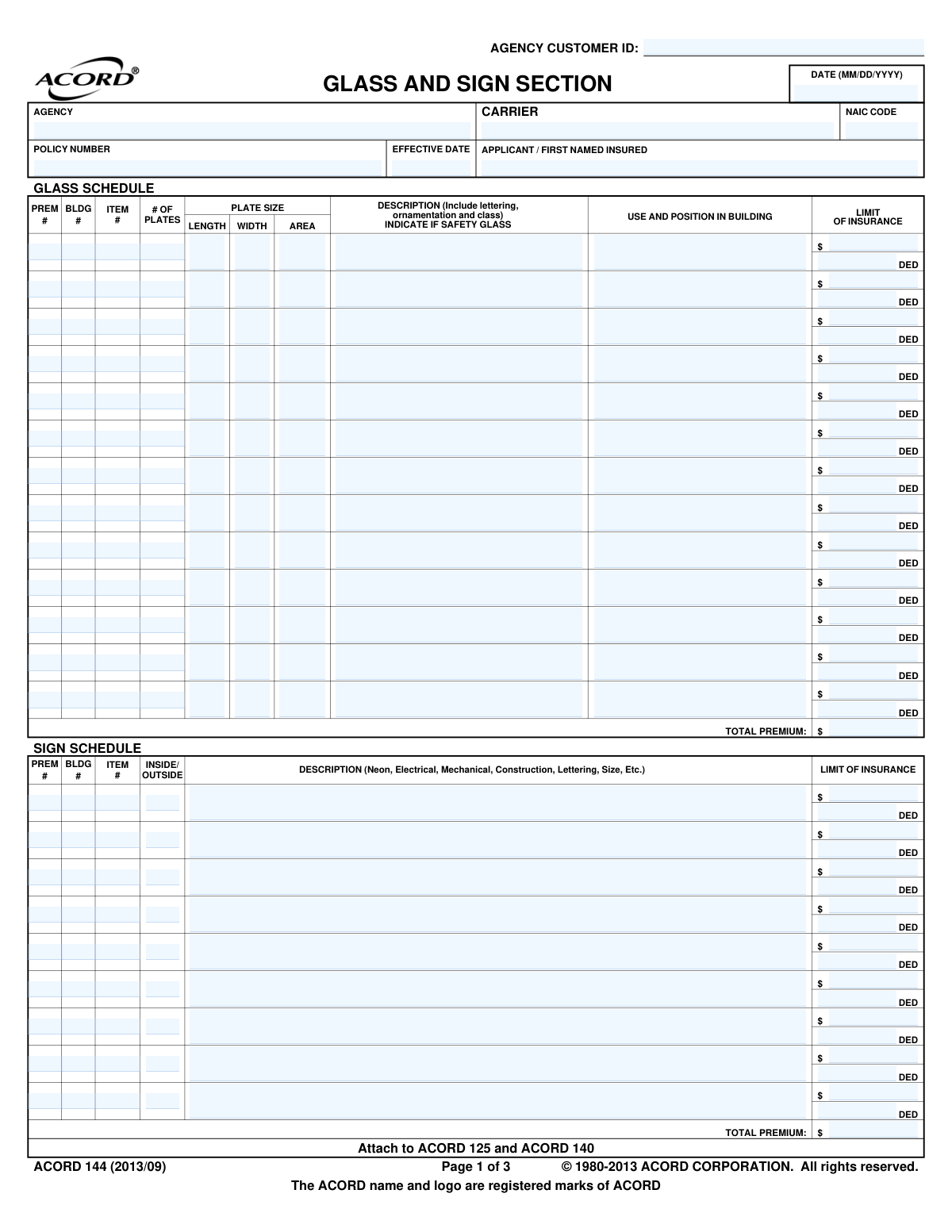
ACORD 144, also known as the Glass and Sign Section, is a supplemental insurance application form used in conjunction with other commercial property applications like ACORD 125. It allows businesses to provide detailed information about their glass installations and signs, including schedules, descriptions, and values, to obtain specific insurance coverage. This detailed information is crucial for underwriters to accurately assess risk and determine premiums. Today, this form can be filled out quickly and accurately using AI-powered services like Instafill.ai, which can also convert non-fillable PDF versions into interactive fillable forms.
ACORD 144 is part of the
builders risk forms and construction insurance forms categories on Instafill.
Our AI automatically handles information lookup, data retrieval, formatting, and form filling.
It takes less than a minute to fill out ACORD 144 using our AI form filling.
Securely upload your data. Information is encrypted in transit and deleted immediately after the form is filled out.
Form specifications
| Form name: | ACORD 144, Glass and Sign Section |
| Number of fields: | 255 |
| Number of pages: | 1 |
| Language: | English |
Instafill Demo: How to fill out PDF forms in seconds with AI
How to Fill Out ACORD 144 Online for Free in 2026
Are you looking to fill out a ACORD 144 form online quickly and accurately? Instafill.ai offers the #1 AI-powered PDF filling software of 2026, allowing you to complete your ACORD 144 form in just 37 seconds or less.
Follow these steps to fill out your ACORD 144 form online using Instafill.ai:
- 1 Navigate to Instafill.ai and upload or select the ACORD 144 form.
- 2 Provide the basic applicant, agency, and policy information in the header section.
- 3 Complete the 'Glass Schedule' by entering details for each glass plate, including its dimensions, description, use, and the requested insurance limit and deductible.
- 4 Fill out the 'Sign Schedule' by listing each sign, its description, whether it's inside or outside, and the corresponding insurance limit and deductible.
- 5 Answer all questions in the 'General Information' section for both glass and sign coverage, providing explanations for any 'Yes' responses in the remarks section.
- 6 Review all entered information for accuracy, then use the platform's tools to apply the required producer and applicant signatures.
- 7 Securely download, save, or share the completed ACORD 144 form directly from the platform.
Our AI-powered system ensures each field is filled out correctly, reducing errors and saving you time.
Why Choose Instafill.ai for Your Fillable ACORD 144 Form?
Speed
Complete your ACORD 144 in as little as 37 seconds.
Up-to-Date
Always use the latest 2026 ACORD 144 form version.
Cost-effective
No need to hire expensive lawyers.
Accuracy
Our AI performs 10 compliance checks to ensure your form is error-free.
Security
Your personal information is protected with bank-level encryption.
Frequently Asked Questions About Form ACORD 144
The ACORD 144 is a supplemental form used to apply for commercial insurance coverage for glass and signs. It provides the insurer with detailed information about the specific glass plates and signs you wish to insure.
Any business or individual applying for commercial property insurance who wants specific coverage for glass features or business signs should complete this form. It is submitted along with a general commercial insurance application like the ACORD 125.
ACORD 125 is the Commercial Insurance Application, and ACORD 140 is the Property Section. The ACORD 144 is an add-on that provides the specific details about glass and signs required for that property coverage.
For each piece of glass you want to insure, you will need to provide its dimensions, a description including any lettering, its location in the building, and the desired insurance limit and deductible.
For each sign, you must provide a detailed description (e.g., neon, electrical, size), indicate if it's located inside or outside, and state the limit of insurance and deductible you are requesting.
You must disclose this in the 'GENERAL INFORMATION' section by checking 'Yes' for question 11, 'DOES GLASS OR SIGNS HAVE SCRATCHES, CRACKS OR DEFECTS?'. You should then provide a detailed explanation in the space provided or in the Remarks section.
This question asks if any of the glass is a load-bearing part of the building's structure, such as glass walls or floors, rather than just a simple window pane. You should answer 'Yes' if the glass provides structural support.
Yes, but you must disclose it by answering 'Yes' to question 14, 'ANY SIGNS OFF PREMISES OR NOT ATTACHED TO BUILDING?'. Provide details about its location and type in the explanation box or the Remarks section.
The Remarks section is used to provide additional information or explanations for any of the questions on the form. If you need more space than is provided for a specific question, you can reference it and continue your answer here.
Both the applicant (or an authorized representative of the business) and the insurance producer (agent) must sign and date the form. Their signatures certify that the information provided is true and complete to the best of their knowledge.
While the header mentions 'Builders Risk Section,' the form's primary content is the 'Glass and Sign Section,' which is applicable to any commercial property. It does, however, have a specific question to identify if the property is under construction, making it useful in both scenarios.
Yes, AI-powered services like Instafill.ai can help you complete this form accurately and efficiently. These tools can auto-fill fields based on your provided information, reducing manual entry and saving time.
You can use a service like Instafill.ai to fill out the form online. Simply upload the ACORD 144 PDF, and the platform will make it an interactive, fillable form that you can complete, sign, and download from your browser.
If you have a flat, non-fillable PDF, you can use a service like Instafill.ai to convert it into an interactive, fillable form. This allows you to easily type your information directly into the fields without needing to print and write by hand.
Compliance ACORD 144
Validation Checks by Instafill.ai
1
Effective Date Format and Logic
This check validates that the 'EFFECTIVE DATE' is a valid date in MM/DD/YYYY format. It also ensures the effective date is not in the past, or is on or after the form's completion date. This prevents backdating policies incorrectly and ensures the policy starts on a valid, future-facing date. If the date is invalid, the form submission should be rejected with an error message prompting for correction.
2
NAIC Code Format
This validation ensures that the 'NAIC CODE' field contains a valid 5-digit numerical code. The NAIC code is a standard identifier for insurance companies, and an incorrect or improperly formatted code can lead to misidentification of the carrier and processing delays. A failed validation should trigger an error asking the user to enter a valid 5-digit code.
3
Applicant Name Completeness
This check ensures that the 'APPLICANT / FIRST NAMED INSURED' field is not empty. This is a critical field for identifying the policyholder and is legally required for the insurance contract to be valid. A submission with a missing applicant name should be blocked until the information is provided.
4
Glass Schedule Area Calculation
For each row in the 'GLASS SCHEDULE', this check verifies that the 'AREA' value is the product of the 'LENGTH' and 'WIDTH' values. This ensures data integrity and accuracy in the schedule, which is used for rating and risk assessment. If the calculation is incorrect, the system should flag the row and prevent submission until the discrepancy is resolved.
5
Glass Schedule Item Completeness
This validation checks that if a 'LIMIT OF INSURANCE' is entered for an item in the 'GLASS SCHEDULE', then the corresponding 'DESCRIPTION' and 'PLATE SIZE' fields for that item are also filled out. It is impossible to underwrite or price coverage for an item that is not described. A failure would require the user to provide the missing description or remove the limit of insurance.
6
Sign Schedule Item Completeness
This validation ensures that if a 'LIMIT OF INSURANCE' is entered for an item in the 'SIGN SCHEDULE', the corresponding 'DESCRIPTION' field for that sign is also completed. Similar to the glass schedule, this is crucial for proper risk evaluation and rating. If the description is missing, the system should prompt the user to provide it before proceeding.
7
Conditional Explanation for 'Yes' Responses
This check applies to all Yes/No questions in the 'GENERAL INFORMATION' section. If a question (e.g., 'IS ANY GLASS STRUCTURAL?') is answered 'Y' (Yes), the system must verify that the corresponding 'EXPLAIN' field is not empty. This ensures that the underwriter receives the necessary context for any non-standard risks. A failed validation would highlight the empty explanation field and require input.
8
Total Premium Calculation
This check verifies that the 'TOTAL PREMIUM' field at the top of the form is the sum of the 'TOTAL PREMIUM' from the 'GLASS SCHEDULE' and the 'TOTAL PREMIUM' from the 'SIGN SCHEDULE'. This ensures mathematical accuracy and that the final quoted premium reflects the sum of its parts. If the totals do not match, the form should be flagged for manual review or automatic recalculation.
9
Applicant Signature Presence
This validation confirms that the 'APPLICANT'S SIGNATURE' field is not empty. The applicant's signature is a legal requirement, indicating they have reviewed the information and attest to its accuracy. An application without a signature is incomplete and cannot be processed, so a failed check must block submission.
10
Applicant Signature Date Validity
This check ensures the 'DATE' next to the applicant's signature is a valid date and is not before the form's main completion date. This confirms when the applicant signed the document, which is important for legal and compliance reasons. An invalid or illogical date should trigger an error and require correction.
11
Florida National Producer Number Requirement
This is a conditional validation that checks if the 'NATIONAL PRODUCER NUMBER' is provided when the business is being written in Florida, as explicitly required on the form. This ensures compliance with state-specific regulations. If the state is Florida and the NPN is missing, the submission should be halted with a message explaining the requirement.
12
Glass Plate Count Validity
This check ensures that the '# OF PLATES' field in the 'GLASS SCHEDULE' contains a positive integer. The number of plates is a key factor in determining exposure and premium. A non-integer or zero/negative value is illogical and would cause calculation errors. The system should reject invalid entries and prompt for a valid number.
13
Limit and Deductible Value Format
This validation ensures that all 'LIMIT OF INSURANCE' and 'DED' (Deductible) fields throughout the form contain valid, non-negative numeric or currency values. These values are fundamental to defining the coverage and cannot be text or negative numbers. A failed check should prompt the user to enter a valid monetary amount.
14
Producer Signature Presence
This check verifies that the 'PRODUCER'S SIGNATURE' field has been signed. The producer's signature confirms their role in the application process and their attestation to the information provided. An unsigned application from a producer is considered incomplete and should be flagged for completion before it can be submitted to the carrier.
Common Mistakes in Completing ACORD 144
Applicants often provide vague descriptions like 'window' or 'store sign' in the schedule sections. The form requires specific details such as lettering, ornamentation, class of glass, or for signs, whether they are neon, electrical, their construction, and size. This lack of detail can lead to underinsurance or disputes during a claim, as the insurer cannot accurately assess the replacement value. To avoid this, provide a comprehensive description for each item, and consider using tools like Instafill.ai which can prompt for necessary details to ensure completeness.
The form explicitly requires an explanation for all 'YES' answers in the General Information section, but this is frequently missed. For example, checking 'YES' to 'IS ANY GLASS STRUCTURAL?' without explaining which glass and where creates ambiguity and forces the underwriter to request more information. This oversight halts the application process and delays quoting and binding. Always review the form for conditional requirements and use the remarks section if the provided space is insufficient.
In the Glass Schedule, applicants may enter incorrect length and width measurements or miscalculate the total area. This often happens due to simple measurement errors or confusion about units (e.g., inches vs. feet). Incorrect dimensions lead to inaccurate risk assessment and premium calculation, potentially resulting in being underinsured. Double-check all measurements on-site and verify calculations before submission; AI-powered tools can also help by performing automatic calculations to prevent arithmetic errors.
When answering question #11, 'DOES GLASS OR SIGNS HAVE SCRATCHES, CRACKS OR DEFECTS?', applicants may be tempted to answer 'NO' to avoid higher premiums or denial, even if minor damage exists. This is a form of misrepresentation that can lead to the policy being voided or a future claim for the damaged item being denied. It is critical to disclose all existing defects honestly; the insurer may simply exclude the pre-existing damage from coverage rather than deny the policy outright.
The 'BLDG #' and 'ITEM #' fields are used to link specific glass panes or signs to properties listed on other forms, like the ACORD 125. Applicants often leave these blank or use inconsistent numbering, making it impossible for the insurer to know which item belongs to which building. This can cause major confusion and claim denials if the location of the damaged property cannot be verified. Ensure these numbers are used logically and correspond directly to the property schedule.
Applicants may not understand technical insurance terms on the form, such as 'structural glass' (question #9) or 'angle settings' (question #2), and answer incorrectly. Answering 'No' when a building has glass curtain walls, for instance, materially misrepresents the risk and could void coverage for those elements. If unsure about a term, it is crucial to ask the agent or broker for clarification before completing the section.
The top of the form clearly states 'Attach to ACORD 125 and ACORD 140', but applicants or agents sometimes submit the ACORD 144 as a standalone document. This form is a supplemental section and is meaningless without the context of the main commercial application (ACORD 125) and property section (ACORD 140). Submitting it alone will result in an immediate rejection for being incomplete. Always bundle the required forms together as a single submission package.
The 'USE AND POSITION IN BUILDING' column in the Glass Schedule is a critical risk factor that is often overlooked. A ground-floor storefront window has a much higher risk of vandalism or breakage than an interior office window on the 10th floor. Failing to provide this information prevents the underwriter from accurately pricing the risk and will lead to follow-up questions, delaying the entire process. Be specific about each item's exact location and function.
A common and easily avoidable error is forgetting to sign and date the application in the designated fields for the applicant and producer. An unsigned application is not legally binding and cannot be processed by the insurance carrier, causing unnecessary delays. Always perform a final review of all pages to ensure all signature and date fields are properly completed. Using digital form fillers can help by highlighting required signature fields before submission.
The form includes fields for individual item limits and a 'TOTAL PREMIUM' at the bottom of each schedule. Manual calculation of these totals is prone to error, leading to discrepancies between the itemized values and the stated total. This can cause confusion in billing and, more importantly, may result in the total insured value being incorrect. Using a tool like Instafill.ai, which can be used to make flat PDFs fillable and can automate calculations, helps ensure accuracy and prevents such mathematical errors.
Saved over 80 hours a year
“I was never sure if my IRS forms like W-9 were filled correctly. Now, I can complete the forms accurately without any external help.”
Kevin Martin Green
Your data stays secure with advanced protection from Instafill and our subprocessors

Robust compliance program
Transparent business model
You’re not the product. You always know where your data is and what it is processed for.
ISO 27001, HIPAA, and GDPR
Our subprocesses adhere to multiple compliance standards, including but not limited to ISO 27001, HIPAA, and GDPR.
Security & privacy by design
We consider security and privacy from the initial design phase of any new service or functionality. It’s not an afterthought, it’s built-in, including support for two-factor authentication (2FA) to further protect your account.
Fill out ACORD 144 with Instafill.ai
Worried about filling PDFs wrong? Instafill securely fills acord-144-glass-and-sign-section forms, ensuring each field is accurate.