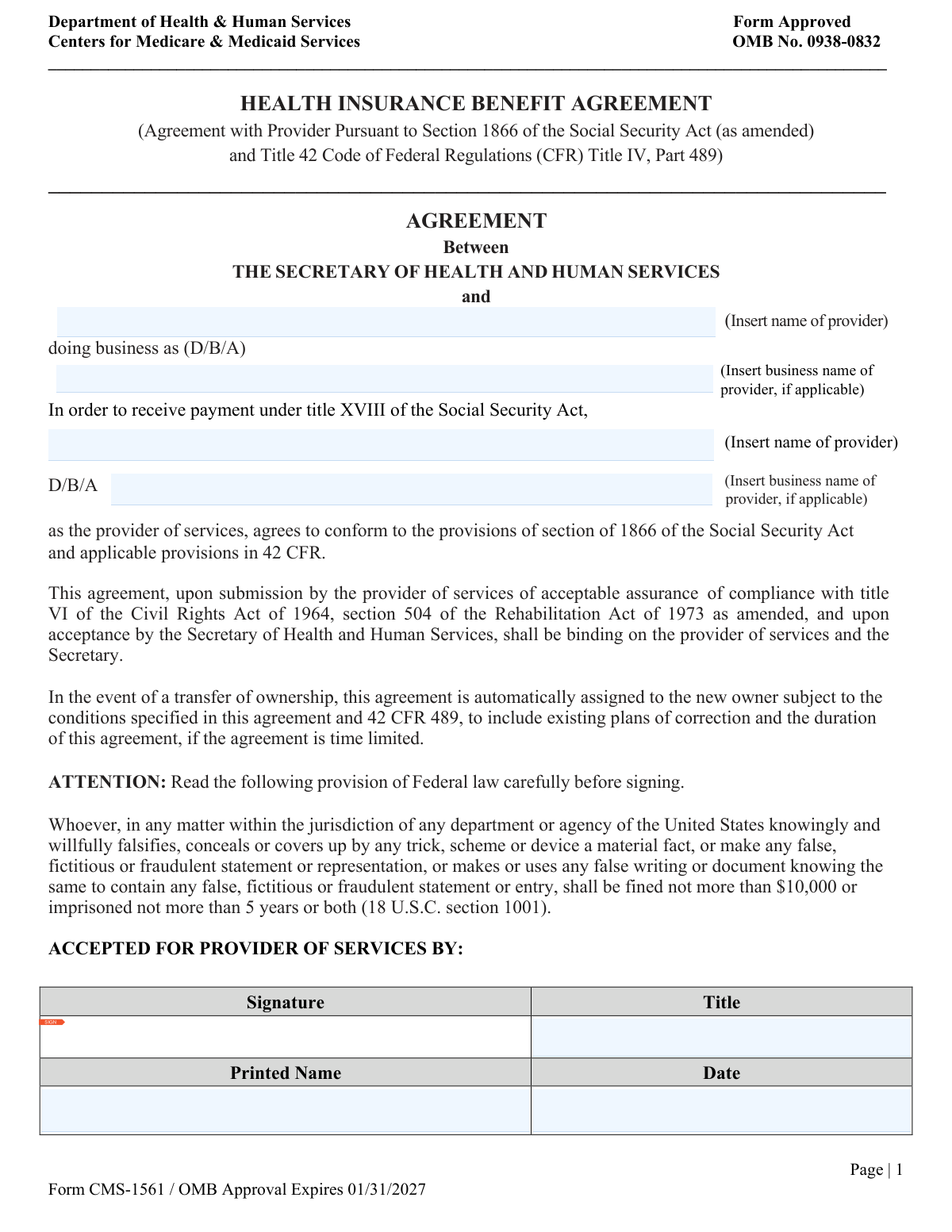
Yes! You can use AI to fill out Form CMS-1561, Health Insurance Benefit Agreement (Agreement with Provider Pursuant to Section 1866 of the Social Security Act)
Form CMS-1561, issued by the Centers for Medicare & Medicaid Services (CMS), is a legally binding agreement between a healthcare provider and the Secretary of Health and Human Services that authorizes the provider to receive payment under Medicare (Title XVIII of the Social Security Act). By signing this agreement, the provider commits to conforming to the provisions of Section 1866 of the Social Security Act and applicable regulations in 42 CFR Part 489, as well as compliance with civil rights laws including Title VI of the Civil Rights Act of 1964 and Section 504 of the Rehabilitation Act of 1973. The agreement also governs the automatic assignment of the contract to new owners in the event of a transfer of ownership. Today, this form can be filled out quickly and accurately using AI-powered services like Instafill.ai, which can also convert non-fillable PDF versions into interactive fillable forms.
Our AI automatically handles information lookup, data retrieval, formatting, and form filling.
It takes less than a minute to fill out CMS-1561 using our AI form filling.
Securely upload your data. Information is encrypted in transit and deleted immediately after the form is filled out.
Form specifications
| Form name: | Form CMS-1561, Health Insurance Benefit Agreement (Agreement with Provider Pursuant to Section 1866 of the Social Security Act) |
| Number of pages: | 1 |
| Language: | English |
| Categories: | insurance forms, health insurance forms, Section 8 forms, social security forms, benefit forms, health benefit forms, CMS forms, ACT Health forms, SEC forms, health forms |
Instafill Demo: How to fill out PDF forms in seconds with AI
How to Fill Out CMS-1561 Online for Free in 2026
Are you looking to fill out a CMS-1561 form online quickly and accurately? Instafill.ai offers the #1 AI-powered PDF filling software of 2026, allowing you to complete your CMS-1561 form in just 37 seconds or less.
Follow these steps to fill out your CMS-1561 form online using Instafill.ai:
- 1 Navigate to Instafill.ai and upload the CMS-1561 form PDF or select it from the available form library to begin the AI-assisted filling process.
- 2 Enter the full legal name of the healthcare provider and the doing business as (D/B/A) name, if applicable, in the designated fields.
- 3 Complete the provider representative section by entering the signature, printed name, title, and date signed by the authorized RHC or provider representative.
- 4 Review the federal law warning regarding falsification of information (18 U.S.C. Section 1001) to ensure all information provided is accurate and truthful before proceeding.
- 5 If applicable, complete the Successor Provider of Services section with the successor representative's signature, printed name, title, and date signed.
- 6 Leave the 'Accepted by the Secretary of Health and Human Services' section blank, as this portion is completed by the HHS representative upon review and acceptance.
- 7 Review all entered information for accuracy, then download, print, or electronically submit the completed CMS-1561 form to your respective Medicare Administrative Contractor (MAC) or State Survey Agency.
Our AI-powered system ensures each field is filled out correctly, reducing errors and saving you time.
Why Choose Instafill.ai for Your Fillable CMS-1561 Form?
Speed
Complete your CMS-1561 in as little as 37 seconds.
Up-to-Date
Always use the latest 2026 CMS-1561 form version.
Cost-effective
No need to hire expensive lawyers.
Accuracy
Our AI performs 10 compliance checks to ensure your form is error-free.
Security
Your personal information is protected with bank-level encryption.
Frequently Asked Questions About Form CMS-1561
Form CMS-1561, also known as the Health Insurance Benefit Agreement, is an official agreement between a provider of services (such as a Rural Health Clinic) and the Secretary of Health and Human Services. It is used to establish a provider's eligibility to receive payment under Medicare (Title XVIII of the Social Security Act) by agreeing to comply with Section 1866 of the Social Security Act and applicable provisions in 42 CFR.
This form must be completed by healthcare providers, particularly Rural Health Clinics (RHCs), who wish to participate in the Medicare program and receive payment under Title XVIII of the Social Security Act. Both the provider representative and a representative from the Department of Health and Human Services (HHS) must sign the agreement.
The form requires the provider's legal name, their 'Doing Business As' (D/B/A) name if applicable, and the signature, printed name, title, and date signed by an authorized representative of the provider. The Secretary of HHS must also provide their signature, title, printed name, and date to finalize the agreement.
Before the agreement becomes binding, the provider must submit acceptable assurance of compliance with Title VI of the Civil Rights Act of 1964 and Section 504 of the Rehabilitation Act of 1973 (as amended). These assurances must be accepted by the Secretary of Health and Human Services for the agreement to take effect.
In the event of a transfer of ownership, the agreement is automatically assigned to the new owner. The new owner is subject to all conditions specified in the agreement and 42 CFR 489, including any existing plans of correction and the duration of the agreement if it is time-limited. The successor provider section of the form must be completed with the new owner's signature, title, printed name, and date.
The form includes a federal warning that anyone who knowingly and willfully falsifies, conceals, or makes fraudulent statements in any matter within the jurisdiction of a U.S. department or agency can be fined up to $10,000, imprisoned for up to 5 years, or both, under 18 U.S.C. Section 1001. Providers should read this provision carefully before signing.
The valid OMB control number for Form CMS-1561 is 0938-0832, and the current approval expires on 01/31/2027. Under the Paperwork Reduction Act of 1995, you are only required to respond to information collections that display a valid OMB control number.
According to the PRA Disclosure Statement, the estimated time to complete this form is approximately 1 hour per response. This includes time to review instructions, search existing data resources, gather the necessary data, and complete and review the form.
You should contact your respective Medicare Administrative Contractor (MAC) or State Survey Agency for guidance on where to submit your completed form. Do not send this form or any sensitive documents to the PRA Reports Clearance Office, as they only handle correspondence related to information collection burden.
Yes, you can use AI-powered services like Instafill.ai to auto-fill Form CMS-1561 accurately and efficiently, saving time and reducing errors. Instafill.ai guides you through each field, ensuring all required information such as provider name, D/B/A name, signatures, titles, and dates are correctly entered.
If your version of Form CMS-1561 is a non-fillable PDF, Instafill.ai can convert it into an interactive fillable form, allowing you to type directly into the fields digitally. This eliminates the need to print, handwrite, and scan the document, making the process faster and more convenient.
The 'Doing Business As' (D/B/A) field is for providers who operate under a trade name or business name that is different from their legal name. If your clinic or practice uses a different name for public-facing operations, you should enter that name in the D/B/A field; otherwise, you may leave it blank.
An authorized representative of the Secretary of Health and Human Services signs the form in the 'Accepted by the Secretary of Health and Human Services' section. This section includes fields for the HHS representative's signature, title, printed name, and the date of signing, and it is completed by CMS or the relevant government authority.
Yes, this is a mandatory information collection. Providers who wish to participate in the Medicare program and receive payments under Title XVIII of the Social Security Act must complete and submit this agreement. Without an accepted agreement, providers cannot receive Medicare reimbursements.
For questions about where to submit your documents or concerns about the form, contact your respective Medicare Administrative Contractor (MAC) or State Survey Agency. For questions about the accuracy of the time estimate or suggestions for improving the form, you may write to CMS at 7500 Security Boulevard, Attn: PRA Reports Clearance Officer, Mail Stop C4-26-05, Baltimore, Maryland 21244-1850.
Compliance CMS-1561
Validation Checks by Instafill.ai
1
Ensures the Name of RHC (Rural Health Clinic) is the Full Legal Name
This check verifies that the 'Name of RHC' field contains the provider's complete legal name as registered with CMS and relevant state authorities, not an abbreviated or informal version. The legal name is critical for binding the correct entity to the agreement under Section 1866 of the Social Security Act. If the name is abbreviated, truncated, or does not match official records, the agreement may be legally unenforceable or result in payment processing errors under Medicare Title XVIII.
2
Validates That the 'Doing Business As' (DBA) Name is Distinct from the Legal Name
This check confirms that if a 'Doing Business As Name of RHC' is provided, it is not identical to the legal name entered in the 'Name of RHC' field. A DBA name is only required when the provider operates under a trade name different from its registered legal name. Submitting the same name in both fields suggests a data entry error and may cause confusion in CMS records, potentially affecting provider identification and reimbursement routing.
3
Ensures the RHC Representative Signature Field is Not Blank
This check verifies that the 'Signature of RHC Representative' field contains a valid, non-empty entry indicating the authorized representative has signed the agreement. The signature is legally required to bind the provider to the terms of the Health Insurance Benefit Agreement, including compliance with 42 CFR Part 489. An unsigned form cannot be accepted by the Secretary of Health and Human Services and will result in rejection of the provider agreement.
4
Validates the Date Signed by RHC Representative is in a Recognized Date Format
This check ensures that the 'Date Signed by RHC Representative' field contains a valid date in an accepted format such as MM/DD/YYYY. A properly formatted date is necessary to establish the effective date of the agreement and to verify the form was signed within any applicable submission windows. An invalid or ambiguous date entry could create legal uncertainty about when the provider's obligations under the agreement commenced.
5
Ensures the Date Signed by RHC Representative is Not a Future Date
This check confirms that the 'Date Signed by RHC Representative' is not a date occurring after the current date of submission. A future-dated signature is logically inconsistent and may indicate a data entry error or an attempt to manipulate the effective date of the agreement. Under federal law (18 U.S.C. Section 1001), submitting false or fictitious information on this form can result in fines up to $10,000 or imprisonment up to 5 years.
6
Ensures the Printed Name of RHC Representative Matches a Recognizable Name Format
This check validates that the 'Printed Name of RHC Representative' field contains at least a first and last name and does not consist solely of numbers, special characters, or placeholder text. The printed name is required to identify the individual who signed the agreement on behalf of the provider. If this field is missing or contains invalid data, it undermines the legal validity of the signature and may prevent CMS from verifying the signatory's authority.
7
Validates That the Title of RHC Representative Field is Not Blank
This check ensures that the 'Title of RHC Representative' field is populated with a job title or role designation, such as 'Administrator,' 'CEO,' or 'Authorized Representative.' The title is necessary to confirm that the individual signing the agreement holds a position with the authority to legally bind the provider organization. A missing title may raise questions about the signatory's authorization and could result in the agreement being flagged for additional review or rejection.
8
Ensures the HHS Representative Signature Field is Not Blank
This check verifies that the 'Signature of HHS Representative' field is populated, indicating that the Secretary of Health and Human Services or their authorized delegate has accepted the agreement. The HHS signature is required for the agreement to become binding on both parties as stated in the agreement text. Without this signature, the agreement is incomplete and the provider cannot be considered enrolled under Medicare Title XVIII.
9
Validates the Date Signed by HHS Representative is in a Recognized Date Format
This check ensures that the 'Date Signed by HHS Representative' field contains a valid date in an accepted format such as MM/DD/YYYY. The HHS acceptance date establishes when the agreement became officially binding and is critical for determining the provider's Medicare participation start date. An improperly formatted or missing date could create administrative and legal ambiguity regarding the effective period of the provider agreement.
10
Ensures the HHS Acceptance Date is On or After the RHC Signature Date
This check confirms that the 'Date Signed by HHS Representative' is equal to or later than the 'Date Signed by RHC Representative,' ensuring a logical chronological sequence of events. The provider must sign before or on the same day that HHS accepts the agreement, as HHS acceptance is a response to the provider's submission. If the HHS date precedes the RHC signature date, it indicates a data entry error or a procedural inconsistency that must be corrected before the agreement can be processed.
11
Validates That Successor RHC Fields Are Either All Populated or All Blank
This check ensures that the successor provider section — including 'Signature of Successor RHC Representative,' 'Printed Name of Successor Representative,' 'Title of Successor RHC Representative,' and 'Date Signed by Successor RHC Representative' — is either completely filled out or entirely left blank. Partial completion of the successor section suggests an incomplete transfer of ownership record, which is governed by 42 CFR 489 and the automatic assignment clause in the agreement. Incomplete successor information could result in improper assignment of the agreement and unresolved plans of correction.
12
Validates the Date Signed by Successor RHC Representative is in a Recognized Date Format
When the successor section is completed, this check ensures that the 'Date Signed by Successor RHC Representative' field contains a valid date in an accepted format such as MM/DD/YYYY. The successor signature date is important for establishing when the transfer of ownership and automatic assignment of the agreement took effect under 42 CFR 489. An invalid or missing date in this field could create legal uncertainty about the timing and validity of the ownership transfer.
13
Ensures the Printed Name of HHS Representative is Not Blank
This check verifies that the 'Printed Name of HHS Representative' field is populated with a recognizable name, identifying the specific CMS or HHS official who accepted the agreement on behalf of the Secretary. This information is necessary for accountability and record-keeping purposes, and to allow the provider to identify the accepting authority if disputes arise. A blank or invalid entry in this field renders the HHS acceptance section incomplete and may affect the enforceability of the agreement.
14
Ensures the Title of HHS Representative Field is Not Blank
This check confirms that the 'Title of HHS Representative' field contains a valid job title or designation for the HHS official accepting the agreement. The title is required to verify that the individual has the delegated authority to accept the agreement on behalf of the Secretary of Health and Human Services. A missing or invalid title may call into question the legitimacy of the HHS acceptance and could create grounds for challenging the agreement's validity.
15
Validates That the Name of RHC Field Does Not Contain Placeholder or Template Text
This check scans the 'Name of RHC' field for placeholder text such as 'Insert name of provider,' 'N/A,' 'TBD,' or similar template language that indicates the field was not properly completed. The form template itself contains instructional placeholder text, and it is critical that submitters replace this with actual provider information before submission. Submitting a form with placeholder text in the provider name field would result in an invalid agreement that cannot be processed by CMS.
16
Ensures the Successor RHC Signature Date is On or After the Original RHC Signature Date
When the successor section is completed, this check verifies that the 'Date Signed by Successor RHC Representative' is equal to or later than the 'Date Signed by RHC Representative' of the original provider. A successor agreement cannot logically predate the original agreement it is being assigned from, as the transfer of ownership must occur after the original agreement was established. A date discrepancy here would indicate a data entry error and could create legal complications regarding the validity and timeline of the ownership transfer under 42 CFR 489.
Common Mistakes in Completing CMS-1561
Providers often enter a nickname, abbreviation, or shortened version of their legal name instead of the full, official legal name registered with CMS. This inconsistency can cause the agreement to be rejected or create discrepancies in Medicare billing records. The provider's legal name must match exactly what is on file with CMS and other federal registrations. AI-powered form filling tools like Instafill.ai can help by cross-referencing and auto-populating the correct legal name consistently throughout the form.
Many providers either leave the D/B/A field blank when they do operate under a trade name, or they fill it in when their operating name is identical to their legal name. The D/B/A field should only be completed if the provider operates under a name different from their legal entity name. Leaving it blank when applicable, or filling it in unnecessarily, can create confusion in CMS records and delay agreement processing.
A common mistake is having a staff member, office manager, or non-authorized representative sign the agreement instead of the legally authorized representative of the provider organization. CMS requires the signature of an individual who has legal authority to bind the organization to the agreement. Unauthorized signatures can render the agreement invalid and require resubmission, delaying Medicare participation. Always verify that the signatory holds an appropriate title such as CEO, President, Owner, or Administrator.
Providers sometimes enter vague or informal titles such as 'Manager,' 'Staff,' or 'Representative' instead of the official title that reflects their legal authority to sign on behalf of the organization. CMS reviewers use the title to verify the signatory's authority to bind the provider to the agreement. The title entered should match the individual's official role as recognized in the organization's governing documents. Tools like Instafill.ai can prompt users to enter their full, official title to avoid this issue.
Providers frequently enter dates in inconsistent formats (e.g., MM/DD/YY instead of MM/DD/YYYY), write illegible dates, or accidentally enter the wrong date such as a prior year. The date on the agreement is legally significant as it establishes when the provider accepted the terms of the Medicare participation agreement. An incorrect or ambiguous date can cause processing delays or require the form to be resubmitted. Always use the full four-digit year and double-check the date before signing.
When a transfer of ownership occurs, providers often forget to complete the 'Accepted for the Successor Provider of Services' section, assuming the original agreement automatically transfers without any additional documentation. While the agreement is automatically assigned to the new owner, the successor provider's authorized representative must still sign and date the form to acknowledge acceptance of the existing terms, plans of correction, and any time limitations. Omitting this section during ownership transfers can result in gaps in Medicare participation coverage.
The agreement explicitly states it only becomes binding upon submission of acceptable assurance of compliance with Title VI of the Civil Rights Act of 1964 and Section 504 of the Rehabilitation Act of 1973. Providers sometimes submit the CMS-1561 without ensuring these compliance assurances have been separately submitted and accepted. This oversight means the agreement is not yet legally binding, which can delay Medicare participation. Providers should confirm all required civil rights documentation is submitted concurrently or prior to this agreement.
A frequent error is when the printed name does not match the signature on the form, either due to the use of a middle name, suffix (Jr., Sr., III), or a different name variation. CMS uses both the printed name and signature together to verify the identity of the authorized representative. Discrepancies between the two can raise questions about the validity of the signature and may require clarification or resubmission. Ensure the printed name is the full legal name exactly as it would appear in official records.
Providers sometimes mail or submit the completed CMS-1561 to the PRA Reports Clearance Office or CMS headquarters instead of their designated Medicare Administrative Contractor (MAC) or State Survey Agency. The form itself warns against this, but the warning is often overlooked. Submitting to the wrong office means the form will not be reviewed or processed, causing significant delays in Medicare enrollment or re-enrollment. Always contact your MAC or State Survey Agency to confirm the correct submission address before sending.
Some providers mistakenly believe they are responsible for completing the 'Accepted by the Secretary of Health and Human Services' section and either leave it blank or attempt to fill it in themselves. This section is reserved exclusively for the CMS/HHS representative and must be completed by the appropriate government official upon acceptance. Providers should submit the form with only their own section completed and allow CMS to complete the government acceptance portion. Attempting to fill in this section can invalidate the agreement.
Providers sometimes rush through the form and sign without carefully reading the federal fraud warning, which cites 18 U.S.C. Section 1001 and outlines penalties of up to $10,000 in fines and/or up to 5 years imprisonment for false statements. By signing, the provider legally attests that all information is accurate and truthful. Signing without understanding this provision can lead to unintentional legal exposure if any information is later found to be inaccurate. Take time to review all information for accuracy before signing.
The CMS-1561 is often distributed as a flat, non-fillable PDF, causing providers to handwrite their information, which can result in illegible entries, inconsistent formatting, and processing delays. Illegible names, dates, or titles can cause CMS reviewers to request a new submission. Instafill.ai can convert this flat PDF into a fully fillable digital form, allowing providers to type all information clearly, validate fields automatically, and produce a clean, professional submission that reduces the risk of rejection.
Saved over 80 hours a year
“I was never sure if my IRS forms like W-9 were filled correctly. Now, I can complete the forms accurately without any external help.”
Kevin Martin Green
Your data stays secure with advanced protection from Instafill and our subprocessors

Robust compliance program
Transparent business model
You’re not the product. You always know where your data is and what it is processed for.
ISO 27001, HIPAA, and GDPR
Our subprocesses adhere to multiple compliance standards, including but not limited to ISO 27001, HIPAA, and GDPR.
Security & privacy by design
We consider security and privacy from the initial design phase of any new service or functionality. It’s not an afterthought, it’s built-in, including support for two-factor authentication (2FA) to further protect your account.
Fill out CMS-1561 with Instafill.ai
Worried about filling PDFs wrong? Instafill securely fills form-cms-1561-health-insurance-benefit-agreement-agreement-with-provider-pursuant-to-section-1866-of-the-social forms, ensuring each field is accurate.