Yes! You can use AI to fill out Arizona Department of Transportation Rental Application (Residential Lease)
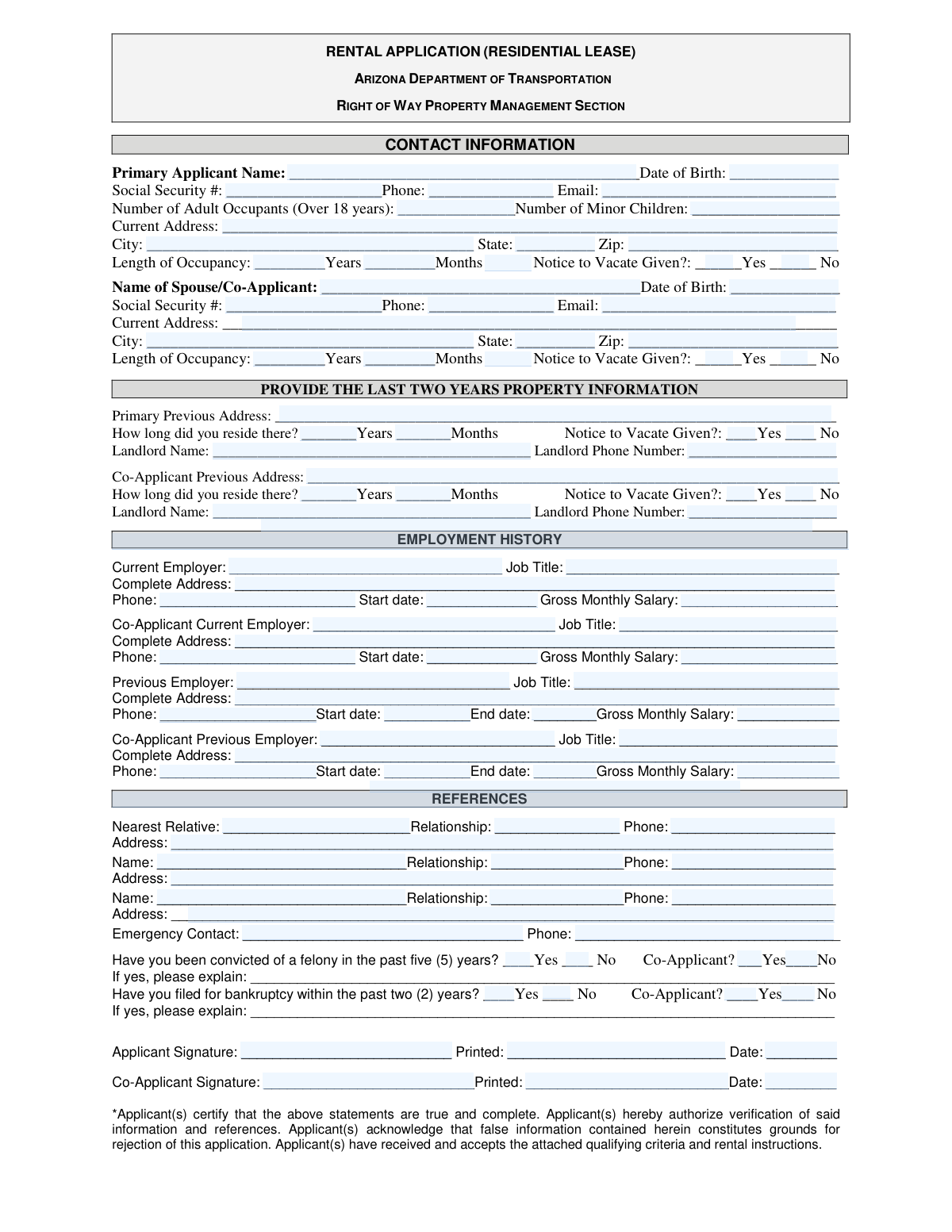
This is a Rental Application for a Residential Lease used by the Arizona Department of Transportation's Right of Way Property Management Section. Prospective tenants use this form to provide personal, residential, employment, and financial information for screening purposes. Today, this form can be filled out quickly and accurately using AI-powered services like Instafill.ai, which can also convert non-fillable PDF versions into interactive fillable forms.
Our AI automatically handles information lookup, data retrieval, formatting, and form filling.
It takes less than a minute to fill out ADOT Rental Application using our AI form filling.
Securely upload your data. Information is encrypted in transit and deleted immediately after the form is filled out.
Form specifications
| Form name: | Arizona Department of Transportation Rental Application (Residential Lease) |
| Number of pages: | 2 |
| Language: | English |
| Categories: | Rental Lease, transportation forms, residential lease forms, rental application forms, lease application forms, rental forms, residential rental forms |
Instafill Demo: How to fill out PDF forms in seconds with AI
How to Fill Out ADOT Rental Application Online for Free in 2026
Are you looking to fill out a ADOT RENTAL APPLICATION form online quickly and accurately? Instafill.ai offers the #1 AI-powered PDF filling software of 2026, allowing you to complete your ADOT RENTAL APPLICATION form in just 37 seconds or less.
Follow these steps to fill out your ADOT RENTAL APPLICATION form online using Instafill.ai:
- 1 Navigate to Instafill.ai and upload the ADOT Rental Application or select it from the template library.
- 2 Provide personal information for the primary applicant and any co-applicants, including names, dates of birth, and social security numbers.
- 3 Enter details about your current and previous two years of residential history, including addresses, length of occupancy, and landlord contact information.
- 4 Fill in your employment history for both current and previous jobs, including employer details, job titles, and gross monthly salary.
- 5 List personal references and an emergency contact with their relationship and contact details.
- 6 Answer the questions regarding felony convictions and bankruptcy history for all applicants.
- 7 Review all the AI-populated fields for accuracy, then e-sign and download your completed application, ready for submission.
Our AI-powered system ensures each field is filled out correctly, reducing errors and saving you time.
Why Choose Instafill.ai for Your Fillable ADOT Rental Application Form?
Speed
Complete your ADOT Rental Application in as little as 37 seconds.
Up-to-Date
Always use the latest 2026 ADOT Rental Application form version.
Cost-effective
No need to hire expensive lawyers.
Accuracy
Our AI performs 10 compliance checks to ensure your form is error-free.
Security
Your personal information is protected with bank-level encryption.
Frequently Asked Questions About Form ADOT Rental Application
This form is used to apply to rent a residential property owned by the Arizona Department of Transportation (ADOT). It gathers your personal, residential, and employment information to determine your eligibility as a tenant.
Applicants must be currently employed for at least six months or be able to demonstrate financial responsibility. According to the form, individuals receiving City, County, or State Aid do not meet the employment requirement.
No, your spouse or co-applicant should be listed on the same form in the designated "Spouse/Co-Applicant" sections. You must provide their personal, residential, and employment history just as you do for yourself.
Your Social Security Number is used to verify your identity and authorize the verification of your credit and background information. This is a standard part of the tenant screening process to assess financial responsibility.
You will need to pay a security deposit equal to one month's rent, plus a prorated rent payment for the remaining days in the current month. These initial payments must be made by cashier’s check, certified check, personal check, or money order only.
Your deposit is refundable if you provide a 30-day written notice to vacate, leave the property in good condition, and have no unpaid rent. The refund process typically takes two to six weeks after you have moved out.
If you are self-employed, you must have been engaged in your business for at least six months prior to the application date. You will need to provide information that demonstrates your financial responsibility.
Not necessarily, but you must disclose any felony convictions within the last five years or bankruptcies within the last two years. You are required to provide an explanation, which will be considered during the review of your application.
The form does not specify a processing time, as it can vary based on how long it takes to verify your references and information. For a specific timeline, you should contact the ADOT Right of Way Property Management Section directly.
No, the form states that only State employees are authorized to represent ADOT in rental transactions. Real estate brokers or other non-state employees are not authorized to represent the department, and no commissions are charged.
Yes, services like Instafill.ai use AI to accurately auto-fill form fields with your saved information. This can save you significant time and help reduce errors on lengthy applications.
Simply upload the application PDF to the Instafill.ai platform. The AI will make the form fillable, allowing you to click and type or use the AI auto-fill feature, and then you can download the completed document.
If the PDF is not interactive, you can use a service like Instafill.ai to convert it into a fillable form. This allows you to easily type your information directly into the fields instead of printing and filling it out by hand.
Compliance ADOT Rental Application
Validation Checks by Instafill.ai
1
Validates Social Security Number Format
This check ensures that the Social Security Number for both the primary applicant and co-applicant is entered in the correct 9-digit format, either as XXXXXXXXX or XXX-XX-XXXX. This is critical for running credit and background checks, which are a standard part of the tenant screening process. If the format is incorrect, the application processing will be halted until a valid SSN is provided.
2
Verifies Applicant is of Legal Age
This validation confirms that the primary applicant and any co-applicant are at least 18 years old based on the 'Date of Birth' provided. Applicants must be of legal age to enter into a binding lease agreement. An application from a minor would be legally invalid, so this check prevents the processing of ineligible applications.
3
Ensures Co-Applicant Information is Complete
If a 'Spouse/Co-Applicant Name' is entered, this check verifies that all associated fields (Date of Birth, Social Security #, Phone, Email, Address, Employment) are also filled out. It is important to have complete information for all individuals who will be financially responsible for the lease. An incomplete co-applicant section will trigger an error, requiring the user to provide all necessary details before submission.
4
Confirms Minimum Six-Month Employment History
This check validates that the 'Start date' for the applicant's current employer is at least six months prior to the application submission date, as required by the 'NOTICE TO APPLICANTS'. This rule is in place to demonstrate stable income and financial responsibility. If the applicant has not been employed for the minimum duration, their application may be flagged for review or rejected.
5
Requires Explanation for Felony Conviction
This is a conditional logic check that ensures if an applicant or co-applicant answers 'Yes' to the question 'Have you been convicted of a felony in the past five (5) years?', the corresponding explanation field must be filled out. This information is necessary for the property manager to assess the nature of the conviction and make an informed decision regarding the application. Failure to provide an explanation will result in an incomplete application.
6
Requires Explanation for Recent Bankruptcy
This validation ensures that if an applicant or co-applicant answers 'Yes' to the question 'Have you filed for bankruptcy within the past two (2) years?', the explanation field is mandatory. This context is crucial for evaluating the applicant's financial risk and stability. The application cannot be processed without this required explanation.
7
Validates Two-Year Residential History
This check verifies that the applicant has provided at least two years of residential history by summing the 'Length of Occupancy' at the current address and the duration at the 'Primary Previous Address'. The form explicitly requests the last two years of property information, which is used to verify rental history with previous landlords. If the provided history is less than 24 months, the application will be flagged as incomplete.
8
Logical Check for Previous Employment Dates
For both the applicant and co-applicant's 'Previous Employer' sections, this validation ensures that the 'End date' of employment is chronologically after the 'Start date'. This check prevents data entry errors and ensures the employment timeline is logical and accurate. An illogical date range would cause a validation failure, prompting the user to correct the dates.
9
Validates Phone Number Format
This check ensures that all phone number fields (applicant, co-applicant, landlord, references, emergency contact) follow a standard 10-digit format (e.g., XXX-XXX-XXXX or (XXX) XXX-XXXX). Correctly formatted phone numbers are essential for communication, reference checks, and emergency situations. An invalid format would prevent the form from being submitted and require correction.
10
Verifies Gross Monthly Salary is a Positive Number
This validation confirms that all 'Gross Monthly Salary' fields contain only positive numerical values. This data is fundamental to assessing the applicant's financial ability to pay rent. Submitting non-numeric characters or a negative number would result in a validation error, as it is not a valid salary figure.
11
Ensures Signature Date is Valid
This check verifies that the 'Date' fields next to the applicant and co-applicant signatures are not set to a future date. The signature date legally records when the applicant certified the information as true and complete. A future date is invalid and would cause the submission to fail until a current or past date is entered.
12
Checks for Mandatory Emergency Contact Information
This validation ensures that both the 'Emergency Contact' name and 'Phone' number fields are filled out. This information is critically important for the property manager in case of an emergency involving the tenant. Leaving these fields blank would render the application incomplete and require the user to provide the information.
13
Validates Adult Occupant Count
This check ensures the 'Number of Adult Occupants' is a positive integer and is at least 1, to account for the primary applicant. This number is used to understand who will be living in the property and to ensure compliance with occupancy limits. A value of zero or a non-integer would be invalid and block submission.
Common Mistakes in Completing ADOT Rental Application
Applicants often enter their take-home (net) pay instead of their gross monthly salary as required. This happens because they reference their bank deposits or the net amount on their pay stubs. This mistake can lead to the application being incorrectly flagged for insufficient income and potentially rejected. To avoid this, applicants should refer to the 'gross pay' figure on their pay stub or calculate it from their annual salary before taxes and other deductions are taken out.
The form requires property information for the last two years, but applicants often only provide their most recent previous address, even if they lived there for less than two years. This creates a gap in the residency history, which can delay processing as the property manager will need to request the missing information. To prevent this, applicants should gather the addresses, dates of occupancy, and landlord contact details for all residences they have lived in over the past 24 months before starting the application.
When applying with a spouse or co-applicant, it is common for applicants to miss filling out all the required fields for the second person. They may skip the co-applicant's previous address, employment history, or signature, assuming the primary applicant's information is sufficient. An application with missing co-applicant data is considered incomplete and will be returned or rejected, delaying the entire process. Both applicants should review the form together to ensure every required field for both individuals is filled out accurately.
Simple typographical errors when entering a Social Security Number (SSN) or Date of Birth (DOB) are frequent but have severe consequences. These details are critical for running credit and background checks, and even a single transposed digit will cause the checks to fail. This often leads to significant processing delays or an automatic rejection of the application. Applicants must double-check these numbers for accuracy before submission; using an AI-powered form-filling tool like Instafill.ai can help by auto-filling from a secure profile, reducing the risk of manual error.
The form asks for 'Length of Occupancy' with separate fields for 'Years' and 'Months', which can cause confusion. Applicants might write '1.5' in the 'Years' field or put the total number of months in one field, leaving the entry ambiguous for the processor. This requires follow-up and clarification, slowing down the application review. To avoid this, applicants should clearly separate the time into full years and the remaining months (e.g., a 20-month stay should be entered as '1' Year and '8' Months).
Applicants sometimes leave the 'Yes/No' questions regarding felony convictions and bankruptcy blank, either due to oversight or discomfort in answering. However, a blank response renders the application incomplete and it cannot be processed. Answering every question is mandatory, and failing to do so is often viewed more negatively than a 'Yes' answer with a proper explanation. Always check one of the boxes for each question to ensure the application can be reviewed.
When an applicant checks 'Yes' for the felony or bankruptcy questions, they often neglect to fill in the required explanation. The space to explain is an opportunity to provide context and show that the issue has been resolved, but leaving it blank suggests the applicant is hiding details or ignoring instructions. This is a major red flag for property managers and can lead to an immediate denial of the application. If you answer 'Yes', you must provide a brief, honest explanation as requested.
To verify income and employment, the landlord needs a complete employer address and a direct phone number, but applicants often provide a general corporate mailing address or a main customer service phone number. This makes it difficult or impossible for the property manager to reach the right person (e.g., in HR) to confirm employment. This failure to verify can cause the application to be delayed or denied. Applicants should find the specific address of their work location and the direct phone number for employment verification before filling out the form.
Forgetting to sign and date the application is one of the most common and critical errors. An unsigned application is not legally binding and cannot be processed, leading to immediate rejection. Applicants may also forget to print their name legibly next to the signature, which is necessary for identification. To avoid this, make the signature block the final checkpoint, ensuring both the applicant and co-applicant have signed, printed their names, and dated the form correctly.
Since this form is a PDF, many applicants will print it and fill it out by hand, but illegible handwriting can make it impossible to process. Key information like names, email addresses, and phone numbers must be clear for background checks and communication. If the processor cannot read the information, the application will be delayed for clarification or rejected entirely. To prevent this, either print very neatly in block letters or use a tool like Instafill.ai, which can convert the non-fillable PDF into a fillable version, allowing you to type your answers clearly.
Saved over 80 hours a year
“I was never sure if my IRS forms like W-9 were filled correctly. Now, I can complete the forms accurately without any external help.”
Kevin Martin Green
Your data stays secure with advanced protection from Instafill and our subprocessors

Robust compliance program
Transparent business model
You’re not the product. You always know where your data is and what it is processed for.
ISO 27001, HIPAA, and GDPR
Our subprocesses adhere to multiple compliance standards, including but not limited to ISO 27001, HIPAA, and GDPR.
Security & privacy by design
We consider security and privacy from the initial design phase of any new service or functionality. It’s not an afterthought, it’s built-in, including support for two-factor authentication (2FA) to further protect your account.
Fill out ADOT Rental Application with Instafill.ai
Worried about filling PDFs wrong? Instafill securely fills arizona-department-of-transportation-rental-application-residential-lease forms, ensuring each field is accurate.