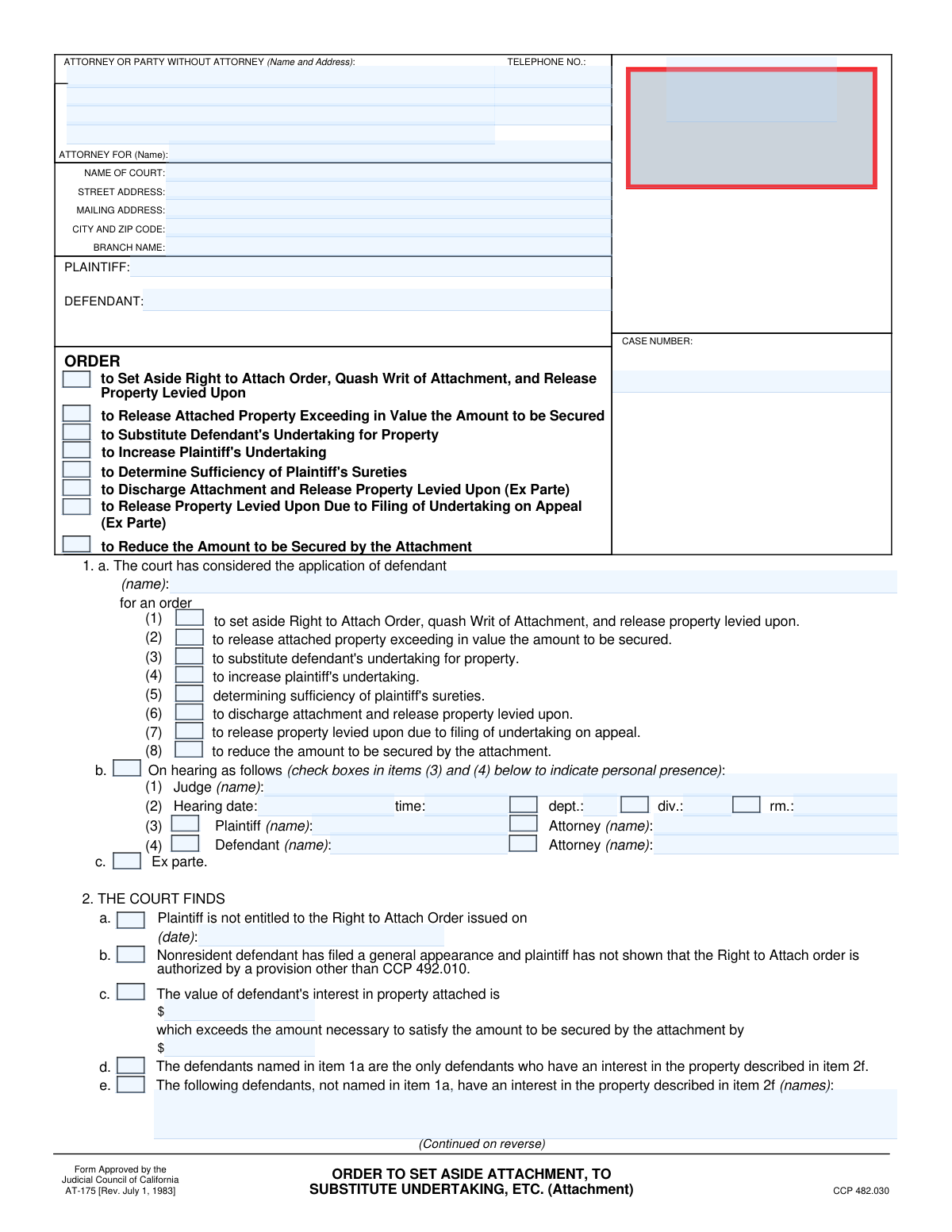
Yes! You can use AI to fill out Form AT-175, Order on Application for Order to Set Aside Right to Attach Order, Quash Writ of Attachment, and Release Property Levied Upon

Form AT-175 is a legal document issued by a California court that formalizes a judge's ruling on a defendant's application concerning a prejudgment attachment. This order can set aside the original attachment order, quash the writ, release levied property, or adjust the required security amount (undertaking), making it a critical document for determining property rights during a lawsuit. Today this form can be filled out quickly and accurately using AI-powered services like Instafill.ai, which can also convert non-fillable PDF versions into interactive fillable forms.
Our AI automatically handles information lookup, data retrieval, formatting, and form filling.
It takes less than a minute to fill out AT-175 using our AI form filling.
Securely upload your data. Information is encrypted in transit and deleted immediately after the form is filled out.

Form specifications

Form name: Form AT-175, Order on Application for Order to Set Aside Right to Attach Order, Quash Writ of Attachment, and Release Property Levied Upon
Number of fields: 119
Number of pages: 2
Language: English
Categories: ACH forms, lease application forms, property forms
main-image

Instafill Demo: How to fill out PDF forms in seconds with AI

How to Fill Out AT-175 Online for Free in 2026

Are you looking to fill out a AT-175 form online quickly and accurately? Instafill.ai offers the #1 AI-powered PDF filling software of 2026, allowing you to complete your AT-175 form in just 37 seconds or less.
Follow these steps to fill out your AT-175 form online using Instafill.ai:
  1. 1 Navigate to Instafill.ai and upload or select Form AT-175 from the form library.
  2. 2 Use the AI assistant to input the court, plaintiff, defendant, and case number information at the top of the form.
  3. 3 Indicate whether the order resulted from a hearing or an ex parte application, and specify who was present.
  4. 4 Check the boxes corresponding to the court's specific findings, such as the plaintiff's entitlement to the attachment or the value of the defendant's property.
  5. 5 Clearly mark the checkboxes in the 'Order' section to reflect the court's decision, such as setting aside the Right to Attach Order, quashing the Writ, or releasing property.
  6. 6 If applicable, provide details for any required undertakings, property descriptions, or reduced attachment amounts as ordered by the court.
  7. 7 Review all auto-filled information for accuracy, then date the form to be ready for the judge's signature and official filing.

Our AI-powered system ensures each field is filled out correctly, reducing errors and saving you time.

Why Choose Instafill.ai for Your Fillable AT-175 Form?

Speed

Complete your AT-175 in as little as 37 seconds.

Up-to-Date

Always use the latest 2026 AT-175 form version.

Cost-effective

No need to hire expensive lawyers.

Accuracy

Our AI performs 10 compliance checks to ensure your form is error-free.

Security

Your personal information is protected with bank-level encryption.

Frequently Asked Questions About Form AT-175

This form is an Order prepared for a judge's signature, typically requested by a defendant in a lawsuit. It is used to formally request the court to modify or cancel a previously issued property attachment, such as releasing seized property or changing the security deposit amount.

The defendant or their attorney usually prepares this form. It is then submitted to the court to be reviewed and signed by a judge, making the requested orders official.

You will need the full case details, including the court name, case number, and the names of the plaintiff and defendant. You must also be prepared to select the specific orders you are requesting regarding the property attachment.

The 'Order Selection' section at the top is a checklist for the applicant to indicate the type of relief they are seeking. The 'Order Details' section further down is where the court's final findings and specific orders are formally documented for the judge's signature.

An 'undertaking' is a form of financial security, like a bond, posted with the court. It is used to cover potential damages to the other party if the court action (like the attachment) is later found to be wrongful.

Complete the 'Hearing Details' section only if a formal court hearing was held for your application. If the order was granted 'ex parte' (without a full hearing), you would check the 'Ex parte' box instead.

If your request is not covered by the standard options, you can use the 'Other' checkbox. Select this option and write a clear and concise description of the specific order you are asking the court to make.

After preparing the form, you must file it with the court clerk. It will then be presented to the judge for review and signature, at which point it becomes an official court order.

Yes, services like Instafill.ai use AI to auto-fill form fields accurately and save time. This can help reduce errors and streamline the process of preparing legal documents.

To use Instafill.ai, you upload the form to their platform. The AI will make the document fillable, and you can provide your information once to have it automatically populated in all the correct fields.

If you have a non-fillable or 'flat' PDF, you can use a service like Instafill.ai. It can convert the document into an interactive, fillable form that you can easily complete and save online.

Releasing property means the court is ordering the seized asset to be returned to you. Substituting an undertaking means you are posting a financial bond in place of the seized property, which is then returned to you while the bond serves as security.

This is a request for the court to order the plaintiff to increase the amount of their security deposit. This might be done if you believe the original amount is not enough to cover the potential damages you could suffer from a wrongful attachment.

Compliance AT-175
Validation Checks by Instafill.ai

1
Case Number Presence and Format
This check ensures that the 'Case Number' field is not empty and follows the court's expected format. The case number is a critical unique identifier for the legal proceeding, and its absence or incorrect format would prevent the document from being correctly filed and associated with the proper case. If validation fails, the system should prompt the user to enter a valid case number before submission.
2
Telephone Number Component Integrity
This validation verifies that if any part of the telephone number (Area Code, Prefix, Line Number) is filled, all three parts are filled with the correct number of digits (3, 3, and 4 respectively). A partial phone number is unusable for contact purposes, making this check essential for ensuring complete and accurate contact information. Failure to provide a complete number will result in an error message asking the user to complete or clear the telephone number fields.
3
Hearing Details Conditional Requirement
This check validates that if the 'CB.0.16' checkbox (indicating a hearing was held) is checked, then the 'Judge Name', 'Hearing Date', and 'Hearing Time' fields must be filled out. These details are mandatory for documenting the specifics of the hearing. If the box is checked but the details are missing, the submission will be rejected with a message indicating the required fields.
4
Hearing Date Future or Present Validity
This validation ensures that the 'Hearing Date' field contains a valid date that is not in the past. Scheduling a hearing for a past date is a logical impossibility and indicates a data entry error. This check prevents incorrect scheduling and ensures the integrity of court records. If an invalid date is entered, the user will be prompted to correct it.
5
Order Selection Requirement
This check ensures that at least one checkbox from the 'Order Selection' group is selected. The purpose of the application is to request a specific order from the court, and failing to select an option leaves the document's intent ambiguous. If no box is checked, the form submission should be blocked until the user specifies the type of order they are requesting.
6
Defendant Name Consistency
This validation compares the 'Defendant Name' field in the party information section with the 'Defendant Name (Defendant Applicant Name)' field. These fields should contain the same name to ensure consistency throughout the legal document. A mismatch could cause confusion or legal challenges regarding the identity of the applicant. If the names do not match, a warning should be displayed to the user.
7
Conditional Undertaking Amount
This check ensures that if the 'Undertaking is Sufficient Substitution' checkbox is selected, the corresponding 'Undertaking Amount' field is filled with a valid, positive numeric value. The amount is a critical piece of information for the court to approve the substitution. If the checkbox is selected without a valid amount, the form will be considered incomplete and an error will be shown.
8
Conditional 'Other' Specification
This validation verifies that if the 'Other' checkbox is checked in either the 'Other Specification' or 'Other Order' section, the corresponding text field ('Other Specification Line 1' or 'Other Order Details Line 1') is not empty. Selecting 'Other' implies that a custom explanation is necessary for the form to be understood. An empty explanation defeats the purpose and makes the form incomplete, so submission will be blocked until the details are provided.
9
Zip Code Format Validation
This check ensures that all zip code fields ('City, State, Zip Code' and 'City and Zip Code') contain a valid 5-digit or 9-digit (ZIP+4) numeric format. Correctly formatted zip codes are essential for mail delivery and accurate location records for both the court and the parties involved. An invalid format will trigger an error, prompting the user to enter a valid US zip code.
10
Conditional Presence Name Requirement
This validation ensures that if a presence checkbox is checked (e.g., 'Plaintiff Present', 'Defendant's Attorney Present'), the corresponding name field (e.g., 'Plaintiff Name', 'Defendant's Attorney Name') is filled out. Simply indicating presence without identifying the person is insufficient for official records. The system will flag this as an error if the name is missing when presence is indicated.
11
Conditional Justification Logic
This check validates that if the 'Enforcement Stayed By Undertaking' checkbox is selected, at least one of the subsequent justification options ('Justification Made', 'Justification Waived In Writing', or 'Justification Waived By Failure To Object') is also checked. The parent selection requires a specific reason for the justification status. If the parent is checked but no child option is selected, the form is logically incomplete and will be rejected.
12
Party Information Completeness
This validation ensures that the primary party identifiers—'Attorney/Party Name', 'Plaintiff Name', and 'Defendant Name'—are all filled out. These fields are fundamental to the legal document, as they identify who is filing the document and who the parties to the action are. Missing information would render the document legally invalid, so the submission must be blocked until all fields are complete.
13
Conditional Finding Date Requirement
This check ensures that if the 'Plaintiff Not Entitled to Right to Attach Order' checkbox is checked, the 'Order Issue Date' field must be filled with a valid date. This date is crucial context for the court's finding, specifying which order is being referenced. If the checkbox is selected but the date is missing, the submission will fail with an error message.
14
Conditional Reduced Amount Validation
This validation verifies that if the 'Reduce Attachment Amount' checkbox is selected, the 'Reduced Attachment Amount' field must contain a valid, positive monetary value. The specific amount of the reduction is the most critical part of this request. The form cannot be processed if this value is missing or invalid, and an error will be displayed to the user.

Common Mistakes in Completing AT-175

Mismatching Requested Orders and Final Order Details

Users often check a box in the initial 'Order Selection' section but fail to check the corresponding box or fill out related details in the final 'ORDER' section (items 4a-h), or vice-versa. This creates a contradictory document, as the court cannot determine what was requested versus what is being ordered, leading to rejection or an incorrect ruling. To avoid this, meticulously ensure that every request in the application section has a corresponding and fully completed order section.

Missing Information for Conditional Fields

The form has many fields that are only required if a specific checkbox is ticked, such as providing the 'Total Undertaking Amount' after checking 'An increase in the amount of plaintiff's undertaking is required'. A frequent error is checking the box but omitting the required follow-up data. This invalidates the selection and can cause the court to disregard the request, delaying the case. Always review the fields immediately following a checkbox to ensure all dependent information is provided.

Entering an Inaccurate or Incomplete Case Number

The case number is the single most important identifier for a court filing, yet it is often entered with transposed digits, incorrect formatting, or missing year prefixes. An incorrect case number will cause the document to be rejected by the court clerk or misfiled, leading to critical delays and potentially missed deadlines. To prevent this, meticulously copy the full case number from official court documents. AI-powered tools like Instafill.ai can help by saving and accurately auto-filling this crucial information.

Providing Vague or Unenforceable Property Descriptions

When an order involves specific property, such as in the 'Property Description' fields, users often provide a vague description like 'defendant's bank account'. This is insufficient for a legal order, which requires an unambiguous identifier like 'Account ending in 1234 at XYZ Bank'. Ambiguity can render the court's order unenforceable, defeating the purpose of the form. Always provide the most detailed description possible, including serial numbers, account numbers, or legal property descriptions.

Using Inconsistent Party or Attorney Names

The form asks for Plaintiff, Defendant, and attorney names in multiple sections. A common mistake is to use abbreviations, misspellings, or slightly different versions of the names throughout the document. This inconsistency creates legal ambiguity about who the order applies to and can lead to challenges or rejection. Always use the full, official legal names as they appear on the original complaint and maintain that exact spelling across the entire form.

Failing to Document Hearing Attendance

If the order resulted from a hearing, the form requires documenting who was present by checking boxes for the Plaintiff, Defendant, and their respective attorneys. Filers often forget to complete this section, leaving an incomplete record of the proceeding. This can become a significant issue if there are later disputes about who appeared or received notice. Always ensure the 'Plaintiff Presence' and 'Defendant Presence' sections are accurately completed if a hearing was held.

Incorrectly Formatting the Telephone Number

This form breaks the telephone number into three separate fields: 'Area Code', 'Phone Number Prefix', and 'Phone Number Line Number'. Users frequently make data entry errors by entering the numbers in the wrong boxes or transposing them. This simple mistake can prevent the court or opposing counsel from being able to make contact, causing communication breakdowns. Using a tool like Instafill.ai can prevent this by automatically parsing and placing the number components into the correct fields.

Omitting the 'Attorney For' Name

The 'Attorney For (Name)' field, which specifies which party the filing attorney represents, is often left blank. This is especially common for parties representing themselves (pro se) who are confused by the term 'attorney'. Leaving it blank creates confusion for the court clerk about who is submitting the form, which can delay processing. If representing yourself, you should enter your own name followed by 'In Pro Per' or 'Pro Se'.

Incomplete 'Other' Specifications

When a situation doesn't fit the standard options, users check the 'Other' box but then provide a cryptic or incomplete explanation in the corresponding text field. This forces the court to guess the filer's intent, which they will not do, typically resulting in the denial of that part of the request. If you must use the 'Other' option, provide a clear, concise, and complete sentence explaining the specific finding or order you are requesting. If the form is a non-fillable PDF, a tool like Instafill.ai can convert it to a fillable version, ensuring you have adequate space to type your explanation.

Contradictory Monetary Values

The form involves several financial figures, such as the 'Value of Defendant's Interest' and the 'Reduced Attachment Amount'. A critical error is entering conflicting numbers in different sections, for example, stating an excess property value of $10,000 in the 'Findings' but then ordering a release of property valued at $5,000. Such contradictions make the form logically unsound and will likely lead to rejection. Carefully calculate and double-check all monetary values for consistency throughout the document.
Saved over 80 hours a year

“I was never sure if my IRS forms like W-9 were filled correctly. Now, I can complete the forms accurately without any external help.”

Kevin Martin Green

Your data stays secure with advanced protection from Instafill and our subprocessors

Robust compliance program

Transparent business model

You’re not the product. You always know where your data is and what it is processed for.

ISO 27001, HIPAA, and GDPR

Our subprocesses adhere to multiple compliance standards, including but not limited to ISO 27001, HIPAA, and GDPR.

Security & privacy by design

We consider security and privacy from the initial design phase of any new service or functionality. It’s not an afterthought, it’s built-in, including support for two-factor authentication (2FA) to further protect your account.

Fill out AT-175 with Instafill.ai

Worried about filling PDFs wrong? Instafill securely fills form-at-175-order-on-application-for-order-to-set-aside-right-to-attach-order-quash-writ-of-attachment-and-release forms, ensuring each field is accurate.