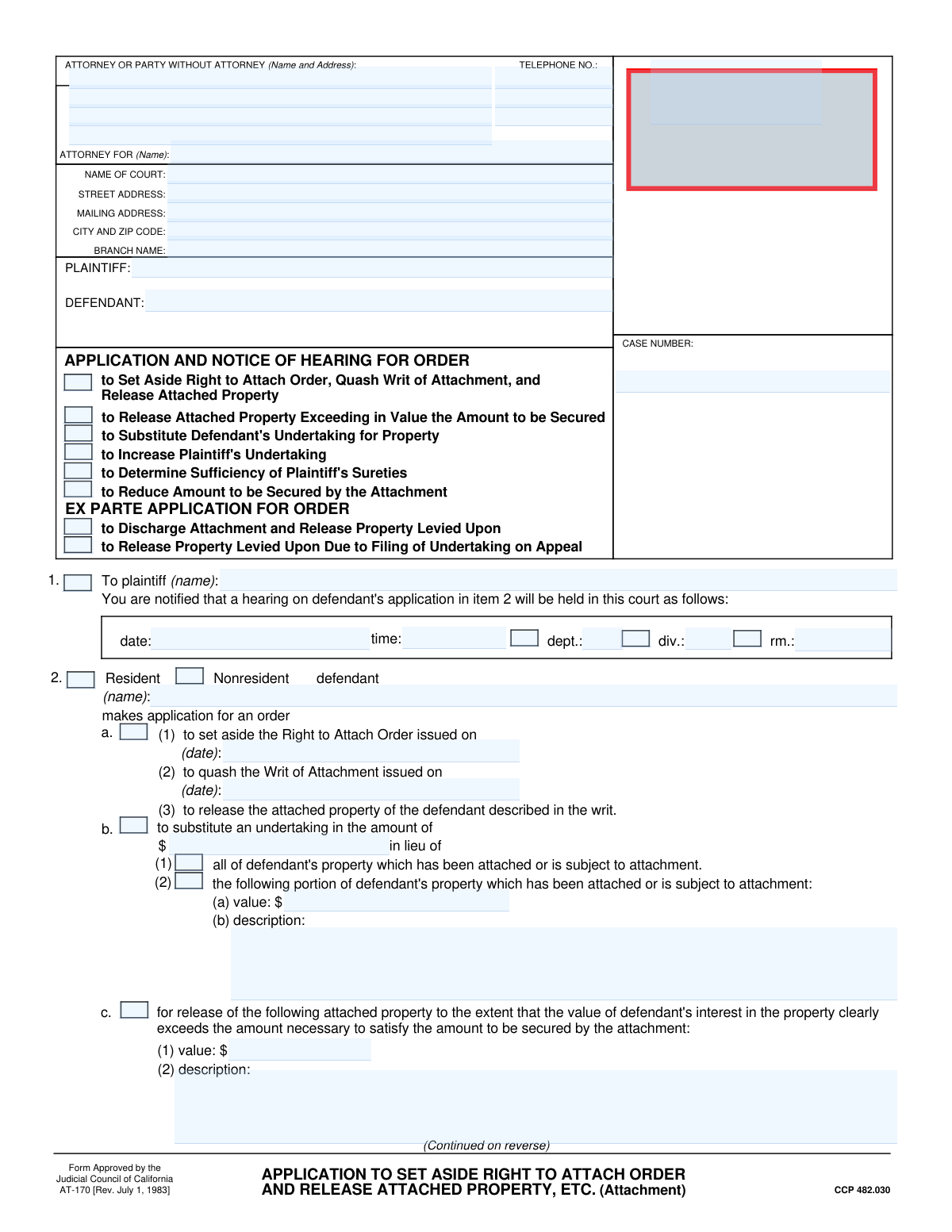
Yes! You can use AI to fill out Form AT-170, Application and Notice of Hearing for Order to Set Aside Right to Attach Order, Quash Writ of Attachment, and Release Attached Property

Form AT-170 is a crucial legal document filed in California courts by a defendant in a civil lawsuit. It serves as a formal application to the court to modify or cancel a previously granted attachment on the defendant's property, and it also provides notice to the plaintiff of an upcoming hearing on the matter. Defendants use this form for various actions, such as setting aside the attachment order, releasing property, or substituting a bond for the property. Today, this complex legal form can be filled out quickly and accurately using AI-powered services like Instafill.ai, which can also convert non-fillable PDF versions into interactive fillable forms.
Our AI automatically handles information lookup, data retrieval, formatting, and form filling.
It takes less than a minute to fill out AT-170 using our AI form filling.
Securely upload your data. Information is encrypted in transit and deleted immediately after the form is filled out.

Form specifications

Form name: Form AT-170, Application and Notice of Hearing for Order to Set Aside Right to Attach Order, Quash Writ of Attachment, and Release Attached Property
Number of fields: 93
Number of pages: 2
Language: English
Categories: ACH forms, lease application forms, property forms
main-image

Instafill Demo: How to fill out PDF forms in seconds with AI

How to Fill Out AT-170 Online for Free in 2026

Are you looking to fill out a AT-170 form online quickly and accurately? Instafill.ai offers the #1 AI-powered PDF filling software of 2026, allowing you to complete your AT-170 form in just 37 seconds or less.
Follow these steps to fill out your AT-170 form online using Instafill.ai:
  1. 1 Navigate to Instafill.ai and upload Form AT-170, or select it from their library of official documents.
  2. 2 Provide the essential case information, including details for the attorney, court, plaintiff, and defendant, letting the AI guide you through the fields.
  3. 3 Select the specific legal relief you are seeking by checking the appropriate boxes, such as 'Set Aside Right to Attach Order' or 'Substitute Defendant's Undertaking for Property'.
  4. 4 Detail the legal grounds and facts supporting your application. You can specify supporting affidavits or points and authorities that will be attached.
  5. 5 Enter the date, time, and department for the court hearing to formally notify the opposing party.
  6. 6 Review all entered information for completeness and accuracy, then sign and date the form before downloading it for filing with the court and serving on the plaintiff.

Our AI-powered system ensures each field is filled out correctly, reducing errors and saving you time.

Why Choose Instafill.ai for Your Fillable AT-170 Form?

Speed

Complete your AT-170 in as little as 37 seconds.

Up-to-Date

Always use the latest 2026 AT-170 form version.

Cost-effective

No need to hire expensive lawyers.

Accuracy

Our AI performs 10 compliance checks to ensure your form is error-free.

Security

Your personal information is protected with bank-level encryption.

Frequently Asked Questions About Form AT-170

This form is used by a defendant in a lawsuit to ask the court to modify or cancel an attachment on their property. This can include requests to release the property, reduce the amount secured, or challenge the legal basis for the attachment.

A defendant (or their attorney) whose property has been seized or is under threat of seizure due to a court-ordered attachment should fill out this form. It is the official way to formally request relief from the court regarding that attachment.

You will need the full court name and address, the case number, the full legal names of the plaintiff and defendant, and details about the attachment order you are challenging, such as the date it was issued.

To 'quash the writ of attachment' is to ask the court to legally invalidate the order that allows your property to be seized. If granted, this would cancel the plaintiff's right to hold your property as security for the lawsuit.

This is a request to replace the attached property with a financial bond (an 'undertaking') for a specified amount. If the court approves, your property is released, and the bond serves as the new security for the plaintiff's claim.

After filing, the court will set a hearing date, which you must provide on the form. At the hearing, a judge will listen to arguments from both you and the plaintiff before deciding whether to grant your request.

You can use this form to request the 'release of attached property exceeding in value the amount to be secured'. You will need to describe the property and specify the value that you believe is excessive.

Yes, the form has a specific section for nonresident defendants. You may need to indicate if your application is being made on the grounds of a general appearance in the case, which can have significant legal implications.

Often, yes. The form has sections to indicate whether you are attaching supporting documents like an affidavit, a legal argument (points and authorities), or other evidence to support your request.

Yes, services like Instafill.ai use AI to accurately auto-fill form fields, which saves time and helps prevent common errors. This can be particularly useful for complex legal forms with numerous fields.

To fill this form out online, you can upload the PDF to the Instafill.ai platform. Their AI-powered tool will help you populate the fields quickly and accurately using your saved information, after which you can download the completed form.

If you have a non-fillable or 'flat' PDF, you can use a service like Instafill.ai. Their platform can convert the document into an interactive, fillable form that you can easily complete and sign online.

The plaintiff likely posted a bond (undertaking) to get the attachment order, which covers your potential damages if the attachment is wrongful. You can use this form to ask the court to increase the amount of that bond if you believe it is too low to cover your potential losses.

Compliance AT-170
Validation Checks by Instafill.ai

1
Case Number Format and Presence
This check ensures that the 'Case Number' field is not empty and conforms to the standard format expected by the court system. Case numbers are critical for correctly filing and associating the document with the proper legal proceeding. A missing or malformed case number will result in filing rejection and delays.
2
Mandatory Application Option Selection
Validates that at least one checkbox is selected from the 'Application and Notice of Hearing for Order Options' or 'Ex Parte Application for Order Options' sections. The primary purpose of this form is to request a specific court order, so at least one option must be chosen to define the application's intent. Failure to select an option makes the form's purpose unclear and will lead to its rejection.
3
Conditional Requirement for Set Aside Application Dates
If the 'Set Aside Right to Attach Order' checkbox is selected, this validation ensures that both 'Date Right to Attach Order Issued' and 'Date Writ of Attachment Issued' fields are filled with valid dates. These dates are essential context for the court to review the request to set aside a prior order. An application lacking these dates is incomplete and cannot be processed.
4
Conditional Requirement for Substitute Undertaking Details
This check is triggered when the 'Substitute an undertaking' checkbox is selected. It verifies that the 'Undertaking Amount' field is filled with a valid monetary value and that one of the two subsequent checkboxes ('All defendant's property' or 'Following portion of property') is also selected. This ensures the application clearly specifies the terms of the proposed substitution, which is necessary for judicial review.
5
Conditional Requirement for Specific Property Description
If the 'Following portion of property' checkbox is checked, this validation ensures the 'Property Portion Value' and 'Property Description' fields are not empty. The court needs a precise description and valuation of the specific property to be released in exchange for the undertaking. Missing this information makes the request ambiguous and unenforceable.
6
Mutually Exclusive Applicant Residency Status
This validation ensures that only one of the 'Resident' or 'Nonresident' checkboxes under 'Applicant Information' can be selected at a time. A party cannot be both a resident and a nonresident, and this legal status affects jurisdiction and applicable procedures. Selecting both would create a logical contradiction, requiring correction before submission.
7
Hearing Details Completeness
Verifies that if a 'Hearing Date' is provided, the 'Hearing Time' and a location field (such as 'Department', 'Division', or 'Room Number') are also filled. A hearing notice is legally deficient if it does not include the time and specific location, as all parties must be properly informed. Incomplete hearing details would render the notice invalid.
8
Primary Telephone Number Format
This check ensures the 'Primary Telephone Number' field contains a valid, 10-digit phone number in a recognizable format (e.g., XXX-XXX-XXXX or (XXX) XXX-XXXX). This is the primary contact method for the court and opposing counsel, so it must be accurate and properly formatted to ensure communication is possible. An invalid number could delay proceedings if the filer cannot be reached.
9
Monetary Value Format Validation
This validation applies to all fields intended to capture monetary values, such as 'Undertaking Amount', 'Property Portion Value', and 'Reduced Attachment Amount'. It checks that the input is a valid number, potentially with currency symbols and commas, and contains no alphabetic characters. This ensures data integrity for financial calculations and legal records.
10
Required Party and Filer Identification
Ensures that the 'Attorney or Party Name', 'Plaintiff Name', and 'Defendant Name' fields are all filled out. A legal document is invalid without clearly identifying the filer and all primary parties involved in the case. Missing this core information would result in immediate rejection of the form by the court clerk.
11
Conditional Requirement for Supporting Facts/Authorities
If the 'Following facts (specify)' or 'Following points and authorities (specify)' checkbox is selected, this validation ensures the corresponding text area ('Supporting Facts' or 'Supporting Points and Authorities') is not empty. Checking the box indicates that the justification is provided directly on the form, so the justification text must be present. An empty field would contradict the selection and make the application unsupported.
12
Conditional Requirement for Nonresident General Appearance Date
When the 'General Appearance Filed On Date' checkbox is selected within the 'Nonresident Defendant's Application' section, this check verifies that the 'General Appearance Filing Date' field contains a valid date. This date is a critical fact for establishing when the defendant submitted to the court's jurisdiction. The form is incomplete if the checkbox is marked but the corresponding date is missing.
13
Declaration Date Presence and Validity
This check ensures the 'Declaration Date' field is filled with a valid date that is on or before the current submission date. The declaration is a sworn statement, and the date it was signed is a legal requirement for its validity. An invalid or future date would call the authenticity of the declaration into question.
14
Zip Code Format Validation
Validates that the 'Zip Code' fields in both the 'Attorney or Party Information' and 'Court Information' sections adhere to a standard 5-digit or 9-digit (ZIP+4) format. Correctly formatted zip codes are essential for mail delivery and ensuring legal notices are sent to the correct address. An incorrect format can lead to failed mail delivery and significant legal complications.

Common Mistakes in Completing AT-170

Entering an Incorrect or Mismatched Case Number

Users often mistype the case number or enter it in an inconsistent format, especially since it may appear in multiple locations on the form. This critical error can lead to the document being rejected by the court clerk or filed in the wrong case, causing significant delays and potential legal jeopardy. To avoid this, carefully copy the exact case number from official court documents and double-check it before submission. AI-powered tools like Instafill.ai can help prevent this by auto-populating the correct case number consistently across the entire document.

Failing to Complete Required Details for a Selected Option

The form contains many checkboxes that require additional information in subsequent fields, such as providing an amount after checking 'Reduce Attachment Amount'. People frequently check the box to indicate their request but then forget to provide the necessary supporting details like dates, monetary amounts, or written explanations. This omission makes the application incomplete and can cause it to be denied or returned. Always review the form after checking a box to ensure all conditionally required fields are filled.

Using Inconsistent or Abbreviated Party Names

Filers may use abbreviations, nicknames, or slightly different versions of the plaintiff's or defendant's names throughout the form. Legal documents require the full, official legal names of all parties as they appear on the initial complaint and other court records. Inconsistencies can lead to filing rejections and create ambiguity about the parties involved. Always use the complete and correct legal names in every field, from the header to the signature block.

Omitting Supporting Document References

Users often attach required documents like affidavits but fail to check the corresponding boxes (e.g., 'Attached affidavit') or fill in the 'Total Pages Attached' field. This oversight can lead the court to believe the supporting documents are missing, potentially weakening the application or causing it to be deemed incomplete. To prevent this, create a checklist of all attachments, check the appropriate boxes on the form, and accurately count and enter the total number of attached pages before filing.

Selecting Conflicting or Incorrect Application Checkboxes

The form presents numerous legal options via checkboxes, such as 'Set Aside Right to Attach Order' and 'Substitute Defendant's Undertaking for Property'. A common error is checking multiple boxes that are mutually exclusive or selecting an option that does not match the legal relief being sought in the supporting text. This confusion can result in the court misunderstanding the request, leading to a denial or the need to refile. Carefully read each option and select only the one(s) that accurately reflect your specific legal application.

Providing a Vague or Incomplete Property Description

When requesting to release or substitute property, the form requires a detailed 'Property Description'. A common mistake is to provide a description that is too general (e.g., 'defendant's car'), which is insufficient for a legal order. An inadequate description will likely cause the court to deny the request because the property cannot be uniquely identified. Be as specific as possible, including serial numbers, account numbers, or a vehicle's make, model, year, and VIN.

Incomplete Hearing Details

The section for hearing details (Date, Time, Department, Room Number) is critical for notifying all parties, yet it is often left incomplete. This may happen if the filer does not yet have the information from the court clerk when preparing the form. Submitting a notice of hearing with missing information makes the notice defective and can result in the hearing being canceled, requiring the entire process to be rescheduled. Always obtain the complete hearing details from the court clerk before finalizing and serving the form.

Errors in Monetary Value Fields

When required to enter amounts like an 'Undertaking Amount' or 'Excess Property Value,' users may include dollar signs or commas, which can interfere with data processing, or they may forget to enter the value altogether. The consequence is an incomplete or invalid application, as the specific financial relief sought is unclear. Ensure you enter only numerals and decimal points in these fields and double-check that a value is provided whenever a related option is selected.

Incomplete Declaration and Signature Section

A declaration is not valid without a date and a clear identification of the declarant. People often sign the form but forget to enter the date of signing or print their name clearly in the 'Declarant's Printed Name' field. This simple oversight can invalidate the entire declaration and application, leading to its rejection. Always complete every field in the declaration section: date it, sign it, and print your name and title legibly. If the form is a non-fillable PDF, a tool like Instafill.ai can convert it to a fillable version to make completing these fields easier.

Confusing Street and Mailing Addresses for the Court

The form asks for both the 'Street Address' and 'Mailing Address' of the court, and these are not always the same. Filers often enter the same address in both fields or use a general P.O. Box when a physical street address is required for certain types of service. This can cause documents to be misdirected, leading to filing delays or missed deadlines. Verify both addresses on the court's official website to ensure proper routing of all correspondence and filings.
Saved over 80 hours a year

“I was never sure if my IRS forms like W-9 were filled correctly. Now, I can complete the forms accurately without any external help.”

Kevin Martin Green

Your data stays secure with advanced protection from Instafill and our subprocessors

Robust compliance program

Transparent business model

You’re not the product. You always know where your data is and what it is processed for.

ISO 27001, HIPAA, and GDPR

Our subprocesses adhere to multiple compliance standards, including but not limited to ISO 27001, HIPAA, and GDPR.

Security & privacy by design

We consider security and privacy from the initial design phase of any new service or functionality. It’s not an afterthought, it’s built-in, including support for two-factor authentication (2FA) to further protect your account.

Fill out AT-170 with Instafill.ai

Worried about filling PDFs wrong? Instafill securely fills form-at-170-application-and-notice-of-hearing-for-order-to-set-aside-right-to-attach-order-quash-writ-of-attachment-and forms, ensuring each field is accurate.