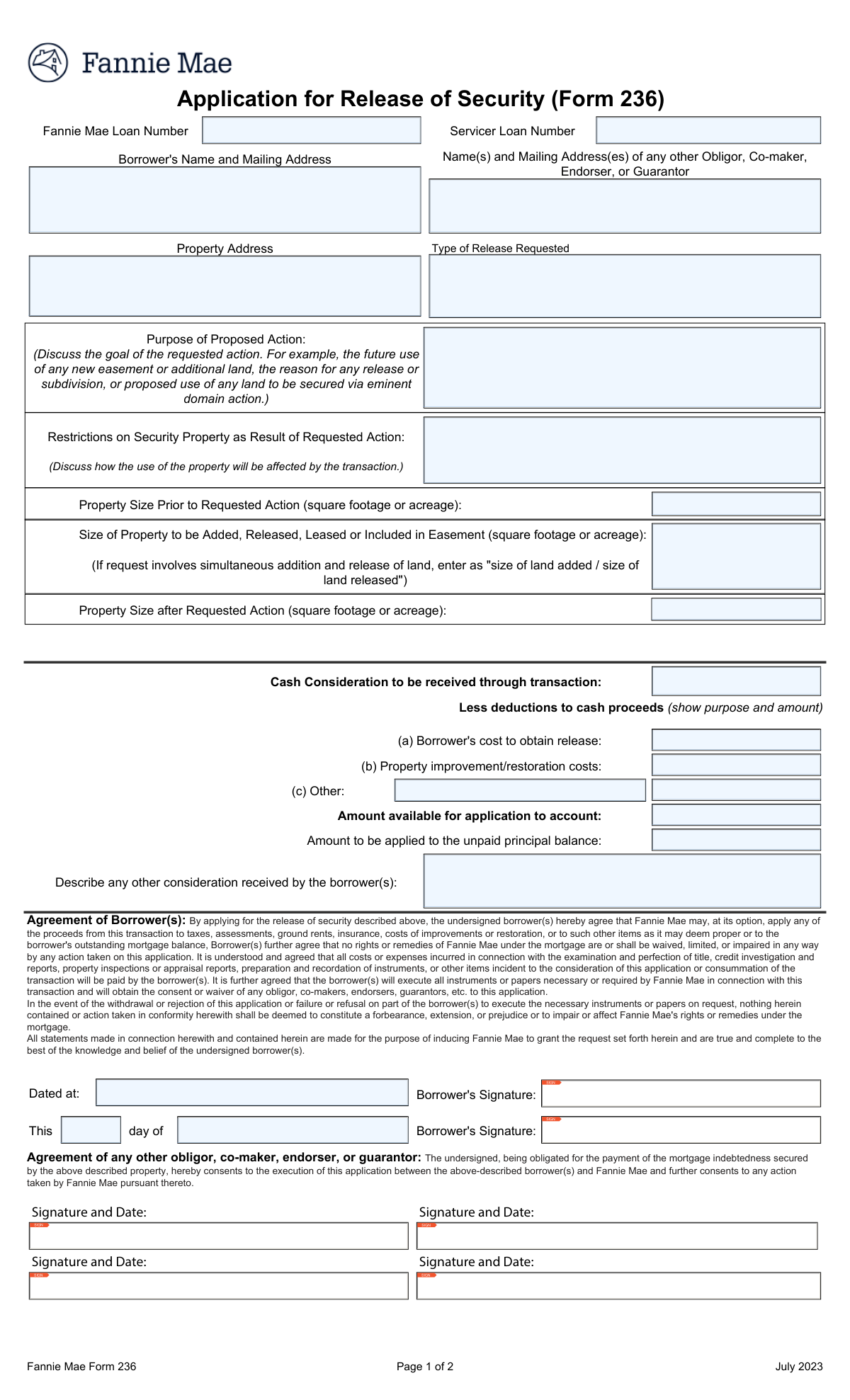
Yes! You can use AI to fill out Form 236, Application for Release and/or Substitution of Security
Form 236, Application for Release and/or Substitution of Security, is a Fannie Mae document submitted by a loan servicer on behalf of a borrower. It is used to formally request permission to alter the property that collateralizes a mortgage, such as releasing a portion of the land, granting an easement, or subdividing the lot. This process is crucial to ensure that any changes to the security property do not negatively impact the lender's interest. Today, this form can be filled out quickly and accurately using AI-powered services like Instafill.ai, which can also convert non-fillable PDF versions into interactive fillable forms.
Our AI automatically handles information lookup, data retrieval, formatting, and form filling.
It takes less than a minute to fill out Fannie Mae Form 236 using our AI form filling.
Securely upload your data. Information is encrypted in transit and deleted immediately after the form is filled out.
Form specifications
| Form name: | Form 236, Application for Release and/or Substitution of Security |
| Number of fields: | 72 |
| Number of pages: | 4 |
| Language: | English |
| Categories: | lease application forms, SEC forms |
Instafill Demo: How to fill out PDF forms in seconds with AI
How to Fill Out Fannie Mae Form 236 Online for Free in 2026
Are you looking to fill out a FANNIE MAE FORM 236 form online quickly and accurately? Instafill.ai offers the #1 AI-powered PDF filling software of 2026, allowing you to complete your FANNIE MAE FORM 236 form in just 37 seconds or less.
Follow these steps to fill out your FANNIE MAE FORM 236 form online using Instafill.ai:
- 1 Navigate to Instafill.ai and upload your Fannie Mae Form 236 or select it from their template library.
- 2 Use the AI assistant to automatically populate key information such as the Fannie Mae and servicer loan numbers, borrower details, and property address.
- 3 Clearly specify the type of release being requested and provide a detailed explanation for the purpose of the proposed action in the 'Release Information' section.
- 4 Enter all financial details, including cash considerations, costs, and the current status of the first and second mortgages.
- 5 Input the property valuation details and the servicer's recommendation for the disposition of any funds.
- 6 Review all the information pre-filled by the AI for accuracy, then have the borrower and servicer representative provide their electronic signatures.
- 7 Download the completed, signed Form 236 for submission to Fannie Mae and any other required parties.
Our AI-powered system ensures each field is filled out correctly, reducing errors and saving you time.
Why Choose Instafill.ai for Your Fillable Fannie Mae Form 236 Form?
Speed
Complete your Fannie Mae Form 236 in as little as 37 seconds.
Up-to-Date
Always use the latest 2026 Fannie Mae Form 236 form version.
Cost-effective
No need to hire expensive lawyers.
Accuracy
Our AI performs 10 compliance checks to ensure your form is error-free.
Security
Your personal information is protected with bank-level encryption.
Frequently Asked Questions About Form Fannie Mae Form 236
This form is an Application for Release of Security, used when a borrower wants to release a portion of the property that secures their Fannie Mae mortgage. This is common for actions like selling a piece of land, granting an easement, or eminent domain.
The borrower initiates the form by providing personal, property, and release details. The mortgage servicer then completes sections on the loan's status and value before submitting it for final approval.
You can find both your Servicer loan number and the Fannie Mae loan number on your monthly mortgage statement. If you cannot locate them, you should contact your mortgage servicer directly for assistance.
In this section, clearly describe the reason for the release. For example, specify if you are granting a utility easement, subdividing your lot for a sale, or if a government agency is acquiring a portion of your land.
Any cash received from the transaction may need to be applied to your unpaid principal balance or past-due payments. The form includes a section where the servicer recommends how these funds should be distributed.
Yes, you can apply, but your servicer must report the loan's delinquency status, including the number of late payments and total amount due. This information will be considered during the review process.
LTV (Loan-to-Value) compares your primary mortgage balance to the property's value. CLTV (Combined Loan-to-Value) includes all loans on the property, like a second mortgage, in the calculation against its value.
MBS stands for Mortgage-Backed Security. This means your loan has been bundled with other mortgages and sold to investors, which can sometimes add complexity to requests like a release of security.
You should submit the form to your mortgage servicer. They will complete their required sections and handle the submission to Fannie Mae for the final decision.
If your loan has Mortgage Insurance, the MI provider also has a financial interest in the property. Their approval is often required to ensure the release of security does not unacceptably increase their risk.
Yes, services like Instafill.ai use AI to help you accurately auto-fill form fields with your saved information. This can save you time and help prevent common errors.
Simply upload the form to the Instafill.ai platform. The AI will make the document interactive, allowing you to click on any field and fill it instantly with your securely saved information.
You can use a service like Instafill.ai, which is designed to convert non-fillable PDFs into interactive, fillable forms. This allows you to easily type your answers directly into the document online.
Compliance Fannie Mae Form 236
Validation Checks by Instafill.ai
Common Mistakes in Completing Fannie Mae Form 236
The form requests the Fannie Mae and Servicer loan numbers in two separate sections. Applicants often make typos or accidentally paste the wrong number in one of the locations, creating a mismatch. This discrepancy forces a manual review to determine the correct loan, causing significant processing delays and potentially leading to the rejection of the application if the correct loan cannot be identified. To avoid this, carefully enter the number once and double-check it, or use an AI form-filler like Instafill.ai to ensure consistency across all repeated fields.
Many fields, such as those under 'First Mortgage Status' or 'Cash Consideration Details', are conditional and should only be filled out if a preceding question is answered a certain way (e.g., 'Yes'). A common mistake is to either ignore these conditional fields when required or fill them out when not required. This results in an incomplete or confusing application, leading to requests for information (RFIs) or outright denial because the reviewer cannot accurately assess risk. Always read the instructions carefully for fields that state 'Fill only if...'
The 'Purpose of Proposed Action' field requires a detailed explanation, but applicants often provide vague, one-word answers like 'subdivision' or 'easement'. This lack of detail prevents the servicer from understanding the transaction's scope and impact on the property's value. Consequently, the application is often delayed pending a request for a more thorough explanation, or it may be denied for insufficient justification. Be specific about the goal, the parties involved, and the future use of the property.
The form requires calculating the property size before, during, and after the action. People frequently make mathematical errors where the 'Property Size Prior to Action' minus/plus the 'Property Size Added/Released' does not equal the 'Property Size After Action'. Another common error is mixing units, such as using acres in one field and square feet in another. These inaccuracies can lead to a flawed valuation of the collateral and may cause the request to be rejected. Always double-check your math and use consistent units of measurement.
The form asks for Loan-to-Value (LTV) and Combined Loan-to-Value (CLTV) ratios to be split into separate 'Whole Number' and 'Decimal Part' fields. Applicants often get this wrong, for example, by entering '80.5' in the whole number field or splitting '80.5%' as '80' and '5' instead of '80' and '50'. This formatting error leads to incorrect data entry and a miscalculation of the loan's risk profile, which is a critical factor in the approval decision. Carefully separate the whole number from the digits after the decimal point.
In the disposition section, applicants may check a box to apply funds (e.g., 'To Unpaid Principal Balance') but forget to enter the corresponding dollar amount, or vice versa. Additionally, the sum of the amounts entered in the disposition fields may not match the 'Available for Account Application' total. This ambiguity forces the servicer to halt processing and contact the borrower for clarification, delaying the application of funds. Ensure every checked box has a corresponding amount and that the total is correct.
Forgetting to sign in all required places is a frequent and critical error that invalidates the entire application. This form has multiple signature lines for borrowers and other parties. Another common mistake is entering a full date in the 'Agreement Month' or 'Agreement Day' fields instead of splitting the components as requested. An unsigned or improperly dated form is not legally binding and will be immediately returned, restarting the entire submission process. AI-powered tools like Instafill.ai can highlight all required signature fields to help prevent this.
Applicants sometimes enter incomplete or informal names (e.g., 'Mike Smith' instead of 'Michael J. Smith') in the 'Borrower's Name' field. Loan documents are legal records that require full legal names as they appear on the mortgage note and title. Using an incorrect name can cause identification issues, create legal discrepancies, and delay processing while the servicer verifies the borrower's identity. Always use the full legal name for all parties listed on the loan.
When using fields like 'Other Deduction Description' or 'Other Consideration Description', people often enter generic terms like 'fees' or 'miscellaneous'. This provides no actionable information for the reviewer, who cannot validate the deduction's legitimacy. As a result, the deduction may be disallowed, or the application will be delayed until a proper breakdown is provided. Always provide specific details, such as 'County recording fee' or 'Appraisal fee to ABC Appraisals'.
The form asks for both the 'Borrower's Mailing Address' and the 'Property Address' separately. Applicants may mistakenly enter the same address in both fields, even if their mailing address is different (e.g., a P.O. Box or a different residence). This can lead to important legal notices and correspondence being sent to the wrong location. It is crucial to differentiate between the physical address of the collateral property and the address where the borrower receives mail. If the form is a non-fillable PDF, a tool like Instafill.ai can make it fillable to reduce data entry errors.
Saved over 80 hours a year
“I was never sure if my IRS forms like W-9 were filled correctly. Now, I can complete the forms accurately without any external help.”
Kevin Martin Green
Your data stays secure with advanced protection from Instafill and our subprocessors

Robust compliance program
Transparent business model
You’re not the product. You always know where your data is and what it is processed for.
ISO 27001, HIPAA, and GDPR
Our subprocesses adhere to multiple compliance standards, including but not limited to ISO 27001, HIPAA, and GDPR.
Security & privacy by design
We consider security and privacy from the initial design phase of any new service or functionality. It’s not an afterthought, it’s built-in, including support for two-factor authentication (2FA) to further protect your account.
Fill out Fannie Mae Form 236 with Instafill.ai
Worried about filling PDFs wrong? Instafill securely fills form-236-application-for-release-andor-substitution-of-security forms, ensuring each field is accurate.