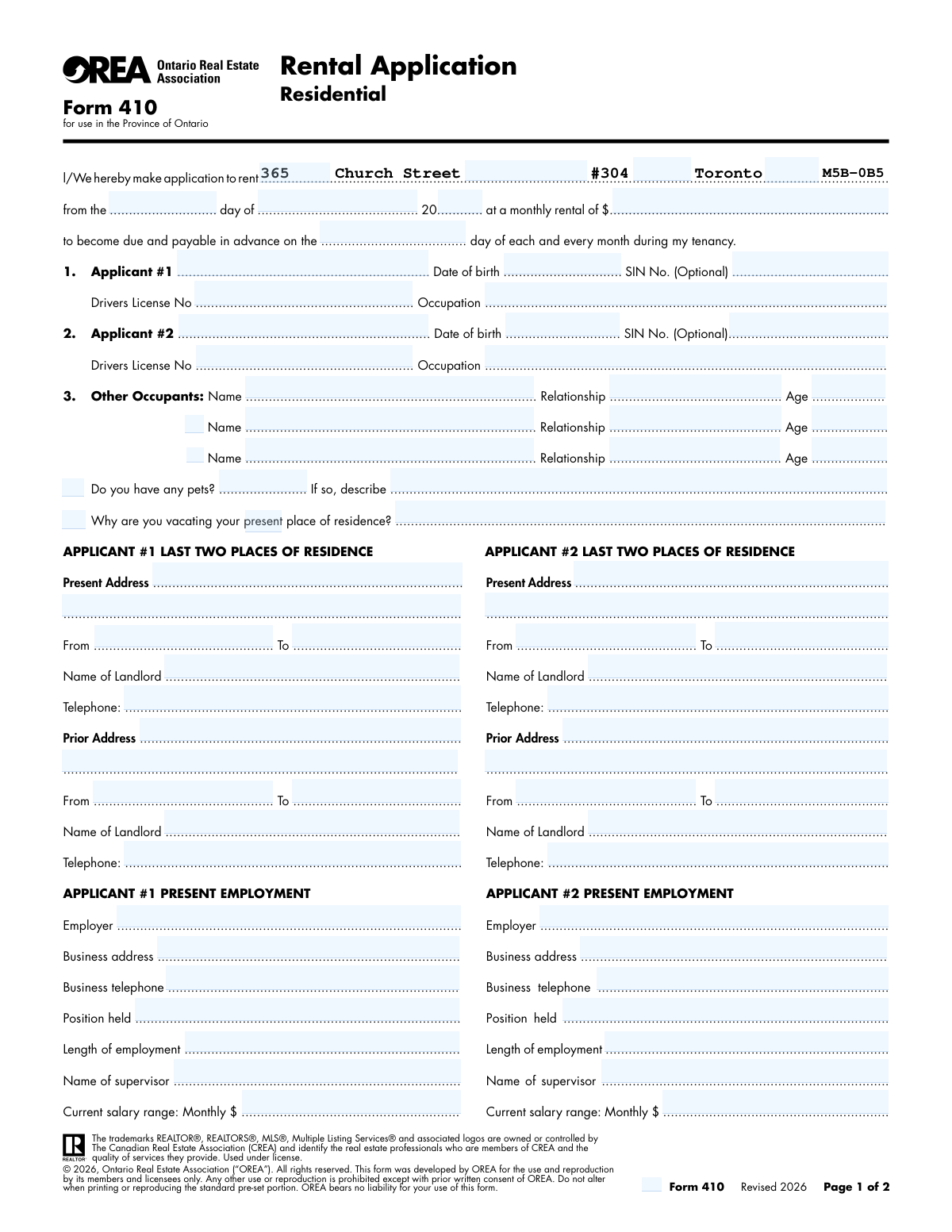
Yes! You can use AI to fill out Ontario Real Estate Association Form 410, Rental Application – Residential

The Ontario Real Estate Association (OREA) Form 410 is a comprehensive rental application used by landlords and property managers to gather detailed information from prospective tenants. It collects personal data, residence history, employment details, financial information, and references to help assess an applicant's suitability for a tenancy. Today, this form can be filled out quickly and accurately using AI-powered services like Instafill.ai, which can also convert non-fillable PDF versions into interactive fillable forms.
Our AI automatically handles information lookup, data retrieval, formatting, and form filling.
It takes less than a minute to fill out OREA Form 410 using our AI form filling.
Securely upload your data. Information is encrypted in transit and deleted immediately after the form is filled out.

Form specifications

Form name: Ontario Real Estate Association Form 410, Rental Application – Residential
Number of fields: 133
Number of pages: 2
Language: English
Categories: estate forms, NJ state forms, PA state forms, real estate forms, rental application forms, rental forms, residential rental forms
main-image

Instafill Demo: How to fill out PDF forms in seconds with AI

How to Fill Out OREA Form 410 Online for Free in 2026

Are you looking to fill out a OREA FORM 410 form online quickly and accurately? Instafill.ai offers the #1 AI-powered PDF filling software of 2026, allowing you to complete your OREA FORM 410 form in just 37 seconds or less.
Follow these steps to fill out your OREA FORM 410 form online using Instafill.ai:
  1. 1 Navigate to Instafill.ai and upload your OREA Form 410 or select it from their template library.
  2. 2 Provide personal, residential, and employment history for the primary applicant (Applicant #1) by answering simple questions.
  3. 3 If there is a second applicant, enter their corresponding personal, residential, and employment information.
  4. 4 List the names, ages, and relationships of any other occupants who will be living in the rental unit.
  5. 5 Enter details for your personal references, bank accounts, vehicles, and any outstanding financial obligations.
  6. 6 Carefully review all the information automatically populated onto the form by the AI to ensure it is complete and accurate.
  7. 7 Electronically sign and date the application, then download the completed form to submit to the landlord or real estate agent.

Our AI-powered system ensures each field is filled out correctly, reducing errors and saving you time.

Why Choose Instafill.ai for Your Fillable OREA Form 410 Form?

Speed

Complete your OREA Form 410 in as little as 37 seconds.

Up-to-Date

Always use the latest 2026 OREA Form 410 form version.

Cost-effective

No need to hire expensive lawyers.

Accuracy

Our AI performs 10 compliance checks to ensure your form is error-free.

Security

Your personal information is protected with bank-level encryption.

Frequently Asked Questions About Form OREA Form 410

This is a residential rental application, likely OREA Form 410, used by landlords to screen potential tenants. All adults who will be financially responsible for the lease (Applicants 1 and 2) must provide their detailed information.

No, if you are the only applicant responsible for the lease, you only need to complete the sections for 'Applicant #1'. You can leave all 'Applicant #2' sections blank.

List anyone who will live in the unit but is not a primary applicant on the lease, such as children, dependents, or other relatives. You will need to provide their name, age, and relationship to the applicant.

No, the form indicates that providing your Social Insurance Number (SIN) is optional. You can choose whether or not to fill in this field.

If you have pets, check 'Yes' and provide a brief description including the type/breed, size, and number of pets. It is also helpful to mention if they are indoor or outdoor animals.

Provide a simple, one-sentence explanation for why you are moving. Common reasons include 'lease is ending,' 'relocating for a new job,' or 'seeking a larger space.'

If you are a first-time renter or new to the workforce, simply complete the 'Present Address' and 'Present Employment' sections as thoroughly as possible. You can leave the 'Prior' sections blank or write 'N/A'.

Landlords typically require supporting documents like a government-issued photo ID, proof of income (pay stubs or an employment letter), and sometimes a recent credit report. It is best to ask the landlord or agent exactly what they need.

This information helps the landlord verify your financial stability and ability to consistently pay rent. The information is used as part of the overall assessment of your application.

Provide the full name, contact information, and occupation for two personal references who are not related to you. You should also state how long you have known them.

Yes, services like Instafill.ai use AI to accurately auto-fill form fields, which can save you significant time and help prevent errors on detailed forms like this rental application.

If you have a flat, non-fillable PDF, you can use a service like Instafill.ai. It can convert the document into an interactive, fillable form that you can easily complete on your computer or phone.

Simply upload the rental application form to the Instafill.ai platform. The AI will identify all the fields, allowing you to fill them out online or have the AI auto-fill them with your saved information before you download the completed document.

An 'Applicant' is a person who is financially responsible for the lease and rent payments. An 'Other Occupant' is a person who will live in the property, such as a child, but is not legally bound by the lease agreement.

Compliance OREA Form 410
Validation Checks by Instafill.ai

1
Validates Applicant Email Address Format
This check ensures that the value entered in the 'Applicant #1 Email Address' and 'Applicant #2 Email Address' fields follows the standard email format (e.g., '[email protected]'). This is crucial for ensuring that communication regarding the application, lease, and other important notices can be successfully delivered. If the format is invalid, the system will reject the entry and prompt the user to provide a correctly formatted email address.
2
Ensures Telephone Number Formatting
This validation verifies that all telephone number fields (e.g., 'Landlord Telephone', 'Business Telephone') adhere to a standard North American format, such as (XXX) XXX-XXXX or XXXXXXXXXX. Correctly formatted numbers are essential for contacting applicants, employers, and references to verify information. A failure will result in an error message requesting the user to re-enter the number in a valid format.
3
Conditional Requirement for Pet Description
This check enforces a conditional rule: if the applicant answers 'Yes' to 'Do you have any pets?', the 'describe pets' field becomes mandatory. This ensures the landlord receives necessary details about the type, size, and number of pets to assess compliance with property rules. If 'Yes' is selected but the description is left blank, the form submission will be blocked until the description is provided.
4
Logical Chronology of Residency Dates
This validation compares the 'From' and 'To' dates for each residency period (e.g., 'Residence - From' and 'Residence - To'). The 'From' date must be chronologically earlier than the 'To' date. This check prevents logical impossibilities in the application data and ensures the residency history is accurate. An invalid date range will trigger an error, requiring the applicant to correct the dates before proceeding.
5
Verifies Legal Age of Applicants
This check calculates the applicant's age based on the 'Date of Birth' provided for both Applicant #1 and Applicant #2. It then verifies that the calculated age is 18 years or older, ensuring the applicant is of legal age to enter into a binding lease agreement. If an applicant is underage, the system will flag the entry as invalid, as they cannot legally be a primary leaseholder.
6
Validates Canadian Postal Code Format
This rule checks that all postal code fields (e.g., 'Present City/Province/Postal Code') match the standard Canadian format of 'A1A 1A1', where 'A' is a letter and '1' is a digit. Accurate postal codes are vital for mail correspondence and for running credit or background checks. An incorrectly formatted postal code will cause a validation error, prompting the user for correction.
7
Ensures Salary is a Positive Numeric Value
This validation ensures that the 'Current Monthly Salary' fields for both applicants contain only positive numerical values. This is critical for financial assessment and calculating the applicant's rent-to-income ratio. Any non-numeric characters, zero, or negative values will be rejected, forcing the user to enter a valid monetary amount.
8
Conditional Validation of Other Occupant Details
This check is triggered when the checkbox for 'Other Occupant 2' or 'Other Occupant 3' is selected, making the corresponding 'Name', 'Age', and 'Relationship' fields for that occupant mandatory. This ensures that all individuals who will be living in the unit are properly identified as required by the lease agreement. If the box is checked but the details are missing, the form cannot be submitted.
9
Validates Composite Tenancy Start Date
This check combines the 'Tenancy start day', 'Tenancy start month', and 'Tenancy start year' fields to ensure they form a valid calendar date. For example, it would reject '31' for the day if the month is 'June'. This prevents invalid lease start dates from being entered and ensures the legal document is based on a real date.
10
Validates Social Insurance Number (SIN) Format
Although optional, this check validates the format of the 'Social Insurance Number' if a value is provided. It ensures the number consists of 9 digits and can optionally apply a checksum algorithm to check for a valid sequence. This helps prevent simple data entry errors for a sensitive piece of information used in credit checks. An invalid format will trigger a warning to the user to review the number.
11
Verifies Continuity of Residency History
This logical check compares the end date of an applicant's prior residence with the start date of their present residence. The 'Tenancy End Date' of the prior address should not be after the 'Residence - From' date of the current address. This helps identify potential gaps or overlaps in the applicant's housing history, which may be important for a landlord's assessment. A discrepancy would flag the entries for review.
12
Validates Rent Due Day Range
This check ensures the 'Rent due day' field contains an integer between 1 and 31. This prevents impossible dates from being set for rent collection in the lease agreement. Entering a value outside this range, such as '0' or '32', would result in an error and require correction.
13
Ensures Signature Date is Not in the Future
This validation checks that the 'Applicant #1 Signature Date' and 'Applicant 2 Signature Date' are not set to a future date. The signature date attests to the accuracy of the information at the time of signing, so a future date is logically impossible. The system will reject any future date and require a date that is today or in the past.

Common Mistakes in Completing OREA Form 410

Mixing Up Applicant #1 and Applicant #2 Information

The form has identical sections for two applicants, which often leads to confusion. Applicants may accidentally enter their information into the wrong section, such as putting Applicant #1's employment history in the fields for Applicant #2. This error can cause significant processing delays and may require the entire application to be resubmitted. To avoid this, carefully double-check that each piece of information corresponds to the correct applicant header before moving to the next section.

Incomplete Residence and Landlord Information

Applicants often provide an address but forget to include the landlord's full name and a valid telephone number for both present and prior residences. This information is critical for the landlord to conduct reference checks, and its absence is a major red flag. Missing contact details can halt the verification process and lead to the application being denied. Always fill out all fields for each residence history entry, including dates, full addresses, and complete landlord contact information.

Mishandling Conditional Pet and Occupant Fields

The form uses conditional logic, requiring details only if a preceding question is answered 'Yes' (e.g., describing pets or listing other occupants). A common error is checking 'Yes' to having pets but failing to provide the required description, or listing an occupant without checking the corresponding box. This incomplete data forces the property manager to follow up, delaying the application. Ensure that if you check a box like 'Do you have any pets?', you also complete the associated description field.

Vague or Overly Long 'Reason for Vacating'

When asked for the 'Reason for vacating current residence,' applicants sometimes write a long, narrative explanation instead of the requested concise statement. The form specifically asks for a one-sentence reason like 'lease ending' or 'relocating for work.' Providing a lengthy or emotional story can be perceived negatively and complicates review. Stick to a brief, factual statement to ensure clarity and professionalism.

Forgetting to Sign and Date the Application

Submitting an application without a signature and date is one of the most common and critical errors. An unsigned application is legally invalid and cannot be processed for credit checks or tenancy agreements. This mistake often happens when applicants are rushing to complete the form. Always perform a final review, ensuring both Applicant #1 and Applicant #2 have signed and dated in their respective sections before submission.

Inconsistent or Illogical Timelines

Applicants may enter conflicting dates for their residence or employment history, such as a 'move-out' date that is earlier than the 'move-in' date. These inconsistencies create confusion and can be interpreted as attempts to hide information, damaging the applicant's credibility. Carefully review all dates to ensure they form a logical and continuous timeline. AI-powered tools like Instafill.ai can help prevent these errors by validating date ranges as you fill out the form.

Omitting Unit or Apartment Numbers

For both personal addresses and employer addresses, applicants frequently forget to include the specific unit, suite, or apartment number. While the street address may be correct, the omission of a unit number makes the address incomplete and can cause mail to be returned or verifications to fail. Always include the unit number in fields like 'Present Street Address' and 'Business address' if applicable. If the original form is a non-fillable PDF, a tool like Instafill.ai can convert it to a fillable version, making it easier to see and complete every field.

Incomplete Personal Reference Contact Details

While an applicant may provide the name of a personal reference, they often neglect to include a complete address and a valid telephone number. Without this contact information, the reference is useless to the property manager, as they cannot be reached for verification. This can weaken the application significantly. To avoid this, confirm the contact details with your references beforehand and enter their full name, address, and phone number accurately.

Incorrectly Formatting Specific Data Fields

The form contains fields with specific formatting instructions that are easily missed, such as 'Tenancy start year (last two digits)' or 'Unit / Apartment number (do not include the '#' symbol)'. Entering '2024' instead of '24' or including a '#' symbol can cause issues with automated data processing. Pay close attention to any instructions in parentheses or field descriptions to ensure your data is entered in the correct format. Using an intelligent form filler like Instafill.ai can help automate this by recognizing and applying the required format.

Ignoring Checkbox Logic for Text Fields

Several sections, like 'Other Occupants' and 'Financial Obligations,' use a checkbox to activate the corresponding text fields. Applicants often fill in the name or payment details but forget to tick the associated checkbox. This can lead to automated systems skipping over the entered information, making the application appear incomplete. Always ensure you check the box right before or after you provide the details for that line item.
Saved over 80 hours a year

“I was never sure if my IRS forms like W-9 were filled correctly. Now, I can complete the forms accurately without any external help.”

Kevin Martin Green

Your data stays secure with advanced protection from Instafill and our subprocessors

Robust compliance program

Transparent business model

You’re not the product. You always know where your data is and what it is processed for.

ISO 27001, HIPAA, and GDPR

Our subprocesses adhere to multiple compliance standards, including but not limited to ISO 27001, HIPAA, and GDPR.

Security & privacy by design

We consider security and privacy from the initial design phase of any new service or functionality. It’s not an afterthought, it’s built-in, including support for two-factor authentication (2FA) to further protect your account.

Fill out OREA Form 410 with Instafill.ai

Worried about filling PDFs wrong? Instafill securely fills ontario-real-estate-association-form-410-rental-application-residential forms, ensuring each field is accurate.