Yes! You can use AI to fill out Petition for Termination of Parental Rights
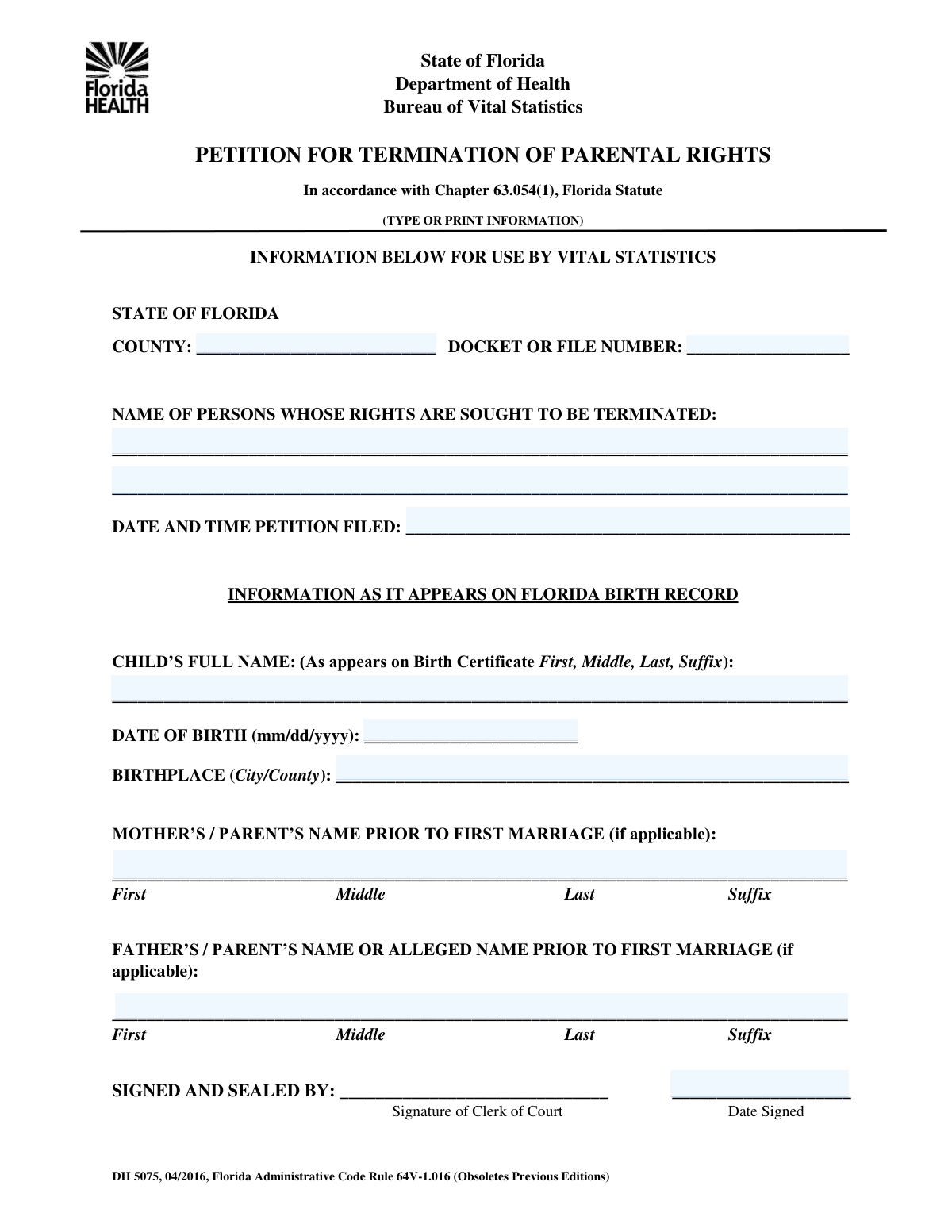
A Petition for Termination of Parental Rights is a formal legal document filed with a court to initiate proceedings to permanently sever the legal relationship between a parent and a child. This is a significant legal step, often taken in cases of adoption, abandonment, or severe neglect, and requires precise and accurate information about the case, the child, and the parents. Today, this form can be filled out quickly and accurately using AI-powered services like Instafill.ai, which can also convert non-fillable PDF versions into interactive fillable forms.
Parental Rights Termination Petition is part of the
ERM forms and rental forms categories on Instafill.
Our AI automatically handles information lookup, data retrieval, formatting, and form filling.
It takes less than a minute to fill out Parental Rights Termination Petition using our AI form filling.
Securely upload your data. Information is encrypted in transit and deleted immediately after the form is filled out.
Form specifications
| Form name: | Petition for Termination of Parental Rights |
| Number of fields: | 12 |
| Number of pages: | 1 |
| Filled form examples: | Form Parental Rights Termination Petition Examples |
| Language: | English |
More forms in ERM forms
Instafill Demo: How to fill out PDF forms in seconds with AI
How to Fill Out Parental Rights Termination Petition Online for Free in 2026
Are you looking to fill out a PARENTAL RIGHTS TERMINATION PETITION form online quickly and accurately? Instafill.ai offers the #1 AI-powered PDF filling software of 2026, allowing you to complete your PARENTAL RIGHTS TERMINATION PETITION form in just 37 seconds or less.
Follow these steps to fill out your PARENTAL RIGHTS TERMINATION PETITION form online using Instafill.ai:
- 1 Navigate to Instafill.ai and upload or select the Petition for Termination of Parental Rights form.
- 2 Enter the case information, including the county and docket number, into the appropriate fields.
- 3 Carefully input the full name of the person whose parental rights are being terminated, along with the child's full name, date of birth, and birthplace.
- 4 Provide the names of the child's parents as requested, including any prior names before marriage.
- 5 Review all entered information for accuracy, paying special attention to names, dates, and case numbers.
- 6 Digitally sign and date the petition in the designated section to certify the information.
- 7 Download the completed, signed petition, ready for filing with the appropriate court.
Our AI-powered system ensures each field is filled out correctly, reducing errors and saving you time.
Why Choose Instafill.ai for Your Fillable Parental Rights Termination Petition Form?
Speed
Complete your Parental Rights Termination Petition in as little as 37 seconds.
Up-to-Date
Always use the latest 2026 Parental Rights Termination Petition form version.
Cost-effective
No need to hire expensive lawyers.
Accuracy
Our AI performs 10 compliance checks to ensure your form is error-free.
Security
Your personal information is protected with bank-level encryption.
Frequently Asked Questions About Form Parental Rights Termination Petition
This form is used to gather essential information for a legal case involving the termination of parental rights. It collects details about the case, the child, and the parents for the court's record.
This form is typically completed by the petitioner (the person or agency seeking the termination of parental rights) or their legal representative.
You should have the court case information like the docket number, the child's full name and birth details, and the full names of the parents involved. Having the original petition document will also be very helpful.
The docket or file number is assigned by the court when a case is initiated. You can find this number on any previously filed court documents related to this case.
For unlabeled fields, you must refer to any accompanying instructions from the court or the original petition document. If you are unsure, contact the court clerk or your legal counsel to ensure you enter the correct information.
This field requires the parent's full name before their first marriage, which is typically their maiden name or birth name. Enter the full name they used before ever being married.
The 'Petition Filing Date' is the official date the document was accepted by the court clerk. The 'Date Signed' is the date you personally signed the form, which may be on or before the filing date.
You should enter the full name of the person whose parental rights the petition seeks to terminate. If the petition applies to both parents, you may need to follow specific court instructions for listing multiple individuals.
Yes, services like Instafill.ai use AI to accurately auto-fill form fields from your saved profiles, which saves time and reduces the risk of errors on complex legal forms.
You can use a service like Instafill.ai to fill out your form online. Simply upload your PDF, and the platform will allow you to fill in the fields digitally, save your progress, and download the completed document.
Instafill.ai can convert flat, non-fillable PDFs into interactive, fillable forms. Upload your document to the platform, and it will automatically identify the fields so you can complete it online.
It is crucial to provide the most accurate information possible, which can be found on the child's birth certificate. If you cannot access this document, provide the best information you have and consult with your legal representative.
After submission, this form becomes part of the official court record for the parental rights termination case. The information will be used by the court in subsequent legal proceedings and hearings.
Compliance Parental Rights Termination Petition
Validation Checks by Instafill.ai
Common Mistakes in Completing Parental Rights Termination Petition
Users often transpose digits, omit leading zeros, or miss hyphens when entering the Docket or File Number. This happens because these numbers can be long and complex, making manual entry prone to error. An incorrect docket number can cause the filing to be rejected or misfiled, leading to significant processing delays and potentially missed legal deadlines.
For fields like 'Name of Person' or 'Child's Full Name', filers may use nicknames, shortened names, or omit middle names out of habit. In a legal context, especially for rights termination, using anything other than the full legal name as it appears on official documents like a birth certificate can create ambiguity and may invalidate the petition. Always use the complete and official legal name to avoid challenges to the filing's validity.
The form contains unlabeled fields like 'Text3' and 'Text4', which are highly confusing. People either leave them blank, assuming they are not important, or guess what information is needed. This often leads to the form being rejected by the court clerk for being incomplete or incorrectly filled. The correct approach is to find the accompanying instructions for the form, which are usually on the court's website, to understand the purpose of these fields.
The 'Petition Filing Date and Time' field is frequently mistaken for the date the person is filling out the form. People may enter the current date, not realizing this field is typically reserved for the court clerk to stamp upon official submission. Prematurely filling this field can cause confusion, create a discrepancy in the official record, and may require the form to be resubmitted.
Fields asking for a parent's name 'prior to first marriage' are often misunderstood. Filers may enter the parent's current name or the name from a recent marriage instead of their original maiden name. This information is critical for identity verification and establishing lineage in legal cases. Incorrect data can hinder background checks and cause significant delays, so it's vital to consult official records like birth or marriage certificates.
The 'Birthplace' field specifically requests both the city and county of birth. A common mistake is to provide only the city, as the county is not always common knowledge. This incomplete data can slow down identity verification and record-matching processes. To avoid this, take a moment to look up the county corresponding to the city of birth before filling out the form.
When filling out the 'Date Signed' field, individuals sometimes post-date it to when they plan to file, or back-date it to match other documents. A legal document's signature date should reflect the actual day it was signed. An incorrect date can call the document's authenticity into question and create timeline discrepancies that could be challenged legally.
Without careful proofreading, it's easy to introduce inconsistencies, such as spelling a name differently in two separate fields or entering conflicting dates. These errors happen when rushing and can undermine the credibility of the entire filing, often leading to rejections or requests for clarification from the court. Using an AI form-filling tool like Instafill.ai can prevent this by autocompleting related fields consistently.
For fields like 'Date of Birth', people may write dates in a format that is not standard for the jurisdiction (e.g., DD/MM/YYYY instead of MM/DD/YYYY in the U.S.). This creates ambiguity (e.g., is 04/08/2023 April 8th or August 4th?) and can lead to critical errors in age calculation or timeline verification. To prevent this, always use the specified format or the unambiguous YYYY-MM-DD format if none is given. AI tools like Instafill.ai can help by automatically formatting dates correctly.
When a form is only available as a non-fillable PDF, it must be printed and filled out by hand, often resulting in illegible handwriting. A court clerk may misread a critical name, date, or number, causing errors in the official record, or they may reject the form outright as unreadable. To ensure perfect legibility, tools like Instafill.ai can convert flat PDFs into fillable digital forms, allowing you to type your information clearly.
Saved over 80 hours a year
“I was never sure if my IRS forms like W-9 were filled correctly. Now, I can complete the forms accurately without any external help.”
Kevin Martin Green
Your data stays secure with advanced protection from Instafill and our subprocessors

Robust compliance program
Transparent business model
You’re not the product. You always know where your data is and what it is processed for.
ISO 27001, HIPAA, and GDPR
Our subprocesses adhere to multiple compliance standards, including but not limited to ISO 27001, HIPAA, and GDPR.
Security & privacy by design
We consider security and privacy from the initial design phase of any new service or functionality. It’s not an afterthought, it’s built-in, including support for two-factor authentication (2FA) to further protect your account.
Fill out Parental Rights Termination Petition with Instafill.ai
Worried about filling PDFs wrong? Instafill securely fills petition-for-termination-of-parental-rights forms, ensuring each field is accurate.



