Yes! You can use AI to fill out Rental application (Form 22) — Residential Tenancies and Rooming Accommodation Act 2008 (Qld)

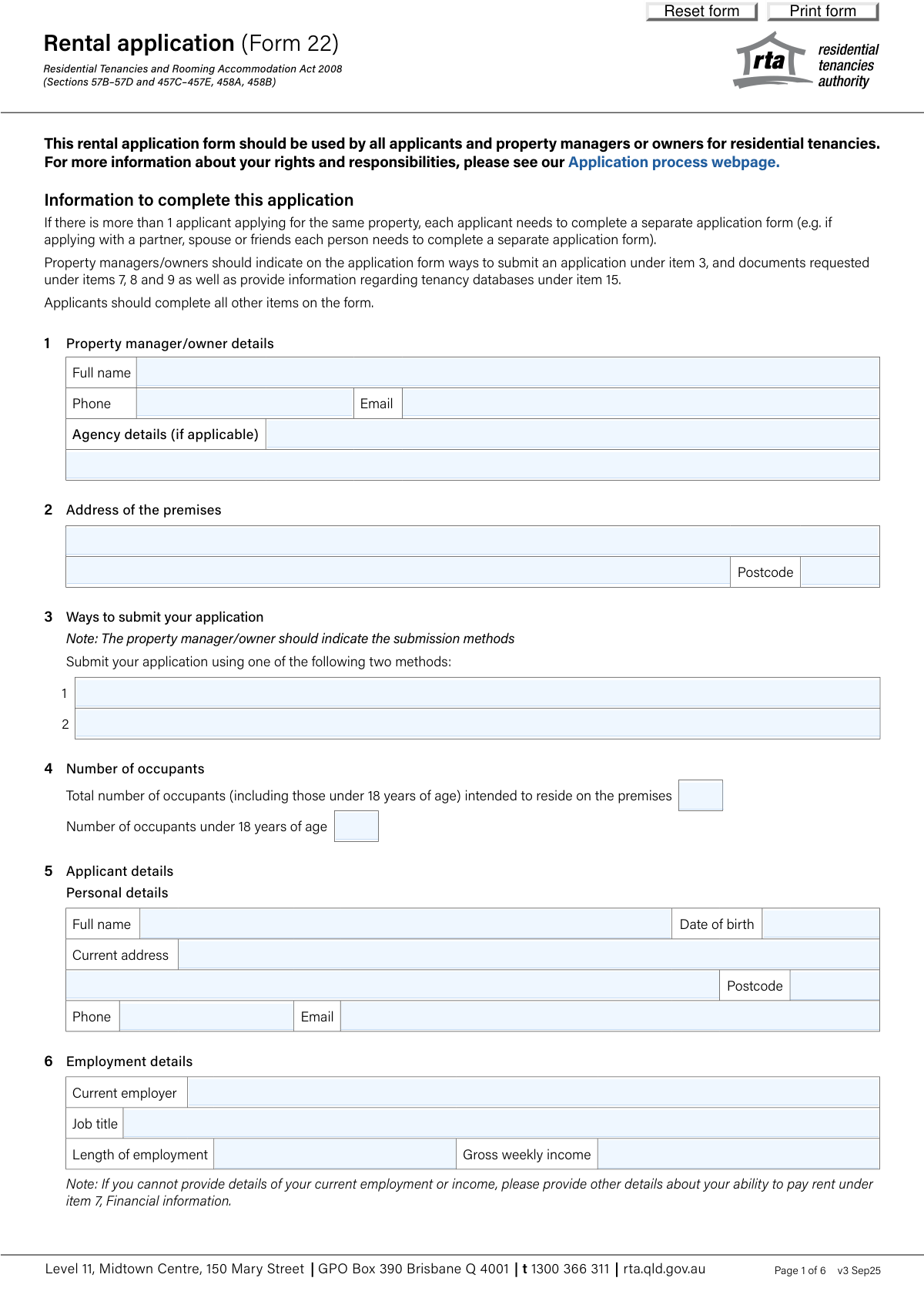
Rental application (Form 22) is the Queensland Residential Tenancies Authority’s standardised application form used by applicants to apply for a residential tenancy under the Residential Tenancies and Rooming Accommodation Act 2008. It collects key information a property manager/owner can lawfully request—such as identity verification, financial ability to pay rent, suitability documents, rental history, references, and details about pets and vehicles—so the lessor can assess the application consistently and compliantly. The form also documents required submission methods and tenancy database checks, helping both parties understand rights, responsibilities, and privacy requirements. Today, this form can be filled out quickly and accurately using AI-powered services like Instafill.ai, which can also convert non-fillable PDF versions into interactive fillable forms.
Our AI automatically handles information lookup, data retrieval, formatting, and form filling.
It takes less than a minute to fill out Form 22 (Rental application) using our AI form filling.
Securely upload your data. Information is encrypted in transit and deleted immediately after the form is filled out.

Form specifications

Form name: Rental application (Form 22) — Residential Tenancies and Rooming Accommodation Act 2008 (Qld)
Number of pages: 5
Filled form examples: Form Form 22 (Rental application) Examples
Language: English
Categories: rental application forms
main-image

Instafill Demo: filling out a legal form in seconds

How to Fill Out Form 22 (Rental application) Online for Free in 2026

Are you looking to fill out a FORM 22 (RENTAL APPLICATION) form online quickly and accurately? Instafill.ai offers the #1 AI-powered PDF filling software of 2026, allowing you to complete your FORM 22 (RENTAL APPLICATION) form in just 37 seconds or less.
Follow these steps to fill out your FORM 22 (RENTAL APPLICATION) form online using Instafill.ai:
  1. 1 Go to Instafill.ai and upload the Rental application (Form 22) PDF (or select it from the form library).
  2. 2 Let the AI detect and map the fields, then enter the property details and property manager/owner information (premises address and submission methods).
  3. 3 Provide applicant personal details and contact information, then add employment and income details (or alternative financial capacity details if not regularly employed).
  4. 4 Attach or list the requested supporting documents for financial information, identity verification, and applicant suitability as required by the property manager/owner.
  5. 5 Complete rental history for current/previous properties and add two references with contact details and relationship to you.
  6. 6 Fill in additional sections as applicable (pets, vehicles, preferred move-in date, desired lease term, and any tenancy database details provided).
  7. 7 Review for completeness and accuracy, generate the final PDF, e-sign/confirm where required, and submit via one of the listed submission methods while saving a copy for your records.

Our AI-powered system ensures each field is filled out correctly, reducing errors and saving you time.

Why Choose Instafill.ai for Your Fillable Form 22 (Rental application) Form?

Speed

Complete your Form 22 (Rental application) in as little as 37 seconds.

Up-to-Date

Always use the latest 2026 Form 22 (Rental application) form version.

Cost-effective

No need to hire expensive lawyers.

Accuracy

Our AI performs 10 compliance checks to ensure your form is error-free.

Security

Your personal information is protected with bank-level encryption.

Frequently Asked Questions About Form Form 22 (Rental application)

Form 22 is the standard rental application used in Queensland to apply for a residential tenancy under the Residential Tenancies and Rooming Accommodation Act 2008. It helps property managers/owners assess your identity, ability to pay rent, and suitability as a tenant.

Each applicant must complete their own separate Form 22, even if you’re applying as a couple, family, or group. This means every adult applicant submits an individual form with their own details and documents.

The property manager/owner should fill in the submission methods (Item 3), indicate which documents are requested (Items 7–9), and list any tenancy databases used (Item 15). Applicants complete the remaining sections, including personal details, employment/financial info, rental history, references, and the submission confirmation.

You must be given at least two different submission methods, and at least one must not be a “restricted way.” Restricted ways include methods that charge you a fee (like an application fee/background check cost) or require you to provide personal info through a third-party platform not run by the property manager/owner.

The property manager/owner will specify what they want, but common examples include recent payslips and bank statements (without transaction details). If you don’t have regular income, you can provide alternatives like Centrelink letters, proof of savings/assets, or previous employment payslips.

If you can’t provide standard employment details, explain your ability to pay rent in Item 7 using alternative evidence (e.g., savings, Centrelink statements, invoices, accountant letters, or prior payslips). You can also discuss acceptable alternatives with the property manager/owner.

The property manager/owner will indicate which identity documents they require (e.g., driver licence, passport). If you can’t provide the requested documents, you should discuss the most suitable alternative identity verification method with them.

They can verify your identity by sighting originals or receiving copies, but they must not keep a copy of original documents unless you consent. If you provide copies, they must store your personal information securely.

If your application is unsuccessful, the property manager/owner must destroy copies of your identification documents within 3 months of the relevant tenancy commencing (unless you consent to them being held longer). Your information must be stored securely and used only for the application process.

If you don’t have a rental history, you can leave Item 10 blank as the form instructs. Consider strengthening your application with references (Item 11) and any suitability documents requested in Item 9.

You must provide two referees who can verify your ability to care for the premises. Include each referee’s name, phone, email, and their connection to you (for example, employer, previous property manager, or personal referee if accepted).

In Items 12 and 13, select Yes/No and provide details (pet type/number and vehicle counts). If you have pets or vehicles, the tenancy agreement may include additional reasonable conditions (e.g., carpet cleaning/pest control for pets or parking rules for vehicles).

Tenancy databases are services property managers/owners may use to check tenancy history, and the form should list which ones may be used and how to contact them. If you are listed on a tenancy database, the property manager/owner must inform you of the listing details.

No—Item 16 states the application will not be processed unless all required documents are submitted. Make sure you include the documents requested under Items 7–9 before signing and submitting.

Yes—AI tools like Instafill.ai can help auto-fill form fields accurately using the information you provide, saving time and reducing errors. Typically, you upload the PDF to Instafill.ai, answer a guided set of questions once, and the tool maps your answers into the correct Form 22 fields for review before you download and submit.

If the PDF is flat/non-fillable, Instafill.ai can convert it into an interactive fillable form so you can type directly into the fields. After conversion, you can auto-fill, review, and export a completed version for submission using the methods listed in Item 3.

Compliance Form 22 (Rental application)
Validation Checks by Instafill.ai

1
Property manager/owner contact details are complete and valid
Validates that Property Manager/Owner Full Name, Phone, and Email are all provided and that the phone and email match acceptable formats. This is important because applicants need a reliable contact point and the submission/processing workflow depends on being able to reach the responsible party. If validation fails, the submission should be blocked or routed to an exception queue for correction before the application can be accepted.
2
Premises address fields and postcode are present and Australian-formatted
Checks that Address Line 1, Address Line 2 (suburb/state where applicable), and Postcode are completed and that the postcode is exactly 4 digits (Australian postcode format). This ensures the application is tied to a specific premises and prevents downstream issues with matching the application to the correct listing. If invalid or missing, the form should require correction because the application cannot be properly associated with a property.
3
At least two submission methods are provided and are distinct
Ensures Submission Method 1 and Submission Method 2 are both populated and not duplicates (case-insensitive and ignoring minor punctuation). The form instructions require at least two ways to submit an application, so capturing two distinct methods is a compliance and usability requirement. If validation fails, the property manager/owner must add/adjust methods before the form can be finalized.
4
Occupant counts are numeric, non-negative, and logically consistent
Validates that Total Occupants and Occupants Under 18 are integers (no decimals), are not negative, and that Occupants Under 18 is less than or equal to Total Occupants. This prevents impossible household compositions and supports correct assessment of occupancy suitability. If the rule fails, the system should reject the submission and prompt the user to correct the counts.
5
Applicant personal details completeness and basic quality checks
Checks that Applicant's Full Name, Current Address (line 1 at minimum), Current Address Postcode, Phone Number, and Email Address are provided and not placeholder text (e.g., 'N/A', 'test', or single-character entries). These fields are essential for identification, communication, and record matching. If validation fails, the application should not proceed because the applicant cannot be reliably contacted or identified.
6
Applicant date of birth is a valid date and indicates an eligible age
Validates that Applicant's Date of Birth is a real calendar date and is not in the future, and optionally enforces a minimum age threshold (commonly 18+) based on business rules. This reduces data entry errors and supports legal/contractual eligibility checks. If invalid, the system should require correction; if underage per policy, the application should be flagged for manual review rather than silently accepted.
7
Phone number format validation for all phone fields
Ensures all phone fields (property manager/owner, applicant, rental history contacts, referees, tenancy databases) match acceptable Australian formats (e.g., 10-digit mobile starting with 04, landline with area code, or international +61 format) and contain only allowed characters. Correct phone formatting is critical for contacting parties and avoiding failed communications. If validation fails, the user should be prompted to correct the number and the record should not be marked complete.
8
Email address format validation for all email fields
Validates that all email fields (property manager/owner, applicant, rental history contacts, referees) conform to a standard email pattern and do not contain obvious invalid values (missing '@', missing domain, spaces). Email is a primary communication channel and is often used for identity/reference verification. If validation fails, the system should block submission or mark the record incomplete until corrected.
9
Employment and income fields are internally consistent
Checks that if any employment details are provided (Current Employer, Job Title, Length of Employment), then Gross Weekly Income is also provided and is a valid currency/number greater than or equal to zero. This prevents partial employment records that cannot be used to assess affordability. If validation fails, the system should prompt for missing fields or require the applicant to instead provide alternative financial evidence under Financial information.
10
Gross weekly income is numeric and within reasonable bounds
Validates that Gross Weekly Income is a numeric value (allowing currency symbols and commas) and falls within configured sanity limits (e.g., not negative and not unrealistically high such as millions per week unless explicitly confirmed). This reduces typos (e.g., extra zeros) that could distort affordability assessment. If out of bounds, the system should require confirmation or correction and flag the application for review.
11
Required documents attached must align with document fields provided
If 'Required documents attached Yes' is selected, validates that the requested document slots (Financial Document 1/2, Identity Document(s), Suitability Document(s) as applicable) are not blank and/or that corresponding uploads/attachments exist in the submission package. This enforces the form statement that the application will not be processed unless all required documents are submitted. If validation fails, the system should prevent marking the application as complete and request the missing documents.
12
Identity verification status is mutually exclusive and consistent with identity documents
Ensures 'Verification of identity completed - Yes' and 'No' are not both selected (and not both unselected if the office-use section is being completed), and if 'Yes' is selected then at least one identity document entry is present. This prevents contradictory processing states and supports auditability of identity checks. If validation fails, the record should be blocked from progressing to the next workflow stage.
13
Rental history entries are complete when any rental history field is provided
For each rental history property (Property 1 and Property 2), if any field is filled in, validates that the address, postcode, rental period, and at least one contact method for the manager/owner (phone or email) are provided. This avoids unusable partial histories that cannot be verified. If validation fails, the system should prompt to complete the missing components or clear the section if the applicant has no rental history.
14
Rental period date range format and chronology validation
Validates that rental period fields (e.g., 'Start – End') contain two valid dates in an accepted format and that the start date is on or before the end date. This ensures the rental timeline is interpretable and supports reference checks and tenancy database comparisons. If invalid, the system should reject the entry and request corrected dates.
15
Referee details: exactly two referees with complete contact information
Checks that both referees are provided with Name, Phone or Email (preferably both), and Referee’s connection to applicant, and that the two referees are not the same person (e.g., same email/phone). References are required to verify suitability and care for the premises, and duplicates reduce verification value. If validation fails, the application should be flagged incomplete and the applicant prompted to provide valid, distinct referees.
16
Conditional pet and vehicle details based on Yes/No selections
Ensures the Pet Details Yes/No and Vehicles Parked Yes/No selections are mutually exclusive, and if 'Yes' is selected then the relevant detail fields are completed (Pet Type and Number of Pets; and at least one vehicle count field with a non-zero integer). This prevents contradictory declarations and ensures the property manager can assess conditions or restrictions. If validation fails, the system should require correction before submission is accepted.

Common Mistakes in Completing Form 22 (Rental application)

Not submitting a separate application for each applicant

People often assume one form covers a couple, family, or group, and only the “main” applicant completes it. This can delay assessment or cause the application to be rejected because the form explicitly requires each applicant to complete a separate Form 22. To avoid this, ensure every adult applicant submits their own completed form and their own supporting documents; AI-powered tools like Instafill.ai can duplicate shared details (property address, move-in date) while keeping each applicant’s personal and employment details distinct.

Filling in property manager/owner sections that should be completed by the agent/owner

Applicants sometimes enter guesses or leave placeholders in Items 1, 3, 7–9, and 15, even though the form notes these are typically indicated by the property manager/owner (e.g., submission methods and which documents are requested). Incorrect entries can create confusion, lead to missing required documents, or result in submission via an unaccepted method. Avoid this by confirming with the agent/owner what they require and only completing applicant sections unless instructed otherwise; Instafill.ai can help by flagging fields that are commonly “agent-completed” and prompting you to confirm requirements.

Incorrect occupant counts (total vs under-18 mismatch)

A frequent error is entering the number of children under 18 but forgetting to include them in the total occupants, or entering inconsistent numbers (e.g., under-18 greater than total). This can raise concerns about undisclosed occupants and may affect suitability assessment or lease conditions. Double-check that “Total number of occupants” includes everyone who will live there and that the “under 18” figure is a subset; Instafill.ai can automatically validate these numbers for consistency.

Using inconsistent names across the form and documents

Applicants often use nicknames, omit middle names, or enter a different surname than what appears on identity documents (e.g., after marriage). This can slow identity verification and trigger follow-up requests, delaying processing. Use your legal name exactly as shown on your primary ID and ensure the same name appears on payslips/bank letters where possible; Instafill.ai can standardize name formatting and prompt you when a mismatch is likely.

Date format mistakes (DOB, rental periods, move-in date)

People commonly enter dates in mixed formats (DD/MM vs MM/DD), provide only a month/year, or write unclear ranges for rental periods (e.g., “2022–2023” without exact dates). Ambiguous dates can cause verification issues with rental history and employment length, and may delay approval. Always use a clear Australian format (DD/MM/YYYY) and specify start and end dates for rental periods; Instafill.ai can enforce consistent date formatting and catch incomplete date ranges.

Providing net income or monthly income instead of gross weekly income

The form asks for “Gross weekly income,” but applicants often enter take-home pay (net) or a monthly/annual figure without converting. This can make affordability look worse or inconsistent with payslips, prompting extra questions or rejection. Use gross (before tax) and convert to a weekly amount (annual Ă· 52, monthly × 12 Ă· 52), and ensure it aligns with your supporting documents; Instafill.ai can calculate and format income correctly from uploaded payslips.

Leaving employment details blank without using the financial information section properly

Applicants who are self-employed, casual, between jobs, or on benefits sometimes leave Item 6 incomplete and also fail to provide alternative evidence under Item 7. This can make the application appear unsupported and may lead to it not being processed. If you can’t complete standard employment fields, clearly explain your situation and attach acceptable alternatives (e.g., Centrelink letters, savings proof, accountant letter); Instafill.ai can guide you to the right supporting-document options and ensure nothing is missed.

Attaching the wrong financial documents or oversharing prohibited details

A common issue is uploading bank statements with full transaction histories (when the form suggests statements without transaction details) or providing documents the agent is not allowed to request (e.g., detailed credit/bank transaction statements). Oversharing increases privacy risk and can create compliance issues, while missing the requested documents can stall processing. Provide only what is requested (e.g., recent payslips, appropriately redacted statements) and confirm document types with the property manager/owner; Instafill.ai can help by checking document completeness and reminding you to redact sensitive transaction data.

Identity verification errors (wrong document types, unclear copies, missing consent rules)

Applicants often list identity documents but forget to actually attach them, provide low-quality scans, or provide originals without understanding consent rules about copying. This can delay verification and may require resubmission. Ensure the documents match what the property manager/owner requested, provide clear copies (all corners visible), and discuss alternatives if you can’t provide the requested IDs; Instafill.ai can validate that required ID files are attached and legible, and if the form is a flat non-fillable PDF, it can convert it into a fillable version to reduce handling errors.

Incomplete rental history and referee contact details

People frequently omit key fields like rental period dates, manager/owner email/phone, or provide referees who can’t be reached (wrong numbers, outdated emails) or who aren’t suitable to verify property care. Missing or incorrect contacts slow reference checks and can weaken the application. Provide complete, current contact details and choose referees who will respond promptly and can speak to your tenancy conduct; Instafill.ai can format phone numbers/emails correctly and prompt you to fill all required subfields.

Pet and vehicle sections left inconsistent (Yes/No not aligned with details)

Applicants sometimes tick “No” but still list a pet/vehicle count, or tick “Yes” and leave the details blank. This creates uncertainty about compliance with building rules, parking availability, and potential lease conditions, and may trigger follow-up questions. Make sure the Yes/No selection matches the details provided, and include practical information (pet type/number; vehicle types/counts); Instafill.ai can cross-check these fields and flag contradictions before submission.

Missing signature/printed name/date and submitting without all required documents

Many applications are delayed because the submission confirmation (printed name, signature, date) is incomplete or because applicants submit the form before attaching all requested documents—despite the form stating it will not be processed without them. This leads to avoidable back-and-forth and can cause you to miss out in competitive rental markets. Before submitting, complete the confirmation section and use a checklist to ensure every requested document is attached; Instafill.ai can run a pre-submission completeness check and ensure required fields and attachments are present.
Saved over 80 hours a year

“I was never sure if my IRS forms like W-9 were filled correctly. Now, I can complete the forms accurately without any external help.”

Kevin Martin Green

Your data stays secure with advanced protection from Instafill and our subprocessors

Robust compliance program

Transparent business model

You’re not the product. You always know where your data is and what it is processed for.

ISO 27001, HIPAA, and GDPR

Our subprocesses adhere to multiple compliance standards, including but not limited to ISO 27001, HIPAA, and GDPR.

Security & privacy by design

We consider security and privacy from the initial design phase of any new service or functionality. It’s not an afterthought, it’s built-in, including support for two-factor authentication (2FA) to further protect your account.

Fill out Form 22 (Rental application) with Instafill.ai

Worried about filling PDFs wrong? Instafill securely fills rental-application-form-22-residential-tenancies-and-rooming-accommodation-act-2008-qld forms, ensuring each field is accurate.