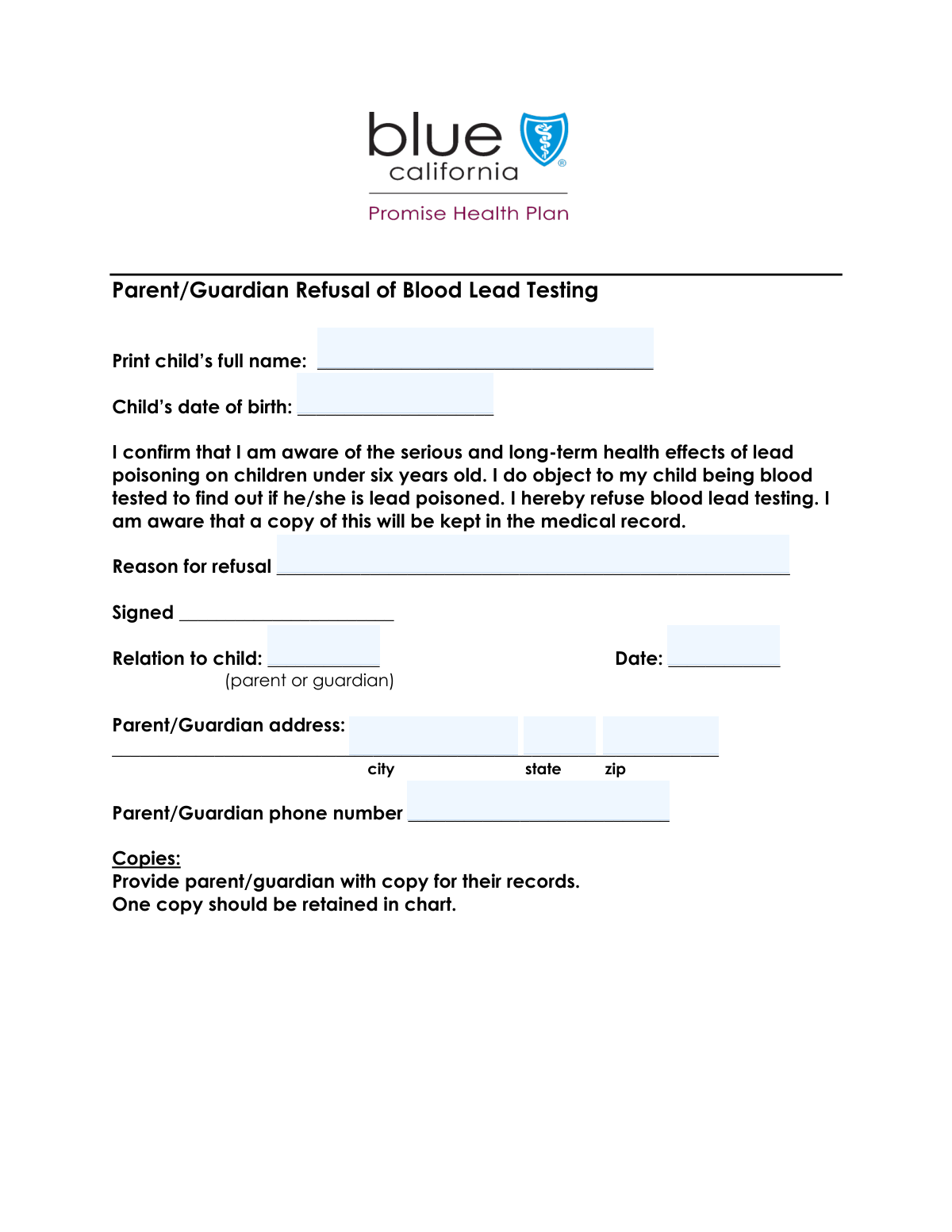
Yes! You can use AI to fill out Parental Refusal of Blood Lead Testing for a Child

This form is a legal document for parents or guardians to officially state their refusal of a blood lead test for their minor child. It is important because it documents the parent's decision for medical records, often requiring them to acknowledge they understand the potential health risks of undetected lead exposure. Today, this form can be filled out quickly and accurately using AI-powered services like Instafill.ai, which can also convert non-fillable PDF versions into interactive fillable forms.
Our AI automatically handles information lookup, data retrieval, formatting, and form filling.
It takes less than a minute to fill out Blood Lead Test Refusal Form using our AI form filling.
Securely upload your data. Information is encrypted in transit and deleted immediately after the form is filled out.

Form specifications

Form name: Parental Refusal of Blood Lead Testing for a Child
Number of fields: 9
Number of pages: 2
Language: English
Categories: rental forms
main-image

Instafill Demo: How to fill out PDF forms in seconds with AI

How to Fill Out Blood Lead Test Refusal Form Online for Free in 2026

Are you looking to fill out a BLOOD LEAD TEST REFUSAL FORM form online quickly and accurately? Instafill.ai offers the #1 AI-powered PDF filling software of 2026, allowing you to complete your BLOOD LEAD TEST REFUSAL FORM form in just 37 seconds or less.
Follow these steps to fill out your BLOOD LEAD TEST REFUSAL FORM form online using Instafill.ai:
  1. 1 Navigate to Instafill.ai and upload or select the Blood Lead Test Refusal Form.
  2. 2 Enter the child's full name and date of birth in the 'Child Information' section.
  3. 3 Provide the parent or guardian's full address and phone number.
  4. 4 Clearly state the reason for refusing the blood lead test in the provided field.
  5. 5 Review all the information you have entered to ensure it is correct and complete.
  6. 6 Electronically sign the form, adding your relationship to the child and the current date.
  7. 7 Download, print, or submit the completed refusal form to the relevant healthcare provider or authority.

Our AI-powered system ensures each field is filled out correctly, reducing errors and saving you time.

Why Choose Instafill.ai for Your Fillable Blood Lead Test Refusal Form Form?

Speed

Complete your Blood Lead Test Refusal Form in as little as 37 seconds.

Up-to-Date

Always use the latest 2026 Blood Lead Test Refusal Form form version.

Cost-effective

No need to hire expensive lawyers.

Accuracy

Our AI performs 10 compliance checks to ensure your form is error-free.

Security

Your personal information is protected with bank-level encryption.

Frequently Asked Questions About Form Blood Lead Test Refusal Form

This form is used by a parent or legal guardian to formally document their decision to refuse a blood lead test for their child.

A parent or legal guardian who has decided to decline a recommended or required blood lead screening for their child should complete and sign this form.

You must enter your child's complete full name and their date of birth in the 'Child Information' section.

Yes, the form requires you to provide a specific reason for your refusal of the blood lead testing.

You need to provide your full address, phone number, your relationship to the child (e.g., mother, father, legal guardian), and your signature with the date.

In this field, you should specify your legal relationship to the child, such as 'Mother', 'Father', or 'Legal Guardian'.

You should submit the completed form to the healthcare provider, clinic, or school that requested the blood lead test for your child.

Submitting this form creates an official record of your decision. The requesting institution will keep it on file to document that the test was offered and you declined.

If you later decide you want your child to have the blood lead test, you should contact the provider or institution where you submitted the form to make arrangements for the test.

Yes, services like Instafill.ai use AI to accurately auto-fill form fields from your saved profile, which can save you time and help prevent errors.

You can use a service like Instafill.ai to easily fill out this form online. Simply upload the document, and the tool will help you complete the fields and sign it electronically.

If you have a non-fillable PDF, you can upload it to a service like Instafill.ai. It can convert flat PDFs into interactive, fillable forms that you can complete on your computer or phone.

Compliance Blood Lead Test Refusal Form
Validation Checks by Instafill.ai

1
Child's Date of Birth Format and Validity
This check ensures the 'Child's Date of Birth' is entered in a valid date format (e.g., MM/DD/YYYY) and that the date is in the past. It is crucial for accurately identifying the child and determining their age for medical purposes. If the date is invalid or set in the future, the form submission will be rejected to prevent nonsensical or fraudulent data entry.
2
Child's Age Logical Consistency
This validation calculates the child's age based on the 'Child's Date of Birth' and the 'Signature Date'. It verifies that the age is within a plausible range for a child (e.g., 0-18 years), which is critical for a form concerning pediatric health. An invalid age might indicate a data entry error, and the system should flag the submission for review or correction.
3
Signature Date and DOB Chronology
This check verifies that the 'Signature Date' is on or after the 'Child's Date of Birth'. It is a logical validation to ensure the form was signed after the child was born. A signature date preceding the birth date is impossible and indicates a significant data entry error, which must be corrected before the form can be processed.
4
Signature Date is Not in the Future
This validation ensures the 'Signature Date' is not a future date. A form cannot be legally signed on a day that has not yet occurred. This check prevents accidental or intentional post-dating, ensuring the form's legal and temporal accuracy. Submissions with future dates will be rejected.
5
Parent/Guardian Phone Number Format
This check validates that the 'Parent/Guardian Phone Number' field contains a valid 10-digit number, accommodating common formats like (XXX) XXX-XXXX or XXX-XXX-XXXX. A correctly formatted phone number is essential for contacting the parent or guardian for follow-up or clarification. An invalid format will trigger an error, prompting the user to correct the entry.
6
Zip Code Format Validation
This validation ensures the 'Zip Code' field contains a valid 5-digit or 9-digit (ZIP+4) US postal code. A correct zip code is critical for mail delivery and for demographic or geographic data analysis. If the format is incorrect, the submission will be flagged, and the user will be required to provide a valid postal code.
7
State Abbreviation Validation
This check verifies that the 'State' field contains a valid, 2-letter US state abbreviation from a predefined list. Using standardized state codes prevents ambiguity and ensures the address is valid for mail and record-keeping. An entry that does not match a valid abbreviation will result in a validation error.
8
Child's Full Name Completeness
This validation ensures the 'Child's Full Name' field is not empty and contains at least two words, representing a first and last name. A complete name is fundamental for correctly identifying the child in all records. An incomplete or empty name field will prevent form submission until the required information is provided.
9
Reason for Refusal Completeness
This check verifies that the 'Reason for Refusal' field is not empty, as it is the primary purpose of this form. A clear reason is required for legal and public health documentation to understand why the blood lead test was declined. An empty field would make the form's purpose void, so the submission will be blocked until a reason is entered.
10
Relation to Child Completeness
This validation ensures the 'Relation to Child' field is filled out. This information is legally necessary to confirm that the person signing the form has the authority to make medical decisions for the child. Without this information, the refusal may not be legally valid, so the form will be rejected until the relationship is specified.
11
Street Address Field Completeness
This check ensures the main address field (labeled 'text__f3f1') is not left blank. A complete street address is necessary for creating a full record and for any potential mail correspondence with the parent or guardian. A missing street address will cause the form to be flagged as incomplete.
12
Full Address Integrity Check
This validation performs a cross-field check to ensure that if any part of the address (street, state, zip) is filled, all parts are filled. A partial address is unusable for mailing or location verification. This check ensures data integrity by requiring a complete address block, preventing submissions with incomplete contact information.

Common Mistakes in Completing Blood Lead Test Refusal Form

Using a Nickname for Child's Full Name

Parents sometimes enter a child's nickname or a shortened version of their name instead of their full legal name. This creates a mismatch with official records like birth certificates and medical files, which can lead to processing delays or outright rejection of the form. To avoid this, always enter the child's complete name exactly as it appears on their official identification documents.

Entering the Wrong Date for Signature

A frequent error is accidentally entering the child's date of birth in the 'Signature Date' field. This happens due to confusion between the two date fields on the form. An incorrect signature date invalidates the document, as it must reflect the day it was actually signed, leading to the form being returned. Always double-check that the signature date is the current date.

Providing a Vague Reason for Refusal

When filling out the 'Reason for Refusal' field, people often provide vague statements like 'personal reasons' or 'don't want to.' These explanations lack the necessary detail for administrative or legal review and may result in the form being deemed incomplete. To prevent delays, provide a clear and specific reason, such as 'religious objection' or 'previous adverse reaction in a family member.'

Incomplete Parent/Guardian Address

Forgetting to include an apartment, suite, or unit number is a very common mistake, especially for those living in multi-unit residences. This omission often leads to returned mail and missed communications from the health provider or agency. Always ensure the full, complete address is entered to guarantee successful delivery of important documents.

Using an Incorrect Date of Birth Format

Different regions use different date formats (e.g., MM/DD/YYYY vs. DD/MM/YYYY), and entering the wrong one can cause significant data entry errors. This can lead to the child's age being calculated incorrectly, potentially affecting eligibility for age-specific programs or procedures. Pay close attention to the required format or use a standard MM/DD/YYYY if unspecified. AI-powered tools like Instafill.ai can automatically format dates correctly to prevent this issue.

Zip Code and City/State Mismatch

People may accidentally enter a zip code that does not correspond to the city and state listed, often due to a typo or using an old, memorized zip code. This error can cause mail to be misdirected or returned as undeliverable, leading to critical communication gaps. Before submitting, verify the zip code against the city and state using an online tool.

Ambiguous 'Relation to Child'

Entering a generic term like 'Guardian' or 'Parent' in the 'Relation to Child' field can be insufficient. Legal and medical forms often require a specific relationship (e.g., 'Mother,' 'Father,' 'Legal Guardian,' 'Foster Parent') to verify who has the authority to make decisions for the child. Using an ambiguous term may trigger a request for additional documentation, delaying the process.

Inconsistent Phone Number Formatting

Phone numbers are often entered without a consistent format (e.g., with/without parentheses, dashes, or spaces). This can cause errors in automated systems that try to parse the number, potentially making it impossible for the organization to make contact. To avoid this, use a standard format like (XXX) XXX-XXXX. Form-filling tools like Instafill.ai can help by standardizing the format automatically.

Leaving Required Fields Blank

In a rush, it's easy to overlook a field, especially text-heavy ones like 'Reason for Refusal' or secondary contact information. Submitting a form with missing required information will almost always result in it being rejected as incomplete, forcing you to fill it out again. To prevent this, do a final review of the entire form to ensure every mandatory field is completed before signing.

Illegible Handwriting on a Printed Form

If the form is a non-fillable PDF that must be printed and filled out by hand, illegible handwriting is a major source of errors. Poor penmanship can cause staff to misinterpret names, dates, or addresses, leading to incorrect data in the system or rejection of the form. To avoid this, print clearly in block letters. Alternatively, services like Instafill.ai can convert flat PDFs into digitally fillable forms, ensuring all your entries are perfectly legible.
Saved over 80 hours a year

“I was never sure if my IRS forms like W-9 were filled correctly. Now, I can complete the forms accurately without any external help.”

Kevin Martin Green

Your data stays secure with advanced protection from Instafill and our subprocessors

Robust compliance program

Transparent business model

You’re not the product. You always know where your data is and what it is processed for.

ISO 27001, HIPAA, and GDPR

Our subprocesses adhere to multiple compliance standards, including but not limited to ISO 27001, HIPAA, and GDPR.

Security & privacy by design

We consider security and privacy from the initial design phase of any new service or functionality. It’s not an afterthought, it’s built-in, including support for two-factor authentication (2FA) to further protect your account.

Fill out Blood Lead Test Refusal Form with Instafill.ai

Worried about filling PDFs wrong? Instafill securely fills parental-refusal-of-blood-lead-testing-for-a-child forms, ensuring each field is accurate.