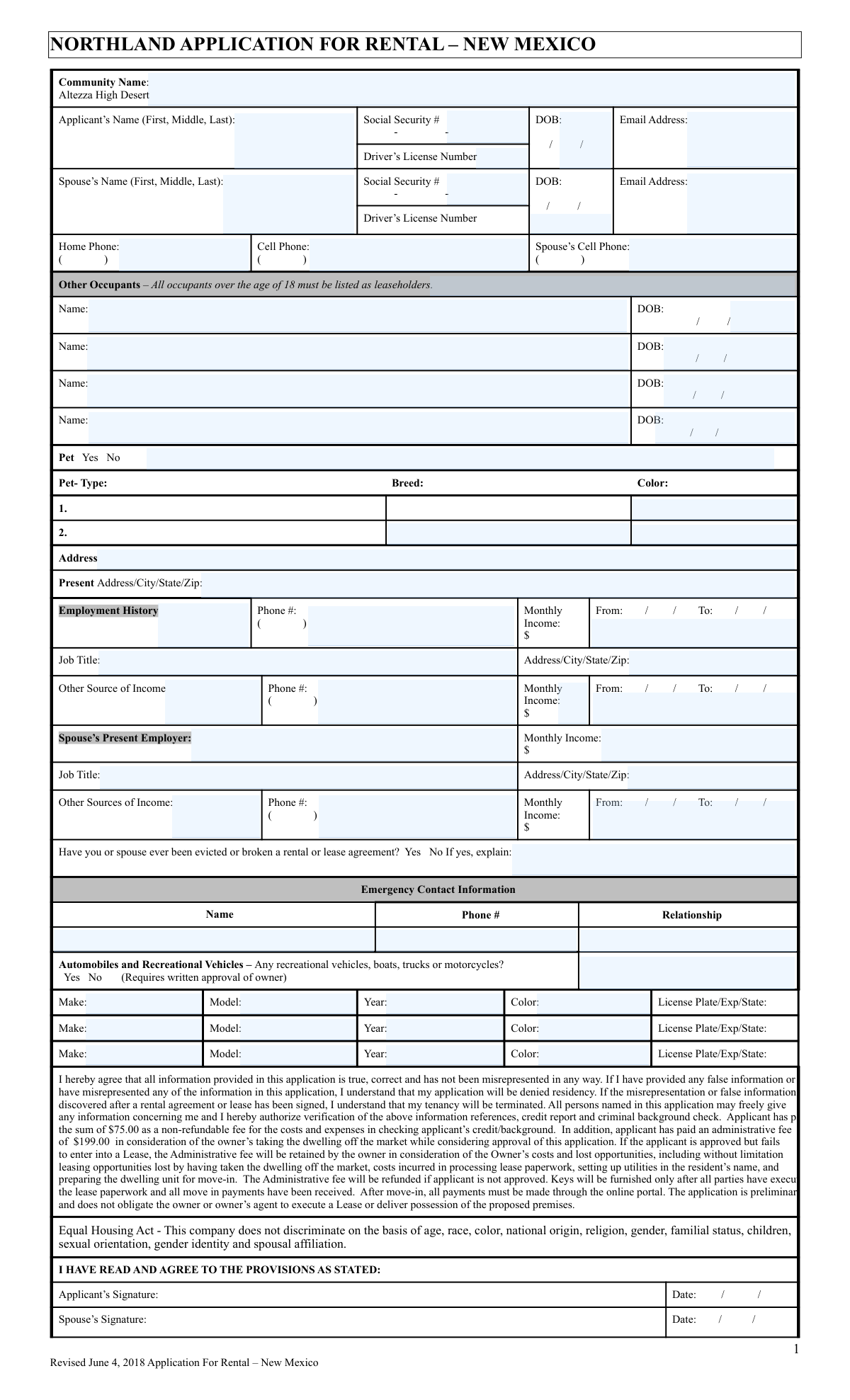
Yes! You can use AI to fill out Northland Application for Rental – New Mexico
This form is a comprehensive rental application required by Northland for properties located in New Mexico. It gathers essential information from potential renters, including personal identification, employment history, income details, and residential history, to assess their suitability as tenants. This information is used for background checks, credit reports, and to verify the applicant's ability to meet lease obligations. Today, this form can be filled out quickly and accurately using AI-powered services like Instafill.ai, which can also convert non-fillable PDF versions into interactive fillable forms.
Our AI automatically handles information lookup, data retrieval, formatting, and form filling.
It takes less than a minute to fill out Northland Application for Rental – New Mexico using our AI form filling.
Securely upload your data. Information is encrypted in transit and deleted immediately after the form is filled out.
Form specifications
| Form name: | Northland Application for Rental – New Mexico |
| Number of pages: | 2 |
| Language: | English |
Instafill Demo: How to fill out PDF forms in seconds with AI
How to Fill Out Northland Application for Rental – New Mexico Online for Free in 2026
Are you looking to fill out a NORTHLAND APPLICATION FOR RENTAL – NEW MEXICO form online quickly and accurately? Instafill.ai offers the #1 AI-powered PDF filling software of 2026, allowing you to complete your NORTHLAND APPLICATION FOR RENTAL – NEW MEXICO form in just 37 seconds or less.
Follow these steps to fill out your NORTHLAND APPLICATION FOR RENTAL – NEW MEXICO form online using Instafill.ai:
- 1 Navigate to Instafill.ai and upload or select the Northland Application for Rental – New Mexico form.
- 2 Provide your personal information, including your full name, Social Security Number, date of birth, and contact details. If applicable, provide the same information for your spouse.
- 3 List all other occupants who will be living in the unit, along with their names and dates of birth.
- 4 Detail your current employment history and all sources of income. If you have a spouse, provide their employment and income information as well.
- 5 Enter your current address, information about any pets, and details for all vehicles you own.
- 6 Provide emergency contact information and answer the question regarding your past rental history, explaining if necessary.
- 7 Review the entire application to ensure all AI-populated fields are accurate, then electronically sign and date the form to authorize the verification process.
Our AI-powered system ensures each field is filled out correctly, reducing errors and saving you time.
Why Choose Instafill.ai for Your Fillable Northland Application for Rental – New Mexico Form?
Speed
Complete your Northland Application for Rental – New Mexico in as little as 37 seconds.
Up-to-Date
Always use the latest 2026 Northland Application for Rental – New Mexico form version.
Cost-effective
No need to hire expensive lawyers.
Accuracy
Our AI performs 10 compliance checks to ensure your form is error-free.
Security
Your personal information is protected with bank-level encryption.
Frequently Asked Questions About Form Northland Application for Rental – New Mexico
This is a rental application for a Northland-managed property in New Mexico, specifically for communities like Altezza High Desert. It is used to collect your personal, financial, and rental history to be considered as a tenant.
The primary applicant and their spouse must provide their full details. Additionally, all other occupants who are 18 years of age or older must be listed as leaseholders on the application.
You must pay a $75.00 non-refundable fee for the credit and background check, plus a $199.00 administrative fee. The administrative fee is only refunded if your application is denied.
If your application is approved but you decide not to sign the lease, the owner will retain the $199 administrative fee. This fee covers the cost of taking the dwelling off the market while your application was being considered.
This information is required to verify your identity and to conduct a standard credit and criminal background check. This is a necessary part of the screening process for all applicants.
You must disclose any past evictions or broken lease agreements on the application. Provide a detailed and honest explanation in the space provided, as this information will be verified during the background check.
You must indicate that you have a pet and provide its type, breed, and color on the form. Be sure to ask the community management about their specific pet policies, as additional fees or restrictions may apply.
Any recreational vehicles, boats, trucks, or motorcycles require written approval from the owner. You must list the vehicle on your application and get explicit permission from management before bringing it to the community.
After you submit the application and pay the fees, the management company will verify your information, including your employment, credit, and background. You will be notified once a decision has been made on your application.
Yes, you should list all verifiable sources of income for both yourself and your spouse. This helps the property manager assess your ability to pay rent and is a key part of the approval process.
Yes, services like Instafill.ai use AI to accurately auto-fill form fields with your saved information. This can help you complete the application faster and with fewer errors.
To fill this form online, you can upload the PDF to the Instafill.ai platform. The AI will identify all the fields, allowing you to quickly populate your personal data and complete the application digitally.
If you have a non-fillable or 'flat' PDF, you can use a tool like Instafill.ai. It can convert the document into an interactive, fillable form so you can type your answers directly into the fields.
Yes, the form states that signatures delivered electronically via formats like PDF are considered original and fully effective. You and your spouse can sign the document digitally before submitting it.
Compliance Northland Application for Rental – New Mexico
Validation Checks by Instafill.ai
1
Verifies Applicant is of Legal Age
This check validates that the applicant's Date of Birth (DOB) indicates they are 18 years of age or older. This is crucial for ensuring the applicant is legally capable of entering into a binding lease agreement. If the applicant is under 18, the application cannot be processed and should be rejected or flagged for manual review.
2
Validates Social Security Number Format
Ensures the Social Security Number (SSN) for both the applicant and spouse is entered in the correct 9-digit format, typically XXX-XX-XXXX. This is essential for running accurate credit and background checks, which are a core part of the screening process. An invalid format will cause these external checks to fail, halting the application.
3
Requires Explanation for Prior Eviction
This rule validates that if the applicant answers 'Yes' to the question 'Have you or spouse ever been evicted or broken a rental or lease agreement?', the corresponding explanation text box is not empty. This information is critical for the property manager to assess risk and make an informed decision. An application with a 'Yes' answer but no explanation should be considered incomplete.
4
Ensures Completeness of Spouse Information
This check verifies that if the 'Spouse’s Name' field is filled out, then the corresponding 'Spouse’s Social Security #', 'DOB', and 'Email Address' fields are also completed. Incomplete spousal information prevents a full background and credit assessment for all adult leaseholders. The system should prompt the user to complete all required spouse fields before submission.
5
Validates Pet Details are Provided if Pet is Indicated
Checks that if the 'Pet' field is marked 'Yes', then at least one set of pet details (Type, Breed, Color) is provided. This ensures the property management is aware of all animals that will be on the premises, which is important for enforcing pet policies, assessing risk, and applying fees. Failure to provide details will result in the application being flagged as incomplete.
6
Validates Logical Employment Dates
This rule ensures that for any employment history entry, the 'From' date is chronologically earlier than the 'To' date. This maintains logical consistency in the applicant's work history, which is used to verify income stability. An illogical date range would indicate a data entry error and should be corrected before the application can be processed.
7
Ensures Valid Email Address Format
Verifies that the email addresses for the applicant and spouse follow the standard '[email protected]' format. A valid email is essential for all communication regarding the application status, lease documents, and future resident notifications. An invalid format would prevent communication and should trigger an error message asking the user to correct it.
8
Validates Standard Phone Number Format
This check ensures that all phone number fields (Home, Cell, Spouse's Cell, Emergency Contact) contain 10 digits and are entered in a consistent format, such as (XXX) XXX-XXXX. Correctly formatted phone numbers are necessary for contacting the applicant or their emergency contact. The system should reject entries that do not conform to the expected format.
9
Verifies Monthly Income is a Numeric Value
This validation confirms that all 'Monthly Income' fields contain only positive numeric characters and optionally a decimal point. This data is fundamental to calculating the applicant's income-to-rent ratio and assessing their financial eligibility. Non-numeric entries would cause calculation errors and must be prevented.
10
Ensures All Emergency Contact Fields are Complete
Validates that if an 'Emergency Contact Name' is provided, the corresponding 'Phone #' and 'Relationship' fields are also filled. Having complete emergency contact information is a critical safety and liability measure for the property management. The system should treat this section as a single unit, requiring all three fields if any one is entered.
11
Validates Vehicle Model Year is Realistic
Checks that the 'Year' for any listed vehicle is a valid 4-digit year that is not in the future and is within a reasonable historical range (e.g., after 1950). This prevents data entry errors and ensures the information used for parking permits and vehicle identification is accurate. An invalid year should trigger an error and require correction.
12
Confirms All Primary Applicant Fields are Complete
This is a master check to ensure all mandatory fields for the primary applicant are filled, including 'Applicant’s Name', 'Social Security #', 'DOB', and 'Present Address'. These fields are the absolute minimum required to begin processing an application for identity verification and background screening. The form should not be submittable until all these core fields are completed.
13
Validates Other Occupant Age
This check reviews the Date of Birth for each 'Other Occupant'. Since the form states that all occupants over 18 must be leaseholders, this validation flags any 'Other Occupant' who is 18 or older. This ensures all legally responsible adults are properly listed on the lease, preventing unauthorized adult occupants.
14
Ensures Signature is Accompanied by a Date
Verifies that if the 'Applicant’s Signature' field is signed (digitally or otherwise), the corresponding 'Date' field is also filled. The date of signature is legally significant as it establishes when the applicant agreed to the terms and authorized background checks. An undated signature may render the authorization invalid and should be flagged.
Common Mistakes in Completing Northland Application for Rental – New Mexico
Applicants often forget to list every adult (18+) who will be living in the unit, as the form requires all such individuals to be leaseholders. Omitting an adult occupant can lead to immediate application denial for misrepresentation or even future eviction for having an unauthorized resident. To avoid this, carefully list the full name and date of birth for every person over 18 who will reside in the apartment, excluding the primary applicant and spouse who are listed separately.
A frequent error is reporting net (take-home) pay instead of gross (pre-tax) monthly income, or simply guessing the amount. Landlords verify income against pay stubs, and a discrepancy can lead to rejection for either failing to meet income requirements or for misrepresenting information. Always calculate your total gross monthly income from all verifiable sources and enter that precise figure to ensure a smooth verification process.
Applicants may be tempted to check 'No' to the eviction history question to avoid scrutiny, or provide a vague explanation if they check 'Yes'. Background checks will almost certainly reveal past evictions, and dishonesty will result in automatic denial. It is crucial to be truthful and provide a concise, factual explanation of the circumstances, as this can halt an application and destroy credibility.
Forgetting to sign and date the application is a simple but critical error that renders the document invalid and halts the entire process. If a spouse is listed on the application, their signature is also mandatory, and a missing signature will cause the same delay. Always double-check that both the applicant and spouse (if applicable) have signed and dated the final page before submission.
Applicants sometimes provide only a middle initial or omit it entirely, and may leave the Social Security Number blank due to privacy concerns or oversight. However, the full legal name and SSN are required for mandatory credit and background checks. Incomplete information prevents the landlord from running these checks, causing significant delays or outright rejection of the application.
When a field doesn't apply, such as 'Spouse's Employer' for a single applicant, people often leave it blank, creating ambiguity for the processor. The agent cannot be sure if the information is not applicable or was simply forgotten, which can slow down processing. To avoid confusion, it's best practice to write 'N/A' or 'None' in fields that do not apply to your situation.
Applicants frequently list only their primary job's income, forgetting to include other valid sources like freelance work, child support, alimony, or disability benefits. This can make it appear as though they don't meet the property's income-to-rent ratio, leading to an unnecessary denial. To present a complete financial picture, be sure to list all consistent, verifiable sources of income in the designated sections.
The form requires detailed information for all vehicles, including recreational ones that need special approval, yet applicants often provide partial information. Common mistakes include forgetting to list a vehicle or providing a license plate number without the corresponding state and expiration date. This can cause issues with parking permits and community rule compliance, so it's important to list every vehicle completely and accurately.
If the form is a non-fillable PDF, applicants must print and fill it out by hand, which can result in illegible handwriting. If the property manager cannot read names, numbers, or addresses, they cannot process the application, leading to delays or rejection. To prevent this, AI-powered tools like Instafill.ai can convert flat PDFs into digitally fillable forms, ensuring all entries are clear and legible.
Simple typos in an email address or phone number are extremely common but have significant consequences, as the property manager cannot reach the applicant with questions or a lease offer. Carefully proofread all contact fields before submitting to ensure you can be reached without issue. AI-powered form filling tools like Instafill.ai can help prevent these errors by automatically validating data formats to catch mistakes.
Saved over 80 hours a year
“I was never sure if my IRS forms like W-9 were filled correctly. Now, I can complete the forms accurately without any external help.”
Kevin Martin Green
Your data stays secure with advanced protection from Instafill and our subprocessors

Robust compliance program
Transparent business model
You’re not the product. You always know where your data is and what it is processed for.
ISO 27001, HIPAA, and GDPR
Our subprocesses adhere to multiple compliance standards, including but not limited to ISO 27001, HIPAA, and GDPR.
Security & privacy by design
We consider security and privacy from the initial design phase of any new service or functionality. It’s not an afterthought, it’s built-in, including support for two-factor authentication (2FA) to further protect your account.
Fill out Northland Application for Rental – New Mexico with Instafill.ai
Worried about filling PDFs wrong? Instafill securely fills northland-application-for-rental-new-mexico forms, ensuring each field is accurate.