Yes! You can use AI to fill out DHCD PRA 811 Program Rental Application and Member Information
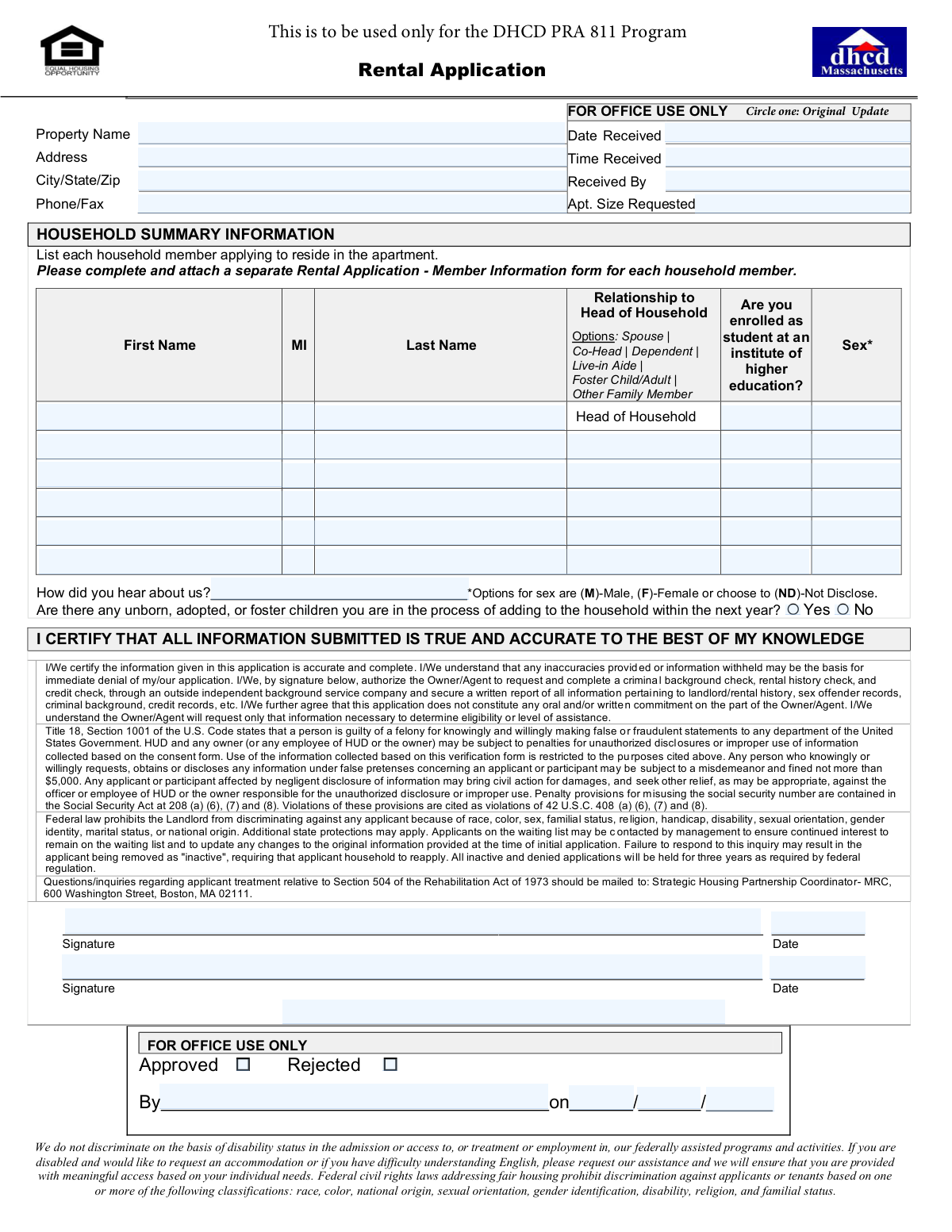
This is a comprehensive rental application for the DHCD Project-Based Rental Assistance (PRA) 811 Program, which provides housing for low-income persons with disabilities. Applicants must provide detailed information about each household member, including personal data, residence history, income, assets, and background information to determine eligibility for the program. Today, this form can be filled out quickly and accurately using AI-powered services like Instafill.ai, which can also convert non-fillable PDF versions into interactive fillable forms.
Our AI automatically handles information lookup, data retrieval, formatting, and form filling.
It takes less than a minute to fill out DHCD PRA 811 Rental Application using our AI form filling.
Securely upload your data. Information is encrypted in transit and deleted immediately after the form is filled out.
Form specifications
| Form name: | DHCD PRA 811 Program Rental Application and Member Information |
| Number of pages: | 5 |
| Language: | English |
| Categories: | rental application forms, rental forms |
Instafill Demo: How to fill out PDF forms in seconds with AI
How to Fill Out DHCD PRA 811 Rental Application Online for Free in 2026
Are you looking to fill out a DHCD PRA 811 RENTAL APPLICATION form online quickly and accurately? Instafill.ai offers the #1 AI-powered PDF filling software of 2026, allowing you to complete your DHCD PRA 811 RENTAL APPLICATION form in just 37 seconds or less.
Follow these steps to fill out your DHCD PRA 811 RENTAL APPLICATION form online using Instafill.ai:
- 1 Navigate to Instafill.ai and upload or select the DHCD PRA 811 Rental Application form.
- 2 Use the AI assistant to fill in the initial Household Summary Information, listing all members who will reside in the apartment.
- 3 Complete a separate 'Rental Application – Member Information' section for each household member, providing personal details, residence history, and background information.
- 4 Accurately list all sources of income for each member, including employment, government benefits like Social Security or TANF, and any other financial support.
- 5 Disclose all assets for each member, such as checking/savings accounts, real estate, retirement accounts, and life insurance policies.
- 6 If applicable, detail out-of-pocket medical/disability expenses for elderly or disabled household heads, as well as any childcare expenses.
- 7 Carefully review all the information entered across the application for accuracy, then electronically sign and date the certification to finalize and submit your application.
Our AI-powered system ensures each field is filled out correctly, reducing errors and saving you time.
Why Choose Instafill.ai for Your Fillable DHCD PRA 811 Rental Application Form?
Speed
Complete your DHCD PRA 811 Rental Application in as little as 37 seconds.
Up-to-Date
Always use the latest 2026 DHCD PRA 811 Rental Application form version.
Cost-effective
No need to hire expensive lawyers.
Accuracy
Our AI performs 10 compliance checks to ensure your form is error-free.
Security
Your personal information is protected with bank-level encryption.
Frequently Asked Questions About Form DHCD PRA 811 Rental Application
This is a rental application used to determine your household's eligibility for the DHCD PRA 811 Program, a federally assisted housing program. It collects information on household members, income, assets, and background.
The Head of Household must complete the main application summary. Additionally, a separate 'Rental Application – Member Information' form must be fully completed for every person who will live in the apartment, including children.
You must not leave any fields blank, as this will make the application incomplete. If a question is not applicable, you should write 'N/A' in the space provided.
Yes, the application asks if you are in the process of adding any unborn, adopted, or foster children to the household within the next year. You must answer this question on the first page.
No, the form clearly states that a lack of rental history will not be considered a negative factor. You should still complete the Rental History section accurately, indicating if it's not applicable.
Yes, the form states that a public records search will be conducted on each adult applicant. By signing, you authorize the owner/agent to perform a criminal background, rental history, and credit check.
You must attach a completed 'Rental Application – Member Information' form for each household member. You may also need to provide copies of paper benefit checks if you receive SSA benefits without a Direct Express card.
The form does not specify submission instructions, but the 'For Office Use Only' section implies it should be delivered to the property management office. Please contact the property office directly to confirm how to submit your application.
Providing false or fraudulent statements is a felony under U.S. law and can result in the immediate denial of your application. You must certify that all information provided is true and complete.
For any household member who is a minor, their parent or legal guardian must sign the 'Rental Application – Member Information' form on their behalf.
Yes, you can use services like Instafill.ai to help fill out this form accurately and efficiently. These AI-powered tools can auto-fill your information, saving you time and reducing potential errors.
To fill this form out online, you can upload the PDF to a platform like Instafill.ai. Their service allows you to complete and sign the form digitally from any device, even if the original PDF is not fillable.
If you have a non-fillable PDF, you can use a service like Instafill.ai to convert it into an interactive, fillable form. This makes it easy to type your information directly into the fields online.
The form states that information on race and ethnicity is collected for statistical purposes only. While you are asked to provide it, this information is not supposed to be used for discriminatory purposes.
Compliance DHCD PRA 811 Rental Application
Validation Checks by Instafill.ai
1
SSN Format and Presence
This check verifies that the Social Security Number (SSN) field is not empty and follows the standard XXX-XX-XXXX format. It is crucial for identity verification and background checks required for housing programs. If the format is incorrect or the field is empty, the application cannot be processed for background screening, and the user should be prompted to correct the entry.
2
Age and Criminal History Section Consistency
This validation ensures that the 'Background and Criminal History' section is only completed for members who are 18 years of age or older. It cross-references the 'Date of Birth' with the answer to 'Is member 18 years of age or older?'. If a member is under 18, this section should be disabled or flagged as an error if filled, preventing the collection of sensitive information from minors.
3
Conditional Income Field Requirement
For each income source listed (e.g., Employment, Social Security), this check confirms that if the applicant selects 'Yes', the corresponding 'Monthly Amount' field is filled with a valid, non-negative numeric value. This is essential for accurately calculating household income and determining program eligibility. An error is raised if 'Yes' is selected but the amount is missing or invalid.
4
Conditional Asset Field Requirement
For each asset type (e.g., Checking, Savings, Stocks), this validation ensures that if 'Yes' is selected, the corresponding 'Balance' or 'Value' field is completed with a numeric value. Accurate asset information is required for eligibility determination in many housing programs. If the value is missing after 'Yes' is selected, the form submission will be considered incomplete.
5
Head of Household Uniqueness and Presence
This check verifies that exactly one person in the household is designated as 'Head of Household' in the 'Relationship to Head of Household' field. Every application must have one Head of Household for processing. The system should flag an error if zero or more than one member is assigned this role across the entire household application.
6
Contact Information Completeness
For each contact method (Home Phone, Work Phone, Cell Phone, Email), this check ensures that either a valid value is provided or the corresponding 'N/A' checkbox is selected, but not both. This prevents ambiguity and ensures that all fields are intentionally addressed as per the form's 'DO NOT LEAVE ANY BLANKS' instruction. A failure would prompt the user to either provide the information or explicitly mark it as not applicable.
7
Conditional Sex Offender State Requirement
This validation is triggered if an applicant answers 'Yes' to the question 'Are you subject to a state sex offender lifetime registration requirement?'. It checks to ensure the subsequent field, 'If Yes, which state?', is not empty. This information is critical for conducting the required background checks. If the state is not provided, the application is flagged as incomplete.
8
Rental History Date Logic
This check validates the chronological order of dates in the rental history section. It ensures that for any single previous residence, the 'Move Out Date' is on or after the 'Move In Date'. This prevents logical impossibilities in the data and ensures the rental history timeline is accurate. A validation failure would require the applicant to correct the dates.
9
Medical Expense Section Eligibility
This check confirms that the 'Medical/Disability' expense section is only filled out if the applicant has answered 'Yes' to the question 'Is the Head, Spouse, or Co-Head of your household either age 62+ or disabled?'. This prevents ineligible households from claiming these deductions. If the answer is 'No' but expenses are listed, the system should flag an inconsistency for review.
10
Childcare Expense Section Logic
If an applicant answers 'Yes' to paying for childcare for a child under 13, this check ensures all related fields are logically completed. It verifies that at least one reason for the care (e.g., 'Work', 'Seek Employment') is selected and that the 'Child’s Name' field is filled. This ensures the claimed expense is properly documented for eligibility purposes. A failure would result in an incomplete section error.
11
Age vs. '62 or Older' Checkbox Consistency
This validation cross-references the applicant's 'Date of Birth' with the 'Check here you were 62 or older as of January 31, 2010' checkbox. If the box is checked, the system calculates if the provided DOB is on or before January 31, 1948. This check is vital for verifying eligibility for certain age-specific benefits or rules. A mismatch would trigger a validation error requiring correction.
12
Address Consistency Check
This check enforces the logic of the 'Member Address Same as Head of Household' checkbox. If the box is checked, the system verifies that the individual address fields for that member are blank. Conversely, if the box is not checked, it ensures the Street, City, State, and Zip fields are all completed. This prevents redundant or conflicting address data.
13
Conditional Criminal History Year
For each type of criminal history question (e.g., Sexual misconduct, Controlled substance), if the applicant answers 'Yes', this check ensures the corresponding 'Year' field is populated. The year must be a valid four-digit number. This detail is necessary for the background check process to evaluate the nature and recency of offenses. Failure to provide the year would halt processing of that section.
14
Signature and Date Presence
This check verifies that all required signature and date fields at the end of the application are completed. The date must be a valid date and cannot be a future date. A missing signature or date invalidates the applicant's certification and authorization, making the entire application void until corrected.
Common Mistakes in Completing DHCD PRA 811 Rental Application
The instructions require a separate 'Rental Application – Member Information' form for each household member, regardless of age. Applicants often only complete this form for the Head of Household, leading to an incomplete packet. This results in an immediate rejection or significant processing delays until all required forms are submitted for every person, including minors. To avoid this, carefully count each household member and fill out a corresponding member information form for each one.
The form explicitly states 'DO NOT LEAVE ANY BLANKS' on multiple pages. Applicants frequently skip fields they believe are not applicable, such as a work phone number or an income source they don't have. An application with blank fields is considered incomplete and will be returned. Always check the 'No' box or write 'N/A' where appropriate to signal that you have reviewed and intentionally answered every question.
The form asks for 'gross income before any deductions,' but many people mistakenly enter their net (take-home) pay. Applicants also forget to list all sources of income, such as part-time work, child support, or regular financial help from family. These errors can lead to incorrect eligibility calculations and potential denial for providing inaccurate information. Always report the full, pre-tax amount for every income source for each household member.
Applicants often overlook certain assets, such as 'Cash on Hand,' the balance on a Direct Express debit card, or retirement accounts, assuming they don't count. The form also asks about assets disposed of for less than fair market value in the last two years, which is a commonly missed question. Omitting assets can be viewed as fraudulent and is grounds for denial. Review the asset list carefully and provide a 'Yes' or 'No' answer and a balance for every single category.
On the summary page, applicants may forget to list every person who will be living in the unit or fail to answer the question about unborn, adopted, or foster children. Furthermore, the 'Head of Household Name' must be written identically on the top of every single member's application form. Inconsistencies or omissions create confusion and can cause delays while the property manager seeks clarification.
An unsigned or undated application is invalid. This mistake often happens when there are multiple adult applicants and one forgets to sign, or when an applicant completes the form but forgets to sign and date the final certification sections. This is a critical error that stops the application from being processed. Double-check that every required signature line on all forms is signed and dated correctly.
The form has sections that apply only under certain conditions, such as the criminal history for adults or medical expenses for elderly/disabled households. Applicants may skip a section that applies to them (e.g., an 18-year-old not filling out their rental history) or fill out one that doesn't, causing confusion. Carefully read the instructions for each section, such as 'If No, skip this section,' to ensure you are providing all necessary information and not providing superfluous data.
The application requires a list of 'all states you have ever resided in,' but people often only list their most recent one or two states of residence. This is considered an incomplete answer and can delay the background check process. To avoid this, take a moment to recall and list every state you have lived in, no matter how short the duration.
In the Income and Assets sections, every single line item has a 'Yes' and 'No' checkbox. A common error is to only check 'Yes' for applicable items and leave all others blank. This violates the 'do not leave blanks' rule and makes the form incomplete. You must go through every line and explicitly check either 'Yes' or 'No' to confirm you have considered each item.
The form specifies certain formats, such as '(M)-Male, (F)-Female or (ND)-Not Disclose' for sex. Applicants might write out the full word or use a different abbreviation, which can cause data entry errors for the processing office. Always use the exact format specified in the instructions to ensure your information is recorded correctly. AI-powered tools like Instafill.ai can help prevent these errors by automatically formatting data according to the form's specific requirements.
Saved over 80 hours a year
“I was never sure if my IRS forms like W-9 were filled correctly. Now, I can complete the forms accurately without any external help.”
Kevin Martin Green
Your data stays secure with advanced protection from Instafill and our subprocessors

Robust compliance program
Transparent business model
You’re not the product. You always know where your data is and what it is processed for.
ISO 27001, HIPAA, and GDPR
Our subprocesses adhere to multiple compliance standards, including but not limited to ISO 27001, HIPAA, and GDPR.
Security & privacy by design
We consider security and privacy from the initial design phase of any new service or functionality. It’s not an afterthought, it’s built-in, including support for two-factor authentication (2FA) to further protect your account.
Fill out DHCD PRA 811 Rental Application with Instafill.ai
Worried about filling PDFs wrong? Instafill securely fills dhcd-pra-811-program-rental-application-and-member-information forms, ensuring each field is accurate.