
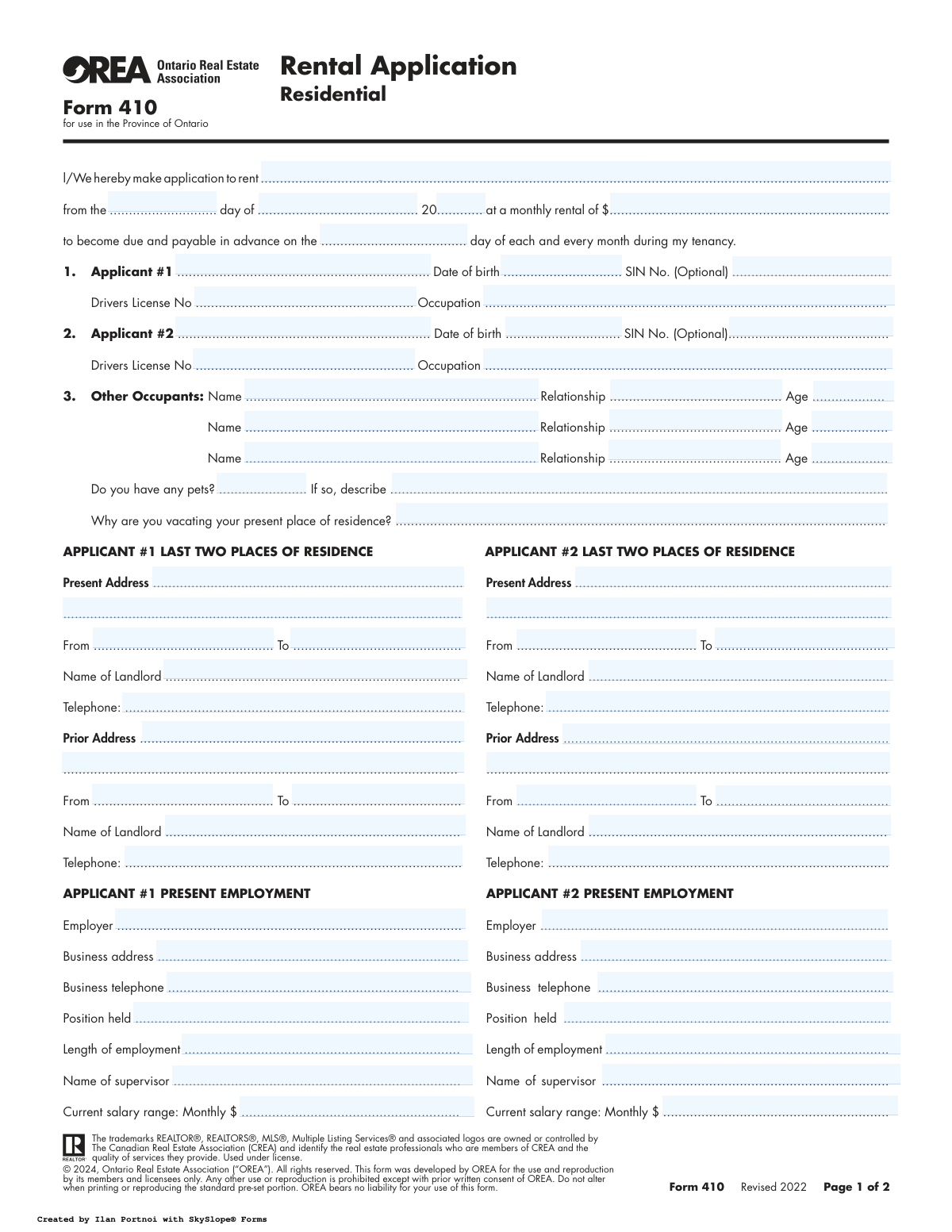
Yes! You can use AI to fill out Form 410, Rental Application Residential
Don't type 115 fields by hand. Tell our AI about yourself, or upload the listing or an old lease, and it fills every field in seconds. You check it, then download, print or sign.
The AI does the filling. You just check it.
No typing into boxes, nothing to install.
What this form asks for
The AI fills all of it, from your answers or your documents.
The AI checks your answers before you download
13 checks built for this form, so a wrong date or a missing answer is caught before anyone else sees it.
This check validates that the date of birth provided for Applicant #1 and Applicant #2 indicates they are of legal age to enter into a rental agreement, typically 18 years or older in Ontario. This is crucial for ensuring the resulting lease is a legally binding contract. If an applicant is found to be a minor, the application may be flagged for manual review or rejected.
This validation ensures that the combination of 'Lease Start Day', 'Lease Start Month', and 'Lease Start Year' forms a valid date that is not in the past. An application to rent a property must be for a future date. An invalid or past date would cause scheduling and legal issues, so the form cannot be submitted until a valid future date is entered.
This check enforces a logical rule: if the applicant answers 'Yes' to the 'Do you have pets?' question, the 'Pet description' field must be filled out. This information is critical for the landlord to assess the suitability of the pet for the property based on size, breed, and number. Failure to provide the description will prevent submission until the details are entered.
While the Social Insurance Number (SIN) is optional, this validation checks that if a value is entered, it conforms to the correct 9-digit format and passes the Luhn algorithm check for Canadian SINs. This prevents data entry errors for a highly sensitive piece of information and ensures that if a credit check is performed using the SIN, it is done with an accurate number. An invalid format will trigger an error, prompting the user to correct it or leave it blank.
This validation verifies that for each residential history entry (present and prior), the 'To' date is not earlier than the 'From' date. This ensures the timeline of an applicant's residency is logical and accurate. Inconsistent dates can indicate a mistake or an attempt to obscure information, and the form will require correction before it can be processed.
This check ensures that if any data is entered into fields specific to 'Applicant #2' (such as their date of birth, employment, or signature), the 'Applicant #2 Full Name' field must also be completed. It is illogical to have details for a co-applicant without their name. This prevents incomplete or orphaned data records and ensures all information can be correctly associated with a named individual.
And 7 more checks
- Valid Phone Number Format
- Valid Email Address Format
- Automobile Year Validity
- Primary Applicant Completeness
- Rent Due Day Range
- Monthly Salary is a Positive Number
- Signature Date is Not in the Future
Let AI fill out your Form 410
No typing. Every field filled in seconds, checked, ready to sign.
How to Fill Out Form 410 Online for Free in 2026
What the AI walks you through.
- Navigate to Instafill.ai and upload or select the OREA Form 410.
- Provide personal details for all applicants, including names, birth dates, and contact information.
- Detail your current and previous residential history for all applicants, including addresses and landlord contact information.
- Enter current and prior employment information for all applicants, including employer details, position, salary, and supervisor's name.
- List your financial details, including bank information, and provide information on any significant financial obligations.
- Provide personal references, vehicle information, and details about any pets or other occupants.
- Carefully review all entered information for accuracy, then electronically sign and date the application to authorize the verification process before submitting it.
Common Mistakes in Completing Form 410
The ones the AI is built to catch.
Incomplete or Inaccurate Residence History
Incorrect Employment Verification Details
Omitting Other Occupants
Providing Inconsistent Salary Information
Confusing Lease Dates and Rent Payment Day
Forgetting to Sign or Date the Application
Providing Inappropriate Personal References
Leaving the 'Reason for Vacating' Field Vague
Failing to Disclose Pets Accurately
Submitting a Poorly Scanned or Illegible Form
Frequently Asked Questions About Form 410
Is it really free for 7 days?
Can I fill other forms too?
How do I cancel?
How does the AI fill out Form 410?
What happens to my information?
How complex is Form 410 to fill out?
What is the purpose of OREA Form 410, the Residential Rental Application?
Who needs to be listed as an applicant on this form?
Do I have to provide my Social Insurance Number (SIN)?
What information do I need to have ready to fill out this application?
Is submitting this application the same as signing a lease?
What am I agreeing to by signing the consent section?
I have a pet. Can a landlord reject my application because of it?
What happens after I submit my application?
Who should I use for my personal references?
Can I use an AI tool to help me fill out this rental application?
How can I use Instafill.ai to complete this form online?
The PDF of Form 410 I received isn't fillable. What can I do?
What supporting documents should I prepare along with this application?
Get your Form 410 filled out by AI
$0 today. Cancel before Nov 12 and you pay nothing.
Other forms like this one
rental application forms: California/National Apartment Association Official Form B-15, Rental Application for Residents and Occupants (May 2015) with Application Agreement, Rental application (Form 22) — Residential Tenancies and Rooming Accommodation Act 2008 (Qld), Residential Rental Application (Statement of Information for Rental Applicants) — Residential Tenancies Act 1997 (Vic) s 29C; Residential Tenancies Regulations 2021 (Vic) reg 14, National Apartment Association (NAA) Rental Application for Residents and Occupants (Virginia) and Supplemental Rental Application for Units Under Government Regulated Affordable Housing Programs, New York Rental Application Form, Corporate Application for Rental, Northland Application for Rental – New Mexico, OREA Form 410, Rental Application Residential, DHCD PRA 811 Program Rental Application and Member Information, Arizona Department of Transportation Rental Application (Residential Lease), Ontario Real Estate Association Form 410, Rental Application – Residential
residential rental forms: OREA Form 410, Rental Application Residential, Form GST524, GST/HST New Residential Rental Property Rebate, Rental application (Form 22) — Residential Tenancies and Rooming Accommodation Act 2008 (Qld), Residential Rental Application (Statement of Information for Rental Applicants) — Residential Tenancies Act 1997 (Vic) s 29C; Residential Tenancies Regulations 2021 (Vic) reg 14, California Association of REALTORS® (C.A.R.) Form LR, Residential Lease or Month-to-Month Rental Agreement (Revised 12/19), Arizona Department of Transportation Rental Application (Residential Lease), Ontario Real Estate Association Form 410, Rental Application – Residential
Let AI fill out your Form 410
Your trial starts once a card is added. You pay nothing before Nov 12.
Our AI already knows this form, all 115 fields of it. Skip the typing: tell it about yourself, or upload what you have, and it fills the whole form in seconds.
- AI fills every field on both pages, tables and checkboxes included
- No typing into boxes: answer a few questions, or upload the listing or an old lease, an old copy of this form, a photo of a document
- The AI checks the answers; you review and change anything before you download
- Download the finished PDF, print it, or sign it online
- Encrypted, and never used to train AI
Cancel before Nov 12 and you pay nothing.
A card is needed to start the trial. Cancel in two clicks from your account.
Terms · Privacy