Yes! You can use AI to fill out Notice of Transfer Forms Packet
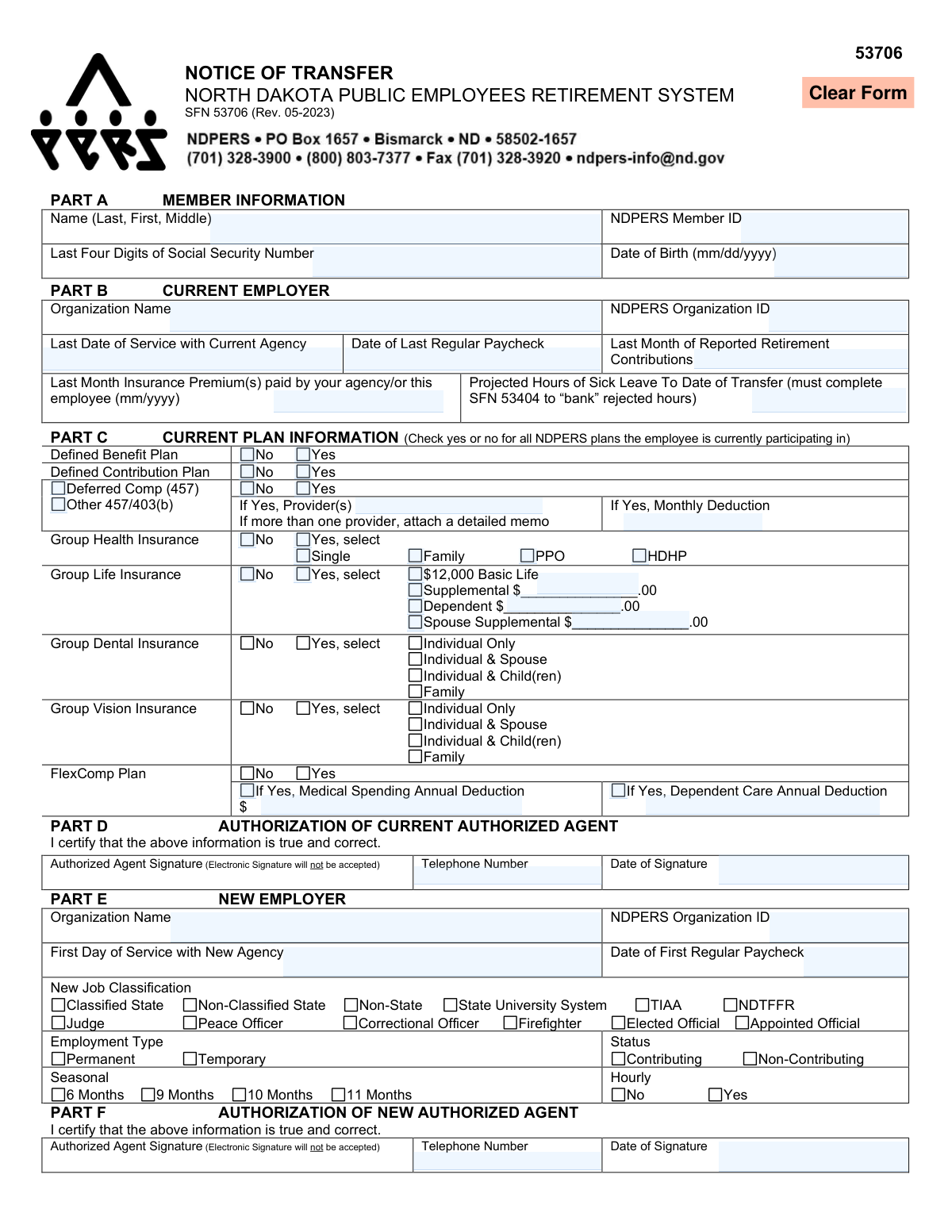
This is a collection of forms required by the North Dakota Public Employees Retirement System (NDPERS) for members moving between participating employers. The packet ensures the seamless transfer of retirement accounts, unused sick leave, and various insurance coverages like health, life, dental, and vision. Properly completing these forms is crucial for maintaining benefits without interruption. Today, this entire packet can be filled out quickly and accurately using AI-powered services like Instafill.ai, which can also convert non-fillable PDF versions into interactive fillable forms.
NDPERS Transfer Forms Packet is part of the
real estate forms, property transfer forms, legal notice forms, transfer forms and ownership transfer forms categories on Instafill.
Rather not fill this in by hand? Instafill is an online form filler that completes PDF forms automatically — upload the blank form, answer a few questions, and the AI fills every field.
Form specifications
| Form name: | Notice of Transfer Forms Packet |
| Number of pages: | 1 |
| Language: | English |
Our AI automatically handles information lookup, data retrieval, formatting, and form filling.
It takes less than a minute to fill out NDPERS Transfer Forms Packet using our AI form filling.
Securely upload your data. Information is encrypted in transit and deleted immediately after the form is filled out.
Instafill Demo: How to fill out PDF forms in seconds with AI
How to Fill Out NDPERS Transfer Forms Packet Online for Free in 2026
Are you looking to fill out a NDPERS TRANSFER FORMS PACKET form online quickly and accurately? Instafill.ai offers the #1 AI-powered PDF filling software of 2026, allowing you to complete your NDPERS TRANSFER FORMS PACKET form in just 37 seconds or less.
Follow these steps to fill out your NDPERS TRANSFER FORMS PACKET form online using Instafill.ai:
- 1 Navigate to Instafill.ai and upload the NDPERS Notice of Transfer Forms Packet.
- 2 Use the AI assistant to automatically fill your personal information (Name, NDPERS Member ID, SSN) across all relevant forms in the packet.
- 3 Complete the main 'Notice of Transfer' (SFN 53706), providing details about your current and new employers with AI-powered guidance.
- 4 Fill out the necessary insurance forms (Health SFN 60036, Dental/Vision SFN 58792, Life SFN 53803) to elect or continue your coverage, letting the AI populate dependent information consistently.
- 5 Complete the 'Transfer of Unused Sick Leave Verification' (SFN 53404) and any other applicable forms like the 'Authorization for Automatic Premium Deduction' (SFN 50134).
- 6 Review all auto-filled information for accuracy, then download the completed packet for printing, signing, and submission to your employers and NDPERS as instructed.
Our AI-powered system ensures each field is filled out correctly, reducing errors and saving you time.
Why Choose Instafill.ai for Your Fillable NDPERS Transfer Forms Packet Form?
Speed
Complete your NDPERS Transfer Forms Packet in as little as 37 seconds.
Up-to-Date
Always use the latest 2026 NDPERS Transfer Forms Packet form version.
Cost-effective
No need to hire expensive lawyers.
Accuracy
Our AI performs 10 compliance checks to ensure your form is error-free.
Security
Your personal information is protected with bank-level encryption.
Frequently Asked Questions About NDPERS Transfer Forms Packet
This packet is for employees moving between two NDPERS-participating employers. It ensures your retirement membership, insurance coverages, and other benefits are correctly transferred to your new employer without interruption.
The Notice of Transfer form must be completed by you (the employee), your current employer's authorized agent, and your new employer's authorized agent. It officially documents the transfer of your NDPERS membership and benefits between the two agencies.
This form must be completed and on file at NDPERS within 60 days of your last day of employment with your former employer. If you miss this deadline, you will forfeit any unused sick leave you had accumulated with that employer.
You complete your portion of the forms and give them to your current employer, who then forwards them to your new employer. Your new employer completes the final sections and is responsible for submitting the entire packet to NDPERS for processing.
To designate your beneficiaries, you must complete and submit the separate 'Life Insurance Designation of Beneficiary' form (SFN 53855). It is critical to complete this form to ensure your benefits are paid according to your wishes.
If your new employer does not offer a plan you are currently enrolled in, your participation in that specific plan will be terminated. You may be eligible for COBRA continuation coverage for certain plans, which you can apply for using form SFN 14120.
To set up automatic payments for premiums you pay directly, complete the 'Authorization for Automatic Premium Deduction' form (SFN 50134). This authorizes NDPERS to deduct your monthly premiums from your designated bank account.
No, the instructions on multiple forms in this packet explicitly state that electronic signatures will not be accepted. You must provide a physical, handwritten signature on all required signature lines.
You can elect to continue your FlexComp Medical Spending Account through COBRA by completing form SFN 53512. You can choose to pre-pay the premium with pre-tax dollars from your final paychecks or pay with after-tax dollars for the remainder of the plan year.
You must complete the Health Insurance Application (SFN 60036) and attach a Certificate of Creditable Coverage from your dependent's previous insurance company. This documentation is required to verify the qualifying life event and eligibility.
Yes, services like Instafill.ai use AI to accurately auto-fill form fields, which can save you time and help prevent errors. This is especially helpful for entering repetitive information like your name, address, and Member ID across multiple forms.
You can use a service like Instafill.ai to upload the PDF packet and fill it out on your computer. The platform allows you to type directly into the fields, add your signature, and then download the completed forms for printing and submission.
If you have a non-fillable or 'flat' PDF, you can use a tool like Instafill.ai to automatically convert it into an interactive, fillable form. This allows you to easily type your information instead of having to print the entire packet and fill it out by hand.
Compliance NDPERS Transfer Forms Packet
Validation Checks by Instafill.ai
1
Validates Social Security Number Format
This check ensures that the 'Last Four Digits of Social Security Number' field contains exactly four numeric digits. This is critical for accurate member identification across all forms and systems. If the format is incorrect, the form submission will be rejected, and the user will be prompted to enter a valid 4-digit number.
2
Ensures Logical Employment Transfer Dates (SFN 53706)
This validation compares the 'Last Date of Service with Current Agency' (Part B) with the 'First Day of Service with New Agency' (Part E). The first day at the new employer must be on or after the last day at the current employer. This check prevents logical impossibilities in the employment timeline, which could affect the calculation of benefits and service continuity. A failure would flag the dates as inconsistent and require correction by the authorized agents.
3
Verifies Sick Leave Hour Reconciliation (SFN 53404)
This check ensures that the 'Total number of hours of unused sick leave at time of employment transfer' from the former employer (Part C) equals the sum of hours 'accepted' and hours 'rejected' by the new employer (Part D). This is a crucial cross-check to ensure all sick leave hours are accounted for during the transfer. A discrepancy would halt processing and require verification from both employers to prevent the forfeiture or misallocation of the member's accrued leave.
4
Enforces Life Insurance Coverage Dependencies (SFN 53803)
This validation confirms that a member has elected 'Supplemental Life' coverage (Part C) before they can elect 'Supplemental Dependent Life' (Part E) or 'Supplemental Spouse Life' (Part F). The form instructions specify this hierarchy of coverage. If a member attempts to select dependent or spouse coverage without first selecting their own supplemental coverage, the election will be invalid and rejected, preventing enrollment in an ineligible plan.
5
Validates Beneficiary Share Percentage Totals (SFN 53855)
This check verifies that the sum of percentages in the '% Share' column equals exactly 100% for the Primary Beneficiary group and, separately, for the Contingent Beneficiary group. This is essential to ensure the member's life insurance proceeds are distributed precisely as intended, without ambiguity. If a group's shares do not total 100%, the form will be flagged for correction by the member before the beneficiary designation can be accepted.
6
Confirms HDHP/HSA Eligibility (SFN 60036)
This check validates that an employee selecting the 'High Deductible Health Plan/Health Savings Account (HDHP/HSA)' is eligible based on their employer type and employment status. The form states this option is limited to specific employee groups (e.g., permanent state employees). The system should cross-reference employer data to prevent ineligible enrollments, which have significant tax and legal consequences. An invalid selection would result in rejection of the health plan choice.
7
Validates Financial Institution Routing Number Format
On forms SFN 50134 and SFN 14120, this check ensures the 'Financial Institution Routing Number' field contains exactly nine numeric digits. This is a standard requirement for all U.S. financial institutions for processing ACH transactions. An incorrect routing number will cause automatic premium payments to fail, which could lead to a lapse in insurance coverage, so the form is rejected until a valid number is provided.
8
Enforces 457 Plan Catch-Up Contribution Rules (SFN 3803)
This validation ensures that a member does not select both the 'Regular 3-Year Catch-up' and the 'Age 50+ and Super Catch-up' options simultaneously. IRS regulations for 457 plans stipulate that these two types of catch-up contributions are mutually exclusive in a given year. An attempt to select both would be a compliance violation, so the form submission would be blocked until the member chooses only one valid catch-up option.
9
Verifies Attachment for 'Loss of Other Coverage' (SFN 60036 & 58792)
This is a conditional check that triggers if the 'Reason for Change' is 'Loss of Other Coverage'. It verifies that a 'Certificate of Creditable Coverage' or similar documentation has been attached to the submission. This documentation is mandatory proof of a qualifying life event, which permits enrollment outside of the standard annual enrollment period. Failure to provide the required attachment will result in the denial of the application until the proof is supplied.
10
Validates Supplemental Spouse Life Insurance Limit (SFN 53803)
This check ensures the requested 'Total Amount of coverage' for a spouse (Part F) does not exceed 50% of the employee's own supplemental life coverage amount (Part C). This rule is a specific provision of the life insurance policy. If the requested spouse coverage exceeds this limit, the election will be rejected, and the member must choose a new, compliant amount.
11
Ensures Timeliness of 457 Deferral Election (SFN 3803)
This validation confirms that the 'Date' of the participant's signature (Part F) is in a month prior to the 'For pay period beginning date' (Part E). This is a critical IRS requirement for deferred compensation, ensuring that the election to defer salary is made before the compensation is earned. If the signature date is not timely, the deferral election for that pay period is invalid and will be rejected.
12
Checks for Completeness of Conditional Plan Details (SFN 53706)
This validation ensures that when a member indicates participation in a plan by checking 'Yes' in Part C, all associated sub-fields are completed. For example, if 'Group Health Insurance' is 'Yes', then a 'type of insurance' (PPO/HDHP) must be selected. This prevents the submission of incomplete data that would require manual follow-up. An incomplete section would cause the form to be returned for completion, delaying the transfer process.
13
Verifies Signature Field Completion
This check confirms that all required signature sections on a form have been completed, as many forms explicitly state 'Electronic Signature will not be accepted'. In a digital system, this could mean verifying that a signature image is present or a confirmation checkbox is ticked. This is a fundamental completeness check to ensure the form is legally binding and authorized by the correct parties (member, authorized agents). A missing signature will always result in the rejection of the form.
14
Validates Date Formats Across All Forms
This check ensures that all date fields are entered in the specified format, such as 'mm/dd/yyyy' or 'mm/yyyy'. Consistent and valid date formatting is essential for correct data processing, calculating eligibility, and determining effective dates for coverage and contributions. Submissions with incorrectly formatted dates would be rejected with an error message indicating the required format, preventing data corruption downstream.
Common Mistakes in Completing NDPERS Transfer Forms Packet
Many forms in the packet, including the Notice of Transfer (SFN 53706) and various authorization forms, explicitly state 'Electronic Signatures will not be accepted.' This mistake often occurs because people are accustomed to digital workflows and overlook this specific requirement. Submitting a form with an electronic or typed signature will cause it to be rejected, leading to significant processing delays and potentially missed deadlines for benefits enrollment or transfers. To avoid this, applicants must print the form, physically sign it with a pen, and then submit the hard copy or a scanned version of the physically signed document.
The 'Transfer of Unused Sick Leave Verification' (SFN 53404) must be completed and on file with NDPERS within 60 days of leaving the former employer. Employees often underestimate the time required to get signatures from both their former and new employers, causing them to miss this critical window. The consequence is severe: any unused sick leave accumulated with the previous employer is permanently forfeited and cannot be used to purchase service credit later. To prevent this, employees should initiate this form immediately upon accepting a new position and proactively follow up with both employers to ensure timely completion and submission.
On the 'Life Insurance Designation of Beneficiary' form (SFN 53855), common errors include not having the percentage shares for primary or contingent beneficiaries add up to exactly 100%, or failing to provide complete details like full legal names and addresses. These omissions happen due to oversight or not having the information readily available. An incorrect designation can lead to disputes or cause NDPERS to distribute benefits according to default rules rather than the member's intent, delaying payment to loved ones. Always double-check that all percentages total 100% for each category and that all required information for each beneficiary is filled in completely and accurately.
The 'Notice of Transfer' form (SFN 53706) requires information and authorized signatures from both the current (Part D) and new (Part F) employers. A frequent mistake is submitting the form after only the current employer has completed their section, assuming the new employer will handle the rest. This leads to an incomplete application and halts the transfer process, which can delay the transfer of retirement contributions and insurance coverage. To avoid this, the employee must act as the coordinator, ensuring the form is routed from the old employer to the new employer for completion before final submission to NDPERS.
Several forms require additional documentation that is often forgotten, such as a 'Certificate of Creditable Coverage' for SFN 60036 or the 'Catch-up Worksheet SFN 51501' for SFN 3803. People often focus only on filling out the main form and overlook instructions to attach other items. Submitting an application without the required attachments will render it incomplete, causing it to be returned and delaying insurance enrollment or retirement contributions. Always review the instructions and checklists carefully to ensure all necessary supporting documents are included with your submission.
When completing the 'Authorization for Automatic Premium Deduction' (SFN 50134), applicants may accidentally transpose digits in the routing or account number or attach a deposit slip instead of a voided check. These errors will cause the automatic deduction to fail, leading to non-payment of premiums and a potential lapse or cancellation of insurance coverage. To avoid this, carefully double-check the numbers against your check or bank statement. AI-powered form-filling tools like Instafill.ai can help prevent these errors by automatically validating routing numbers and ensuring data is entered in the correct format.
When an employee transfers between NDPERS employers, a packet of forms is required, not just the 'Notice of Transfer.' Employees often submit only one form, failing to realize that corresponding applications for health (SFN 60036), dental/vision (SFN 58792), and sick leave (SFN 53404) are also necessary to ensure a seamless transition of benefits. This results in a fragmented submission and can lead to delays or unintended loss of specific coverages. Before submitting, use the 'Transfer Forms Checklist' at the beginning of the packet to verify that all relevant forms have been completed.
The 'Life Insurance Enrollment/Change' form (SFN 53803) has several layers of coverage with specific dependencies. A common error is requesting a supplemental spouse amount that exceeds 50% of the employee's coverage or not realizing that electing coverage above the Guaranteed Issue limit requires submitting a separate Evidence of Insurability (EOI) form. This leads to the requested coverage being denied or delayed pending further documentation. Carefully read the instructions for each section and check the NDPERS website for the EOI form if you are requesting a high coverage amount or enrolling outside of your initial eligibility period.
On the '457 Deferred Compensation Plan Enrollment/Change' form (SFN 3803), a critical mistake is selecting a new provider (e.g., Bravera, Nationwide) but failing to complete that provider's own separate enrollment forms. The SFN 3803 only authorizes the payroll deduction; it does not open the investment account. This results in contributions being rejected, meaning the employee misses out on market gains and tax deferral. To prevent this, you must contact the provider's agent directly to open an account at the same time you submit the SFN 3803 to NDPERS.
When filling out forms by hand, poor handwriting can make critical information like names, addresses, and ID numbers impossible to read. Similarly, applicants may forget to fill out a required field on one of the many forms. This forces processors to halt processing to request clarification, causing delays. Since these forms are non-fillable PDFs, a tool like Instafill.ai can convert them into a fillable format, allowing you to type your information for perfect clarity and helping ensure all required fields are completed before submission.
Saved over 80 hours a year
“I was never sure if my IRS forms like W-9 were filled correctly. Now, I can complete the forms accurately without any external help.”
Kevin Martin Green
Your data stays secure with advanced protection from Instafill and our subprocessors




Robust compliance program
Transparent business model
You’re not the product. You always know where your data is and what it is processed for.
ISO 27001, HIPAA, and GDPR
Our subprocesses adhere to multiple compliance standards, including but not limited to ISO 27001, HIPAA, and GDPR.
Security & privacy by design
We consider security and privacy from the initial design phase of any new service or functionality. It’s not an afterthought, it’s built-in, including support for two-factor authentication (2FA) to further protect your account.
Fill out NDPERS Transfer Forms Packet with Instafill.ai
Worried about filling PDFs wrong? Instafill securely fills notice-of-transfer-forms-packet forms, ensuring each field is accurate.
