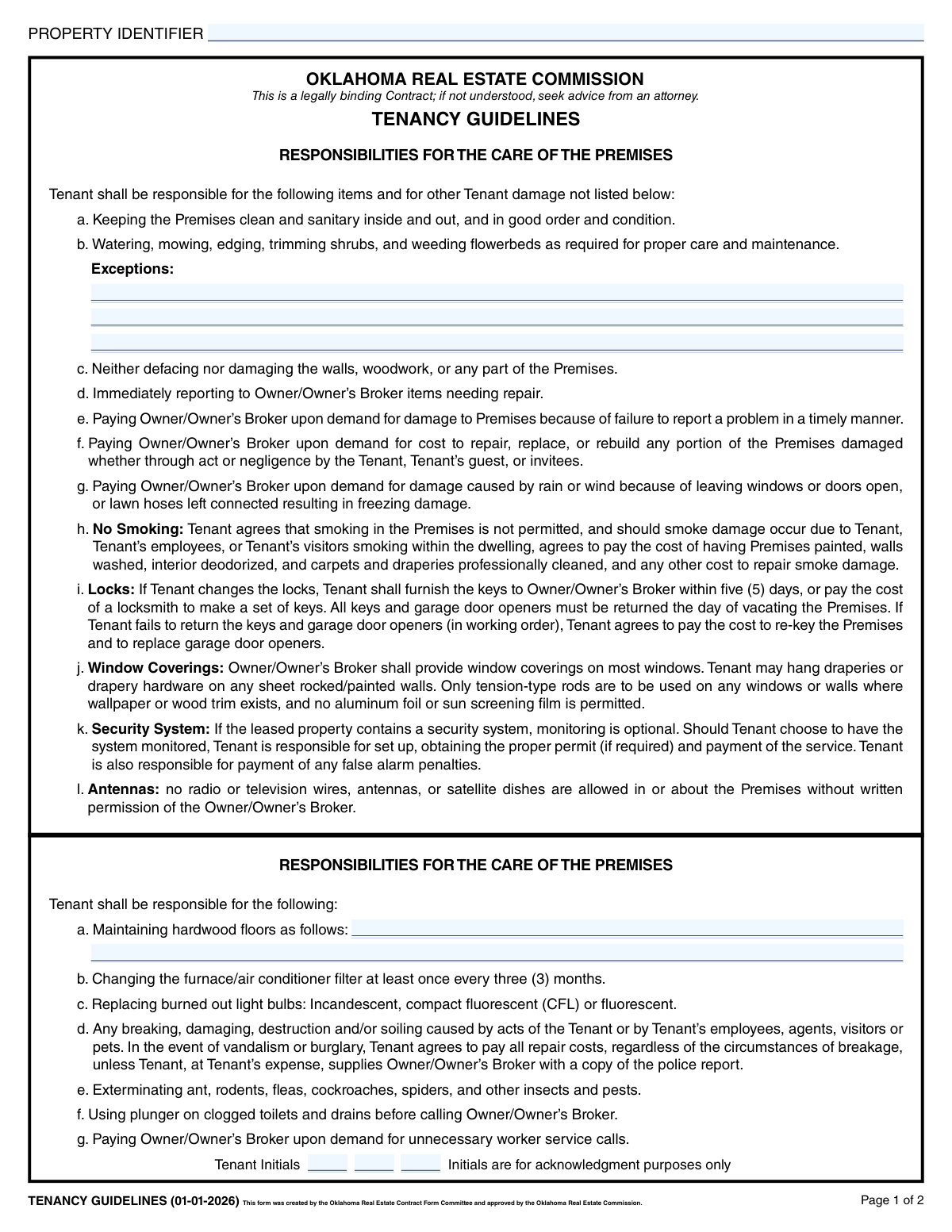
Yes! You can use AI to fill out Oklahoma Real Estate Commission Tenancy Guidelines (01-01-2026)

This form, created by the Oklahoma Real Estate Contract Form Committee, is a legally binding addendum to a lease agreement that details a tenant's specific responsibilities for maintaining a rental property. It covers everything from lawn care and minor repairs to safety protocols for smoke detectors and cold weather. Today, this form can be filled out quickly and accurately using AI-powered services like Instafill.ai, which can also convert non-fillable PDF versions into interactive fillable forms.
Our AI automatically handles information lookup, data retrieval, formatting, and form filling.
It takes less than a minute to fill out OREC Tenancy Guidelines using our AI form filling.
Securely upload your data. Information is encrypted in transit and deleted immediately after the form is filled out.

Form specifications

Form name: Oklahoma Real Estate Commission Tenancy Guidelines (01-01-2026)
Number of pages: 2
Language: English
Categories: real estate forms, estate forms, PA state forms, NJ state forms
main-image

Instafill Demo: How to fill out PDF forms in seconds with AI

How to Fill Out OREC Tenancy Guidelines Online for Free in 2026

Are you looking to fill out a OREC TENANCY GUIDELINES form online quickly and accurately? Instafill.ai offers the #1 AI-powered PDF filling software of 2026, allowing you to complete your OREC TENANCY GUIDELINES form in just 37 seconds or less.
Follow these steps to fill out your OREC TENANCY GUIDELINES form online using Instafill.ai:
  1. 1 Navigate to Instafill.ai and upload or select the Oklahoma Tenancy Guidelines form.
  2. 2 Use the AI assistant to automatically fill in the Property Identifier and any specific exceptions to tenant responsibilities.
  3. 3 Enter details such as the trip charge amount, maximum number of vehicles allowed, and the address for maintenance requests.
  4. 4 Review the detailed guidelines for property care, smoke detectors, and cold weather procedures.
  5. 5 Each tenant should carefully read the document and provide their initials on both pages to acknowledge their understanding.
  6. 6 Electronically sign and date the form in the designated fields for all tenants.
  7. 7 Securely download, print, or share the completed and legally binding Tenancy Guidelines document.

Our AI-powered system ensures each field is filled out correctly, reducing errors and saving you time.

Why Choose Instafill.ai for Your Fillable OREC Tenancy Guidelines Form?

Speed

Complete your OREC Tenancy Guidelines in as little as 37 seconds.

Up-to-Date

Always use the latest 2026 OREC Tenancy Guidelines form version.

Cost-effective

No need to hire expensive lawyers.

Accuracy

Our AI performs 10 compliance checks to ensure your form is error-free.

Security

Your personal information is protected with bank-level encryption.

Frequently Asked Questions About Form OREC Tenancy Guidelines

This form is a legally binding document that outlines the tenant's specific responsibilities for the care and maintenance of the rental property. It serves as an addendum to the main lease agreement.

All tenants listed on the lease agreement must sign and initial this form. This acknowledges that they have read, understood, and agreed to comply with all the listed guidelines.

Unless specified otherwise in the 'Exceptions' section, the tenant is responsible for watering, mowing, edging, trimming shrubs, and weeding flowerbeds to maintain the property's appearance.

The tenant is financially responsible for repairing any damage caused by their act or negligence, or that of their guests. This includes damage from leaving windows open or failing to report a problem in a timely manner.

No, smoking is not permitted inside the premises. If smoke damage occurs, you will be charged for all costs to paint, clean, and deodorize the unit.

If you change the locks, you must provide a copy of the new keys to the Owner or Owner's Broker within five days. Failure to do so may result in you being charged for a locksmith.

This is a pre-agreed fee that the tenant must pay if the Owner or Broker needs to make a special trip to the property due to a tenant's breach of the lease agreement.

You must test the smoke detector weekly, replace batteries as needed, and immediately report any malfunctions to the Owner or Broker in writing.

Yes, you cannot park boats, trailers, campers, or commercial vehicles over ¾ ton on or near the premises. The form also specifies a maximum number of motor vehicles allowed.

During freeze warnings, you should keep the heat on (at least 60 degrees), open cabinet doors under sinks, and let faucets drip continuously. You must also disconnect all outdoor water hoses.

All maintenance requests should be sent to the address provided in the designated section at the bottom of page 2 of the form.

Yes, services like Instafill.ai use AI to accurately auto-fill form fields. This can save you time and help ensure the information is entered correctly.

You can use a service like Instafill.ai to upload the PDF and fill it out electronically. The platform allows you to type directly into the fields, add your signature, and download the completed document.

Tools like Instafill.ai can convert flat, non-fillable PDFs into interactive, fillable forms. Simply upload your document to the platform to make the fields active and easy to complete online.

Compliance OREC Tenancy Guidelines
Validation Checks by Instafill.ai

1
Ensures Property Identifier is Consistent Across Pages
This check verifies that the 'Property Identifier' value entered on page 1 is identical to the value entered on page 2. This is crucial for ensuring the legal document is internally consistent and applies unambiguously to a single property. If the identifiers do not match, the submission should be flagged for manual review to prevent contractual errors regarding the subject property.
2
Requires at Least One Tenant Signature
This validation ensures that the 'First Tenant Name' field is not empty. A tenancy agreement is not legally binding without at least one tenant's commitment. A failure of this check indicates an incomplete and unenforceable contract, and the form should be rejected until a primary tenant is identified and signs.
3
Validates Signature Date Presence for Each Tenant
For every tenant name provided (First, Second, or Third), this check confirms that the corresponding 'Dated' field is also filled. A signature is legally incomplete without a date, as it establishes the time of agreement. If a name is present but a date is missing, the form is incomplete and must be returned to the user for correction.
4
Verifies Valid Date Format for All Signature Dates
This check ensures that all signature date fields are entered in a recognizable and valid date format, such as MM/DD/YYYY. Incorrect or ambiguous date formats can lead to legal disputes about when the agreement was executed. Submissions with invalid formats should be rejected with a message guiding the user to enter a proper date.
5
Validates Trip Charge is a Proper Monetary Value
This validation confirms that the 'Trip Charge Amount' field contains a valid numerical or currency value (e.g., '75.00'). Entering non-numeric text would make this clause unenforceable. The check prevents data entry errors and ensures the fee amount is clear, and failure should prompt the user to enter a valid number.
6
Ensures Maximum Motor Vehicles is a Whole Number
This check verifies that the 'Maximum Motor Vehicles' field contains a positive integer. The number of vehicles must be a whole number, as you cannot have a fraction of a vehicle. This validation prevents invalid data like text or decimals, ensuring the rule is clear and enforceable, and will reject non-integer inputs.
7
Requires Tenant Initials for Each Signing Tenant
This validation ensures that for each tenant who has provided a name and signature date, their corresponding 'Tenant Initials' field on page 2 is also filled. These initials signify acknowledgment of specific clauses throughout the document, strengthening the agreement. A missing initial for a listed tenant indicates an incomplete acknowledgment and should halt processing until corrected.
8
Mandates Presence of Maintenance Request Address
This check confirms that at least the first line of the 'Maintenance Request Address' is provided. This information is critical for the tenant to properly report issues as required by the agreement. Without this address, the tenant cannot fulfill their obligations, potentially leading to disputes, so the form should be considered incomplete if it's missing.
9
Prevents Future Signature Dates
This validation checks that all signature dates are not set in the future; they must be on or before the date of submission. A future-dated signature is legally invalid as it represents an agreement to an event that has not yet occurred. Forms with future dates should be rejected and require the user to input the correct, current date of signing.
10
Ensures Completeness of Second Tenant Information
This check is a conditional validation that triggers if the 'Second Tenant Name' field is filled. It then verifies that the 'Second Tenant Signature Date' and 'Tenant 2 Initials' fields are also completed. This ensures that any individual listed as a party to the agreement has fully executed their portion, preventing situations where a co-tenant is named but has not formally agreed to the terms.
11
Ensures Completeness of Third Tenant Information
Similar to the check for the second tenant, this validation activates if 'Third Tenant Name' is provided. It confirms that the 'Third Tenant Signature Date' and 'Tenant 3 Initials' fields are also filled. This maintains the integrity of the contract by ensuring all named parties have completed the necessary signature and acknowledgment steps.
12
Validates Presence of Primary Property Identifier
This check ensures the 'Property Identifier' field on page 1 is not left blank. This identifier is the primary link between the legal agreement and the physical property being leased. Without it, the entire contract is ambiguous and unenforceable, so its absence must result in an immediate rejection of the form submission.

Common Mistakes in Completing OREC Tenancy Guidelines

Forgetting to Initial Each Page

Tenants often overlook the initial boxes at the bottom of each page. These initials serve as legal acknowledgment that the tenant has read and understood the terms on that specific page. Missing initials can lead to disputes where a tenant claims they were unaware of a particular rule, weakening the enforceability of the guidelines. To avoid this, carefully review each page and place your initials in every designated box.

Leaving Key Numerical Fields Blank

Fields such as 'Trip Charge Amount' and 'Maximum Motor Vehicles' are frequently left empty. This happens when the applicant is unsure of the value or assumes it's not applicable. This creates ambiguity that can lead to significant disputes later regarding fees or property rules. Always fill in these fields; if a value is zero or should be negotiated, clarify with the owner/broker and enter the agreed-upon figure.

Incomplete Tenant Signature Blocks

When multiple tenants are involved, it's common for one or more to miss signing, dating, or initialing the document. This oversight can invalidate the agreement for the non-signing tenants, leaving the landlord exposed and complicating matters of joint responsibility. Ensure every tenant listed on the lease completely fills out their respective signature, date, and initial fields across the entire document.

Inconsistent or Missing Property Identifier

The form requires the 'Property Identifier' on both page 1 and page 2, but people often forget to fill it in on the second page or enter it differently. This inconsistency can cause administrative confusion and delays in processing or filing the document correctly. To prevent this, copy the exact same property address or identifier into both fields before submitting.

Writing Vague Responsibility Exceptions

In the 'Exceptions' field for property care, tenants may write unclear notes like 'landlord handles yard' without specifying what that entails. This ambiguity can lead to disagreements over specific tasks like mowing, weeding, or shrub trimming. To avoid conflict, exceptions should be written with explicit detail, clearly defining the responsibilities of both the tenant and the owner.

Providing an Incomplete Maintenance Address

When filling out the address for maintenance requests, applicants sometimes provide only a name and phone number, omitting the full mailing address. This prevents the owner or broker from sending formal written correspondence as may be required for certain notices. Always provide the complete address, including street, city, state, and ZIP code, to ensure proper communication channels.

Using Ambiguous Date Formats

People often use numeric-only date formats like '03/04/26', which can be interpreted as either March 4th or April 3rd depending on regional conventions. This ambiguity can be critical in a legal document where timelines are important. It is best to write out the date in a clear, unambiguous format, such as 'March 4, 2026', to prevent any confusion.

Ignoring Unspecified Instructions

A blank field, such as the one for 'Maintaining hardwood floors', is often ignored by the tenant, who assumes no special care is needed. This can lead to the tenant using improper cleaning products or methods that cause permanent damage to the floors, resulting in costly repairs deducted from their security deposit. If a field for instructions is blank, the tenant should proactively ask the owner for clarification and document the instructions.

Printing Name on a Signature Line

On the 'Tenant' signature line, individuals sometimes print their name instead of providing a cursive signature. A printed name may not be considered a legally binding signature in some contexts, potentially weakening the contract's validity. Always use your legal, handwritten signature on designated signature lines to ensure the agreement is fully enforceable. AI-powered tools like Instafill.ai can help by providing a dedicated, secure digital signature field.

Failing to Convert and Fill a Flat PDF

This form is often distributed as a non-fillable PDF, forcing tenants to print it, fill it out by hand, and then scan it back, which can lead to illegible handwriting and data entry errors. This manual process is inefficient and prone to mistakes that can delay the leasing process. Using a service like Instafill.ai can convert the flat PDF into an interactive, fillable form, ensuring all entries are clear, legible, and correctly formatted.
Saved over 80 hours a year

“I was never sure if my IRS forms like W-9 were filled correctly. Now, I can complete the forms accurately without any external help.”

Kevin Martin Green

Your data stays secure with advanced protection from Instafill and our subprocessors

Robust compliance program

Transparent business model

You’re not the product. You always know where your data is and what it is processed for.

ISO 27001, HIPAA, and GDPR

Our subprocesses adhere to multiple compliance standards, including but not limited to ISO 27001, HIPAA, and GDPR.

Security & privacy by design

We consider security and privacy from the initial design phase of any new service or functionality. It’s not an afterthought, it’s built-in, including support for two-factor authentication (2FA) to further protect your account.

Fill out OREC Tenancy Guidelines with Instafill.ai

Worried about filling PDFs wrong? Instafill securely fills oklahoma-real-estate-commission-tenancy-guidelines-01-01-2026 forms, ensuring each field is accurate.