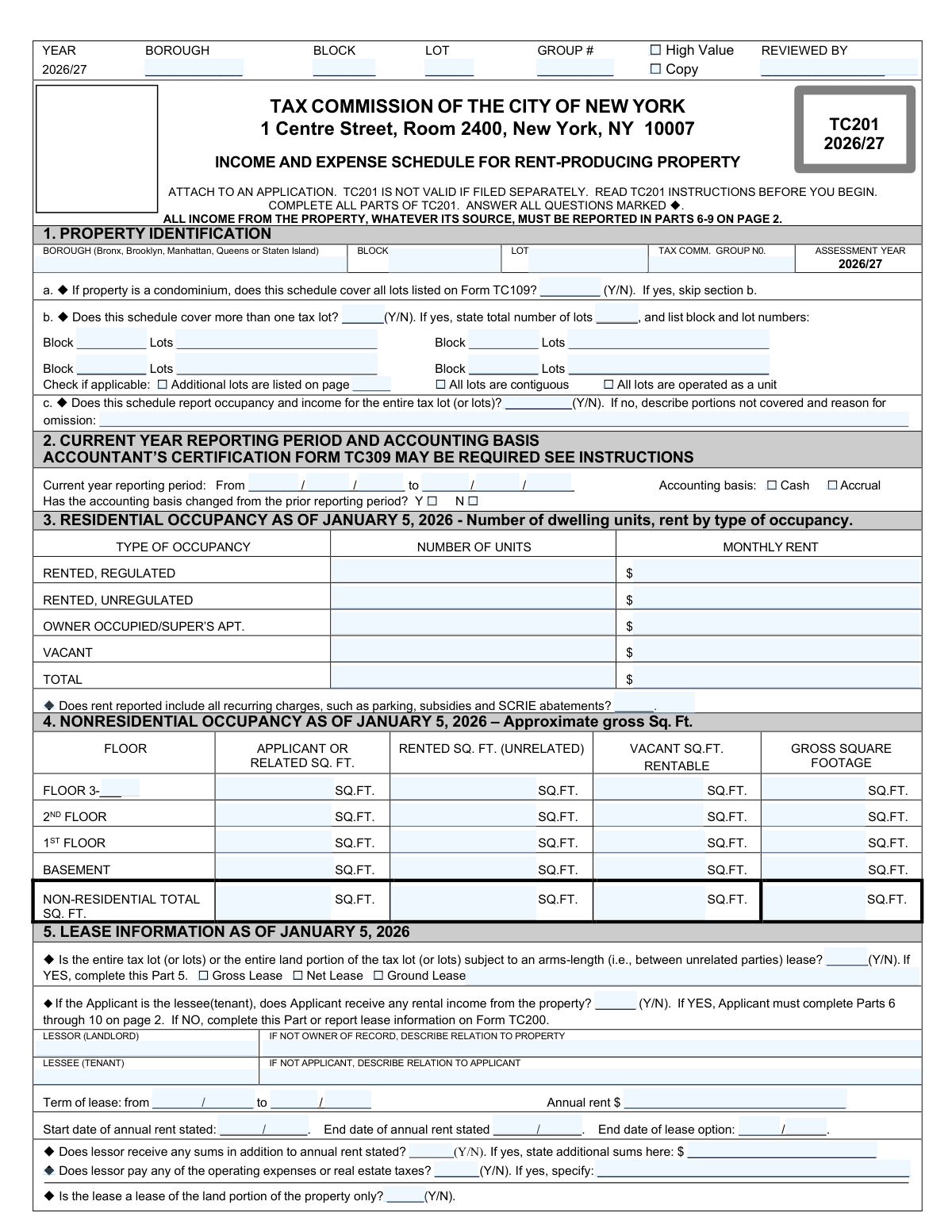
Yes! You can use AI to fill out Form TC201, Income and Expense Schedule for Rent Producing Properties

Form TC201 is a schedule required by the Tax Commission of the City of New York to report the annual income and expenses for rent-producing properties. This information is crucial for the Tax Commission to accurately review applications for the correction of property tax assessments. Today, this form can be filled out quickly and accurately using AI-powered services like Instafill.ai, which can also convert non-fillable PDF versions into interactive fillable forms.
Our AI automatically handles information lookup, data retrieval, formatting, and form filling.
It takes less than a minute to fill out TC201 using our AI form filling.
Securely upload your data. Information is encrypted in transit and deleted immediately after the form is filled out.

Form specifications

Form name: Form TC201, Income and Expense Schedule for Rent Producing Properties
Number of pages: 6
Language: English
Categories: income forms, income and expense forms
main-image

Instafill Demo: How to fill out PDF forms in seconds with AI

How to Fill Out TC201 Online for Free in 2026

Are you looking to fill out a TC201 form online quickly and accurately? Instafill.ai offers the #1 AI-powered PDF filling software of 2026, allowing you to complete your TC201 form in just 37 seconds or less.
Follow these steps to fill out your TC201 form online using Instafill.ai:
  1. 1 Navigate to Instafill.ai and upload your Form TC201 or select it from the template library.
  2. 2 Provide property identification details in Part 1, including the borough, block, lot, and information about any related lots.
  3. 3 Complete Part 2 with the reporting period and accounting basis, and fill out Parts 3 and 4 with residential and non-residential occupancy details.
  4. 4 In Part 6, enter all income information for the prior and current years, itemizing residential, commercial, and ancillary income sources.
  5. 5 Detail all operating expenses in Part 7, including fuel, wages, repairs, insurance, and real estate taxes, and itemize miscellaneous expenses in Part 9.
  6. 6 Review the automatically calculated net profit or loss in Part 8 and verify that all entered information is accurate and complete.
  7. 7 Securely download your completed Form TC201, ready to be attached to your application and filed with the NYC Tax Commission.

Our AI-powered system ensures each field is filled out correctly, reducing errors and saving you time.

Why Choose Instafill.ai for Your Fillable TC201 Form?

Speed

Complete your TC201 in as little as 37 seconds.

Up-to-Date

Always use the latest 2026 TC201 form version.

Cost-effective

No need to hire expensive lawyers.

Accuracy

Our AI performs 10 compliance checks to ensure your form is error-free.

Security

Your personal information is protected with bank-level encryption.

Frequently Asked Questions About Form TC201

Form TC201 is an Income and Expense Schedule used to report financial data from the operation of a rent-producing property. It must be filed as an attachment to an application for assessment review, like Form TC150, and is not valid if submitted alone.

Owners of rent-producing properties, such as apartment buildings or commercial buildings, must file this form. This includes properties leased to a single tenant or even properties that are 100% vacant.

Yes, you are not required to file Form TC201 for residential properties that have six or fewer units and no commercial space. Additionally, cooperatives, hotels, and certain owner-operated businesses have their own specific forms to use instead.

No, they are two separate requirements for two different city agencies. Filing Form TC201 does not satisfy the Department of Finance's RPIE filing requirement, and vice versa.

The Tax Commission requires a current statement, which is typically the full calendar year ending December 31, 2025. In some specific cases for properties with lower assessments, a statement for the previous calendar year may be accepted.

If the actual tentative assessment of an individual parcel is $5,400,000 or more, Form TC201 must be accompanied by Form TC309, which must be signed by an independent certified public accountant.

Substantiation is providing additional documentation to explain unusual financial figures, such as an operating loss, a significant decrease in income, or very high repair costs. The instructions list 13 specific conditions that require you to submit this extra proof with your application.

You can use a single, combined Form TC201 to cover a group of related lots. You must attach the combined schedule to the application for the first lot in the group and also file Form TC166 listing all the related lots.

You must report the actual monthly rent due based on your December 2025 or January 2026 rent roll. Your application may be denied if you simply divide the annual income by 12 to calculate this figure.

You should not report projections, reserves, income tax, mortgage payments, capital costs, or depreciation. Payments to related persons must be disclosed separately and not included as standard operating expenses.

Yes, services like Instafill.ai use AI to accurately auto-fill form fields from your documents, which can save you significant time and reduce errors. This is especially helpful for forms with detailed financial data.

Simply upload your Form TC201 to the Instafill.ai platform. The AI will identify the fields, and you can then connect your data sources to have the information filled in automatically and accurately.

If you have a flat, non-fillable PDF, you can upload it to a service like Instafill.ai. The platform can convert it into an interactive, fillable form that you can complete and manage online.

This section is for other operating expenses not specified elsewhere, such as the amortization of common area improvements or certain lease buyout costs. You must itemize these costs in Part 9.

Compliance TC201
Validation Checks by Instafill.ai

1
Validates Reporting Period Chronology and Duration
This check ensures that the 'Reporting Period End Date' in Part 2 is after the 'Reporting Period Start Date'. It also verifies that the reporting period covers a full year as required by the instructions. An invalid or illogical date range makes the financial data meaningless and prevents proper analysis, which could lead to the application being rejected.
2
Residential Rent Roll vs. Annual Income Consistency
This validation compares the monthly residential rent roll from Part 3 with the annual residential income reported in Part 6. It flags cases where the annual income is exactly 12 times the monthly rent roll, as the instructions explicitly state this may lead to denial. It also flags if the annual income is significantly different (e.g., less than, or more than 110% of) the extrapolated rent roll, as this requires substantiation.
3
Residential Occupancy Unit Summation
This check verifies that the sum of the 'Number of Units' for Rented (Regulated and Unregulated), Owner Occupied, and Vacant in Part 3 equals the 'Total' number of residential units entered. This ensures the internal consistency and completeness of the occupancy data. A mismatch indicates a data entry error and prevents an accurate understanding of the property's occupancy status.
4
Non-Residential Square Footage Summation
For each floor listed in Part 4, this validation ensures that the sum of 'Applicant or Related SQ. FT.', 'Rented SQ. FT. (Unrelated)', and 'Vacant SQ. FT.' equals the 'Rentable Gross Square Footage' for that floor. This is crucial for verifying the allocation of space is complete and accurate. Discrepancies would require correction as they impact the assessment of commercial space utilization and value.
5
Total Gross Income Calculation Integrity
This check confirms that the sum of all individual income lines (Part 6, lines a through k) for the current year correctly adds up to the 'TOTAL GROSS INCOME' (Part 6, line l). This is a fundamental arithmetic check to ensure the accuracy of the total income figure used in all subsequent calculations. An incorrect total would invalidate the entire financial statement and likely cause the application to be denied a merits review.
6
Total Expenses Calculation Integrity
This validation performs two checks in Part 7: it ensures that the sum of lines a through l equals the 'EXPENSES BEFORE REAL ESTATE TAXES' on line m, and that the sum of line m and line n equals the 'TOTAL EXPENSES' on line o. This maintains the arithmetic integrity of the expense reporting. Failure of this check points to a calculation error that must be fixed before the application can be processed.
7
Net Profit/Loss Calculation Verification
This check validates the calculations in Part 8. It ensures that 'Net before real estate taxes' equals 'Total Gross Income' (Part 6, line l) minus 'Expenses Before Real Estate Taxes' (Part 7, line m). It also verifies that 'Net after real estate taxes' equals 'Total Gross Income' minus 'Total Expenses' (Part 7, line o). This confirms the final profit or loss figure is derived correctly from the reported income and expenses.
8
Miscellaneous Expense Itemization Requirement
This validation ensures that if a value greater than zero is entered for 'Miscellaneous Expenses' (Part 7, line l), then Part 9 must contain at least one itemized expense. It also checks that the sum of the amounts in Part 9 equals the total reported on Part 7, line l. This is required for transparency and to prevent filers from hiding significant, unclassified expenses, which could result in a denial of review.
9
Whole Dollar Monetary Format
This check scans all monetary fields in Parts 6, 7, 8, and 9 to ensure they are reported as whole dollar amounts, without decimals or cents. The form instructions explicitly state that figures should be reported to the nearest whole dollar. Submitting rounded or estimated figures with cents may result in the application being denied a merits review.
10
Repairs & Maintenance Expense Threshold
This validation checks if the 'Repairs and Maintenance' expense (Part 7, line e) for the current year is higher than 15% of the 'Total Gross Income' (Part 6, line l). If the threshold is exceeded, the system flags the submission as requiring mandatory substantiation, specifically an itemized breakdown of costs. Failure to provide this required documentation may result in a denial of review of the application.
11
Gross Income Decrease Substantiation Trigger
This check compares the 'Total Gross Income' for the current year to the prior year. If there is a decrease of more than 10%, it triggers a requirement for the applicant to provide a specific explanation for the drop in income. This is a critical check to identify potential issues or significant changes in property performance that require further scrutiny by the Tax Commission.
12
Operating Loss Substantiation Trigger
This validation checks if the 'Net after real estate taxes' (Part 8, line b) for the current year is a negative value, indicating an operating loss. According to the instructions, any operating loss must be substantiated with a specific explanation of the circumstances causing it. Failure to provide this explanation can lead to a denial of review.
13
Multiple Lot Declaration Consistency
This check ensures that if the 'Multiple Tax Lot Confirmation' question in Part 1 is answered 'Y' (Yes), then the 'Total Number of Lots' field must be greater than 1 and at least one Block/Lot combination must be entered. This ensures that when a filer claims the schedule covers multiple lots, they provide the necessary identifying information. Incomplete information would halt processing until the lot details are clarified.
14
Lease Information Completeness
This validation confirms that if the question in Part 5 regarding an arms-length lease is answered 'Y' (Yes), then all subsequent fields in Part 5 (Lessor, Lessee, Term of lease, Annual rent) must be completed. This ensures that when a major lease governing the entire property is declared, all critical details of that lease are provided as required. Missing information would render this section incomplete and require follow-up.

Common Mistakes in Completing TC201

Calculating Monthly Rent Instead of Using Rent Roll Data

This mistake occurs when filers divide the total annual residential income (from Part 6) by 12 to calculate the monthly rent for Part 3, instead of using an actual rent roll from a specific month like December or January. The Tax Commission explicitly warns this can lead to the application being denied review. To avoid this, always use the actual rent roll for the specified month to complete Part 3. AI-powered tools like Instafill.ai can help prevent this by using cross-field validation rules to flag inconsistencies between annual and monthly reported income.

Failing to Provide Required Substantiation

The form requires detailed explanations and documentation for 13 specific conditions, such as an operating loss, a significant drop in income (>10%), or high repair costs (>15% of gross rent). Filers often overlook this, but failure to submit substantiation with the application or at the hearing will likely result in a denial of review. Since this form is often a non-fillable PDF, tools like Instafill.ai can convert it into a fillable version and provide smart checklists to help ensure all required attachments are prepared.

Expensing Capital Improvements as Repairs

Property owners frequently misclassify major capital improvements, such as a new roof or boiler, under 'Repairs and Maintenance' in Part 7. These costs should be amortized over their useful life and included with an itemized schedule under 'Miscellaneous Expenses'. This error overstates current year expenses, misrepresents the property's net operating income, and can trigger scrutiny or denial. To avoid this, carefully follow the instructions for amortizing costs; AI tools can provide guidance and specific fields to ensure correct categorization.

Reporting Rounded or Estimated Financial Figures

For convenience, filers may round income and expense figures to the nearest hundred or thousand, but the instructions demand reporting to the nearest whole dollar. Using rounded or estimated figures can signal poor record-keeping to the Tax Commission and may result in the application being denied a merits review. It is crucial to use exact figures from financial records. AI-powered form filling tools like Instafill.ai help prevent this by automatically formatting numerical inputs correctly and can validate data against source documents to ensure precision.

Submitting Form TC201 as a Standalone Document

This form is an attachment to Form TC150 or TC159 and is invalid if submitted alone, causing filers to miss critical deadlines. This often happens due to a misunderstanding of the overall application process. To avoid this, always ensure the TC201 is included as part of a complete application package. Smart filing assistants like Instafill.ai can bundle related forms together, preventing the submission of incomplete or standalone attachments.

Confusing RPIE and Tax Commission Filings

Property owners are required to file a Real Property Income and Expense (RPIE) statement with the Department of Finance and a TC201 with the Tax Commission. The instructions explicitly state that filing one does not satisfy the requirement for the other. This confusion can lead to a failure to file the RPIE, resulting in fines and the loss of eligibility for Tax Commission review the following year.

Incorrectly Handling Related-Party Transactions

The form requires that income from owner-occupied spaces and expenses paid to related entities be reported on separate, specific lines. Filers often mistakenly combine these with general operating figures, which obscures the property's true arms-length performance and can delay the review process. To prevent this, meticulously separate all related-party transactions as instructed. AI tools like Instafill.ai can be configured to recognize and properly allocate data for related-party transactions.

Omitting Required CPA Certification (Form TC309)

For properties with an actual tentative assessment of $5,400,000 or more, the TC201 must be accompanied by Form TC309, certified by an independent CPA. Forgetting this form or being unaware of the assessment threshold will invalidate the income and expense data and likely lead to denial. An intelligent form-filling solution like Instafill.ai could use conditional logic to alert the user to this requirement based on the property's entered value.

Failing to Itemize Miscellaneous Expenses

Filers often enter a lump sum on the 'Miscellaneous Expenses' line (Part 7, line l) without completing the required itemization in Part 9. An un-itemized total is grounds for the expense to be disallowed, understating total expenses and weakening the case for an assessment reduction. Since the form is a flat PDF, a tool like Instafill.ai can convert it to a fillable format with expandable sections for itemization, making it easier to provide complete details.

Using the Wrong Form for the Property Type

Submitting TC201 for a cooperative (needs TC203) or a hotel (needs TC208) is a common error that causes immediate rejection. This happens when filers don't read the 'Who should use Form TC201?' section carefully. Always verify the correct form for your specific property type before starting. An AI-powered platform like Instafill.ai can help by guiding users to the correct form through a series of initial screening questions about their property.
Saved over 80 hours a year

“I was never sure if my IRS forms like W-9 were filled correctly. Now, I can complete the forms accurately without any external help.”

Kevin Martin Green

Your data stays secure with advanced protection from Instafill and our subprocessors

Robust compliance program

Transparent business model

You’re not the product. You always know where your data is and what it is processed for.

ISO 27001, HIPAA, and GDPR

Our subprocesses adhere to multiple compliance standards, including but not limited to ISO 27001, HIPAA, and GDPR.

Security & privacy by design

We consider security and privacy from the initial design phase of any new service or functionality. It’s not an afterthought, it’s built-in, including support for two-factor authentication (2FA) to further protect your account.

Fill out TC201 with Instafill.ai

Worried about filling PDFs wrong? Instafill securely fills form-tc201-income-and-expense-schedule-for-rent-producing-properties forms, ensuring each field is accurate.