Yes! You can use AI to fill out Income and Expense Declaration (California Judicial Council Form FL-150)

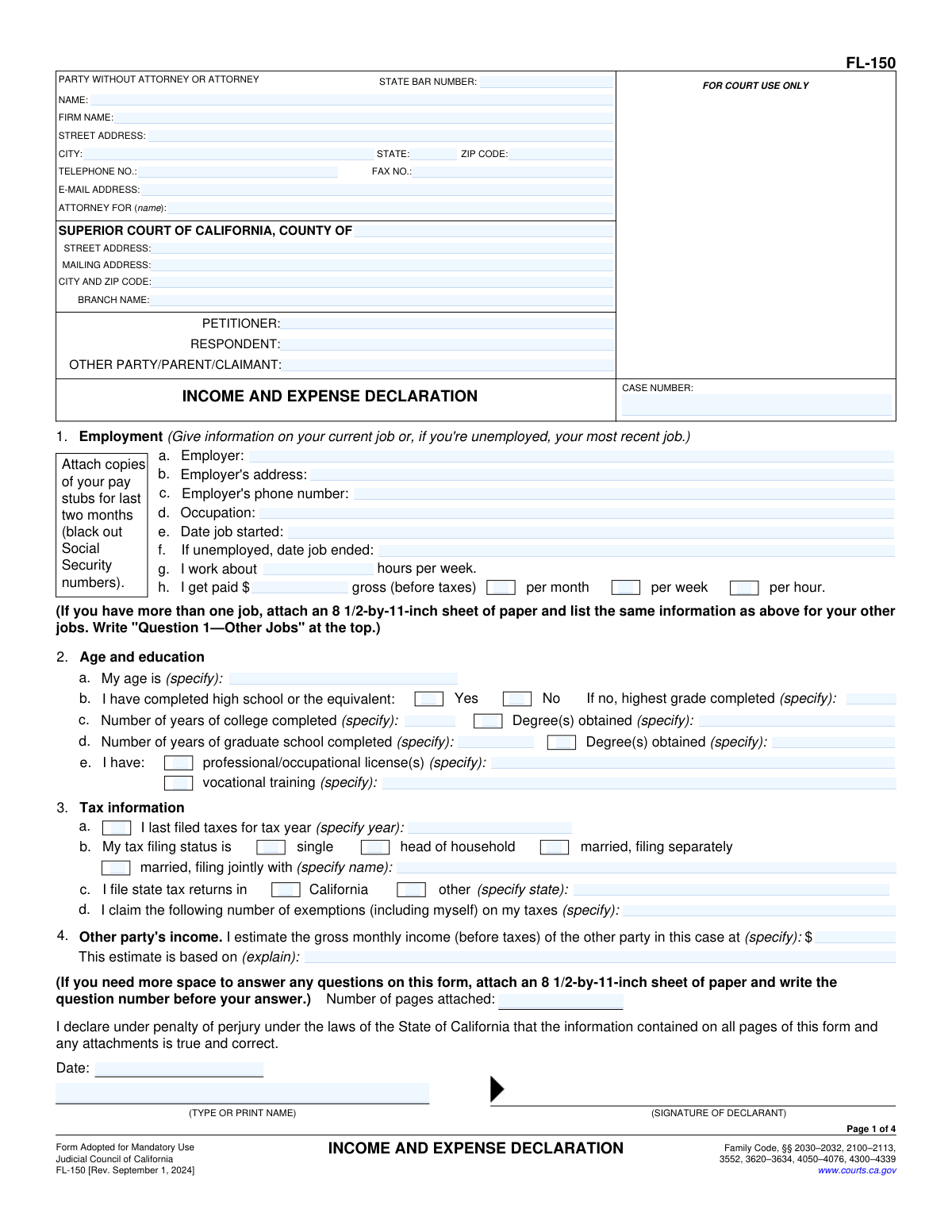
The FL-150 Income and Expense Declaration is a California Judicial Council form used in family law proceedings—such as divorce, legal separation, child support, and spousal support cases—to provide the court with a comprehensive picture of a party's financial circumstances, including employment, income from all sources, monthly expenses, assets, and debts. It is a mandatory disclosure document that helps judges make fair and informed decisions regarding support orders and other financial matters. Accurate and complete completion of this form is critical, as errors or omissions can negatively affect court outcomes. Today, this form can be filled out quickly and accurately using AI-powered services like Instafill.ai, which can also convert non-fillable PDF versions into interactive fillable forms.
Our AI automatically handles information lookup, data retrieval, formatting, and form filling.
It takes less than a minute to fill out FL-150 using our AI form filling.
Securely upload your data. Information is encrypted in transit and deleted immediately after the form is filled out.

Form specifications

Form name: Income and Expense Declaration (California Judicial Council Form FL-150)
Number of pages: 4
Language: English
main-image

Instafill Demo: filling out a legal form in seconds

How to Fill Out FL-150 Online for Free in 2026

Are you looking to fill out a FL-150 form online quickly and accurately? Instafill.ai offers the #1 AI-powered PDF filling software of 2026, allowing you to complete your FL-150 form in just 37 seconds or less.
Follow these steps to fill out your FL-150 form online using Instafill.ai:
  1. 1 Navigate to Instafill.ai and search for or upload the California FL-150 Income and Expense Declaration form to begin filling it out online.
  2. 2 Enter your attorney or party contact information, including your State Bar number (if applicable), name, firm name, address, phone, fax, and email, as well as the court information and case details such as petitioner, respondent, and case number.
  3. 3 Complete the employment section by providing your current or most recent employer's name, address, phone number, job title, start/end dates, hours worked per week, and gross pay frequency.
  4. 4 Fill in your age and education background, including high school completion status, years of college and graduate school, degrees obtained, professional licenses, and any vocational training.
  5. 5 Enter all income information across every applicable category—salary/wages, overtime, commissions, public assistance, spousal or partner support, pension, Social Security, disability, unemployment, workers' compensation, investment income, self-employment income, and any other one-time or additional income—providing both last month and average monthly amounts.
  6. 6 Complete the deductions, assets, monthly expenses, debts, and children's information sections, including health insurance details, parenting time percentages, special needs, and hardship explanations.
  7. 7 Review all entered information for accuracy, add the declaration date and your printed name, attach any required supporting documents, and submit or print the completed FL-150 form for filing with the court.

Our AI-powered system ensures each field is filled out correctly, reducing errors and saving you time.

Why Choose Instafill.ai for Your Fillable FL-150 Form?

Speed

Complete your FL-150 in as little as 37 seconds.

Up-to-Date

Always use the latest 2026 FL-150 form version.

Cost-effective

No need to hire expensive lawyers.

Accuracy

Our AI performs 10 compliance checks to ensure your form is error-free.

Security

Your personal information is protected with bank-level encryption.

Frequently Asked Questions About Form FL-150

This is an Income and Expense Declaration form used in California family law cases to disclose your financial situation to the court. It is typically required of both petitioners and respondents in cases involving child support, spousal support, partner support, or other financial matters. The court uses this information to make fair decisions about support orders.

You should gather recent pay stubs, tax returns (last 1–2 years), bank statements, documentation of all income sources (disability, Social Security, rental income, etc.), records of monthly expenses, and information about any debts or assets you own. You will also need your court case number and the names of all parties exactly as they appear on court documents.

In the self-employment section, enter your net self-employment income (after business expenses) for last month and your average monthly income over the past 12 months. You must also indicate your role (owner/sole proprietor, business partner, or other), the name and type of business, and how many years you have been in business. Supporting documents such as profit-and-loss statements or tax schedules are typically attached.

'Last month' refers to the actual gross amount you received in the most recent calendar month. 'Average monthly' is calculated by adding up all income received in that category over the past 12 months and dividing by 12. Both figures are required so the court can see both your current and typical income levels.

Yes, you must report all sources of income including public assistance (TANF, SSI, GA/GR), Social Security retirement benefits, Social Security disability (not SSI), state disability insurance (SDI), and private disability insurance. Check the appropriate boxes and enter the last month and average monthly amounts for each applicable source.

In the 'Other Party's Income' section, enter your best estimate of the other party's gross monthly income and provide a brief explanation of how you arrived at that figure — for example, based on their job title, prior tax returns, pay stubs you have seen, or other known facts. The court understands this may be an estimate and will consider your explanation.

You may list required union dues, required retirement contributions, medical and health insurance premiums, child support you pay for children from other relationships, court-ordered spousal or partner support you pay, and necessary job-related expenses that your employer does not reimburse. Only enter amounts you are actually paying, and use last month's figures.

Report the total current value of your cash and checking/savings accounts, the fair market value of stocks, bonds, and other easily sellable assets (minus any debts against them), and the estimated fair market value of all other real or personal property (also minus any debts). Check the appropriate boxes to indicate whether the 'other property' is real property (land/buildings) or personal property (vehicles, jewelry, etc.).

Check the 'No' box next to 'Completed high school' and then enter the highest grade you completed in the space provided (for example, 8, 10, or 11). If you have completed vocational training or hold any professional licenses, check those boxes and describe the training or licenses in the spaces provided.

Check the box in the 'Change in income' section (item 9) and provide a brief explanation describing what changed, when it changed, and how it affected your income. This is important so the court understands why your last month's income may differ significantly from your 12-month average.

Yes — services like Instafill.ai use AI to automatically fill in form fields accurately based on information you provide, saving you significant time and reducing errors. Instafill.ai can guide you through each section of the Income and Expense Declaration, ensure required fields are completed correctly, and help you prepare a complete, court-ready document.

Visit Instafill.ai, upload or select the Income and Expense Declaration form, and the AI will walk you through each field — asking for your income, expenses, assets, and other required details. Once completed, you can review, download, and print the filled form ready for court submission. No special software is needed.

If you have a flat, non-fillable PDF of this form, Instafill.ai can convert it into an interactive fillable form so you can type directly into the fields. This eliminates the need to print and handwrite your responses, making the process faster and ensuring your submission is legible and professional.

You do not need an attorney to complete this form — self-represented parties (in propria persona) can fill it out themselves. If you do have an attorney, they complete the contact section at the top with their State Bar number, firm name, address, and the name of the party they represent. If you are self-represented, enter your own contact information in that section.

Sign and date the declaration section at the bottom of the form, and print your full name next to your signature. Note the number of any additional pages you are attaching. You typically need to file the original with the court clerk and provide a copy to the other party; check your local court's rules for the exact number of copies required and whether electronic filing is accepted.

Compliance FL-150
Validation Checks by Instafill.ai

1
Ensures the State Bar Number is in a valid format if the filer is an attorney
This check verifies that the State Bar Number field contains only numeric characters and falls within an expected length range (typically 6–7 digits for California bar numbers). It is important because an invalid or missing bar number can prevent the court from verifying the attorney's standing and may result in the filing being rejected. If the field is populated but does not match the expected numeric format, the submission should be flagged for correction.
2
Ensures the ZIP Code is in a valid US postal format
This check validates that the ZIP Code field for both the attorney/party contact and the court information contains either a standard 5-digit ZIP code or a ZIP+4 format (e.g., 90210 or 90210-1234). Malformed ZIP codes can cause mail to be undeliverable and may indicate a data entry error. Any entry that does not match the 5-digit or 9-digit (with hyphen) pattern should be flagged as invalid.
3
Ensures the Telephone and Fax Numbers include a valid area code and digit count
This check confirms that all telephone and fax number fields contain exactly 10 digits (excluding formatting characters such as dashes, spaces, or parentheses), representing a valid North American Numbering Plan number with area code. Phone numbers with fewer than 10 digits or non-numeric characters (other than standard formatting) are invalid and would prevent the court or opposing party from making contact. Entries that do not resolve to a 10-digit number after stripping formatting should be rejected.
4
Ensures the Email Address is in a valid format
This check verifies that the email address field contains a properly structured email address, including a local part, an '@' symbol, a domain name, and a valid top-level domain (e.g., [email protected]). An improperly formatted email address would prevent electronic service of documents and court notifications. Any entry missing the '@' symbol, domain, or containing illegal characters should be flagged as invalid.
5
Ensures the Date Job Started is a valid date and precedes the Date Job Ended
This check validates that the 'Date job started' field contains a recognizable calendar date and, when 'Date job ended' is also populated, confirms that the start date is earlier than the end date. Illogical date sequences (e.g., an end date before a start date) indicate a data entry error that could misrepresent the filer's employment history to the court. If the end date is present and is on or before the start date, the submission should be flagged for correction.
6
Ensures exactly one pay frequency checkbox is selected when gross pay is entered
This check confirms that when a gross pay amount is entered in the employment section, exactly one of the three pay frequency options—per month, per week, or per hour—is selected. Selecting multiple pay frequency checkboxes or none at all makes the reported income ambiguous and prevents accurate calculation of monthly income for support purposes. If the gross pay field is populated but zero or more than one frequency checkbox is checked, the submission should be flagged.
7
Ensures the Last Filed Tax Year is a valid four-digit year not in the future
This check validates that the 'Last filed tax year' field contains a four-digit numeric year (e.g., 2023) and that the year is not greater than the current calendar year. Tax years in the future are logically impossible and indicate a data entry error, while non-numeric or partial entries cannot be processed. Any entry that is not a four-digit number or exceeds the current year should be rejected.
8
Ensures only one tax filing status checkbox is selected
This check verifies that exactly one of the four tax filing status options—Single, Head of Household, Married Filing Separately, or Married Filing Jointly—is selected in the Tax Information section. Selecting multiple filing statuses is contradictory and would create an inconsistency in the financial disclosure. If more than one status checkbox is checked, the submission should be flagged and the filer prompted to select only one.
9
Ensures the Name of Person Filed With is provided when Married Filing Jointly is selected
This check confirms that the 'Name of person filed with (if joint)' field is populated whenever the 'Married, filing jointly' checkbox is selected. The joint filer's name is required to verify the tax filing relationship and ensure completeness of the financial disclosure. If the jointly filed checkbox is checked but the name field is left blank, the submission should be flagged as incomplete.
10
Ensures conditional income amount fields are populated when their corresponding source checkbox is selected
This check verifies that whenever a conditional income source checkbox is selected—such as Public Assistance, Spousal Support, Partner Support, or Disability—the corresponding 'Last month' and 'Average monthly' dollar amount fields are also filled in with a numeric value. Checking a source box without providing amounts creates an incomplete financial disclosure that the court cannot use to calculate support. Any checked income source with blank or non-numeric amount fields should be flagged for completion.
11
Ensures the Average Monthly Income is not less than zero and is numerically consistent with the Last Month amount
This check validates that all 'Average monthly' income fields contain non-negative numeric values and performs a reasonableness check by flagging cases where the average monthly amount is dramatically inconsistent with the last month amount (e.g., more than five times greater or less) without a corresponding explanation. Extreme discrepancies between last month and average monthly figures may indicate data entry errors that would distort the court's assessment of income. Fields with negative values or extreme unexplained variances should be flagged for review.
12
Ensures the Highest Grade Completed field is filled when 'Completed High School — No' is selected
This check confirms that the 'Highest grade completed' field is populated with a numeric grade value (typically between 1 and 11) whenever the 'Completed high school — No' checkbox is selected. This information is required to assess the filer's educational background for support calculations, and leaving it blank when the filer has not completed high school results in an incomplete record. If the 'No' checkbox is selected and the grade field is empty or contains a non-numeric value, the submission should be flagged.
13
Ensures the Professional License and Vocational Training specification fields are completed when their checkboxes are selected
This check verifies that the 'Professional/occupational license(s) (specify)' and 'Vocational training (specify)' text fields are populated whenever their respective checkboxes are checked. These details are necessary for the court to evaluate the filer's earning capacity, and a checked box with no specification provides no useful information. If either checkbox is selected but the corresponding specification field is blank, the submission should be flagged as incomplete.
14
Ensures the Case Number is consistent across all sections of the form
This check compares the Case Number entered in the 'Case Parties and Number' section with the Case Number entered in the 'Header - Parties and Case Number' section to confirm they are identical. Mismatched case numbers across sections of the same form can cause the document to be filed under the wrong case or rejected by the court clerk. If the two case number fields contain different values, the submission should be flagged and the filer prompted to reconcile them.
15
Ensures the Date Signed is a valid date and is not in the future
This check validates that the 'Date signed' field in the Attachments and Declaration section contains a recognizable calendar date and that the date is not set in the future. A future-dated signature is legally invalid for a declaration and may indicate a data entry error or an attempt to backdate the document. Any entry that cannot be parsed as a valid date or that falls after the current date should be flagged for correction.
16
Ensures the Hours Worked Per Week is a positive numeric value within a reasonable range
This check validates that the 'Hours worked per week' field contains a positive numeric value and falls within a plausible range (greater than 0 and no more than 168, the total hours in a week). Values outside this range are physically impossible and indicate a data entry error that would affect income calculations. Any entry that is non-numeric, zero, negative, or exceeds 168 should be flagged as invalid.

Common Mistakes in Completing FL-150

Reporting net pay instead of gross pay for income fields

Many people confuse gross pay (before taxes) with net pay (take-home pay after deductions) when filling out salary, wages, overtime, and other income fields. This is one of the most common and consequential errors because it significantly understates income, which can affect support calculations and court decisions. Every income field on this form explicitly requests gross (before-tax) amounts. Always use your pay stub's gross earnings figure, not the amount deposited into your bank account. Tools like Instafill.ai can flag income fields and remind you to enter pre-tax amounts.

Entering last month's income instead of the correct average monthly figure

The form requires both a 'last month' amount and a separate 'average monthly' amount for nearly every income category (salary, overtime, commissions, disability, etc.). People frequently enter the same number in both fields or skip the average monthly column entirely. The average monthly figure should be calculated by totaling all income in that category over the past 12 months and dividing by 12, which may differ significantly from last month if income is irregular. Failing to distinguish these figures can misrepresent your financial situation to the court.

Omitting or incorrectly formatting the court case number

Court case numbers often include letters, dashes, leading zeros, and specific formatting (e.g., 'FL-2024-00123') that must be reproduced exactly. People frequently drop leading zeros, omit dashes, or transpose characters, which can cause the form to be rejected or misfiled. The case number appears in multiple sections of this form (header and case parties section), and both must match exactly. Always copy the case number directly from a previously filed court document and double-check every character.

Failing to check the correct pay frequency box for gross pay

The form requires you to enter your gross pay amount AND check whether that amount is per month, per week, or per hour. Many filers enter a dollar amount but forget to check the corresponding frequency box, or they check the wrong box (e.g., entering a weekly amount but checking 'per month'). This error can cause the court to dramatically overestimate or underestimate income. Always verify that the dollar amount you enter matches the frequency box you select, and convert to the correct period if needed.

Leaving the 'Attorney For' field blank or entering the wrong party

The 'Attorney For' field requires the name of the client the attorney represents, not the attorney's own name. Attorneys sometimes leave this blank or accidentally enter their own name, which creates confusion about representation in the case. Self-represented parties (pro per/pro se) should write their own name in this field. This field is critical for the court to identify who is being represented, and an error here can cause procedural complications.

Incorrectly estimating or leaving blank the other party's gross monthly income

The 'Other Party's Income' section asks for an estimate of the opposing party's gross monthly income and requires an explanation of how that estimate was derived. People often leave the explanation blank, enter a vague or unsupported number, or confuse net and gross income for the other party. Courts use this figure in support calculations, so an unsupported or unexplained estimate may be challenged. Provide a clear, factual basis for your estimate (e.g., prior tax returns, pay stubs you have seen, or public employment records) and always explain your methodology.

Entering self-employment income without deducting legitimate business expenses

Self-employed filers are required to report income after business expenses, not total gross revenue. Many people mistakenly enter their total business revenue or gross receipts, which overstates their actual self-employment income. Conversely, some filers deduct personal expenses as business expenses, understating income. Use your Schedule C or equivalent business records to calculate net self-employment income accurately, and ensure you also check the correct role box (owner/sole proprietor, business partner, or other) and provide the business name and type.

Skipping conditional fields that are required based on earlier answers

This form contains many fields that are only required when a prior checkbox is selected — for example, 'Highest grade completed' is only needed if you checked 'No' for completing high school, and 'Name of person filed with' is only needed if you checked 'Married, filing jointly.' People frequently either fill in conditional fields when they shouldn't (leaving irrelevant data) or skip required conditional fields after checking a box. Read each section carefully to ensure you complete all follow-up fields triggered by your checkbox selections. AI-powered tools like Instafill.ai can automatically show or hide conditional fields based on your answers, preventing these errors.

Providing incomplete or missing household member information

The form requires details for each person in the household, including their age, relationship to you, and gross monthly income, with a Yes/No indicator for each. People often leave income blank for household members (especially children or non-working adults), fail to specify the relationship clearly, or skip entries for some household members entirely. Every person living in the household should be listed with complete information, as this data directly affects support and hardship calculations.

Entering monthly expense amounts inconsistently or confusing estimated vs. actual vs. proposed

The monthly expenses section has three separate columns: estimated expenses, actual expenses, and proposed needs. Filers frequently enter the same number in all three columns, leave columns blank, or confuse which column applies to their situation. 'Actual' expenses reflect what you currently pay, 'estimated' may apply when exact figures are unknown, and 'proposed needs' reflect what you are requesting. Entering incorrect or identical figures across all columns undermines the credibility of your financial disclosure and may result in an inaccurate support order.

Omitting professional licenses, vocational training, or education details

The education and training section asks about professional/occupational licenses and vocational training, but many filers skip these fields or check the box without providing the required details in the 'specify' field. Courts use this information to assess earning capacity, so omitting a professional license (such as a contractor's license, nursing license, or real estate license) can result in an inaccurate assessment of your ability to earn income. If you check the box indicating you hold a license or completed vocational training, always complete the corresponding 'specify' field with the license name, issuing authority, and number if applicable.

Failing to account for all income sources, especially irregular or one-time income

People often report only their primary salary and overlook other income sources such as dividends, rental income, trust distributions, workers' compensation, one-time windfalls (inheritance, lottery), or income from a second job. The form has specific fields for each of these categories, and omitting any source — even irregular income — can be considered an incomplete or misleading financial disclosure. Review all your bank statements and tax returns from the past 12 months before completing the form to ensure every income source is captured. Instafill.ai can help prompt you through each income category systematically to reduce the risk of omissions.
Saved over 80 hours a year

“I was never sure if my IRS forms like W-9 were filled correctly. Now, I can complete the forms accurately without any external help.”

Kevin Martin Green

Your data stays secure with advanced protection from Instafill and our subprocessors

Robust compliance program

Transparent business model

You’re not the product. You always know where your data is and what it is processed for.

ISO 27001, HIPAA, and GDPR

Our subprocesses adhere to multiple compliance standards, including but not limited to ISO 27001, HIPAA, and GDPR.

Security & privacy by design

We consider security and privacy from the initial design phase of any new service or functionality. It’s not an afterthought, it’s built-in, including support for two-factor authentication (2FA) to further protect your account.

Fill out FL-150 with Instafill.ai

Worried about filling PDFs wrong? Instafill securely fills income-and-expense-declaration-california-judicial-council-form-fl-150 forms, ensuring each field is accurate.