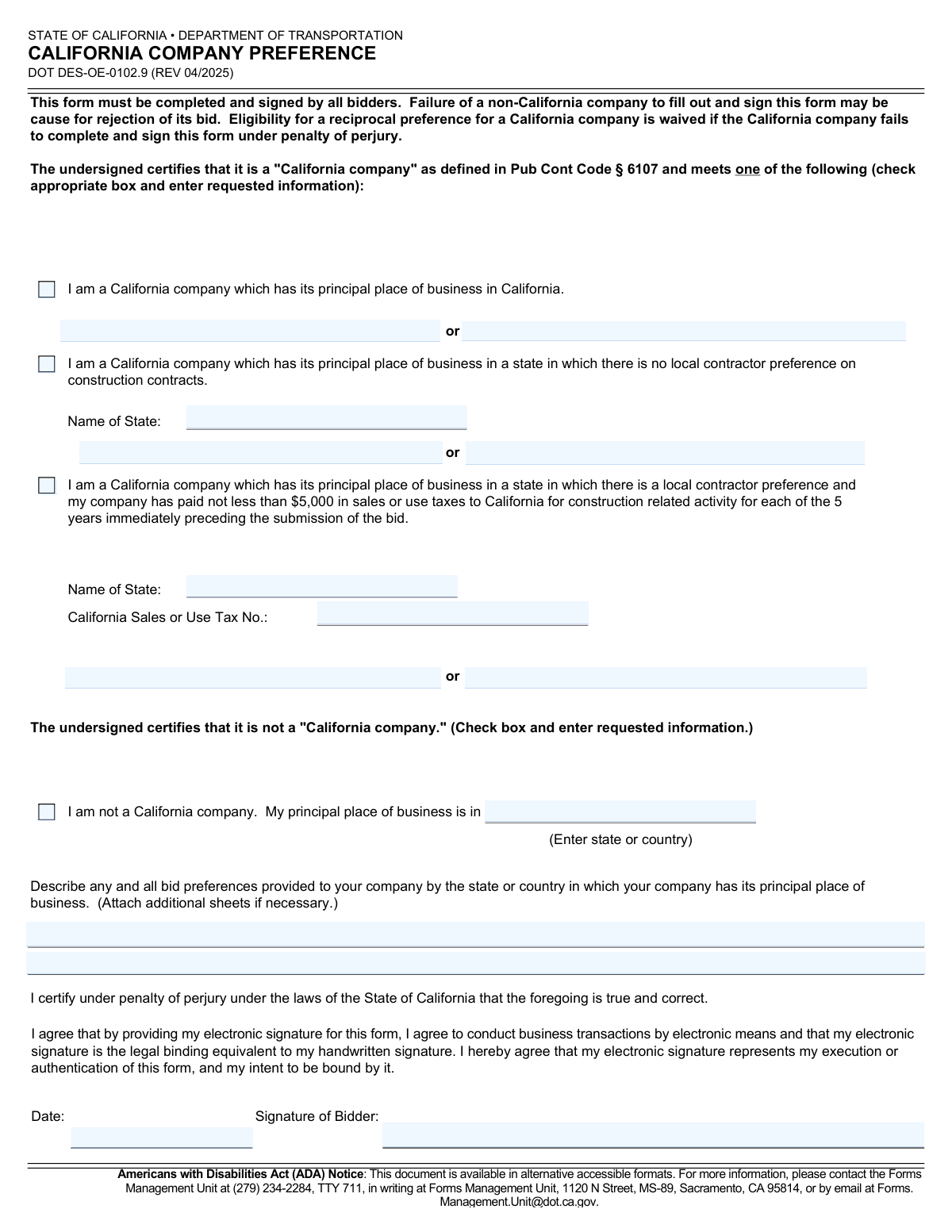
Yes! You can use AI to fill out California Company Preference, DOT DES-OE-0102.9
Form DOT DES-OE-0102.9, the California Company Preference form, is a mandatory document for all bidders on California Department of Transportation contracts. It is used to certify whether a company qualifies as a "California company" as defined by state law, which is crucial for determining eligibility for reciprocal preferences in the bidding process. Today, this form can be filled out quickly and accurately using AI-powered services like Instafill.ai, which can also convert non-fillable PDF versions into interactive fillable forms.
Our AI automatically handles information lookup, data retrieval, formatting, and form filling.
It takes less than a minute to fill out DOT DES-OE-0102.9 using our AI form filling.
Securely upload your data. Information is encrypted in transit and deleted immediately after the form is filled out.
Form specifications
| Form name: | California Company Preference, DOT DES-OE-0102.9 |
| Number of pages: | 1 |
| Language: | English |
| Categories: | company forms |
Instafill Demo: How to fill out PDF forms in seconds with AI
How to Fill Out DOT DES-OE-0102.9 Online for Free in 2026
Are you looking to fill out a DOT DES-OE-0102.9 form online quickly and accurately? Instafill.ai offers the #1 AI-powered PDF filling software of 2026, allowing you to complete your DOT DES-OE-0102.9 form in just 37 seconds or less.
Follow these steps to fill out your DOT DES-OE-0102.9 form online using Instafill.ai:
- 1 Navigate to Instafill.ai and upload or select the California Company Preference form (DOT DES-OE-0102.9).
- 2 Allow the AI to process the document and identify all the necessary fields for certification.
- 3 Determine your company's status and check the appropriate box to certify as either a 'California company' under one of the specified conditions or as a 'non-California company'.
- 4 Provide the required information corresponding to your selection, such as your principal place of business, state name, or California Sales or Use Tax Number.
- 5 If you are not a California company, describe any bid preferences provided by your home state or country.
- 6 Carefully review all the information you have entered for accuracy and completeness.
- 7 Electronically sign and date the form to certify the statements under penalty of perjury, then download the completed document for submission with your bid.
Our AI-powered system ensures each field is filled out correctly, reducing errors and saving you time.
Why Choose Instafill.ai for Your Fillable DOT DES-OE-0102.9 Form?
Speed
Complete your DOT DES-OE-0102.9 in as little as 37 seconds.
Up-to-Date
Always use the latest 2026 DOT DES-OE-0102.9 form version.
Cost-effective
No need to hire expensive lawyers.
Accuracy
Our AI performs 10 compliance checks to ensure your form is error-free.
Security
Your personal information is protected with bank-level encryption.
Frequently Asked Questions About Form DOT DES-OE-0102.9
This form is used by the California Department of Transportation (Caltrans) to determine if a bidding company qualifies for a reciprocal preference as a 'California company' on construction contracts. It helps Caltrans apply preference rules fairly during the bid evaluation process.
All companies, both from California and from out-of-state, that are submitting a bid on a Caltrans project must complete and sign this form as part of their bid package.
If you are a non-California company, your bid may be rejected for being non-responsive. If you are a California company, you will waive your eligibility for any reciprocal preference you might have been entitled to.
Your business is a 'California company' if it meets the definition in Public Contract Code § 6107. You must select one of the three 'California company' options on the form that accurately describes your situation, such as having your principal place of business in California.
You must check the box indicating you are not a California company, enter the state or country where your principal place of business is located, and describe any bid preferences your company receives in your home state or country.
Yes, potentially. If your principal place of business is in a state with a local contractor preference, you may still qualify if your company has paid at least $5,000 in California sales or use taxes for construction-related activity for each of the last five years.
Depending on your company's status, you may need your principal business address, the name of your principal state of business, and your California Sales or Use Tax Number if applicable. Non-California companies will need to describe any bid preferences they receive from their home state.
This form should be completed, signed, and included with your overall bid package as required by the contract's bidding instructions.
Yes, the form explicitly states that by providing an electronic signature, you agree it is the legal equivalent of your handwritten signature and that you consent to conduct business electronically.
Principal place of business generally refers to the primary location where a company's high-level officers direct, control, and coordinate the business's activities. This is often referred to as the company's 'nerve center'.
Yes, services like Instafill.ai use AI to accurately auto-fill form fields, which can save you time and help reduce errors.
Simply upload the DES-OE-0102.9 form to the Instafill.ai platform. The AI will identify the fields, and you can then provide your information to have the form filled out automatically before you download, sign, and submit it.
You can use a service like Instafill.ai, which can convert flat, non-fillable PDFs into interactive, fillable forms. This allows you to easily type your information directly into the fields online.
Compliance DOT DES-OE-0102.9
Validation Checks by Instafill.ai
1
Exclusive Status Selection
This check ensures that only one of the primary status options is selected. A bidder can either be a 'California company' under one of the three specified conditions or 'not a California company', but not multiple statuses simultaneously. This is critical for correctly applying preference rules. If more than one option is selected, the form is considered ambiguous and will be rejected for clarification.
2
Mandatory Status Declaration
Verifies that the bidder has selected at least one of the four primary status checkboxes (three for 'California company', one for 'not a California company'). The entire purpose of the form is to declare this status. A submission without this declaration is incomplete and invalid, which may lead to the rejection of the entire bid.
3
Signature and Date Completion
Ensures that both the 'Signature of Bidder' and 'Date' fields are filled. The form is a certification under penalty of perjury, making the signature and date legally essential. Failure to sign and date the form invalidates the certification and is grounds for bid rejection as stated in the form instructions.
4
Date Format and Plausibility
Validates that the 'Date' field is in the specified 'mm/dd/yyyy' format and represents a real, valid date. The check also ensures the date is not in the future or unreasonably far in the past. An invalid date format can cause processing errors, and an implausible date questions the validity of the signature, potentially leading to rejection.
5
Conditional Fields for CA Company Option 2
If the bidder checks the box for being a California company with a principal place of business in a state with no local preference, this validation ensures the 'Name of State', 'Reference Website', and 'Statute/Code Citation' fields are all completed. This information is required to verify the claim. Missing information will render the claim unsubstantiated and may cause the preference to be denied.
6
Conditional Fields for CA Company Option 3
If the bidder checks the box for being a California company that has paid sufficient sales/use taxes, this validation confirms that the 'Name of State' and 'California Sales or Use Tax No.' fields are filled. These details are essential for the contracting agency to verify the bidder's eligibility for this specific preference category. An incomplete submission will prevent verification and lead to the denial of the preference.
7
Conditional Fields for Non-California Company
If the bidder checks the box certifying they are 'not a California company', this check ensures the 'My principal place of business is in' and 'Describe any and all bid preferences' fields are completed. This information is necessary to determine if any reciprocal preferences apply against the bidder. Failure to provide this information may result in the bid being deemed non-responsive.
8
State Name Logic for CA Company Options 2 and 3
For bidders selecting Option 2 or 3, this check validates that the entered 'Name of State' is a valid U.S. state and is not 'California'. A California company with its principal place of business in California should select Option 1. Selecting Option 2 or 3 with 'California' as the state is a logical contradiction that would require correction.
9
California Sales or Use Tax Number Format
This validation inspects the 'California Sales or Use Tax No.' field to ensure it conforms to a standard format expected for California tax accounts (e.g., specific alphanumeric patterns and length). An incorrectly formatted number can prevent automated verification and delay processing. If the number cannot be validated, the claim for preference under Option 3 may be rejected.
10
Website URL Format Validation
For bidders selecting Option 2, this check verifies that the value entered in the 'Reference Website' field is a valid URL format (e.g., starts with 'http://' or 'https://'). This ensures the provided link is functional and can be used by officials to verify the claim about no local contractor preference. An invalid URL makes the provided evidence inaccessible and may invalidate the claim.
11
Non-California Company Location Logic
When a bidder declares they are not a California company, this check ensures the location entered for their principal place of business is not 'California'. This is a logical consistency check, as a company with a principal place of business in California would, by definition, be a 'California company'. An incorrect entry would indicate a misunderstanding of the form and require correction.
12
Completeness of CA Company Option 1
If the bidder checks the box for being a California company with its principal place of business in California (Option 1), this validation ensures that the associated address/location field is filled out. Although simple, this option still requires providing the location information as evidence. Leaving this field blank would make the declaration incomplete and may require follow-up or rejection.
Common Mistakes in Completing DOT DES-OE-0102.9
This common oversight happens when bidders rush to complete the submission packet. An unsigned or undated form is legally invalid and will be rejected, as the certification is made under penalty of perjury. Bidders must carefully review the form before submission to ensure the signature and date fields are properly completed to avoid automatic disqualification.
Bidders sometimes get confused and check multiple mutually exclusive boxes, such as certifying as both a 'California company' and a 'non-California company'. This creates an ambiguous and invalid submission, which may lead to the bid being deemed non-responsive. You must carefully read the definitions and select only one certification that accurately reflects your company's status.
This occurs when a bidder checks a box but leaves the associated text fields blank, such as checking Option 2 but not entering the name of the state. This renders the certification incomplete and may cause the bid to be rejected. Always double-check that all required information for your selected option, like state names or tax numbers, is filled in completely.
Companies with a California branch office might mistakenly claim it as their 'principal place of business' under Option 1. This term has a specific legal definition referring to the 'nerve center' of the business, which may differ from just having a physical presence. Incorrectly certifying this can lead to penalties for perjury and bid disqualification, so it is crucial to understand the legal definition before selecting an option.
Some bidders sign and date the form but neglect to check any of the boxes to certify their company's status. This is a critical omission as it fails to provide the core information the form is designed to collect. This will result in the waiver of preference eligibility for California companies or potential bid rejection for non-California companies.
A bidder might assume their home state has no local contractor preference and check Option 2 without proper verification. This is a serious error, as the certification is made under penalty of perjury and requires supporting documentation like a statute or website. Falsely claiming this can have severe legal consequences and will lead to the bid being rejected.
A company might check Option 3 without meeting the strict requirement of paying at least $5,000 in California sales/use taxes for *each* of the last 5 consecutive years. This mistake can happen if records are not thoroughly checked, and it constitutes a false certification under penalty of perjury. Bidders must verify their complete 5-year tax payment history with the state before selecting this option.
Non-California companies often provide a vague or inaccurate description of their home state's bid preferences, sometimes simply writing 'None' without research. Caltrans uses this information to apply reciprocal preferences, so an incomplete or incorrect answer can lead to bid rejection or miscalculation of the preference. Bidders must thoroughly research and accurately describe all applicable preferences as required.
When completing Option 3, bidders may enter an incorrect, expired, or improperly formatted California Sales or Use Tax Number. This data entry error prevents verification of the tax payment history, invalidating the claim for this preference category. Using a tool like Instafill.ai can help by validating data formats and auto-filling correct information from a company's profile, reducing typos.
The form explicitly requests the date in mm/dd/yyyy format, but applicants often use other conventions like dd-mm-yy or a non-numeric month. This can cause data entry and processing delays on the agency's end, and in some automated systems, it could be flagged as an error. AI form-filling tools like Instafill.ai can automatically format dates correctly, ensuring compliance and preventing processing issues.
This is a fundamental error where a bidder fails to submit the form at all, believing it doesn't apply to them. The instructions clearly state it must be completed by *all* bidders, and failure to do so has significant consequences, including bid rejection or waiver of preference. If the form is a non-fillable PDF, a tool like Instafill.ai can convert it into an interactive, fillable version to make completion easier.
Saved over 80 hours a year
“I was never sure if my IRS forms like W-9 were filled correctly. Now, I can complete the forms accurately without any external help.”
Kevin Martin Green
Your data stays secure with advanced protection from Instafill and our subprocessors

Robust compliance program
Transparent business model
You’re not the product. You always know where your data is and what it is processed for.
ISO 27001, HIPAA, and GDPR
Our subprocesses adhere to multiple compliance standards, including but not limited to ISO 27001, HIPAA, and GDPR.
Security & privacy by design
We consider security and privacy from the initial design phase of any new service or functionality. It’s not an afterthought, it’s built-in, including support for two-factor authentication (2FA) to further protect your account.
Fill out DOT DES-OE-0102.9 with Instafill.ai
Worried about filling PDFs wrong? Instafill securely fills california-company-preference-dot-des-oe-01029 forms, ensuring each field is accurate.