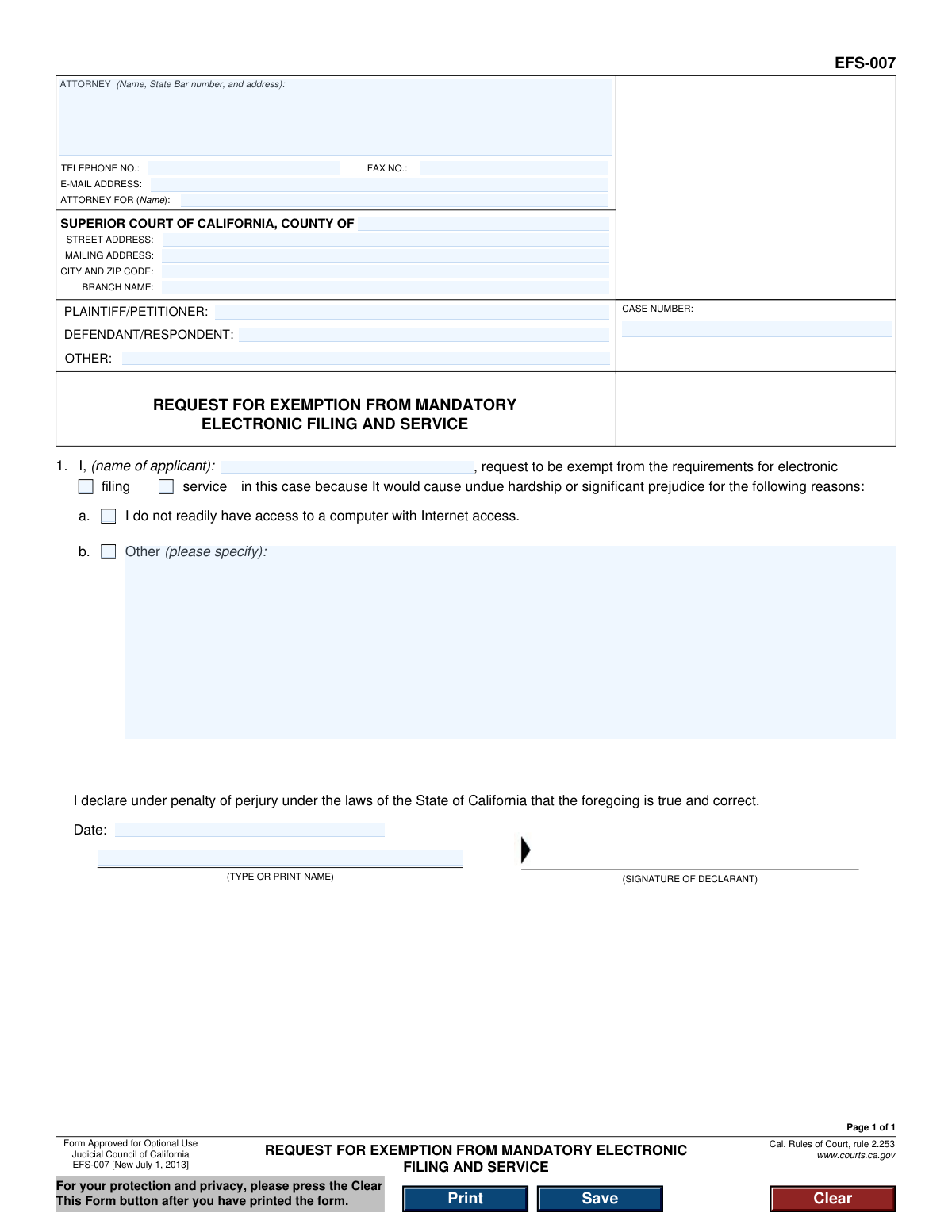
Yes! You can use AI to fill out Judicial Council of California, Form EFS-007, Request for Exemption from Mandatory Electronic Filing and Service

Form EFS-007 is a legal document used in California courts by individuals who seek an exemption from the mandatory requirement to file and serve documents electronically. It is filed to inform the court that e-filing would cause undue hardship or significant prejudice, for reasons such as lack of internet access. Today, this form can be filled out quickly and accurately using AI-powered services like Instafill.ai, which can also convert non-fillable PDF versions into interactive fillable forms.
EFS-007 is part of the California court forms, California judicial forms, court filing forms and Judicial Council forms categories on Instafill.
Our AI automatically handles information lookup, data retrieval, formatting, and form filling.
It takes less than a minute to fill out EFS-007 using our AI form filling.
Securely upload your data. Information is encrypted in transit and deleted immediately after the form is filled out.

Form specifications

Form name: Judicial Council of California, Form EFS-007, Request for Exemption from Mandatory Electronic Filing and Service
Number of fields: 25
Number of pages: 1
Language: English
main-image

Instafill Demo: How to fill out PDF forms in seconds with AI

How to Fill Out EFS-007 Online for Free in 2026

Are you looking to fill out a EFS-007 form online quickly and accurately? Instafill.ai offers the #1 AI-powered PDF filling software of 2026, allowing you to complete your EFS-007 form in just 37 seconds or less.
Follow these steps to fill out your EFS-007 form online using Instafill.ai:
  1. 1 Navigate to Instafill.ai and upload or select Form EFS-007.
  2. 2 Enter the court and case information, including the county, court address, and case number.
  3. 3 Provide your attorney or personal information, including name, address, and contact details.
  4. 4 Identify the parties in the case, such as the Plaintiff/Petitioner and Defendant/Respondent.
  5. 5 State your name as the applicant and check the box that specifies your reason for requesting an exemption, providing a detailed explanation if necessary.
  6. 6 Date and provide your name on the signature line to declare the information is true and correct under penalty of perjury.
  7. 7 Review all the information for accuracy before downloading, printing, and filing the completed form with the appropriate court.

Our AI-powered system ensures each field is filled out correctly, reducing errors and saving you time.

Why Choose Instafill.ai for Your Fillable EFS-007 Form?

Speed

Complete your EFS-007 in as little as 37 seconds.

Up-to-Date

Always use the latest 2026 EFS-007 form version.

Cost-effective

No need to hire expensive lawyers.

Accuracy

Our AI performs 10 compliance checks to ensure your form is error-free.

Security

Your personal information is protected with bank-level encryption.

Frequently Asked Questions About Form EFS-007

This form is used to request an exemption from the court's requirement to file and serve legal documents electronically. It is for individuals who would face undue hardship or significant prejudice if forced to use the electronic system.

Any party in a California Superior Court case, or their attorney, who is subject to mandatory e-filing but cannot comply should fill out this form. This is common for individuals without reliable access to a computer or the internet.

The form lists 'undue hardship or significant prejudice' as the standard. This includes not having ready access to a computer with internet, but you can also specify other valid reasons like a physical disability, language barrier, or other circumstances that make e-filing extremely difficult.

You can find this information on other documents related to your case, such as the initial complaint or summons. You must copy the exact case number, party names, and the specific Superior Court and branch name where your case is being heard.

In section 1, you must state your name and check the box for the type of exemption you need: 'filing,' 'service,' or both. Then, you must check the box that best describes your reason, either lack of internet access or 'Other'.

If you check 'Other,' you must briefly explain why e-filing would cause you undue hardship. Examples could include a disability that prevents computer use, a lack of technical knowledge, or living in a remote area with no reliable internet service.

You must file the original, signed paper form with the clerk of the court where your case is located. Since you are requesting an exemption from e-filing, you will submit this form in person or by mail, not electronically.

The court will review your request and a judge will decide whether to grant or deny your exemption. You will be notified of the court's decision, and if granted, you will be permitted to file and serve paper documents.

If your request is denied, you must comply with the mandatory electronic filing and service rules. The court may provide information on public computer terminals or other resources to help you e-file.

No, you are not required to have an attorney to file Form EFS-007. If you are representing yourself (in 'pro per'), you can fill out and submit the form on your own behalf.

This is a legal statement confirming that all the information you have provided on the form is true and correct to the best of your knowledge. Providing false information can have serious legal consequences, so be sure your statements are accurate.

Yes, services like Instafill.ai use AI to accurately auto-fill form fields with your personal and case information, which saves time and reduces errors. You are still responsible for providing the specific reasons for your exemption and signing the form.

You can use a service like Instafill.ai to easily fill out the form on your computer. Simply upload the PDF, and the tool will allow you to type your information into the fields before you print it for signing and submission.

If you have a non-fillable or 'flat' PDF, you can upload it to Instafill.ai. The service can convert it into an interactive, fillable form that you can complete on your computer before printing.

Compliance EFS-007
Validation Checks by Instafill.ai

1
Case Number Presence and Format
Ensures the 'CASE NUMBER' field is not empty and contains a value that conforms to the expected format for a California court case number. The case number is the primary identifier linking this request to the correct legal proceeding. A missing or malformed case number will cause the document to be rejected by the court clerk as it cannot be filed.
2
Court County Specification
Validates that the 'COUNTY OF' field is filled in with a valid California county name. This information is critical for routing the document to the correct Superior Court jurisdiction for processing. Failure to specify the county will result in an immediate rejection of the filing.
3
Party Identification
Checks that at least one 'PLAINTIFF/PETITIONER' and one 'DEFENDANT/RESPONDENT' are identified on the form. This basic case information is necessary to properly docket the request and understand its context within the litigation. A form lacking party information is considered incomplete and cannot be processed.
4
Applicant Name Presence
Verifies that the applicant's name is provided in the declaration statement beginning with 'I, (name of applicant):'. This field is mandatory as it identifies the individual who is requesting the exemption. The form is legally invalid without the identity of the applicant.
5
Exemption Type Selection
Ensures that the applicant has selected at least one of the two exemption type checkboxes: 'electronic filing' or 'electronic service'. The form's purpose is to request a specific exemption, so the nature of the request must be clearly indicated. If neither box is checked, the request is ambiguous and will be rejected.
6
Reason for Exemption Provided
Validates that a reason for the exemption request has been provided by checking either the 'I do not readily have access to a computer with Internet access' box or the 'Other' box. California Rules of Court require a showing of undue hardship, so a justification is mandatory. The request will be denied if no reason is given.
7
Conditional Requirement for 'Other' Reason
This is a logical check to ensure that if the 'Other' reason checkbox is selected, the corresponding text field specifying the reason is not empty. Ticking 'Other' without providing an explanation gives the court no information on which to base a decision. The form will be considered incomplete if the explanation is missing.
8
Declaration Date Validity
Checks that the 'Date' field contains a complete and valid date that is not set in the future. The date of signature is a legally significant part of the declaration under penalty of perjury. An invalid, future, or missing date will invalidate the declaration and cause the form to be rejected.
9
Declarant Printed Name Presence
Verifies that the '(TYPE OR PRINT NAME)' field below the signature line is filled out. This printed name serves to legibly identify the signatory of the declaration. A missing printed name can render the signature ambiguous and is grounds for the court to reject the document.
10
Applicant and Declarant Name Consistency
Compares the applicant's name from the first paragraph with the printed name of the declarant in the signature block. These two names must match to confirm that the person requesting the exemption is the same person making the sworn declaration. A mismatch will trigger a validation error to prevent potential fraud or filing errors.
11
Attorney State Bar Number Validation
If an attorney's name is entered, this check verifies that a California State Bar number is also included and follows a valid numerical format. This is essential for verifying the attorney's credentials and their standing with the State Bar. Filings from attorneys without a valid bar number will be rejected.
12
Email Address Format
Validates that any value entered in the 'E-MAIL ADDRESS' field conforms to the standard format (e.g., [email protected]). While optional, if an email is provided, it must be valid to ensure the court and other parties can use it for communication. An invalid format would trigger a warning to the user to correct it.

Common Mistakes in Completing EFS-007

Entering an Incorrect or Incomplete Case Number

Filers often mistype the case number, omit leading zeros, or forget to include it altogether. This is a critical error because the case number is the primary identifier used by the court clerk to link the document to the correct case file. An incorrect number will cause the filing to be rejected, leading to delays and potentially missed deadlines.

Failing to Specify the Correct Court Branch

Many counties have multiple court branches, and filers frequently list only the main county courthouse address, omitting the specific branch name where the case is being heard. This can cause the document to be sent to the wrong location, resulting in significant processing delays or outright rejection. Always verify the exact street address and branch name for your specific case.

Omitting the Attorney's State Bar Number

When an attorney fills out the form, they sometimes forget to include their State Bar number. This number is a mandatory and unique identifier required by the court to verify the attorney's standing and contact information. Failure to provide it will result in the form being deemed incomplete and rejected by the clerk.

Confusing Applicant Name with 'Attorney For'

Self-represented (pro per) litigants often mistakenly put their own name in the 'ATTORNEY FOR' field. This field is exclusively for the name of the party the attorney is representing. A self-represented individual should write 'In Pro Per' or 'Pro Se' in the attorney field and enter their name as the applicant in section 1, which can cause confusion and clerical errors.

Forgetting to Select the Exemption Type

The form requires the applicant to specify if they are requesting an exemption from 'electronic filing,' 'electronic service,' or both, by checking the appropriate boxes. Applicants sometimes overlook these checkboxes, leaving the court unsure of what exemption is being requested. An ambiguous request is likely to be denied for being incomplete.

Providing a Vague 'Other' Justification

When selecting the 'Other' reason for exemption, filers must provide a specific and compelling explanation of the 'undue hardship or significant prejudice.' Simply writing 'it is too difficult' or 'I am not good with computers' is insufficient and will likely lead to denial. The reason must be detailed and clearly articulate a genuine barrier to using the electronic system.

Submitting Contradictory Information

A common mistake is providing information that contradicts the reason for the exemption. For example, checking the box for 'I do not readily have access to a computer with Internet access' while also providing an email address in the contact section undermines the credibility of the claim. This inconsistency can lead a judge or clerk to deny the request.

Forgetting to Sign the Declaration

An unsigned legal document is invalid. Forgetting to physically sign the form in the 'SIGNATURE OF DECLARANT' field is one of the most common and fatal errors, leading to immediate rejection by the court clerk. This can cause critical delays, especially if a filing deadline is approaching.

Omitting the Date on the Declaration

The date next to the signature is a required part of the declaration 'under penalty of perjury.' It establishes when the declaration was made. Filers often forget to fill in the date, rendering the form incomplete and subject to rejection by the court.

Failing to Type or Print the Signer's Name

The form includes a line for '(TYPE OR PRINT NAME)' below the signature line. This is necessary to ensure the identity of the signer is clear, as signatures can be illegible. Omitting the printed name can lead to rejection or requests for clarification, delaying the processing of the exemption request. AI-powered tools like Instafill.ai can help prevent these data entry errors by ensuring all required fields are completed correctly before printing.
Saved over 80 hours a year

“I was never sure if my IRS forms like W-9 were filled correctly. Now, I can complete the forms accurately without any external help.”

Kevin Martin Green

Your data stays secure with advanced protection from Instafill and our subprocessors

Robust compliance program

Transparent business model

You’re not the product. You always know where your data is and what it is processed for.

ISO 27001, HIPAA, and GDPR

Our subprocesses adhere to multiple compliance standards, including but not limited to ISO 27001, HIPAA, and GDPR.

Security & privacy by design

We consider security and privacy from the initial design phase of any new service or functionality. It’s not an afterthought, it’s built-in, including support for two-factor authentication (2FA) to further protect your account.

Fill out EFS-007 with Instafill.ai

Worried about filling PDFs wrong? Instafill securely fills judicial-council-of-california-form-efs-007-request-for-exemption-from-mandatory-electronic-filing-and-service forms, ensuring each field is accurate.

Related forms by category

California court forms Judicial Council of California Form SC-105, Request for Court Order and Answer (Small Claims), Judicial Council of California Form SC-120, Defendant’s Claim and ORDER to Go to Small Claims Court (Small Claims), Judicial Council of California Form SER-001, Request for Sheriff to Serve Court Papers, Judicial Council of California Form SER-001, Request for Sheriff to Serve Court Papers, Affidavit for Collection of Personal Property California Probate Code Section 13100, Form POS-040, Proof of Service—Civil, Declaration of Facts of Death (California Superior Court), declaration-of-marriage-for-court-proceeding-california-family-law, ADOPT-200, Adoption Request, ADOPT-200, Stepparent Adoption Request, ADOPT-210, Adoption Agreement, ADOPT-310, Contact After Adoption Agreement, Judicial Council of California Form ADOPT-200, Adoption Request, Form ADR-107, Mediation Attendance Sheet, Form ADR-110, Order Appointing Referee, Form ADR-109, Stipulation or Motion for Order Appointing Referee, Form ADR-102, Request for Trial De Novo After Judicial Arbitration, Form ADR-108, Referee's Report (Code Civ. Proc., §§ 638, 639), Form ADR-106, Petition to Confirm, Correct, or Vacate Contractual Arbitration Award, Form ADR-104, Rejection of Award and Request for Trial After Attorney-Client Fee Arbitration · + 434 more →
California judicial forms Judicial Council of California Form FL-300, Request for Order, Judicial Council of California Form FL-150, Income and Expense Declaration, Judicial Council of California Form DE-111, Petition for Probate (Probate—Decedents Estates), Judicial Council of California Form SC-104, Proof of Service (Small Claims), Judicial Council of California Form SC-105, Request for Court Order and Answer (Small Claims), Judicial Council of California Form DE-111, Petition for Probate (Probate—Decedents Estates), Judicial Council of California Form SC-104, Proof of Service (Small Claims), Judicial Council of California Form SC-108, Request to Correct or Cancel Judgment and Answer (Small Claims), Judicial Council of California Form SC-120, Defendant’s Claim and ORDER to Go to Small Claims Court (Small Claims), Civil Case Cover Sheet (Judicial Council of California Form CM-010), Civil Case Cover Sheet (Judicial Council of California Form CM-010), Judicial Council of California Form TR-205, Request for Trial by Written Declaration (Trial by Written Declaration—Traffic), Judicial Council of California Form DE-120, Notice of Hearing—Decedent's Estate or Trust, Inventory and Appraisal Attachment (Judicial Council of California Form DE-161, GC-041), CLETS-001, Confidential Information for Law Enforcement (Judicial Council of California), Judicial Council of California Form SER-001, Request for Sheriff to Serve Court Papers, Judicial Council of California Form UD-105, Answer—Unlawful Detainer, CLETS-001, Confidential Information for Law Enforcement (Judicial Council of California), Judicial Council of California Form ADOPT-210, Adoption Agreement, Judicial Council of California Form DE-120, Notice of Hearing—Decedent's Estate or Trust · + 50 more →
court filing forms Debtor’s(s’) Chapter 13 Plan (Containing a Motion for Valuation), Form MC 98, Statement of Grievance Regarding e-Filing Access Plan, Form MC 502, Notice of Filing of Transcript and Affidavit of Mailing, Form MC 503, Motion to Change Time for Filing Transcript on Appeal, Form MC 514, Receipt of Prepaid Filing Fees for MiFILE Transaction, Form EFS-005-JV/JV-141, Electronic Service: Consent, Withdrawal of Consent, Address Change (Juvenile), Form EFS-006, Withdrawal of Consent to Electronic Service (Electronic Filing and Service), Form EFS-020, Proposed Order (Cover Sheet), Form EFS-005-CV, Consent to Electronic Service and Notice of Electronic Service Address, Form EFS-010, Notice of Change of Electronic Service Address, Form EFS-008, Order of Exemption from Mandatory Electronic Filing and Service
Judicial Council forms Judicial Council of California Form FL-300, Request for Order, Judicial Council of California Form FL-150, Income and Expense Declaration, Judicial Council of California Form DE-111, Petition for Probate (Probate—Decedents Estates), Judicial Council of California Form SC-104, Proof of Service (Small Claims), Judicial Council of California Form SC-105, Request for Court Order and Answer (Small Claims), Judicial Council of California Form DE-111, Petition for Probate (Probate—Decedents Estates), Judicial Council of California Form SC-104, Proof of Service (Small Claims), Judicial Council of California Form SC-108, Request to Correct or Cancel Judgment and Answer (Small Claims), Judicial Council of California Form SC-120, Defendant’s Claim and ORDER to Go to Small Claims Court (Small Claims), Civil Case Cover Sheet (Judicial Council of California Form CM-010), Civil Case Cover Sheet (Judicial Council of California Form CM-010), Judicial Council of California Form TR-205, Request for Trial by Written Declaration (Trial by Written Declaration—Traffic), Judicial Council of California Form DE-120, Notice of Hearing—Decedent's Estate or Trust, Inventory and Appraisal Attachment (Judicial Council of California Form DE-161, GC-041), CLETS-001, Confidential Information for Law Enforcement (Judicial Council of California), Judicial Council of California Form SER-001, Request for Sheriff to Serve Court Papers, Judicial Council of California Form UD-105, Answer—Unlawful Detainer, CLETS-001, Confidential Information for Law Enforcement (Judicial Council of California), Judicial Council of California Form ADOPT-210, Adoption Agreement, Judicial Council of California Form DE-120, Notice of Hearing—Decedent's Estate or Trust · + 52 more →