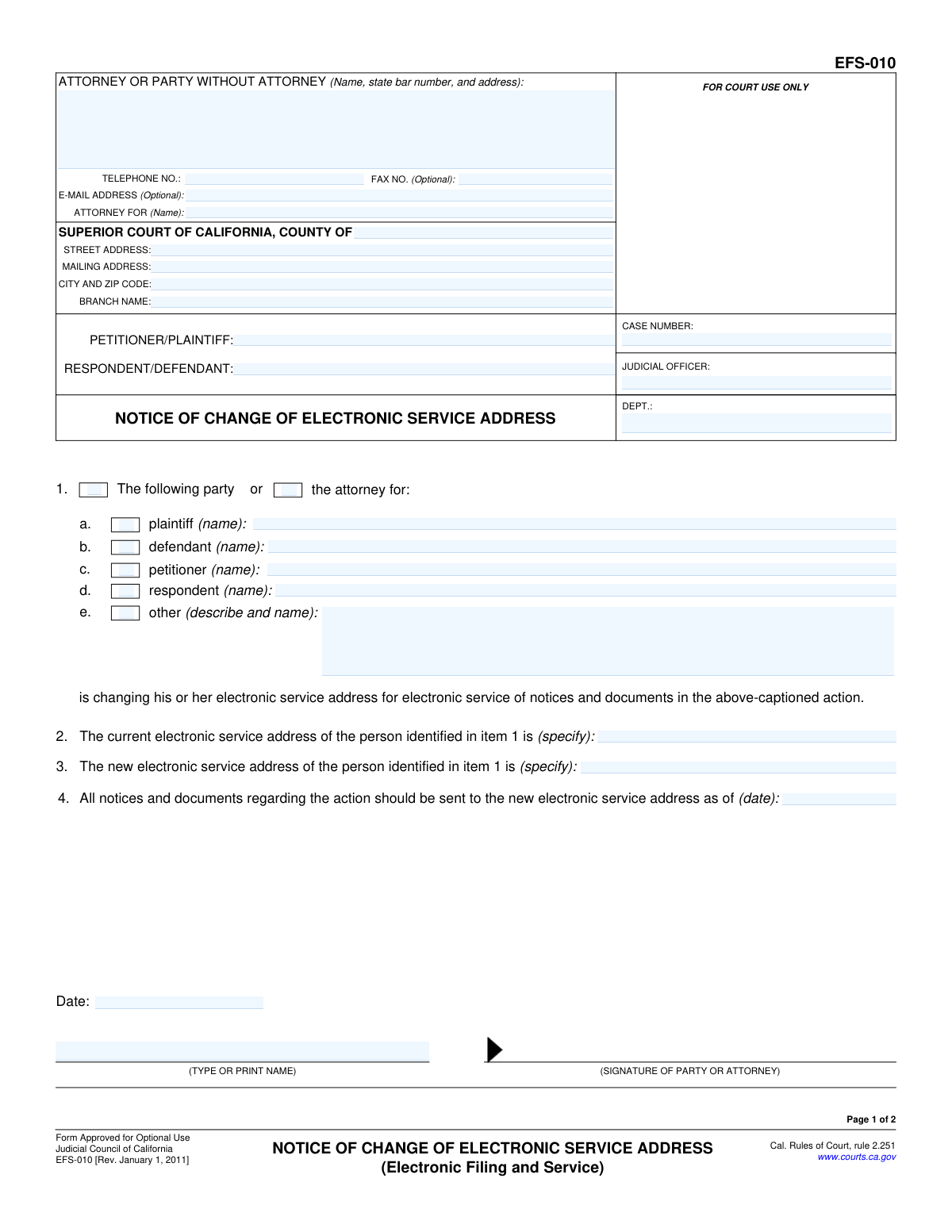
Yes! You can use AI to fill out Form EFS-010, Notice of Change of Electronic Service Address

Form EFS-010, Notice of Change of Electronic Service Address, is a legal document used in California courts to formally notify the court and all parties in a case of a change in an individual's or attorney's email address for electronic service. This ensures that all official notices and documents are sent to the correct, current address, maintaining proper communication throughout the legal process. Today, this form can be filled out quickly and accurately using AI-powered services like Instafill.ai, which can also convert non-fillable PDF versions into interactive fillable forms.
EFS-010 is part of the California court forms and court filing forms categories on Instafill.
Our AI automatically handles information lookup, data retrieval, formatting, and form filling.
It takes less than a minute to fill out EFS-010 using our AI form filling.
Securely upload your data. Information is encrypted in transit and deleted immediately after the form is filled out.

Form specifications

Form name: Form EFS-010, Notice of Change of Electronic Service Address
Number of fields: 48
Number of pages: 1
Language: English
main-image

Instafill Demo: How to fill out PDF forms in seconds with AI

How to Fill Out EFS-010 Online for Free in 2026

Are you looking to fill out a EFS-010 form online quickly and accurately? Instafill.ai offers the #1 AI-powered PDF filling software of 2026, allowing you to complete your EFS-010 form in just 37 seconds or less.
Follow these steps to fill out your EFS-010 form online using Instafill.ai:
  1. 1 Navigate to Instafill.ai and upload your Form EFS-010 or select it from their template library.
  2. 2 Provide the court and case information, including the county, case number, and the names of the petitioner/plaintiff and respondent/defendant.
  3. 3 Identify the party or attorney whose electronic service address is changing by checking the appropriate box and providing their name.
  4. 4 Enter the current electronic service address in Item 2 and the new electronic service address in Item 3.
  5. 5 Specify the date on which the new address becomes effective for service of all notices and documents.
  6. 6 Review all the information auto-filled by the AI, then date and e-sign the notice.
  7. 7 Complete the 'Proof of Electronic Service' section on page 2 to confirm that all other parties in the case have been notified of the change.

Our AI-powered system ensures each field is filled out correctly, reducing errors and saving you time.

Why Choose Instafill.ai for Your Fillable EFS-010 Form?

Speed

Complete your EFS-010 in as little as 37 seconds.

Up-to-Date

Always use the latest 2026 EFS-010 form version.

Cost-effective

No need to hire expensive lawyers.

Accuracy

Our AI performs 10 compliance checks to ensure your form is error-free.

Security

Your personal information is protected with bank-level encryption.

Frequently Asked Questions About Form EFS-010

This form is used to officially notify the court and all other parties in a legal case that your designated email address for receiving electronic court documents has changed.

Any party or attorney involved in a California court case who is using electronic service must file this form if their electronic service address (usually email) changes.

An electronic service address is the email address you have registered with the court's electronic filing system and provided to other parties for the purpose of receiving official legal notices and documents electronically.

Page 1 is the official notice to the court of your address change. Page 2 is the 'Proof of Electronic Service,' which is a sworn statement confirming you have sent a copy of this notice to all other parties in the case.

The Proof of Service must be completed and signed by someone who is at least 18 years old and not a party to the lawsuit. This person, the 'declarant', is confirming they sent the notice on your behalf.

Yes, if you are participating in e-service and your email address changes, you must file Form EFS-010 to ensure you continue to receive important case documents from the court and other parties.

You will need your court case number, the full names of the parties, your old electronic service address, your new electronic service address, and the date the change becomes effective.

After completing and signing the form, you must file it with the court handling your case and also serve a copy on all other parties or their attorneys, as documented on the Proof of Service page.

This is the date on which you want all parties and the court to start using your new electronic service address. Choose a date that gives everyone adequate notice of the change.

On Page 2, check the box indicating that service on additional persons is described in an attachment. Then, attach a separate page listing the service details for each additional person.

Yes, services like Instafill.ai use AI to help you accurately auto-fill form fields with your saved information, which saves time and reduces the risk of errors.

Upload the EFS-010 PDF to Instafill.ai, and its AI will make the form fillable. You can then type directly into the fields, and the platform can use your profile to auto-fill recurring information like your name, address, and case details.

You can use a service like Instafill.ai, which can convert flat, non-fillable PDFs into interactive forms. This allows you to easily type your information, sign, and save the completed document.

Compliance EFS-010
Validation Checks by Instafill.ai

1
Case Number Presence and Format
This check ensures the 'CASE NUMBER' field is not empty and conforms to the standard format used by the court. The case number is the primary identifier for a legal action, and its absence or incorrect format would prevent the document from being correctly filed and associated with the case record. If validation fails, the user should be prompted to enter a valid case number before submission.
2
Exclusive Party Identification
Validates that exactly one checkbox from section 1 (a, b, c, d, or e) is selected and that the corresponding name or description field is populated. This is critical to unambiguously identify which party or attorney is changing their service address. A failure would mean the notice is unclear, leading to its rejection or confusion about who it applies to.
3
New Electronic Service Address Format
This check verifies that the value entered in section 3, 'The new electronic service address', is a valid email address format (e.g., contains '@' and a domain). Since the entire purpose of the form is to update this address, an invalid format would make the filing pointless and could lead to missed service of important legal documents. The system should reject submissions with an improperly formatted email address.
4
New Address Differs From Current Address
This validation compares the 'current electronic service address' in section 2 with the 'new electronic service address' in section 3 to ensure they are not identical. Submitting a form with the same address in both fields indicates no change is being made, which is likely an error. If the addresses are the same, the user should be alerted to either correct the new address or cancel the submission.
5
Effective Date Logic
Ensures the date provided in section 4, 'as of (date)', is a valid date and is not in the past relative to the signature date. The effective date specifies when other parties should begin using the new address, so it must be a clear and logical future point in time. A past date would create ambiguity and potential disputes over proper service, so the system should flag it as an error.
6
Cross-Page Case Information Consistency
This check verifies that the 'CASE NUMBER', 'PETITIONER/PLAINTIFF', and 'RESPONDENT/DEFENDANT' fields on Page 2 are identical to the corresponding fields on Page 1. This ensures that the Proof of Service page is correctly associated with the Notice page and belongs to the same case. Mismatched information could invalidate the proof of service or cause filing errors.
7
Filer Contact Information Presence
Validates that the 'ATTORNEY OR PARTY WITHOUT ATTORNEY' name and 'TELEPHONE NO.' fields are filled out. This information is required for the court and other parties to contact the filer if there are any questions about the notice. Failure to provide this information can lead to processing delays or rejection of the form.
8
Court County Specification
This check ensures that the 'COUNTY OF' field within the 'SUPERIOR COURT OF CALIFORNIA' section is not empty. Specifying the county is essential for routing the document to the correct court jurisdiction. Without this information, the form could be sent to the wrong court, causing significant delays or failure to file.
9
Declarant's E-Service Address Validity
On Page 2, this validates that the declarant's electronic service address in section 1b is a properly formatted email address. This address may be used to communicate with the person who is certifying the service, so its accuracy is important for the integrity of the declaration. An invalid format should trigger an error message.
10
Service Recipient Information Completeness
Verifies that on Page 2, both the 'Name of person served' (section 2a) and the 'Electronic service address of person served' (section 2b) are completed. The proof of service is meaningless without knowing who was served and where the notice was sent. If either field is empty, the proof of service is incomplete and should not be accepted.
11
Service Date and Time Presence
This check ensures that the 'On (date)' field (section 2c) and 'At (time)' field (section 2d) on the Proof of Service page are both filled out. The date and time of service are fundamental components of a valid proof of service, establishing a legally significant timeline. Missing this information would invalidate the declaration of service.
12
Logical Service Date
This validation compares the service date on Page 2 (section 2c) with the signature date on Page 1. The service date must be on or after the date the notice was signed. It is logically impossible to serve a document before it has been finalized and signed, and a violation would invalidate the proof of service.
13
Signature Date Presence (Page 1)
Ensures the 'Date' field in the signature block on Page 1 is filled with a valid date. The signature date establishes when the notice was formally executed by the party or attorney. An undated notice is incomplete and may be rejected by the court clerk.

Common Mistakes in Completing EFS-010

Entering an Incorrect or Incomplete Case Number

This common data entry error often happens due to typos or misremembering the exact sequence of letters and numbers. An incorrect case number is a critical flaw that can cause the court clerk to reject the filing or misfile the document in the wrong case, leading to significant delays. To avoid this, always copy the case number directly from a previous official court document. AI-powered tools like Instafill.ai can prevent this by saving and accurately auto-populating case information across all related forms.

Swapping the Current and New Electronic Service Addresses

Users frequently enter the new email address in Section 2 (for the current address) and the old one in Section 3 (for the new address). This mistake completely undermines the form's purpose, as it directs parties to continue using the old, soon-to-be-unmonitored address. Carefully read the label for each section to ensure the address being replaced is in Section 2 and the one to be used going forward is in Section 3.

Typographical Errors in the New Email Address

A single typo in the new electronic service address entered in Section 3 will make it invalid, meaning the party will not receive crucial legal notices and documents. This can lead to missed deadlines, hearings, or even a default judgment being entered against them. Meticulously proofread the new email address character by character before filing. Using a tool like Instafill.ai can help by validating email formats and ensuring accuracy.

Forgetting to Sign the Form

An unsigned legal document is invalid and will be rejected by the court clerk. Filers often print the form and forget the final step of signing it, or they mistakenly type their name where a legal signature is required. Always ensure a valid signature (wet or electronic, as per court rules) is placed in the signature field on both Page 1 (the notice) and Page 2 (the proof of service).

Invalid Proof of Service Declaration

The person who signs the Proof of Service on Page 2 (the declarant) must be over 18 and cannot be a party to the lawsuit. A common error is for the plaintiff or defendant to sign this section themselves, which invalidates the proof that other parties were properly notified. This service must be performed and the declaration signed by a neutral third party, such as a legal assistant, friend, or professional process server.

Omitting the Effective Date in Section 4

Failing to specify the date when the new address becomes effective creates ambiguity for the court and all other parties. Without this date, others will not know when to stop using the old address, potentially resulting in important documents being sent to an unmonitored inbox. Always enter a clear date in Section 4 to ensure a smooth transition and prevent any disruption in receiving case communications.

Failing to Repeat Case Information on Page 2

The top of Page 2 requires the case caption (party names) and case number to be filled in again, but filers often overlook this, assuming the information from Page 1 is sufficient. If the pages are separated during processing, an incomplete Page 2 can cause filing issues with the Proof of Service. Ensure these header fields are completed on all pages; form-filling software like Instafill.ai can automatically populate this repetitive data to prevent such omissions.

Ambiguity in Identifying the Party in Section 1

Users sometimes check a box like 'plaintiff' or 'defendant' but forget to write the specific name of that party on the corresponding line. This ambiguity makes the notice unclear and can lead to its rejection or cause confusion about whose address has actually changed. To avoid this, ensure you both check the correct box identifying the party's role and type or print their full name exactly as it appears in the case caption.

Incomplete Service List on Proof of Service

The Proof of Service on Page 2 must list every party (or their attorney) who was served with the notice, along with the electronic address used. Forgetting to include a party means there is no official record they were notified, which could lead to legal challenges. If there are more parties than space allows, you must check the box indicating an attachment is included and list all additional persons served on a separate page.

Handwriting on a Non-Fillable PDF

Many court forms are available online as flat, non-fillable PDFs, leading people to print and handwrite the information. This often results in illegible entries that can be misinterpreted by the court clerk or opposing counsel, potentially causing the form to be rejected. For clarity and professionalism, it is best to use a fillable version. If one is not available, tools like Instafill.ai can convert the non-fillable PDF into an interactive form, allowing you to type directly into the fields for a clean submission.
Saved over 80 hours a year

“I was never sure if my IRS forms like W-9 were filled correctly. Now, I can complete the forms accurately without any external help.”

Kevin Martin Green

Your data stays secure with advanced protection from Instafill and our subprocessors

Robust compliance program

Transparent business model

You’re not the product. You always know where your data is and what it is processed for.

ISO 27001, HIPAA, and GDPR

Our subprocesses adhere to multiple compliance standards, including but not limited to ISO 27001, HIPAA, and GDPR.

Security & privacy by design

We consider security and privacy from the initial design phase of any new service or functionality. It’s not an afterthought, it’s built-in, including support for two-factor authentication (2FA) to further protect your account.

Fill out EFS-010 with Instafill.ai

Worried about filling PDFs wrong? Instafill securely fills form-efs-010-notice-of-change-of-electronic-service-address forms, ensuring each field is accurate.

Related forms by category

California court forms Judicial Council of California Form SC-105, Request for Court Order and Answer (Small Claims), Judicial Council of California Form SC-120, Defendant’s Claim and ORDER to Go to Small Claims Court (Small Claims), Judicial Council of California Form SER-001, Request for Sheriff to Serve Court Papers, Judicial Council of California Form SER-001, Request for Sheriff to Serve Court Papers, Affidavit for Collection of Personal Property California Probate Code Section 13100, Form POS-040, Proof of Service—Civil, Declaration of Facts of Death (California Superior Court), declaration-of-marriage-for-court-proceeding-california-family-law, ADOPT-200, Adoption Request, ADOPT-200, Stepparent Adoption Request, ADOPT-210, Adoption Agreement, ADOPT-310, Contact After Adoption Agreement, Judicial Council of California Form ADOPT-200, Adoption Request, Form ADR-107, Mediation Attendance Sheet, Form ADR-110, Order Appointing Referee, Form ADR-109, Stipulation or Motion for Order Appointing Referee, Form ADR-102, Request for Trial De Novo After Judicial Arbitration, Form ADR-108, Referee's Report (Code Civ. Proc., §§ 638, 639), Form ADR-106, Petition to Confirm, Correct, or Vacate Contractual Arbitration Award, Form ADR-104, Rejection of Award and Request for Trial After Attorney-Client Fee Arbitration · + 434 more →
court filing forms Debtor’s(s’) Chapter 13 Plan (Containing a Motion for Valuation), Form MC 98, Statement of Grievance Regarding e-Filing Access Plan, Form MC 502, Notice of Filing of Transcript and Affidavit of Mailing, Form MC 503, Motion to Change Time for Filing Transcript on Appeal, Form MC 514, Receipt of Prepaid Filing Fees for MiFILE Transaction, Form EFS-005-JV/JV-141, Electronic Service: Consent, Withdrawal of Consent, Address Change (Juvenile), Form EFS-006, Withdrawal of Consent to Electronic Service (Electronic Filing and Service), Form EFS-020, Proposed Order (Cover Sheet), Form EFS-005-CV, Consent to Electronic Service and Notice of Electronic Service Address, Judicial Council of California, Form EFS-007, Request for Exemption from Mandatory Electronic Filing and Service, Form EFS-008, Order of Exemption from Mandatory Electronic Filing and Service