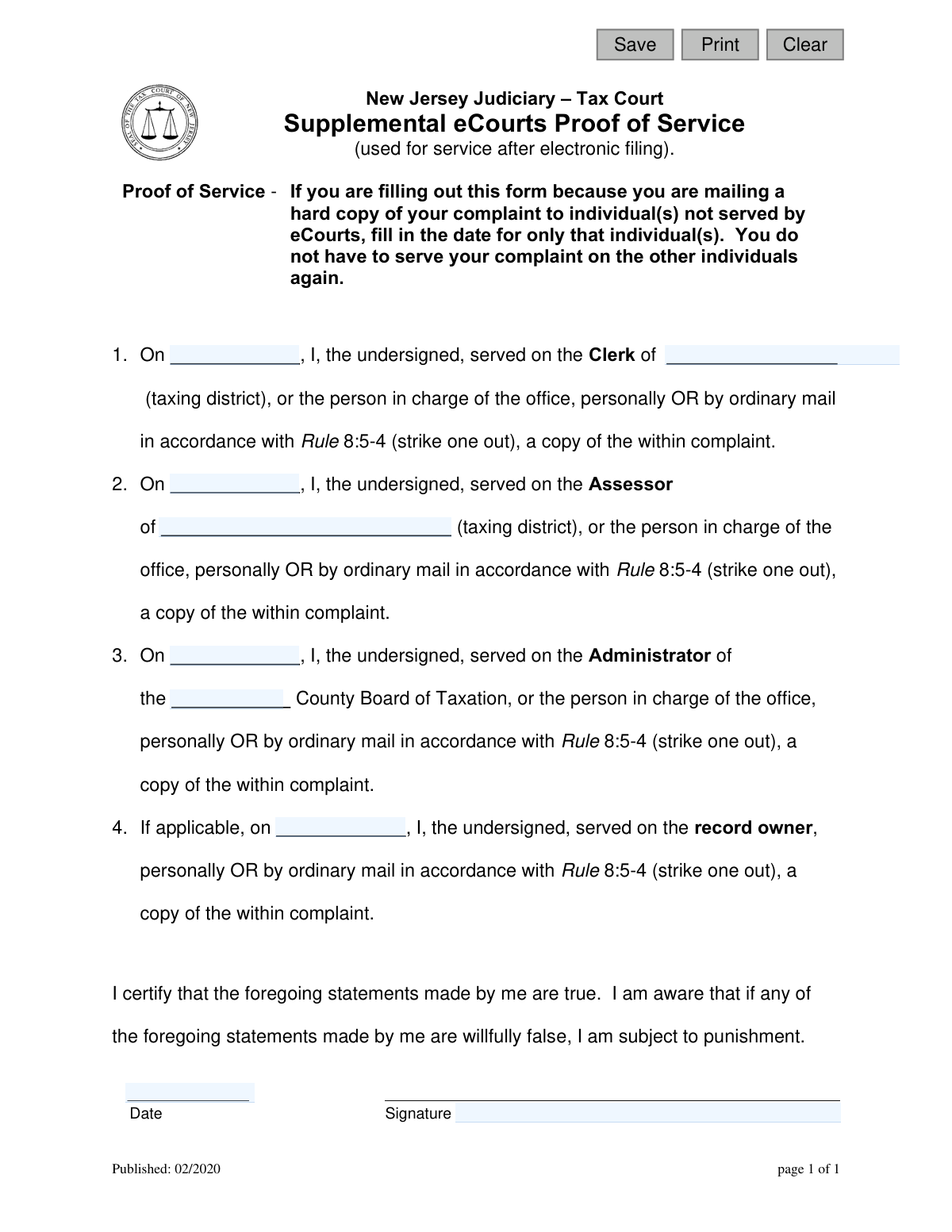
Yes! You can use AI to fill out New Jersey Judiciary – Tax Court Supplemental eCourts Proof of Service (used for service after electronic filing)

This form is a legal document for the New Jersey Tax Court, acting as a sworn statement to prove that a complaint, initially filed via eCourts, has been properly served to other required parties via mail or in person. It ensures that individuals like the taxing district clerk, assessor, and county tax board administrator, who may not be part of the electronic system, have received the necessary legal documents. Today, this form can be filled out quickly and accurately using AI-powered services like Instafill.ai, which can also convert non-fillable PDF versions into interactive fillable forms.
Supplemental eCourts Proof of Service is part of the court filing forms, New Jersey forms and proof of service forms categories on Instafill.
Our AI automatically handles information lookup, data retrieval, formatting, and form filling.
It takes less than a minute to fill out Supplemental eCourts Proof of Service using our AI form filling.
Securely upload your data. Information is encrypted in transit and deleted immediately after the form is filled out.

Form specifications

Form name: New Jersey Judiciary – Tax Court Supplemental eCourts Proof of Service (used for service after electronic filing)
Number of fields: 12
Number of pages: 1
Language: English
main-image

Instafill Demo: How to fill out PDF forms in seconds with AI

How to Fill Out Supplemental eCourts Proof of Service Online for Free in 2026

Are you looking to fill out a SUPPLEMENTAL ECOURTS PROOF OF SERVICE form online quickly and accurately? Instafill.ai offers the #1 AI-powered PDF filling software of 2026, allowing you to complete your SUPPLEMENTAL ECOURTS PROOF OF SERVICE form in just 37 seconds or less.
Follow these steps to fill out your SUPPLEMENTAL ECOURTS PROOF OF SERVICE form online using Instafill.ai:
  1. 1 Navigate to Instafill.ai and upload or select the 'Supplemental eCourts Proof of Service' form.
  2. 2 Use the AI assistant to automatically populate your name as the filer.
  3. 3 Enter the specific dates you served the complaint to the Clerk, Assessor, and County Board of Taxation Administrator.
  4. 4 Input the names of the corresponding taxing district and county for each party served.
  5. 5 If applicable, provide the date of service on the record owner.
  6. 6 Carefully review all entered information for accuracy, then digitally sign and date the certification statement.
  7. 7 Securely download, print, or share the completed proof of service for your records and for filing with the court.

Our AI-powered system ensures each field is filled out correctly, reducing errors and saving you time.

Why Choose Instafill.ai for Your Fillable Supplemental eCourts Proof of Service Form?

Speed

Complete your Supplemental eCourts Proof of Service in as little as 37 seconds.

Up-to-Date

Always use the latest 2026 Supplemental eCourts Proof of Service form version.

Cost-effective

No need to hire expensive lawyers.

Accuracy

Our AI performs 10 compliance checks to ensure your form is error-free.

Security

Your personal information is protected with bank-level encryption.

Frequently Asked Questions About Form Supplemental eCourts Proof of Service

This form is used to prove that you have served a hard copy of your Tax Court complaint to individuals or offices that were not served electronically through the New Jersey eCourts system. It supplements your original electronic filing.

You only need to fill out this form if you filed your complaint electronically but had to separately mail or personally deliver a copy to certain parties. If all parties were served electronically through eCourts, you do not need this form.

You may need to serve a hard copy of the complaint to the Clerk and Assessor of the taxing district, the Administrator of the County Board of Taxation, and, if applicable, the record owner of the property.

For each party you served, you must indicate whether you delivered the complaint 'personally' or 'by ordinary mail.' You should cross out the method you did not use, leaving only the one that applies for that specific service.

You typically need to serve the record owner if you are not the owner of the property in question but are filing the complaint, for example, as a tenant who is responsible for paying the property taxes.

You should enter the exact date you mailed the complaint or delivered it in person to that specific individual or office. Use a different date for each party if they were served on different days.

The taxing district is the municipality, such as the city, township, or borough, where the property related to your tax complaint is located.

This form should be filed with the New Jersey Tax Court as part of your case file. It serves as your official record that service was completed on all required parties.

Yes, services like Instafill.ai use AI to accurately auto-fill form fields from your saved information, which can save you time and help prevent errors.

You can use a service like Instafill.ai to upload the form and fill it out directly on your computer. This allows you to easily type your information, save your progress, and ensure the document is neat and legible.

If you have a non-fillable or 'flat' PDF, you can use Instafill.ai to convert it into an interactive, fillable form. This makes it easy to complete on your computer without needing to print and write by hand.

By signing the form, you are legally certifying under penalty of punishment that the information you provided about serving the complaint is true. Knowingly providing false information can have serious legal consequences.

No, the form instructions state that you do not have to serve your complaint on individuals again if they were already served via eCourts. This form is only for proving service to those who were not.

Compliance Supplemental eCourts Proof of Service
Validation Checks by Instafill.ai

1
Signature Date Presence and Format
This check ensures the 'Signature Date' (sigDt) field is not empty and is formatted as a valid date (e.g., MM/DD/YYYY). The signature date is legally required to certify the truthfulness of the statements made on the form. A missing or improperly formatted date would render the proof of service invalid and could lead to the rejection of the filing.
2
Filer Name Presence
This validation verifies that the 'filerName' field, representing the undersigned person, is filled out. An anonymous certification is legally insufficient and invalidates the entire proof of service document. This check ensures accountability and that a specific individual is attesting to the service, as required by the certification statement.
3
At Least One Service Action Required
This check ensures that at least one of the four service sections (Clerk, Assessor, Administrator, or Owner) is completed with a service date. The purpose of the form is to prove service was made, so a completely blank form is meaningless. If no service dates are entered, the form fails to fulfill its function and should be rejected.
4
Clerk Service Section Completeness
This validation is a conditional check that ensures if a date is entered for serving the Clerk ('serveClerkDt'), then the corresponding 'clerkDistrict' field must also be filled in. Providing a date without specifying which taxing district's clerk was served makes the entry incomplete and unverifiable. Failure to provide the district name would result in an error prompting the user to complete the information.
5
Assessor Service Section Completeness
This check verifies that if a date is entered for serving the Assessor ('serveAssessDt'), the 'assessDistrict' field is also completed. Similar to serving the clerk, knowing the date of service is useless without knowing which taxing district's assessor was served. This rule ensures the record of service is complete and legally sound.
6
Administrator Service Section Completeness
This validation ensures that if a date is entered for serving the County Board of Taxation Administrator ('serveAdminDt'), the 'cntyTaxBrd' field is also filled out. The entry is ambiguous and invalid without the name of the specific County Board of Taxation. This check prevents incomplete submissions that would be rejected by the court.
7
Logical Date Chronology
This check compares all entered service dates ('serveClerkDt', 'serveAssessDt', 'serveAdminDt', 'serveOwnerDt') against the 'Signature Date' (sigDt). All service dates must be on or before the signature date. It is logically impossible to certify that you have served a document on a future date, and doing so would invalidate the certification.
8
Prohibition of Future Dates
This validation ensures that no date entered on the form, including all service dates and the signature date, is a date in the future relative to the current date. Entering a future date is a common data entry error and is logically invalid for a form attesting to past actions. This check prevents nonsensical data from being submitted.
9
Valid Date Formatting for All Date Fields
This check iterates through all date fields on the form ('serveClerkDt', 'serveAssessDt', 'serveAdminDt', 'serveOwnerDt', 'sigDt') to confirm they follow a standard and parseable date format. Inconsistent or invalid formats like 'February 1st' or '2/35/2023' can cause system errors and make the legal document ambiguous. This ensures data integrity and compliance.
10
Consistent Taxing District Identification
This validation checks that if both the 'clerkDistrict' and 'assessDistrict' fields are filled out, their values are identical. For a single complaint, the clerk and assessor should belong to the same taxing district. A mismatch likely indicates a data entry error that could cause confusion or legal challenges regarding proper service.
11
Plausible Historical Date
This check ensures that all dates entered are on or after the form's publication date of February 2020. An earlier date would be impossible as it would mean the form was filled out before it was created. This serves as a sanity check to catch significant data entry errors or the use of an incorrect, outdated form.
12
Filer Name Format Validation
This check verifies that the 'filerName' field contains at least two words, separated by a space, to encourage the entry of a full name rather than a single name or initial. While not a strict legal requirement, providing a full name enhances the formality and accountability of the legal certification. It helps prevent ambiguous or incomplete entries like 'John' or 'S'.

Common Mistakes in Completing Supplemental eCourts Proof of Service

Using the Form for Parties Already Served via eCourts

This form is exclusively for proving service on parties who were NOT served through the eCourts system. A common mistake is to list all parties, including those already served electronically, which creates a confusing and inaccurate record. This can lead to rejection or questions from the court. To avoid this, carefully read the instructions at the top of the form and only list individuals or entities you served manually via mail or in person.

Failing to Specify the Method of Service

Each service entry requires the filer to choose between 'personally' or 'by ordinary mail' by striking out the method not used. People often forget this step, leaving the method of service ambiguous and rendering the proof defective. This can invalidate the service and cause significant delays. Always review each entry to ensure you have clearly crossed out the inapplicable service method.

Entering an Incorrect or Incomplete Taxing District Name

Filers frequently use unofficial abbreviations, misspell, or enter the wrong municipality for the 'taxing district' or 'County Board of Taxation'. This ambiguity can cause the filing to be rejected because it is unclear which legal entity was properly served. To prevent this, always use the full, official name of the municipality and county, and double-check the spelling before submitting.

Confusing the Service Date with the Signing Date

A critical error is entering the date the form is being signed into the 'On [date], I, the undersigned, served...' field. This field requires the exact date the complaint was actually mailed or delivered, not the date you are filling out the form. An incorrect service date can create an inaccurate legal record and jeopardize your case if deadlines are at issue. Always use the actual date of service for each party.

Omitting the Date of Service

The date of service is the most crucial piece of information on this form, yet it is sometimes left blank. Without a date, there is no proof of when service occurred, making the entry invalid and potentially leading to a dismissal for failure to serve. Before signing, meticulously check that a service date is entered for every party you manually served. AI-powered tools like Instafill.ai can help by flagging empty required fields before submission.

Inconsistent Information Across Fields

Filers may inadvertently enter conflicting information, such as spelling the taxing district differently in the Clerk's section versus the Assessor's section. These discrepancies, often caused by typos or haste, can raise doubts about the accuracy of the filing and may require clarification or correction. To avoid this, ensure that recurring information like names and districts are entered identically in all fields. Using a tool that auto-populates recurring data can prevent these inconsistencies.

Forgetting to Sign and Date the Certification

The certification at the bottom of the form is a sworn statement, and it is invalid without a signature and the date of signing. Forgetting either of these elements is a common oversight that will lead to the form being rejected by the court, delaying the case. Always perform a final check to ensure you have physically or electronically signed the form and entered the current date next to your signature.

Incorrectly Completing the 'If Applicable' Section

Section 4, regarding service on the record owner, is conditional and should only be completed if required by the specific circumstances of the case. Many filers fill it out by default, which can create confusion or imply facts that are not true. You should first determine if service on the record owner is necessary before completing this section. Leaving it blank when it does not apply is the correct procedure.

Ambiguously Striking Out Service Methods

In an attempt to be thorough, or due to confusion, some individuals strike out both 'personally' and 'by ordinary mail', or neither. This makes it impossible to determine how service was performed. This ambiguity invalidates the proof of service for that entry. To avoid this, make a clear and deliberate choice, striking out only the single method that was not used. Since this form is a non-fillable PDF, tools like Instafill.ai can convert it into an interactive, fillable version, making it easier to clearly edit and manage such options.
Saved over 80 hours a year

“I was never sure if my IRS forms like W-9 were filled correctly. Now, I can complete the forms accurately without any external help.”

Kevin Martin Green

Your data stays secure with advanced protection from Instafill and our subprocessors

Robust compliance program

Transparent business model

You’re not the product. You always know where your data is and what it is processed for.

ISO 27001, HIPAA, and GDPR

Our subprocesses adhere to multiple compliance standards, including but not limited to ISO 27001, HIPAA, and GDPR.

Security & privacy by design

We consider security and privacy from the initial design phase of any new service or functionality. It’s not an afterthought, it’s built-in, including support for two-factor authentication (2FA) to further protect your account.

Fill out Supplemental eCourts Proof of Service with Instafill.ai

Worried about filling PDFs wrong? Instafill securely fills new-jersey-judiciary-tax-court-supplemental-ecourts-proof-of-service-used-for-service-after-electronic-filing forms, ensuring each field is accurate.

Related forms by category

court filing forms Debtor’s(s’) Chapter 13 Plan (Containing a Motion for Valuation), Form MC 98, Statement of Grievance Regarding e-Filing Access Plan, Form MC 502, Notice of Filing of Transcript and Affidavit of Mailing, Form MC 503, Motion to Change Time for Filing Transcript on Appeal, Form MC 514, Receipt of Prepaid Filing Fees for MiFILE Transaction, Form EFS-005-JV/JV-141, Electronic Service: Consent, Withdrawal of Consent, Address Change (Juvenile), Form EFS-006, Withdrawal of Consent to Electronic Service (Electronic Filing and Service), Form EFS-020, Proposed Order (Cover Sheet), Form EFS-005-CV, Consent to Electronic Service and Notice of Electronic Service Address, Judicial Council of California, Form EFS-007, Request for Exemption from Mandatory Electronic Filing and Service, Form EFS-010, Notice of Change of Electronic Service Address, Form EFS-008, Order of Exemption from Mandatory Electronic Filing and Service, Form VL-125, Order on Application to Vacate Prefiling Order and Remove Plaintiff/Petitioner from Judicial Council Vexatious Litigant List, Form VL-120, Application for Order to Vacate Prefiling Order and Remove Plaintiff/Petitioner From Judicial Council Vexatious Litigant List, Form VL-100, Prefiling Order—Vexatious Litigant, New Jersey Judiciary, Appellate Division, Request for Extension of Transcript Filing
New Jersey forms State of New Jersey Alternate Benefit Program Withdrawal Request Acknowledgement Receipt, Horizon Blue Cross Blue Shield of New Jersey Applied Behavior Analysis Supplemental Information Form, State of New Jersey Application for Employment (Form DPF-663), New Jersey Judiciary Plea Form (Plea 01), Supplemental Plea Form for Certain Sexual Offenses: Megan’s Law/Parole Supervision for Life/Community Supervision for Life (Plea 05), Financial Questionnaire to Establish Indigency, New Jersey Judiciary Resource Family Information Form, Foreclosure Case Information Statement (FCIS) - Appendix XII-B2, New Jersey Judiciary Records Request Form, Superior Court of New Jersey, Application for Appeal and Order, FL Certification of Requested Background Checks for Kinship Legal Guardianship, Certification of Caregiver as to Knowledge of Identity and/or Location of Parents, FL Order Judgment for Kinship Legal Guardianship, New Jersey Judiciary Certification of Repair and Plea of Guilty, Uniform Summary Support Order (USSO), New Jersey Judiciary Volunteer Application (CN 10293), Application to Take the New Jersey Court Interpreter Oral Examination, New Jersey Judiciary Attorney Fee Arbitration Request, Order to Show Cause with Temporary Restraints Pursuant to Rule 4:52, Tax Court of New Jersey, State Tax Complaint · + 271 more →
proof of service forms Form POS-040, Proof of Service—Civil, Judicial Council of California Form SC-104, Proof of Service (Small Claims), Judicial Council of California Form SC-104, Proof of Service (Small Claims), Form DV-200, Proof of Personal Service (CLETS) (Domestic Violence Prevention), Illinois Circuit Court Eviction Summons and Proof of Service of Eviction Summons & Eviction Complaint (Form E-S 3507.3), proof-of-electronic-service-appellate, Form APP-009, Proof of Service (Appellate Division), Form APP-109, Proof of Service (Appellate Division), Form GC-020(P), PROOF OF PERSONAL SERVICE OF NOTICE OF HEARING— GUARDIANSHIP OR CONSERVATORSHIP, Form APP-109E, Proof of Electronic Service (Appellate Division), Proof of Personal Service of Notice of Initial Appearance—CARE Act Proceedings, Form CARE-116, Proof of Personal Service of Notice of Hearing—CARE Act Proceedings, Form CR-106, Proof of Service — Criminal Record Clearing, CARE-107, Proof of Personal Service of Notice of Order for CARE Act Report, Form CIV-120, Notice of Entry of Dismissal and Proof of Service, Form DAL-012, Proof of Service—Disability Access Litigation, Form DE-120(P), Proof of Personal Service of Notice of Hearing—Decedent's Estate or Trust, Form EA-200, Proof of Personal Service (Elder or Dependent Adult Abuse Prevention), Form EA-260, Proof of Service of Order After Hearing by Mail (Elder or Dependent Adult Abuse Prevention), Form FL-115, Proof of Service of Summons (Family Law—Uniform Parentage—Custody and Support) · + 31 more →