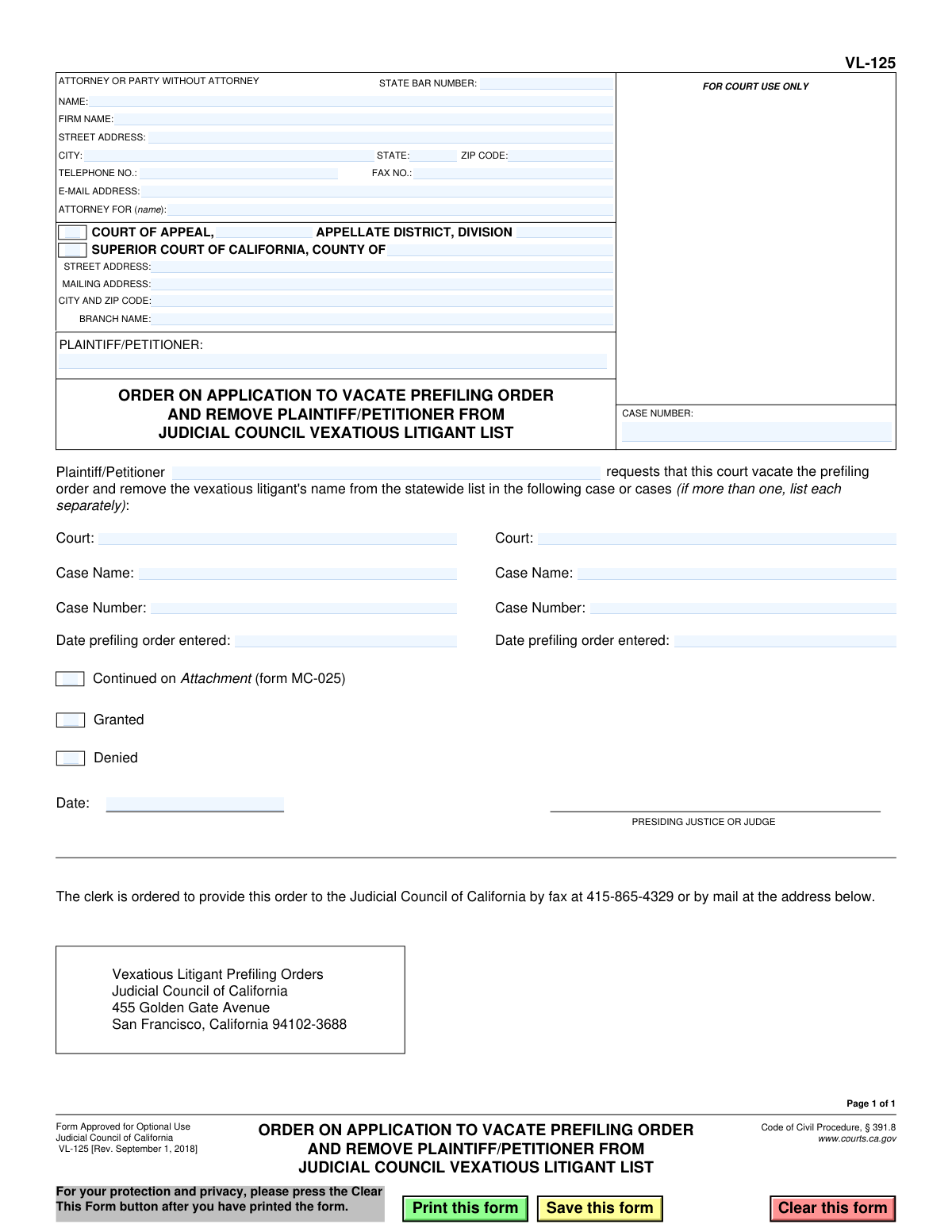
Yes! You can use AI to fill out Form VL-125, Order on Application to Vacate Prefiling Order and Remove Plaintiff/Petitioner from Judicial Council Vexatious Litigant List
Form VL-125 is a judicial order issued by a California court in response to an application to vacate a prefiling order and remove a person's name from the Judicial Council Vexatious Litigant List. This order is crucial as it officially documents the court's decision—either granting or denying the request—to lift the legal restrictions that prevent the individual from filing new lawsuits without prior court approval. Today, preparing and managing such legal documents is streamlined with AI-powered services like Instafill.ai, which can also convert non-fillable PDF versions into interactive, fillable forms for easy completion.
VL-125 is part of the
California court forms, California judicial forms, court filing forms and Judicial Council forms categories on Instafill.
Our AI automatically handles information lookup, data retrieval, formatting, and form filling.
It takes less than a minute to fill out VL-125 using our AI form filling.
Securely upload your data. Information is encrypted in transit and deleted immediately after the form is filled out.
Form specifications
| Form name: | Form VL-125, Order on Application to Vacate Prefiling Order and Remove Plaintiff/Petitioner from Judicial Council Vexatious Litigant List |
| Number of fields: | 39 |
| Number of pages: | 1 |
| Language: | English |
Instafill Demo: How to fill out PDF forms in seconds with AI
How to Fill Out VL-125 Online for Free in 2026
Are you looking to fill out a VL-125 form online quickly and accurately? Instafill.ai offers the #1 AI-powered PDF filling software of 2026, allowing you to complete your VL-125 form in just 37 seconds or less.
Follow these steps to fill out your VL-125 form online using Instafill.ai:
- 1 Navigate to Instafill.ai and upload or select Form VL-125 from the form library.
- 2 Use the AI assistant to automatically populate the court and party information, including the court name, address, plaintiff/petitioner details, and case number.
- 3 Enter the specific details of the prefiling order(s) under review, such as the original case name, case number, and the date the order was entered.
- 4 Indicate the court's decision by checking the appropriate box for 'Granted' or 'Denied' as determined by the judge.
- 5 The presiding judge or justice will date and sign the order to make it legally effective.
- 6 Review the completed form for accuracy, then download, print, or e-file it. The clerk is then ordered to provide a copy to the Judicial Council of California.
Our AI-powered system ensures each field is filled out correctly, reducing errors and saving you time.
Why Choose Instafill.ai for Your Fillable VL-125 Form?
Speed
Complete your VL-125 in as little as 37 seconds.
Up-to-Date
Always use the latest 2026 VL-125 form version.
Cost-effective
No need to hire expensive lawyers.
Accuracy
Our AI performs 10 compliance checks to ensure your form is error-free.
Security
Your personal information is protected with bank-level encryption.
Frequently Asked Questions About Form VL-125
Form VL-125 is the official court order that either grants or denies an individual's application to be removed from the California Judicial Council's Vexatious Litigant List and have their prefiling order vacated.
No, this is an order form that is completed and signed by a judge. You would initiate the process by filing an 'Application to Vacate Prefiling Order' (Form VL-120), and this VL-125 form is the court's decision on your application.
If 'Granted' is checked, your request has been approved. The court will order that the original prefiling order is vacated and your name will be removed from the statewide vexatious litigant list.
If 'Denied' is checked, your application has been rejected. You will remain on the vexatious litigant list and the prefiling order against you will stay in effect.
The court needs the case name, case number, and the date the original prefiling order was entered for each relevant case. This information should be in your application that you previously filed.
The form has space to list two separate cases. If there are more, the court will check the box for 'Continued on Attachment' and list the additional cases on Form MC-025.
The form instructs the court clerk to send the signed order to the Judicial Council of California. The mailing address and fax number are provided directly on the form for the clerk's use.
A prefiling order is a court order that prohibits a person designated as a 'vexatious litigant' from filing new lawsuits in propria persona (without an attorney) unless they first obtain permission from the presiding judge.
The form does not specify a timeframe. After the clerk sends the granted order to the Judicial Council, they will process it and update the statewide list, which can take several weeks.
Since this form is completed by the court, you would not fill it out yourself. However, AI-powered services like Instafill.ai can help you accurately and quickly fill out the necessary 'Application' form (VL-120) that you must file to start this process.
You can upload the application form (VL-120) to Instafill.ai, and its AI will help you auto-fill your personal information, case details, and other required fields, saving you time and reducing errors.
Services like Instafill.ai can convert flat, non-fillable PDFs into interactive, fillable forms. This allows you to easily type your information into the fields before printing.
The court will use the information you provided in your 'Application to Vacate Prefiling Order and Remove Plaintiff/Petitioner from Judicial Council Vexatious Litigant List' (Form VL-120).
Compliance VL-125
Validation Checks by Instafill.ai
1
At Least One Prefiling Order Case Required
This check ensures that the details for at least the first prefiling order case (Court, Case Name, Date Entered, Case Number) are fully completed. The purpose of the form is to request the vacation of one or more such orders, so this information is fundamental to the application's validity. If this section is left blank, the form cannot be processed as its core subject matter is missing.
2
Prefiling Order Date Format and Validity
Validates that the 'Date prefiling order entered' fields (dateEntered1, dateEntered2) contain a valid date in a recognized format (e.g., MM/DD/YYYY). The date must also be in the past, as it represents a historical court action. An invalid or future date would make the request nonsensical and prevent court staff from locating the correct original order.
3
Case Number Format Validation
This check verifies that the 'Case Number' fields (caseNumber1, caseNumber2, and the main header CaseNumber) follow a standard format expected by the court system. While formats vary, this rule typically checks for a valid combination of letters, numbers, and special characters like hyphens. Incorrectly formatted case numbers can lead to processing delays or failure to identify the correct case file.
4
Mutually Exclusive Order Decision
Ensures that only one of the 'Granted' or 'Denied' checkboxes can be selected by the court. An application cannot be simultaneously granted and denied, as these are contradictory outcomes. This logical check is critical for maintaining the integrity and clarity of the final court order.
5
Completeness of Court Decision
This validation confirms that once the form is being finalized by the court, either the 'Granted' or 'Denied' checkbox must be selected. An order that lacks a decision is incomplete and legally ineffective. This check prevents the issuance of ambiguous or unfinished court documents.
6
Judge's Signature Date Validation
Verifies that the 'Date' field next to the judge's signature line is a valid, non-future date. This date establishes when the order becomes official. Failure to provide a valid date would create ambiguity about the order's effective date and could invalidate the document.
7
Attachment Continuation Logic
Checks if the 'Continued on Attachment (form MC-025)' checkbox is selected. If it is, the system should flag that an additional document is expected to be part of the submission. This ensures that all listed cases are accounted for and prevents the oversight of information provided on separate pages.
8
Attorney State Bar Number Format
Validates that the 'STATE BAR NUMBER' field contains a valid numeric identifier, typically a 5-6 digit number for California attorneys. This is crucial for verifying the identity and credentials of the legal representative filing the form. An invalid number could indicate an error or an unauthorized filer, prompting further review.
9
Email Address Format
Ensures that the value entered in the 'E-MAIL ADDRESS' field conforms to the standard email format (e.g., '[email protected]'). This is important for ensuring that electronic communications and notifications regarding the case can be successfully delivered. An invalid email address would lead to communication failures.
10
ZIP Code Format
This check verifies that the 'ZIP CODE' fields in the attorney and court address sections contain a valid 5-digit or 9-digit (ZIP+4) numeric format. Correct ZIP codes are essential for the timely and accurate delivery of physical mail by the postal service. An invalid format will cause mail to be returned or delayed.
11
Main Case Number Presence
Confirms that the primary 'CASE NUMBER' field in the top-right header section is not empty. This number identifies the current legal proceeding in which the application to vacate is being filed. Without this identifier, the document cannot be correctly filed or associated with the appropriate court case.
12
Plaintiff/Petitioner Name Completeness
Ensures the 'PLAINTIFF/PETITIONER' field is filled out, identifying the individual who is on the vexatious litigant list. This name is the primary subject of the order and is essential for the court and Judicial Council to process the request correctly. A missing name makes the form's purpose unclear and unserviceable.
13
Chronological Date Consistency
This logical check verifies that the 'Date prefiling order entered' is chronologically before the judge's signature 'Date' on the order. A prefiling order cannot be vacated on a date before it was originally entered. This validation prevents logical impossibilities and ensures the timeline of events is coherent.
14
Completeness of Second Case Information
If any field for the second case (court2, caseName2, dateEntered2, or caseNumber2) is filled, this validation ensures all other fields for that same case are also completed. This rule prevents partial or incomplete case entries, which are unusable for processing. It guarantees that every listed case has a full set of data.
Common Mistakes in Completing VL-125
Applicants often mistakenly enter the case number for the current application instead of the original case(s) where the prefiling order was issued. This happens due to confusion about which case to reference. This error will cause the court clerk to reject the filing or the judge to deny the application, as they cannot locate the original order to vacate. To avoid this, carefully review the original vexatious litigant determination and copy the exact case number, court, and case name from that document.
A frequent mistake is entering the current date or the filing date of the original lawsuit in the 'Date prefiling order entered' field. The form specifically requires the exact date the judge signed and entered the vexatious litigant prefiling order. An incorrect date can lead to significant delays as court staff must manually search for the correct order. Always refer to the original prefiling order document to find the precise entry date.
Filers may list only the county (e.g., 'Superior Court of Los Angeles County') without specifying the exact branch or district (e.g., 'Stanley Mosk Courthouse'). This ambiguity forces court staff to search for the case, causing delays. To prevent this, provide the full, specific court name, including the street address and branch name as it appeared on the original order. Using a tool like Instafill.ai can help by auto-populating correct court addresses based on the case number or county.
The form provides space for two cases, but a prefiling order may apply to more. Applicants sometimes list only one case or forget to attach the required 'MC-025' form for additional cases. This results in an incomplete application, and the prefiling order will remain active for any unlisted cases. Ensure all cases subject to the order are listed, using the MC-025 attachment if necessary, to fully resolve the vexatious litigant status.
Parties representing themselves (pro se or in pro per) often get confused by the 'ATTORNEY FOR (name):' field. They might incorrectly write 'Self,' 'Pro Se,' or leave it blank when they should re-enter their own name as the party they are representing. This can cause confusion in court records. The correct practice for a self-represented party is to write their own name in this field.
This form is available as a fillable PDF, but people sometimes print a blank copy and fill it out by hand. Poor handwriting can make case numbers, names, and dates unreadable, leading to data entry errors by the clerk and potential rejection of the filing. It is crucial to type directly into the fillable PDF for clarity. If you only have a flat PDF, tools like Instafill.ai can convert it into a fillable version, ensuring a clean and legible submission.
Leaving fields like 'TELEPHONE NO.', 'E-MAIL ADDRESS', or 'STATE BAR NUMBER' blank or providing outdated information is a common oversight. The court and other parties rely on this information for official communication. Missing contact details can lead to missed hearing notices or important updates, jeopardizing the application. Always double-check that all contact fields are complete and accurate before filing.
Some applicants simply write their own name in the 'Case Name' field. The proper case name should be listed in the format 'Plaintiff Name v. Defendant Name' as it appears on the original court documents. An incorrect case name makes it difficult for the clerk to locate the file, which can delay or halt the processing of the application. Always copy the full case name exactly as it appears on previous filings.
The applicant, in an attempt to be thorough, may check the 'Granted' or 'Denied' box and enter a date at the bottom of the form. This section is reserved exclusively for the judge to issue their order. Submitting a form with this section pre-filled will result in its rejection, as it appears to usurp judicial authority. Applicants must leave the entire order section, including the date and signature line for the judge, completely blank.
Saved over 80 hours a year
“I was never sure if my IRS forms like W-9 were filled correctly. Now, I can complete the forms accurately without any external help.”
Kevin Martin Green
Your data stays secure with advanced protection from Instafill and our subprocessors

Robust compliance program
Transparent business model
You’re not the product. You always know where your data is and what it is processed for.
ISO 27001, HIPAA, and GDPR
Our subprocesses adhere to multiple compliance standards, including but not limited to ISO 27001, HIPAA, and GDPR.
Security & privacy by design
We consider security and privacy from the initial design phase of any new service or functionality. It’s not an afterthought, it’s built-in, including support for two-factor authentication (2FA) to further protect your account.
Fill out VL-125 with Instafill.ai
Worried about filling PDFs wrong? Instafill securely fills form-vl-125-order-on-application-to-vacate-prefiling-order-and-remove-plaintiffpetitioner-from-judicial-council forms, ensuring each field is accurate.