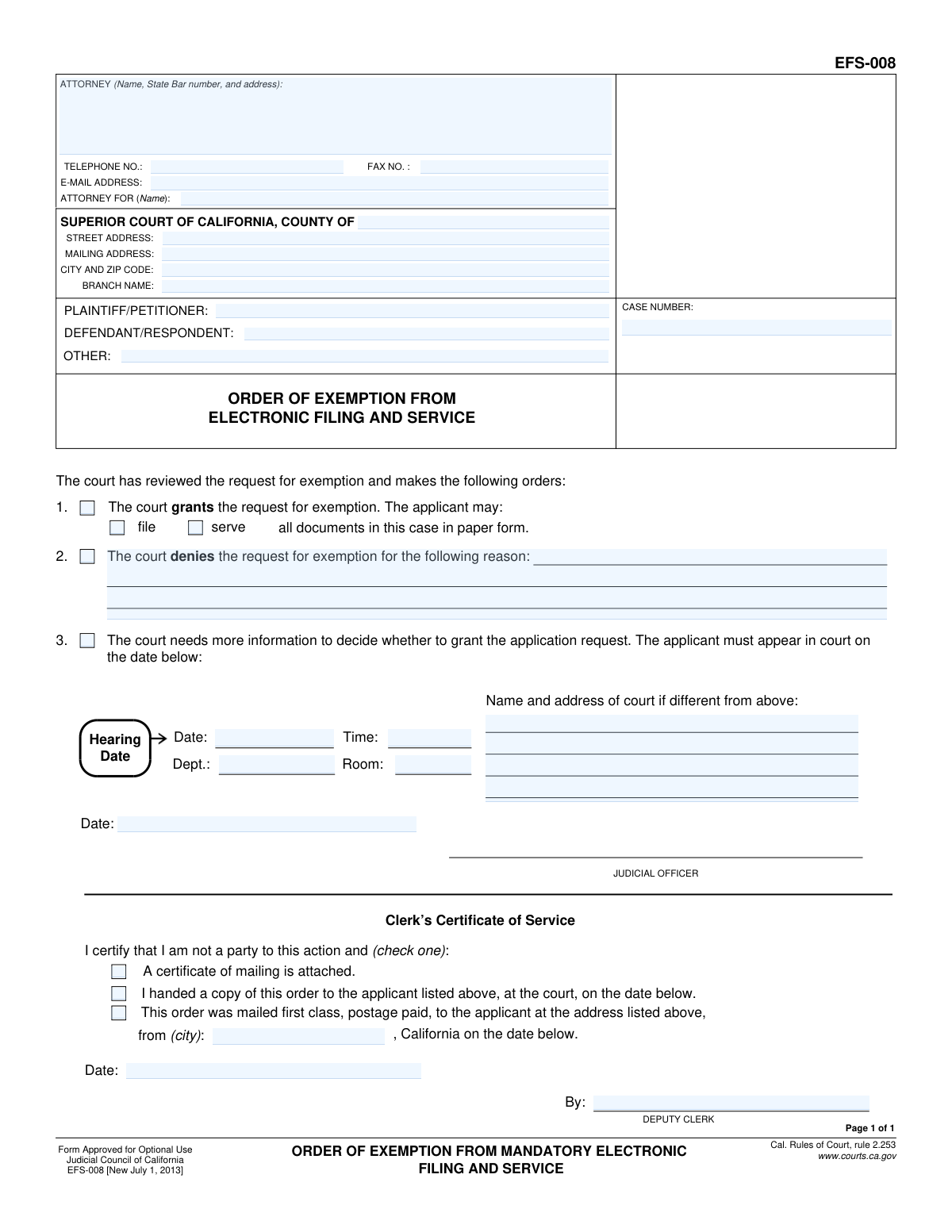
Yes! You can use AI to fill out Form EFS-008, Order of Exemption from Mandatory Electronic Filing and Service
Form EFS-008, Order of Exemption from Mandatory Electronic Filing and Service, is a legal document issued by a California Superior Court. It serves as the court's official decision on a party's request to be excused from the requirement to file and serve case documents electronically, allowing them to use traditional paper methods instead. Today, this form can be filled out quickly and accurately using AI-powered services like Instafill.ai, which can also convert non-fillable PDF versions into interactive fillable forms.
Our AI automatically handles information lookup, data retrieval, formatting, and form filling.
It takes less than a minute to fill out EFS-008 using our AI form filling.
Securely upload your data. Information is encrypted in transit and deleted immediately after the form is filled out.
Form specifications
| Form name: | Form EFS-008, Order of Exemption from Mandatory Electronic Filing and Service |
| Number of fields: | 32 |
| Number of pages: | 1 |
| Language: | English |
Instafill Demo: How to fill out PDF forms in seconds with AI
How to Fill Out EFS-008 Online for Free in 2026
Are you looking to fill out a EFS-008 form online quickly and accurately? Instafill.ai offers the #1 AI-powered PDF filling software of 2026, allowing you to complete your EFS-008 form in just 37 seconds or less.
Follow these steps to fill out your EFS-008 form online using Instafill.ai:
- 1 Navigate to Instafill.ai and upload or select the Form EFS-008.
- 2 Use the AI assistant to automatically populate case information, such as the court name, case number, and party details (plaintiff/petitioner and defendant/respondent).
- 3 The judicial officer will indicate the court's decision by checking the appropriate box: granting the exemption, denying it and providing a reason, or requiring a hearing.
- 4 If a hearing is ordered, enter the date, time, department, and location details into the designated fields.
- 5 The judicial officer will date the form to finalize the order.
- 6 The court clerk will complete the 'Clerk's Certificate of Service' section, certifying how and when the order was delivered to the applicant.
- 7 Review the entire completed form for accuracy before downloading, printing, or filing it according to court procedures.
Our AI-powered system ensures each field is filled out correctly, reducing errors and saving you time.
Why Choose Instafill.ai for Your Fillable EFS-008 Form?
Speed
Complete your EFS-008 in as little as 37 seconds.
Up-to-Date
Always use the latest 2026 EFS-008 form version.
Cost-effective
No need to hire expensive lawyers.
Accuracy
Our AI performs 10 compliance checks to ensure your form is error-free.
Security
Your personal information is protected with bank-level encryption.
Frequently Asked Questions About Form EFS-008
This is the official form the court uses to inform you of its decision on your request to be exempt from mandatory e-filing and e-service. You do not fill out this form; you receive it from the court after they have made a decision.
No, you do not fill out Form EFS-008. To request an exemption, you must complete and file a 'Request for Exemption from Mandatory Electronic Filing and Service' (Form EFS-007), and the court will use this EFS-008 form to provide its ruling.
If box 1 is checked, your request for an exemption has been granted. You are now permitted to file and/or serve documents in your case in paper form as indicated on the order.
If your request was denied, you must comply with the court's electronic filing and service requirements. The reason for the denial will be written in the space provided in section 2.
This means the judge needs more information before making a decision on your request. You must appear in court at the date, time, and location specified to explain why you need the exemption.
Individuals who do not have a computer or internet access, have a disability that prevents e-filing, or can show other good cause may request an exemption from the court's requirement to file and serve documents electronically.
The 'Clerk's Certificate of Service' at the bottom of the form indicates how the order was sent to you. It will be either handed to you in person at the court or mailed to the address you provided on your request.
An exemption for 'filing' allows you to submit your documents to the court in paper form. An exemption for 'service' allows you to deliver copies of your documents to other parties in the case by mail or in person, rather than electronically.
No, you do not fill out any part of this form. The court clerk or judicial officer completes the entire form, including the case caption, before sending it to you.
Yes, while you don't fill out this specific Order form, AI-powered services like Instafill.ai can help you accurately complete the initial 'Request for Exemption' form (EFS-007). These tools can auto-fill your case information and personal details, saving you time and reducing errors.
You can upload the 'Request for Exemption' form (EFS-007) to Instafill.ai's platform. The AI will identify the fields, allowing you to quickly fill them out online and then download the completed, ready-to-file document.
Services like Instafill.ai can convert flat, non-fillable PDFs into interactive, fillable forms. Simply upload the non-fillable request form, and the platform will make it easy for you to type your information directly into the fields.
You can now file and serve documents in paper form according to the terms of the order. Keep a copy of the order for your records and be prepared to show it if your ability to file in paper is ever questioned.
Compliance EFS-008
Validation Checks by Instafill.ai
1
Ensures Case Number is Provided
This check verifies that the 'CASE NUMBER' field is not empty. The case number is a critical identifier for court records, and its absence would make it impossible to file or associate the order with the correct legal action. If this field is empty, the form submission should be rejected and the user prompted to enter a valid case number.
2
Mutually Exclusive Order Selection
Validates that only one of the main order options (1. Granted, 2. Denied, 3. More information needed) is selected. The court's order must be unambiguous; it cannot simultaneously grant, deny, and request a further hearing on the exemption. If more than one of these options is checked, an error should be raised to force a single, clear decision.
3
Conditional Requirement for Grant Specifics
If the 'Granted' checkbox (option 1) is selected, this check ensures that at least one of the sub-options ('serve' or 'file') is also checked. It is not sufficient to simply grant an exemption; the order must specify what the applicant is exempt from. Failure to specify would render the order vague and unenforceable.
4
Conditional Requirement for Denial Reason
This validation ensures that if the 'Denied' checkbox (option 2) is selected, the corresponding text field for the reason is filled out. A denial must be accompanied by a justification for legal and procedural correctness. An empty reason field would make the denial arbitrary and could be grounds for appeal.
5
Conditional Requirement for Hearing Details
Verifies that if the 'More information needed' checkbox (option 3) is selected, the 'Hearing Date', 'Time', and 'Dept.' fields are all completed. Scheduling a hearing without providing the essential details of when and where it will occur makes the order ineffective. The system should flag this as an error if any of these fields are missing.
6
Valid Email Address Format
Checks that the value entered in the 'E-MAIL ADDRESS' field follows the standard '[email protected]' format. This is important for ensuring that electronic communications from the court can be successfully delivered to the attorney or party. An invalid format would lead to communication failures and potential delays in the case.
7
Valid Phone Number Format
This check ensures the 'TELEPHONE NO.' field is entered in a recognizable format, such as (XXX) XXX-XXXX or XXX-XXX-XXXX. Proper formatting helps ensure data consistency and usability for court staff who may need to contact the filer. If the format is incorrect, the system should prompt for correction.
8
Logical Order Date
Validates that the 'Date' for the Judicial Officer's signature is a valid calendar date and is not set in the future. An order cannot be officially signed on a future date. This check prevents data entry errors and ensures the chronological integrity of the court record.
9
Logical Clerk's Service Date
This check ensures the 'Date' in the Clerk's Certificate of Service section is on or after the Judicial Officer's signature 'Date'. The clerk cannot certify service of an order before the order officially exists. This validation maintains the logical sequence of events in the legal process.
10
Mutually Exclusive Certificate of Service Method
Verifies that only one of the three checkboxes in the 'Clerk’s Certificate of Service' section is selected. The order can only be served by one method at a time as certified by the clerk (attached certificate, handed in person, or mailed). Selecting multiple methods creates ambiguity in the official record of service.
11
Conditional Requirement for Mailing City
If the service method 'This order was mailed first class...' is checked, this validation ensures the 'from (city)' field is filled. The city of mailing is a required component for a valid proof of service by mail. Omitting this information would make the certificate of service incomplete.
12
Party Identification Completeness
Ensures that both the 'PLAINTIFF/PETITIONER' and 'DEFENDANT/RESPONDENT' fields are filled out. A court order must clearly identify the primary parties to the action to be valid and enforceable. Missing party information would make the document legally deficient.
13
Future-Dated Hearing
If a hearing is scheduled (option 3), this check validates that the 'Hearing Date' is a date in the future relative to the order date. A court cannot schedule a hearing for a date that has already passed. This prevents logical impossibilities and ensures the applicant is given proper notice.
Common Mistakes in Completing EFS-008
Filers often make typos, transpose digits, or omit required prefixes/suffixes when entering the case number. This is a critical error because the case number is the primary identifier used by the court to docket the document. An incorrect number will cause the filing to be rejected, leading to delays and potentially missed deadlines for the exemption request.
A frequent mistake is for the applicant to check a box in the order section, such as 'The court grants the request for exemption' (Item 1). This happens when filers misunderstand that this section is reserved exclusively for the judicial officer. Submitting a form with this section pre-filled will lead to immediate rejection, as it appears to usurp the court's authority.
Many California counties have multiple courthouse locations, and filers often enter the address for the main county courthouse instead of the specific branch where the case is assigned. This can cause the document to be misrouted, leading to significant processing delays or rejection. Always verify the correct branch name and address from the court's website or prior case documents before filling out this section.
The attorney information field requires a name, State Bar number, and address. Attorneys or their staff sometimes rush and forget to include the State Bar number, which is essential for the court to verify their standing. This omission can lead to the document being rejected for being incomplete, delaying the court's review of the exemption request.
This form, EFS-008, is an 'Order' that the court issues. A common procedural error is for a party to fill out and file this form when they should be filing a 'Request' or 'Application' for exemption (a different form). This fundamental misunderstanding results in an automatic rejection, as a party cannot file an order on their own behalf.
When this form is printed and completed by hand, illegible handwriting can make it impossible for the court clerk to accurately enter the information into the system. Key details like the case number, party names, or attorney contact information may be misread, causing filing errors or rejection. To prevent this, it is best to use a fillable PDF; if the original is not fillable, a tool like Instafill.ai can convert it, allowing you to type information clearly before printing.
Filers may misspell party names, use abbreviations, or incorrectly place the plaintiff's name in the defendant's field (or vice versa). These inconsistencies create confusion and can cause the clerk to reject the filing if the names do not exactly match the court's record. To avoid this, carefully copy the full legal names of all parties from the original complaint or petition.
Instead of writing the full name of the party they represent (e.g., 'Jane Doe'), an attorney might write a generic term like 'Plaintiff'. In cases with multiple plaintiffs or defendants, this creates ambiguity for the court and other parties. Always specify the full name of the client being represented to ensure the record is clear and accurate.
In the rush to fill out the form, the line 'SUPERIOR COURT OF CALIFORNIA, COUNTY OF' is sometimes left blank. This is a simple but critical oversight, as it fails to identify which of California's 58 county courts has jurisdiction. The form is considered incomplete without this information and will be rejected by the clerk.
Some filers omit their phone number or email address, viewing it as optional. However, this contact information is crucial for the court clerk, who may need to quickly contact the filer to resolve minor issues with the document. Without it, any small error is more likely to result in a full rejection and delay, whereas a quick call or email could resolve the problem.
Judicial Council forms are updated periodically, and courts require the use of the most current version. Filers who find a form through a search engine or reuse an old file may inadvertently submit an obsolete version. This will likely lead to rejection, forcing the filer to redo the work on the correct form and resubmit, wasting time and effort.
Saved over 80 hours a year
“I was never sure if my IRS forms like W-9 were filled correctly. Now, I can complete the forms accurately without any external help.”
Kevin Martin Green
Your data stays secure with advanced protection from Instafill and our subprocessors

Robust compliance program
Transparent business model
You’re not the product. You always know where your data is and what it is processed for.
ISO 27001, HIPAA, and GDPR
Our subprocesses adhere to multiple compliance standards, including but not limited to ISO 27001, HIPAA, and GDPR.
Security & privacy by design
We consider security and privacy from the initial design phase of any new service or functionality. It’s not an afterthought, it’s built-in, including support for two-factor authentication (2FA) to further protect your account.
Fill out EFS-008 with Instafill.ai
Worried about filling PDFs wrong? Instafill securely fills form-efs-008-order-of-exemption-from-mandatory-electronic-filing-and-service forms, ensuring each field is accurate.