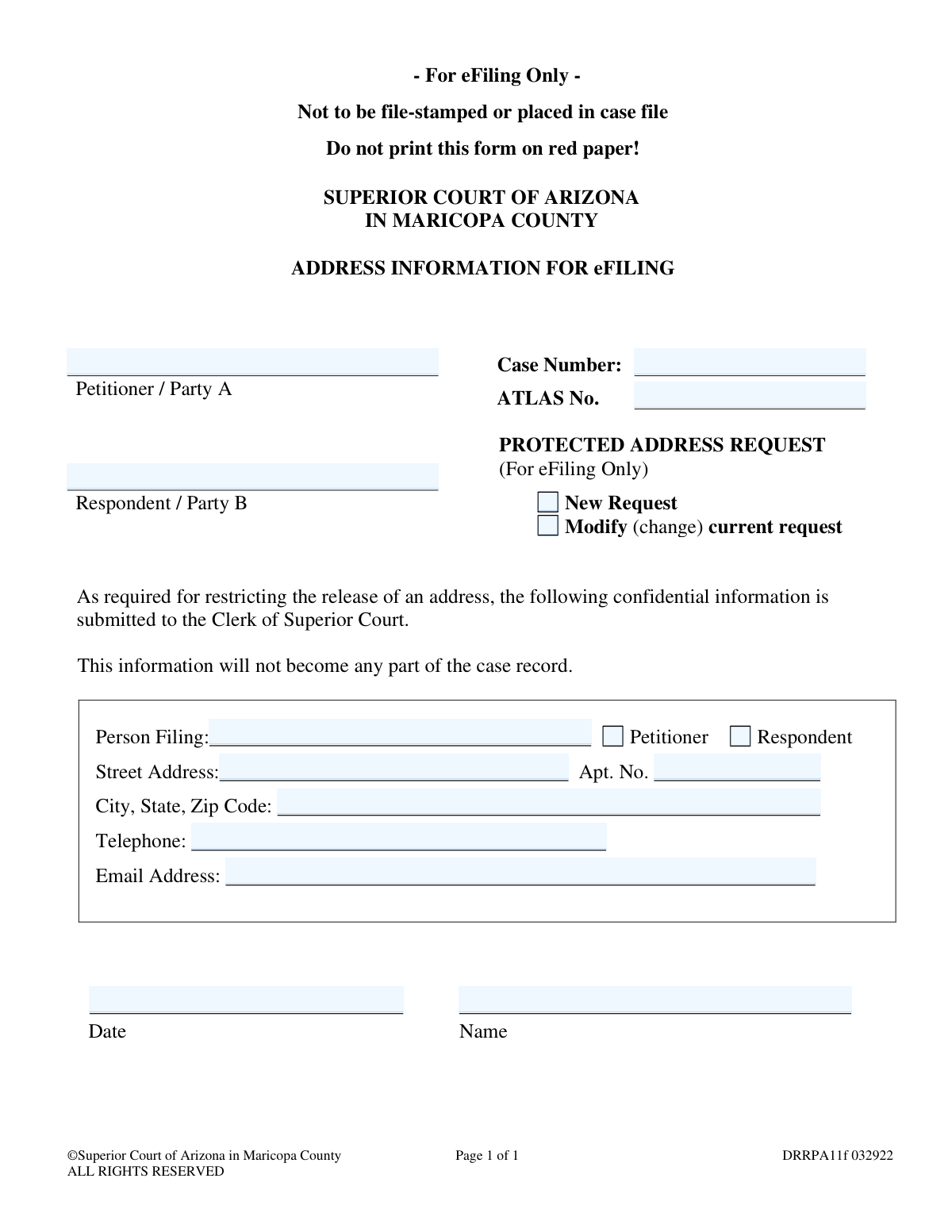
Yes! You can use AI to fill out Superior Court of Arizona in Maricopa County, Protected Address Request for eFiling Only
Form DRRPA11f, the Protected Address Request, is a confidential document submitted to the Clerk of Superior Court in Maricopa County, Arizona. Its purpose is to provide your address for eFiling without making it part of the public case record, thereby protecting your privacy. Today, this form can be filled out quickly and accurately using AI-powered services like Instafill.ai, which can also convert non-fillable PDF versions into interactive fillable forms.
DRRPA11f is part of the
County court forms, court filing forms and superior court forms categories on Instafill.
Our AI automatically handles information lookup, data retrieval, formatting, and form filling.
It takes less than a minute to fill out DRRPA11f using our AI form filling.
Securely upload your data. Information is encrypted in transit and deleted immediately after the form is filled out.
Form specifications
| Form name: | Superior Court of Arizona in Maricopa County, Protected Address Request for eFiling Only |
| Number of fields: | 16 |
| Number of pages: | 1 |
| Language: | English |
Instafill Demo: How to fill out PDF forms in seconds with AI
How to Fill Out DRRPA11f Online for Free in 2026
Are you looking to fill out a DRRPA11F form online quickly and accurately? Instafill.ai offers the #1 AI-powered PDF filling software of 2026, allowing you to complete your DRRPA11F form in just 37 seconds or less.
Follow these steps to fill out your DRRPA11F form online using Instafill.ai:
- 1 Navigate to Instafill.ai and upload or select the DRRPA11f, Protected Address Request form.
- 2 Provide the case details, including the Case Number and the names of the Petitioner and Respondent.
- 3 Indicate whether you are filing a new request or modifying a current one.
- 4 Specify whether you are the Petitioner or Respondent filing the request.
- 5 Enter your confidential contact information, including your full street address, telephone number, and email address.
- 6 Electronically sign and date the form to certify the information provided.
- 7 Review the completed form for accuracy before submitting it for eFiling as per the court's instructions.
Our AI-powered system ensures each field is filled out correctly, reducing errors and saving you time.
Why Choose Instafill.ai for Your Fillable DRRPA11f Form?
Speed
Complete your DRRPA11f in as little as 37 seconds.
Up-to-Date
Always use the latest 2026 DRRPA11f form version.
Cost-effective
No need to hire expensive lawyers.
Accuracy
Our AI performs 10 compliance checks to ensure your form is error-free.
Security
Your personal information is protected with bank-level encryption.
Frequently Asked Questions About Form DRRPA11f
This form is used to provide your confidential address and contact information to the Clerk of the Superior Court for eFiling purposes. It ensures your address remains protected and is not placed in the public case file.
Any party in a case (Petitioner or Respondent) who is eFiling documents and wishes to keep their physical address and contact details confidential from the public record should complete this form.
No, the form clearly states it is not to be file-stamped or placed in the case file. The information is for confidential use by the Clerk of Court for eFiling administration only.
This form is designated 'For eFiling Only' and should be submitted electronically through the court's official eFiling system. It should not be physically filed at the courthouse.
Select 'New Request' if this is the first time you are submitting your confidential address for this case. Select 'Modify' if you have previously submitted this form and need to update your address or other contact information.
An ATLAS Number is a person-identifier used by Arizona courts, often in family law or child support cases. You should fill it in if you have one, but it is not required if one has not been assigned to you.
If your address changes, you must submit a new 'Protected Address Request' form, checking the 'Modify (change) current request' box. This is crucial for ensuring the court has your current information for official notices.
No, this form is a standalone request for address protection. You do not need to attach any other supporting documents with it.
This is a standard instruction for many Arizona court forms. Red paper is often reserved for specific types of urgent court orders, and using it for other filings can cause processing confusion and delays.
Yes, services like Instafill.ai use AI to accurately auto-fill form fields with your saved information. This can save you time, reduce the chance of errors, and simplify the process.
Upload the PDF of the form to Instafill.ai, which will make it interactive. You can then use the AI-powered tools to quickly populate your name, case number, and address before downloading the completed document for eFiling.
You can use a service like Instafill.ai, which specializes in converting flat, non-fillable PDFs into interactive forms you can type directly into. This allows you to create a clean, professional-looking document without printing and handwriting.
While your lawyer can assist you, you are the one providing the personal information. You should review the form for accuracy before it is submitted as part of your eFiling.
Yes, the form can be used by either the Petitioner or the Respondent. Simply check the 'Respondent' box in the 'Person Filing' section.
Compliance DRRPA11f
Validation Checks by Instafill.ai
1
Validates Case Number Format
This check ensures the 'Case Number' matches the specific format required by the Maricopa County Superior Court (e.g., specific prefixes, number of digits, use of hyphens). This is critical for associating the protected address request with the correct legal case in the court's system. An invalid format would cause a lookup failure, leading to the rejection of the submission.
2
Ensures a Single Request Type is Selected
The form offers two mutually exclusive options: 'New Request' and 'Modify (change) current request'. This validation confirms that the user has selected exactly one of these choices. Selecting neither leaves the request's purpose ambiguous, while selecting both is a logical contradiction. Failure to select one option will halt submission and prompt the user for clarification.
3
Requires 'Person Filing' Selection
This validation ensures that either 'Petitioner' or 'Respondent' is selected to identify the 'Person Filing'. This information is mandatory for the Clerk of Court to understand who is making the request and whose address is to be protected. If no selection is made, the form is considered incomplete and cannot be processed.
4
Verifies Filer Name Consistency
This is a logical check that verifies the 'Name' provided at the bottom of the form corresponds to the party selected under 'Person Filing'. For instance, if 'Petitioner' is selected, the 'Name' should match the 'Petitioner / Party A' field. This prevents a party from incorrectly filing on behalf of another and ensures the integrity of the request.
5
Requires a Complete Street Address
The 'Street Address' field is the primary subject of this form and must not be empty. This validation checks for the presence of a value that plausibly represents a street address (e.g., contains both numbers and letters). Submitting the form without this crucial piece of information would render the request pointless and it will be rejected for incompleteness.
6
Validates City, State, and Zip Code Structure
This check parses the 'City, State, Zip Code' field to ensure it contains a recognizable city name, a valid two-letter state abbreviation, and a 5-digit or 9-digit ZIP code. Correctly structured data is essential for the court's database and for ensuring the address is recorded accurately. An improperly formatted entry could lead to data entry errors and processing delays.
7
Validates US Telephone Number Format
This validation ensures the 'Telephone' field contains a valid 10-digit US phone number, accommodating common formats like (XXX) XXX-XXXX or XXX-XXX-XXXX. A valid contact number is essential in case the Clerk of Court needs to contact the filer for clarification. An invalid number would hinder communication and could delay the processing of the protection request.
8
Validates Email Address Format
This check verifies that the input in the 'Email Address' field conforms to the standard email format (e.g., [email protected]). As this is a request for eFiling, the email address is the primary method for communication and notifications about the request's status. An invalid email address would mean the filer might miss critical updates.
9
Ensures Date is Valid and Not in the Future
The 'Date' field is validated to ensure it is a real, correctly formatted date (e.g., MM/DD/YYYY) and that the date is not in the future. It provides an accurate and legally sound timestamp for when the request was made. An invalid or future date would call the document's authenticity into question and result in rejection.
10
Requires Filer's Full Name
The 'Name' field, representing the filer's signature, is a mandatory field. This validation ensures that the field is not left blank, as an anonymous request is not legally valid. The name identifies the individual making the sworn statement and is fundamental for the document's acceptance by the court.
11
Verifies 'Modify Request' is Logically Possible
This is a system-level check that activates if 'Modify (change) current request' is selected. The system must verify that a prior protected address request already exists for this filer in the specified case. If no existing request is found, the submission should be blocked, and the user prompted to file a 'New Request' instead to prevent logical errors in the case record.
12
Ensures At Least One Party Name is Provided
This validation checks that at least one of the party fields, 'Petitioner / Party A' or 'Respondent / Party B', is filled out. A court case cannot exist without parties, so this information is essential for identifying the case and the context of the address protection request. A submission without any party information would be impossible to file correctly.
Common Mistakes in Completing DRRPA11f
Users often mistype the case number or omit prefixes/suffixes (e.g., 'CV2023-001234'). This happens due to manual data entry errors or confusion about the correct format. An incorrect case number means the clerk cannot link the request to the proper case, leading to immediate rejection and failure to protect the address. To avoid this, carefully copy the complete case number from official court documents.
Many filers are unsure what an ATLAS number is or where to find it, so they leave the field blank. This number is a specific identifier for cases involving child support enforcement. If the case has an ATLAS number and it is omitted, the request may be significantly delayed or rejected by the Clerk's office. Always check documents from the Division of Child Support Services (DCSS) for this number if your case involves child support.
In the stress of legal matters, it's easy to confuse the official roles of Petitioner and Respondent. A person might incorrectly list the names in the wrong fields or check the wrong box under 'Person Filing'. This causes a data mismatch in the court's system, leading to rejection of the form and delaying the address protection. Always refer to the original case filing documents to confirm the exact names and roles of each party.
Filers often overlook the mandatory choice between 'New Request' and 'Modify (change) current request'. Rushing through the form can cause them to miss these checkboxes entirely. Without this information, the clerk's office doesn't know whether to create a new protected entry or update an existing one, resulting in the form being returned as incomplete. Always double-check that one, and only one, of these boxes is selected.
Mistakes like forgetting an apartment number, using incorrect state abbreviations, or failing to include a full ZIP code are common. This often happens when filling out the form quickly. An incomplete or incorrect address in the system could cause confidential court communications to be lost or returned. To prevent this, enter the full address as it would be verified by the USPS. AI-powered form fillers like Instafill.ai can help by automatically validating and formatting addresses correctly.
Typos in an email address (e.g., '[email protected]') or entering a phone number without an area code are frequent errors. The consequence is that the court and its eFiling system cannot contact the filer with critical updates, questions, or notifications about their case. Carefully proofread all contact information before submitting. Using a tool like Instafill.ai can also help by validating the format of such fields to ensure they are correct.
The form explicitly states 'For eFiling Only' and 'Not to be file-stamped'. However, people may mistakenly print it and try to file it as a standard public document, which could expose their confidential address. This form is not a motion; it is a data entry sheet for the court's backend system. It must be submitted through the specific portal or process designated for protected address information within the eFiling system, not as a regular filing.
A filer might believe this form legally seals their address from the opposing party in all contexts. This is a critical misunderstanding; the form only protects the address within the court's administrative eFiling contact database. It does not redact the address from the body of other documents already filed or prevent it from being discovered through other means. To truly protect an address, a separate legal motion to seal or redact is typically required.
Court forms are often provided as flat, non-fillable PDFs, leading to messy, hard-to-read handwritten submissions or improperly formatted text boxes added with basic PDF editors. This can result in data entry errors by the court clerk and potential rejection of the form. To avoid this, use a service like Instafill.ai, which can convert any non-fillable PDF into an interactive, fillable form, ensuring all entries are clean, legible, and correctly placed.
Saved over 80 hours a year
“I was never sure if my IRS forms like W-9 were filled correctly. Now, I can complete the forms accurately without any external help.”
Kevin Martin Green
Your data stays secure with advanced protection from Instafill and our subprocessors

Robust compliance program
Transparent business model
You’re not the product. You always know where your data is and what it is processed for.
ISO 27001, HIPAA, and GDPR
Our subprocesses adhere to multiple compliance standards, including but not limited to ISO 27001, HIPAA, and GDPR.
Security & privacy by design
We consider security and privacy from the initial design phase of any new service or functionality. It’s not an afterthought, it’s built-in, including support for two-factor authentication (2FA) to further protect your account.
Fill out DRRPA11f with Instafill.ai
Worried about filling PDFs wrong? Instafill securely fills superior-court-of-arizona-in-maricopa-county-protected-address-request-for-efiling-only forms, ensuring each field is accurate.