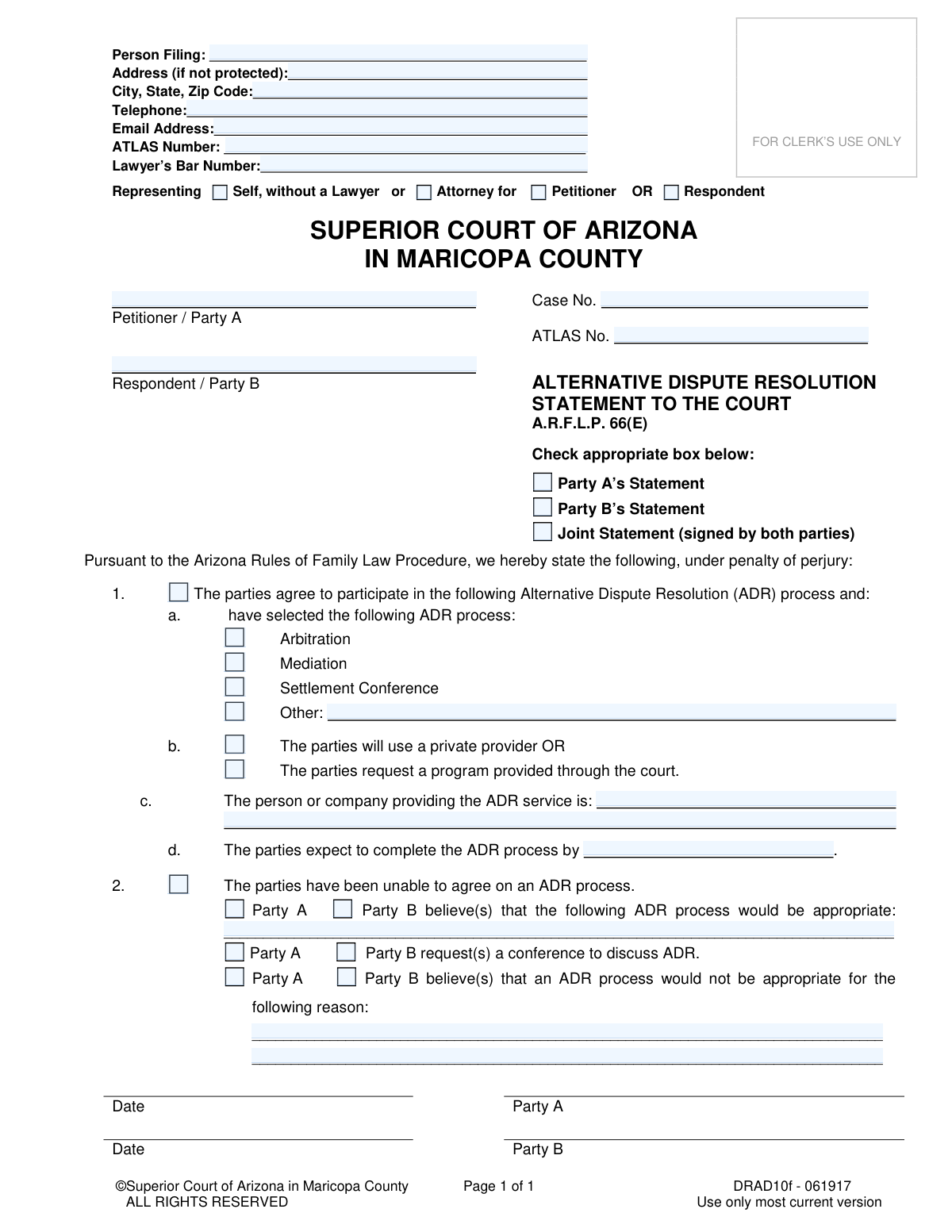
Yes! You can use AI to fill out Alternative Dispute Resolution Statement to the Court (A.R.F.L.P. 66(E))
The Alternative Dispute Resolution Statement to the Court is a required document in Arizona family law proceedings under A.R.F.L.P. 66(E). It communicates to the court whether the involved parties have agreed on an alternative method to resolve their dispute, such as mediation or arbitration, or if they disagree on the process. This statement is crucial for managing the case timeline and exploring settlement options outside of a formal trial. Today, this form can be filled out quickly and accurately using AI-powered services like Instafill.ai, which can also convert non-fillable PDF versions into interactive fillable forms.
DRAD10f is part of the
County court forms, family court forms, family law forms and superior court forms categories on Instafill.
Our AI automatically handles information lookup, data retrieval, formatting, and form filling.
It takes less than a minute to fill out DRAD10f using our AI form filling.
Securely upload your data. Information is encrypted in transit and deleted immediately after the form is filled out.
Form specifications
| Form name: | Alternative Dispute Resolution Statement to the Court (A.R.F.L.P. 66(E)) |
| Number of fields: | 39 |
| Number of pages: | 1 |
| Language: | English |
Instafill Demo: How to fill out PDF forms in seconds with AI
How to Fill Out DRAD10f Online for Free in 2026
Are you looking to fill out a DRAD10F form online quickly and accurately? Instafill.ai offers the #1 AI-powered PDF filling software of 2026, allowing you to complete your DRAD10F form in just 37 seconds or less.
Follow these steps to fill out your DRAD10F form online using Instafill.ai:
- 1 Navigate to Instafill.ai and upload or select the Arizona Alternative Dispute Resolution Statement form.
- 2 Use the AI assistant to automatically populate your personal details, case number, and attorney information in the header section.
- 3 Indicate whether you are filing as Party A, Party B, or submitting a joint statement with the other party.
- 4 Select the appropriate option to show whether you agree on an ADR process. If you agree, specify the method (e.g., Mediation, Arbitration), the provider, and the expected completion date.
- 5 If you do not agree on an ADR process, state your preferred method or provide a reason why you believe ADR is not appropriate for your case.
- 6 Review all the information entered by the AI for accuracy, then digitally sign and date the statement.
- 7 Download the completed form and file it with the Superior Court of Arizona in Maricopa County as required.
Our AI-powered system ensures each field is filled out correctly, reducing errors and saving you time.
Why Choose Instafill.ai for Your Fillable DRAD10f Form?
Speed
Complete your DRAD10f in as little as 37 seconds.
Up-to-Date
Always use the latest 2026 DRAD10f form version.
Cost-effective
No need to hire expensive lawyers.
Accuracy
Our AI performs 10 compliance checks to ensure your form is error-free.
Security
Your personal information is protected with bank-level encryption.
Frequently Asked Questions About Form DRAD10f
This form is used to inform the Superior Court of Arizona in Maricopa County about the parties' agreement or disagreement on using an alternative method, like mediation, to resolve their family law case outside of a trial.
Both the Petitioner (Party A) and the Respondent (Party B) in a family law case are required to file this statement. It can be filed jointly if both parties are in agreement, or separately if they are not.
An ATLAS Number is a case participant number assigned by the Arizona courts in family law cases. You can typically find this number on other official documents you have received for your case.
Complete Section 1 if you and the other party have agreed on an ADR process, provider, and timeline. Complete Section 2 if you have been unable to agree, or if you believe ADR is not appropriate for your case.
If you cannot agree, indicate this in Section 2. You can then state which process you believe is appropriate or request a conference with the court to discuss the issue.
Yes, if you believe an ADR process would be inappropriate (for example, in cases involving domestic violence), you can state this in Section 2 and provide a brief reason for your position.
No, you are not required to use a private provider. The form allows you to select a private provider or request a program provided through the court system.
A 'Joint Statement' is a single form filed and signed by both parties when they are in complete agreement. A 'Party's Statement' is filed by one individual to state their own position on ADR to the court.
The completed and signed form must be filed with the Clerk of the Superior Court in Maricopa County. This can usually be done in person, by mail, or via the court's e-filing portal.
Yes, this form must be filed according to the deadlines set by the Arizona Rules of Family Law Procedure or specific orders from the judge in your case. It is typically required early in the legal process.
Yes, services like Instafill.ai use AI to help you accurately auto-fill form fields with your saved information, which saves time and reduces the chance of errors.
You can upload the ADR Statement PDF to Instafill.ai. The platform's AI will make the document interactive, allowing you to easily type in your information before downloading the completed form for filing.
If you have a non-fillable PDF, you can use a tool like Instafill.ai to convert it into an interactive, fillable form. This allows you to type your answers directly onto the document from your computer.
Compliance DRAD10f
Validation Checks by Instafill.ai
1
Exclusive Representation Selection
This validation ensures the filer selects either 'Self, without a Lawyer' or 'Attorney for', but not both. This is crucial for correctly identifying the filer's legal representation status and avoids ambiguity. If both or neither are selected, the form submission should be blocked with an error message prompting the user to choose only one option.
2
Attorney Information Completeness
If 'Attorney for' is selected, this check verifies that the 'Lawyer’s Bar Number' field is filled and that a role ('Petitioner' or 'Respondent') is also selected. This is necessary to properly associate the attorney with the correct party and validate their credentials. A failure would prevent the form from being submitted until the missing information is provided.
3
Exclusive Statement Type Selection
This validation confirms that exactly one of the statement type checkboxes ('Party A’s Statement', 'Party B’s Statement', or 'Joint Statement') is selected. This is a fundamental requirement to understand who is submitting the document and which signatures are required. The system should prevent submission if zero or more than one option is checked.
4
Case Number Format Validation
This check validates that the 'Case No.' field matches the expected format for Maricopa County Superior Court cases, such as a prefix followed by numbers (e.g., 'FC2023-123456'). This ensures the document can be correctly filed and associated with the right case in the court's system. An incorrect format could lead to filing delays or rejection.
5
Mutually Exclusive ADR Sections (1 vs 2)
This check ensures that information is provided for either Section 1 (agreement on ADR) or Section 2 (disagreement on ADR), but not both. These sections are mutually exclusive, and filling both would create a logical contradiction in the filing. The system should flag an error if data is present in both sections.
6
ADR Process Selection Requirement
If the filer indicates agreement in Section 1, this validation verifies that one ADR process ('Arbitration', 'Mediation', 'Settlement Conference', or 'Other') is selected. This is a required piece of information for an agreement. The form should be considered incomplete if Section 1 is filled but no process is chosen.
7
Conditional 'Other' ADR Process Detail
When the 'Other' checkbox is selected under Section 1.a, this validation ensures the adjacent text field is not empty. This is important to capture the specific, non-standard ADR process the parties have agreed upon. The form should be considered incomplete if 'Other' is checked but no description is provided.
8
Conditional Private Provider Identification
If the parties indicate they will use a 'private provider' in Section 1.b, this check mandates that the 'person or company providing the ADR service' field is filled out. This information is essential for court records and for understanding who is facilitating the dispute resolution. A failure to provide the name would result in an incomplete submission.
9
ADR Completion Date Logic
This validation verifies that the date provided in Section 1.d, for the expected completion of the ADR process, is a valid date and is in the future. A past or invalid date would be nonsensical for a future deadline. The check ensures data integrity and realistic planning by rejecting any date that is not after the current date.
10
Conditional Reason for ADR Inappropriateness
If a party checks the box in Section 2 indicating that 'an ADR process would not be appropriate,' this validation requires that the corresponding reason text field is filled. This justification is required by the court to evaluate the request to bypass ADR. The submission should be blocked until a reason is provided.
11
Signature Date Requirement Consistency
This check correlates the statement type ('Party A', 'Party B', or 'Joint') with the required signature dates. For a 'Party A's Statement', Party A's date is required; for a 'Joint Statement', both dates are required. This verifies that the appropriate party or parties have attested to the statement, which is legally necessary for the document's validity.
12
Required Party Identification
This validation ensures that the 'Petitioner / Party A' and 'Respondent / Party B' name fields are not empty. These fields are critical for identifying the primary individuals involved in the case. The form cannot be processed without this fundamental information for case association.
13
Email Address Format
This check verifies that the value entered into the 'Email Address' field follows the standard format of an email address (e.g., '[email protected]'). This is important for ensuring that any electronic communications from the court can be successfully delivered to the filer. An invalid format should trigger a warning to the user to correct the entry.
14
Filer Role Consistency in Section 2
This validation ensures that the selections made in Section 2 are consistent with the filer identified at the top of the form. For example, if 'Party A’s Statement' is checked, only Party A should be able to check boxes like 'Party A believe(s)...'. This prevents one party from making assertions on behalf of the other and maintains the integrity of the statement.
Common Mistakes in Completing DRAD10f
Filers often mistype the case number or forget to include it. The case number is the primary identifier that links this document to the correct court file, and its absence or inaccuracy can cause the clerk to reject the form or misfile it. This leads to significant delays in the case. Always double-check the case number against other official court documents before submitting.
A frequent error is checking conflicting boxes, such as selecting both 'Self, without a Lawyer' and 'Attorney for,' or indicating representation for both 'Petitioner' and 'Respondent.' This confusion makes it unclear who is filing the form and in what capacity, which can lead to rejection by the court clerk. Filers must carefully select only one option for their representation type and one for the party they represent.
People frequently forget to check whether they are submitting a 'Party A’s Statement,' 'Party B’s Statement,' or a 'Joint Statement.' This is critical information for the court to understand the context of the filing. Without this designation, the court doesn't know if the statement reflects one party's position or a mutual agreement, leading to processing delays or requests for clarification.
A major logical error is providing information in both Section 1 (for parties who agree on ADR) and Section 2 (for parties who disagree). These sections are mutually exclusive and filling out both indicates a misunderstanding of the form. This will almost certainly result in the form being returned for correction, delaying the ADR process. You must complete either Section 1 or Section 2, but not both.
When parties agree on ADR, they often fail to complete all required details in Section 1. For example, they might select 'Mediation' but leave the provider's name (1c) or the expected completion date (1d) blank. An incomplete agreement is not actionable for the court and can delay the issuance of necessary orders. Ensure every required field in Section 1 is filled out if you are reporting an agreement.
The ATLAS number is a unique identifier for individuals in the Arizona court system, but many self-represented litigants do not know what it is or where to find it. Leaving this field blank can slow down administrative processing, as clerks may need to manually look up the party. The ATLAS number can typically be found on previous court orders or documents related to your case.
In Section 2, where parties state differing opinions, filers often write a suggestion or objection without checking the corresponding 'Party A' or 'Party B' box. This leaves the court guessing which party is making the request or holds that belief. To avoid ambiguity and ensure your position is clearly understood, you must check the box next to your party designation for any statement you make in this section.
When a party believes ADR is not appropriate, they may provide a vague or legally insufficient reason like 'we do not get along.' The court needs a specific, valid reason, such as a history of domestic violence or a pure question of law that ADR cannot resolve. A weak explanation may be disregarded, and the court might order the parties to an ADR process anyway.
One party might fill out the form, check 'Joint Statement,' and sign it without obtaining the other party's signature, assuming they agree. A joint statement is only valid if signed by both parties (or their attorneys). Submitting a singly-signed 'Joint Statement' is misleading and will be treated as a one-party statement, requiring refiling and causing confusion.
Forgetting to sign and date the form is a common and critical error that invalidates the entire document. An unsigned legal filing has no effect and will be immediately rejected by the court clerk, halting all progress until a properly executed form is submitted. AI-powered tools like Instafill.ai can convert flat PDFs into fillable forms and highlight required fields like signatures to prevent this oversight.
Saved over 80 hours a year
“I was never sure if my IRS forms like W-9 were filled correctly. Now, I can complete the forms accurately without any external help.”
Kevin Martin Green
Your data stays secure with advanced protection from Instafill and our subprocessors

Robust compliance program
Transparent business model
You’re not the product. You always know where your data is and what it is processed for.
ISO 27001, HIPAA, and GDPR
Our subprocesses adhere to multiple compliance standards, including but not limited to ISO 27001, HIPAA, and GDPR.
Security & privacy by design
We consider security and privacy from the initial design phase of any new service or functionality. It’s not an afterthought, it’s built-in, including support for two-factor authentication (2FA) to further protect your account.
Fill out DRAD10f with Instafill.ai
Worried about filling PDFs wrong? Instafill securely fills alternative-dispute-resolution-statement-to-the-court-arflp-66e forms, ensuring each field is accurate.