Yes! You can use AI to fill out Affidavit Regarding Minor Children (Superior Court of Arizona in Maricopa County)
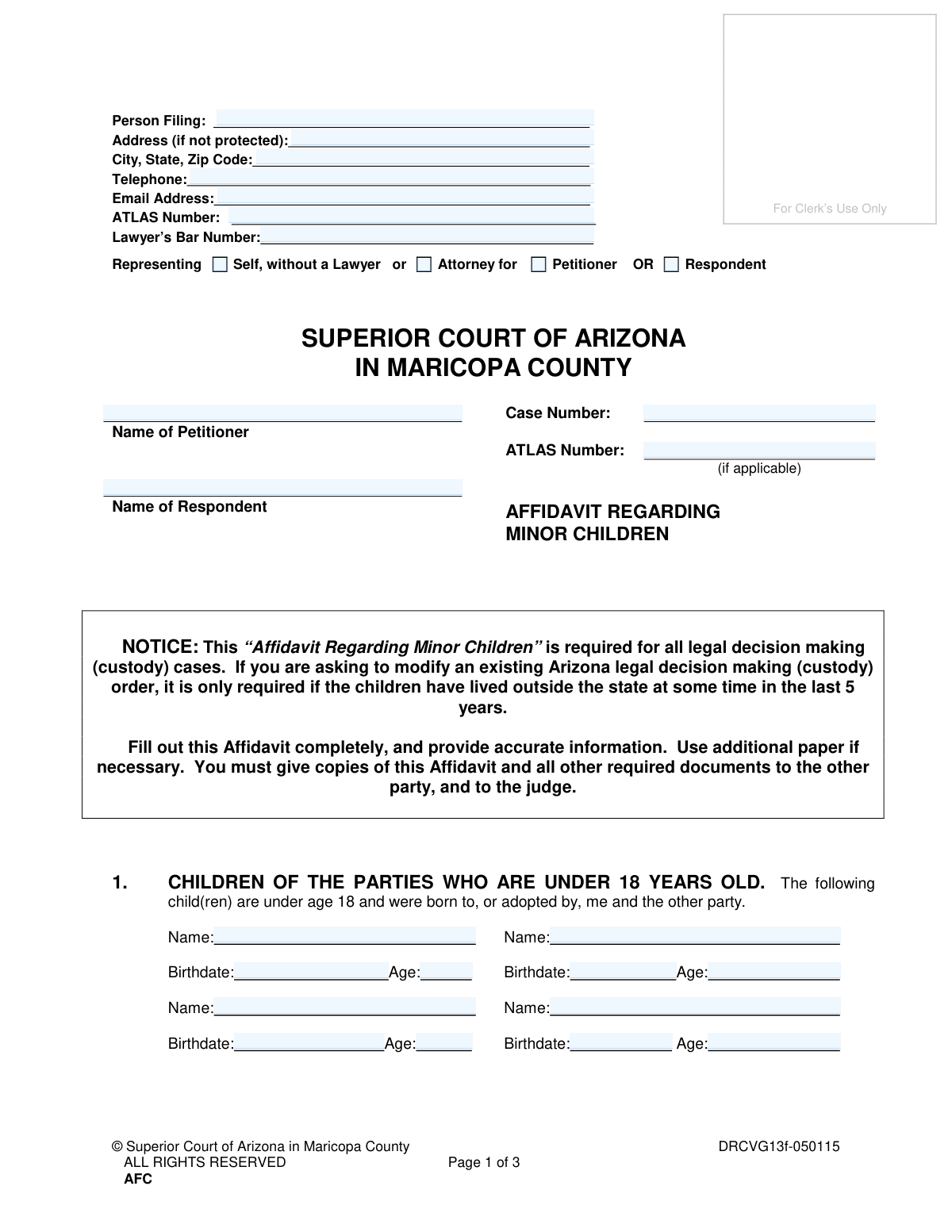
This affidavit is a mandatory legal document for court proceedings in Maricopa County, Arizona, that involve the custody of minor children. It is used to formally declare key information about the children, including their residential history for the past five years and any other court cases related to their custody. Completing this form accurately is crucial for the court to make informed decisions. Today, this form can be filled out quickly and accurately using AI-powered services like Instafill.ai, which can also convert non-fillable PDF versions into interactive fillable forms.
DRCVG13f is part of the
child custody forms, County court forms and superior court forms categories on Instafill.
Our AI automatically handles information lookup, data retrieval, formatting, and form filling.
It takes less than a minute to fill out DRCVG13f using our AI form filling.
Securely upload your data. Information is encrypted in transit and deleted immediately after the form is filled out.
Form specifications
| Form name: | Affidavit Regarding Minor Children (Superior Court of Arizona in Maricopa County) |
| Number of fields: | 74 |
| Number of pages: | 1 |
| Language: | English |
Instafill Demo: How to fill out PDF forms in seconds with AI
How to Fill Out DRCVG13f Online for Free in 2026
Are you looking to fill out a DRCVG13F form online quickly and accurately? Instafill.ai offers the #1 AI-powered PDF filling software of 2026, allowing you to complete your DRCVG13F form in just 37 seconds or less.
Follow these steps to fill out your DRCVG13F form online using Instafill.ai:
- 1 Navigate to Instafill.ai and upload or select the 'Affidavit Regarding Minor Children' form for Arizona.
- 2 Provide your personal information as the 'Person Filing', including your name, contact details, and representation status (e.g., self-represented or with an attorney).
- 3 Use the AI assistant to accurately list all minor children involved, inputting their full names and birthdates as prompted.
- 4 Detail the children's residential history for the last 5 years, including addresses, dates of residence, and the names of the adults they lived with.
- 5 Answer the questions regarding any past or pending court cases involving the children's custody, providing court names, case numbers, and status.
- 6 Review all the information auto-populated by the AI across the entire affidavit to ensure it is correct and complete.
- 7 Once verified, sign the oath or affirmation section, and download the completed document, ready for notarization and filing with the Superior Court.
Our AI-powered system ensures each field is filled out correctly, reducing errors and saving you time.
Why Choose Instafill.ai for Your Fillable DRCVG13f Form?
Speed
Complete your DRCVG13f in as little as 37 seconds.
Up-to-Date
Always use the latest 2026 DRCVG13f form version.
Cost-effective
No need to hire expensive lawyers.
Accuracy
Our AI performs 10 compliance checks to ensure your form is error-free.
Security
Your personal information is protected with bank-level encryption.
Frequently Asked Questions About Form DRCVG13f
This affidavit is a required legal document for all cases involving legal decision-making (custody) of minor children in Arizona. It provides the court with essential information about the children, their residential history, and any related legal proceedings.
The person filing the case (Petitioner) or the person responding to it (Respondent) must complete and file this affidavit. It is required for all legal decision-making cases in Maricopa County Superior Court.
If you are modifying an existing Arizona legal decision-making order, this affidavit is only required if the children have lived outside of Arizona at some time in the last 5 years.
You must list every address where your children have lived for the past five years, including the dates they lived there, the city and state, and the name of the adult they lived with. If a child is younger than five, provide the history since their birth.
The form instructions state to 'Use additional paper if necessary.' If you need more space, attach a separate sheet with the required information, clearly labeling it as an addendum to the relevant section.
An ATLAS number is a case number assigned by the Arizona Department of Economic Security (DES) for child support services. You only need to include it on the form if one has been assigned to your case.
The form specifies 'Address (if not protected).' If you have a court order protecting your address, you should not list it here. Consult with the court clerk or an attorney on the proper procedure for protected information.
You must disclose any past or pending court cases in any state that involved legal decision-making (custody) or parenting time for the children listed on the form. This includes divorce, paternity, or dependency cases where you were a party or witness.
Yes, the 'Oath or Affirmation' section at the end of the form must be signed in the presence of a Notary Public or a Deputy Clerk of the Court. They must witness your signature and apply their seal.
After having the form notarized, you must file the original with the Superior Court Clerk. You are also required to provide copies to the other party in your case and to the judge.
Yes, services like Instafill.ai use AI to accurately auto-fill form fields, which can save time and help prevent common errors. However, you are ultimately responsible for verifying that all information is true and correct before signing.
You can use a service like Instafill.ai to upload the PDF and fill it out on your computer. This allows you to type directly into the fields, creating a clean, legible document that is easy for the court to read.
If you have a non-fillable or 'flat' PDF, you can use a tool like Instafill.ai to make it interactive. The service can convert the document into a fillable form that you can complete and save electronically.
Compliance DRCVG13f
Validation Checks by Instafill.ai
1
Verifies Child's Age and Birthdate Consistency
This check ensures that the 'Age' entered for each child in Section 1 accurately corresponds to the 'Birthdate' provided. The system will calculate the age based on the birthdate and the current date, then compare it to the entered age. This is crucial for establishing the child's minor status correctly. If the values do not match, the user will be prompted to correct either the birthdate or the age to ensure data integrity for legal purposes.
2
Ensures All Listed Children are Minors
Validates that every child listed in Section 1 is under the age of 18, as specified by the section's title. The check uses the provided 'Birthdate' to calculate the child's current age. This is a fundamental requirement of the affidavit. If any child is calculated to be 18 or older, an error will be triggered, as the form is exclusively for minor children.
3
Validates Telephone Number Format
This check confirms that the 'Telephone' number in the filer's information section is entered in a valid format (e.g., 10 digits, with or without parentheses, spaces, or hyphens). Proper formatting is essential for ensuring the court and other parties can successfully contact the filer. A validation failure would prompt the user to re-enter the number in a recognized format.
4
Validates Email Address Format
Ensures the 'Email Address' provided by the filer follows the standard '[email protected]' format. A valid email is critical for official electronic communication and service of documents. If the entry does not meet the format requirements, the system will display an error message asking the user to provide a valid email address.
5
Conditional Requirement for Lawyer's Bar Number
This validation check makes the 'Lawyer’s Bar Number' field mandatory if the filer selects the 'Attorney for' option. This ensures that an individual claiming to be legal representation provides their official identification number for verification. If 'Self, without a Lawyer' is selected, this field would be optional or disabled.
6
Validates Chronology of Residence History Dates
For each residence entry in Section 2, this check verifies that the 'To' date is chronologically after the 'From' date. It also checks for and prevents overlapping date ranges for the same child. This validation is vital for creating an accurate and legally sound timeline of the child's living situation. An error would require the user to correct the dates to form a logical sequence.
7
Ensures Completeness of Residence History Entries
This check ensures that if any field for a specific residence history in Section 2 is filled out (e.g., 'Child's Name'), then all other fields for that same entry ('Dates From/To', 'Address', 'Lived with', etc.) must also be completed. This prevents partial, unusable entries from being submitted. A failure would highlight the incomplete entry and require the user to fill in the missing information.
8
Cross-references Child Names Across Sections
This validation confirms that any 'Child’s Name' entered in Sections 2, 3, 4, or 5 is also listed in Section 1. This maintains consistency and ensures that information about residence history or court cases is only provided for the children who are subjects of the affidavit. If a name does not match, the user will be alerted to either correct the name or add the child to Section 1.
9
Conditional Validation for Prior Court Cases (Section 3)
This check enforces a conditional logic on Section 3. If the user checks the 'I have' box, indicating involvement in prior custody cases, then the subsequent detail fields (Name of each child, Name of Court, Court Case Number, etc.) become mandatory. If 'I have not' is checked, these fields are disabled or ignored, preventing incomplete or contradictory submissions.
10
Conditional Validation for Pending Court Cases (Section 4)
Similar to the check for Section 3, this validation applies to Section 4. If the 'I do have' box is checked, indicating knowledge of a pending custody case, the system requires the user to fill out the associated detail fields. This ensures that all relevant pending legal actions are disclosed as required. Failure to provide details after checking the box will result in a validation error.
11
Validates Case Number Format
This check verifies that the 'Case Number' field follows the expected format for the jurisdiction (e.g., Maricopa County format, which might look like 'CV2023-012345'). A correctly formatted case number is essential for accurately filing the document with the court and linking it to the correct legal proceeding. An invalid format would trigger an error message with an example of the correct format.
12
Mandatory Oath and Signature Date
This validation ensures that the 'Date' field next to the signature line in the 'Oath or Affirmation' section is filled out. The signature itself would be handled physically or via e-signature, but the date is a critical piece of data that can be validated. An affidavit is not legally valid without a signature and date, so this check prevents submission of an incomplete document.
13
Exclusive Representation Selection
This check ensures that the user selects only one representation status. The user cannot select both 'Self, without a Lawyer' and 'Attorney for'. This prevents ambiguity about the filer's role in the case. If the user tries to select both, an error message will appear, forcing them to choose only one option.
14
Completeness of Filer and Case Header
This validation ensures that essential identifying information at the top of the form is complete. It checks that 'Person Filing', 'Name of Petitioner', 'Name of Respondent', and 'Case Number' are all filled out. This information is fundamental for identifying the parties and the specific case the affidavit belongs to, and its absence would make the document impossible to process correctly.
Common Mistakes in Completing DRCVG13f
In Section 2, filers often fail to list every address where each child has lived for the entire last five years, or since birth if younger. This happens due to forgotten details or underestimating the timeline's importance for establishing jurisdiction. An incomplete history can cause significant delays or dismissal of the case, as the court cannot verify its authority. To avoid this, gather all address information before starting and list residences chronologically without any gaps.
A frequent and critical error is signing the document without being in the presence of a Notary Public or Deputy Clerk. An affidavit is a sworn statement, and the notarization process is what makes it legally valid. Submitting a form that is signed but not notarized will result in its immediate rejection by the court, forcing the filer to start over and causing significant delays. Always wait to sign the document until you are physically in front of an authorized notary.
In Sections 3 and 4, a person correctly checks the box indicating they have been involved in other custody cases but then fails to provide the required details like the court, case number, and status. This omission makes the affidavit incomplete, as the court needs this specific information to review prior or pending litigation. This will result in the judge ordering the filer to amend the document, delaying the proceedings. If you check "I have" or "I do," you must completely fill out the corresponding details section.
Filers often enter the case number on the first page but forget to write it in the designated space at the top of pages 2 and 3. This oversight can cause subsequent pages to be misplaced or separated from the main filing, leading to an incomplete record. A clerk may reject the document if it's not properly identified on every page. To prevent this, make it a habit to fill in the case number on all pages before completing the rest of the form.
It is common for filers to mix up the 'Petitioner' (the person who started the case) and the 'Respondent' (the person responding) in the case caption. Similarly, a self-represented Petitioner might accidentally check the box for 'Respondent' under the representation section. These errors create procedural confusion and may require filing an amended document to correct the record. Carefully confirm your role in the case before filling out these sections.
In Section 2, the 'From' and 'To' dates for a child's residences do not flow seamlessly, leaving unexplained gaps in time. For example, one entry ends in 'May 2020' and the next begins in 'August 2020,' leaving June and July unaccounted for. Courts require a continuous timeline to establish jurisdiction under the UCCJEA, and any gaps will cause the affidavit to be questioned or rejected. Carefully map out each child's timeline to ensure every month for the last five years is covered.
A simple but fatal oversight is forgetting to sign or date the document in the 'Oath or Affirmation' section before it is notarized. An unsigned or undated affidavit is legally invalid and will be rejected by the court clerk, halting the case. This requires the filer to redo the notarization process entirely. Always perform a final review of the form, paying close attention to the signature and date lines, before the notary applies their seal.
When completing the residence history in Section 2, people sometimes provide vague information like 'Phoenix, AZ' instead of a full street address. This often happens when they cannot recall the exact address, but the court requires specific locations to properly establish jurisdiction. Incomplete addresses can lead to the affidavit being deemed insufficient, causing delays while the court requests more precise information. Tools like Instafill.ai can help by auto-completing and validating addresses to ensure they are complete and properly formatted.
In Section 1, filers may use a nickname instead of a child's full legal name, or they may miscalculate the child's age based on the birthdate. These inconsistencies create confusion and can raise questions about the overall accuracy of the sworn statement, potentially delaying proceedings while the court seeks clarification. Always use the child's full legal name as it appears on their birth certificate and double-check the age calculation. Since this form is a non-fillable PDF, a tool like Instafill.ai can convert it to a fillable version and automatically calculate ages based on birthdates to prevent errors.
In Section 5, a filer may know that another person (like a grandparent) has or claims custody rights but fails to disclose it, either by mistake or intentionally. Omitting this information is a serious error, as the court must be aware of all parties with a potential legal claim to the children. Failure to disclose can lead to sanctions and complicate the case significantly down the road. If you check 'I do know,' you must provide the name, address, and nature of the claim for that person.
Saved over 80 hours a year
“I was never sure if my IRS forms like W-9 were filled correctly. Now, I can complete the forms accurately without any external help.”
Kevin Martin Green
Your data stays secure with advanced protection from Instafill and our subprocessors

Robust compliance program
Transparent business model
You’re not the product. You always know where your data is and what it is processed for.
ISO 27001, HIPAA, and GDPR
Our subprocesses adhere to multiple compliance standards, including but not limited to ISO 27001, HIPAA, and GDPR.
Security & privacy by design
We consider security and privacy from the initial design phase of any new service or functionality. It’s not an afterthought, it’s built-in, including support for two-factor authentication (2FA) to further protect your account.
Fill out DRCVG13f with Instafill.ai
Worried about filling PDFs wrong? Instafill securely fills affidavit-regarding-minor-children-superior-court-of-arizona-in-maricopa-county forms, ensuring each field is accurate.