
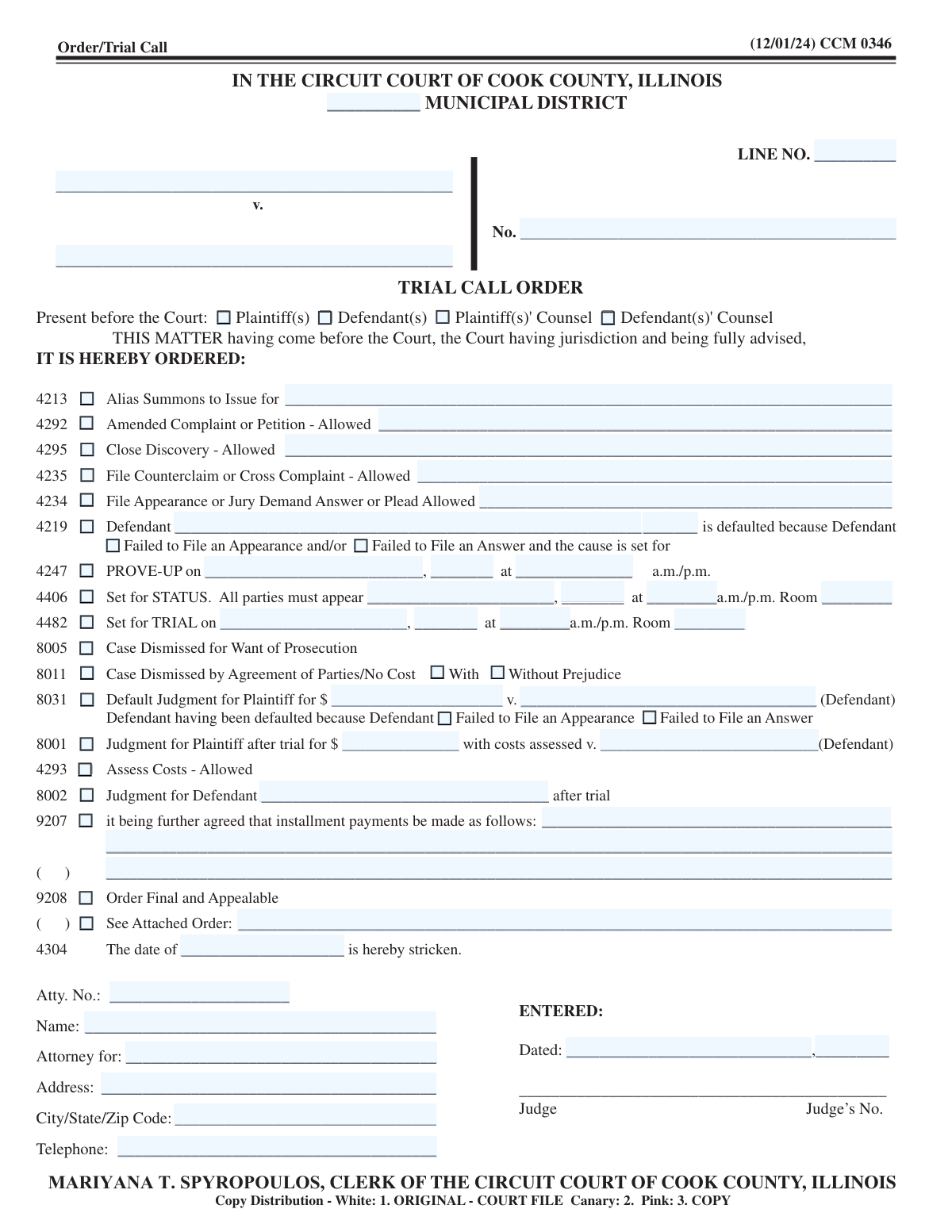
Yes! You can use AI to fill out Circuit Court of Cook County, Illinois, Form CCM 0346, Order/Trial Call
Don't type 70 fields by hand. Tell our AI about yourself, or upload a document you already have, and it fills every field in seconds. You check it, then download, print or sign.
The AI does the filling. You just check it.
No typing into boxes, nothing to install.
What this form asks for
The AI fills all of it, from your answers or your documents.
The AI checks your answers before you download
14 checks built for this form, so a wrong date or a missing answer is caught before anyone else sees it.
This check ensures that the core case identification fields, specifically 'Plaintiff(s) Name(s)', 'Defendant(s) Name(s)', and 'Case Number', are not empty. These fields are fundamental for identifying the legal matter to which the order applies. A failure in this validation would render the entire form legally ambiguous and prevent it from being correctly filed or associated with the proper court record.
Validates that the 'Case Number' field adheres to the specific format required by the Circuit Court of Cook County (e.g., YYYY-L-###### or similar). This is critical for accurate electronic filing, docketing, and retrieval of case documents. An incorrectly formatted case number can lead to filing rejections or the order being misfiled in the court's system.
This validation confirms that the 'Entered Date' is a valid calendar date and is not set in the future. The entered date represents when the judge signed the order, so it must be the current date or a date in the past. An invalid or future date would compromise the legal authenticity and timeline of the court's action.
Verifies that any new dates scheduled for court events, such as 'PROVE-UP on', 'Set for STATUS', or 'Set for TRIAL', are dates set in the future. Scheduling a court event for a past date is a logical impossibility and indicates a data entry error. This check prevents the creation of unenforceable or nonsensical scheduling orders.
Ensures that if the 'Default Judgment for Plaintiff' box is checked, then the 'Default Judgment Amount', 'Defaulted Defendant Name', and at least one reason ('Failed to File an Appearance' or 'Failed to File an Answer') are also provided. An order for default judgment is incomplete and unenforceable without specifying the amount, the liable party, and the legal basis for the default. Failure to provide this information would result in an invalid order.
This check enforces that if 'Case Dismissed by Agreement of Parties' is selected, then either the 'With Prejudice' or 'Without Prejudice' box must be checked, but not both. The distinction is legally critical, as it determines whether the case can be refiled. Selecting neither or both options creates a legally ambiguous and invalid order.
And 8 more checks
- Conditional PROVE-UP Scheduling Details
- Mutually Exclusive Case Dispositions
- Conditional Attached Order Reference
- Attorney Information Integrity
- Monetary Amount Format
- Conditional Defendant Default Details
- Attorney Telephone Number Format
- City/State/Zip Combination Validation
Let AI fill out your CCM 0346
No typing. Every field filled in seconds, checked, ready to sign.
How to Fill Out CCM 0346 Online for Free in 2026
What the AI walks you through.
- Navigate to Instafill.ai and upload or select Form CCM 0346, the Order/Trial Call form.
- Use the AI assistant to automatically populate the case caption, including the municipal district, plaintiff and defendant names, line number, and case number.
- Indicate which parties and/or counsel were present before the court by checking the appropriate boxes.
- Select the specific orders issued by the judge from the checklist, such as setting a trial date, dismissing the case, or entering a default judgment.
- Fill in the necessary details for each selected order, like dates, times, room numbers, or monetary amounts, as prompted by the system.
- Enter the representing attorney's information, including their name, attorney number, address, and the party they represent, along with the date the order was entered.
- Review all the information on the completed form for accuracy, then download the final document to be filed with the court.
Common Mistakes in Completing CCM 0346
The ones the AI is built to catch.
Incorrect or Incomplete Case Caption Information
Missing Details for a Selected Order
Ambiguous Dismissal Terms
Incomplete Attorney Information Section
Ambiguous Date or Time Entries
Misidentifying the Defendant in a Default Order
Filling Details Without Checking the Corresponding Order Box
Forgetting to Specify the Stricken Date
Data Entry Errors from Manually Filling a Non-Fillable PDF
Incorrectly Marking Who is Present in Court
Frequently Asked Questions About CCM 0346
Is it really free for 7 days?
Can I fill other forms too?
How do I cancel?
How does the AI fill out CCM 0346?
What happens to my information?
How complex is CCM 0346 to fill out?
What is the purpose of the Order/Trial Call form (CCM 0346)?
Who fills out this form?
What does it mean if a defendant is 'defaulted'?
What is a 'PROVE-UP' hearing?
What is the difference between a case being 'Set for STATUS' versus 'Set for TRIAL'?
My order says the case was 'Dismissed for Want of Prosecution.' What does that mean?
What is the difference between a dismissal 'With Prejudice' and 'Without Prejudice'?
What does 'Alias Summons to Issue' mean?
What information do I need to have to understand this order?
What does it mean if the 'Order Final and Appealable' box is checked?
The order mentions installment payments. What do I need to do?
Can an AI tool help me with a form like this?
How can I fill out court forms online if I need to file one?
What can I do if I have a court form PDF that is not fillable?
Get your CCM 0346 filled out by AI
$0 today. Cancel before Oct 31 and you pay nothing.
Other forms like this one
court forms: Form Summons, Supreme Court of New York, Form SC-100, Plaintiff's Claim and ORDER to Go to Small Claims Court, Form AO 240, Application to Proceed in District Court Without Prepaying Fees or Costs, Form AO 239, Application to Proceed in District Court Without Prepaying Fees or Costs, Affidavit for Service by Publication/Posting (Circuit Court of Cook County, Illinois) (CCG 0013 A/B), Petition for Leave to Proceed In Forma Pauperis (Court of Common Pleas of Lehigh County, Pennsylvania, Civil Division), In Forma Pauperis Affidavit/Petition (AOPC 622A) – Pennsylvania Magisterial District Court, Judicial Council of California Form SC-105, Request for Court Order and Answer (Small Claims), SC-120, Defendant’s Claim and ORDER to Go to Small Claims Court (Small Claims), SC-105, Request for Court Order and Answer (Small Claims), Judicial Council of California Form SC-120, Defendant’s Claim and ORDER to Go to Small Claims Court (Small Claims), In Forma Pauperis Affidavit Petition (AOPC 622A) — Pennsylvania Magisterial District Court, Florida Supreme Court Approved Family Law Form 12.901(b)(3), Petition for Dissolution of Marriage with No Dependent or Minor Child(ren) or Property (02/18), Illinois Supreme Court Approved Form E-O 3500.3, Eviction Order, Form P3 (Rule 25-3(2)) — Affidavit of Applicant for Grant of Probate or Grant of Administration with Will Annexed (Short Form) (Supreme Court of British Columbia), Form SC-100, Plaintiff’s Claim and ORDER to Go to Small Claims Court, Designation of Record on Appeal (Civil) (Maricopa County Justice Courts, Arizona) (Form APP 8150-702), FW-003, Order on Court Fee Waiver (Superior Court), Judicial Council of California Form SER-001, Request for Sheriff to Serve Court Papers, FW-003, Order on Court Fee Waiver (Superior Court)
Cook County forms: Affidavit for Service by Publication/Posting (Circuit Court of Cook County, Illinois) (CCG 0013 A/B)
Illinois court forms: Affidavit for Service by Publication/Posting (Circuit Court of Cook County, Illinois) (CCG 0013 A/B), Illinois Supreme Court Approved Form E-O 3500.3, Eviction Order, Illinois Circuit Court Eviction Summons and Proof of Service of Eviction Summons & Eviction Complaint (Form E-S 3507.3)
UK court forms: Form Summons, Supreme Court of New York, Form SC-100, Plaintiff's Claim and ORDER to Go to Small Claims Court, Form AO 240, Application to Proceed in District Court Without Prepaying Fees or Costs, Form AO 239, Application to Proceed in District Court Without Prepaying Fees or Costs, Affidavit for Service by Publication/Posting (Circuit Court of Cook County, Illinois) (CCG 0013 A/B), Petition for Leave to Proceed In Forma Pauperis (Court of Common Pleas of Lehigh County, Pennsylvania, Civil Division), In Forma Pauperis Affidavit/Petition (AOPC 622A) – Pennsylvania Magisterial District Court, Judicial Council of California Form SC-105, Request for Court Order and Answer (Small Claims), SC-120, Defendant’s Claim and ORDER to Go to Small Claims Court (Small Claims), SC-105, Request for Court Order and Answer (Small Claims), Judicial Council of California Form SC-120, Defendant’s Claim and ORDER to Go to Small Claims Court (Small Claims), In Forma Pauperis Affidavit Petition (AOPC 622A) — Pennsylvania Magisterial District Court, Florida Supreme Court Approved Family Law Form 12.901(b)(3), Petition for Dissolution of Marriage with No Dependent or Minor Child(ren) or Property (02/18), Illinois Supreme Court Approved Form E-O 3500.3, Eviction Order, Form P3 (Rule 25-3(2)) — Affidavit of Applicant for Grant of Probate or Grant of Administration with Will Annexed (Short Form) (Supreme Court of British Columbia), Form SC-100, Plaintiff’s Claim and ORDER to Go to Small Claims Court, Designation of Record on Appeal (Civil) (Maricopa County Justice Courts, Arizona) (Form APP 8150-702), FW-003, Order on Court Fee Waiver (Superior Court), Judicial Council of California Form SER-001, Request for Sheriff to Serve Court Papers, FW-003, Order on Court Fee Waiver (Superior Court)
circuit court forms: Illinois Circuit Court Eviction Summons and Proof of Service of Eviction Summons & Eviction Complaint (Form E-S 3507.3), Affidavit for Service by Publication/Posting (Circuit Court of Cook County, Illinois) (CCG 0013 A/B), Form MC 60, Notice of Record Return from Circuit Court/Court of Appeals
County court forms: Affidavit for Service by Publication/Posting (Circuit Court of Cook County, Illinois) (CCG 0013 A/B), Petition for Leave to Proceed In Forma Pauperis (Court of Common Pleas of Lehigh County, Pennsylvania, Civil Division), Designation of Record on Appeal (Civil) (Maricopa County Justice Courts, Arizona) (Form APP 8150-702), Maricopa County Justice Courts, Motion to Set Aside / Vacate Judgment, Superior Court of Chatham County, Georgia, Hearing Request Form, Form CFS 601-2, County Treasurer's and Judge's Certification of Expenditures for Care and Support of Minors Other Than Wards of the Court, Tax Court of New Jersey, County Equalization Table Complaint (CN 10339), Application for Judgment to Apply Freeze Act using County Board of Taxation figures (N.J.S.A. 54:3-26), Family Department Pleading/Motion and Order, Disclosure Statement (Superior Court of Arizona in Maricopa County), Proposed Divorce / Legal Separation Resolution Statement, Notice of Default Hearing, Superior Court of Arizona in Maricopa County, Acceptance of Service for Family Court Cases, A.R.F.L.P. Rule 40(F), Affidavit of Direct Payments (Superior Court of Arizona in Maricopa County), Affidavit of Financial Information, Superior Court of Arizona in Maricopa County, Affidavit of Non-Compliance (Form DR41f), Affidavit Regarding Minor Children (Superior Court of Arizona in Maricopa County), Affidavit of Service with Signature Confirmation for Family Cases, Alternative Dispute Resolution Statement to the Court (A.R.F.L.P. 66(E)), Current Employer or Other Payor Information (DRS88f)
Let AI fill out your CCM 0346
Your trial starts once a card is added. You pay nothing before Oct 31.
Our AI already knows this form, all 70 fields of it. Skip the typing: tell it about yourself, or upload what you have, and it fills the whole form in seconds.
- AI fills every field on the form, checkboxes included
- No typing into boxes: answer a few questions, or upload a document you already have, an old copy of this form, a photo of a document
- The AI checks the answers; you review and change anything before you download
- Download the finished PDF, print it, or sign it online
- Encrypted, and never used to train AI
Cancel before Oct 31 and you pay nothing.
A card is needed to start the trial. Cancel in two clicks from your account.
Terms · Privacy