Yes! You can use AI to fill out Affidavit of Service with Signature Confirmation for Family Cases
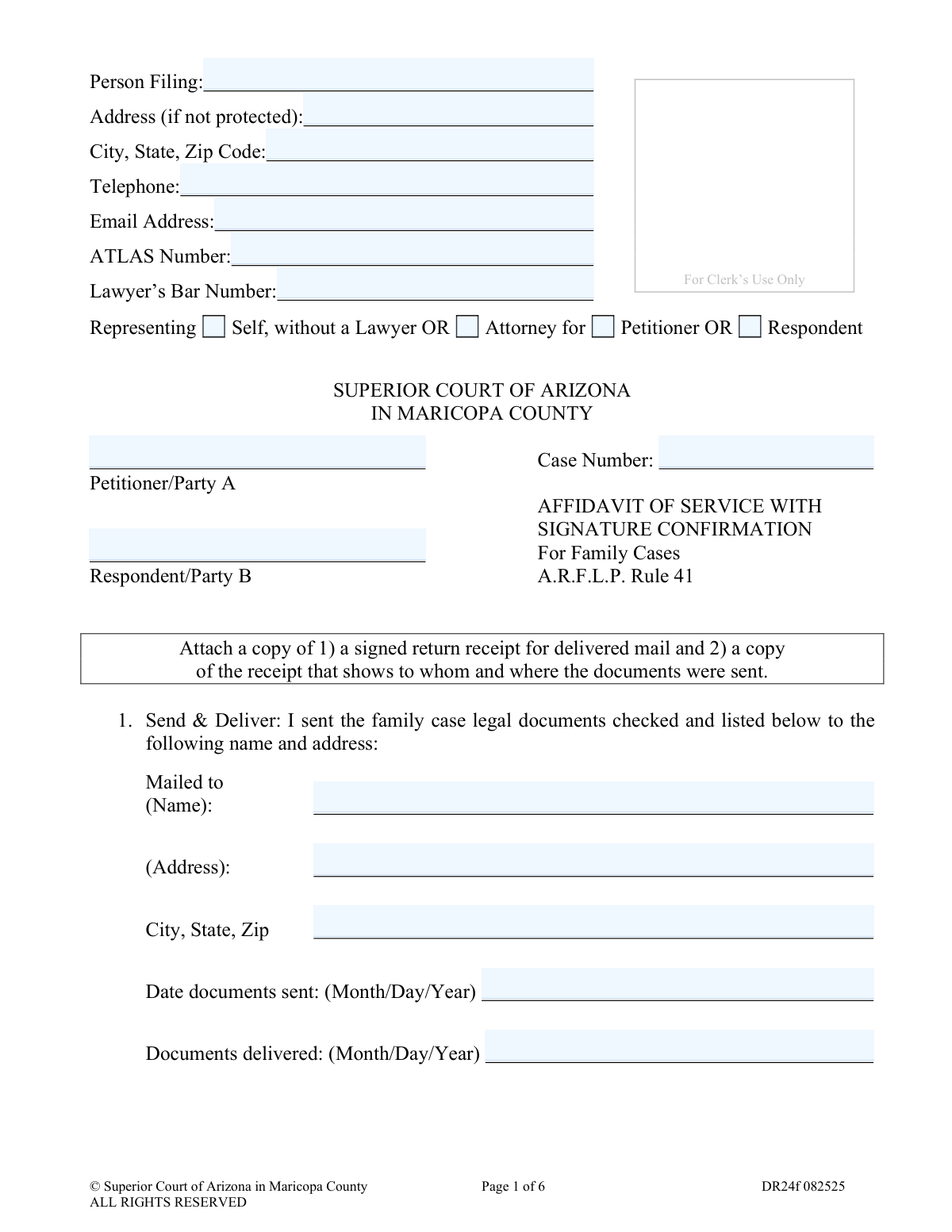
Form DR24f is an affidavit used in the Superior Court of Arizona in Maricopa County for family law cases. It serves as a sworn statement to the court, confirming that legal documents have been officially served to the opposing party via a method that provides signature confirmation, such as certified mail or a commercial delivery service. This document is crucial for proving proper legal notice has been given, which is a fundamental requirement in legal proceedings. Today, this form can be filled out quickly and accurately using AI-powered services like Instafill.ai, which can also convert non-fillable PDF versions into interactive fillable forms.
DR24f is part of the
County court forms, family court forms, family law forms, law firm forms and superior court forms categories on Instafill.
Our AI automatically handles information lookup, data retrieval, formatting, and form filling.
It takes less than a minute to fill out DR24f using our AI form filling.
Securely upload your data. Information is encrypted in transit and deleted immediately after the form is filled out.
Form specifications
| Form name: | Affidavit of Service with Signature Confirmation for Family Cases |
| Number of fields: | 120 |
| Number of pages: | 1 |
| Language: | English |
Instafill Demo: How to fill out PDF forms in seconds with AI
How to Fill Out DR24f Online for Free in 2026
Are you looking to fill out a DR24F form online quickly and accurately? Instafill.ai offers the #1 AI-powered PDF filling software of 2026, allowing you to complete your DR24F form in just 37 seconds or less.
Follow these steps to fill out your DR24F form online using Instafill.ai:
- 1 Navigate to Instafill.ai and upload or select the DR24f, Affidavit of Service with Signature Confirmation form.
- 2 Use the AI assistant to input your personal details, case number, and the names of the petitioner and respondent.
- 3 Provide the service details, including the name and address of the person served, the date the documents were sent, and the date they were delivered.
- 4 Select the method of delivery used (e.g., U.S. Mail, FedEx) and indicate who signed for the documents.
- 5 Check the boxes corresponding to all the legal documents that were included in the service packet.
- 6 Review the auto-filled affidavit for accuracy, then print the document to be signed in the presence of a notary public.
- 7 Attach a copy of the signed return receipt and the mailing invoice to the notarized affidavit before filing it with the court.
Our AI-powered system ensures each field is filled out correctly, reducing errors and saving you time.
Why Choose Instafill.ai for Your Fillable DR24f Form?
Speed
Complete your DR24f in as little as 37 seconds.
Up-to-Date
Always use the latest 2026 DR24f form version.
Cost-effective
No need to hire expensive lawyers.
Accuracy
Our AI performs 10 compliance checks to ensure your form is error-free.
Security
Your personal information is protected with bank-level encryption.
Frequently Asked Questions About Form DR24f
This form is a sworn statement you file with the court to prove that you have legally delivered (served) family case documents to the other party. It requires a signature as proof of receipt, which is then submitted to the court with this affidavit.
The person who sent the legal documents (the Petitioner or Respondent) must fill out this form after the other party has received and signed for them. It serves as your proof to the court that service was completed.
You must attach two items: a copy of the signed return receipt (like the green card from Certified Mail or a printout of the signature) and a copy of the mailing receipt or package label showing the recipient's name and address.
You can use U.S. Mail services like Certified Mail or Priority Mail with signature confirmation, or a nationwide commercial service such as FedEx or UPS. The key requirement is that the service provides proof of signature upon delivery.
The documents must be signed by the other party, their attorney, or a designated official if the party is incarcerated. To ensure only the intended recipient signs, you can request 'restricted delivery' from the postal service.
In Section 4, you must check the box for every single document you included in the package sent to the other party. The documents are conveniently grouped by case type, such as 'Divorce with Children' or 'Modify Child Support'.
Yes, this is an affidavit, which is a sworn statement. You must sign the form in the presence of a Notarial Officer, who will then complete the 'Oath or Affirmation' section and apply their official stamp or seal.
After you have completed the form, attached the required proofs of delivery, and had it notarized, you must file it with the Superior Court of Arizona in Maricopa County for your specific case.
You must send the documents via a method with signature confirmation to the correctional facility. In addition, you are required to mail a second, identical set of documents via regular First Class U.S. Mail and indicate that you did so by checking the appropriate box in Section 2.
Yes, services like Instafill.ai use AI to accurately auto-fill form fields, which can save you time and help prevent errors. The AI can recognize fields and populate them with your saved information.
Simply upload the PDF of the 'Affidavit of Service' to the Instafill.ai platform. It will make the form interactive, allowing you to use its AI-powered tools to quickly and accurately enter your information before downloading the completed document for printing and notarization.
If you have a flat, non-fillable PDF, you can use a service like Instafill.ai to convert it into an interactive, fillable form. This allows you to easily type your information directly into the fields on your computer.
The 'Date documents sent' is the day you mailed or shipped the package. The 'Documents delivered' date is the day the other party actually received and signed for the package, which you will find on your delivery confirmation receipt.
If your case type is not pre-listed, check the box for 'Other Type Case'. You can then write in the type of case and manually list each document you sent in the space provided.
Compliance DR24f
Validation Checks by Instafill.ai
1
Filer Representation Status Required
This check ensures that the person filing has selected one of the representation options: 'Self, without a Lawyer', 'Attorney for Petitioner', or 'Attorney for Respondent'. This information is mandatory for the court to understand the filer's legal standing and who is responsible for the submission. If no option is selected, the form cannot be processed as the filer's role is ambiguous.
2
Conditional Lawyer's Bar Number
This validation verifies that if the filer selects 'Attorney for Petitioner' or 'Attorney for Respondent', the 'Lawyer’s Bar Number' field must be completed. The Bar Number is a unique identifier for a licensed attorney and is required for verification and official record-keeping. Failure to provide it when representing a party will result in rejection of the filing.
3
Case Number Format and Presence
This check validates that the 'Case Number' field is not empty and conforms to the Maricopa County format (e.g., FC-prefixed). The case number is the primary identifier that links this affidavit to the correct family case file within the court's system. An incorrect or missing case number would cause the document to be misfiled or rejected, delaying the case.
4
Service Recipient Address Completeness
This validation ensures that the recipient's full name, address, and city, state, and zip code are all provided in Section 1. Complete and accurate address information is legally required to prove that the documents were sent to the correct party at a specific, verifiable location. Incomplete information undermines the validity of the service claim.
5
Logical Date Sequence for Service
This check verifies that the 'Documents delivered' date is on or after the 'Date documents sent'. It is logically and physically impossible for a document to be delivered before it is mailed. This check prevents simple data entry errors and ensures the timeline of service is credible.
6
Method of Delivery Selection
This validation ensures that at least one checkbox is selected in Section 2, 'Method of Delivery'. The filer must declare the specific method used (e.g., U.S. Mail, commercial service) as different methods have different rules under the Arizona Rules of Family Law Procedure (A.R.F.L.P.). Without this selection, the affidavit is incomplete and does not meet procedural requirements.
7
Document Enclosure Minimum
This check confirms that at least one document checkbox is selected in Section 4, or that the 'Other Type Case' section is filled out with a list of documents. An Affidavit of Service is meaningless if it does not specify which legal documents were served. This validation ensures the affidavit has a clear purpose and documents the service of specific items.
8
Affiant Signature Date Presence
This check ensures the 'Date' field next to the affiant's signature in Section 5 is filled out with a valid date. This date is legally significant as it marks the day the filer swore under penalty of perjury that the information is true. An undated affidavit is legally deficient and cannot be accepted by the court.
9
Notary Date Consistency
This validation confirms that the date in the notary section ('Subscribed and sworn to or affirmed before me this: (date)') is on or after the affiant's own signature date. A notary cannot legally notarize a signature before it has been made. This check prevents invalid notarizations and ensures the legal integrity of the sworn statement.
10
Attachment Requirement: Signature Receipt
This check verifies that a file has been uploaded for the 'signed return receipt' as instructed on Page 6. This attachment is the primary evidence that the intended recipient received the documents, which is the core purpose of 'Service with Signature Confirmation'. The form is invalid without this proof of receipt.
11
Attachment Requirement: Mailing Invoice
This validation ensures a file has been uploaded for the 'mailing invoice' or 'package label' as required on Page 6. This document serves as secondary evidence, proving that the documents were actually sent to the specified person and address. It corroborates the information provided in Section 1 of the affidavit.
12
Telephone Number Format
This check validates that the 'Telephone' field contains a valid phone number format, such as 10 digits with an optional country code or formatting characters. A valid contact number is crucial for the court clerk or judge to contact the filer if there are questions or issues with the filing. An invalid number can cause communication breakdowns and delays.
Common Mistakes in Completing DR24f
Filers often forget to write the case number on every required page (pages 1-6) or incorrectly swap the names of the Petitioner and Respondent. This happens due to oversight when handling multi-page documents, and the consequence is that the clerk's office may reject the filing or misfile the document, causing significant delays. To avoid this, double-check that the case number is present and correct on every single page and that the party names match the original petition exactly. Using a form-filling tool like Instafill.ai can help prevent this by automatically populating recurring information like the case number across all pages of the document.
A very common error is failing to attach both required documents: a copy of the signed return receipt and a copy of the mailing receipt/invoice. People may forget one of the two items or mistakenly believe that a tracking printout is sufficient without the actual signature confirmation. Without this complete proof, the service is considered invalid, and the court cannot proceed, which could lead to case dismissal. Always create a checklist and ensure both the signature proof and the mailing cost/address proof are securely attached to page 6 before filing.
The affidavit is not valid unless it is signed in the presence of a notarial officer who then completes the 'Oath or Affirmation' section on page 5. People often make the mistake of signing the document beforehand or forgetting to get it notarized altogether. An improperly notarized affidavit will be rejected by the court, invalidating the service of process and forcing the filer to start over. To prevent this, do not sign the document until you are physically in front of the notary, and verify that they have correctly dated, signed, and stamped the form.
In Section 4, filers must check the boxes corresponding to every document that was sent to the other party. Mistakes occur when filers check the wrong case type, forget to check a document, or check a document that wasn't actually included. This creates a discrepancy in the legal record and can be challenged by the other party, potentially invalidating the service for the missing documents. Before filling out this section, create a physical stack of the exact documents being sent and use it as a reference to meticulously check off each item on the form.
The form requires the signature of the other party, their attorney, or a designated jail official. A frequent and critical error is accepting a return receipt signed by a different person, such as a family member or roommate at the address. This invalidates the service because there is no proof the intended recipient actually received the documents. To avoid this, use a 'Restricted Delivery' service option when mailing, which ensures only the specified addressee can sign for the package.
In Section 1, the form asks for both the date the documents were sent and the date they were delivered. Filers sometimes enter the same date for both, guess the delivery date, or enter the dates in an incorrect format. These dates are legally significant for calculating response deadlines, and any inaccuracy can lead to procedural challenges. The 'Date sent' is the day you mailed the package, found on your mailing receipt, while the 'Date delivered' is found on the tracking information or return receipt and should only be filled in after delivery is confirmed. AI-powered tools can help by validating the date format to ensure it meets court requirements.
The recipient's name and address written in Section 1 must exactly match the name and address printed on the attached mailing receipt or package label. People may write from memory and introduce a small typo or use a slightly different address format, creating an inconsistency. This discrepancy can be used to challenge the validity of the service. To prevent this, directly copy the address from the mailing label onto the form, and consider using smart form fillers like Instafill.ai that can save and auto-fill addresses to reduce manual entry errors.
This form is often available as a flat, non-fillable PDF, leading people to print it, fill it out by hand, and then scan it. This can result in illegible handwriting, smudges, or poor scan quality that makes the document difficult for the court to read and process. An unreadable form may be rejected, forcing the filer to resubmit. To ensure clarity, use a fillable version of the form. Tools like Instafill.ai can convert non-fillable PDFs into interactive forms, allowing you to type directly into the fields for a clean and legible submission.
Page 6 gives a specific instruction to 'tape the green signed return receipt card to this page with the signature side visible.' People may use staples, which can obscure parts of the card or tear it, or attach a poor-quality photocopy where the signature is illegible. This can lead to the clerk rejecting the filing because the proof is not presented correctly or is unreadable. Follow the instructions precisely by using clear tape on the edges of the receipt card, ensuring the signature and delivery address are fully visible.
On the first page, individuals representing themselves sometimes get confused and check the box for 'Attorney for' or are unsure whether they are the 'Petitioner' or 'Respondent.' This happens when filers are unfamiliar with legal terminology and can cause confusion in the court record. If you are filing without a lawyer, you must check 'Self, without a Lawyer' and then correctly identify your role as either the original filer (Petitioner) or the responding party (Respondent).
Saved over 80 hours a year
“I was never sure if my IRS forms like W-9 were filled correctly. Now, I can complete the forms accurately without any external help.”
Kevin Martin Green
Your data stays secure with advanced protection from Instafill and our subprocessors

Robust compliance program
Transparent business model
You’re not the product. You always know where your data is and what it is processed for.
ISO 27001, HIPAA, and GDPR
Our subprocesses adhere to multiple compliance standards, including but not limited to ISO 27001, HIPAA, and GDPR.
Security & privacy by design
We consider security and privacy from the initial design phase of any new service or functionality. It’s not an afterthought, it’s built-in, including support for two-factor authentication (2FA) to further protect your account.
Fill out DR24f with Instafill.ai
Worried about filling PDFs wrong? Instafill securely fills affidavit-of-service-with-signature-confirmation-for-family-cases forms, ensuring each field is accurate.