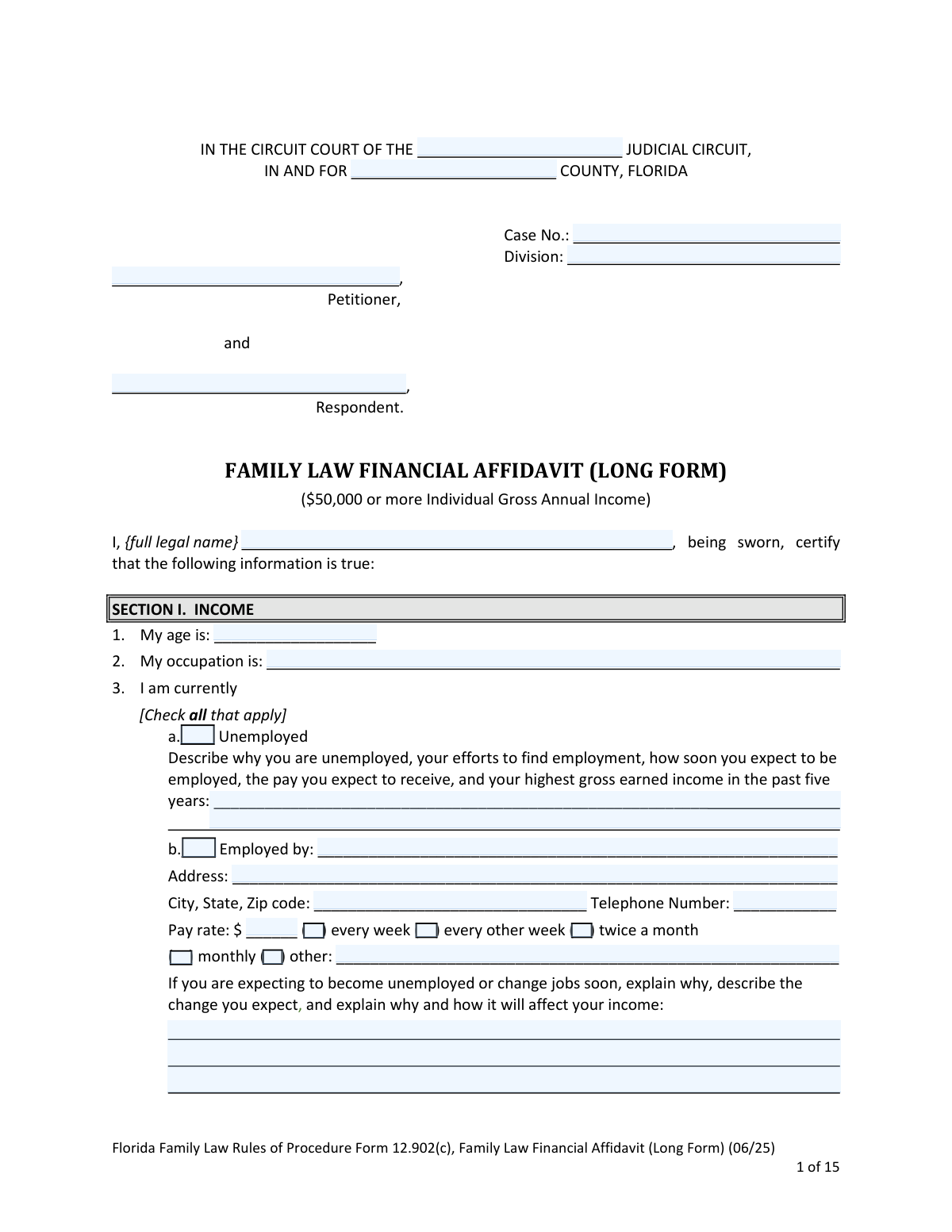
Yes! You can use AI to fill out Florida Family Law Rules of Procedure Form 12.902(c), Family Law Financial Affidavit (Long Form)
Form 12.902(c), the Family Law Financial Affidavit (Long Form), is a comprehensive document used in Florida family law proceedings to provide a detailed picture of an individual's financial situation. It is mandatory for parties with a gross annual income of $50,000 or more and is crucial for determining matters like alimony, child support, and equitable distribution of assets and liabilities. Today, this form can be filled out quickly and accurately using AI-powered services like Instafill.ai, which can also convert non-fillable PDF versions into interactive fillable forms.
Form 12.902(c) is part of the
family court forms, family law forms, financial affidavit forms and divorce forms categories on Instafill.
Our AI automatically handles information lookup, data retrieval, formatting, and form filling.
It takes less than a minute to fill out Form 12.902(c) using our AI form filling.
Securely upload your data. Information is encrypted in transit and deleted immediately after the form is filled out.
Form specifications
| Form name: | Florida Family Law Rules of Procedure Form 12.902(c), Family Law Financial Affidavit (Long Form) |
| Number of fields: | 999 |
| Number of pages: | 1 |
| Language: | English |
Instafill Demo: How to fill out PDF forms in seconds with AI
How to Fill Out Form 12.902(c) Online for Free in 2026
Are you looking to fill out a FORM 12.902(C) form online quickly and accurately? Instafill.ai offers the #1 AI-powered PDF filling software of 2026, allowing you to complete your FORM 12.902(C) form in just 37 seconds or less.
Follow these steps to fill out your FORM 12.902(C) form online using Instafill.ai:
- 1 Navigate to Instafill.ai and upload or select the Florida Family Law Financial Affidavit (Long Form) 12.902(c).
- 2 Use the AI-powered tool to automatically populate your personal and case information, such as name, address, and case number.
- 3 Follow the guided prompts to enter your monthly gross income from all sources, including salary, bonuses, and business income, letting the tool assist with calculations.
- 4 Systematically list all your average monthly expenses across the provided categories, such as household, automobile, children's expenses, and insurance.
- 5 Detail your assets (e.g., cash, real estate, retirement plans) and liabilities (e.g., mortgages, credit card debt), specifying their value and whether they are marital or non-marital.
- 6 Review the automatically generated summary of your total income, expenses, and net worth for accuracy before electronically signing the affidavit under penalties of perjury.
- 7 Download the completed, signed form and follow the instructions for filing with the court and serving the other party as required by Florida law.
Our AI-powered system ensures each field is filled out correctly, reducing errors and saving you time.
Why Choose Instafill.ai for Your Fillable Form 12.902(c) Form?
Speed
Complete your Form 12.902(c) in as little as 37 seconds.
Up-to-Date
Always use the latest 2026 Form 12.902(c) form version.
Cost-effective
No need to hire expensive lawyers.
Accuracy
Our AI performs 10 compliance checks to ensure your form is error-free.
Security
Your personal information is protected with bank-level encryption.
Frequently Asked Questions About Form Form 12.902(c)
This form provides a detailed breakdown of your financial situation for a family law case. You are required to use this long form if your individual gross annual income is $50,000 or more, unless specific exceptions apply.
You must file the completed affidavit with the court and serve a copy on the other party (or their attorney) within 45 days of being served with the petition.
The form instructions provide formulas to convert your pay to a monthly amount. For example, to convert weekly pay, multiply the weekly amount by 52 and then divide by 12.
If you do not know the exact cost, you can provide a reasonable estimate. The form instructs you to write the word 'estimate' next to each amount that is an approximation.
Generally, marital assets and liabilities are those acquired during the marriage, while non-marital ones were acquired before the marriage or through specific means like a personal inheritance. The form refers to Florida Statute 61.075(1) for precise legal definitions.
You must file the original document with the clerk of the circuit court. A copy must be served on the other party or their attorney via e-mail, mail, or hand delivery on the same day you file.
No, you should not list your address on this form if a judge has made a finding that you are a victim of domestic violence or other specific offenses. Instead, you should file a 'Request for Confidential Filing of Address,' Form 12.980(h).
Yes, if your case involves establishing or modifying child support, you must file a Child Support Guidelines Worksheet (Form 12.902(e)) with the court. This requirement cannot be waived by the parties.
Complete the employment section for your primary job on the form. For any additional jobs, list the same required information on a separate sheet and attach it to your affidavit.
A contingent asset is a possible future asset, such as a potential bonus, inheritance, or proceeds from a lawsuit. You are required to list all such possible assets and liabilities in Section III, Part D of the form.
Yes, services like Instafill.ai use AI to accurately auto-fill form fields from your profile, which can save you significant time and help reduce errors on complex documents like this.
You can use a service like Instafill.ai to upload the PDF and fill it out in an intuitive online interface. This allows you to type your information, save your progress, and easily download or print the completed form.
If you have a flat, non-fillable PDF, you can upload it to a platform like Instafill.ai. Its technology can convert the document into an interactive, fillable form that you can complete on your computer.
Compliance Form 12.902(c)
Validation Checks by Instafill.ai
1
Validates Total Monthly Gross Income Calculation
This check sums the values from lines 1 through 16 in the 'PRESENT MONTHLY GROSS INCOME' section and verifies that the total matches the value entered in line 17. This is critical for ensuring the foundational gross income figure is arithmetically correct before any deductions are applied. If this calculation fails, all subsequent net income and support calculations will be based on a flawed number.
2
Validates Present Net Monthly Income Calculation
This check subtracts the 'TOTAL DEDUCTIONS' (line 26) from the 'TOTAL PRESENT MONTHLY GROSS INCOME' (line 17) and confirms the result matches the 'PRESENT NET MONTHLY INCOME' (line 27). This is a crucial step in determining the party's disposable income, which is a primary factor in alimony and child support calculations. An error here would render the core financial summary of the affidavit inaccurate.
3
Validates Total Monthly Expenses Calculation
This check sums the subtotals from all expense categories (lines 27, 39, 65, 70, 79, 105, and 119) and compares the result to the 'TOTAL MONTHLY EXPENSES' on line 120. It ensures that the declared total expenses accurately reflect the itemized list provided by the filer. A discrepancy could indicate a mathematical error or an attempt to misrepresent financial need, impacting the surplus/deficit analysis.
4
Ensures Correct Surplus or Deficit Calculation
This check compares the 'TOTAL PRESENT MONTHLY NET INCOME' (line 121) with the 'TOTAL MONTHLY EXPENSES' (line 122). It then verifies that the difference is correctly calculated and placed in either the 'SURPLUS' field (line 123) or the 'DEFICIT' field (line 124), and that the other field is left blank. This prevents contradictory financial summaries and ensures the final financial state is clearly and accurately represented.
5
Requires Explanation for Unemployment Status
This validation confirms that if the 'Unemployed' checkbox (Section I, 3a) is selected, the corresponding text field requiring an explanation is not empty. The court requires this information to assess earning capacity and the reasons for unemployment. Failure to provide this mandatory explanation results in an incomplete affidavit and may delay proceedings.
6
Requires Employer Details if Employed
This check verifies that if the 'Employed by' checkbox (Section I, 3b) is selected, the associated fields for Employer Name, Address, and Pay Rate are filled out. This information is essential for income verification and for legal service purposes. An affidavit claiming employment without providing these fundamental details is considered incomplete and lacks credibility.
7
Validates Total Net Worth Calculation
This check confirms that the 'TOTAL NET WORTH' in Section III.C is the correct result of subtracting 'Total Liabilities' from 'Total Assets'. This calculation provides a critical snapshot of the party's overall financial health. An incorrect net worth figure gives a misleading impression of the party's estate, which is central to equitable distribution.
8
Ensures Signature and Date are Present
This validation verifies that the 'Signature of Party' and 'Dated' fields at the end of the document are both completed. An affidavit is not legally binding without a signature and date, as they certify that the information is true under penalty of perjury. Submitting an unsigned or undated form will lead to its rejection by the court.
9
Requires Selection for Child Support Worksheet Status
This check ensures that one of the two mandatory checkboxes in Section III.E, regarding the 'Child Support Guidelines Worksheet,' has been selected. This declaration is required to inform the court whether child support is an issue in the case. Failing to make a selection leaves a critical procedural question unanswered and makes the filing incomplete.
10
Verifies Use of Long Form Based on Income
This check examines the 'LAST YEAR'S GROSS INCOME' field. If the amount entered is less than $50,000, a warning should be triggered, as the instructions state this form is for individuals with gross annual incomes of $50,000 or more. This helps prevent procedural errors and ensures the filer is using the correct affidavit for their income level, avoiding potential rejection or delays.
11
Validates Account Number Format for Privacy
This check scans all fields where account numbers are requested (e.g., Assets, Liabilities) to ensure they contain only the last 4 digits. This is a critical security measure to protect the filer's sensitive financial data in a public court document, as instructed on the form. The validation should flag any entry that appears to be a full account number to prevent inadvertent disclosure of personal information.
12
Ensures Pay Rate Frequency is Specified
If a value is entered in the 'Pay rate' field (Section I, 3b), this check validates that a corresponding pay frequency checkbox (e.g., 'every week', 'every other week', 'twice a month') is also selected. This context is essential for accurately converting the pay rate to the required monthly income figure. Without the frequency, the pay rate is ambiguous and the monthly income calculation cannot be reliably performed.
13
Verifies Header Case Information is Complete
This check ensures that the header fields for 'Case No.', 'County', 'Petitioner', and 'Respondent' are all filled in. This information is essential for the clerk of court to correctly identify and file the document within the proper case file. A submission with missing header information would be rejected or misfiled, causing significant administrative delays.
Common Mistakes in Completing Form 12.902(c)
The form requires all income and expenses to be listed as monthly amounts, providing specific formulas for conversion. A frequent error is using simplified but incorrect math, like multiplying weekly pay by 4 instead of the correct formula (Weekly Pay x 52 / 12). This mistake, often made for convenience, significantly understates true monthly income. Consequently, it leads to inaccurate child support and alimony calculations, can damage credibility, and may require the entire form to be amended and refiled.
Filers often mistakenly enter their net (take-home) pay in the 'Gross salary or wages' field because it's the number they are most familiar with. The form, however, requires the gross income before any taxes or deductions are taken out. This error provides an incomplete and misleading picture of one's earning capacity, which can result in incorrect support calculations and legal challenges from the opposing party. To avoid this, always refer to a pay stub, which clearly distinguishes between gross and net pay.
In today's digital economy, people often forget to list assets that aren't in a traditional bank or brokerage account. This includes funds in digital wallets like PayPal or Venmo, cryptocurrency holdings, and NFTs, all of which are specifically mentioned on the form. Failure to disclose these assets, whether intentional or not, is a serious omission that can lead to court sanctions, the reopening of a finalized case, and a complete loss of credibility. A thorough review of all financial accounts, including digital ones, is essential for accuracy.
The affidavit has multiple sections where a single expense, like health insurance, could potentially be listed (e.g., 'Monthly Deductions,' 'Monthly Expenses for Minor Children,' 'Monthly Insurance'). A common mistake is to list the same expense in more than one category, which artificially inflates one's total monthly expenses. This creates an inaccurate financial picture and can mislead the court regarding one's actual budget surplus or deficit. To prevent this, carefully track each expense and ensure it is entered only once in the most appropriate section as guided by the form's instructions.
The distinction between 'marital' and 'non-marital' property is a legal determination, not an emotional one. Filers frequently misclassify assets or debts based on who uses them or whose name is on the title, rather than the legal standard (e.g., when it was acquired). This is one of the most contentious areas in a dissolution and leads to prolonged disputes, increased legal fees, and delays. It is crucial to understand the legal definitions or seek advice to properly categorize each item in Section III.
The section for 'Contingent Assets and Liabilities' is often misunderstood and left blank. People fail to list potential assets like accrued vacation or sick leave, anticipated bonuses, stock options, or potential inheritances. This omission provides an incomplete financial disclosure to the court. If a significant contingent asset is realized after the case is closed, it could be grounds for the other party to reopen the case, alleging fraudulent disclosure.
This lengthy form requires numerous calculations to arrive at subtotals and grand totals for income, expenses, assets, and liabilities. Simple addition or subtraction errors are extremely common when filling out the form manually. A single miscalculation can throw off the final 'Surplus' or 'Deficit' figure, making the entire document unreliable and reflecting poorly on the filer's diligence. Using a calculator and double-checking all math is critical. AI-powered tools like Instafill.ai can eliminate these errors by performing calculations automatically.
The affidavit explicitly states that attachments are required to itemize certain complex entries, such as business income, rental property income, or if you run out of space for assets. Many filers either forget to include these attachments or fail to prepare them with sufficient detail. This results in an incomplete filing that will be challenged by the other party, leading to formal discovery requests and delays. Always review the form for any instruction that says 'Attach sheet' and ensure the corresponding document is included.
When a category does not apply, people often leave the line blank. This creates ambiguity for the court and the opposing counsel: does the blank mean 'zero,' 'not applicable,' or that the information was simply forgotten? An incomplete form can be rejected or lead to unnecessary questions and challenges. The proper procedure is to explicitly enter '$0' or 'N/A' in any field that does not apply to you, ensuring every line is accounted for.
The Certificate of Service at the end of the form is a sworn statement certifying when and how the document was sent to the other party. Common mistakes include forgetting to fill it out, entering the wrong date, or failing to check the method of delivery (e-mail, mail, hand delivery). An incorrect or incomplete certificate can invalidate the service of the document, cause missed deadlines, and create procedural problems that delay the case. It is crucial to fill this section out accurately at the time of service.
Saved over 80 hours a year
“I was never sure if my IRS forms like W-9 were filled correctly. Now, I can complete the forms accurately without any external help.”
Kevin Martin Green
Your data stays secure with advanced protection from Instafill and our subprocessors

Robust compliance program
Transparent business model
You’re not the product. You always know where your data is and what it is processed for.
ISO 27001, HIPAA, and GDPR
Our subprocesses adhere to multiple compliance standards, including but not limited to ISO 27001, HIPAA, and GDPR.
Security & privacy by design
We consider security and privacy from the initial design phase of any new service or functionality. It’s not an afterthought, it’s built-in, including support for two-factor authentication (2FA) to further protect your account.
Fill out Form 12.902(c) with Instafill.ai
Worried about filling PDFs wrong? Instafill securely fills florida-family-law-rules-of-procedure-form-12902c-family-law-financial-affidavit-long-form forms, ensuring each field is accurate.