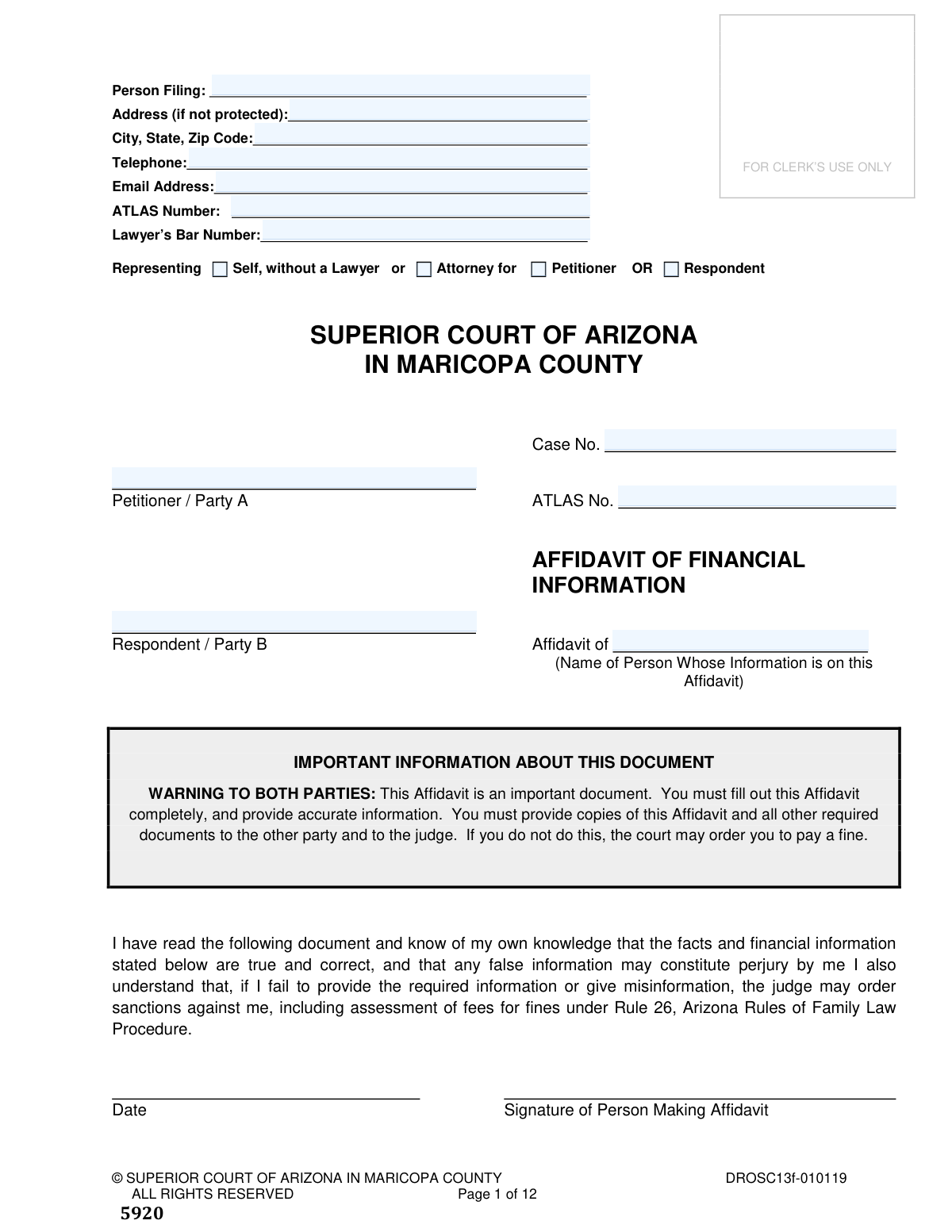
Yes! You can use AI to fill out Affidavit of Financial Information, Superior Court of Arizona in Maricopa County
The Affidavit of Financial Information is a sworn legal document required by the Superior Court of Arizona in Maricopa County for family law cases, such as divorce or child custody disputes. It provides a comprehensive and detailed statement of a person's income, expenses, assets, and debts, which is crucial for the court to make fair decisions regarding child support, spousal maintenance, and the division of property. Today, this form can be filled out quickly and accurately using AI-powered services like Instafill.ai, which can also convert non-fillable PDF versions into interactive fillable forms.
DROSC13f-010119 is part of the
County court forms, family court forms, family law forms, financial affidavit forms and superior court forms categories on Instafill.
Our AI automatically handles information lookup, data retrieval, formatting, and form filling.
It takes less than a minute to fill out DROSC13f-010119 using our AI form filling.
Securely upload your data. Information is encrypted in transit and deleted immediately after the form is filled out.
Form specifications
| Form name: | Affidavit of Financial Information, Superior Court of Arizona in Maricopa County |
| Number of fields: | 328 |
| Number of pages: | 1 |
| Language: | English |
Instafill Demo: How to fill out PDF forms in seconds with AI
How to Fill Out DROSC13f-010119 Online for Free in 2026
Are you looking to fill out a DROSC13F-010119 form online quickly and accurately? Instafill.ai offers the #1 AI-powered PDF filling software of 2026, allowing you to complete your DROSC13F-010119 form in just 37 seconds or less.
Follow these steps to fill out your DROSC13F-010119 form online using Instafill.ai:
- 1 Navigate to Instafill.ai and upload or select the Affidavit of Financial Information form.
- 2 Use the AI assistant to accurately fill in your personal details, case number, and general information in Section 1.
- 3 Input your employment history, education, and all sources of gross monthly income as detailed in Sections 2, 3, and 4.
- 4 Detail all monthly expenses for children and your household, including insurance, child care, housing, utilities, and transportation, as prompted by the system for Sections 6 and 7.
- 5 List all outstanding debts and accounts in Section 8, providing creditor names, balances, and payment information.
- 6 Gather and upload required supporting documents, such as pay stubs, tax returns, and insurance information, as instructed within the form.
- 7 Carefully review all the information you've entered for accuracy, then electronically sign the affidavit and follow the final page's instructions for filing and serving the document.
Our AI-powered system ensures each field is filled out correctly, reducing errors and saving you time.
Why Choose Instafill.ai for Your Fillable DROSC13f-010119 Form?
Speed
Complete your DROSC13f-010119 in as little as 37 seconds.
Up-to-Date
Always use the latest 2026 DROSC13f-010119 form version.
Cost-effective
No need to hire expensive lawyers.
Accuracy
Our AI performs 10 compliance checks to ensure your form is error-free.
Security
Your personal information is protected with bank-level encryption.
Frequently Asked Questions About Form DROSC13f-010119
This form is used in Arizona family law cases to provide the court and the other party with a complete and accurate statement of your financial situation, including income, expenses, assets, and debts.
Both parties in a family law case (Petitioner and Respondent) must complete and file this affidavit to disclose their financial information, especially when matters like child support, spousal maintenance, or division of assets are being decided.
You must attach copies of your two most recent pay stubs and your federal income tax returns for the last three years, including all W-2 and 1099 forms. Additional documents, like proof of child support payments or business financial statements, may also be required.
You are signing under penalty of perjury. The form warns that failing to provide complete, accurate information can result in sanctions from the court, including fines or other penalties.
The form instructs you to convert income to a monthly average. To do this, multiply your weekly gross income by 4.33 or your bi-weekly (every other week) income by 2.165.
The instructions state that you must answer every question. If a question does not apply, you should write “NA” for “not applicable” in the space provided.
If you are self-employed, you must complete Section 5 with your business details and attach a copy of the Schedule C from your last tax return and the most recent income/expense statement from your business.
Both parties must complete Section 7 if either party is requesting spousal maintenance, division of expenses, attorneys' fees, or an adjustment to the child support amount.
You must file the original with the Clerk of the Superior Court, deliver a copy to the assigned Judge or Commissioner, and mail or deliver a copy to the other party and their attorney. You must complete the certificate of mailing on the last page.
Yes, services like Instafill.ai use AI to help you accurately auto-fill form fields, which can save you time and reduce errors on complex documents like this affidavit.
You can use a service like Instafill.ai to fill out the form online. Simply upload the PDF, and the platform will allow you to type your information directly into the fields before printing the completed document for signature and filing.
If you have a non-fillable or 'flat' PDF, you can upload it to a service like Instafill.ai. Their technology can convert it into an interactive, fillable form that you can complete on your computer.
Section 6 is specifically for the monthly expenses of children common to both parties, used for child support calculations. Section 7 is a schedule of all your personal and household monthly expenses, used for spousal maintenance or fee requests.
Compliance DROSC13f-010119
Validation Checks by Instafill.ai
1
Date Chronology Validation for Marriage and Divorce
This check ensures that the 'Date of Divorce' entered in Section 1.C is on or after the 'Date of Marriage'. This maintains logical consistency in the timeline of events. If the divorce date precedes the marriage date, the form submission will be rejected, and the user will be prompted to correct the dates, as this represents a chronological impossibility.
2
Mandatory Signature and Date Validation
Verifies that the signature and date fields on page 1, where the filer attests to the truthfulness of the information, are both completed. This is critical for the affidavit's legal validity, as an unsigned or undated document is not legally binding. A failure in this check will prevent submission and display an error message highlighting the missing signature or date.
3
Completeness Check for All Fields
This validation enforces the form's instruction that every blank must be completed. It checks that every field contains a value or the specific text 'NA' for 'not applicable'. This ensures the filer has reviewed and consciously addressed every question, preventing accidental omissions. If any field is left empty, the submission will be blocked until the user fills it in or enters 'NA'.
4
Gross Monthly Income Calculation Verification
This check cross-references the itemized income sources in Section 4 (A through M) with the stated 'TOTAL' gross monthly income. The system will sum the individual amounts and compare it to the total provided by the user. This is important for financial accuracy and prevents mathematical errors. If the sum does not match the total, an error will be flagged, requiring the user to review and correct their income figures.
5
Conditional Validation for Self-Employment Section
Ensures that if a monetary value greater than zero is entered for 'Self-employment Income' (Section 4.E), then the corresponding detailed 'SELF-EMPLOYMENT INCOME' section (Section 5) must be filled out. This guarantees that claims of self-employment income are substantiated with the required business details. If Section 4.E has income but Section 5 is empty, the user will be prompted to complete Section 5.
6
Employment History Date Logic
Validates that for a previous job listed in Section 2.C, the 'Date previous job ended' is chronologically after the 'Date previous job began'. This check prevents logical errors in the employment history timeline. An invalid date sequence would trigger an error, forcing the user to correct the employment dates before proceeding.
7
Email Address Format Validation
This check confirms that the value entered in the 'Email Address' field on the first page follows the standard email format (e.g., '[email protected]'). Proper formatting is essential for ensuring the court and other parties can reliably communicate with the filer electronically. An invalid format will result in an error message prompting the user to enter a valid email address.
8
Case Number Consistency Across All Pages
Verifies that the 'Case No.' field is present and identical on every page of the document where it appears. This is crucial for administrative processing and ensuring all pages of the affidavit are correctly associated with the proper court case. If the case number is missing on any page or is inconsistent, the system will flag an error to prevent filing a disjointed or misidentified document.
9
Health Insurance Premium Summation Check
In Section 6.A, this validation ensures the 'Total monthly cost' of health insurance is greater than or equal to the sum of the 'Premium cost to insure you alone' and the 'Premium cost to insure child(ren)'. This prevents logical and financial inconsistencies in the reported insurance expenses. A mismatch will trigger a validation error, requiring the user to review and correct the insurance premium amounts.
10
Child's Date of Birth Validity
This check ensures that any 'Date of Birth' entered for a child in Section 1.E is a valid date and occurs before the current date. This prevents data entry errors, such as future dates or non-existent dates. An invalid date would block submission and prompt the user to enter a correct and past date of birth for the child.
11
Historical Tax Year Sequence Validation
In Section 2.D, this check verifies that the three 'Year' fields for past tax returns are sequential and represent the three years immediately preceding the current filing year (e.g., 2023, 2022, 2021 for a 2024 filing). This ensures the financial history provided is relevant and correctly ordered as required. If the years are incorrect, non-sequential, or in the future, an error will be shown.
12
Monetary Field Format Enforcement
This validation ensures that all currency fields across the form contain only numeric values, adhering to the instruction to 'Round all amounts of money to the nearest dollar'. It will flag entries containing currency symbols ($), commas, or cents. This standardization is vital for accurate data processing and calculations by the court system. Failure will prompt the user to re-enter the value as a whole number.
13
Attachment Checklist Completion
Verifies that for each of the three 'YES' or 'NO' questions on page 2 regarding required attachments (pay stubs, tax returns), one of the two options is selected. This confirms the filer has acknowledged the requirement to provide supporting documentation. If a question is left unanswered, the form cannot be submitted. A 'NO' answer may trigger a soft warning that a separate explanation is required.
14
Unemployment Status Explanation Requirement
This is a conditional check that activates if the filer indicates they are not working. It verifies that Section 2.B ('If you are not working, why not?') contains an explanation. This context is critical for the court to understand the filer's financial situation and earning potential. If the filer is unemployed and this field is blank, an error will require them to provide an explanation.
15
Representation Status Selection Logic
Ensures the filer makes a valid selection for their representation status on page 1. The user must select one option from the 'Self' vs 'Attorney for' group and one from the 'Petitioner' vs 'Respondent' group. This check prevents ambiguous or contradictory information about who is filing and on whose behalf. An incomplete or conflicting selection will block submission.
Common Mistakes in Completing DROSC13f-010119
The form requires converting weekly pay by multiplying by 4.33 and bi-weekly by 2.165. People often use simpler but incorrect multipliers like 4 or 2, leading to an inaccurate representation of their monthly income. This error can significantly impact child support and spousal maintenance calculations, potentially leading to unfair orders. To avoid this, carefully follow the form's instructions or use an AI-powered form filling tool like Instafill.ai, which can perform these calculations automatically and accurately based on your pay frequency.
Filers frequently list their take-home pay (net income) instead of their total earnings before taxes and deductions (gross income), as required in Section 4. This happens because people are more familiar with their net pay. Under-reporting gross income can be viewed as a misrepresentation to the court and will result in incorrect financial calculations, likely requiring amendments and causing delays. Always use the 'gross pay' figure from your pay stub for all income sections.
The instructions on page 2 explicitly state to write 'NA' (not applicable) if a question does not apply, yet many people leave fields blank. A blank field is ambiguous and can lead the court or opposing counsel to believe the form is incomplete or that information is being withheld. This can trigger sanctions or require you to refile the entire document. To prevent this, review every single field and enter 'N/A' for any that do not apply to your situation.
The affidavit requires attaching crucial supporting documents like the last two pay stubs, three years of tax returns, and W-2s. People often forget to gather and include these attachments, or they check the 'YES' box on the page 2 checklist without actually attaching the items. An affidavit submitted without its required attachments is considered incomplete and will be rejected by the court or disregarded by the judge, causing significant delays and potentially damaging your credibility.
In Section 6, the form asks for the specific monthly premium cost for the individual alone and for the children separately, not just the total premium. This information is often not readily available on a pay stub, so people guess, enter the total cost in all fields, or leave it blank. Incorrect insurance figures can lead to improper allocation of healthcare costs in a court order. You should contact your HR department or insurance provider to get an accurate breakdown before filling out this section.
This complex form has multiple sections for expenses (e.g., Section 6 for children, Section 7 for household, Section 8 for debts). A common error is listing the same expense in more than one section, such as listing a car payment in both Section 7 and Section 8, which inflates your stated financial need. This can be seen as an attempt to mislead the court and will undermine the integrity of your financial statement. Carefully read the instructions for each section to ensure every expense is listed only once in the correct category.
For expenses that fluctuate, like electricity, food, or gas (Section 7), the form requires a monthly average. Many filers simply enter the amount of their last bill, which may not be representative of their typical spending. Using a single high or low bill can skew the financial picture, leading to inaccurate assessments of need. To avoid this, review the last 6-12 months of statements for variable expenses and calculate a true monthly average.
The final page (Page 12) is a legal declaration that you have sent copies to all required parties, including the judge and opposing party. People often forget to fill this page out, use the wrong dates, or fail to actually mail the copies as stated. Failure to properly complete this page and serve the document means the judge will not read your affidavit, effectively nullifying your filing until it is corrected and properly served.
People often focus on their primary salary and forget to declare all sources of income as required in Section 4, such as commissions, tips, rental income, or contributions from others living in the household. This omission, whether intentional or not, can be considered perjury and may result in severe sanctions from the court, including fines and negative rulings. It is critical to be thorough and list every dollar from every source. AI-powered tools like Instafill.ai can help by prompting you to consider various income types you might otherwise forget.
The affidavit is a sworn statement, and it is legally invalid without a signature and date on page 1. This is a simple but surprisingly common oversight, often made in the rush to complete the lengthy document. An unsigned affidavit will be immediately rejected by the court clerk, forcing you to refile and delaying your case. If the form is a non-fillable PDF, a tool like Instafill.ai can convert it to a fillable version, making it easier to manage and complete all fields before printing for signature.
The 'Case No.' field appears at the top of nearly every page of this 12-page document. It is a frequent mistake for filers to enter the case number on the first page but forget to repeat it on all subsequent pages. If the pages become separated during processing by the court clerk, the unnumbered pages can be lost or misfiled, rendering your submission incomplete. To prevent this, meticulously enter the case number on every single page before you sign and file the document.
In Section 6.H, the form asks for 'Extraordinary Expenses' for children, such as special needs or private school tuition. People often misunderstand this and list common costs like sports fees or music lessons, which are typically not considered 'extraordinary' by the court unless they are unusually high or previously agreed upon. Listing routine costs here can weaken your argument for a deviation from standard child support guidelines. Only list expenses that are genuinely above and beyond typical child-rearing costs and be prepared to explain why they are necessary.
Saved over 80 hours a year
“I was never sure if my IRS forms like W-9 were filled correctly. Now, I can complete the forms accurately without any external help.”
Kevin Martin Green
Your data stays secure with advanced protection from Instafill and our subprocessors

Robust compliance program
Transparent business model
You’re not the product. You always know where your data is and what it is processed for.
ISO 27001, HIPAA, and GDPR
Our subprocesses adhere to multiple compliance standards, including but not limited to ISO 27001, HIPAA, and GDPR.
Security & privacy by design
We consider security and privacy from the initial design phase of any new service or functionality. It’s not an afterthought, it’s built-in, including support for two-factor authentication (2FA) to further protect your account.
Fill out DROSC13f-010119 with Instafill.ai
Worried about filling PDFs wrong? Instafill securely fills affidavit-of-financial-information-superior-court-of-arizona-in-maricopa-county forms, ensuring each field is accurate.