Yes! You can use AI to fill out Maricopa County Justice Courts, Motion to Set Aside / Vacate Judgment
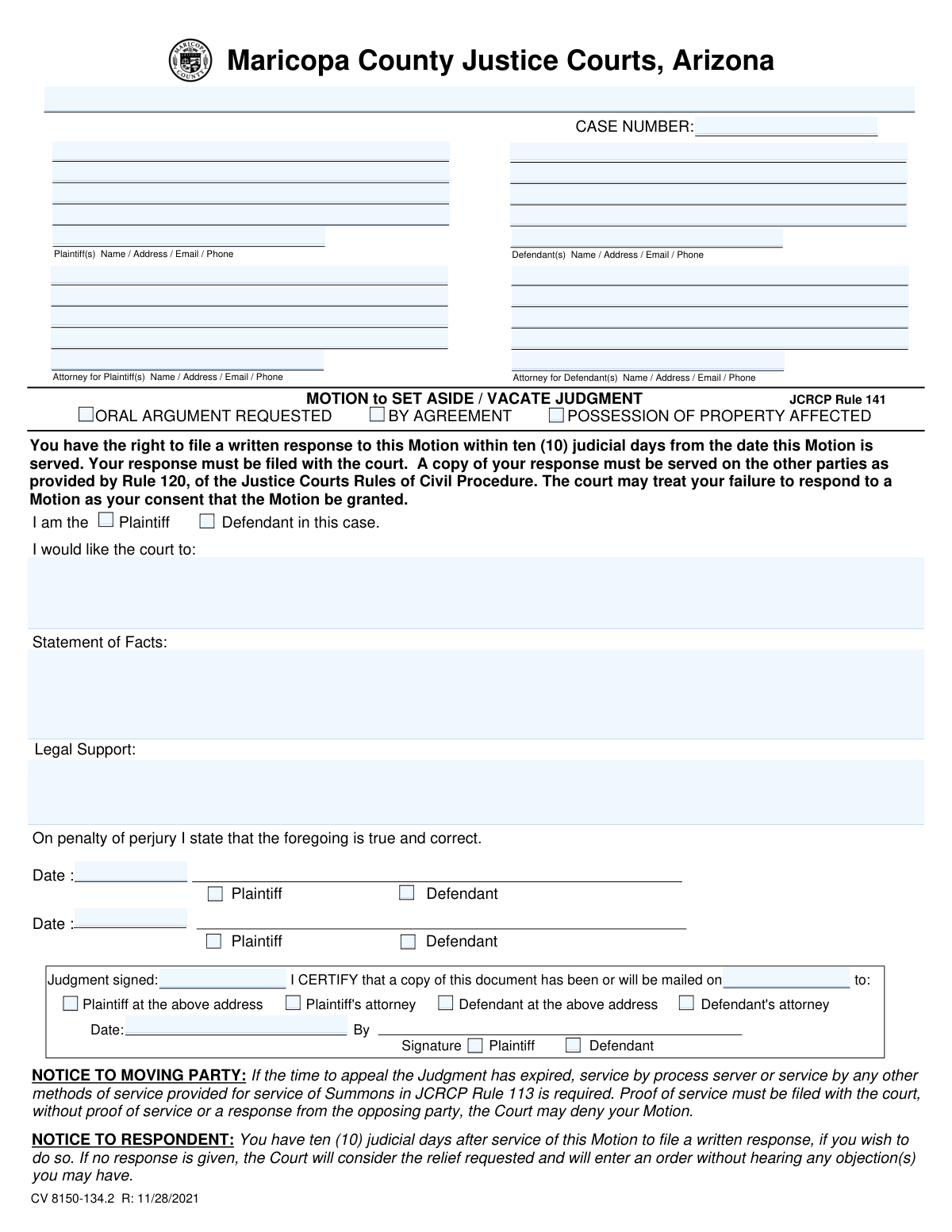
This form is a formal request submitted to the Maricopa County Justice Courts to ask a judge to nullify or cancel a prior court ruling. It is typically used when a party believes a judgment was made in error, for example, if they failed to appear in court, and requires a detailed explanation of the circumstances and a valid legal defense. Today, this form can be filled out quickly and accurately using AI-powered services like Instafill.ai, which can also convert non-fillable PDF versions into interactive fillable forms.
Our AI automatically handles information lookup, data retrieval, formatting, and form filling.
It takes less than a minute to fill out CV 8150-134 using our AI form filling.
Securely upload your data. Information is encrypted in transit and deleted immediately after the form is filled out.
Form specifications
| Form name: | Maricopa County Justice Courts, Motion to Set Aside / Vacate Judgment |
| Number of pages: | 2 |
| Filled form examples: | Form CV 8150-134 Examples |
| Language: | English |
| Categories: | court forms, UK court forms, County court forms |
Instafill Demo: How to fill out PDF forms in seconds with AI
How to Fill Out CV 8150-134 Online for Free in 2026
Are you looking to fill out a CV 8150-134 form online quickly and accurately? Instafill.ai offers the #1 AI-powered PDF filling software of 2026, allowing you to complete your CV 8150-134 form in just 37 seconds or less.
Follow these steps to fill out your CV 8150-134 form online using Instafill.ai:
- 1 Navigate to Instafill.ai and upload the Motion to Set Aside / Vacate Judgment form or select it from their template library.
- 2 Provide the AI assistant with your case information, including the court name, case number, and the full names and contact details for the plaintiff, defendant, and any attorneys.
- 3 Specify your role in the case (Plaintiff or Defendant) and indicate the specific action you want the court to take in the 'I would like the court to' section.
- 4 Clearly articulate your 'Statement of Facts,' explaining the reasons for your request (e.g., why you missed a court date), and provide the 'Legal Support' for your motion.
- 5 Complete the Certificate of Service section by indicating who will be served with the motion and the date of service.
- 6 Review all the information automatically populated by the AI for accuracy, then digitally sign and date the form in the designated areas.
- 7 Download the completed document, ready for filing with the court clerk and serving to the opposing party according to the court's rules.
Our AI-powered system ensures each field is filled out correctly, reducing errors and saving you time.
Why Choose Instafill.ai for Your Fillable CV 8150-134 Form?
Speed
Complete your CV 8150-134 in as little as 37 seconds.
Up-to-Date
Always use the latest 2026 CV 8150-134 form version.
Cost-effective
No need to hire expensive lawyers.
Accuracy
Our AI performs 10 compliance checks to ensure your form is error-free.
Security
Your personal information is protected with bank-level encryption.
Frequently Asked Questions About Form CV 8150-134
This form is used to ask the court to cancel (set aside or vacate) a judgment that was previously made in your case. It is often filed if you believe the judgment was made in error or if a default judgment was entered because you missed your court date.
Either the plaintiff (the person who started the case) or the defendant (the person being sued) can file this motion to request that a judgment be set aside by the court.
If a judgment was entered because you failed to appear, you must explain in detail both why you missed your court date and what your legal defense would have been had you appeared.
You must complete the form, sign it, and return the original to the court clerk along with any supporting documents and the applicable filing fee. Do not write on the back of the form; use a separate page for additional space.
Yes, you are required to serve the other party with a copy of your completed motion and any documents you submitted to the court. You must also file proof of this service with the court.
If the time to appeal has passed (more than 14 days for a Civil Case or 5 days for an Eviction), you must have the documents served by a licensed process server. The process server will then file proof of service with the court.
The other party has ten judicial days to file a response. The court will then either rule on the motion based on the submitted documents or schedule a hearing for oral arguments before making a decision.
If the opposing party does not file a written response, the court may consider this as their consent to your request. The judge may then grant your motion without holding a hearing.
Not necessarily. The court will review all the documents and may rule on the motion without a hearing, or it may set a hearing date if oral arguments are needed. If a hearing is set, you will be notified and must appear.
In this section, provide a clear and chronological summary of the facts that support your request to set aside the judgment. Be specific and stick to the relevant events of the case.
Yes, services like Instafill.ai use AI to help you accurately auto-fill form fields, which can save you time and reduce errors. This is especially helpful for entering case details and personal information.
Simply upload the form's PDF to the Instafill.ai platform, and its AI will identify the fields and help you fill them out interactively. Once completed, you can download the filled form to print and file with the court.
If you have a non-fillable or 'flat' PDF, you can use a service like Instafill.ai. It can convert the static PDF into an interactive, fillable form that you can easily complete on your computer.
Compliance CV 8150-134
Validation Checks by Instafill.ai
1
Ensures Exclusive Filer Identity Selection
This validation confirms that the filing party has selected exactly one of the 'I am the Plaintiff' or 'I am the Defendant' checkboxes. This identification is fundamental for the court to understand who is making the motion and to correctly interpret the signature blocks. Failure to select one, or selecting both, creates ambiguity and will likely lead to the form's rejection for clarification.
2
Validates Case Number Presence and Format
Checks that the 'Case Number' field is not empty and, if possible, conforms to the expected format for Maricopa County Justice Courts. The case number is the primary identifier used to link the motion to the correct court file. A missing or malformed case number will cause the filing to be rejected or misfiled, delaying the legal process.
3
Verifies Presence of Statement of Facts and Legal Support
This check ensures that both the 'Statement of Facts' and 'Legal Support' text areas contain information, as they form the core of the motion. The instructions explicitly state that a detailed explanation is required, especially for failure to appear. Submitting a motion without this justification makes it impossible for the judge to rule in the filer's favor, and the form will be considered incomplete and denied.
4
Ensures Consistency Between Filer Identity and Signature
This validation cross-references the 'I am the...' checkbox with the signature block (e.g., 'First - Plaintiff' or 'First - Defendant'). If 'I am the Plaintiff' is selected, the signature block must also indicate the plaintiff is signing. This confirms the person making the motion is the one signing it under penalty of perjury, a fundamental requirement for a valid legal filing.
5
Validates Signature Block Integrity
This check verifies that if a date is entered in the 'First Date' field, a corresponding 'First - Plaintiff' or 'First - Defendant' checkbox is also marked. This action links the signature date to the signing party, which is essential for the 'on penalty of perjury' declaration. An undated or unattributed signature invalidates the declaration and will cause the court to reject the motion.
6
Validates Logical Sequence of Judgment and Service Dates
This check confirms that the 'Certificate of Service Date' (or 'Mailed Date') is on or after the 'Judgment Signed Date'. It is logically impossible to serve a copy of a document before it has been created and signed by the court. An illogical date sequence indicates a data entry error and could invalidate the proof of service, potentially causing the motion to be denied.
7
Ensures at Least One Recipient is Selected for Service
This validation verifies that at least one recipient checkbox ('Plaintiff at the above address', 'Plaintiff's attorney', etc.) is marked in the Certificate of Service section. The certificate is a sworn statement that the other party has been notified; without a specified recipient, the certificate is meaningless. The court will deny the motion if there is no proof that the opposing party was properly served.
8
Validates Identification of Certificate of Service Signatory
This check ensures that either the 'Plaintiff' or 'Defendant' checkbox is selected next to the signature line in the Certificate of Service section. This identifies who is certifying that service was completed and should align with the party filing the motion. An unidentified certification is invalid, and without valid proof of service, the court cannot proceed with the motion.
9
Validates All Date Fields for Correct Format and Plausibility
This check ensures that 'First Date', 'Judgment Signed Date', and 'Certificate of Service Date' are all entered in a valid date format (e.g., MM/DD/YYYY) and are not future dates (unless the field explicitly allows it, like a future mailing date). Incorrectly formatted or impossible dates are ambiguous and can cause critical errors in calculating deadlines. The system should reject submissions with invalid dates to prevent processing errors.
10
Validates Completeness of Filer's Contact Information
If 'I am the Plaintiff' is checked, this validation ensures the Plaintiff's Name, Address, and Phone/Email fields are filled. If 'I am the Defendant' is checked, it verifies the same for the Defendant. Complete contact information is legally required for the court and the opposing party to send notices and responses, and missing information can result in the motion being denied or delayed.
11
Validates Phone Number Format
This check ensures that all phone number fields for parties and attorneys follow a standard format (e.g., 10 digits, possibly with parentheses and hyphens). This is important for ensuring the court and other parties can successfully make contact if needed for hearings or clarifications. An invalid or incomplete phone number can hinder communication and delay proceedings.
12
Validates Email Address Format
This validation confirms that any email address entered for parties or attorneys conforms to the standard '[email protected]' format. As courts increasingly rely on email for official notices, a valid email address is crucial for timely communication. An incorrectly formatted email will result in failed delivery of important documents, potentially jeopardizing a party's case.
13
Validates that Requested Relief is Specified
This check ensures the text field 'I would like the court to:' is not left blank. This statement explicitly tells the judge what action the filer is requesting (e.g., 'vacate the judgment'). Without a clear request for relief, the motion has no purpose, and the court will be unable to grant any order, resulting in an automatic denial for being vague.
14
Ensures Completeness of Attorney Contact Information
This check triggers if an attorney's name is entered for either the plaintiff or defendant. It then verifies that the attorney's address, phone number, and email address are also provided. When a party is represented by counsel, all communications must go through the attorney, making their complete and accurate contact information a legal necessity.
Common Mistakes in Completing CV 8150-134
The instructions require explaining both *why* you failed to appear and what your *legal defense* would have been. People often only provide an excuse for their absence, neglecting to outline their defense. An incomplete statement gives the judge grounds to deny the motion, as it fails to demonstrate a potentially meritorious defense. To avoid this, structure your 'Statement of Facts' into two clear parts addressing both required points.
The form has complex, time-sensitive service rules (first-class mail vs. process server) based on when the judgment was signed. Filers often misunderstand these rules and use the wrong method, which invalidates the service. This forces you to re-serve the documents correctly, causing significant delays and potentially risking the denial of your motion if deadlines are missed. Always calculate the days since the judgment to determine if a process server is mandatory.
After a process server serves the motion, they must file an affidavit of service with the court, or you must ensure it is filed. Many filers assume the act of service is the final step and forget to confirm this critical filing. The form explicitly warns that without proof of service on file, the court may deny the motion, as there is no official record that the opposing party was notified.
The 'I CERTIFY' section is a legal declaration that is often filled out incorrectly or left blank. Common errors include forgetting to enter the mailing date, failing to check which party was served, or neglecting to sign. An incomplete certificate can cause the court clerk to reject the filing or lead a judge to deny the motion for procedural defects. AI-powered form filling tools like Instafill.ai can help prevent this by flagging required fields and ensuring dates are entered correctly.
A motion is a formal request that is invalid without a signature and date beneath the 'On penalty of perjury' statement. Filers frequently overlook this crucial step, resulting in the motion being rejected by the clerk or denied by the judge. This halts all progress and requires refiling. Always perform a final review of the form, specifically looking for the signature and date fields before submitting.
The form requires separating the chronological story of what happened ('Statement of Facts') from the legal reasons why the judgment should be vacated ('Legal Support'). People often blend these, making the motion confusing and less persuasive. To avoid this, use the 'Statement of Facts' to tell your story with dates and events, and use the 'Legal Support' section to cite rules (like JCRCP Rule 141) or legal principles that justify your request.
The case number is the primary identifier for your file, and a simple typo is a common data entry error. An incorrect case number can lead to your motion being filed in the wrong case or rejected by the clerk's office, causing significant delays. To prevent this, carefully copy the case number exactly as it appears on previous court documents. Using a tool like Instafill.ai can help by saving and auto-populating correct case information to ensure consistency.
The instructions state to include 'any supporting documentation,' but filers often submit the motion by itself without evidence. If your reason for absence was a medical emergency, you should attach a doctor's note; if your defense involves a contract, you should attach it. Submitting the motion without evidence to back up your claims severely weakens your argument and makes it less likely a judge will grant your request.
The court and opposing party use the address on the form to mail crucial notices, including hearing dates and the court's final ruling. If you provide an old address, you will not receive these documents, likely causing you to miss a hearing and have your motion denied. Always verify that the name, address, email, and phone number for all parties are current and complete before filing.
The instructions explicitly state, 'do not write on the back of the Motion form' and to use a second page for additional space. Court documents are often scanned for electronic dockets, and information on the back is typically missed. This means a judge may never see your full argument or facts, leading them to rule on incomplete information. Always attach a separate, clearly labeled page if you need more space.
The form has two signature lines and requires the signer to check a box identifying as 'Plaintiff' or 'Defendant'. Filers sometimes sign on the wrong line or forget to check the box, creating ambiguity about who is attesting to the motion's contents. This can cause processing delays or require the court to seek clarification. If the form is a non-fillable PDF, a tool like Instafill.ai can convert it into an interactive version, making it easier to see and complete all necessary checkboxes.
Saved over 80 hours a year
“I was never sure if my IRS forms like W-9 were filled correctly. Now, I can complete the forms accurately without any external help.”
Kevin Martin Green
Your data stays secure with advanced protection from Instafill and our subprocessors

Robust compliance program
Transparent business model
You’re not the product. You always know where your data is and what it is processed for.
ISO 27001, HIPAA, and GDPR
Our subprocesses adhere to multiple compliance standards, including but not limited to ISO 27001, HIPAA, and GDPR.
Security & privacy by design
We consider security and privacy from the initial design phase of any new service or functionality. It’s not an afterthought, it’s built-in, including support for two-factor authentication (2FA) to further protect your account.
Fill out CV 8150-134 with Instafill.ai
Worried about filling PDFs wrong? Instafill securely fills maricopa-county-justice-courts-motion-to-set-aside-vacate-judgment forms, ensuring each field is accurate.



