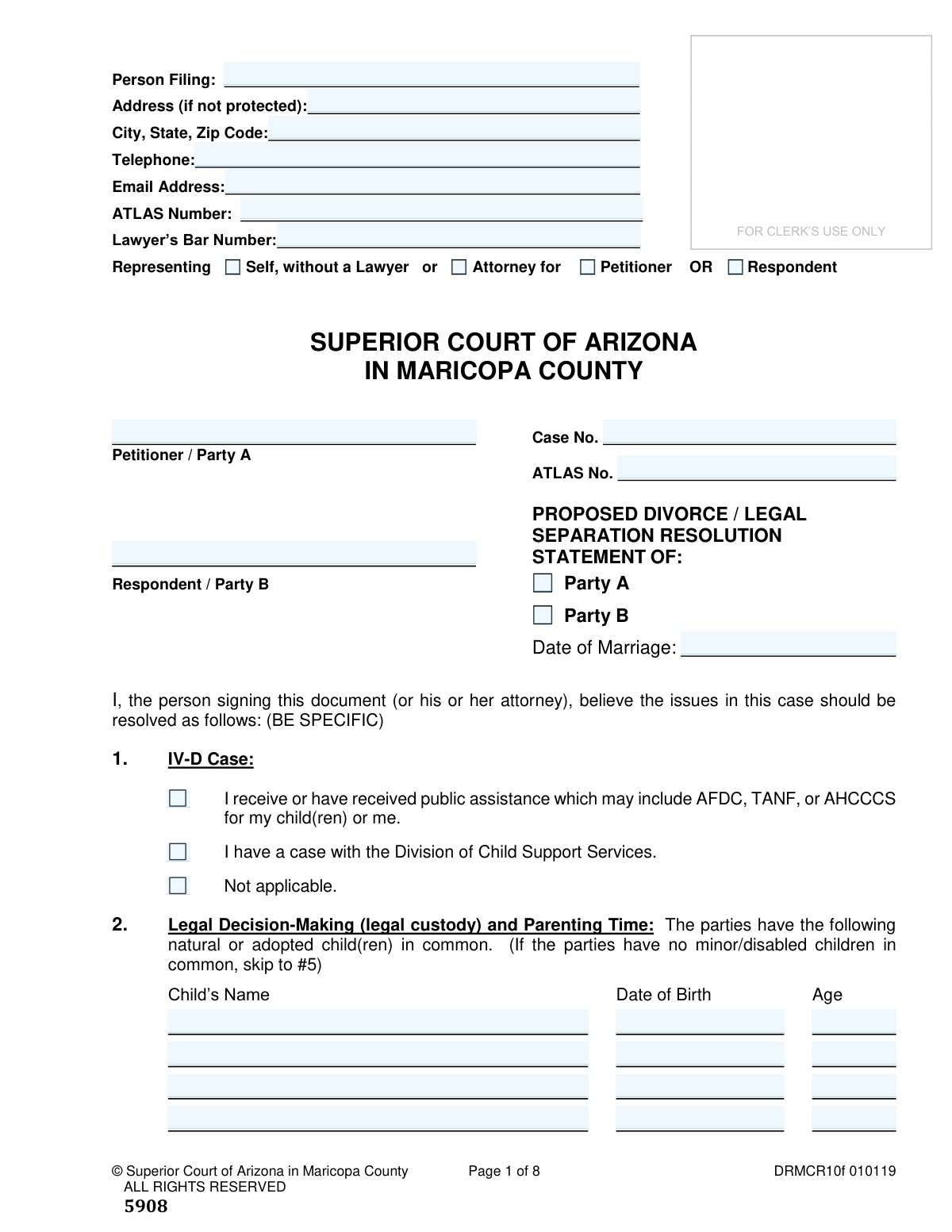
Yes! You can use AI to fill out Proposed Divorce / Legal Separation Resolution Statement
The Resolution Statement for Divorce / Legal Separation is a legal document required by the Superior Court of Arizona in Maricopa County. Under Arizona Rule of Family Law Procedure 49, each party must file this statement to detail their specific proposed resolutions for all issues, including child custody, support, property division, and debt. This process encourages transparency and settlement before trial. Today, this form can be filled out quickly and accurately using AI-powered services like Instafill.ai, which can also convert non-fillable PDF versions into interactive fillable forms.
DRMCR10f is part of the
County court forms, legal separation forms and superior court forms categories on Instafill.
Our AI automatically handles information lookup, data retrieval, formatting, and form filling.
It takes less than a minute to fill out DRMCR10f using our AI form filling.
Securely upload your data. Information is encrypted in transit and deleted immediately after the form is filled out.
Form specifications
| Form name: | Proposed Divorce / Legal Separation Resolution Statement |
| Number of fields: | 285 |
| Number of pages: | 1 |
| Language: | English |
Instafill Demo: How to fill out PDF forms in seconds with AI
How to Fill Out DRMCR10f Online for Free in 2026
Are you looking to fill out a DRMCR10F form online quickly and accurately? Instafill.ai offers the #1 AI-powered PDF filling software of 2026, allowing you to complete your DRMCR10F form in just 37 seconds or less.
Follow these steps to fill out your DRMCR10F form online using Instafill.ai:
- 1 Navigate to Instafill.ai and upload or select the Resolution Statement for Divorce / Legal Separation (DRMCR10f).
- 2 Provide your personal details, case information, and specify whether you are Party A or Party B.
- 3 Detail your proposals for child-related matters, including legal decision-making, parenting time, child support calculations, and past support.
- 4 State your position on financial issues, including spousal maintenance, the division of separate and community property, and the allocation of community debts.
- 5 Address any requests for attorney's fees, name changes, or other outstanding issues that need to be resolved.
- 6 Carefully review all the information populated by the AI for accuracy and completeness, then electronically sign and date the statement.
- 7 Download the completed form and follow the procedural instructions to file the original with the Clerk of Superior Court and serve copies on the judge and the opposing party.
Our AI-powered system ensures each field is filled out correctly, reducing errors and saving you time.
Why Choose Instafill.ai for Your Fillable DRMCR10f Form?
Speed
Complete your DRMCR10f in as little as 37 seconds.
Up-to-Date
Always use the latest 2026 DRMCR10f form version.
Cost-effective
No need to hire expensive lawyers.
Accuracy
Our AI performs 10 compliance checks to ensure your form is error-free.
Security
Your personal information is protected with bank-level encryption.
Frequently Asked Questions About Form DRMCR10f
The Resolution Statement is a required court document where you detail your specific proposals to resolve all issues in your divorce or legal separation, including property, debt, and child-related matters.
Every party involved in a divorce, legal separation, or any case involving paternity, legal decision-making, parenting time, or child support must file a Resolution Statement unless the court says otherwise.
You must file the Resolution Statement with the court 30 days after you and the other party have exchanged your initial disclosure information, or by a different date if ordered by the court.
The Resolution Statement details your proposed settlement terms and is filed with the court, whereas the Disclosure Statement is an exchange of facts and documents that is not filed with the court.
File the signed original and three copies with the Clerk of Superior Court, provide one file-stamped copy to your assigned judge, and mail or hand-deliver another copy to the other party or their attorney.
If there are no minor or disabled children from the marriage, you can skip the sections related to Legal Decision-Making (Item 2), Child Support (Item 3), and Past Support (Item 4).
Use the tables in Items 8 and 10 to list each asset or debt, its value or amount owed, and then specify how you want the net value or responsibility for payment to be divided between you and your spouse.
Yes, Item 12 provides a space for you to state the full former name you wish to be restored to when the divorce or legal separation is finalized.
An ATLAS number is for cases involving the Arizona Department of Economic Security for public assistance or child support services. You should provide this number in the heading and check the appropriate box in Item 1 if it applies to you.
By signing, you verify your willingness to settle the case based on your proposals. You are also required to meet with the opposing party before your court date to try and resolve as many issues as possible.
Yes, services like Instafill.ai use AI to accurately auto-fill form fields with your information, which can save you significant time and help ensure accuracy.
You can use a service like Instafill.ai to upload the PDF document. The platform makes the form interactive, allowing you to type your answers, save your progress, and complete it from any device.
If you have a non-fillable PDF, you can upload it to a service like Instafill.ai. It will automatically convert the flat document into an interactive, fillable form that you can easily complete online.
Compliance DRMCR10f
Validation Checks by Instafill.ai
1
Case Number Presence and Format
Validates that the 'Case No.' field is not empty and ideally conforms to the Maricopa County format. This is critical for the Clerk of Court to correctly associate the document with the existing case file. Failure to provide a valid case number will result in rejection of the filing or significant processing delays.
2
Filing Party Identification
Ensures that exactly one checkbox is selected to identify the filing party, either 'Party A' or 'Party B' in the header section. This is necessary to understand whose proposals are being presented in the document. If neither or both are checked, the document is ambiguous and cannot be processed correctly.
3
Date of Marriage Logical Validity
Verifies that the 'Date of Marriage' is a valid, complete date and occurs before the document's signature date. This check prevents illogical or erroneous data entry, such as a future date of marriage. An invalid date would call into question the fundamental facts of the case and could delay proceedings.
4
Conditional Skip for Child-Related Sections
Checks if Sections 2 (Legal Decision-Making), 3 (Child Support), and 4 (Past Support) are left blank when the filer indicates there are no minor children by skipping from the child list to section 5. Conversely, it ensures these sections are not skipped if children are listed. This enforces the form's structural logic, preventing irrelevant data from being submitted or required data from being omitted.
5
Child Age and Date of Birth Consistency
Cross-references the child's 'Date of Birth' with the entered 'Age' in Section 2. The system should calculate the age based on the DOB and flag any discrepancy with the manually entered age. This ensures data accuracy for child support and custody calculations, which are highly dependent on the children's correct ages.
6
Child Support Income Format
Ensures that the values entered for 'Party A’s Gross Monthly Income' and 'Party B’s Gross Monthly Income' in Section 3 are valid, non-negative numeric values. This data is a fundamental input for the child support calculation, and non-numeric or missing values would prevent the calculation from being performed. The check maintains the integrity of financial data used in legal formulas.
7
Uninsured Expense Percentage Allocation
In Section 3, if the 'Other' option for 'Uninsured Medical/Dental/Vision Expenses' is selected, this check verifies that the percentages for Party A and Party B are both filled and sum to 100%. This ensures a complete and clear proposal for dividing future uninsured costs. An incomplete or incorrect allocation would create ambiguity and potential for future conflict.
8
Spousal Maintenance Mutually Exclusive Selection
Validates that only one of the three primary options in Section 5 (Spousal Maintenance) is selected: 'No spousal maintenance', 'I should pay...', or 'I should receive...'. This prevents contradictory proposals within the same section. If a user selects an option to pay or receive, the validation also ensures the corresponding amount and duration fields are filled with positive numbers.
9
Community Property Value Equalization
For each item listed in the Community Property table (Section 8), this check verifies that the sum of the 'Proposed for Party A' and 'Proposed for Party B' columns equals the 'Fair Market Value' minus the 'Amount owed'. This mathematical validation ensures the proposed division of assets is balanced and fully accounts for the net value of each item. Discrepancies would make the proposed division mathematically unsound.
10
Debt Division Percentage Total
If the option 'All of the debt should be paid % by Party A and % by Party B' is selected in Section 10, this check ensures that the two percentage values are entered and their sum is exactly 100%. This prevents incomplete or illogical proposals for dividing the total community debt. A sum other than 100% would mean the proposal does not account for the entire debt obligation.
11
Community Debt Allocation Sum
For each creditor listed in the Debts table (Section 10), this validation confirms that the sum of 'Amount To Be Paid By Party A' and 'Amount To Be Paid By Party B' equals the 'Total Amount' of the debt. This is crucial for ensuring that the proposal accounts for the entire debt and there is no ambiguity in how it will be paid. An incorrect sum would lead to confusion and potential future disputes over the remaining balance.
12
Attorney's Fees Conditional Requirement
Verifies that if a party selects an option in Section 11 to pay or receive attorney's fees, the corresponding 'amount' and 'days' fields are filled with valid, positive numbers. This ensures that a proposal for fee payment is complete and actionable. A failure would mean the proposal is just a statement of intent without the specific terms needed for an order.
13
Signature and Date Presence
Confirms that the document has been signed and dated in Section 14. The signature attests to the truthfulness of the statements and the willingness to settle on these terms. An unsigned or undated document is not legally valid and would be rejected by the court.
14
Mailing and Filing Date Validity
Validates that all dates entered on the final page for filing with the Clerk, mailing to the Judge, and mailing to the opposing party are valid dates that are not in the future. This provides an accurate record of when procedural service and filing requirements were met. Future dates are impossible and indicate data entry errors.
Common Mistakes in Completing DRMCR10f
In the Child Support section, filers must state their 'Gross Monthly Income', which is income before any taxes or deductions. A frequent mistake is entering net (take-home) pay, which is lower and results in an inaccurate child support calculation. This can lead to disputes and incorrect court orders. To avoid this, refer to a recent pay stub and use the gross pay figure, not the final deposit amount.
The form requires the 'Fair Market Value' (FMV) for property, which is the current sale price, not the original purchase price or a sentimental value. People often guess, or intentionally inflate or deflate values depending on who they want to receive the asset. This leads to an inequitable division and can be challenged in court, causing delays. Researching comparable sales for vehicles and real estate and getting appraisals for valuable items is the best way to establish an accurate FMV.
It is very common for filers to forget to list all community assets and debts, particularly items like retirement accounts (401ks, IRAs), pensions, life insurance policies with cash value, or smaller credit card debts. Failure to disclose an asset can have severe legal consequences, including reopening the case after the divorce is final. A thorough review of all financial documents from during the marriage is essential to create a complete and accurate list.
The tables in Item 8 for dividing property are often filled out incorrectly. Common errors include forgetting to subtract the loan amount ('Encumbrance') from the Fair Market Value to determine the net equity, or making mathematical errors when proposing the split between Party A and Party B. These mistakes make the proposal confusing and unworkable for the court. Carefully calculating the net value for each item and ensuring the proposed division columns add up correctly is critical.
In the section for Legal Decision-Making and Parenting Time, filers sometimes use the 'Other' field to write vague statements like 'reasonable parenting time as agreed by the parties.' This is not a valid, enforceable schedule and creates opportunities for future conflict and litigation. A proper plan must be highly specific, detailing exact days, exchange times, and a clear schedule for holidays and vacations to be approved by the court.
Filers often misunderstand the legal distinction between separate property (owned before marriage, or a gift/inheritance to one spouse) and community property (acquired during the marriage). They may incorrectly list an asset in Item 6 ('Separate Property') when it legally belongs to the community, or fail to claim a community lien in Item 7. This can result in accidentally forfeiting rights to an asset and requires careful consideration of when and how each property was acquired.
The instructions clearly state that the filer must file the original with the court clerk, deliver a copy to the assigned judge, and serve a copy on the opposing party. A critical and frequent error is failing to provide a copy to the judge. This means the judge will not have the statement to review before a hearing, putting the filer at a major disadvantage. Following the procedural checklist and accurately completing the certificate of service on the final page is essential to ensure the document is properly considered.
When calculating child support, the form asks for the monthly insurance premium for the children only. Many people mistakenly enter the cost for their entire family plan, which is an inflated number. This error leads to an incorrect child support calculation. The filer must contact their HR department or insurance provider to determine the specific marginal cost of adding only the children to the plan.
The form uses 'Party A' and 'Party B' as shorthand for 'Petitioner' and 'Respondent'. Filers can easily get confused and inconsistently assign assets, debts, or parenting roles to the wrong party throughout the lengthy document. This creates significant confusion and requires correction. It is vital to identify who is the Petitioner (the person who initiated the case) and who is the Respondent and use those roles consistently on every item.
If a party wishes to have their former name restored, they must make a specific request in Item 12. Many people overlook this section in the stress of filling out the financial details. Forgetting to complete this item means their name will not be changed in the final divorce decree, forcing them to undertake a separate, more burdensome, and costly legal process for a name change later on.
Saved over 80 hours a year
“I was never sure if my IRS forms like W-9 were filled correctly. Now, I can complete the forms accurately without any external help.”
Kevin Martin Green
Your data stays secure with advanced protection from Instafill and our subprocessors

Robust compliance program
Transparent business model
You’re not the product. You always know where your data is and what it is processed for.
ISO 27001, HIPAA, and GDPR
Our subprocesses adhere to multiple compliance standards, including but not limited to ISO 27001, HIPAA, and GDPR.
Security & privacy by design
We consider security and privacy from the initial design phase of any new service or functionality. It’s not an afterthought, it’s built-in, including support for two-factor authentication (2FA) to further protect your account.
Fill out DRMCR10f with Instafill.ai
Worried about filling PDFs wrong? Instafill securely fills proposed-divorce-legal-separation-resolution-statement forms, ensuring each field is accurate.