
Yes! You can use AI to fill out Current Employer or Other Payor Information (DRS88f)
Don't type 13 fields by hand. Tell our AI about yourself, or upload a document you already have, and it fills every field in seconds. You check it, then download, print or sign.
The AI does the filling. You just check it.
No typing into boxes, nothing to install.
What this form asks for
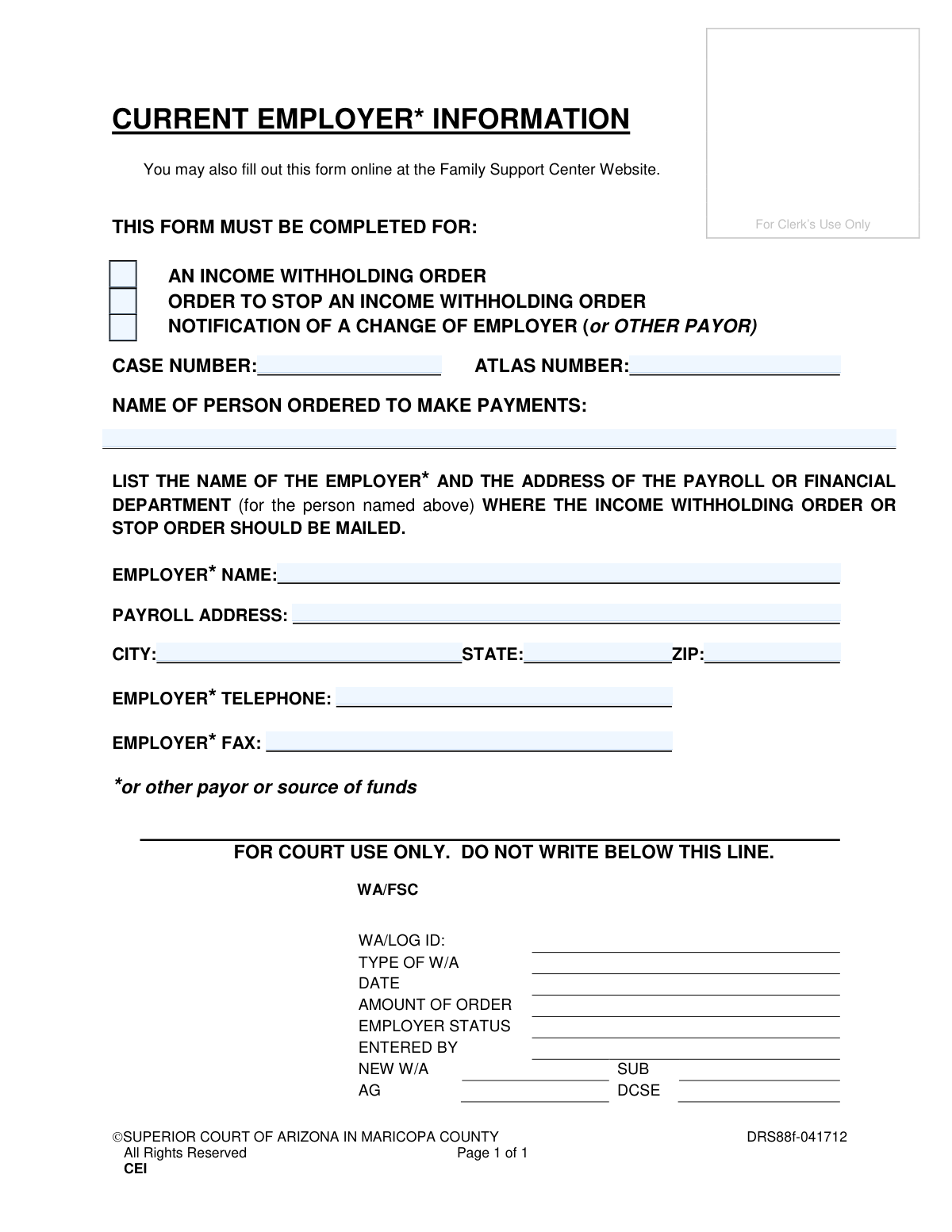
The AI fills all of it, from your answers or your documents.
The AI checks your answers before you download
12 checks built for this form, so a wrong date or a missing answer is caught before anyone else sees it.
Validates that at least one of the three checkboxes indicating the form's purpose (Income Withholding Order, Stop Order, or Change of Employer) has been selected. This is a critical check because the form cannot be processed without knowing the intended action. If no purpose is selected, the submission should be rejected with an error message prompting the user to choose an option.
Ensures the 'CASE NUMBER' field is not empty and conforms to the expected format (e.g., specific alphanumeric pattern). The Case Number is a primary identifier for legal proceedings, and its absence or incorrect format would prevent the system from associating the form with the correct file. A failed validation should halt submission and highlight the field.
Verifies that the 'ATLAS NUMBER' field is populated and matches the required system format. Similar to the Case Number, the ATLAS Number is a key identifier used by the support agency to track the case. An invalid or missing number would lead to processing delays or rejection of the submission.
Checks that the 'NAME OF PERSON ORDERED TO MAKE PAYMENTS' field is not blank. This field is essential for identifying the individual subject to the court order. Submitting the form without this name would make the entire document legally void and un-actionable.
Ensures the 'EMPLOYER NAME' field is filled out. The legal order must be sent to a specific employer or payor, making this information mandatory for processing an income withholding or stop order. Failure to provide the employer's name renders the form useless for its primary function.
Validates that the 'PAYROLL ADDRESS', 'CITY', 'STATE', and 'ZIP' fields are all completed. A complete and accurate mailing address is necessary to ensure legal documents are successfully delivered to the employer's payroll department. An incomplete address will result in returned mail and significant delays in enforcing the court order.
And 6 more checks
- State Abbreviation Validation
- ZIP Code Format Validation
- ZIP Code and City/State Consistency
- Employer Telephone Number Format
- Employer Fax Number Format
- Prohibition of 'For Court Use Only' Data Entry
Let AI fill out your DRS88f
No typing. Every field filled in seconds, checked, ready to sign.
How to Fill Out DRS88f Online for Free in 2026
What the AI walks you through.
- Navigate to Instafill.ai and upload or select the Current Employer or Other Payor Information form.
- Indicate the purpose of the form by checking the box for an income withholding order, a stop order, or a change of employer notification.
- Provide the required case information, including the Case Number and ATLAS Number.
- Enter the full name of the person who is ordered to make payments.
- Input the complete details of the employer or payor, including their name, payroll address, and contact information.
- Review all the information auto-filled by the AI to ensure accuracy and completeness.
- Download the finalized form, ready for submission to the court.
Common Mistakes in Completing DRS88f
The ones the AI is built to catch.
Transposing or Omitting Case/ATLAS Numbers
Providing an Incomplete or Informal Payer Name
Using a General Corporate Address Instead of the Payroll Department
Entering an Incorrect or Vague Employer Name
Overlooking Non-Employer Income Sources
Failing to Specify the Action Being Requested
Submitting a Form with Illegible Handwriting
Omitting Parts of the Payroll Address
Writing in Restricted 'For Court Use Only' Areas
Frequently Asked Questions About DRS88f
Is it really free for 7 days?
Can I fill other forms too?
How do I cancel?
How does the AI fill out DRS88f?
What happens to my information?
How complex is DRS88f to fill out?
Get your DRS88f filled out by AI
$0 today. Cancel before Nov 7 and you pay nothing.
Other forms like this one
superior court forms: FW-003, Order on Court Fee Waiver (Superior Court), FW-003, Order on Court Fee Waiver (Superior Court), Form FW-003, Order on Court Fee Waiver (Superior Court), Declaration of Facts of Death (California Superior Court), Form FW-003-GC, Order on Court Fee Waiver (Superior Court) (Ward or Conservatee), Superior Court of Chatham County, Georgia, Hearing Request Form, Form FW-006, Request for Hearing About Court Fee Waiver Order (Superior Court), Form FW-002, Request to Waive Additional Court Fees (Superior Court), Form FW-008, Order on Court Fee Waiver After Hearing (Superior Court), Form FW-002-GC, Request to Waive Additional Court Fees (Superior Court) (Ward or Conservatee), Form REC-001(N), Notice of Intent to Destroy Superior Court Records; Offer to Transfer Possession, Form REC-001(R), Request for Transfer or Extension of Time for Retention of Superior Court Records, Notice of Hearing on Request for Transfer or Extension of Time for Retention of Superior Court Records; Court Order; Release and Receipt of Superior Court Records, Form REC-002(R), Release and Receipt of Superior Court Records, Superior Court of New Jersey, Application for Appeal and Order, Superior Court of New Jersey Dissolution (FM) Case Management Order, New Jersey Judiciary – Superior Court, Appellate Division Application for Permission to File Emergent Motion, New Jersey Judiciary Superior Court - Appellate Division Civil Case Information Statement, New Jersey Judiciary Superior Court - Appellate Division Criminal Case Information Statement, New Jersey Judiciary Superior Court - Appellate Division Notice of Appeal (CN: 10502)
County court forms: Affidavit for Service by Publication/Posting (Circuit Court of Cook County, Illinois) (CCG 0013 A/B), Petition for Leave to Proceed In Forma Pauperis (Court of Common Pleas of Lehigh County, Pennsylvania, Civil Division), Designation of Record on Appeal (Civil) (Maricopa County Justice Courts, Arizona) (Form APP 8150-702), Maricopa County Justice Courts, Motion to Set Aside / Vacate Judgment, Circuit Court of Cook County, Illinois, Form CCM 0346, Order/Trial Call, Superior Court of Chatham County, Georgia, Hearing Request Form, Form CFS 601-2, County Treasurer's and Judge's Certification of Expenditures for Care and Support of Minors Other Than Wards of the Court, Tax Court of New Jersey, County Equalization Table Complaint (CN 10339), Application for Judgment to Apply Freeze Act using County Board of Taxation figures (N.J.S.A. 54:3-26), Family Department Pleading/Motion and Order, Disclosure Statement (Superior Court of Arizona in Maricopa County), Proposed Divorce / Legal Separation Resolution Statement, Notice of Default Hearing, Superior Court of Arizona in Maricopa County, Acceptance of Service for Family Court Cases, A.R.F.L.P. Rule 40(F), Affidavit of Direct Payments (Superior Court of Arizona in Maricopa County), Affidavit of Financial Information, Superior Court of Arizona in Maricopa County, Affidavit of Non-Compliance (Form DR41f), Affidavit Regarding Minor Children (Superior Court of Arizona in Maricopa County), Affidavit of Service with Signature Confirmation for Family Cases, Alternative Dispute Resolution Statement to the Court (A.R.F.L.P. 66(E))
Let AI fill out your DRS88f
Your trial starts once a card is added. You pay nothing before Nov 7.
Our AI already knows this form, all 13 fields of it. Skip the typing: tell it about yourself, or upload what you have, and it fills the whole form in seconds.
- AI fills every field on the form, checkboxes included
- No typing into boxes: answer a few questions, or upload a document you already have, an old copy of this form, a photo of a document
- The AI checks the answers; you review and change anything before you download
- Download the finished PDF, print it, or sign it online
- Encrypted, and never used to train AI
Cancel before Nov 7 and you pay nothing.
A card is needed to start the trial. Cancel in two clicks from your account.
Terms · Privacy