
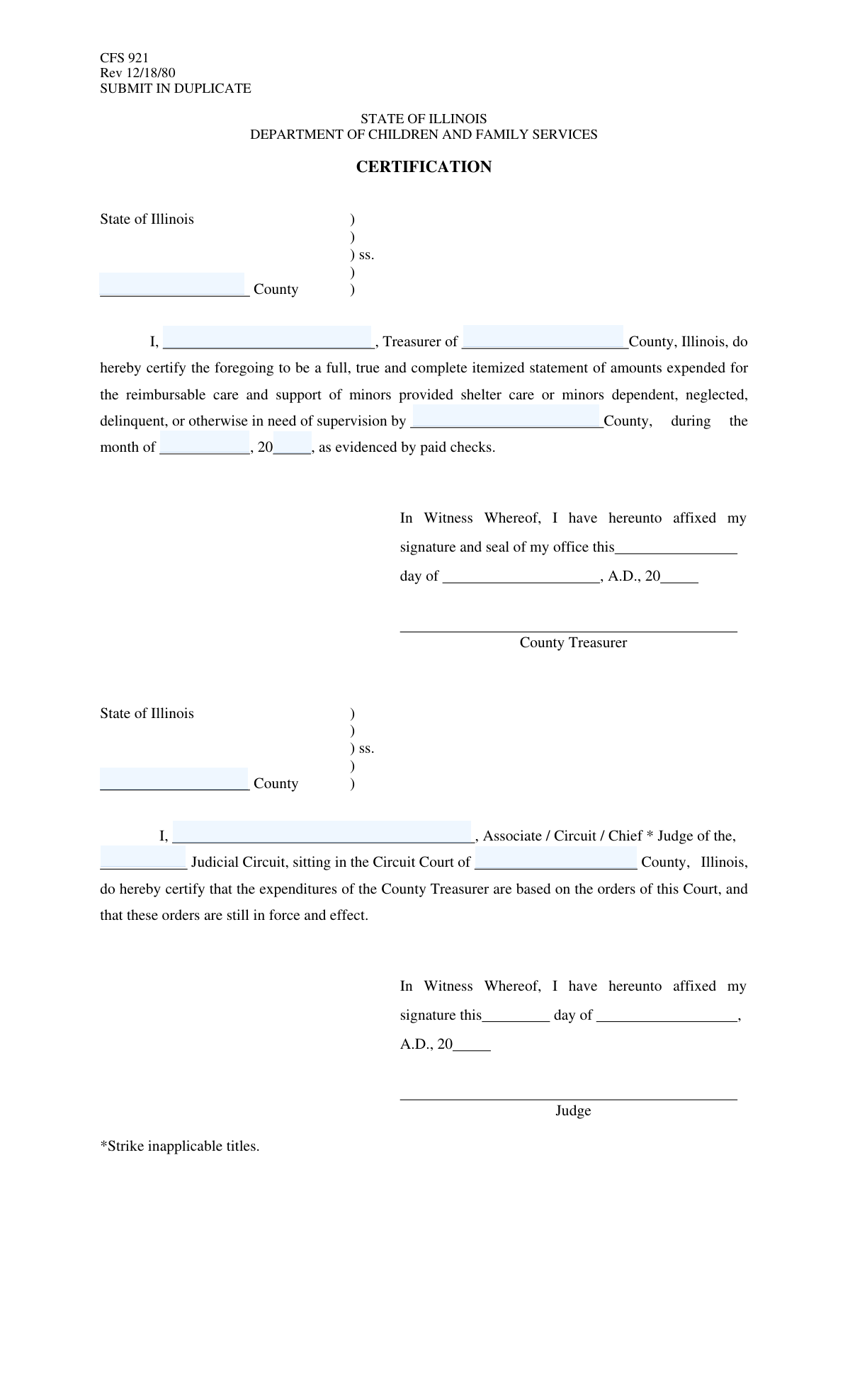
Yes! You can use AI to fill out Form CFS 601-2, County Treasurer's and Judge's Certification of Expenditures for Care and Support of Minors Other Than Wards of the Court
Don't type 10 fields by hand. Tell our AI about yourself, or upload a document you already have, and it fills every field in seconds. You check it, then download, print or sign.
The AI does the filling. You just check it.
No typing into boxes, nothing to install.
What this form asks for
The AI fills all of it, from your answers or your documents.
The AI checks your answers before you download
12 checks built for this form, so a wrong date or a missing answer is caught before anyone else sees it.
This check ensures the 'Treasurer's Name' field is not empty. The name of the certifying treasurer is a mandatory piece of information required to identify the official making the certification. A submission without this name is incomplete and cannot be legally processed or accepted.
This validation confirms that the value entered in the 'Illinois County' field is one of the 102 official counties in the State of Illinois. This is critical for ensuring the certification is filed with and routed to the correct jurisdiction. An invalid county name will cause the submission to be rejected until a valid county is provided.
This check compares the 'Illinois County' field with the 'Certifying County' field to ensure they contain the exact same value. Since both fields refer to the same geographical entity, any mismatch indicates a data entry error. The form must be flagged for review to resolve the inconsistency before it can be processed.
This validation ensures the 'Certification Month' field contains a valid month, either as a number (1-12) or a full month name (e.g., 'January'). This is crucial for accurately reporting the time period of the expenditures. An invalid month would make the financial reporting ambiguous and requires user correction.
This check verifies that the 'Certification Year' field contains exactly two numeric digits, as specified by the field instructions. This enforces the form's specific formatting requirement and prevents ambiguity that could arise from entering a four-digit year. Any entry that is not a two-digit number will be flagged for correction.
This logical check ensures the combination of 'Certification Month' and 'Certification Year' does not represent a future date. Expenditures can only be certified after they have occurred. A future date is a logical error that indicates a mistake, and the form will be rejected until a valid, past or current date is provided.
And 6 more checks
- Certifying Judge's Name Presence
- Valid Judicial Circuit
- Treasurer's Full Name Format
- Judge's Full Name Format
- Name Fields Character Validation
- Certification Date Follows Expenditure Period
Let AI fill out your CFS 601-2
No typing. Every field filled in seconds, checked, ready to sign.
How to Fill Out CFS 601-2 Online for Free in 2026
What the AI walks you through.
- Navigate to Instafill.ai and upload your CFS 601-2 form or select it from the form library.
- Use the AI assistant to automatically identify and label all fields, including County Treasurer and Judicial Certification sections.
- Enter the Illinois County, the certification month, and the year for the expenditures being reported.
- Provide the full name of the County Treasurer and the total amount of expenditures in the designated fields.
- In the Judicial Certification section, input the name of the certifying Judge and the corresponding Judicial Circuit.
- Review all entered information for accuracy before generating the completed form.
- Securely download, print, or share the finalized CFS 601-2 for the required signatures and submission.
Common Mistakes in Completing CFS 601-2
The ones the AI is built to catch.
Confusing Certification Date with Reporting Period
Using an Incorrect Year Format
Entering an Incomplete or Abbreviated Name
Overlooking Unlabeled Signature or Date Fields
Inconsistent County Name Entries
Submitting a Form with Illegible Handwriting
Using an Ambiguous Judicial Circuit Identifier
Omitting or Using an Incorrect Official Title
Misspelling Proper Nouns like Names and Counties
Frequently Asked Questions About CFS 601-2
Is it really free for 7 days?
Can I fill other forms too?
How do I cancel?
How does the AI fill out CFS 601-2?
What happens to my information?
How complex is CFS 601-2 to fill out?
What is the purpose of this form?
Who is required to fill out this form?
What information does the County Treasurer need to provide?
How should I enter the year in the 'Certification Year' field?
What details are needed for the Judicial Certification section?
What is a 'Judicial Circuit'?
Do I need to attach any other documents to this form?
Where do I submit this form once it's completed and signed?
Can I use an AI tool to help fill out this form?
How can I use Instafill.ai to complete this form online?
The PDF I have isn't fillable. What should I do?
What happens if I make a mistake on the form?
Get your CFS 601-2 filled out by AI
$0 today. Cancel before Nov 10 and you pay nothing.
Other forms like this one
court forms: Form Summons, Supreme Court of New York, Form SC-100, Plaintiff's Claim and ORDER to Go to Small Claims Court, Form AO 240, Application to Proceed in District Court Without Prepaying Fees or Costs, Form AO 239, Application to Proceed in District Court Without Prepaying Fees or Costs, Affidavit for Service by Publication/Posting (Circuit Court of Cook County, Illinois) (CCG 0013 A/B), Petition for Leave to Proceed In Forma Pauperis (Court of Common Pleas of Lehigh County, Pennsylvania, Civil Division), In Forma Pauperis Affidavit/Petition (AOPC 622A) – Pennsylvania Magisterial District Court, Judicial Council of California Form SC-105, Request for Court Order and Answer (Small Claims), SC-120, Defendant’s Claim and ORDER to Go to Small Claims Court (Small Claims), SC-105, Request for Court Order and Answer (Small Claims), Judicial Council of California Form SC-120, Defendant’s Claim and ORDER to Go to Small Claims Court (Small Claims), In Forma Pauperis Affidavit Petition (AOPC 622A) — Pennsylvania Magisterial District Court, Florida Supreme Court Approved Family Law Form 12.901(b)(3), Petition for Dissolution of Marriage with No Dependent or Minor Child(ren) or Property (02/18), Illinois Supreme Court Approved Form E-O 3500.3, Eviction Order, Form P3 (Rule 25-3(2)) — Affidavit of Applicant for Grant of Probate or Grant of Administration with Will Annexed (Short Form) (Supreme Court of British Columbia), Form SC-100, Plaintiff’s Claim and ORDER to Go to Small Claims Court, Designation of Record on Appeal (Civil) (Maricopa County Justice Courts, Arizona) (Form APP 8150-702), FW-003, Order on Court Fee Waiver (Superior Court), Judicial Council of California Form SER-001, Request for Sheriff to Serve Court Papers, FW-003, Order on Court Fee Waiver (Superior Court)
CAR forms: Form SSA-44, Medicare Income-Related Monthly Adjustment Amount - Life-Changing Event, Form I-90, Application to Replace Permanent Resident Card, Form 2441, Child and Dependent Care Expenses, Form WH-380-E, Certification of Health Care Provider, Form 4137, Social Security and Medicare Tax on Unreported Tip Income, Form 8959, Additional Medicare Tax, Form 8919, Uncollected Social Security and Medicare Tax, Form CMS-1763, Request for Termination of Medicare Coverage, Form CMS-855O, Medicare Enrollment Application, Form CMS-460, Medicare Participation Agreement, Form CMS-4040, Request for Enrollment in Medicare Part B, Form WH-380-F, Certification of Health Care Provider, Form W-10, Dependent Care Provider’s Identification, Form 1099-K, Payment Card and Third Party Network Transactions, Form CMS-40B, Application for Enrollment in Medicare Part B, Form SS-5-FS, Application for a Social Security Card, Form REG 195, Disabled Person Placard, Form AR-11, Alien's Change of Address Card, Form I-905, Application for Authorization to Issue Certification for Health Care Workers, Form I-131A, Application for Carrier Documentation
UK court forms: Form Summons, Supreme Court of New York, Form SC-100, Plaintiff's Claim and ORDER to Go to Small Claims Court, Form AO 240, Application to Proceed in District Court Without Prepaying Fees or Costs, Form AO 239, Application to Proceed in District Court Without Prepaying Fees or Costs, Affidavit for Service by Publication/Posting (Circuit Court of Cook County, Illinois) (CCG 0013 A/B), Petition for Leave to Proceed In Forma Pauperis (Court of Common Pleas of Lehigh County, Pennsylvania, Civil Division), In Forma Pauperis Affidavit/Petition (AOPC 622A) – Pennsylvania Magisterial District Court, Judicial Council of California Form SC-105, Request for Court Order and Answer (Small Claims), SC-120, Defendant’s Claim and ORDER to Go to Small Claims Court (Small Claims), SC-105, Request for Court Order and Answer (Small Claims), Judicial Council of California Form SC-120, Defendant’s Claim and ORDER to Go to Small Claims Court (Small Claims), In Forma Pauperis Affidavit Petition (AOPC 622A) — Pennsylvania Magisterial District Court, Florida Supreme Court Approved Family Law Form 12.901(b)(3), Petition for Dissolution of Marriage with No Dependent or Minor Child(ren) or Property (02/18), Illinois Supreme Court Approved Form E-O 3500.3, Eviction Order, Form P3 (Rule 25-3(2)) — Affidavit of Applicant for Grant of Probate or Grant of Administration with Will Annexed (Short Form) (Supreme Court of British Columbia), Form SC-100, Plaintiff’s Claim and ORDER to Go to Small Claims Court, Designation of Record on Appeal (Civil) (Maricopa County Justice Courts, Arizona) (Form APP 8150-702), FW-003, Order on Court Fee Waiver (Superior Court), Judicial Council of California Form SER-001, Request for Sheriff to Serve Court Papers, FW-003, Order on Court Fee Waiver (Superior Court)
L.A. Care forms: Form SSA-44, Medicare Income-Related Monthly Adjustment Amount - Life-Changing Event, Form 2441, Child and Dependent Care Expenses, Form WH-380-E, Certification of Health Care Provider, Form 4137, Social Security and Medicare Tax on Unreported Tip Income, Form 8959, Additional Medicare Tax, Form 8919, Uncollected Social Security and Medicare Tax, Form CMS-1763, Request for Termination of Medicare Coverage, Form CMS-855O, Medicare Enrollment Application, Form CMS-460, Medicare Participation Agreement, Form CMS-4040, Request for Enrollment in Medicare Part B, Form WH-380-F, Certification of Health Care Provider, Form W-10, Dependent Care Provider’s Identification, Form CMS-40B, Application for Enrollment in Medicare Part B, Form I-905, Application for Authorization to Issue Certification for Health Care Workers, DHS-6696-ENG, Minnesota Health Care Programs Application (MNsure/DHS), California Department of Social Services (CDSS) Community Care Licensing Child Care Forms Packet (LIC 9150, LIC 282, LIC 627, LIC 700, LIC 995A, CDPH 286, LIC 9227), State of Illinois Department of Human Services (IDHS) – Bureau of Child Care and Development Child Care Application (Form IL444-3455), Form CH-006: PA-BH-Res-PCS, Oregon Behavioral Health Support Program Plan of Care Authorization (Plan of Care Request for Behavioral Health Residential or Personal Care Services), State of Illinois Department of Children and Family Services Medical Report on an Adult in a Child Care Facility (CFS 602), Carer Payment and Carer Allowance – Medical Report (SA431) for a child under 16 years
certification forms: Form HS 200, Licensure & Certification Application, W-9, Request for Taxpayer Identification Number and Certification, Form WH-380-E, Certification of Health Care Provider, Form WH-385, Certification for Serious Injury or Illness, Form WH-380-F, Certification of Health Care Provider, Form WH-385-V, Certification for Serious Injury or Illness, Form 8802, Application for U.S. Residency Certification, Form I-905, Application for Authorization to Issue Certification for Health Care Workers, Form N-648, Medical Certification for Disability Exceptions, Form 01-339, Texas Sales and Use Tax Resale Certificate / Texas Sales and Use Tax Exemption Certification, Dakota County CDA New Admissions Informal Review Request Form (Housing Choice Voucher Program) and HUD Form 5382, Certification of Domestic Violence, Dating Violence, Sexual Assault, or Stalking, and Alternate Documentation, NJ Department of Labor & Workforce Development Form MW-562, Payroll Certification for Public Works Projects (Contractor and Subcontractor’s Weekly and Final Certification), ROTC Cadet Academic Plan / Degree and Credit Hour Worksheet (Student Identification, Term-by-Term Courses, GPA Summary, and Completion Certification), Certification for Special Assessment (Office of Building, Planning, & Code Compliance, City of Knox, Indiana), Outpatient Behavioral Health (BH) – ABA Treatment Request: Required Information for Precertification (GR-69017-4), Form W-9, Request for Taxpayer Identification Number and Certification, 401(k) Program Rollover Certification, WTIA 401(k) Plan Rollover Contribution Employee Certification, Trust Certification and Trustee Powers, Form GR-68831, Precertification Information Request Form
County court forms: Affidavit for Service by Publication/Posting (Circuit Court of Cook County, Illinois) (CCG 0013 A/B), Petition for Leave to Proceed In Forma Pauperis (Court of Common Pleas of Lehigh County, Pennsylvania, Civil Division), Designation of Record on Appeal (Civil) (Maricopa County Justice Courts, Arizona) (Form APP 8150-702), Maricopa County Justice Courts, Motion to Set Aside / Vacate Judgment, Circuit Court of Cook County, Illinois, Form CCM 0346, Order/Trial Call, Superior Court of Chatham County, Georgia, Hearing Request Form, Tax Court of New Jersey, County Equalization Table Complaint (CN 10339), Application for Judgment to Apply Freeze Act using County Board of Taxation figures (N.J.S.A. 54:3-26), Family Department Pleading/Motion and Order, Disclosure Statement (Superior Court of Arizona in Maricopa County), Proposed Divorce / Legal Separation Resolution Statement, Notice of Default Hearing, Superior Court of Arizona in Maricopa County, Acceptance of Service for Family Court Cases, A.R.F.L.P. Rule 40(F), Affidavit of Direct Payments (Superior Court of Arizona in Maricopa County), Affidavit of Financial Information, Superior Court of Arizona in Maricopa County, Affidavit of Non-Compliance (Form DR41f), Affidavit Regarding Minor Children (Superior Court of Arizona in Maricopa County), Affidavit of Service with Signature Confirmation for Family Cases, Alternative Dispute Resolution Statement to the Court (A.R.F.L.P. 66(E)), Current Employer or Other Payor Information (DRS88f)
Let AI fill out your CFS 601-2
Your trial starts once a card is added. You pay nothing before Nov 10.
Our AI already knows this form, all 10 fields of it. Skip the typing: tell it about yourself, or upload what you have, and it fills the whole form in seconds.
- AI fills every field on the form, checkboxes included
- No typing into boxes: answer a few questions, or upload a document you already have, an old copy of this form, a photo of a document
- The AI checks the answers; you review and change anything before you download
- Download the finished PDF, print it, or sign it online
- Encrypted, and never used to train AI
Cancel before Nov 10 and you pay nothing.
A card is needed to start the trial. Cancel in two clicks from your account.
Terms · Privacy