Yes! You can use AI to fill out Acceptance of Service for Family Court Cases, A.R.F.L.P. Rule 40(F)
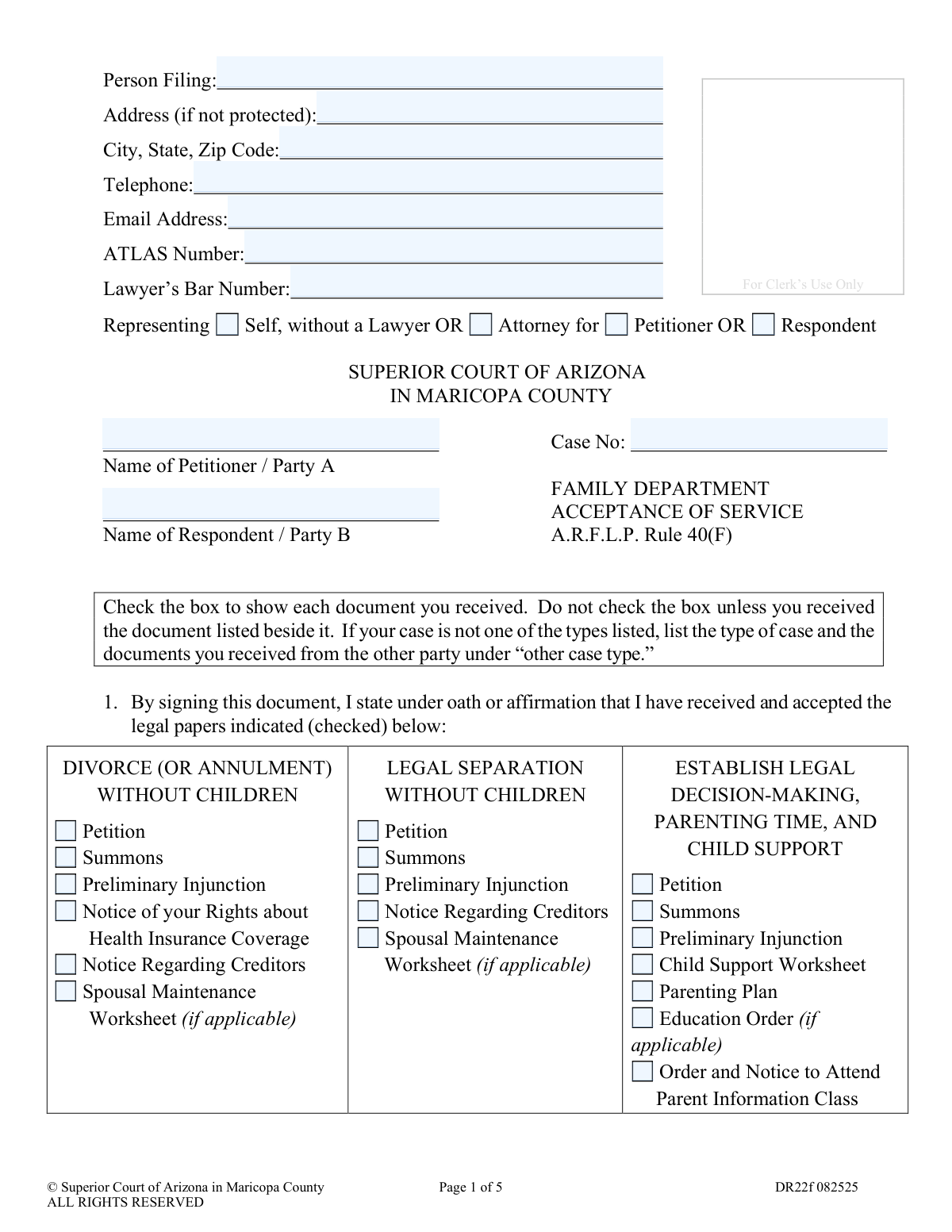
Form DR22f, Acceptance of Service, is a legal document for the Superior Court of Arizona in Maricopa County used in family law cases. By signing, an individual confirms they have received specific legal papers, such as a divorce petition, which starts the official timeline for their response and waives the need for formal personal service. This acknowledgment is crucial for the case to proceed and establishes deadlines for the receiving party. Today, this form can be filled out quickly and accurately using AI-powered services like Instafill.ai, which can also convert non-fillable PDF versions into interactive fillable forms.
DR22f is part of the
County court forms, family court forms, family law forms and superior court forms categories on Instafill.
Our AI automatically handles information lookup, data retrieval, formatting, and form filling.
It takes less than a minute to fill out DR22f using our AI form filling.
Securely upload your data. Information is encrypted in transit and deleted immediately after the form is filled out.
Form specifications
| Form name: | Acceptance of Service for Family Court Cases, A.R.F.L.P. Rule 40(F) |
| Number of fields: | 125 |
| Number of pages: | 1 |
| Language: | English |
Instafill Demo: How to fill out PDF forms in seconds with AI
How to Fill Out DR22f Online for Free in 2026
Are you looking to fill out a DR22F form online quickly and accurately? Instafill.ai offers the #1 AI-powered PDF filling software of 2026, allowing you to complete your DR22F form in just 37 seconds or less.
Follow these steps to fill out your DR22F form online using Instafill.ai:
- 1 Navigate to Instafill.ai and upload your DR22f form, or select it from their library of official Arizona court documents.
- 2 Use the AI assistant to accurately fill in your personal details, case number, and the names of the Petitioner and Respondent at the top of the form.
- 3 Carefully review the list of case types (e.g., Divorce, Legal Separation, Paternity) and check the box next to each specific document you have received from the other party.
- 4 Read the declarations to understand the response deadline (20 days if in Arizona, 30 if outside) and the consequences of not responding, which could result in a default judgment.
- 5 If applicable to your divorce case, complete the optional section to request that your legal name be restored to a former name.
- 6 Sign and date the form. This document must be notarized, so follow the prompts to connect with an online notary or print the form to have it notarized in person.
- 7 Download the completed and notarized document from Instafill.ai and file it with the Clerk of the Superior Court as required.
Our AI-powered system ensures each field is filled out correctly, reducing errors and saving you time.
Why Choose Instafill.ai for Your Fillable DR22f Form?
Speed
Complete your DR22f in as little as 37 seconds.
Up-to-Date
Always use the latest 2026 DR22f form version.
Cost-effective
No need to hire expensive lawyers.
Accuracy
Our AI performs 10 compliance checks to ensure your form is error-free.
Security
Your personal information is protected with bank-level encryption.
Frequently Asked Questions About Form DR22f
This form is used to formally acknowledge that you have received legal documents for a family court case. Signing it takes the place of being formally served by a process server or sheriff.
The person named as the Respondent or Party B in a family court case fills out this form after the Petitioner (Party A) gives them the initial court papers.
No, absolutely not. Signing this form only confirms that you have received the legal documents; it does not mean you agree with any of the requests made in the petition.
Signing is voluntary. If you choose not to sign, the other party will have to arrange for you to be formally served by a process server, which can be more intrusive and may involve additional costs.
Find the section that matches your case type, such as 'Divorce with Children,' and carefully check the box next to each individual document you actually received from the other party. Do not check a box for a document you did not receive.
You must file a written Response with the court within 20 days if you accepted service in Arizona, or 30 days if you accepted service outside of Arizona. The clock starts once this signed form is filed with the Clerk of Court.
If you fail to file a Response within the legal time limit, the court can issue a 'Default Judgment,' which means the other party may be granted everything they asked for in their petition without your input.
Yes, you must sign the form in the presence of a Notarial Officer (a notary public), who will then complete the bottom section and apply their stamp or seal.
In a divorce case, you can use section 4 to request your name be restored. Fill in your complete current married name and the full legal name you had before the marriage.
If your specific case type is not listed, you can use the 'other case type' section. Write in the type of case and then manually list each document you received in the space provided.
Yes, services like Instafill.ai use AI to accurately auto-fill form fields with your personal information and case details, which saves time and helps prevent errors.
You can use a service like Instafill.ai to fill out the form online. Simply upload the PDF, and you can type your information directly into the fields on your computer, then download or print the completed form.
If you have a non-fillable or 'flat' PDF, you can use a tool like Instafill.ai. It can convert the document into an interactive, fillable form that you can easily complete on your device.
Compliance DR22f
Validation Checks by Instafill.ai
1
Representation Status Selection
This check ensures that the person filing has selected one of the representation statuses: 'Self, without a Lawyer', 'Attorney for Petitioner', or 'Attorney for Respondent'. This information is mandatory for the court to understand who is filing the document and in what capacity. If no selection is made, the form submission will be rejected, and the user will be prompted to choose an option.
2
Conditional Attorney Bar Number
Validates that the 'Lawyer’s Bar Number' field is filled out if the filer has selected 'Attorney for Petitioner' or 'Attorney for Respondent'. This number is crucial for verifying the attorney's credentials with the State Bar. If the filer is an attorney and this field is left blank or contains an invalid format, the submission will fail until a valid bar number is provided.
3
Case Number Format and Presence
This check verifies that the 'Case No' field is not empty and conforms to the standard Maricopa County case number format (e.g., FC-prefixed followed by digits). The case number is the primary identifier for the legal action and is essential for correctly filing the document with the Clerk of the Court. An incorrect or missing case number will prevent the document from being associated with the correct case file.
4
Party Names Completeness
Ensures that both the 'Name of Petitioner / Party A' and 'Name of Respondent / Party B' fields are completed. These names are fundamental to identifying the parties involved in the family court case. Leaving either of these fields blank would make the document legally ambiguous and result in a validation error, requiring the user to enter both names.
5
Minimum Document Acceptance Check
This validation confirms that at least one checkbox is selected from the lists of legal documents. The entire purpose of an 'Acceptance of Service' form is to affirm receipt of specific documents. If no documents are checked, the form has no legal standing, so the submission will be blocked with a message instructing the user to select the documents they received.
6
Other Case Type and Document List Consistency
This check ensures that if a user enters text into the 'List other case type here' field, they must also list at least one document in the free-text fields below it. Conversely, if a document is listed, the case type must be specified. This prevents incomplete or ambiguous entries for non-standard case types, ensuring clarity for the court record. Failure to meet this condition will trigger an error.
7
Name Restoration Eligibility Check
Verifies that if the name restoration section (Section 4) is filled out, the user has also checked documents under a 'Divorce' case type. The form explicitly states this section is 'only in Divorce Cases'. This logical check prevents users in other case types (like Legal Separation or Paternity) from making an invalid request, which would be rejected by the court.
8
Name Restoration Field Exclusivity
This validation ensures that if the user fills in the 'My complete married name is' and 'I want my legal name restored to' fields, the 'Not applicable' checkbox is not selected. These options are mutually exclusive. An error will be shown if both the name fields and the 'Not applicable' checkbox are filled, forcing the user to make a clear choice.
9
Signature and Date Requirement
This check confirms that the signature field has been signed and the adjacent 'Date' field is filled with a valid, non-future date. The signature and date are what make the sworn statement legally binding. An unsigned or undated form is invalid, so the system will prevent submission until both fields are properly completed.
10
Printed Name Presence
Validates that the 'Printed Name of Person Who Signed' field is filled out. A signature can often be illegible, so the printed name is required for clear identification of the person who signed the document. If this field is empty, the form submission will be halted until the name is entered.
11
Notary Block Completeness
This check ensures all required fields in the notary section ('STATE OF', 'COUNTY OF', 'Date', and the name of the person) are completed. Notarization is a legal requirement for this sworn statement, and an incomplete notary block renders the document invalid. The system will flag any missing information in this section before allowing submission.
12
Notary Signer Name Consistency
Verifies that the name entered in the notary block (following '...affirmed before me this: [Date] by') matches the name in the 'Printed Name of Person Who Signed' field. This ensures the person who signed the document is the same person whose signature was witnessed by the notary. A mismatch would indicate a serious error and prevent the form from being accepted.
13
Email Address Format Validation
This check validates that any entry in the 'Email Address' field follows the standard '[email protected]' format. While not always mandatory, a valid email is crucial for electronic communication and notifications from the court. An invalid format will trigger a warning, prompting the user to correct the email address or leave it blank.
14
Telephone Number Format
Ensures that the 'Telephone' number, if provided, contains a valid number of digits and preferably follows a standard format like (XXX) XXX-XXXX. This facilitates contact by the court or other parties if needed. The validation prevents entry of clearly incorrect data (e.g., too few digits or alphabetical characters) and helps ensure data quality.
Common Mistakes in Completing DR22f
The person signing this form to accept service is typically the Respondent, but they must fill out the 'Person Filing' section at the top. This can cause confusion, leading them to incorrectly swap the Petitioner and Respondent names in the designated fields. This error can cause significant clerical issues and may require the form to be amended and refiled, delaying the case.
The form requires the Case Number to be written on the top of all five pages. Filers often enter it on the first page but forget to carry it over to the subsequent pages, or they make a typo on one of the pages. This can lead to the court clerk misfiling or rejecting the document, as the pages may become separated or deemed incomplete.
Users may check boxes for documents they did not actually receive, either by mistake or by assuming they should check the entire section for their case type. Since the form is signed under oath, this constitutes a false statement and can have serious legal consequences, including jeopardizing their position in the case. It is crucial to only check the box for each specific document physically received.
The form lists many similar case types, such as 'Divorce with Children' versus 'Divorce without Children.' A filer might hastily check boxes under the wrong category, invalidating the acceptance of service for the actual documents they received. This error requires refiling and can delay legal proceedings significantly.
The signature on page 5 must be witnessed and certified by a Notarial Officer. Filers, especially those representing themselves, often overlook this requirement, sign the document, and file it directly. The court clerk will reject an un-notarized form, causing delays and requiring the filer to repeat the signing process correctly.
Signing this form starts a strict countdown (20 days in-state, 30 days out-of-state) to file a formal Response. Many people mistakenly believe that signing this form is their response or that it pauses the case. This misunderstanding can lead to a default judgment being entered against them, where the other party gets everything they asked for.
This form is often a non-fillable PDF that must be printed and completed by hand. Illegible handwriting can make critical information like names, case numbers, and dates unreadable to the court clerk. This can lead to data entry errors in the court's system or outright rejection of the form. AI-powered tools like Instafill.ai can convert such PDFs into fillable versions, ensuring all entries are clear and legible.
In divorce cases, a party can request their former name be restored, but they may fill this section out incorrectly or when it's not applicable. They might provide an incomplete name or attempt to use this section in a non-divorce case. It is crucial to either fill it out completely and accurately or check the 'Not applicable' box to avoid ambiguity.
Some individuals may sign and notarize the form but forget to check any of the boxes on pages 1-3 to indicate which documents they received. This makes the 'Acceptance of Service' meaningless, as it doesn't specify what is being accepted. The court will reject the form as incomplete, halting case progress until a valid acceptance is filed.
It is a surprisingly common mistake for filers to complete the entire form but forget the final, crucial step of signing and dating it before notarization. An unsigned or undated form is legally invalid and will be rejected by the court clerk. This simple oversight necessitates re-doing the signature and notarization process, causing unnecessary delays. AI form-filling tools like Instafill.ai often include validation checks that can flag empty signature fields to help prevent this error.
If a case type isn't listed, users must write it in and manually list every document received on the subsequent lines. A common mistake is to only write the case type but fail to list the specific documents, or vice-versa. This omission makes the acceptance incomplete and legally insufficient, leading to rejection by the court.
Saved over 80 hours a year
“I was never sure if my IRS forms like W-9 were filled correctly. Now, I can complete the forms accurately without any external help.”
Kevin Martin Green
Your data stays secure with advanced protection from Instafill and our subprocessors

Robust compliance program
Transparent business model
You’re not the product. You always know where your data is and what it is processed for.
ISO 27001, HIPAA, and GDPR
Our subprocesses adhere to multiple compliance standards, including but not limited to ISO 27001, HIPAA, and GDPR.
Security & privacy by design
We consider security and privacy from the initial design phase of any new service or functionality. It’s not an afterthought, it’s built-in, including support for two-factor authentication (2FA) to further protect your account.
Fill out DR22f with Instafill.ai
Worried about filling PDFs wrong? Instafill securely fills acceptance-of-service-for-family-court-cases-arflp-rule-40f forms, ensuring each field is accurate.