Yes! You can use AI to fill out Affidavit of Non-Compliance (Form DR41f)

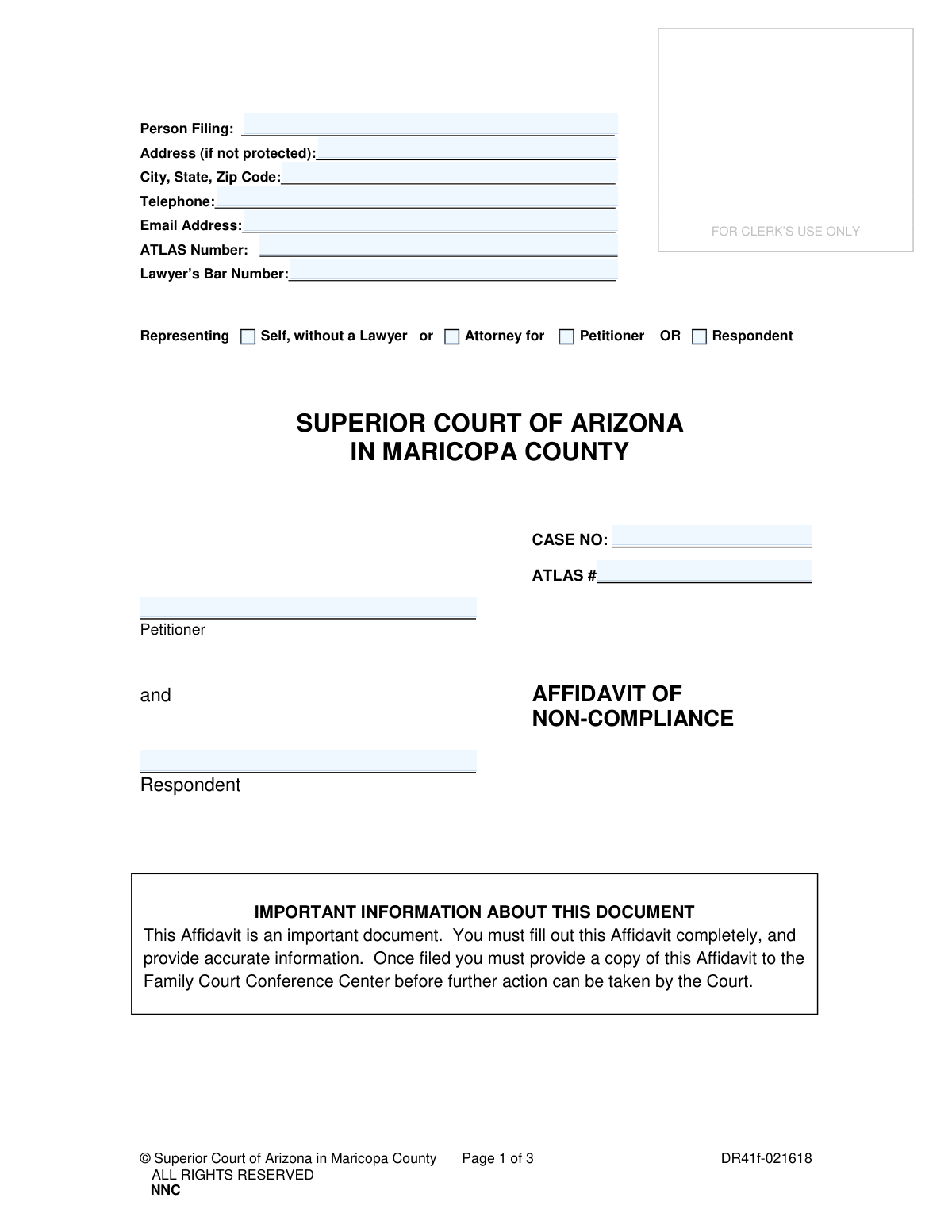
This form, officially known as the Affidavit of Non-Compliance, is used within the Superior Court of Arizona in Maricopa County to formally declare that a party has violated a court order, typically concerning child support or spousal maintenance. Filing this affidavit initiates a process for the court to review and potentially enforce the original order. Today, this form can be filled out quickly and accurately using AI-powered services like Instafill.ai, which can also convert non-fillable PDF versions into interactive fillable forms.
DR41f is part of the County court forms, family court forms, family law forms and superior court forms categories on Instafill.
Our AI automatically handles information lookup, data retrieval, formatting, and form filling.
It takes less than a minute to fill out DR41f using our AI form filling.
Securely upload your data. Information is encrypted in transit and deleted immediately after the form is filled out.

Form specifications

Form name: Affidavit of Non-Compliance (Form DR41f)
Number of fields: 36
Number of pages: 1
Language: English
main-image

Instafill Demo: How to fill out PDF forms in seconds with AI

How to Fill Out DR41f Online for Free in 2026

Are you looking to fill out a DR41F form online quickly and accurately? Instafill.ai offers the #1 AI-powered PDF filling software of 2026, allowing you to complete your DR41F form in just 37 seconds or less.
Follow these steps to fill out your DR41F form online using Instafill.ai:
  1. 1 Navigate to Instafill.ai and upload or select the Affidavit of Non-Compliance (Form DR41f).
  2. 2 Provide your personal details, case number, and identify your role (Petitioner or Respondent).
  3. 3 Enter the specifics of the original court order, including the date, the judge's name, and the type of support ordered.
  4. 4 Clearly describe how the other party has failed to comply with the court order, providing specific details of the violation.
  5. 5 Review all the information populated by the AI to ensure it is accurate and complete.
  6. 6 Sign the affidavit under oath or affirmation. This step often requires the presence of a notary public or deputy clerk.
  7. 7 Download the completed, signed document and file it with the Superior Court, providing a copy to the Family Court Conference Center as required.

Our AI-powered system ensures each field is filled out correctly, reducing errors and saving you time.

Why Choose Instafill.ai for Your Fillable DR41f Form?

Speed

Complete your DR41f in as little as 37 seconds.

Up-to-Date

Always use the latest 2026 DR41f form version.

Cost-effective

No need to hire expensive lawyers.

Accuracy

Our AI performs 10 compliance checks to ensure your form is error-free.

Security

Your personal information is protected with bank-level encryption.

Frequently Asked Questions About Form DR41f

This form is used to officially notify the Superior Court of Arizona in Maricopa County that a person has failed to obey a court order for child support, spousal maintenance, or other financial support.

You should file this affidavit if you are the recipient of a court-ordered support payment and the other party has not paid as required. It is typically filed after a judge has authorized you to use this method for enforcement.

An ATLAS number is a case identifier used by the Arizona child support system. You only need to fill this in if your case is being handled by the Division of Child Support Services (DCSS); otherwise, you can leave it blank.

In Section 1, you must provide the date of the original support order, the name of the judge who issued it, and the name of the person ordered to pay. You also need to check the boxes for the type of support and describe the payment terms.

In this section, you must provide a clear and specific description of the violation. Include details such as missed payment dates, amounts owed, or failure to reimburse specific expenses as ordered by the court.

Yes, the affidavit requires a sworn statement. You must sign the 'OATH OR AFFIRMATION' section in the presence of a Notary Public or a Deputy Clerk, who will then complete and seal that portion of the form.

After completing and notarizing the affidavit, you must file the original with the Clerk of the Court. You must also provide a copy to the Family Court Conference Center for the court to take further action.

After the form is filed and served correctly, the court will review your claim of non-compliance. This may result in an enforcement hearing or other actions to compel the other party to follow the court order.

No, you are not required to have an attorney to file this affidavit. You can represent yourself by checking the 'Representing Self, without a Lawyer' box at the top of the form.

Yes, services like Instafill.ai use AI to help you accurately auto-fill form fields with your information. This can save time and help prevent common errors when completing the document.

To fill this form out online, you can upload the PDF to Instafill.ai. The platform's AI will make the fields interactive, allowing you to type your information directly into the form and then download the completed document for printing and filing.

If you have a non-fillable or 'flat' PDF, you can use a tool like Instafill.ai. It can convert the document into an interactive, fillable form online, so you can easily type in your information before printing.

The 'obligor' is the legal term for the person who is obligated, or required by the court order, to make the support payments. This is the individual you are reporting for non-compliance.

Compliance DR41f
Validation Checks by Instafill.ai

1
Case Number Consistency Across Pages
This check ensures that the 'CASE NO' entered at the top of the form is identical to the 'Case No.' fields on subsequent pages. Maintaining consistency is critical for document integrity, preventing the pages from being misattributed to different court cases. A mismatch would cause processing errors and potential rejection of the filing by the clerk's office.
2
Exclusive Representation Status Selection
Validates that the filer has selected one, and only one, representation status from the available options ('Self, without a Lawyer', 'Attorney for Petitioner', 'Respondent'). This information is fundamental for the court to understand who is filing the affidavit and in what capacity. Failure to select a single, valid option would create ambiguity regarding the filer's legal standing in the matter.
3
Conditional Lawyer's Bar Number Requirement
This rule verifies that the 'Lawyer’s Bar Number' field is populated if the filer has identified as an 'Attorney for Petitioner' or 'Attorney for Respondent'. Conversely, it ensures the field is empty if 'Self, without a Lawyer' is selected. This is crucial for verifying the credentials of legal counsel and ensuring only authorized individuals are filing on behalf of a client.
4
ATLAS Number Consistency Check
This validation confirms that the 'ATLAS Number' provided in the filer's contact information section matches the 'ATLAS #' in the main case caption area. The ATLAS number is a key identifier in the Arizona court system, and consistency is essential for linking the document correctly to the case and party records. Discrepancies could lead to the document being misfiled or not processed.
5
Valid and Historical Date for Support Order
This check ensures the date entered in Section 1 ('INFORMATION REGARDING CURRENT SUPPORT ORDER') is in a valid format (e.g., MM/DD/YYYY) and represents a date in the past. An order cannot be violated before it has been issued, so a future or invalid date would render the affidavit logically unsound. This validation prevents nonsensical or erroneous filings.
6
Completeness of Support Order Details (Section 1)
If any information is entered in Section 1, this validation ensures that the date, Judicial Officer's name, obligor's name, and at least one support type checkbox are all completed. An incomplete reference to the court order makes it impossible for the court to identify which specific mandate is being allegedly violated. This check guarantees that the affidavit provides a clear and actionable basis for review.
7
Mandatory Violation Description
This validation confirms that the text area in Section 3, 'DESCRIPTION ON HOW THE COURT ORDER HAS BEEN VIOLATED', is not empty. This section contains the substantive allegation and is the primary reason for the affidavit's existence. Without a description of the violation, the filing has no purpose and cannot be acted upon by the court.
8
Filer's Signature and Date Presence
This check verifies that the 'Signature of Person Sending Documents' and the corresponding 'Date' field under the 'OATH OR AFFIRMATION' are both completed. The signature legally affirms the truthfulness of the document's contents under penalty of perjury, and the date establishes when this affirmation occurred. An unsigned or undated affidavit is legally invalid.
9
Standard Telephone Number Format
This rule validates that the 'Telephone' field contains a number in a recognizable format (e.g., 10 digits, with optional hyphens or parentheses). A valid phone number is essential for the court or other parties to contact the filer for clarifications or scheduling. An invalid format could hinder communication and delay case proceedings.
10
Valid Email Address Format
This check ensures the 'Email Address' field conforms to the standard '[email protected]' format. As courts increasingly rely on electronic communication and document service, a valid email address is critical for timely and official correspondence. An incorrectly formatted email would lead to communication failures.
11
Identification of Case Parties
This validation ensures that the 'Petitioner' and 'Respondent' name fields in the case caption are both filled out. These names define the primary parties to the legal action. Omitting this information would make it impossible for the clerk to file the document in the correct case file, as case numbers can be mistyped.
12
At Least One Order Section Must Be Detailed
This logical check verifies that the filer has provided the necessary details in either Section 1 ('INFORMATION REGARDING CURRENT SUPPORT ORDER') or Section 2 ('INFORMATION REGARDING ORDER TO MONITOR'). The affidavit is meaningless without specifying which court order is the subject of the non-compliance claim. The form must reference at least one of these foundational orders to be valid.
13
Completeness of Order to Monitor Details (Section 2)
If a date is entered in Section 2, this check ensures the Judicial Officer's name is also provided and at least one monitoring type checkbox is selected. This section serves as an alternative basis for the filing, and if used, it must be complete to be understood by the court. Incomplete information would make the reference to the 'Order to Monitor' ambiguous and unenforceable.
14
City, State, Zip Code Structure Validation
This check validates that the 'City, State, Zip Code' field is properly structured, containing a city name, a two-letter state abbreviation, and a 5-digit or 9-digit ZIP code. Accurate address information is crucial for official mailings from the court, especially if the address is not protected. An improperly formatted address could result in failed delivery of important legal notices.

Common Mistakes in Completing DR41f

Inconsistent or Missing Case Number

Filers often enter the case number in the top section but forget to repeat it on subsequent pages, or they make a typo in one of the entries. This inconsistency can lead to the document being misfiled or rejected by the clerk, causing significant delays in the enforcement process. To avoid this, double-check that the exact same case number is written clearly on every page where it is required. AI-powered tools like Instafill.ai can prevent this by auto-populating the case number across all relevant fields after a single entry.

Signing the Affidavit Before Notarization

A frequent and critical error is signing the document at home before taking it to a notary public or court clerk. The 'Oath or Affirmation' section requires the filer to sign in the physical presence of the notary, who must witness the signature. Signing beforehand invalidates the affidavit, requiring the filer to complete and sign a new form, wasting time and effort. Always wait to sign until you are in front of the authorized official.

Vague or Emotional Description of Violation

In Section 3, filers often provide emotional or overly general statements like 'He never pays on time' instead of specific, factual details. The court needs objective information, such as exact dates of missed payments, specific amounts owed, and a clear calculation of the total arrears. A vague description weakens the affidavit and may result in the court being unable to take enforcement action. It is crucial to list each violation with corresponding dates and dollar amounts.

Omitting Details of the Original Court Order

People frequently leave Section 1 incomplete, forgetting to enter the exact date of the order, the full name of the presiding Judicial Officer, or the name of the obligor (the person ordered to pay). These details are essential for the court to locate and verify the specific order being enforced. Without this information, the affidavit may be deemed insufficient, halting the process until the missing data is provided.

Incorrectly Identifying Parties

There is often confusion between the roles of 'Petitioner,' 'Respondent,' and 'Obligor,' leading to incorrect information being entered in the case caption and Section 1. A filer might misidentify themselves or the other party, or incorrectly name the person ordered to pay support. This can cause legal confusion and processing errors. Carefully review the original court documents to confirm who is the Petitioner and Respondent, and who is the designated Obligor.

Failing to Check Representation Status Correctly

A self-represented individual might mistakenly check 'Attorney for' or forget to indicate whether they are the Petitioner or Respondent. This simple checkbox error can cause confusion about who is filing the document and in what capacity. It's vital to accurately check 'Self, without a Lawyer' and then select your correct role in the case (Petitioner or Respondent).

Forgetting the ATLAS Number

The ATLAS number is a unique identifier for family court cases in Maricopa County and is requested in two separate places on the form. Many filers, especially those representing themselves, are unaware of this number or forget to include it. Omitting the ATLAS number can slow down the court's ability to link the affidavit to the correct case file, leading to processing delays. This number can be found on previous court documents related to your case.

Failing to Distribute the Filed Copy

The form's instructions clearly state that after filing, a copy must be provided to the Family Court Conference Center for further action. Many people assume that filing the document with the clerk is the final step and neglect this crucial distribution requirement. This failure can cause the case to stall indefinitely, as the Conference Center will not be aware that an enforcement action has been requested.

Illegible Handwriting on a Printed Form

Because this form is often provided as a non-fillable PDF, individuals print it and fill it out by hand, which can result in illegible entries for names, dates, and case numbers. If the clerk or judge cannot read the information, the document will be rejected, forcing the filer to start over. To prevent this, it is best to use a tool like Instafill.ai, which can convert flat PDFs into digitally fillable forms, ensuring all entries are clear, legible, and correctly formatted.

Misunderstanding the 'Order to Monitor' Section

Section 2 applies only in specific situations where a judge has previously authorized this affidavit as an alternative to a new enforcement petition. Many filers mistakenly fill out this section, assuming it's a standard part of the process, or leave it blank when it is actually required for their specific case. This misunderstanding can lead to the affidavit being processed incorrectly or rejected. You should only complete Section 2 if a judge has explicitly given you an 'Order to Monitor'.
Saved over 80 hours a year

“I was never sure if my IRS forms like W-9 were filled correctly. Now, I can complete the forms accurately without any external help.”

Kevin Martin Green

Your data stays secure with advanced protection from Instafill and our subprocessors

Robust compliance program

Transparent business model

You’re not the product. You always know where your data is and what it is processed for.

ISO 27001, HIPAA, and GDPR

Our subprocesses adhere to multiple compliance standards, including but not limited to ISO 27001, HIPAA, and GDPR.

Security & privacy by design

We consider security and privacy from the initial design phase of any new service or functionality. It’s not an afterthought, it’s built-in, including support for two-factor authentication (2FA) to further protect your account.

Fill out DR41f with Instafill.ai

Worried about filling PDFs wrong? Instafill securely fills affidavit-of-non-compliance-form-dr41f forms, ensuring each field is accurate.

Related forms by category

County court forms Affidavit for Service by Publication/Posting (Circuit Court of Cook County, Illinois) (CCG 0013 A/B), Petition for Leave to Proceed In Forma Pauperis (Court of Common Pleas of Lehigh County, Pennsylvania, Civil Division), Designation of Record on Appeal (Civil) (Maricopa County Justice Courts, Arizona) (Form APP 8150-702), Maricopa County Justice Courts, Motion to Set Aside / Vacate Judgment, Circuit Court of Cook County, Illinois, Form CCM 0346, Order/Trial Call, Superior Court of Chatham County, Georgia, Hearing Request Form, Form CFS 601-2, County Treasurer's and Judge's Certification of Expenditures for Care and Support of Minors Other Than Wards of the Court, Tax Court of New Jersey, County Equalization Table Complaint (CN 10339), Application for Judgment to Apply Freeze Act using County Board of Taxation figures (N.J.S.A. 54:3-26), Family Department Pleading/Motion and Order, Disclosure Statement (Superior Court of Arizona in Maricopa County), Proposed Divorce / Legal Separation Resolution Statement, Notice of Default Hearing, Superior Court of Arizona in Maricopa County, Acceptance of Service for Family Court Cases, A.R.F.L.P. Rule 40(F), Affidavit of Direct Payments (Superior Court of Arizona in Maricopa County), Affidavit of Financial Information, Superior Court of Arizona in Maricopa County, Affidavit Regarding Minor Children (Superior Court of Arizona in Maricopa County), Affidavit of Service with Signature Confirmation for Family Cases, Alternative Dispute Resolution Statement to the Court (A.R.F.L.P. 66(E)), Current Employer or Other Payor Information (DRS88f) · + 17 more →
family court forms Form 12.995(c), Safety-Focused Parenting Plan, Florida Supreme Court Approved Family Law Form 12.901(b)(3), Petition for Dissolution of Marriage with No Dependent or Minor Child(ren) or Property (02/18), Form N161, Appellant’s notice (All appeals except small claims track appeals and appeals to the Family Division of the High Court), Form N161, Appellant's Notice (All appeals except small claims track appeals and appeals to the Family Division of the High Court), Florida Supreme Court Approved Family Law Form 12.915, Designation of Current Mailing and E-mail Address, declaration-of-marriage-for-court-proceeding-california-family-law, Florida Supreme Court Approved Family Law Form 12.902(d), Uniform Child Custody Jurisdiction and Enforcement Act (UCCJEA) Affidavit, Florida Supreme Court Approved Family Law Form 12.941(a), Petition for Enforcement of Out-of-State Custody Decree and for Order to Pick Up Minor Child(ren), Florida Supreme Court Approved Family Law Form 12.970(a), Petition for Temporary Custody by Extended Family, Adoption Request (Stepparent), Florida Family Law Rules of Procedure Form 12.900(b), Notice of and Consent to Limited Appearance, Florida Family Law Rules of Procedure Form 12.900(d), Termination of Limited Appearance, Florida Family Law Rules of Procedure Form 12.900(e), Acknowledgment of Assistance by Attorney, Florida Family Law Rules of Procedure Form 12.900(g), Agreement Limiting Representation, Florida Family Law Rules of Procedure Form 12.900(h), Notice of Related Cases, Florida Family Law Rules of Procedure Form 12.901(a), Joint Petition for Simplified Dissolution of Marriage, Form 12.902(b), Family Law Financial Affidavit (Short Form), Florida Family Law Rules of Procedure Form 12.902(c), Family Law Financial Affidavit (Long Form), Florida Family Law Rules of Procedure Form 12.902(e), Child Support Guidelines Worksheet, Florida Supreme Court Approved Family Law Form 12.902(f)(1), Marital Settlement Agreement for Dissolution of Marriage with Dependent or Minor Child(ren) · + 73 more →
family law forms Form 12.902(b), Family Law Financial Affidavit (Short Form), Florida Supreme Court Approved Family Law Form 12.901(b)(3), Petition for Dissolution of Marriage with No Dependent or Minor Child(ren) or Property (02/18), Form FL-170, Declaration for Default or Uncontested Dissolution or Legal Separation (Family Law), Form FL-100, Petition—Marriage/Domestic Partnership (Family Law), Florida Supreme Court Approved Family Law Form 12.915, Designation of Current Mailing and E-mail Address, declaration-of-marriage-for-court-proceeding-california-family-law, Florida Supreme Court Approved Family Law Form 12.902(d), Uniform Child Custody Jurisdiction and Enforcement Act (UCCJEA) Affidavit, Florida Family Law Rules of Procedure Form 12.910(a), Summons: Personal Service on an Individual, Florida Supreme Court Approved Family Law Form 12.941(a), Petition for Enforcement of Out-of-State Custody Decree and for Order to Pick Up Minor Child(ren), Florida Supreme Court Approved Family Law Form 12.970(a), Petition for Temporary Custody by Extended Family, Form FL-110, Summons (Family Law), Form FL-120, Response—Marriage/Domestic Partnership (Family Law), ADOPT-200, Adoption Request, ADOPT-200, Stepparent Adoption Request, ADOPT-210, Adoption Agreement, ADOPT-310, Contact After Adoption Agreement, Adoption Assistance Program Nonrecurring Adoption Expense Agreement and Claim, Adoption Request (Stepparent), Adoption and Safe Families Act (ASFA) Survey, Florida Family Law Rules of Procedure Form 12.900(b), Notice of and Consent to Limited Appearance · + 74 more →
superior court forms FW-003, Order on Court Fee Waiver (Superior Court), FW-003, Order on Court Fee Waiver (Superior Court), Form FW-003, Order on Court Fee Waiver (Superior Court), Declaration of Facts of Death (California Superior Court), Form FW-003-GC, Order on Court Fee Waiver (Superior Court) (Ward or Conservatee), Superior Court of Chatham County, Georgia, Hearing Request Form, Form FW-006, Request for Hearing About Court Fee Waiver Order (Superior Court), Form FW-002, Request to Waive Additional Court Fees (Superior Court), Form FW-008, Order on Court Fee Waiver After Hearing (Superior Court), Form FW-002-GC, Request to Waive Additional Court Fees (Superior Court) (Ward or Conservatee), Form REC-001(N), Notice of Intent to Destroy Superior Court Records; Offer to Transfer Possession, Form REC-001(R), Request for Transfer or Extension of Time for Retention of Superior Court Records, Notice of Hearing on Request for Transfer or Extension of Time for Retention of Superior Court Records; Court Order; Release and Receipt of Superior Court Records, Form REC-002(R), Release and Receipt of Superior Court Records, Superior Court of New Jersey, Application for Appeal and Order, Superior Court of New Jersey Dissolution (FM) Case Management Order, New Jersey Judiciary – Superior Court, Appellate Division Application for Permission to File Emergent Motion, New Jersey Judiciary Superior Court - Appellate Division Civil Case Information Statement, New Jersey Judiciary Superior Court - Appellate Division Criminal Case Information Statement, New Jersey Judiciary Superior Court - Appellate Division Notice of Appeal (CN: 10502) · + 71 more →