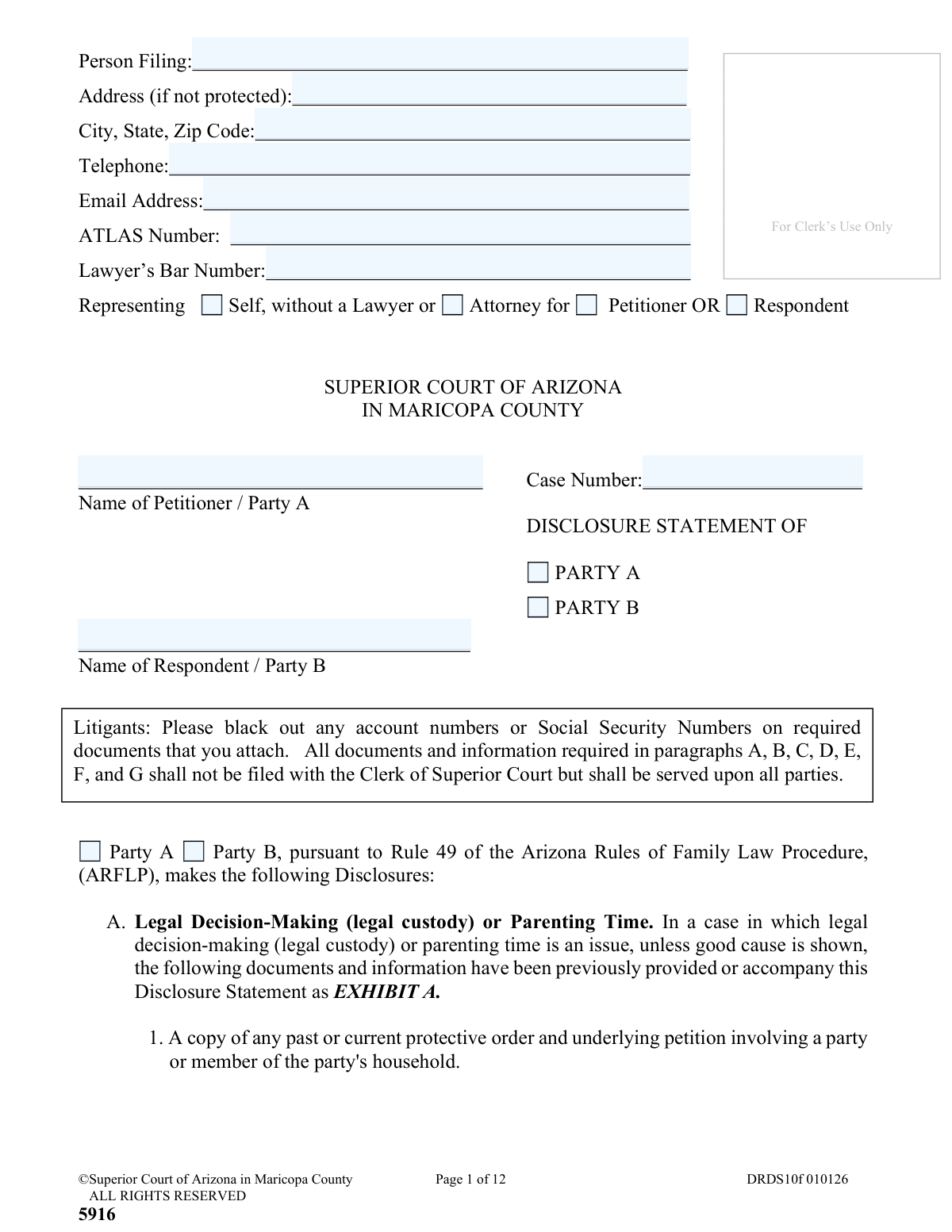
Yes! You can use AI to fill out Disclosure Statement (Superior Court of Arizona in Maricopa County)
Form DRDS10f, the Disclosure Statement, is a critical document in Arizona family law proceedings, mandated by Rule 49 of the Arizona Rules of Family Law Procedure. It requires parties to formally disclose and exchange detailed information and documents concerning assets, debts, income, child custody matters, and potential witnesses to ensure transparency and facilitate fair resolutions. Today, this form can be filled out quickly and accurately using AI-powered services like Instafill.ai, which can also convert non-fillable PDF versions into interactive fillable forms.
DRDS10f is part of the
County court forms, family court forms, family law forms and superior court forms categories on Instafill.
Our AI automatically handles information lookup, data retrieval, formatting, and form filling.
It takes less than a minute to fill out DRDS10f using our AI form filling.
Securely upload your data. Information is encrypted in transit and deleted immediately after the form is filled out.
Form specifications
| Form name: | Disclosure Statement (Superior Court of Arizona in Maricopa County) |
| Number of fields: | 170 |
| Number of pages: | 1 |
| Language: | English |
Instafill Demo: How to fill out PDF forms in seconds with AI
How to Fill Out DRDS10f Online for Free in 2026
Are you looking to fill out a DRDS10F form online quickly and accurately? Instafill.ai offers the #1 AI-powered PDF filling software of 2026, allowing you to complete your DRDS10F form in just 37 seconds or less.
Follow these steps to fill out your DRDS10F form online using Instafill.ai:
- 1 Navigate to Instafill.ai and upload or select the DRDS10f Disclosure Statement form.
- 2 Use the AI assistant to accurately fill in the case heading with your personal details, the other party's information, and the case number.
- 3 Systematically complete each section (A-G), detailing your positions and information on legal decision-making, child support, spousal maintenance, property, and debts.
- 4 Gather and label all required supporting documents (e.g., tax returns, bank statements, deeds) as Exhibits A through G, as instructed by the form.
- 5 List all expected lay witnesses (Exhibit F) and expert witnesses (Exhibit G), providing their contact information and a summary of their expected testimony.
- 6 Review all entered information and attached exhibits for accuracy, then electronically sign and date the statement.
- 7 Download the completed form and serve it to the other party or their attorney as required, ensuring you do not file it with the court clerk. Complete the final page to certify service.
Our AI-powered system ensures each field is filled out correctly, reducing errors and saving you time.
Why Choose Instafill.ai for Your Fillable DRDS10f Form?
Speed
Complete your DRDS10f in as little as 37 seconds.
Up-to-Date
Always use the latest 2026 DRDS10f form version.
Cost-effective
No need to hire expensive lawyers.
Accuracy
Our AI performs 10 compliance checks to ensure your form is error-free.
Security
Your personal information is protected with bank-level encryption.
Frequently Asked Questions About Form DRDS10f
This form, required by Arizona Rule of Family Law Procedure 49, is used to exchange detailed information between parties in a family law case. It covers issues like child support, property, debt, and witnesses to ensure full discovery and avoid surprises in court.
Every party involved in a divorce, paternity, legal decision-making, parenting time, or child support case must complete and send a Disclosure Statement unless the court or a party agreement allows otherwise.
No, you do not file the Disclosure Statement or its supporting documents with the Clerk of Superior Court. You must mail or hand-deliver it directly to the other party or their attorney.
You must send your Disclosure Statement to the other party within 40 days after the Response to the initial Petition has been filed in your case.
You must provide a completed Affidavit of Financial Information, proof of income for the last two years (tax returns, W-2s, pay stubs), and proof of certain child-related expenses like insurance and child care.
The Disclosure Statement is a detailed exchange of facts and documents sent only to the other party, while the Resolution Statement contains different information and is filed directly with the Clerk of Superior Court.
You have a continuing duty to disclose. You must create and send an additional or amended disclosure to the other party within 30 days of discovering the new information.
On Exhibit F (for regular witnesses) and Exhibit G (for expert witnesses), you must provide their name, address, phone number, and a summary of their expected testimony. Failure to disclose a witness at least 60 days before trial may prevent them from testifying.
Yes, Section D requires you to list all items of personal property, including household furniture, furnishings, and vehicles, along with your estimate of their current fair market value.
If you have a non-fillable PDF, you can use a service like Instafill.ai. It can convert flat PDFs into interactive, fillable forms that you can complete on your computer.
Yes, services like Instafill.ai use AI to help you accurately auto-fill form fields with your information. This can save significant time and help reduce the chance of errors.
You can upload the Disclosure Statement PDF to the Instafill.ai platform. The service will make the document interactive, allowing you to easily type in your information and use AI-powered tools to assist with filling it out.
An ATLAS number is related to child support services. You should provide it in the heading section if you are receiving or have ever received AFDC from the Arizona Department of Economic Security.
You must gather all the required documents for each section (e.g., Child Support, Property) and group them together. You then place a coversheet on each group, labeling it as 'EXHIBIT A', 'EXHIBIT B', and so on, as instructed by the form.
Compliance DRDS10f
Validation Checks by Instafill.ai
1
Case Number Presence and Format
This check ensures the 'Case Number' field is not empty and conforms to the Maricopa County Superior Court's format. The case number is the primary identifier linking this document to the correct legal proceeding. If the number is missing or invalid, the document cannot be correctly filed or associated with the case, causing significant processing delays.
2
Representation Status Logic
This validation verifies the logical consistency of the representation status. If the filer selects 'Attorney for', then the 'Lawyer’s Bar Number' field must be populated. Conversely, if 'Representing Self' is chosen, the bar number field should be empty. This prevents submissions with contradictory information and ensures proper identification of legal counsel.
3
Filer Role Selection
This check ensures that exactly one role has been selected for the person filing: either 'Representing Self, without a Lawyer' or 'Attorney for' (with either 'Petitioner' or 'Respondent' checked). The form requires a clear declaration of the filer's capacity. A failure here would mean the filer's role in the case is ambiguous, preventing the court from understanding who is submitting the document.
4
Party Identification Check
This validation confirms that one of the checkboxes for 'PARTY A' or 'PARTY B' is marked under the 'DISCLOSURE STATEMENT OF' heading. This is crucial for identifying which party's disclosures are contained in the document. Without this selection, it's impossible to know which party is making the declaration, rendering the document legally ambiguous.
5
Party Name Completeness
This check verifies that the names for both 'Petitioner / Party A' and 'Respondent / Party B' are filled in the case caption. These names define the parties to the action and are essential for the document's legal validity. Missing party names would make the document contextually incomplete and potentially invalid.
6
Telephone Number Format
This validation checks that the 'Telephone' field contains a valid 10-digit phone number, potentially allowing for common formats like (XXX) XXX-XXXX. Accurate contact information is critical for the court and opposing parties to communicate with the filer. An invalid number would hinder communication and could lead to missed deadlines or notifications.
7
Email Address Format
This check ensures that the 'Email Address' field, if provided, contains a string in a valid email format (e.g., [email protected]). As courts increasingly use electronic communication, a valid email is essential for official correspondence and service. An invalid format would result in failed communication and potential prejudice to the filer.
8
Witness Information Completeness
For each witness listed in Exhibit F or G, this validation ensures that the 'Witness Name', 'Address', and 'Telephone No.' fields are all populated. Incomplete witness information prevents the opposing party from being able to contact or investigate the witness, undermining the purpose of disclosure. A partially filled entry will be rejected to enforce full disclosure.
9
Witness Testimony Summary Requirement
This check verifies that the 'Summary of Expected Testimony' for each listed witness is not empty and exceeds a minimum character count. The form explicitly states this summary should describe what the witness will say, not just the topic. This validation prevents filers from providing vague or useless information, ensuring the disclosure is substantive and meaningful as required by court rules.
10
Signature and Date Presence
This validation confirms that the filer has signed and dated the statement on page 5. A signature is required to attest that the information is true under penalty of perjury, making it legally binding. An unsigned or undated form is legally invalid and cannot be accepted.
11
Mailing Confirmation Completeness
This check ensures the final page includes the name and address of the 'Other Party' or their 'Lawyer', and that the date of mailing/delivery is filled out. This section serves as a certificate of service, proving that the filer complied with the requirement to send the documents to the opposing side. Without this information, there is no proof of service, and the filing may be deemed improper.
12
Lawyer's Bar Number Format
When a 'Lawyer’s Bar Number' is provided, this check validates it against the official format for the State Bar of Arizona. This is crucial for verifying that the attorney is licensed and in good standing. An invalid bar number could indicate an error or an attempt at unauthorized practice of law, and the submission would be flagged for review.
Common Mistakes in Completing DRDS10f
The form instructions explicitly state NOT to file the Disclosure Statement with the Clerk of Superior Court, but to serve it directly on the other party. This is a common procedural error because people are accustomed to filing all legal documents with the court. Filing it incorrectly can lead to rejection by the clerk, delays, and demonstrates a failure to follow court rules, while also failing to properly notify the other party.
The form requires filers to black out Social Security Numbers and full account numbers on all attached financial documents. In the rush to gather dozens or hundreds of pages, this critical step is often missed, exposing sensitive data and increasing the risk of identity theft or financial fraud. To avoid this, you must carefully review every page of every exhibit before serving the documents on the other party.
Exhibit F requires a summary of what a witness is expected to 'actually say, NOT just the topic.' Many filers mistakenly write a single topic like 'child's well-being' instead of a detailed summary of the witness's specific observations and knowledge. This error can result in the judge limiting or excluding the witness's testimony at trial, as the opposing party was not given fair notice.
Sections B, C, D, and E require a comprehensive and specific set of financial documents, such as tax returns for the past two years and bank statements for the six months prior to filing. People often forget documents, provide statements for the wrong date range, or omit sources of income like bonuses or recurring gifts. This non-compliance can lead to sanctions from the court and motions to compel from the other party, delaying the case and increasing legal costs.
The form provides a space for the case number at the bottom or top of most pages. Filers frequently enter it on the first page but forget to add it to the rest, including the exhibit pages. If pages become separated, they cannot be easily identified with the correct case, causing administrative problems. AI-powered form filling tools like Instafill.ai can prevent this by automatically populating the case number on every required page after a single entry.
The instructions require that specific sets of documents be compiled and clearly labeled with coversheets as 'EXHIBIT A,' 'EXHIBIT B,' and so on. A common mistake is to simply attach a disorganized stack of papers. This makes the disclosure difficult for the receiving party to understand and is technically non-compliant with Rule 49, potentially leading to legal challenges and motions.
Section H explains that disclosure is an ongoing duty, and any new or different information (like a new job, raise, or large debt) must be shared within 30 days of its discovery. Many people treat this as a one-time submission and fail to provide updates. This failure can result in court sanctions, damage the party's credibility, and potentially lead to evidence being excluded at trial.
The final page is a legally significant certificate confirming that the documents were sent to the other party. Mistakes include forgetting to sign, failing to enter the date of mailing, or providing an incorrect address for the other party or their lawyer. An improperly completed certificate can create disputes over whether service was properly executed, potentially invalidating the disclosure until it is corrected.
The instructions differentiate between the Disclosure Statement (which is served on the other party) and the Affidavit of Financial Information (which is filed with the court). People often confuse the two, either filing the Disclosure Statement incorrectly or failing to file the Affidavit at all. This procedural error can halt case progress and require corrective action to get the case back on track.
The filer's signature on page 5, under penalty of perjury, is what makes the document a sworn statement. An unsigned or undated form is legally invalid and will be considered a failure to disclose, potentially leading to sanctions. This simple oversight can completely undermine the entire effort of preparing the extensive disclosure package. Since this form is a non-fillable PDF, a tool like Instafill.ai can convert it to a fillable version and flag mandatory signature fields to prevent this error.
Saved over 80 hours a year
“I was never sure if my IRS forms like W-9 were filled correctly. Now, I can complete the forms accurately without any external help.”
Kevin Martin Green
Your data stays secure with advanced protection from Instafill and our subprocessors

Robust compliance program
Transparent business model
You’re not the product. You always know where your data is and what it is processed for.
ISO 27001, HIPAA, and GDPR
Our subprocesses adhere to multiple compliance standards, including but not limited to ISO 27001, HIPAA, and GDPR.
Security & privacy by design
We consider security and privacy from the initial design phase of any new service or functionality. It’s not an afterthought, it’s built-in, including support for two-factor authentication (2FA) to further protect your account.
Fill out DRDS10f with Instafill.ai
Worried about filling PDFs wrong? Instafill securely fills disclosure-statement-superior-court-of-arizona-in-maricopa-county forms, ensuring each field is accurate.