
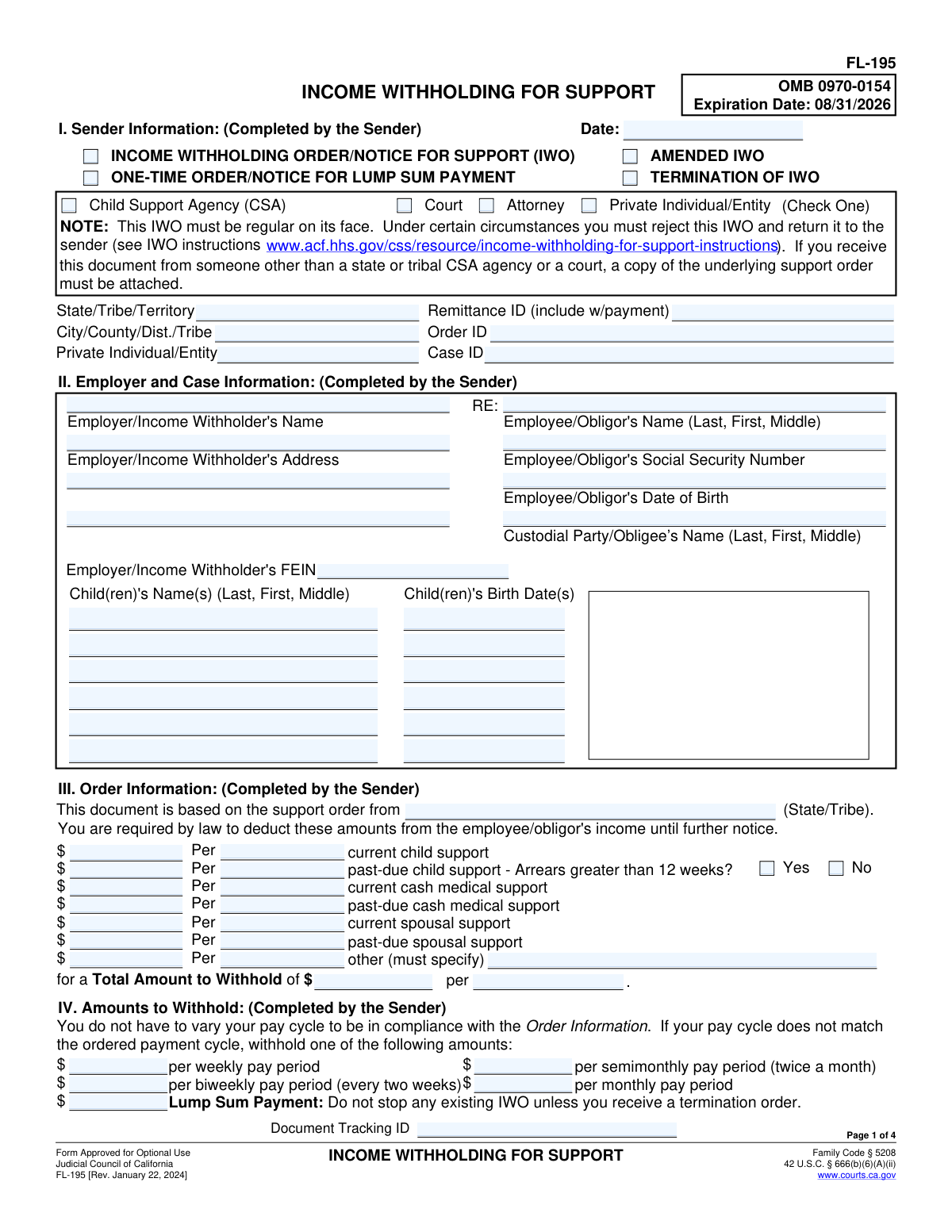
Yes! You can use AI to fill out Form FL-195, Income Withholding for Support
Don't type 130 fields by hand. Tell our AI about yourself, or upload a document you already have, and it fills every field in seconds. You check it, then download, print or sign.
The AI does the filling. You just check it.
No typing into boxes, nothing to install.
What this form asks for
The AI fills all of it, from your answers or your documents.
The AI checks your answers before you download
12 checks built for this form, so a wrong date or a missing answer is caught before anyone else sees it.
This check ensures that the Employee/Obligor's Social Security Number (SSN) is entered in a valid format, such as XXX-XX-XXXX or XXXXXXXXX. A valid SSN is critical for uniquely identifying the employee and correctly applying the withholding order. If the format is invalid, the form submission should be rejected to prevent misidentification and processing errors.
This check verifies that the Employer/Income Withholder's Federal Employer Identification Number (FEIN) follows the standard XX-XXXXXXX format. The FEIN is essential for legal and tax reporting purposes, ensuring the order is directed to the correct business entity. An invalid FEIN could lead to the order being rejected or sent to the wrong company, delaying support payments.
This validation confirms that the 'Total Amount to Withhold' in Section III is the correct sum of all individual support amounts (current and past-due child, medical, spousal, and other). This is a crucial cross-check to ensure the final withholding amount is accurate and matches the itemized breakdown. If the total is incorrect, it could lead to under or over-withholding from the employee's pay.
This check ensures that exactly one IWO type (e.g., 'AMENDED IWO', 'TERMINATION OF IWO') is selected in Section I. Selecting multiple or no types creates ambiguity about the intended action. This validation is important for the employer to understand whether they are starting, changing, or stopping a withholding, and failure would require clarification from the sender.
This validation verifies that exactly one sender type (e.g., 'Child Support Agency', 'Court', 'Private Individual/Entity') is checked in Section I. The sender's identity establishes the legal authority of the order and dictates how the employer must handle it, especially if a copy of the underlying order is required. An ambiguous sender could cause the employer to reject the IWO as not being 'regular on its face'.
This check validates that if a monetary value is entered into the 'other' support field in Section III, the corresponding description field must not be empty. This is important for transparency and legal clarity, ensuring the employer and employee understand the nature of the additional deduction. A missing description would make the order incomplete and could be grounds for rejection.
And 6 more checks
- Validate Date Formats
- Logical Check for Child's Birth Date
- Consistency of Header Information Across Pages
- Conditional Requirement for Termination Date
- Logical Check for Termination of IWO
- Validate Arrears Status Consistency
Let AI fill out your FL-195
No typing. Every field filled in seconds, checked, ready to sign.
How to Fill Out FL-195 Online for Free in 2026
What the AI walks you through.
- Navigate to Instafill.ai and upload your PDF of Form FL-195 or select it from the template library.
- Provide sender information, indicating whether you are a court, child support agency, attorney, or private individual, and include relevant case identifiers.
- Enter the employer's details and the employee/obligor's personal information, including name, SSN, and the names of the children involved.
- Specify the court order details, breaking down the amounts to be withheld for current and past-due child support, spousal support, and medical support.
- Input the remittance information, directing the employer where to send the payments, such as the California State Disbursement Unit (SDU).
- Review all the information auto-filled by the AI for accuracy, make any necessary edits, and then download, print, or e-file the completed FL-195 form.
Common Mistakes in Completing FL-195
The ones the AI is built to catch.
Incorrect or Incomplete Employer Identification
Using Incorrect Employee/Obligor Identifiers
Missing Case and Order Identifiers
Inconsistent Withholding Amounts and Frequencies
Omitting Arrears Status
Incorrect Pay Cycle Conversion Calculations
Failure to Complete and Return the Termination Notice
Ignoring Defective IWOs Instead of Returning Them
Leaving New Employer Information Blank
Improperly Handling a Non-Fillable PDF Version
Frequently Asked Questions About FL-195
Is it really free for 7 days?
Can I fill other forms too?
How do I cancel?
How does the AI fill out FL-195?
What happens to my information?
How complex is FL-195 to fill out?
What is the purpose of the Income Withholding for Support (FL-195) form?
As an employer, what am I legally required to do when I receive this form?
How much money should I withhold from my employee's paycheck?
Where do I send the withheld support payments?
What should I do if the employee listed on the form no longer works for me?
Can I be penalized for not following this Income Withholding Order?
Is it legal to fire an employee because of this income withholding order?
What do I do if I receive more than one support order for the same employee?
How are lump-sum payments like bonuses or commissions handled?
The PDF form I received is not fillable. How can I complete it?
Can I use an AI tool to help me fill out the FL-195 form?
How can I use Instafill.ai to fill this form online?
Who fills out this form?
When do I need to start withholding and send the payment?
Get your FL-195 filled out by AI
$0 today. Cancel before Nov 1 and you pay nothing.
Other forms like this one
California court forms: Judicial Council of California Form SC-105, Request for Court Order and Answer (Small Claims), Judicial Council of California Form SC-120, Defendant’s Claim and ORDER to Go to Small Claims Court (Small Claims), Judicial Council of California Form SER-001, Request for Sheriff to Serve Court Papers, Judicial Council of California Form SER-001, Request for Sheriff to Serve Court Papers, Affidavit for Collection of Personal Property California Probate Code Section 13100, Form POS-040, Proof of Service—Civil, Declaration of Facts of Death (California Superior Court), declaration-of-marriage-for-court-proceeding-california-family-law, ADOPT-200, Adoption Request, ADOPT-200, Stepparent Adoption Request, ADOPT-210, Adoption Agreement, ADOPT-310, Contact After Adoption Agreement, Judicial Council of California Form ADOPT-200, Adoption Request, Form ADR-107, Mediation Attendance Sheet, Form ADR-110, Order Appointing Referee, Form ADR-109, Stipulation or Motion for Order Appointing Referee, Form ADR-102, Request for Trial De Novo After Judicial Arbitration, Form ADR-108, Referee's Report (Code Civ. Proc., §§ 638, 639), Form ADR-106, Petition to Confirm, Correct, or Vacate Contractual Arbitration Award, Form ADR-104, Rejection of Award and Request for Trial After Attorney-Client Fee Arbitration
family law forms: Form 12.902(b), Family Law Financial Affidavit (Short Form), Florida Supreme Court Approved Family Law Form 12.901(b)(3), Petition for Dissolution of Marriage with No Dependent or Minor Child(ren) or Property (02/18), Form FL-170, Declaration for Default or Uncontested Dissolution or Legal Separation (Family Law), Form FL-100, Petition—Marriage/Domestic Partnership (Family Law), declaration-of-marriage-for-court-proceeding-california-family-law, Florida Supreme Court Approved Family Law Form 12.902(d), Uniform Child Custody Jurisdiction and Enforcement Act (UCCJEA) Affidavit, Florida Family Law Rules of Procedure Form 12.910(a), Summons: Personal Service on an Individual, Florida Supreme Court Approved Family Law Form 12.941(a), Petition for Enforcement of Out-of-State Custody Decree and for Order to Pick Up Minor Child(ren), Florida Supreme Court Approved Family Law Form 12.970(a), Petition for Temporary Custody by Extended Family, Form FL-110, Summons (Family Law), Form FL-120, Response—Marriage/Domestic Partnership (Family Law), ADOPT-200, Adoption Request, ADOPT-200, Stepparent Adoption Request, ADOPT-210, Adoption Agreement, ADOPT-310, Contact After Adoption Agreement, Adoption Assistance Program Nonrecurring Adoption Expense Agreement and Claim, Adoption Request (Stepparent), Adoption and Safe Families Act (ASFA) Survey, Florida Family Law Rules of Procedure Form 12.900(b), Notice of and Consent to Limited Appearance, Florida Family Law Rules of Procedure Form 12.900(d), Termination of Limited Appearance
legal separation forms: Form FL-170, Declaration for Default or Uncontested Dissolution or Legal Separation, Form FL-170, Declaration for Default or Uncontested Dissolution or Legal Separation (Family Law), Form FL-115, Proof of Service of Summons (Family Law—Uniform Parentage—Custody and Support), Form FL-140, Declaration of Disclosure (Family Law), Form FL-145, Form Interrogatories—Family Law, Form FL-160, Property Declaration (Family Law), Form FL-191, Child Support Case Registry Form, Form FL-141, Declaration Regarding Service of Declaration of Disclosure and Income and Expense Declaration, Form FL-190, Notice of Entry of Judgment (Family Law—Uniform Parentage—Custody and Support), Form FL-180, Judgment (Family Law), Proposed Divorce / Legal Separation Resolution Statement
California legal forms: Form FL-115, Proof of Service of Summons (Family Law—Uniform Parentage—Custody and Support), Form FL-140, Declaration of Disclosure (Family Law), Form FL-145, Form Interrogatories—Family Law, Form FL-160, Property Declaration (Family Law), Form FL-191, Child Support Case Registry Form, Form FL-141, Declaration Regarding Service of Declaration of Disclosure and Income and Expense Declaration, Form FL-190, Notice of Entry of Judgment (Family Law—Uniform Parentage—Custody and Support), Form FL-180, Judgment (Family Law), Form FL-341(E), Joint Legal Custody Attachment
family court forms: Form 12.995(c), Safety-Focused Parenting Plan, Florida Supreme Court Approved Family Law Form 12.901(b)(3), Petition for Dissolution of Marriage with No Dependent or Minor Child(ren) or Property (02/18), Form N161, Appellant’s notice (All appeals except small claims track appeals and appeals to the Family Division of the High Court), Form N161, Appellant's Notice (All appeals except small claims track appeals and appeals to the Family Division of the High Court), declaration-of-marriage-for-court-proceeding-california-family-law, Florida Supreme Court Approved Family Law Form 12.902(d), Uniform Child Custody Jurisdiction and Enforcement Act (UCCJEA) Affidavit, Florida Supreme Court Approved Family Law Form 12.941(a), Petition for Enforcement of Out-of-State Custody Decree and for Order to Pick Up Minor Child(ren), Florida Supreme Court Approved Family Law Form 12.970(a), Petition for Temporary Custody by Extended Family, Adoption Request (Stepparent), Florida Family Law Rules of Procedure Form 12.900(b), Notice of and Consent to Limited Appearance, Florida Family Law Rules of Procedure Form 12.900(d), Termination of Limited Appearance, Florida Family Law Rules of Procedure Form 12.900(e), Acknowledgment of Assistance by Attorney, Florida Family Law Rules of Procedure Form 12.900(g), Agreement Limiting Representation, Florida Family Law Rules of Procedure Form 12.900(h), Notice of Related Cases, Florida Family Law Rules of Procedure Form 12.901(a), Joint Petition for Simplified Dissolution of Marriage, Form 12.902(b), Family Law Financial Affidavit (Short Form), Florida Family Law Rules of Procedure Form 12.902(c), Family Law Financial Affidavit (Long Form), Florida Family Law Rules of Procedure Form 12.902(e), Child Support Guidelines Worksheet, Florida Supreme Court Approved Family Law Form 12.902(f)(1), Marital Settlement Agreement for Dissolution of Marriage with Dependent or Minor Child(ren), Florida Supreme Court Approved Family Law Form 12.902(f)(2), Marital Settlement Agreement for Dissolution of Marriage with Property but No Dependent or Minor Child(ren)
Let AI fill out your FL-195
Your trial starts once a card is added. You pay nothing before Nov 1.
Our AI already knows this form, all 130 fields of it. Skip the typing: tell it about yourself, or upload what you have, and it fills the whole form in seconds.
- AI fills every field on all 4 pages, checkboxes included
- No typing into boxes: answer a few questions, or upload a document you already have, an old copy of this form, a photo of a document
- The AI checks the answers; you review and change anything before you download
- Download the finished PDF, print it, or sign it online
- Encrypted, and never used to train AI
Cancel before Nov 1 and you pay nothing.
A card is needed to start the trial. Cancel in two clicks from your account.
Terms · Privacy