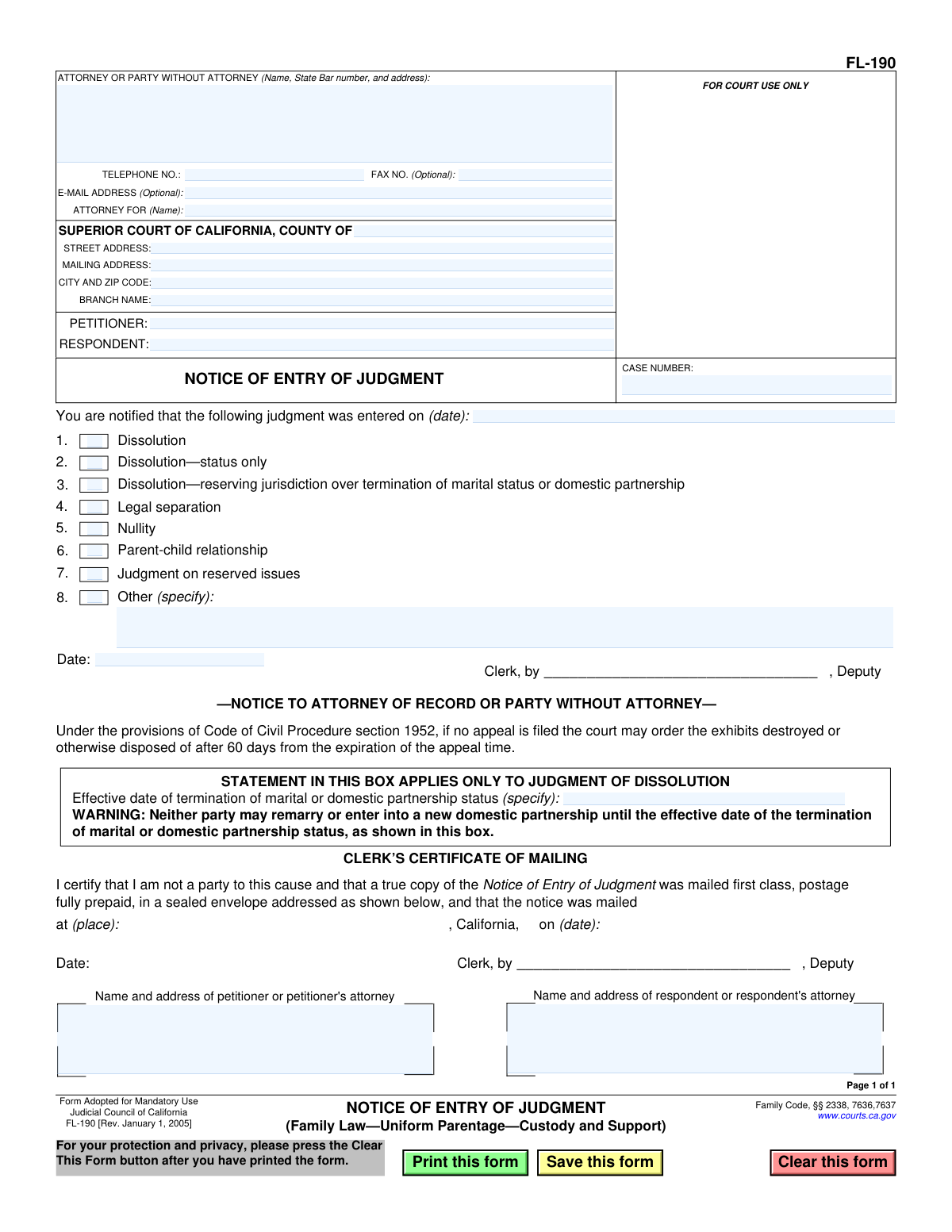
Yes! You can use AI to fill out Form FL-190, Notice of Entry of Judgment (Family Law—Uniform Parentage—Custody and Support)
California Form FL-190, Notice of Entry of Judgment, is a mandatory legal document used by the court clerk to inform all parties in a family law case that a final judgment has been officially recorded. This notice is critical as it establishes the official date of the judgment, which starts the clock for filing appeals or other post-judgment motions. Today, this form can be filled out quickly and accurately using AI-powered services like Instafill.ai, which can also convert non-fillable PDF versions into interactive fillable forms.
FL-190 is part of the
California court forms, California legal forms, family court forms, family law forms, legal judgment forms, legal notice forms and legal separation forms categories on Instafill.
Our AI automatically handles information lookup, data retrieval, formatting, and form filling.
It takes less than a minute to fill out FL-190 using our AI form filling.
Securely upload your data. Information is encrypted in transit and deleted immediately after the form is filled out.
Form specifications
| Form name: | Form FL-190, Notice of Entry of Judgment (Family Law—Uniform Parentage—Custody and Support) |
| Number of fields: | 32 |
| Number of pages: | 1 |
| Language: | English |
Instafill Demo: How to fill out PDF forms in seconds with AI
How to Fill Out FL-190 Online for Free in 2026
Are you looking to fill out a FL-190 form online quickly and accurately? Instafill.ai offers the #1 AI-powered PDF filling software of 2026, allowing you to complete your FL-190 form in just 37 seconds or less.
Follow these steps to fill out your FL-190 form online using Instafill.ai:
- 1 Navigate to Instafill.ai and upload or select the FL-190 Notice of Entry of Judgment form.
- 2 Provide the court information, including the county, court address, and branch name.
- 3 Enter the names of the petitioner and respondent, along with the case number.
- 4 Input the name, address, and contact information for the attorney or self-represented party.
- 5 Specify the date the judgment was entered and check the box that corresponds to the type of judgment (e.g., Dissolution, Parent-child relationship, etc.).
- 6 Review the information populated by the AI to ensure all details are correct before the clerk signs, dates, and certifies the mailing.
- 7 Download the completed form for your records, which will then be officially filed and mailed by the court clerk.
Our AI-powered system ensures each field is filled out correctly, reducing errors and saving you time.
Why Choose Instafill.ai for Your Fillable FL-190 Form?
Speed
Complete your FL-190 in as little as 37 seconds.
Up-to-Date
Always use the latest 2026 FL-190 form version.
Cost-effective
No need to hire expensive lawyers.
Accuracy
Our AI performs 10 compliance checks to ensure your form is error-free.
Security
Your personal information is protected with bank-level encryption.
Frequently Asked Questions About Form FL-190
This form is an official notice from the court clerk informing all parties that a final judgment has been officially entered into the court's record for a family law case. It specifies the date the judgment was entered and the type of judgment, such as dissolution or a parent-child relationship order.
The court clerk completes, signs, and mails this form to both parties (or their attorneys) after the judge signs the final judgment. While you may be required to prepare a proposed version to submit with your judgment packet, the clerk handles the final, official notice.
Receiving this form signifies that your family law case has concluded and a final, legally binding judgment has been made by the court. This notice officially starts the timeline for any potential appeals.
The judgment date is when the court officially recorded your judgment. The 'effective date of termination' applies only to dissolution (divorce) cases and is the specific date your marital or domestic partnership status legally ends, making you single again.
This warning is critical for dissolution cases, as it explicitly states that neither party may legally remarry or enter a new domestic partnership until after the 'effective date of termination' shown on the form.
The clerk checks the box that corresponds to the specific legal action that was finalized in your case. This clarifies whether the judgment was for a divorce, legal separation, nullity, or establishing a parent-child relationship, among other options.
You should carefully review the notice for accuracy and keep it in a safe place for your personal records. The date on this form is important as it marks the beginning of the time limit to file an appeal if you disagree with the judgment.
The Notice of Entry of Judgment starts the clock on your time to appeal. You must file a notice of appeal within a strict deadline, so you should immediately consult an attorney or the California Rules of Court to understand the process and time limits.
This section is the court clerk's sworn statement certifying that a true copy of the notice was mailed to both parties at the addresses listed. It serves as official proof that everyone involved in the case has been notified of the judgment.
The form warns that if no appeal is filed, trial exhibits may be destroyed 60 days after the appeal deadline passes. To retrieve your exhibits, you must contact the court clerk and make arrangements to pick them up before they are disposed of.
Yes, when you need to prepare a proposed Notice of Entry of Judgment to submit with your final paperwork, AI-powered services like Instafill.ai can help. These tools can accurately auto-fill your case number, party names, and court information, saving time and preventing errors.
Simply upload the FL-190 PDF to the Instafill.ai platform. It will become an interactive form, allowing you to type your information directly into the fields, save your progress, and download the completed document for filing.
If you have a non-fillable or 'flat' PDF, you can use a service like Instafill.ai to make it interactive. Upload the document, and the platform will automatically convert it into a fillable form that you can complete on your computer.
Compliance FL-190
Validation Checks by Instafill.ai
1
Case Number Presence
This check ensures that the 'CASE NUMBER' field is not empty. The case number is a critical and unique identifier for the legal proceeding within the court system. Without a case number, the form cannot be correctly filed or associated with the appropriate case record, rendering it invalid for court use.
2
Mandatory Judgment Type Selection
This validation verifies that at least one checkbox from items 1 through 8, specifying the type of judgment, has been selected. The primary purpose of this form is to give notice of a specific judgment, so this selection is fundamental. A submission without a judgment type selected is incomplete and fails to convey the necessary information.
3
Conditional Requirement for 'Specify' Fields
This check ensures that if the checkbox for 'Judgment on reserved issues' (item 7) or 'Other' (item 8) is selected, the corresponding text field for specification is filled out. This additional detail is required to understand the nature of the judgment. Failure to provide this specification makes the notice ambiguous and potentially unenforceable.
4
Valid Judgment Entry Date Format
This validation confirms that the date entered for when the judgment was entered is a valid, properly formatted date (e.g., MM/DD/YYYY). It also checks that the date is not in the future. An invalid or future date is logically impossible and would invalidate the notice.
5
Petitioner and Respondent Name Completeness
This check verifies that the names of both the 'PETITIONER' and 'RESPONDENT' are provided. These names are essential for identifying the parties involved in the legal action. A form missing either name is ambiguous and cannot be properly processed or served.
6
Mandatory Court County
This validation ensures that the 'COUNTY OF' field for the Superior Court is completed. This information specifies the exact court jurisdiction that issued the judgment. Without the county, the notice is not specific enough to be legally valid and cannot be correctly routed or filed.
7
Filing Party Information Completeness
This check ensures that the name and address block for the 'ATTORNEY OR PARTY WITHOUT ATTORNEY' is filled out. This information identifies the person or firm submitting the notice and provides essential contact details for the court and other parties. An omission here can lead to filing rejection or communication failures.
8
Logical Date Sequence for Mailing
This validation compares the 'judgment was entered on' date with the 'notice was mailed on' date in the Clerk's Certificate of Mailing. The mailing date must be on or after the judgment entry date. It is logically impossible to mail a notice of an event before it has occurred, and a failure indicates a data entry error.
9
Logical Termination Date
This check validates that the 'Effective date of termination of marital or domestic partnership status', if entered, is on or after the date the judgment was entered. The legal termination of a relationship cannot predate the judgment that grants it. This check prevents logical and legal inconsistencies on the form.
10
Certificate of Mailing Completeness
This validation verifies that the place of mailing ('at (place)') and date of mailing ('on (date)') are both filled in on the 'CLERK’S CERTIFICATE OF MAILING'. These details are required to create a formal record of when and where the notice was served by the clerk. An incomplete certificate can be challenged and may invalidate the proof of service.
11
Mailing Address Presence for All Parties
This check ensures that the name and address blocks for both the petitioner's and respondent's sides are completed in the mailing certificate section. The clerk cannot fulfill their duty to mail the notice if the addresses are missing. This is a critical check to ensure proper service to all parties.
12
Phone Number Format Validation
This check verifies that if a value is entered in the 'TELEPHONE NO.' field, it conforms to a standard phone number format. While optional, providing a correctly formatted number ensures that the contact information is usable and professional. An improperly formatted number can hinder communication if the court or other parties need to make contact.
13
'Attorney For' Party Specification
This validation ensures that if an attorney is identified in the top contact block (e.g., by the presence of a State Bar number), the 'ATTORNEY FOR (Name)' field is also completed. This is crucial for clarifying which party (Petitioner or Respondent) the attorney represents. Omitting this information creates ambiguity regarding legal representation.
Common Mistakes in Completing FL-190
Saved over 80 hours a year
“I was never sure if my IRS forms like W-9 were filled correctly. Now, I can complete the forms accurately without any external help.”
Kevin Martin Green
Your data stays secure with advanced protection from Instafill and our subprocessors

Robust compliance program
Transparent business model
You’re not the product. You always know where your data is and what it is processed for.
ISO 27001, HIPAA, and GDPR
Our subprocesses adhere to multiple compliance standards, including but not limited to ISO 27001, HIPAA, and GDPR.
Security & privacy by design
We consider security and privacy from the initial design phase of any new service or functionality. It’s not an afterthought, it’s built-in, including support for two-factor authentication (2FA) to further protect your account.
Fill out FL-190 with Instafill.ai
Worried about filling PDFs wrong? Instafill securely fills form-fl-190-notice-of-entry-of-judgment-family-lawuniform-parentagecustody-and-support forms, ensuring each field is accurate.