
Yes! You can use AI to fill out Form FL-160, Property Declaration (Family Law)
Don't type 528 fields by hand. Tell our AI about yourself, or upload a document you already have, and it fills every field in seconds. You check it, then download, print or sign.
The AI does the filling. You just check it.
No typing into boxes, nothing to install.
What this form asks for
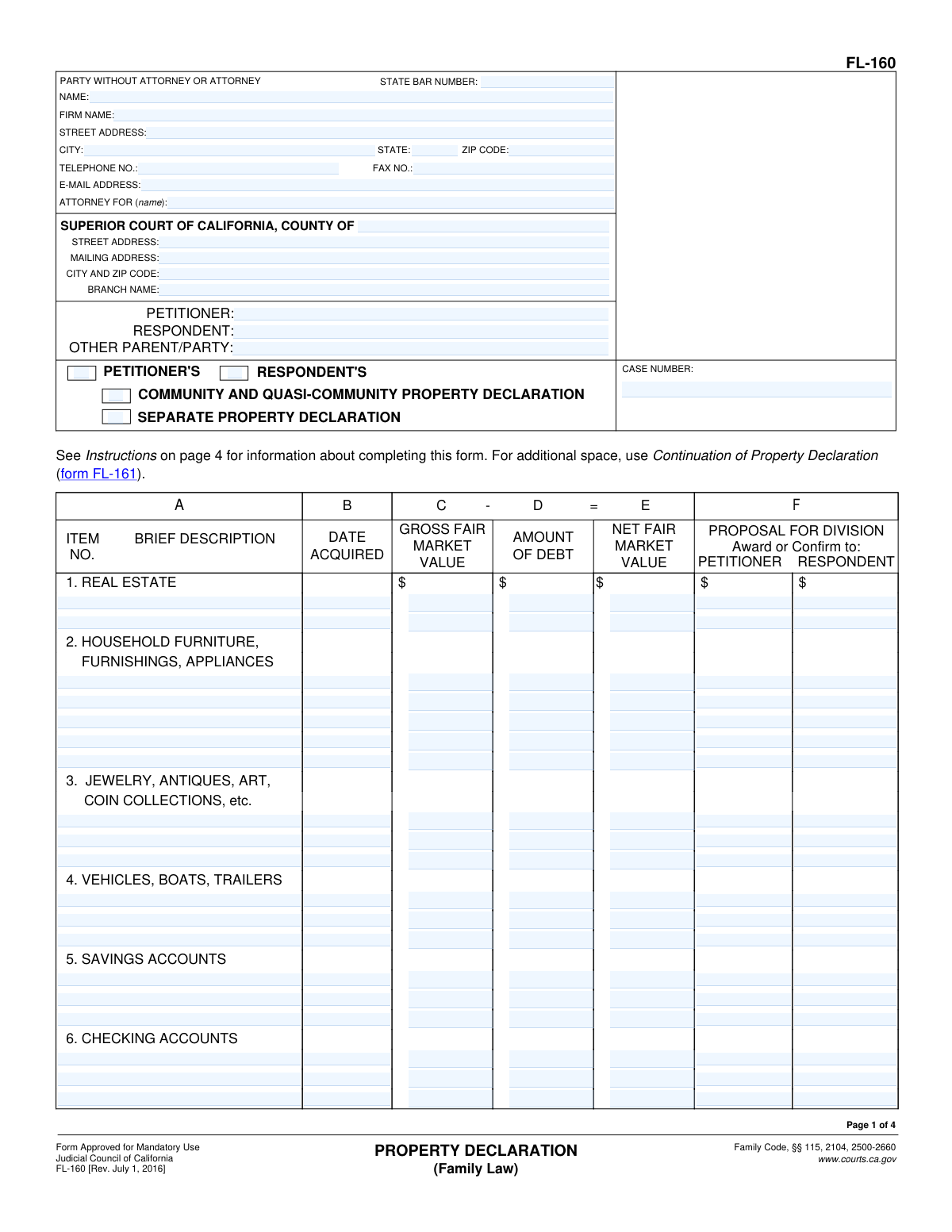
The AI fills all of it, from your answers or your documents.
The AI checks your answers before you download
13 checks built for this form, so a wrong date or a missing answer is caught before anyone else sees it.
This check ensures that exactly one filer (Petitioner or Respondent) and one property type (Community or Separate) are selected at the top of the form. These selections are mandatory to define the context and ownership of the declaration. If either selection is missing or if both options in a category are checked, the form is ambiguous and cannot be processed correctly.
Verifies that the essential case identifiers, specifically the Petitioner's Name, Respondent's Name, and the Case Number, are filled out. This information is critical for associating the property declaration with the correct legal case in the court's records. A submission lacking these details would be unfileable and would be rejected.
For each asset listed on pages 1 and 2, this validation confirms that the 'Net Fair Market Value' (Column E) correctly equals the 'Gross Fair Market Value' (Column C) minus the 'Amount of Debt' (Column D). This ensures the mathematical accuracy of the financial data presented, which is fundamental for equitable property division. Any row with a calculation error will be flagged for correction.
This check validates that the values in the 'Total Assets' row (Item 18) are the accurate sum of all corresponding columns (Gross Fair Market Value, Amount of Debt, Net Fair Market Value) for items 1 through 17. Correct totals are crucial for providing an accurate summary of the estate's value. If the totals do not match the sum of the individual entries, the form will be considered erroneous.
Verifies that the 'Total Debts' amount in row 26 is the correct sum of the 'Total Owing' column for all individual debts listed in items 19 through 25. This ensures the overall debt liability is calculated correctly, which is as important as the total assets for the case. A mismatch would require the filer to review and correct the debt entries or the total.
This check ensures that all date fields, such as 'Date Acquired' for assets and 'Date Incurred' for debts, are entered in a valid format (e.g., MM/DD/YYYY). It also validates that the dates are not in the future. This is important for establishing the timeline of acquisitions and liabilities relative to the marriage and separation dates, and failure to provide a valid date can lead to legal challenges.
And 7 more checks
- Asset Row Integrity
- Debt Row Integrity
- Signature Block Completion
- Continuation Sheet Cross-Check
- Monetary Field Numeric Validation
- Division Proposal Completeness
- Attorney Bar Number Requirement
Let AI fill out your FL-160
No typing. Every field filled in seconds, checked, ready to sign.
How to Fill Out FL-160 Online for Free in 2026
What the AI walks you through.
- Navigate to Instafill.ai and upload or select the FL-160 Property Declaration form.
- Enter the court information, party names (petitioner and respondent), and the case number in the header section.
- Indicate whether you are the petitioner or respondent and check the box for either 'Community and Quasi-Community Property Declaration' or 'Separate Property Declaration'.
- Complete the assets section by providing a brief description, acquisition date, gross value, and any debt for each item, such as real estate, vehicles, and bank accounts.
- Fill out the debts section by listing all obligations like student loans, credit cards, and taxes, including to whom it's owed, the date incurred, and the total amount.
- For each asset and debt, specify your proposal for division by indicating whether it should be awarded to the petitioner or the respondent.
- Carefully review all the information provided, then date and e-sign the declaration under penalty of perjury before downloading for your records or filing.
Common Mistakes in Completing FL-160
The ones the AI is built to catch.
Confusing Community and Separate Property
Providing Vague Asset and Debt Descriptions
Misstating Gross Fair Market Value (FMV)
Making Mathematical and Calculation Errors
Failing to Include Required Supporting Documents
Omitting or Guessing Dates of Acquisition
Miscategorizing Assets and Debts
Completing the Wrong Columns for the Form's Purpose
Ambiguous Proposal for Division
Forgetting to Sign and Date the Declaration
Frequently Asked Questions About FL-160
Is it really free for 7 days?
Can I fill other forms too?
How do I cancel?
How does the AI fill out FL-160?
What happens to my information?
How complex is FL-160 to fill out?
What is the purpose of the Property Declaration (FL-160) form?
Who needs to fill out the FL-160 form?
Can I list both community and separate property on the same form?
What documents do I need to attach when serving this form for disclosure?
How do I determine the 'Gross Fair Market Value' for an item?
What's the difference between 'Gross Fair Market Value' and 'Net Fair Market Value'?
What should I do if I have more assets or debts than will fit on the form?
What does 'Proposal for Division' mean?
Do I have to fill out every column on the form?
Can AI tools help me fill out this form?
How can I fill out the Property Declaration form online?
The PDF I downloaded is not fillable. What can I do?
Where do I sign the Property Declaration?
Get your FL-160 filled out by AI
$0 today. Cancel before Nov 1 and you pay nothing.
Other forms like this one
California court forms: Judicial Council of California Form SC-105, Request for Court Order and Answer (Small Claims), Judicial Council of California Form SC-120, Defendant’s Claim and ORDER to Go to Small Claims Court (Small Claims), Judicial Council of California Form SER-001, Request for Sheriff to Serve Court Papers, Judicial Council of California Form SER-001, Request for Sheriff to Serve Court Papers, Affidavit for Collection of Personal Property California Probate Code Section 13100, Form POS-040, Proof of Service—Civil, Declaration of Facts of Death (California Superior Court), declaration-of-marriage-for-court-proceeding-california-family-law, ADOPT-200, Adoption Request, ADOPT-200, Stepparent Adoption Request, ADOPT-210, Adoption Agreement, ADOPT-310, Contact After Adoption Agreement, Judicial Council of California Form ADOPT-200, Adoption Request, Form ADR-107, Mediation Attendance Sheet, Form ADR-110, Order Appointing Referee, Form ADR-109, Stipulation or Motion for Order Appointing Referee, Form ADR-102, Request for Trial De Novo After Judicial Arbitration, Form ADR-108, Referee's Report (Code Civ. Proc., §§ 638, 639), Form ADR-106, Petition to Confirm, Correct, or Vacate Contractual Arbitration Award, Form ADR-104, Rejection of Award and Request for Trial After Attorney-Client Fee Arbitration
family law forms: Form 12.902(b), Family Law Financial Affidavit (Short Form), Florida Supreme Court Approved Family Law Form 12.901(b)(3), Petition for Dissolution of Marriage with No Dependent or Minor Child(ren) or Property (02/18), Form FL-170, Declaration for Default or Uncontested Dissolution or Legal Separation (Family Law), Form FL-100, Petition—Marriage/Domestic Partnership (Family Law), declaration-of-marriage-for-court-proceeding-california-family-law, Florida Supreme Court Approved Family Law Form 12.902(d), Uniform Child Custody Jurisdiction and Enforcement Act (UCCJEA) Affidavit, Florida Family Law Rules of Procedure Form 12.910(a), Summons: Personal Service on an Individual, Florida Supreme Court Approved Family Law Form 12.941(a), Petition for Enforcement of Out-of-State Custody Decree and for Order to Pick Up Minor Child(ren), Florida Supreme Court Approved Family Law Form 12.970(a), Petition for Temporary Custody by Extended Family, Form FL-110, Summons (Family Law), Form FL-120, Response—Marriage/Domestic Partnership (Family Law), ADOPT-200, Adoption Request, ADOPT-200, Stepparent Adoption Request, ADOPT-210, Adoption Agreement, ADOPT-310, Contact After Adoption Agreement, Adoption Assistance Program Nonrecurring Adoption Expense Agreement and Claim, Adoption Request (Stepparent), Adoption and Safe Families Act (ASFA) Survey, Florida Family Law Rules of Procedure Form 12.900(b), Notice of and Consent to Limited Appearance, Florida Family Law Rules of Procedure Form 12.900(d), Termination of Limited Appearance
legal separation forms: Form FL-170, Declaration for Default or Uncontested Dissolution or Legal Separation, Form FL-170, Declaration for Default or Uncontested Dissolution or Legal Separation (Family Law), Form FL-115, Proof of Service of Summons (Family Law—Uniform Parentage—Custody and Support), Form FL-140, Declaration of Disclosure (Family Law), Form FL-145, Form Interrogatories—Family Law, Form FL-191, Child Support Case Registry Form, Form FL-195, Income Withholding for Support, Form FL-141, Declaration Regarding Service of Declaration of Disclosure and Income and Expense Declaration, Form FL-190, Notice of Entry of Judgment (Family Law—Uniform Parentage—Custody and Support), Form FL-180, Judgment (Family Law), Proposed Divorce / Legal Separation Resolution Statement
California legal forms: Form FL-115, Proof of Service of Summons (Family Law—Uniform Parentage—Custody and Support), Form FL-140, Declaration of Disclosure (Family Law), Form FL-145, Form Interrogatories—Family Law, Form FL-191, Child Support Case Registry Form, Form FL-195, Income Withholding for Support, Form FL-141, Declaration Regarding Service of Declaration of Disclosure and Income and Expense Declaration, Form FL-190, Notice of Entry of Judgment (Family Law—Uniform Parentage—Custody and Support), Form FL-180, Judgment (Family Law), Form FL-341(E), Joint Legal Custody Attachment
family court forms: Form 12.995(c), Safety-Focused Parenting Plan, Florida Supreme Court Approved Family Law Form 12.901(b)(3), Petition for Dissolution of Marriage with No Dependent or Minor Child(ren) or Property (02/18), Form N161, Appellant’s notice (All appeals except small claims track appeals and appeals to the Family Division of the High Court), Form N161, Appellant's Notice (All appeals except small claims track appeals and appeals to the Family Division of the High Court), declaration-of-marriage-for-court-proceeding-california-family-law, Florida Supreme Court Approved Family Law Form 12.902(d), Uniform Child Custody Jurisdiction and Enforcement Act (UCCJEA) Affidavit, Florida Supreme Court Approved Family Law Form 12.941(a), Petition for Enforcement of Out-of-State Custody Decree and for Order to Pick Up Minor Child(ren), Florida Supreme Court Approved Family Law Form 12.970(a), Petition for Temporary Custody by Extended Family, Adoption Request (Stepparent), Florida Family Law Rules of Procedure Form 12.900(b), Notice of and Consent to Limited Appearance, Florida Family Law Rules of Procedure Form 12.900(d), Termination of Limited Appearance, Florida Family Law Rules of Procedure Form 12.900(e), Acknowledgment of Assistance by Attorney, Florida Family Law Rules of Procedure Form 12.900(g), Agreement Limiting Representation, Florida Family Law Rules of Procedure Form 12.900(h), Notice of Related Cases, Florida Family Law Rules of Procedure Form 12.901(a), Joint Petition for Simplified Dissolution of Marriage, Form 12.902(b), Family Law Financial Affidavit (Short Form), Florida Family Law Rules of Procedure Form 12.902(c), Family Law Financial Affidavit (Long Form), Florida Family Law Rules of Procedure Form 12.902(e), Child Support Guidelines Worksheet, Florida Supreme Court Approved Family Law Form 12.902(f)(1), Marital Settlement Agreement for Dissolution of Marriage with Dependent or Minor Child(ren), Florida Supreme Court Approved Family Law Form 12.902(f)(2), Marital Settlement Agreement for Dissolution of Marriage with Property but No Dependent or Minor Child(ren)
Let AI fill out your FL-160
Your trial starts once a card is added. You pay nothing before Nov 1.
Our AI already knows this form, all 528 fields of it. Skip the typing: tell it about yourself, or upload what you have, and it fills the whole form in seconds.
- AI fills every field on all 4 pages, checkboxes included
- No typing into boxes: answer a few questions, or upload a document you already have, an old copy of this form, a photo of a document
- The AI checks the answers; you review and change anything before you download
- Download the finished PDF, print it, or sign it online
- Encrypted, and never used to train AI
Cancel before Nov 1 and you pay nothing.
A card is needed to start the trial. Cancel in two clicks from your account.
Terms · Privacy