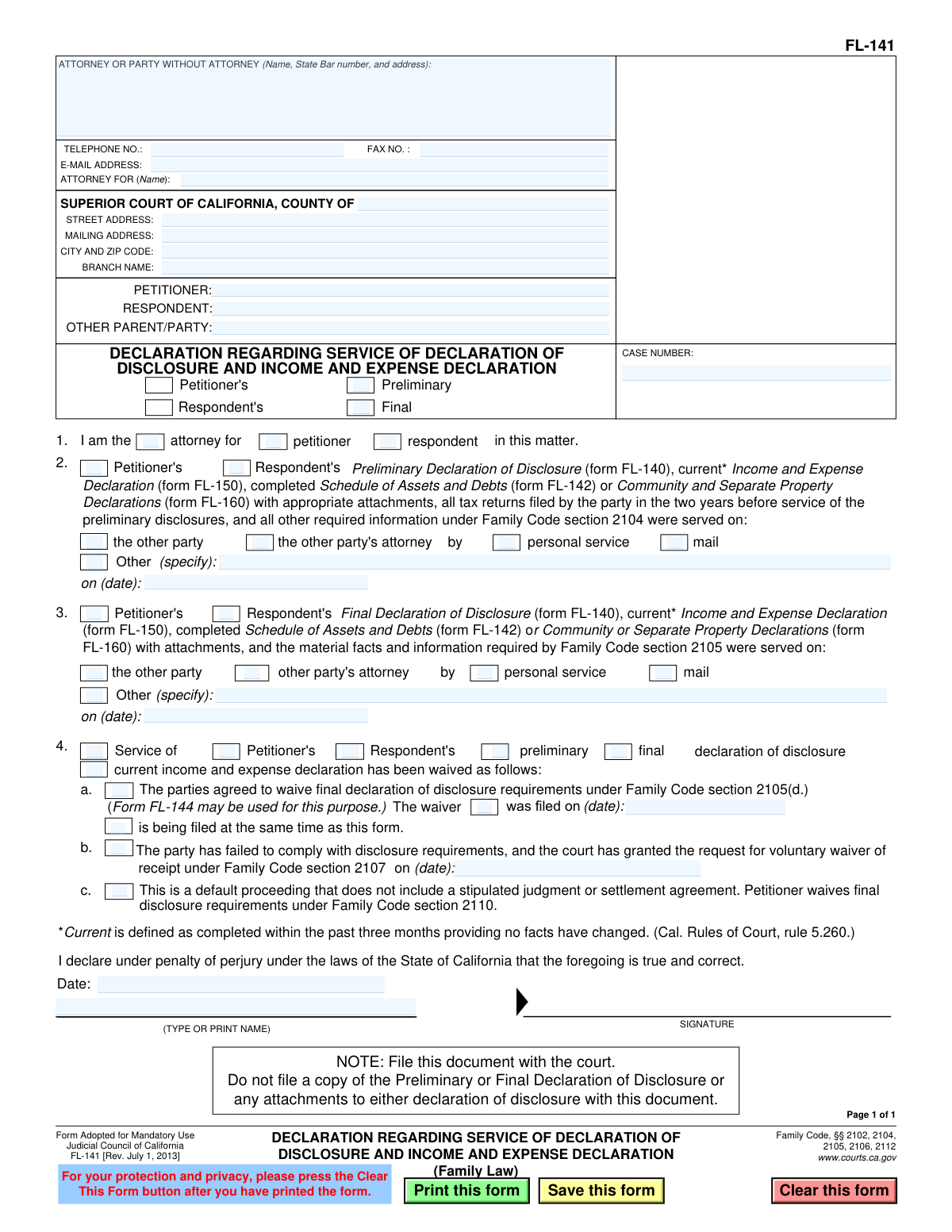
Yes! You can use AI to fill out Form FL-141, Declaration Regarding Service of Declaration of Disclosure and Income and Expense Declaration

Form FL-141 is a mandatory California Judicial Council form used in family law proceedings to declare to the court that you have served your financial disclosures on the other party. It confirms that documents like the Declaration of Disclosure (FL-140) and Income and Expense Declaration (FL-150) have been properly delivered, ensuring transparency in the division of assets and debts. Today, this form can be filled out quickly and accurately using AI-powered services like Instafill.ai, which can also convert non-fillable PDF versions into interactive fillable forms.
Our AI automatically handles information lookup, data retrieval, formatting, and form filling.
It takes less than a minute to fill out FL-141 using our AI form filling.
Securely upload your data. Information is encrypted in transit and deleted immediately after the form is filled out.

Form specifications

Form name: Form FL-141, Declaration Regarding Service of Declaration of Disclosure and Income and Expense Declaration
Number of fields: 57
Number of pages: 1
Language: English
main-image

Instafill Demo: How to fill out PDF forms in seconds with AI

How to Fill Out FL-141 Online for Free in 2026

Are you looking to fill out a FL-141 form online quickly and accurately? Instafill.ai offers the #1 AI-powered PDF filling software of 2026, allowing you to complete your FL-141 form in just 37 seconds or less.
Follow these steps to fill out your FL-141 form online using Instafill.ai:
  1. 1 Navigate to Instafill.ai and upload or select Form FL-141 from the form library.
  2. 2 Use the AI-powered tool to automatically fill in the court and case information at the top of the form.
  3. 3 Identify yourself as the petitioner, respondent, or attorney, and specify whose disclosure documents are being served.
  4. 4 Check the appropriate boxes to indicate whether you are serving the Preliminary or Final Declaration of Disclosure.
  5. 5 Enter the date and method of service (e.g., personal service, mail) used to deliver the documents to the other party or their attorney.
  6. 6 If applicable, complete the section regarding any court-approved waivers of the final declaration of disclosure.
  7. 7 Review all entered information for accuracy, then electronically sign and date the declaration before downloading the completed form for filing with the court.

Our AI-powered system ensures each field is filled out correctly, reducing errors and saving you time.

Why Choose Instafill.ai for Your Fillable FL-141 Form?

Speed

Complete your FL-141 in as little as 37 seconds.

Up-to-Date

Always use the latest 2026 FL-141 form version.

Cost-effective

No need to hire expensive lawyers.

Accuracy

Our AI performs 10 compliance checks to ensure your form is error-free.

Security

Your personal information is protected with bank-level encryption.

Frequently Asked Questions About Form FL-141

This form is used to inform the court that you have served your financial disclosure documents on the other party in your family law case. It acts as your official proof that you have completed this required step.

Both the petitioner and the respondent in a family law case must each complete and file their own FL-141. This proves to the court that both sides have exchanged their financial information as required by law.

No, this is very important. You only file Form FL-141 with the court. Do not attach your private financial documents like the Declaration of Disclosure (FL-140), tax returns, or bank statements.

The Preliminary Declaration of Disclosure is exchanged at the beginning of a case. The Final Declaration is a more updated and complete version exchanged before a settlement or trial, unless both parties agree to waive it.

Before filing this form, you must serve your Declaration of Disclosure (FL-140), a current Income and Expense Declaration (FL-150), a Schedule of Assets and Debts (FL-142), and your tax returns from the last two years.

In these sections, you must indicate whether you served the other party or their attorney, the method of service (e.g., personal service, mail), and the exact date the service was completed.

Parties can mutually agree in writing to skip the exchange of Final Declarations of Disclosure, often to save time and expense when a full settlement is near. This waiver must be filed with the court.

The signed Form FL-141 should be filed with the clerk of the Superior Court where your case is being heard. You must also send a copy to the other party or their attorney.

No. Form FL-140 is the actual disclosure of your finances. Form FL-141 is the separate form you file with the court to prove that you have given a copy of your FL-140 and other financial documents to the other party.

Failing to file proof that you served your disclosures can significantly delay your case. A judge cannot enter a final judgment until the disclosure requirements are met by both parties.

Yes, services like Instafill.ai use AI to auto-fill form fields accurately and save time. This can help you fill in your case information and other details quickly and reduce the chance of errors.

You can use Instafill.ai to easily complete this form online. Simply upload the form, and the AI will make the fields interactive, allowing you to type your information directly before printing for signature and filing.

If you have a non-fillable PDF, you can use a service like Instafill.ai. It can convert flat, non-interactive PDFs into fillable forms that you can easily complete on your computer.

Compliance FL-141
Validation Checks by Instafill.ai

1
Case Identification Completeness
This check ensures that the Case Number, Petitioner name, and Respondent name fields are all populated. These fields are essential for associating the declaration with the correct legal case and parties. If this information is missing, the court clerk will reject the filing as it cannot be properly docketed.
2
Exclusive Disclosure Type Selection
Validates that exactly one of the 'Preliminary' or 'Final' checkboxes is selected in the form's title section. The form serves different purposes depending on which is chosen, and selecting both or neither creates ambiguity. A failed validation would prompt the user to clarify which type of disclosure declaration is being served.
3
Declaring Party Identification
Ensures that either 'Petitioner's' or 'Respondent's' is selected next to the 'Preliminary'/'Final' checkboxes in the header. This identifies which party is making the declaration. Without this, it's unclear whose disclosure is being referenced, making the document invalid for its legal purpose.
4
Declarant Role Specified
Verifies that in Section 1, the user has identified their role by checking at least one box (e.g., 'petitioner', 'respondent', or 'attorney for' a party). This declaration is made under penalty of perjury, so the identity and capacity of the declarant must be clearly established. Failure to specify the role makes the declaration legally insufficient.
5
Preliminary Service Details Consistency
If 'Preliminary' is checked in the header, this validation ensures Section 2 is fully completed. It requires a recipient ('the other party' or 'the other party's attorney'), a method of service, and a valid date in the 'on (date)' field. Incomplete service information invalidates the proof of service, which is the primary purpose of this form.
6
Final Declaration Logic Check
If 'Final' is checked in the header, this validation confirms that either Section 3 (detailing the service of the final declaration) is completed OR an option in Section 4 (detailing a waiver) is selected. A final declaration must either be served or formally waived; this check prevents a submission that attests to neither action.
7
Required Specification for 'Other' Service Method
Checks that if the 'Other' checkbox for method of service is selected in either Section 2 or Section 3, the corresponding 'specify' text field is not empty. The court needs to know the specific method used for service to determine if it was legally valid. An empty specification field makes the method of service unclear and potentially invalid.
8
Valid Date Format
Ensures that all date fields on the form (e.g., service dates, waiver dates, signature date) are entered in a valid and recognizable format, such as MM/DD/YYYY. This prevents data entry errors and ensures the dates are machine-readable and unambiguous for the court record. An invalid format would require user correction before submission.
9
Logical Date Plausibility
This check verifies that all entered dates are plausible. For example, a service date or signature date cannot be in the future. Furthermore, the signature date should logically occur on or after any service dates mentioned in the document. This prevents nonsensical or fraudulent date entries.
10
Waiver Date Requirement
If the checkbox in Section 4b ('The party has failed to comply...') is checked, this validation ensures the corresponding 'on (date)' field is filled with a valid date. The date is a critical piece of information for the court to understand when the waiver was granted. A missing date would render this section incomplete.
11
Mutually Exclusive Waiver Filing Status
In Section 4, this check ensures the user selects either that the waiver 'was filed on (date)' OR 'is being filed at the same time as this form,' but not both. These are mutually exclusive statuses. If 'was filed on' is selected, it also validates that the date field is completed.
12
Signature Block Completion
Validates that the declarant's printed name and the signature date are both provided at the bottom of the form. A declaration under penalty of perjury is invalid without the declarant's name and the date of signing. This check ensures these fundamental requirements for a legal declaration are met.
13
Email Address Format Validation
This check verifies that if an email address is entered in the header, it conforms to a standard email format (e.g., '[email protected]'). This is important for ensuring that any electronic communications or notifications sent by the court or other parties are deliverable. An invalid format would trigger an error, prompting the user to correct the entry.
14
Phone Number Format Validation
This validation ensures that the telephone number, if provided, follows a standard format (e.g., contains 10 digits, possibly with parentheses or dashes). Proper formatting ensures the number is valid and can be used for communication if necessary. It helps maintain data quality and usability for the court and other parties.

Common Mistakes in Completing FL-141

Attaching Prohibited Disclosure Documents

Filers mistakenly attach their detailed financial disclosures (like forms FL-140, FL-150, or FL-142) when filing this FL-141 form with the court. This happens because they bundle all related paperwork together, but the form explicitly states these sensitive documents should only be served on the other party, not filed with the court, to protect privacy. This error can lead to the entire filing being rejected and exposes private financial information in a public court file. Always file only the FL-141 form itself with the court.

Confusing Preliminary vs. Final Disclosures

Users often fill out the wrong section, for example, completing Section 3 for a preliminary disclosure or checking both 'Preliminary' and 'Final' in the caption. This misrepresents the current stage of the legal proceedings and creates confusion for the court. This can result in the form being rejected and requiring refiling. Carefully determine which disclosure you have served and only fill out the corresponding section (Section 2 for Preliminary, Section 3 for Final).

Contradicting Service and Waiver Declarations

A person might incorrectly check a box in Section 2 or 3 indicating they served their disclosures, while also checking a waiver box in Section 4. This often stems from confusion about the form's purpose, as serving disclosures and waiving them are mutually exclusive actions. This contradiction will cause the court to reject the form, delaying the case until a corrected and logically consistent declaration is filed. Before filling, determine if you are declaring service or a waiver, and only complete the relevant section.

Missing or Incorrect Date of Service

The 'on (date)' field in Section 2 or 3 is frequently left blank or filled with an incorrect date, such as the date of signing rather than the date of actual service. The date of service is a critical legal fact that establishes deadlines and compliance with court rules. A missing or inaccurate date can invalidate the proof of service, potentially requiring the party to re-serve all documents and file a new declaration, causing significant delays.

Incomplete Header Information

Parties often forget to fill out the complete court address, case number, or party names in the header section. This happens due to oversight or assuming the information is already known. An incomplete or incorrect header can lead to the document being rejected by the clerk or misfiled in the wrong case, delaying legal proceedings. Using a tool like Instafill.ai can help by auto-populating case information consistently across all related forms.

Improperly Claiming a Waiver

In Section 4, a party may check a waiver box without meeting the specific legal requirements for that waiver, such as checking 4a without a signed agreement from the other party. This misunderstanding of legal procedure renders the declaration invalid. The court will disregard the claimed waiver, which can halt case progress until the proper disclosure is either served or a legally valid waiver is executed and declared.

Forgetting to File the Separate Waiver Form

When checking a box in Section 4 to declare a waiver, filers often forget that this FL-141 form does not constitute the waiver itself. They must also file the actual waiver agreement (e.g., Form FL-144) either before or at the same time. Failing to file the underlying waiver document means the declaration on FL-141 is unsupported and has no effect, leading to non-compliance with disclosure rules.

Missing Signature or Date of Signing

Forgetting to physically or digitally sign the form and enter the date of signing at the bottom is a frequent and critical error. An unsigned declaration is legally invalid and has no effect, as it is not made 'under penalty of perjury'. The court clerk will reject an unsigned form, forcing the filer to resubmit and potentially miss important deadlines.

Ambiguous Filer Identity

In the caption and in Section 1, filers sometimes neglect to check the box indicating whether they are the 'Petitioner' or 'Respondent'. This creates ambiguity about whose declaration of service this is, which is essential information for the court and the opposing party. This simple oversight can lead to rejection of the form for being unclear. AI-powered form fillers like Instafill.ai can help prevent this by ensuring all required checkboxes are addressed before finalization.

Incorrectly Identifying Who Was Served

In Sections 2 and 3, people often make mistakes when indicating who received the documents, for example, checking 'the other party' when service was actually made on 'the other party's attorney'. Proper service depends on serving the correct individual or their legal representative as required by court rules. This error can invalidate the service, requiring the entire process to be repeated, which wastes time and money. If the form is a non-fillable PDF, Instafill.ai can convert it to a fillable version to make selecting the correct options easier.
Saved over 80 hours a year

“I was never sure if my IRS forms like W-9 were filled correctly. Now, I can complete the forms accurately without any external help.”

Kevin Martin Green

Your data stays secure with advanced protection from Instafill and our subprocessors

Robust compliance program

Transparent business model

You’re not the product. You always know where your data is and what it is processed for.

ISO 27001, HIPAA, and GDPR

Our subprocesses adhere to multiple compliance standards, including but not limited to ISO 27001, HIPAA, and GDPR.

Security & privacy by design

We consider security and privacy from the initial design phase of any new service or functionality. It’s not an afterthought, it’s built-in, including support for two-factor authentication (2FA) to further protect your account.

Fill out FL-141 with Instafill.ai

Worried about filling PDFs wrong? Instafill securely fills form-fl-141-declaration-regarding-service-of-declaration-of-disclosure-and-income-and-expense-declaration forms, ensuring each field is accurate.

Related forms by category

California court forms Judicial Council of California Form SC-105, Request for Court Order and Answer (Small Claims), Judicial Council of California Form SC-120, Defendant’s Claim and ORDER to Go to Small Claims Court (Small Claims), Judicial Council of California Form SER-001, Request for Sheriff to Serve Court Papers, Judicial Council of California Form SER-001, Request for Sheriff to Serve Court Papers, Affidavit for Collection of Personal Property California Probate Code Section 13100, Form POS-040, Proof of Service—Civil, Declaration of Facts of Death (California Superior Court), declaration-of-marriage-for-court-proceeding-california-family-law, ADOPT-200, Adoption Request, ADOPT-200, Stepparent Adoption Request, ADOPT-210, Adoption Agreement, ADOPT-310, Contact After Adoption Agreement, Judicial Council of California Form ADOPT-200, Adoption Request, Form ADR-107, Mediation Attendance Sheet, Form ADR-110, Order Appointing Referee, Form ADR-109, Stipulation or Motion for Order Appointing Referee, Form ADR-102, Request for Trial De Novo After Judicial Arbitration, Form ADR-108, Referee's Report (Code Civ. Proc., §§ 638, 639), Form ADR-106, Petition to Confirm, Correct, or Vacate Contractual Arbitration Award, Form ADR-104, Rejection of Award and Request for Trial After Attorney-Client Fee Arbitration · + 434 more →
California legal forms Form FL-115, Proof of Service of Summons (Family Law—Uniform Parentage—Custody and Support), Form FL-140, Declaration of Disclosure (Family Law), Form FL-145, Form Interrogatories—Family Law, Form FL-160, Property Declaration (Family Law), Form FL-191, Child Support Case Registry Form, Form FL-195, Income Withholding for Support, Form FL-190, Notice of Entry of Judgment (Family Law—Uniform Parentage—Custody and Support), Form FL-180, Judgment (Family Law), Form FL-341(E), Joint Legal Custody Attachment
family court forms Form 12.995(c), Safety-Focused Parenting Plan, Florida Supreme Court Approved Family Law Form 12.901(b)(3), Petition for Dissolution of Marriage with No Dependent or Minor Child(ren) or Property (02/18), Form N161, Appellant’s notice (All appeals except small claims track appeals and appeals to the Family Division of the High Court), Form N161, Appellant's Notice (All appeals except small claims track appeals and appeals to the Family Division of the High Court), Florida Supreme Court Approved Family Law Form 12.915, Designation of Current Mailing and E-mail Address, declaration-of-marriage-for-court-proceeding-california-family-law, Florida Supreme Court Approved Family Law Form 12.902(d), Uniform Child Custody Jurisdiction and Enforcement Act (UCCJEA) Affidavit, Florida Supreme Court Approved Family Law Form 12.941(a), Petition for Enforcement of Out-of-State Custody Decree and for Order to Pick Up Minor Child(ren), Florida Supreme Court Approved Family Law Form 12.970(a), Petition for Temporary Custody by Extended Family, Adoption Request (Stepparent), Florida Family Law Rules of Procedure Form 12.900(b), Notice of and Consent to Limited Appearance, Florida Family Law Rules of Procedure Form 12.900(d), Termination of Limited Appearance, Florida Family Law Rules of Procedure Form 12.900(e), Acknowledgment of Assistance by Attorney, Florida Family Law Rules of Procedure Form 12.900(g), Agreement Limiting Representation, Florida Family Law Rules of Procedure Form 12.900(h), Notice of Related Cases, Florida Family Law Rules of Procedure Form 12.901(a), Joint Petition for Simplified Dissolution of Marriage, Form 12.902(b), Family Law Financial Affidavit (Short Form), Florida Family Law Rules of Procedure Form 12.902(c), Family Law Financial Affidavit (Long Form), Florida Family Law Rules of Procedure Form 12.902(e), Child Support Guidelines Worksheet, Florida Supreme Court Approved Family Law Form 12.902(f)(1), Marital Settlement Agreement for Dissolution of Marriage with Dependent or Minor Child(ren) · + 46 more →
family law forms Form 12.902(b), Family Law Financial Affidavit (Short Form), Florida Supreme Court Approved Family Law Form 12.901(b)(3), Petition for Dissolution of Marriage with No Dependent or Minor Child(ren) or Property (02/18), Form FL-170, Declaration for Default or Uncontested Dissolution or Legal Separation (Family Law), Form FL-100, Petition—Marriage/Domestic Partnership (Family Law), Florida Supreme Court Approved Family Law Form 12.915, Designation of Current Mailing and E-mail Address, declaration-of-marriage-for-court-proceeding-california-family-law, Florida Supreme Court Approved Family Law Form 12.902(d), Uniform Child Custody Jurisdiction and Enforcement Act (UCCJEA) Affidavit, Florida Family Law Rules of Procedure Form 12.910(a), Summons: Personal Service on an Individual, Florida Supreme Court Approved Family Law Form 12.941(a), Petition for Enforcement of Out-of-State Custody Decree and for Order to Pick Up Minor Child(ren), Florida Supreme Court Approved Family Law Form 12.970(a), Petition for Temporary Custody by Extended Family, Form FL-110, Summons (Family Law), Form FL-120, Response—Marriage/Domestic Partnership (Family Law), ADOPT-200, Adoption Request, ADOPT-200, Stepparent Adoption Request, ADOPT-210, Adoption Agreement, ADOPT-310, Contact After Adoption Agreement, Adoption Assistance Program Nonrecurring Adoption Expense Agreement and Claim, Adoption Request (Stepparent), Adoption and Safe Families Act (ASFA) Survey, Florida Family Law Rules of Procedure Form 12.900(b), Notice of and Consent to Limited Appearance · + 53 more →
income and expense forms Form FL-150, Income and Expense Declaration, Judicial Council of California Form FL-150, Income and Expense Declaration, TC201, Income and Expense Schedule for Rent-Producing Property, Income and Expense Declaration (California Judicial Council Form FL-150), Uniform Domestic Relations Form – Affidavit 1 AFFIDAVIT OF BASIC INFORMATION, INCOME, AND EXPENSES, Loan Rehabilitation: Income and Expense Information, William D. Ford Federal Direct Loan (Direct Loan) Program/Federal Family Education Loan (FFEL) Program, Form TC201, Income and Expense Schedule for Rent Producing Properties, Form EM-115, Emancipation of Minor Income and Expense Declaration
income expense forms Form TC201, Income and Expense Schedule for Rent Producing Properties, Form FL-150, Income and Expense Declaration, Judicial Council of California Form FL-150, Income and Expense Declaration, TC201, Income and Expense Schedule for Rent-Producing Property, Income and Expense Declaration (California Judicial Council Form FL-150), Uniform Domestic Relations Form – Affidavit 1 AFFIDAVIT OF BASIC INFORMATION, INCOME, AND EXPENSES, Loan Rehabilitation: Income and Expense Information, William D. Ford Federal Direct Loan (Direct Loan) Program/Federal Family Education Loan (FFEL) Program, ACORD 810, Business Income / Extra Expense / Rental Value, Form EM-115, Emancipation of Minor Income and Expense Declaration
legal separation forms Form FL-170, Declaration for Default or Uncontested Dissolution or Legal Separation, Form FL-170, Declaration for Default or Uncontested Dissolution or Legal Separation (Family Law), Form FL-115, Proof of Service of Summons (Family Law—Uniform Parentage—Custody and Support), Form FL-140, Declaration of Disclosure (Family Law), Form FL-145, Form Interrogatories—Family Law, Form FL-160, Property Declaration (Family Law), Form FL-191, Child Support Case Registry Form, Form FL-195, Income Withholding for Support, Form FL-190, Notice of Entry of Judgment (Family Law—Uniform Parentage—Custody and Support), Form FL-180, Judgment (Family Law)
legal service forms Form POS-040, Proof of Service—Civil, Form FL-115, Proof of Service of Summons (Family Law—Uniform Parentage—Custody and Support)