Yes! You can use AI to fill out Form II, Legal Services Plan - Union

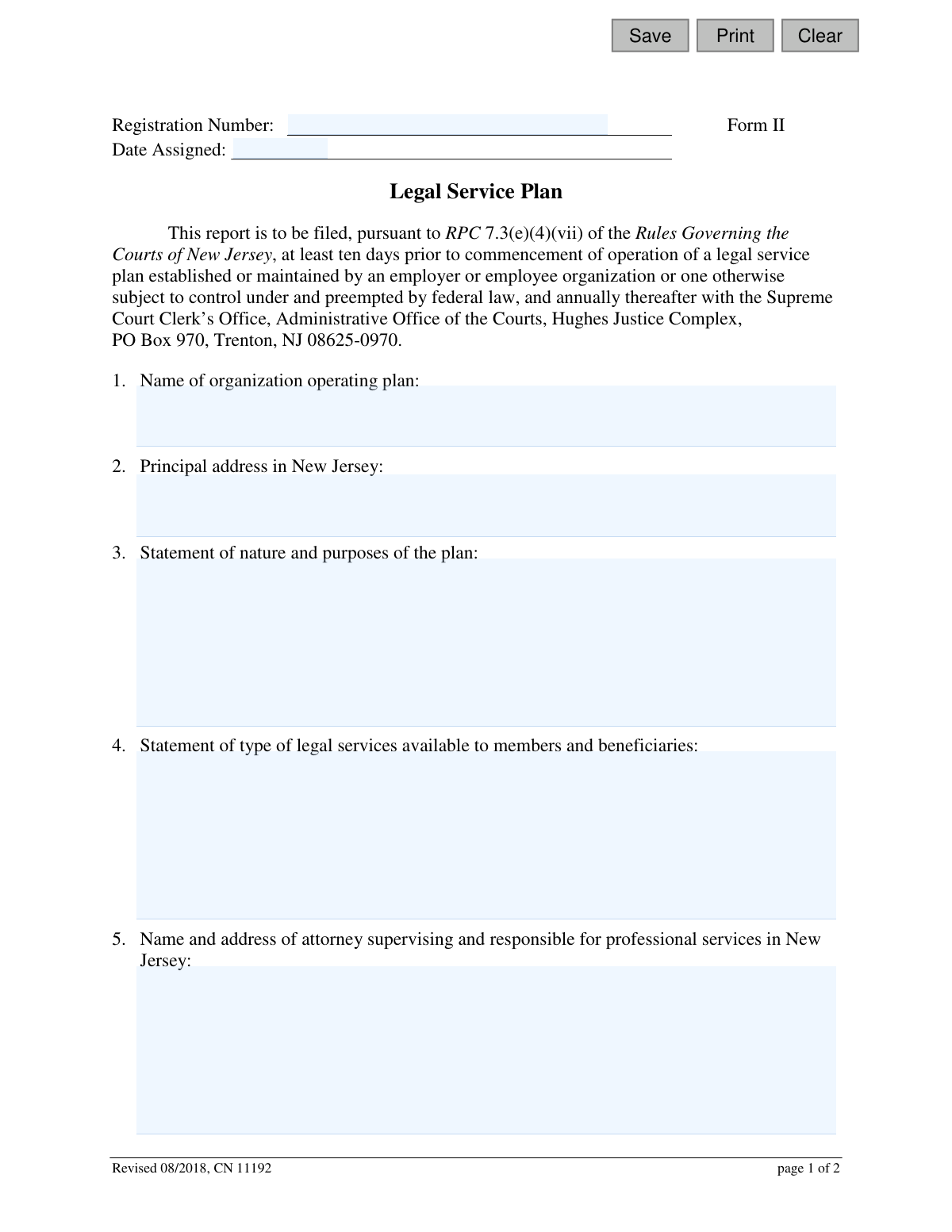
This form, officially known as Form II, is a report required by the New Jersey Courts for the registration of a legal service plan established by an employer or employee organization. It is filed to ensure compliance with Rule of Professional Conduct 7.3(e)(4)(vii) by providing details about the plan's operation, services, and associated attorneys. Today, this form can be filled out quickly and accurately using AI-powered services like Instafill.ai, which can also convert non-fillable PDF versions into interactive fillable forms.
Form II is part of the legal service forms and New Jersey forms categories on Instafill.
Our AI automatically handles information lookup, data retrieval, formatting, and form filling.
It takes less than a minute to fill out Form II using our AI form filling.
Securely upload your data. Information is encrypted in transit and deleted immediately after the form is filled out.

Form specifications

Form name: Form II, Legal Services Plan - Union
Number of fields: 21
Number of pages: 1
Language: English
main-image

Instafill Demo: How to fill out PDF forms in seconds with AI

How to Fill Out Form II Online for Free in 2026

Are you looking to fill out a FORM II form online quickly and accurately? Instafill.ai offers the #1 AI-powered PDF filling software of 2026, allowing you to complete your FORM II form in just 37 seconds or less.
Follow these steps to fill out your FORM II form online using Instafill.ai:
  1. 1 Navigate to Instafill.ai and upload or select the New Jersey Legal Services Plan - Union Form II.
  2. 2 Use the AI assistant to automatically populate key details such as the organization's name, address, and registration number.
  3. 3 Clearly describe the nature, purpose, and type of legal services available under the plan in the designated sections.
  4. 4 Enter the names and addresses of the supervising attorney, other participating attorneys, and members of the governing body.
  5. 5 Indicate how attorneys are compensated for their services under the plan.
  6. 6 Carefully review all auto-filled and manually entered information for completeness and accuracy.
  7. 7 Electronically sign and date the certification sections before downloading the completed form for submission to the New Jersey Supreme Court Clerk’s Office.

Our AI-powered system ensures each field is filled out correctly, reducing errors and saving you time.

Why Choose Instafill.ai for Your Fillable Form II Form?

Speed

Complete your Form II in as little as 37 seconds.

Up-to-Date

Always use the latest 2026 Form II form version.

Cost-effective

No need to hire expensive lawyers.

Accuracy

Our AI performs 10 compliance checks to ensure your form is error-free.

Security

Your personal information is protected with bank-level encryption.

Frequently Asked Questions About Form Form II

This form is used to register a legal service plan established by an employer or employee organization with the New Jersey Supreme Court Clerk's Office, as required by state court rules.

An employer or employee organization, such as a union, that establishes or maintains a legal service plan for its members in New Jersey must file this form.

The initial report must be filed at least ten days before the plan begins operation, and an updated report must be filed annually after that.

Mail the completed form to the Supreme Court Clerk’s Office, Administrative Office of the Courts, Hughes Justice Complex, PO Box 970, Trenton, NJ 08625-0970.

The Registration Number is likely assigned by the Administrative Office of the Courts after your first filing. You should leave this field blank on your initial submission and use the assigned number on all future annual filings.

This is the New Jersey-licensed attorney who has the ultimate professional responsibility for overseeing the legal services provided to members under the plan.

You must provide the full names and addresses of all individuals who serve on the committee or board that directs the operations of the legal service plan.

The form requires two dated signatures: one from the supervising attorney responsible for the plan's legal services and one from the principal officer or person in charge of the plan.

Yes, section 6 requires you to list the names and addresses of all attorneys employed by or cooperating with the plan who will perform legal services in New Jersey.

Briefly describe the plan's goals and the reason it was established, such as providing affordable legal assistance to union members for specific types of legal matters.

Yes, services like Instafill.ai use AI to help you auto-fill form fields accurately and efficiently, saving you time and helping to prevent errors.

You can upload the PDF of the form to the Instafill.ai platform. The service will make the document interactive, allowing you to type your information directly into the fields before downloading the completed form.

If you have a non-fillable or 'flat' PDF, you can use a service like Instafill.ai. It can convert the document into an interactive, fillable form that you can complete on your computer.

Compliance Form II
Validation Checks by Instafill.ai

1
Organization Name Presence
This check ensures that the 'Name of organization operating plan' field (orgName) is not empty. The organization's name is a primary identifier for the legal service plan and is essential for registration and record-keeping. If this field is left blank, the form submission will be rejected and the user will be prompted to provide the organization's full name.
2
Principal New Jersey Address Validation
This validation verifies that the 'Principal address in New Jersey' field (orgAddr) contains a complete and valid mailing address located within the state of New Jersey. It checks for standard address components like a street, city, and a valid NJ ZIP code. This is crucial for official correspondence and confirming the plan's jurisdiction, and failure to provide a valid NJ address will result in an error.
3
Supervising Attorney Information Completeness
This check ensures that the 'Name and address of attorney supervising and responsible' field (supContact) contains both a name and a full address. The supervising attorney is a key point of contact and accountability for the plan. An incomplete entry would prevent proper communication and regulatory oversight, so the submission will be blocked until both name and address are provided.
4
Attorney Remuneration Method Selection
This validation confirms that one of the three radio button options under 'Are attorneys who provide legal services under the plan...' (attyPlan) has been selected. This information is required to understand the operational and financial structure of the plan. If no option is selected, the user will be unable to proceed and will be required to specify how attorneys are remunerated.
5
Conditional Remuneration Description
This is a logical check that activates if the user selects option (c) 'otherwise remunerated' for attorney payment (attyPlan). It verifies that the corresponding text box (attyPlanDesc) is not empty and contains a description of the remuneration arrangement. This detail is mandatory for transparency, and the form cannot be submitted with option (c) selected unless an explanation is provided.
6
Signature Date Format and Presence
This validation ensures that both 'Dated' fields in the certification section (SigSupDt, SigPoDt) are filled out with valid dates. The check verifies the dates are in a recognized format (e.g., MM/DD/YYYY) and are not blank. These dates certify when the attestations were made, and an invalid or missing date would invalidate the certification.
7
Signature Date Logicality
This check verifies that the signature dates (SigSupDt, SigPoDt) are not set in the future. It also ensures the dates are chronologically reasonable, for instance, being on or after the form's revision date of August 2018. This prevents clerical errors and ensures the certification is dated accurately at the time of signing.
8
Plan Nature and Purpose Statement
This validation ensures that the 'Statement of nature and purposes of the plan' field (planNature) is not left empty. This statement is a core component of the registration, explaining the plan's mission to the regulatory body. A submission without this information would be incomplete and will be rejected, requiring the user to provide the necessary details.
9
Available Legal Services Statement
This check confirms that the 'Statement of type of legal services available' field (typeService) has been filled out. This information clarifies the scope of the plan for members and for regulatory review. Submitting the form without describing the available services would result in a validation failure.
10
Supervising Attorney Name Consistency
This validation cross-references the name of the supervising attorney provided in field #5 (supContact) with the name entered in the supervising attorney's signature block (SigSupName). The names must match to ensure the person certifying the form is the same individual listed as responsible for the plan's professional services. A mismatch will trigger an error to prevent potential fraud or misrepresentation.
11
Principal Officer Name Presence
This check ensures that the name of the 'Principal Officer or Person in Charge of the Plan' (SigPoName) is entered in the second signature block. This signature and name are required to certify the plan's details from a management perspective. The form submission will be blocked if this name is missing, as it indicates an incomplete certification.
12
Cooperating Attorneys List Completeness
This validation examines the 'Names and addresses of attorneys employed by or cooperating with the plan' field (employContact). If the field is not empty, it checks that each entry contains both a name and a corresponding address. This ensures that any listed attorney can be properly identified and located, and partial entries will be flagged as errors.
13
Governing Body List Completeness
This check applies to the 'Names and addresses of those persons serving on the governing body of the plan' field (serveContact). If any information is entered, this validation ensures each listed individual has both a name and an address. Complete information is necessary for transparency and accountability of the plan's governance.
14
Registration Number Format
This validation checks the format of the 'Registration Number' (regNum), if one is entered. It would verify that the number conforms to the expected pattern (e.g., a specific length, alphanumeric structure, or prefix) defined by the Administrative Office of the Courts. This helps maintain data integrity and ensures the number is valid for internal processing and lookups.

Common Mistakes in Completing Form II

Using an Incorrect or Abbreviated Organization Name

Filers often use a trade name, a common abbreviation, or make a typo in the organization's name in section 1, instead of using the full, legal name. This discrepancy can cause the filing to be rejected or create legal ambiguity about which entity is responsible for the plan. To avoid this, always use the complete legal name as registered with the state; AI-powered tools like Instafill.ai can help by storing and auto-filling the correct legal entity name to ensure consistency.

Providing a Non-Compliant New Jersey Address

The form explicitly requires the 'Principal address in New Jersey' in section 2, but filers may mistakenly provide a P.O. Box or an out-of-state corporate headquarters address. A non-compliant address can lead to the form being returned and may delay the plan's approval and operation. Always provide a physical street address located within New Jersey. If the form is a non-fillable PDF, a tool like Instafill.ai can convert it to a fillable version and use address validation to prevent such errors.

Vague or Incomplete Plan Descriptions

In sections 3 and 4, filers often provide overly broad or generic descriptions of the plan's purpose and the legal services offered, sometimes leaving them mostly blank. This lack of specificity can lead to scrutiny from the Administrative Office of the Courts and potential misinterpretation by plan members. Descriptions should be detailed and precise, clearly outlining the scope and limits of the plan to meet regulatory requirements.

Incomplete or Inaccurate Attorney Lists

Sections 5, 6, and 7 require complete lists of supervising attorneys, participating attorneys, and governing body members, including their full addresses. A common error is omitting individuals, providing incomplete addresses, or having typos in names. This is a critical compliance failure that can result in penalties and questions about the plan's legitimacy, so it is essential to maintain and verify a current, exhaustive list before submission.

Failing to Update Information on Annual Filings

This form must be filed annually, and a common mistake is resubmitting the previous year's form without updating key information. Changes in the governing body (section 7), participating attorneys (section 6), or plan services (section 4) must be reflected. Submitting outdated information can be considered a false filing and may lead to disciplinary action or suspension of the plan.

Improperly Reporting Attorney Remuneration

In section 8, filers may be confused by the options or select '(c) otherwise remunerated' without providing the mandatory detailed explanation. Failing to fully and accurately describe the remuneration arrangement is a significant omission that will likely trigger a request for more information and delay approval. If option (c) is chosen, a comprehensive description of the payment structure must be written in the space provided.

Missing One of the Two Required Signatures

The form requires two separate certifications and signatures: one from the Supervising Attorney and one from the Principal Officer of the plan. A frequent and critical error is submitting the form with only one signature, or having the same person sign both lines, rendering the filing incomplete and invalid. Ensure that both designated individuals sign and date the form in the correct places before submission to avoid immediate rejection.

Incorrect Filing Submission Timing

The instructions state the form must be filed 'at least ten days prior to commencement of operation' and 'annually thereafter.' Organizations often miss these deadlines, either by filing too close to the start date or by forgetting the annual renewal entirely. Late filings can result in unauthorized operation of the plan and potential sanctions from the New Jersey Courts, so it is crucial to calendar these deadlines carefully.

Listing a Non-Compliant Supervising Attorney

Section 5 requires the name of the attorney supervising professional services 'in New Jersey.' A serious mistake is to list an attorney who is not licensed to practice in New Jersey or is not in good standing with the NJ State Bar. This invalidates a core requirement of the plan's oversight and will lead to certain rejection. Always verify the supervising attorney's credentials and current standing with the New Jersey Bar before filing.

Omitting the Registration Number on Annual Filings

While the 'Registration Number' field is left blank on the initial filing, it is assigned by the court and must be included on all subsequent annual filings. Forgetting to add this number can cause significant processing delays, as the clerk's office may struggle to match the renewal with the existing plan file. AI-powered form-filling tools like Instafill.ai can help by storing the assigned number and automatically populating it on future renewal forms to ensure accuracy.
Saved over 80 hours a year

“I was never sure if my IRS forms like W-9 were filled correctly. Now, I can complete the forms accurately without any external help.”

Kevin Martin Green

Your data stays secure with advanced protection from Instafill and our subprocessors

Robust compliance program

Transparent business model

You’re not the product. You always know where your data is and what it is processed for.

ISO 27001, HIPAA, and GDPR

Our subprocesses adhere to multiple compliance standards, including but not limited to ISO 27001, HIPAA, and GDPR.

Security & privacy by design

We consider security and privacy from the initial design phase of any new service or functionality. It’s not an afterthought, it’s built-in, including support for two-factor authentication (2FA) to further protect your account.

Fill out Form II with Instafill.ai

Worried about filling PDFs wrong? Instafill securely fills form-ii-legal-services-plan-union forms, ensuring each field is accurate.

Related forms by category

legal service forms Form POS-040, Proof of Service—Civil, Form FL-115, Proof of Service of Summons (Family Law—Uniform Parentage—Custody and Support), Form FL-141, Declaration Regarding Service of Declaration of Disclosure and Income and Expense Declaration, form-i-legal-services-plan-non-union
New Jersey forms State of New Jersey Alternate Benefit Program Withdrawal Request Acknowledgement Receipt, Horizon Blue Cross Blue Shield of New Jersey Applied Behavior Analysis Supplemental Information Form, State of New Jersey Application for Employment (Form DPF-663), New Jersey Judiciary Plea Form (Plea 01), Supplemental Plea Form for Certain Sexual Offenses: Megan’s Law/Parole Supervision for Life/Community Supervision for Life (Plea 05), Financial Questionnaire to Establish Indigency, New Jersey Judiciary Resource Family Information Form, Foreclosure Case Information Statement (FCIS) - Appendix XII-B2, New Jersey Judiciary Records Request Form, Superior Court of New Jersey, Application for Appeal and Order, FL Certification of Requested Background Checks for Kinship Legal Guardianship, Certification of Caregiver as to Knowledge of Identity and/or Location of Parents, FL Order Judgment for Kinship Legal Guardianship, New Jersey Judiciary Certification of Repair and Plea of Guilty, Uniform Summary Support Order (USSO), New Jersey Judiciary Volunteer Application (CN 10293), Application to Take the New Jersey Court Interpreter Oral Examination, New Jersey Judiciary Attorney Fee Arbitration Request, Order to Show Cause with Temporary Restraints Pursuant to Rule 4:52, Tax Court of New Jersey, State Tax Complaint · + 158 more →