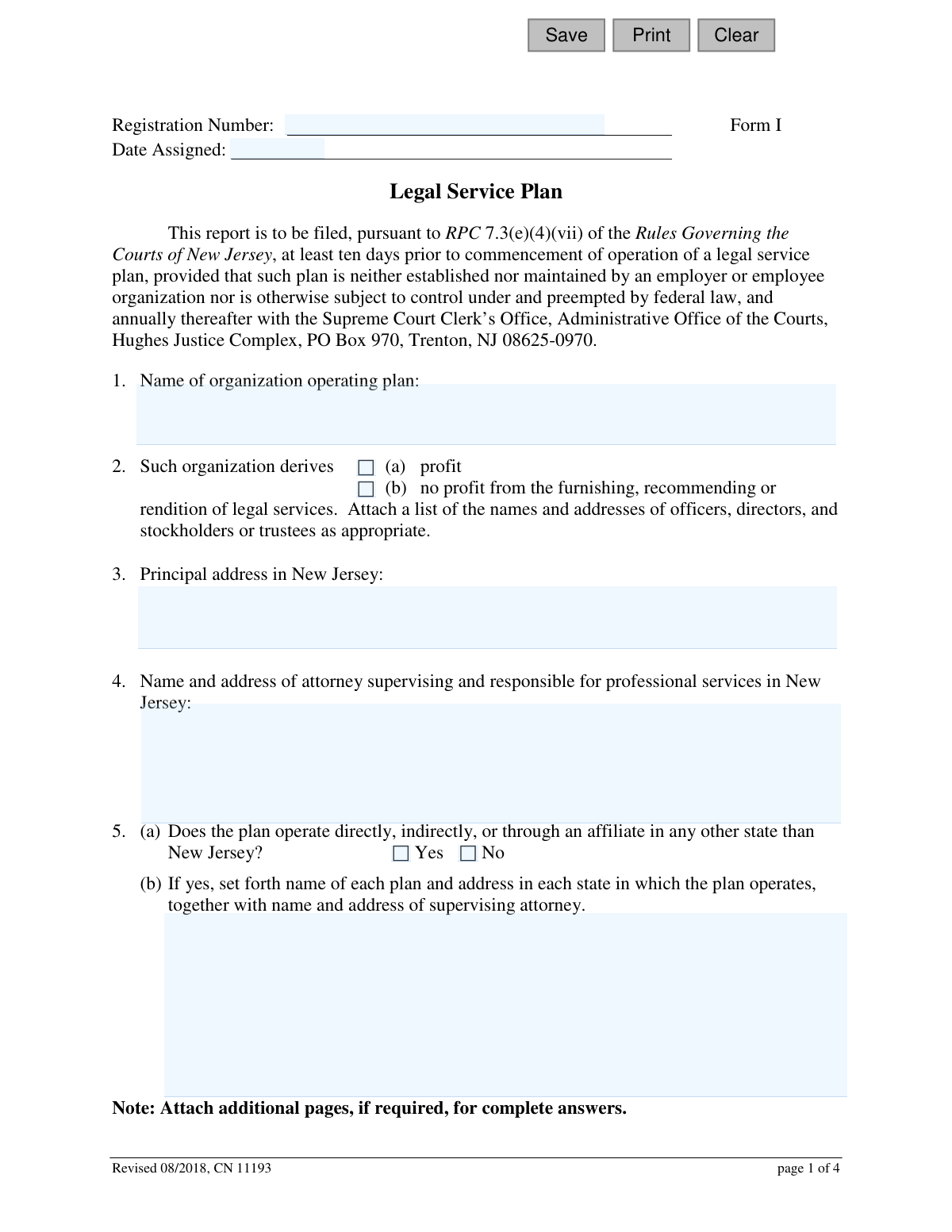
Yes! You can use AI to fill out Form I, Legal Services Plan - Non-Union
Form I, the Legal Services Plan - Non-Union, is a mandatory report filed with the New Jersey Supreme Court Clerk's Office for any legal service plan not established by an employer or employee organization. This form ensures that such plans comply with the Rules Governing the Courts of New Jersey, providing transparency about their operation, finances, and the attorneys involved. Today, this form can be filled out quickly and accurately using AI-powered services like Instafill.ai, which can also convert non-fillable PDF versions into interactive fillable forms.
Our AI automatically handles information lookup, data retrieval, formatting, and form filling.
It takes less than a minute to fill out Form I / CN 11193 using our AI form filling.
Securely upload your data. Information is encrypted in transit and deleted immediately after the form is filled out.
Form specifications
| Form name: | Form I, Legal Services Plan - Non-Union |
| Number of fields: | 40 |
| Number of pages: | 1 |
| Language: | English |
Instafill Demo: How to fill out PDF forms in seconds with AI
How to Fill Out Form I / CN 11193 Online for Free in 2026
Are you looking to fill out a FORM I / CN 11193 form online quickly and accurately? Instafill.ai offers the #1 AI-powered PDF filling software of 2026, allowing you to complete your FORM I / CN 11193 form in just 37 seconds or less.
Follow these steps to fill out your FORM I / CN 11193 form online using Instafill.ai:
- 1 Navigate to Instafill.ai and upload or select the New Jersey Legal Services Plan form.
- 2 Use the AI assistant to automatically fill in basic information like the organization's name, address, and responsible attorney details.
- 3 Provide a detailed description of the plan, including beneficiaries, benefits, and subscription charges, guided by the platform's prompts.
- 4 List the names and addresses of all attorneys performing services under the plan and specify their remuneration arrangements.
- 5 Input financial details, including arrangements for legal fees, expenses, and subscription fee projections or actuals for annual filings.
- 6 Review all the information pre-filled by the AI for accuracy, make any necessary corrections, and digitally sign the certification statements.
- 7 Securely download, print, or share the completed Form I for filing with the New Jersey Supreme Court Clerk's Office.
Our AI-powered system ensures each field is filled out correctly, reducing errors and saving you time.
Why Choose Instafill.ai for Your Fillable Form I / CN 11193 Form?
Speed
Complete your Form I / CN 11193 in as little as 37 seconds.
Up-to-Date
Always use the latest 2026 Form I / CN 11193 form version.
Cost-effective
No need to hire expensive lawyers.
Accuracy
Our AI performs 10 compliance checks to ensure your form is error-free.
Security
Your personal information is protected with bank-level encryption.
Frequently Asked Questions About Form Form I / CN 11193
This form is used to register a non-union, non-employer-based legal service plan with the Supreme Court of New Jersey. This registration is required by court rules before the plan can begin operating and must be renewed annually.
Any organization that operates a legal service plan in New Jersey must file this form, unless the plan is established by an employer or employee organization. The initial filing must be completed before operation, with subsequent filings occurring annually.
You must file the initial report at least ten days before your legal service plan commences operation. After the initial filing, you are required to file an updated report annually.
The completed form and any required attachments must be filed with the Supreme Court Clerk’s Office at the Administrative Office of the Courts, Hughes Justice Complex, PO Box 970, Trenton, NJ 08625-0970.
You must attach a list of the organization's officers and directors, copies of all member contracts if they are not identical, and for annual refilings, financial statements including a balance sheet and profit and loss statement.
In this section, you must describe the plan's intended beneficiaries, the schedule of legal benefits offered, and the subscription charges. You also need to explain the process for handling complaints and referring members to counsel outside of New Jersey.
This section requires you to describe the financial arrangements with attorneys, how other expenses are paid, and the anticipated or actual subscription fees. For annual refilings, you must provide actual financial data from the previous year.
The form requires signatures from two different individuals: the attorney supervising the plan's professional services and the principal officer in charge of the plan. Both are certifying that the information provided is true and accurate.
In Section 5, you must indicate that the plan operates in other states. You will then need to provide the name of the plan, its address, and the name and address of the supervising attorney for each state of operation.
The initial filing is for registering a new plan, focusing on its intended operation. Annual refilings provide updates, including actual financial data from the past year, a report on any lawsuits, and changes in the number of subscribers.
Yes, you can use AI-powered services like Instafill.ai to help fill out this form. These tools can auto-fill fields accurately, saving you time and helping to prevent errors.
To fill this form out online, you can upload the PDF to a service like Instafill.ai. The platform will make the document interactive, allowing you to type your information directly into the fields and then download the completed form.
If you have a non-fillable or 'flat' PDF, you can use a tool like Instafill.ai to make it interactive. Simply upload the file, and the service will convert it into a fillable form that you can complete on your computer.
This is the New Jersey-licensed attorney who is professionally accountable for the legal services provided by the plan. Their name and address must be listed in Section 4, and they are required to sign the form.
Compliance Form I / CN 11193
Validation Checks by Instafill.ai
1
Ensures Organization Name is Provided
This check verifies that the 'Name of organization operating plan' field (Section 1) is not empty. The organization's name is a fundamental identifier for the legal services plan registration. If this field is left blank, the submission cannot be processed as it would be impossible to identify which entity is filing the report.
2
Verifies Selection of Profit Status
This validation ensures that a choice has been made for Section 2, indicating whether the organization derives 'profit' or 'no profit'. This information is critical for regulatory classification and determining which financial disclosures are applicable. Failure to select an option will result in a validation error, as the plan's financial structure must be declared.
3
Validates Principal Address is in New Jersey
This check confirms that the 'Principal address in New Jersey' (Section 3) is a complete and valid address, specifically ensuring the state is 'NJ'. The form is for plans operating under New Jersey court rules, making a local principal address a mandatory requirement. An incomplete or out-of-state address would render the filing invalid for this jurisdiction.
4
Conditional Validation for Out-of-State Operations
This check is triggered based on the answer to Section 5(a). If the user answers 'Yes' to the question 'Does the plan operate... in any other state than New Jersey?', this validation ensures that Section 5(b) is filled out with the required details. This is important for understanding the full scope of the plan's operations. If 'Yes' is selected and the details are missing, the form is considered incomplete.
5
Conditional Validation for Multiple Contract Types
This check is dependent on the answer to Section 6(g). If the user answers 'No' to 'Will all contracts... be identical?', this validation ensures the subsequent field is filled with a positive integer indicating the number of different contract types. This information is necessary to ensure all required contract forms have been attached for review. A non-numeric or empty value will block submission.
6
Verification of Attached Contract Forms
This validation confirms that at least one file has been attached as required at the end of Section 6. The rules require submission of all contract forms to be used by the plan for review. A missing attachment makes it impossible for the regulatory body to approve the plan's terms with its members, thus the submission will be rejected until the file is provided.
7
Ensures Attorney List is Provided
This check verifies that the field 'List names and addresses of all attorneys who will be performing legal services' (Section 7a) is not empty. A legal services plan cannot operate without registered attorneys to provide the services. An empty list would indicate the plan is not ready for operation, and the submission will be flagged as incomplete.
8
Conditional Validation for 'Other' Remuneration
This check is triggered by the selection in Section 8. If the user selects option '(c) otherwise remunerated' for how attorneys are paid, this validation ensures the corresponding description box is filled out. This detail is crucial for transparency and to ensure the payment structure complies with professional conduct rules. An empty description for option (c) will result in a validation failure.
9
Logical Check for Annual Subscriber Counts
For annual refilings, this check validates the mathematical consistency of the fields in Section 11. It ensures that ('Number of subscribers... as of filing date' - 'Number of subscribers... on previous filing date') equals the 'Net change'. This cross-field validation prevents simple data entry errors and ensures the reported numbers are logical and accurate.
10
Verification of Financial Attachments for Annual Refiling
This validation applies only to annual refilings, not initial filings. It checks that the four specified financial documents (financial statement, balance sheet, profit and loss statement, and financial projections) listed in Section 9(d) are attached. These documents are essential for ongoing oversight of the plan's financial health, and their absence will cause the refiling to be rejected.
11
Validates Signature Dates
This check ensures that the 'Dated' fields in the signature section are filled with valid dates and that these dates are not in the future. The signature date legally attests to the accuracy of the information at a specific point in time. A missing, invalid, or future date would invalidate the certification, preventing the form from being accepted.
12
Signature Name Consistency Check
This validation compares the name typed in the signature line for the 'Attorney Supervising and Responsible for the Professional Services' with the name provided in Section 4 ('Name and address of attorney supervising...'). The names must match to ensure the person certifying the form is the same individual identified as being responsible for the plan's services. A mismatch would indicate a potential error or unauthorized signature and will fail validation.
Common Mistakes in Completing Form I / CN 11193
This form requires several attachments, such as a list of officers/directors (Question 2), copies of all contract forms (Question 6g), and detailed financial statements for annual refilings (Question 9d). Applicants often overlook these instructions, leading to an incomplete submission. An incomplete filing will be rejected, causing significant delays in the registration or renewal process. To avoid this, create a checklist of all required documents before submission and ensure each one is included.
Questions in Section 6, such as describing beneficiaries, the schedule of benefits, and provisions for relief, require detailed, specific explanations. Many filers provide one-sentence or overly broad answers that lack the necessary detail for regulators to properly evaluate the plan. This can lead to follow-up inquiries and delays. Be thorough and provide comprehensive descriptions that fully answer each part of the question.
The form requires two separate, dated signatures on the final page: one from the supervising attorney and one from the principal officer of the plan. A common error is to have only one person sign, or to leave the date fields blank. A submission with missing or undated signatures is legally invalid and will be returned. Carefully review the final page to ensure both signature blocks are completed correctly by the appropriate individuals.
Several questions, particularly in Sections 9 (Finances) and 11 (Subscriber Numbers), have different requirements for an initial filing versus an annual refiling. For example, Question 9c asks for 'anticipated' fees on an initial filing but 'actual' fees on a subsequent one. Submitting the wrong type of information can lead to rejection. Read each question carefully to determine if it applies to your filing type (initial vs. annual) and provide the correct data.
In Question 5, if an applicant answers 'Yes' to operating in other states, they must then complete part (b) with the name of the plan, its address, and the supervising attorney in each of those states. It is common for filers to check 'Yes' but leave part (b) blank or incomplete. This omission results in an incomplete application and requires correction, delaying the approval process. If you operate in other states, ensure you provide all the requested details for each one.
Question 7a requires a list of the 'names and addresses of all attorneys' performing services for the plan. Filers sometimes list only the law firm's name or provide an incomplete list, which does not meet the requirement. This can be seen as an attempt to obscure information and will result in the form being returned for correction. You must list each individual attorney by name along with their full address to ensure compliance.
Question 2 asks whether the organization derives a profit and explicitly states to 'Attach a list of the names and addresses of officers, directors, and stockholders or trustees'. A frequent mistake is to check the 'profit' or 'no profit' box but forget to include the mandatory attachment. This attachment is critical for transparency and its absence will render the filing incomplete. Always double-check that this list is prepared and included with your submission.
Question 3 asks for the 'Principal address in New Jersey'. This generally implies a physical street address where the business is located and can be served legal documents, not a PO Box. Providing only a PO Box can lead to rejection or requests for clarification. To avoid this, provide the full physical street address of the plan's main office in New Jersey.
In Question 6g, if you indicate that contracts with members will not be identical by answering 'No', you must then state how many different kinds of contracts will be used and attach a copy of each one. Filers often answer 'No' but then fail to attach the various contract forms. This inconsistency is a red flag for reviewers and will halt the processing of your application. Ensure that your answer in 6g aligns with the documents you attach.
The financial reporting in Section 9 is complex, distinguishing between legal fees, other expenses, and subscription fees, as well as between initial and subsequent filings. Common errors include miscalculating figures, providing projections when actuals are required, or failing to attach the mandatory financial statements (balance sheet, P&L statement) on annual refilings. Since this form is a non-fillable PDF, using a tool like Instafill.ai can help by converting it to a fillable format and validating data entries to prevent such mistakes.
Saved over 80 hours a year
“I was never sure if my IRS forms like W-9 were filled correctly. Now, I can complete the forms accurately without any external help.”
Kevin Martin Green
Your data stays secure with advanced protection from Instafill and our subprocessors

Robust compliance program
Transparent business model
You’re not the product. You always know where your data is and what it is processed for.
ISO 27001, HIPAA, and GDPR
Our subprocesses adhere to multiple compliance standards, including but not limited to ISO 27001, HIPAA, and GDPR.
Security & privacy by design
We consider security and privacy from the initial design phase of any new service or functionality. It’s not an afterthought, it’s built-in, including support for two-factor authentication (2FA) to further protect your account.
Fill out Form I / CN 11193 with Instafill.ai
Worried about filling PDFs wrong? Instafill securely fills form-i-legal-services-plan-non-union forms, ensuring each field is accurate.