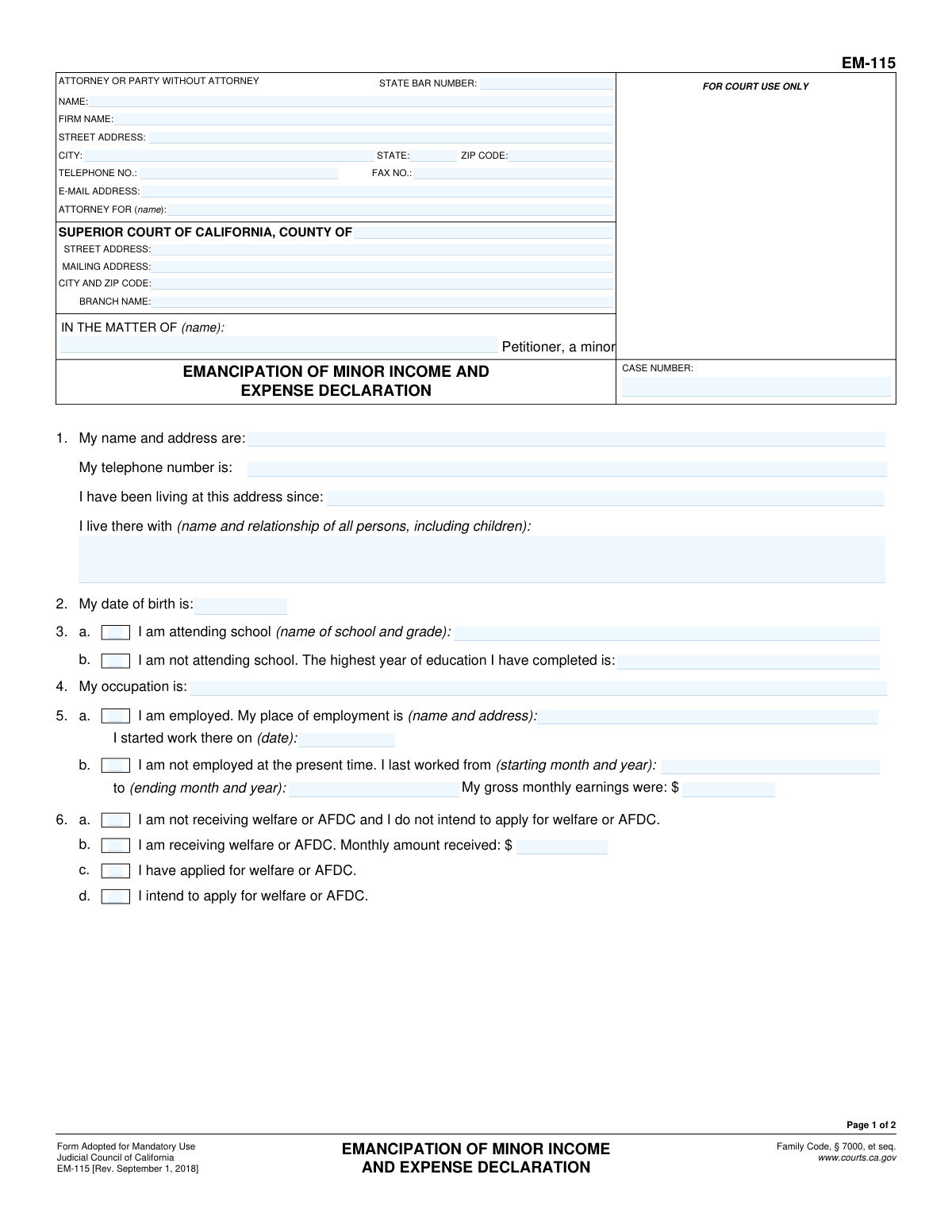
Yes! You can use AI to fill out Form EM-115, Emancipation of Minor Income and Expense Declaration
This is the Emancipation of Minor Income and Expense Declaration, California Judicial Council Form EM-115. It is a mandatory document for minors in California who are petitioning the court to be legally declared an adult (emancipated). The form provides the court with a detailed financial statement, including the minor's income, assets, and expenses, to prove they are capable of managing their own financial affairs. Today, this form can be filled out quickly and accurately using AI-powered services like Instafill.ai, which can also convert non-fillable PDF versions into interactive fillable forms.
EM-115 is part of the
California court forms, income and expense forms and income expense forms categories on Instafill.
Our AI automatically handles information lookup, data retrieval, formatting, and form filling.
It takes less than a minute to fill out EM-115 using our AI form filling.
Securely upload your data. Information is encrypted in transit and deleted immediately after the form is filled out.
Form specifications
| Form name: | Form EM-115, Emancipation of Minor Income and Expense Declaration |
| Number of fields: | 83 |
| Number of pages: | 1 |
| Language: | English |
Instafill Demo: How to fill out PDF forms in seconds with AI
How to Fill Out EM-115 Online for Free in 2026
Are you looking to fill out a EM-115 form online quickly and accurately? Instafill.ai offers the #1 AI-powered PDF filling software of 2026, allowing you to complete your EM-115 form in just 37 seconds or less.
Follow these steps to fill out your EM-115 form online using Instafill.ai:
- 1 Navigate to Instafill.ai and upload or select Form EM-115, the Emancipation of Minor Income and Expense Declaration.
- 2 Use the AI assistant to fill in the court and personal information, including your name, address, date of birth, and school status in sections 1-3.
- 3 Provide details about your employment history and occupation in sections 4 and 5.
- 4 Declare your status regarding welfare or AFDC benefits in section 6.
- 5 List all your monthly income sources in section 7 and detail your assets, such as cash, bank accounts, and vehicles, in section 8.
- 6 Itemize your monthly expenses, including rent, food, utilities, and transportation in section 9.
- 7 Carefully review all the information for accuracy, then e-sign and date the declaration to finalize it for submission to the court.
Our AI-powered system ensures each field is filled out correctly, reducing errors and saving you time.
Why Choose Instafill.ai for Your Fillable EM-115 Form?
Speed
Complete your EM-115 in as little as 37 seconds.
Up-to-Date
Always use the latest 2026 EM-115 form version.
Cost-effective
No need to hire expensive lawyers.
Accuracy
Our AI performs 10 compliance checks to ensure your form is error-free.
Security
Your personal information is protected with bank-level encryption.
Frequently Asked Questions About Form EM-115
This form is used by a minor petitioning for emancipation to provide the court with a detailed breakdown of their financial situation. It helps demonstrate that the minor is financially self-sufficient and capable of managing their own affairs.
The minor who is filing the petition to be declared emancipated must complete and sign this form. It is a mandatory part of the emancipation proceedings in California.
You should gather documents like pay stubs, bank statements, and monthly bills. You'll need to report your income, assets (like cash or a car), and all your monthly expenses (like rent, food, and utilities).
If you are not employed, check box 5b and provide the dates of your last employment and what your gross monthly earnings were at that time. If you have never worked, you can indicate that in the space provided.
Gross monthly earnings refer to your total income before any taxes or deductions are taken out. If your income varies, calculate an average from the past few months to provide a realistic figure.
Yes, in section 7b, you must report any money you receive from parents or other adults who assist you. You should specify their name, relationship, and the average monthly amount you receive.
If you do not have any assets like cash, savings, or a vehicle, you should enter '$0' in the corresponding fields. It is important to be truthful and accurate, even if you have no assets to declare.
For expenses that fluctuate, such as food or utilities, you should calculate an average based on the last 2-3 months. This provides the court with a reasonable estimate of your living costs.
Not necessarily, but you must be honest and report it in section 6. The court's primary concern is whether you are capable of managing your own financial affairs, and this information will be considered as part of your overall situation.
This form must be filed with the Superior Court in the county where you are petitioning for emancipation. It is submitted as part of your complete emancipation case file.
Yes, services like Instafill.ai use AI to help auto-fill form fields accurately and save time. This can be particularly useful for entering repetitive information like your name and case number across different forms.
You can use a service like Instafill.ai to upload the PDF form and fill it out digitally. Their platform allows you to type directly into the fields, save your progress, and then print the completed form for submission.
If you have a non-fillable or 'flat' PDF, you can upload it to a platform like Instafill.ai. Their technology can convert the document into an interactive, fillable form that you can easily complete on your computer.
Compliance EM-115
Validation Checks by Instafill.ai
1
Petitioner Age Verification
This check validates that the petitioner's date of birth provided in Section 2 results in an age that is legally considered a minor (typically under 18). This is the most critical validation, as the entire premise of an emancipation petition is that the filer is a minor. If the calculated age is 18 or over, the form submission should be rejected as it is not applicable to the individual.
2
Mutually Exclusive School Status
Validates that in Section 3, the petitioner has selected either 'I am attending school' or 'I am not attending school,' but not both. If the 'attending' option is checked, the school name and grade must be filled. If the 'not attending' option is checked, the highest year of education must be provided. This ensures logical consistency and completeness for the chosen path.
3
Mutually Exclusive Employment Status
Ensures that in Section 4, only one of the two checkboxes ('I am employed' or 'I am not employed') is selected. The system must also verify that the corresponding required fields for the selected option are completed. This prevents contradictory or incomplete information regarding the petitioner's employment situation.
4
Conditional Welfare Amount Entry
This check verifies that if the box 'I am receiving welfare or AFDC' is checked in Section 6, the 'Monthly amount received' field contains a valid, non-zero numeric value. Conversely, if that box is not checked, the amount field should be empty or zero. This ensures that claims of receiving aid are properly substantiated with a monetary amount.
5
Gross Monthly Earnings Calculation
Verifies that the 'average of my gross monthly earnings' in Section 7 is the correct sum of the amounts listed for 'Salary and wages', 'Money received from parents', and 'Other'. This check is crucial for ensuring the financial data is accurate and not misrepresented. A mismatch would indicate a calculation error and require correction before the form can be processed.
6
Total Assets Calculation
This validation confirms that the total 'Value' listed in Section 8 correctly equals the sum of the individual asset amounts (Cash, Checking account, Savings account, etc.). Accurate asset reporting is fundamental to assessing the minor's financial independence. An incorrect total could mislead the court about the petitioner's financial standing.
7
Total Monthly Expenses Calculation
Ensures the total 'Amount' for monthly expenses in Section 9 is the accurate sum of all individual expense items listed (Rent, Food, Clothing, etc.). This validation is essential for understanding the petitioner's cost of living and financial needs. An error in this total could invalidate the assessment of their ability to be self-supporting.
8
Income vs. Expense Plausibility Check
Compares the total gross monthly earnings from Section 7 with the total monthly expenses from Section 9. While not a strict failure, a flag should be raised if expenses significantly exceed income, as this calls into question the petitioner's ability to be self-sufficient, which is the core requirement for emancipation. This check helps identify petitions that may not meet the legal standard for financial independence.
9
Case Number Consistency
This check verifies that the 'CASE NUMBER' field entered on Page 1 is identical to the 'CASE NUMBER' field on Page 2. Maintaining consistency is critical for document integrity and ensuring that all pages of the declaration are correctly associated with the proper court case. A mismatch could lead to filing errors or misplaced pages.
10
Employment and Residency Date Logic
Validates that all dates on the form are logical. The 'living at this address since' date (Section 1) and the employment 'start date' (Section 4) cannot be in the future. For past employment, the 'starting month and year' must be before the 'ending month and year'. This prevents impossible or illogical timelines from being submitted.
11
Signature Date Requirement and Validity
Ensures that the 'Date' field next to the petitioner's signature is filled out with a valid date. The date must not be in the future and should be on or after any other event dates listed on the form, such as the employment start date. This confirms when the declaration was attested to and is a mandatory component for a legally valid document.
12
Required Petitioner Identification
Validates that the petitioner's full name and current address in Section 1 are completed. This information is fundamental for identifying the party filing the petition and for all official correspondence. A submission without this core identifying information is incomplete and cannot be processed by the court.
Common Mistakes in Completing EM-115
Applicants often mistakenly enter their net (take-home) pay in Section 4 and Section 7, instead of their gross monthly earnings (pre-tax income). This understates their true financial capacity and can weaken their petition for emancipation. To avoid this, applicants should refer to their pay stubs to find the gross pay amount before any deductions are taken out. AI-powered tools like Instafill.ai can help by providing field-specific guidance to ensure the correct income figures are used.
A frequent error is having financial figures that don't add up across different sections. For example, the sum of the income sources in Section 7 does not match the 'average gross monthly earnings' stated in Section 4, or the total expenses in Section 9 exceed the total income. Such inconsistencies damage credibility and suggest a lack of financial management skills, which is the core of the petition. Double-checking all calculations before submission is crucial to present a coherent and believable financial picture.
It is a very common and simple oversight to leave the header fields ('IN THE MATTER OF' and 'CASE NUMBER') on page 2 blank. Court documents can sometimes be separated during processing. Failing to fill this out risks having the second page misfiled or lost, rendering the declaration incomplete and causing significant delays. Always double-check that identifying information is present on every single page of the submission.
Forgetting to physically sign and date the form at the bottom of page 2 is a critical failure that invalidates the entire document. The signature is a declaration under penalty of perjury, and without it, the form is just a collection of unverified statements. An unsigned form will be rejected by the court clerk, forcing the petitioner to refile and delaying the entire legal process.
In Section 1, when asked who they live with, petitioners may write vague answers like 'my family' instead of listing the full name and relationship of each person as required. The court needs this specific information to fully understand the minor's living situation and degree of independence. Incomplete answers can lead to the court requesting more information, which delays the proceedings.
The form has several sections with mutually exclusive choices, such as Section 3 (school status) and Section 4 (employment status). A common mistake is to provide information for both options (e.g., stating you are attending school and also stating the highest year completed as if you are not). This creates confusion and may require a corrected filing. Petitioners must carefully read and select only one option in these sections.
Petitioners often focus only on their job salary (Section 7a) and forget to declare other crucial income sources. This includes regular financial support from parents or other adults (7b) or income from 'other' sources like gig work or cash-based side jobs (7c). A complete and honest declaration of all income is required, and omitting sources can be viewed as misleading the court.
Minors seeking emancipation may not have experience tracking finances and often guess their monthly expenses in Section 9. This frequently leads to unrealistically low or incomplete figures that do not reflect the true cost of living independently. This undermines the claim of financial self-sufficiency. It is vital to track actual spending on rent, food, utilities, and other costs for at least a month to provide accurate, believable data.
Petitioners, especially those without an attorney, often leave the top caption of the form incomplete, missing the correct County, Street Address, and Branch Name of the Superior Court. If it is not the initial filing, they may also forget the Case Number. This information is essential for the court clerk to file the document correctly. Leaving it blank guarantees processing delays. This information can typically be found on the court's website or on previous court documents.
In Section 8, petitioners may not know the fair market value of their assets, particularly a vehicle, or may omit assets they deem insignificant, like a small savings account balance. The court requires a complete list of all assets with a reasonable, good-faith estimate of their current value. Failing to do so can negatively impact the court's assessment of the minor's overall financial stability. Tools like Instafill.ai can convert non-fillable PDFs into fillable versions, making it easier to enter and review this detailed information.
Saved over 80 hours a year
“I was never sure if my IRS forms like W-9 were filled correctly. Now, I can complete the forms accurately without any external help.”
Kevin Martin Green
Your data stays secure with advanced protection from Instafill and our subprocessors

Robust compliance program
Transparent business model
You’re not the product. You always know where your data is and what it is processed for.
ISO 27001, HIPAA, and GDPR
Our subprocesses adhere to multiple compliance standards, including but not limited to ISO 27001, HIPAA, and GDPR.
Security & privacy by design
We consider security and privacy from the initial design phase of any new service or functionality. It’s not an afterthought, it’s built-in, including support for two-factor authentication (2FA) to further protect your account.
Fill out EM-115 with Instafill.ai
Worried about filling PDFs wrong? Instafill securely fills form-em-115-emancipation-of-minor-income-and-expense-declaration forms, ensuring each field is accurate.